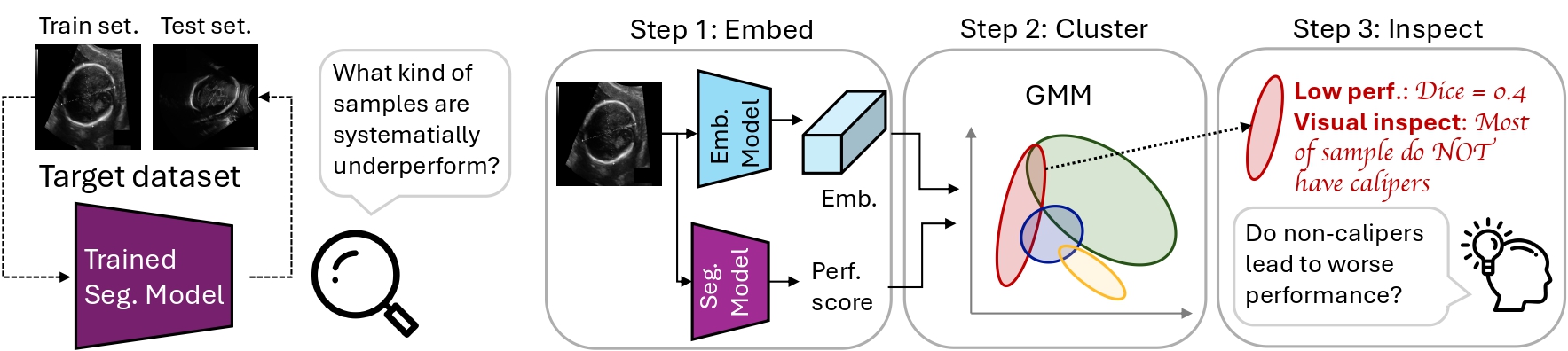
Public pytorch implementation for our paper SEG4SEG: Identifying Systematic Failure Modes in Segmentation by Subgroup Discovery Methods.
If you find this code helpful in your research, please cite the following paper:
@inproceedings{weng2026seg4seg,
        title={SEG4SEG: Identifying Systematic Failure Modes in Segmentation by Subgroup Discovery Methods},
        author={Weng, Nina and Petersen, Eike and Bissoto, Alceu and Sun, Susu and Koch, Lisa M and Feragen, Aasa and Bigdeli, Siavash and Baumgartner, Christian F},
        booktitle={Medical Imaging with Deep Learning},
        year={2026}
}
This work has been accepted to MIDL 2026 as Spotlight Presentation.
The code is implemented in Python 3.9 using the Pytorch library. We only tested the code with Python 3.9.
Install dependencies:
pip install -r requirements.txt
requirements.txt contains the minimal direct dependencies for this repo.
Run one SDM sweep with a trained segmentation model:
python3 -m sdm.run_once --ds_name isic2018_d --pre_trained_seg_model_config_name 250527090603_unet_isic_bce
What it does:
./records/{save_to}_{cluster_method}/{ds_name}_{config_name}/For full argument and hyperparameter details, see sdm/run_once.py.
After running SDM, you will get one CSV per hyperparameter setting under:
./records/{save_to}_{cluster_method}/{ds_name}_{config_name}/
Each CSV contains per-image cluster assignment and model performance, e.g.:
| image_id | cluster_label | y_dice |
|---|---|---|
| 100_D.png | 9 | 0.94098216 |
| 101_G.png | 7 | 0.8338238 |
| 102_G.png | 7 | 0.8475865 |
We provide 4 analysis notebooks in ./sdm/, one per case:
sdm/sdm_analysis_caseA_updated.ipynbsdm/sdm_analysis_caseB_updated.ipynbsdm/sdm_analysis_caseC_updated.ipynbsdm/sdm_analysis_caseD_updated.ipynbAll notebooks follow the same 3-part analysis:
lambda (performance gap and subgroup purity).lambda and random seeds.Analysis config) and set:
ds_name_base, bias_levels, ds_config_map)cluster_method, sdm_ks, sdm_lambdas, random_seeds)BASE_DIR, dataset metadata paths)MODE = 'synthetic' for shortcut datasets.MODE = 'real' for original real-world datasets.Note: make sure corresponding SDM CSV files and segmentation Dice files (records/seg_model/.../dice_test.pt) exist before running the notebooks.
If you want to use our pretrained models for analysis, you can download them from this link and follow the instructions provided in that link.
We provide 4 scripts under prepare_dataset/.
First, set paths in global_config.py:
FIVES_DATASET_DIRHC18_DATASET_DIRISIC2018_DATASET_DIRISIC2018_DATAFILES_DIRThen run:
python ./prepare_dataset/fives/mkdataset.py --splits train,test --percents 2,5,10,20
python ./prepare_dataset/hc18/mkdataset.py --bias-proportions 20,40,60,80
python ./prepare_dataset/isic2018_annotationstyle/mkdataset.py --percents 10,20,40,60,80,90
python ./prepare_dataset/isic2018_central_cropping/mkdataset.py --percents 20,40,60,80 --seed 42
Outputs:
Command:
python3 -m train.train_seg --ds_name <DATASET_NAME> --model unet --loss_type bce --batch_size 32 --lr 1e-4 --num_epochs 100
Datasets:
fives_p2, fives_p5, fives_p10, fives_p20hc18_caliper20, hc18_caliper40, hc18_caliper60, hc18_caliper80, hc18_caliper95isic2018_p20, isic2018_p40, isic2018_p60, isic2018_p80isic2018_as_p10, isic2018_as_p20, isic2018_as_p40, isic2018_as_p60, isic2018_as_p80, isic2018_as_p90Example:
python3 -m train.train_seg --ds_name isic2018_as_p95 --model unet --loss_type bce --batch_size 32 --lr 1e-5 --num_epochs 100
What it does:
records/seg_model/...Notes:
fives*, hc18*, and isic2018_as_p*, validation is created by splitting train (80/20).isic, isic2018, isic2018_d, isic2018_p*, and isic2018_v2_p*, validation is loaded from the dataset val split.The datasets used in this project could be found by the following link:
The annotation-style metadata for ISIC2018 is provided in:
datafiles/ISIC2018/isic2018_anno_styles.csv
which is annotated by Nina Weng using LabelMe.If you found our annotation useful, please cite our paper.
Public pytorch implementation for our paper SEG4SEG: Identifying Systematic Failure Modes in Segmentation by Subgroup Discovery Methods.
If you find this code helpful in your research, please cite the following paper:
@inproceedings{weng2026seg4seg,
        title={SEG4SEG: Identifying Systematic Failure Modes in Segmentation by Subgroup Discovery Methods},
        author={Weng, Nina and Petersen, Eike and Bissoto, Alceu and Sun, Susu and Koch, Lisa M and Feragen, Aasa and Bigdeli, Siavash and Baumgartner, Christian F},
        booktitle={Medical Imaging with Deep Learning},
        year={2026}
}
This work has been accepted to MIDL 2026 as Spotlight Presentation.
The code is implemented in Python 3.9 using the Pytorch library. We only tested the code with Python 3.9.
Install dependencies:
pip install -r requirements.txt
requirements.txt contains the minimal direct dependencies for this repo.
Run one SDM sweep with a trained segmentation model:
python3 -m sdm.run_once --ds_name isic2018_d --pre_trained_seg_model_config_name 250527090603_unet_isic_bce
What it does:
./records/{save_to}_{cluster_method}/{ds_name}_{config_name}/For full argument and hyperparameter details, see sdm/run_once.py.
After running SDM, you will get one CSV per hyperparameter setting under:
./records/{save_to}_{cluster_method}/{ds_name}_{config_name}/
Each CSV contains per-image cluster assignment and model performance, e.g.:
| image_id | cluster_label | y_dice |
|---|---|---|
| 100_D.png | 9 | 0.94098216 |
| 101_G.png | 7 | 0.8338238 |
| 102_G.png | 7 | 0.8475865 |
We provide 4 analysis notebooks in ./sdm/, one per case:
sdm/sdm_analysis_caseA_updated.ipynbsdm/sdm_analysis_caseB_updated.ipynbsdm/sdm_analysis_caseC_updated.ipynbsdm/sdm_analysis_caseD_updated.ipynbAll notebooks follow the same 3-part analysis:
lambda (performance gap and subgroup purity).lambda and random seeds.Analysis config) and set:
ds_name_base, bias_levels, ds_config_map)cluster_method, sdm_ks, sdm_lambdas, random_seeds)BASE_DIR, dataset metadata paths)MODE = 'synthetic' for shortcut datasets.MODE = 'real' for original real-world datasets.Note: make sure corresponding SDM CSV files and segmentation Dice files (records/seg_model/.../dice_test.pt) exist before running the notebooks.
If you want to use our pretrained models for analysis, you can download them from this link and follow the instructions provided in that link.
We provide 4 scripts under prepare_dataset/.
First, set paths in global_config.py:
FIVES_DATASET_DIRHC18_DATASET_DIRISIC2018_DATASET_DIRISIC2018_DATAFILES_DIRThen run:
python ./prepare_dataset/fives/mkdataset.py --splits train,test --percents 2,5,10,20
python ./prepare_dataset/hc18/mkdataset.py --bias-proportions 20,40,60,80
python ./prepare_dataset/isic2018_annotationstyle/mkdataset.py --percents 10,20,40,60,80,90
python ./prepare_dataset/isic2018_central_cropping/mkdataset.py --percents 20,40,60,80 --seed 42
Outputs:
Command:
python3 -m train.train_seg --ds_name <DATASET_NAME> --model unet --loss_type bce --batch_size 32 --lr 1e-4 --num_epochs 100
Datasets:
fives_p2, fives_p5, fives_p10, fives_p20hc18_caliper20, hc18_caliper40, hc18_caliper60, hc18_caliper80, hc18_caliper95isic2018_p20, isic2018_p40, isic2018_p60, isic2018_p80isic2018_as_p10, isic2018_as_p20, isic2018_as_p40, isic2018_as_p60, isic2018_as_p80, isic2018_as_p90Example:
python3 -m train.train_seg --ds_name isic2018_as_p95 --model unet --loss_type bce --batch_size 32 --lr 1e-5 --num_epochs 100
What it does:
records/seg_model/...Notes:
fives*, hc18*, and isic2018_as_p*, validation is created by splitting train (80/20).isic, isic2018, isic2018_d, isic2018_p*, and isic2018_v2_p*, validation is loaded from the dataset val split.The datasets used in this project could be found by the following link:
The annotation-style metadata for ISIC2018 is provided in:
datafiles/ISIC2018/isic2018_anno_styles.csv
which is annotated by Nina Weng using LabelMe.If you found our annotation useful, please cite our paper.



