Custom literals in Rust
See the codeculit - Custom Literals in Rust



You probably know that numbers in Rust can be suffixed to specify their type, e.g. 100i32.
But did you know that syntactically any literal can have a suffix? And did you know that the suffix can be whatever you want?
This crate provides an attribute macro #[culit] for “Custom Literals”. When applied to any statement, it enables using custom literals in that statement.
culit = "0.6"
Note: culit does not have any dependencies such as syn or quote, and it is a simple mapping SourceCode -> SourceCode, so compile-speeds will be very fast.
A NonZeroUsize literal that fails to compile if it is 0: 100nzusize
use culit::culit;
use std::num::NonZeroUsize;

#[culit]
fn main() {
    assert_eq!(100nzusize, NonZeroUsize::new(100).unwrap());
    // COMPILE ERROR!
    // let illegal = 0nzusize;
}

mod custom_literal {
    pub mod integer {
        macro_rules! nzusize {
            // handle `0` specially
            (0) => {
                compile_error!("`0` is not a valid `NonZeroUsize`")
            };
            ($value:literal) => {
                const { NonZeroUsize::new($value).unwrap() }
            };
        }
        pub(crate) use nzusize;
    }
}
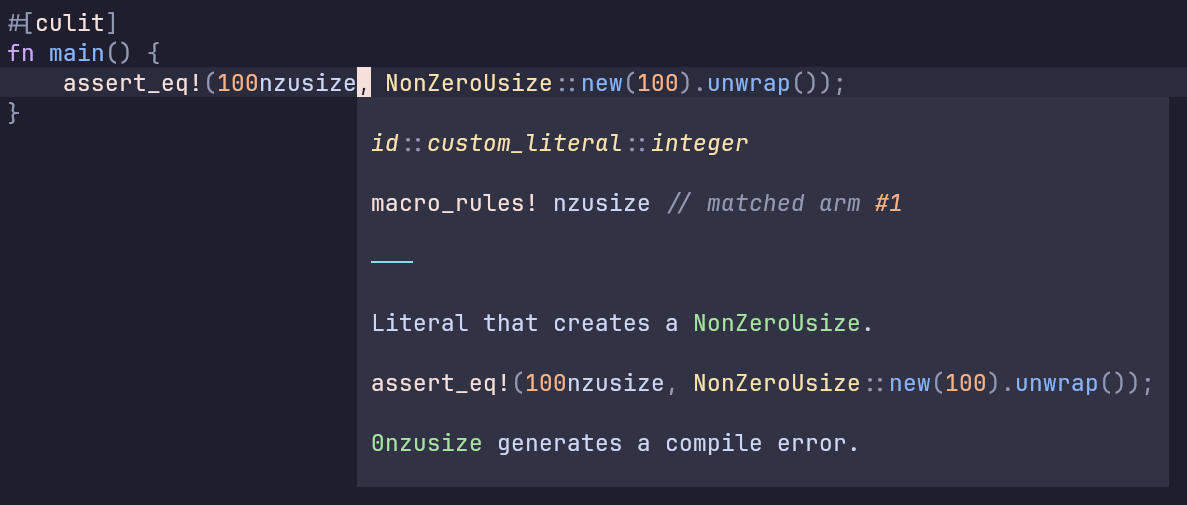
Hovering over the custom literals shows documentation for the macro that generates them. You can also do “goto definition”. It’s quite nice!
Python-like f-strings: "hello {name}"f
use culit::culit;

#[culit]
fn main() {
    let name = "bob";
    let age = 23;

    assert_eq!(
        "hi, my name is {name} and I am {age} years old"f,
        format!("hi, my name is {name} and I am {age} years old")
    );
}

mod custom_literal {
    pub mod string {
        macro_rules! f {
            ($value:literal) => {
                format!($value)
            };
        }
        pub(crate) use f;
    }
}
Duration literals: 100m, 2h…
use culit::culit;
use std::time::Duration;

#[culit]
fn main() {
    assert_eq!(
        100d + 11h + 8m + 7s,
        Duration::from_secs(100 * 60 * 60 * 24)
        + Duration::from_secs(11 * 60 * 60)
        + Duration::from_secs(8 * 60)
        + Duration::from_secs(7)
    );
}

// works on functions, constants, modules, everything!
#[culit]
const TIME: Duration = 100d;

mod custom_literal {
    pub mod integer {
        // day
        macro_rules! d {
            ($value:literal) => {
                Duration::from_secs(60 * 60 * 24 * $value)
            };
        }
        pub(crate) use d;

        // hour
        macro_rules! h {
            ($value:literal) => {
                Duration::from_secs(60 * 60 * $value)
            };
        }
        pub(crate) use h;

        // minute
        macro_rules! m {
            ($value:literal) => {
                Duration::from_secs(60 * $value)
            };
        }
        pub(crate) use m;

        // second
        macro_rules! s {
            ($value:literal) => {
                Duration::from_secs($value)
            };
        }
        pub(crate) use s;
    }
}
The possibilities are endless!
#[culit] replaces every literal that has a custom suffix with a call to the macro
at crate::custom_literal::<type>::<suffix>!($value), where $value is the literal with the suffix stripped:
| literal | expansion |
|---|---|
100km | crate::custom_literal::integer::km!(100) |
70.008e7feet | crate::custom_literal::float::feet!(70.008e7) |
"foo"bar | crate::custom_literal::string::bar!("foo") |
'a'ascii | crate::custom_literal::character::ascii!('a') |
b"foo"bar | crate::custom_literal::byte_string::bar!(b"foo") |
b'a'ascii | crate::custom_literal::byte_character::ascii!(b'a') |
c"foo"bar | crate::custom_literal::c_string::bar!(c"foo") |
Notes:
usize and f32 do not expand, so you cannot overwrite them.raw_byte_str. rb#"f\oo"# just becomes b"f\\oo"Here’s a skeleton for the custom_literal module which must exist at crate::custom_literal.
This module adds a new literal for every type of literal:
mod custom_literal {
    pub mod integer {
        macro_rules! custom {
            ($value:literal) => {
                // ...
            }
        }
        pub(crate) use custom;
    }

    pub mod float {
        macro_rules! custom {
            ($value:literal) => {
                // ...
            }
        }
        pub(crate) use custom;
    }

    pub mod string {
        macro_rules! custom {
            ($value:literal) => {
                // ...
            }
        }
        pub(crate) use custom;
    }

    pub mod character {
        macro_rules! custom {
            ($value:literal) => {
                // ...
            }
        }
        pub(crate) use custom;
    }

    pub mod byte_character {
        macro_rules! custom {
            ($value:literal) => {
                // ...
            }
        }
        pub(crate) use custom;
    }

    pub mod byte_string {
        macro_rules! custom {
            ($value:literal) => {
                // ...
            }
        }
        pub(crate) use custom;
    }

    pub mod c_string {
        macro_rules! custom {
            ($value:literal) => {
                // ...
            }
        }
        pub(crate) use custom;
    }
}
We look for custom literals in the crate::custom_literal module.
You can choose a custom module by passing arguments to the culit macro.
The default usage of #[culit] is identical to #[culit(crate::custom_literal)]
This will make #[culit] globally accessible in your entire crate, without needing to import it:
#[macro_use(culit)]
extern crate culit;
603 followers · starred Sep 2025
261 followers · starred Sep 2025
506 followers · starred Sep 2025
316 followers · starred Sep 2025
Custom literals in Rust
See the codeculit - Custom Literals in Rust
You probably know that numbers in Rust can be suffixed to specify their type, e.g. 100i32.
But did you know that syntactically any literal can have a suffix? And did you know that the suffix can be whatever you want?
This crate provides an attribute macro #[culit] for “Custom Literals”. When applied to any statement, it enables using custom literals in that statement.
culit = "0.6"
Note: culit does not have any dependencies such as syn or quote, and it is a simple mapping SourceCode -> SourceCode, so compile-speeds will be very fast.
A NonZeroUsize literal that fails to compile if it is 0: 100nzusize
use culit::culit;
use std::num::NonZeroUsize;

#[culit]
fn main() {
    assert_eq!(100nzusize, NonZeroUsize::new(100).unwrap());
    // COMPILE ERROR!
    // let illegal = 0nzusize;
}

mod custom_literal {
    pub mod integer {
        macro_rules! nzusize {
            // handle `0` specially
            (0) => {
                compile_error!("`0` is not a valid `NonZeroUsize`")
            };
            ($value:literal) => {
                const { NonZeroUsize::new($value).unwrap() }
            };
        }
        pub(crate) use nzusize;
    }
}
Hovering over the custom literals shows documentation for the macro that generates them. You can also do “goto definition”. It’s quite nice!
Python-like f-strings: "hello {name}"f
use culit::culit;

#[culit]
fn main() {
    let name = "bob";
    let age = 23;

    assert_eq!(
        "hi, my name is {name} and I am {age} years old"f,
        format!("hi, my name is {name} and I am {age} years old")
    );
}

mod custom_literal {
    pub mod string {
        macro_rules! f {
            ($value:literal) => {
                format!($value)
            };
        }
        pub(crate) use f;
    }
}
Duration literals: 100m, 2h…
use culit::culit;
use std::time::Duration;

#[culit]
fn main() {
    assert_eq!(
        100d + 11h + 8m + 7s,
        Duration::from_secs(100 * 60 * 60 * 24)
        + Duration::from_secs(11 * 60 * 60)
        + Duration::from_secs(8 * 60)
        + Duration::from_secs(7)
    );
}

// works on functions, constants, modules, everything!
#[culit]
const TIME: Duration = 100d;

mod custom_literal {
    pub mod integer {
        // day
        macro_rules! d {
            ($value:literal) => {
                Duration::from_secs(60 * 60 * 24 * $value)
            };
        }
        pub(crate) use d;

        // hour
        macro_rules! h {
            ($value:literal) => {
                Duration::from_secs(60 * 60 * $value)
            };
        }
        pub(crate) use h;

        // minute
        macro_rules! m {
            ($value:literal) => {
                Duration::from_secs(60 * $value)
            };
        }
        pub(crate) use m;

        // second
        macro_rules! s {
            ($value:literal) => {
                Duration::from_secs($value)
            };
        }
        pub(crate) use s;
    }
}
The possibilities are endless!
#[culit] replaces every literal that has a custom suffix with a call to the macro
at crate::custom_literal::<type>::<suffix>!($value), where $value is the literal with the suffix stripped:
| literal | expansion |
|---|---|
100km | crate::custom_literal::integer::km!(100) |
70.008e7feet | crate::custom_literal::float::feet!(70.008e7) |
"foo"bar | crate::custom_literal::string::bar!("foo") |
'a'ascii | crate::custom_literal::character::ascii!('a') |
b"foo"bar | crate::custom_literal::byte_string::bar!(b"foo") |
b'a'ascii | crate::custom_literal::byte_character::ascii!(b'a') |
c"foo"bar | crate::custom_literal::c_string::bar!(c"foo") |
Notes:
usize and f32 do not expand, so you cannot overwrite them.raw_byte_str. rb#"f\oo"# just becomes b"f\\oo"Here’s a skeleton for the custom_literal module which must exist at crate::custom_literal.
This module adds a new literal for every type of literal:
mod custom_literal {
    pub mod integer {
        macro_rules! custom {
            ($value:literal) => {
                // ...
            }
        }
        pub(crate) use custom;
    }

    pub mod float {
        macro_rules! custom {
            ($value:literal) => {
                // ...
            }
        }
        pub(crate) use custom;
    }

    pub mod string {
        macro_rules! custom {
            ($value:literal) => {
                // ...
            }
        }
        pub(crate) use custom;
    }

    pub mod character {
        macro_rules! custom {
            ($value:literal) => {
                // ...
            }
        }
        pub(crate) use custom;
    }

    pub mod byte_character {
        macro_rules! custom {
            ($value:literal) => {
                // ...
            }
        }
        pub(crate) use custom;
    }

    pub mod byte_string {
        macro_rules! custom {
            ($value:literal) => {
                // ...
            }
        }
        pub(crate) use custom;
    }

    pub mod c_string {
        macro_rules! custom {
            ($value:literal) => {
                // ...
            }
        }
        pub(crate) use custom;
    }
}
We look for custom literals in the crate::custom_literal module.
You can choose a custom module by passing arguments to the culit macro.
The default usage of #[culit] is identical to #[culit(crate::custom_literal)]
This will make #[culit] globally accessible in your entire crate, without needing to import it:
#[macro_use(culit)]
extern crate culit;
603 followers · starred Sep 2025
261 followers · starred Sep 2025
506 followers · starred Sep 2025
316 followers · starred Sep 2025



