
README
Spectral Relief
Spectral Relief is a free, open-source VST3 audio spectrogram plugin for macOS and Windows. It shows the sound playing through your track as a detailed 2D image or a 3D surface. It does not change the sound and adds no plugin latency.
Project status: This is an early public version. It has been manually tested with Ableton Live 12 on an Apple Silicon Mac. The macOS and Windows versions are also built and tested automatically on GitHub.
Download — no building required
Download Spectral Relief from GitHub Releases
On the release page:
- Open the newest release.
- Find the Assets section.
- Download the correct plug-in ZIP:
- Mac:
Spectral-Relief-...-macOS-universal.zip - Windows:
Spectral-Relief-...-Windows-x64.zip
- Mac:
- Unzip the downloaded file.
- Follow the simple installation guide.
Do not download GitHub's automatic Source code ZIP if you only want to use the plug-in. That download contains the project code, not the ready-made plug-in.
The Mac version supports both Apple Silicon and Intel Macs. The Windows version supports 64-bit Windows and 64-bit VST3 hosts such as Ableton Live.
The downloads are not commercially signed. macOS requires one extra security step the first time you install the plug-in. Windows may show a security warning. The installation guide explains what to do.
Demo
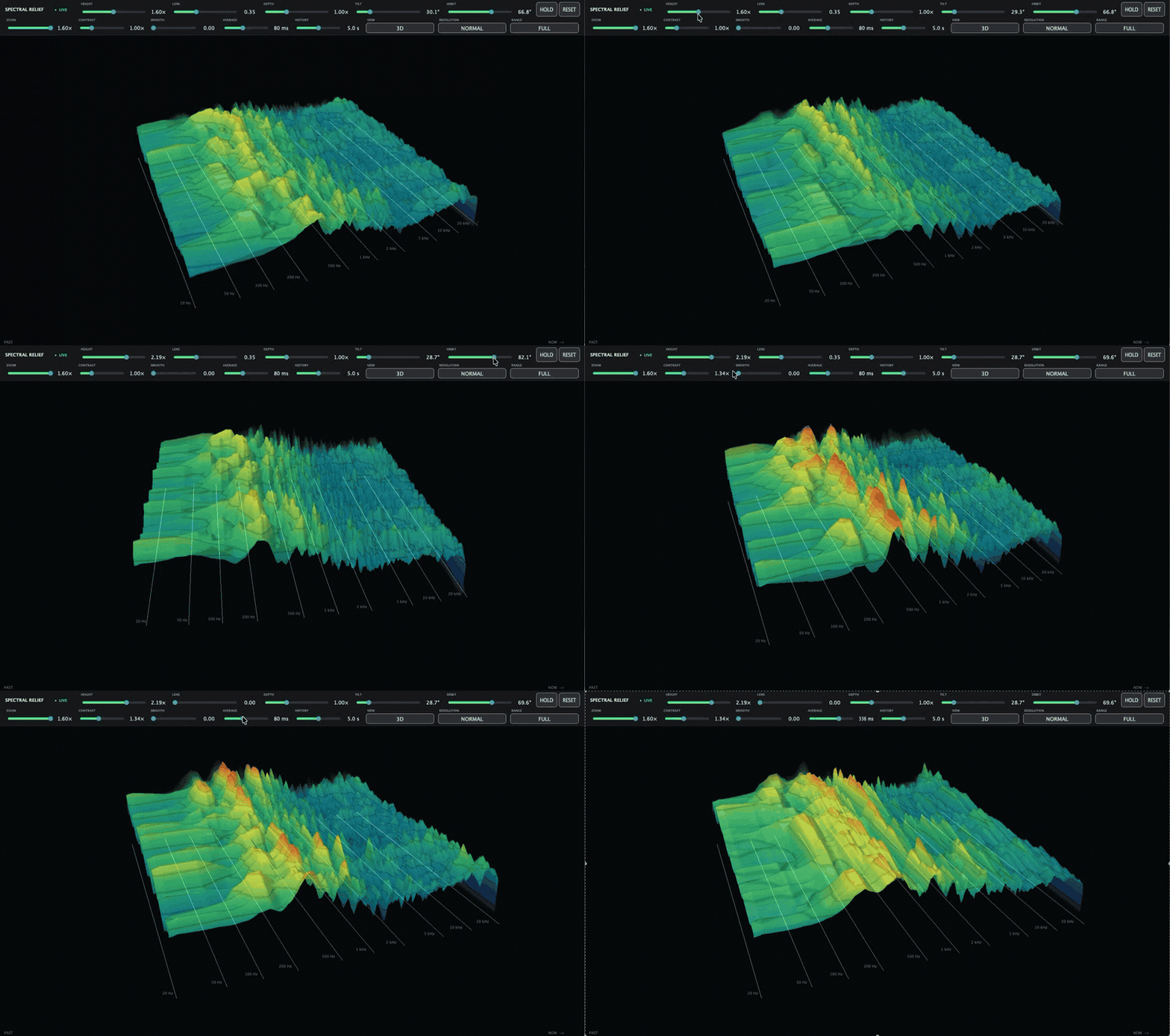
What it can show
- A detailed 2D spectrogram or 3D mountain-like view
- Frequencies arranged in a way that better matches human hearing
- Accurate, unweighted dBFS loudness levels
- Up to 1024 logarithmic frequency bands
- Full, Low, Mid, and High frequency views
- Two to eight seconds of visible audio history
- Optional averaging and visual smoothing
- A top-down view and a freely adjustable 3D camera
All controls change only the picture. They do not change your audio.
Controls
| Control | What it does |
|---|---|
| Height | Makes the frequency mountains taller or shorter. |
| Lens | Adds a round fisheye-style view. |
| Depth | Changes how much space the audio history uses. |
| Tilt / Orbit | Moves the 3D camera, including a top-down view. |
| Zoom | Moves the view closer or farther away. |
| Contrast | Makes quiet and loud areas easier to tell apart. It does not change mountain height. |
| Smooth | Smooths the picture over time. Set it to zero to keep every analyzed row. |
| Average | Averages loudness for up to 1000 ms without mixing nearby frequencies. |
| History | Shows between two and eight seconds of audio. |
| View | Switches between the 3D surface and the exact 2D spectrogram. |
| Resolution | Selects Normal, High, or Ultra detail. |
| Range | Selects Full, Low, Mid, or High frequencies. |
| Hold / Reset | Freezes the picture or clears its history. |
Install in Ableton Live
Use the macOS and Windows installation guide. It shows where to copy the VST3 file, how to handle the unsigned plug-in warning, and how to make Ableton scan for the plug-in.
For a deeper manual test, use the Ableton smoke-test guide.
Build from source
You do not need to build the project if you downloaded a release. This section is for developers who want to study or change the source code.
You need:
- macOS or 64-bit Windows
- CMake 3.25 or newer
- Git
- Xcode Command Line Tools on macOS, or Visual Studio 2022 with Desktop development with C++ on Windows
JUCE 8.0.15 is downloaded automatically from its pinned commit.
Example for macOS:
cmake -S . -B build-release \
  -DCMAKE_BUILD_TYPE=Release \
  -DCMAKE_OSX_ARCHITECTURES=arm64
cmake --build build-release --target SpectralReliefTests SpectralRelief_VST3 -j4
ctest --test-dir build-release --output-on-failure
The built plug-in will be here:
build-release/SpectralRelief_artefacts/Release/VST3/Spectral Relief.vst3
How it works
The plug-in copies a small analysis feed while the original audio continues unchanged. A background worker calculates the spectrum. The renderer keeps a fixed-size history for the 2D and 3D views.
The audio thread never waits for the visualization. If the display cannot keep up, Spectral Relief drops visual samples instead of interrupting the sound.
Inspiration and acknowledgements
The visual style and some performance ideas were inspired by Chrome Music Lab's Spectrogram, developed by Google Creative Lab. Its moving GPU surface, rolling texture, and bright frequency lines helped guide this project.
Spectral Relief is an original C++ project made with JUCE and OpenGL. It does not include or port Chrome Music Lab source code. It is not an official Google product and is not connected with or endorsed by Google.
See THIRD_PARTY_NOTICES.md for framework and reference licenses.
Contributing
Contributions, bug reports, and focused pull requests are welcome. Please read CONTRIBUTING.md before making a pull request. Report security problems using SECURITY.md.
License
Copyright © 2026 Nijat Burjiyev.
Spectral Relief is public, open-source software licensed under the
GNU Affero General Public License v3.0 only (AGPL-3.0-only).
The project uses JUCE under JUCE's AGPLv3 open-source option. A commercial JUCE license is required if somebody wants to distribute a closed-source version.
Apple has deprecated OpenGL. This early version still uses it because JUCE provides a compact way to support plug-in hosts. The audio analysis code is kept separate so the renderer can be replaced later.
Contributors

9 commits
See what people are saying
Similar repos


Languages
C++
90.4%
CMake
9.1%
README
Spectral Relief
Spectral Relief is a free, open-source VST3 audio spectrogram plugin for macOS and Windows. It shows the sound playing through your track as a detailed 2D image or a 3D surface. It does not change the sound and adds no plugin latency.
Project status: This is an early public version. It has been manually tested with Ableton Live 12 on an Apple Silicon Mac. The macOS and Windows versions are also built and tested automatically on GitHub.
Download — no building required
Download Spectral Relief from GitHub Releases
On the release page:
- Open the newest release.
- Find the Assets section.
- Download the correct plug-in ZIP:
- Mac:
Spectral-Relief-...-macOS-universal.zip - Windows:
Spectral-Relief-...-Windows-x64.zip
- Mac:
- Unzip the downloaded file.
- Follow the simple installation guide.
Do not download GitHub's automatic Source code ZIP if you only want to use the plug-in. That download contains the project code, not the ready-made plug-in.
The Mac version supports both Apple Silicon and Intel Macs. The Windows version supports 64-bit Windows and 64-bit VST3 hosts such as Ableton Live.
The downloads are not commercially signed. macOS requires one extra security step the first time you install the plug-in. Windows may show a security warning. The installation guide explains what to do.
Demo
What it can show
- A detailed 2D spectrogram or 3D mountain-like view
- Frequencies arranged in a way that better matches human hearing
- Accurate, unweighted dBFS loudness levels
- Up to 1024 logarithmic frequency bands
- Full, Low, Mid, and High frequency views
- Two to eight seconds of visible audio history
- Optional averaging and visual smoothing
- A top-down view and a freely adjustable 3D camera
All controls change only the picture. They do not change your audio.
Controls
| Control | What it does |
|---|---|
| Height | Makes the frequency mountains taller or shorter. |
| Lens | Adds a round fisheye-style view. |
| Depth | Changes how much space the audio history uses. |
| Tilt / Orbit | Moves the 3D camera, including a top-down view. |
| Zoom | Moves the view closer or farther away. |
| Contrast | Makes quiet and loud areas easier to tell apart. It does not change mountain height. |
| Smooth | Smooths the picture over time. Set it to zero to keep every analyzed row. |
| Average | Averages loudness for up to 1000 ms without mixing nearby frequencies. |
| History | Shows between two and eight seconds of audio. |
| View | Switches between the 3D surface and the exact 2D spectrogram. |
| Resolution | Selects Normal, High, or Ultra detail. |
| Range | Selects Full, Low, Mid, or High frequencies. |
| Hold / Reset | Freezes the picture or clears its history. |
Install in Ableton Live
Use the macOS and Windows installation guide. It shows where to copy the VST3 file, how to handle the unsigned plug-in warning, and how to make Ableton scan for the plug-in.
For a deeper manual test, use the Ableton smoke-test guide.
Build from source
You do not need to build the project if you downloaded a release. This section is for developers who want to study or change the source code.
You need:
- macOS or 64-bit Windows
- CMake 3.25 or newer
- Git
- Xcode Command Line Tools on macOS, or Visual Studio 2022 with Desktop development with C++ on Windows
JUCE 8.0.15 is downloaded automatically from its pinned commit.
Example for macOS:
cmake -S . -B build-release \
  -DCMAKE_BUILD_TYPE=Release \
  -DCMAKE_OSX_ARCHITECTURES=arm64
cmake --build build-release --target SpectralReliefTests SpectralRelief_VST3 -j4
ctest --test-dir build-release --output-on-failure
The built plug-in will be here:
build-release/SpectralRelief_artefacts/Release/VST3/Spectral Relief.vst3
How it works
The plug-in copies a small analysis feed while the original audio continues unchanged. A background worker calculates the spectrum. The renderer keeps a fixed-size history for the 2D and 3D views.
The audio thread never waits for the visualization. If the display cannot keep up, Spectral Relief drops visual samples instead of interrupting the sound.
Inspiration and acknowledgements
The visual style and some performance ideas were inspired by Chrome Music Lab's Spectrogram, developed by Google Creative Lab. Its moving GPU surface, rolling texture, and bright frequency lines helped guide this project.
Spectral Relief is an original C++ project made with JUCE and OpenGL. It does not include or port Chrome Music Lab source code. It is not an official Google product and is not connected with or endorsed by Google.
See THIRD_PARTY_NOTICES.md for framework and reference licenses.
Contributing
Contributions, bug reports, and focused pull requests are welcome. Please read CONTRIBUTING.md before making a pull request. Report security problems using SECURITY.md.
License
Copyright © 2026 Nijat Burjiyev.
Spectral Relief is public, open-source software licensed under the
GNU Affero General Public License v3.0 only (AGPL-3.0-only).
The project uses JUCE under JUCE's AGPLv3 open-source option. A commercial JUCE license is required if somebody wants to distribute a closed-source version.
Apple has deprecated OpenGL. This early version still uses it because JUCE provides a compact way to support plug-in hosts. The audio analysis code is kept separate so the renderer can be replaced later.
See what people are saying
Similar repos
Contributors
9 commits
Languages
C++
90.4%
CMake
9.1%