
📋 Universal command-line clipboard with automatic copy and paste detection. Eg, `cb|sort|cb`. The missing link between GUIs and CLIs!
Shell
135
16 commits
updated Sep 7, 2025
README
📋 cb
Universal command-line clipboard with automatic copy and paste detection. Eg,
cb|sort|cb.
Purpose
cb is a clipboard for working between graphical and command-line interfaces (GUIs and CLIs). The clipboard is a surprisingly convenient integration between the two and doesn't use temporary files. cb automatically performs a copy or a paste based on the context.
Why you don't need cb
If any of the following are true, you do not need cb:
- You use GUIs exclusively.
- You use CLIs exclusively.
- You can use the system equivalent copy-and-paste CLIs directly. Eg,
XSel or
pbcopy/pbpaste. - You prefer using temporary files when working across GUIs and CLIs.
All cb provides is a consistent interface across operating systems. Any clipboard CLI will do. What's important is how you use the tool.
Usage
Supply standard input to copy:
$ echo abc|cb
Supply no input to paste:
$ cb
abc
Both copy and paste can appear in the same command:
$ curl "$(cb)"|cb
Contents on the clipboard can be used bidirectionally with other GUIs like graphical text editors or web browsers using the usual shortcut (control-c/v or command-c/v).
Installation
# Download the script to ~/bin/cb.
curl https://raw.githubusercontent.com/niedzielski/clipboard/main/cb -o ~/bin/cb &&

# Make the script executable.
chmod +x ~/bin/cb
cb also supports sourcing in Almquist-like shells like . cb or source ./cb.
The heart of cb is tiny so edit it however you like and discard the rest!
Dependencies
cb requires the following dependencies to be installed:
- Linux: xclip on X (eg,
sudo apt install xclip) and wl-clipboard on Wayland (sudo apt install wl-clipboard). - macOS: none (
pbcopy/pbpasteare installed by default). - Windows: CygUtils (install
putclip/getclipvia Cygwin GUI).
If in doubt, it's simplest to just try executing cb.
Troubleshooting
Is ~/bin in the PATH environment variable?
grep --only-matching ~/bin <<< "$PATH" should report a match. If not, add it
like PATH="$PATH":~/bin.
Examples
All of these examples appear trivial because copy-and-paste is ubiquitous. The intent is to demonstrate the understated usefulness of the system clipboard for CLI-GUI integration. You can work seamlessly across GUIs and CLIs with it.
-
Sort clipboard lines:
cb|sort|cb.Expand for detail…
$ # Simulate copying some lines of text from another program with control or command-C. $ printf 'c\nb\na'|cb $ cb c b a $ # Sort the clipboard's contents by line. $ cb|sort|cb $ # Simulate pasting the text back to another program with control or command-V. $ cb a b c -
Count the number of bytes, characters, and lines on the clipboard:
cb|wc --bytes --chars --lines.Expand for detail…
$ # Simulate copying text from another program with control or command-C. $ echo abc|cb $ cb|wc --bytes --chars --lines 1 4 4 -
Replace single quotes with double quotes on the clipboard:
cb|sed s%\'%\"%g|cb.Expand for detail…
$ # Simulate copying text from another program with control or command-C. $ cb <<<\'abc\' $ cb|sed s%\'%\"%g|cb $ # Simulate pasting the text back to another program with control or command-V. $ cb "abc" -
Diff the clipboard with a file:
diff <(cb) right-hand-side.text. Works with diff GUIs too:meld <(cb) right-hand-side.text.Expand for detail…
$ # Simulate copying some lines of text from another program with control or command-C.

$ cb << 'eof'
a
b
eof

$ # Simulate a previously saved reference.

$ cat << 'eof' > right-hand-side.text
a
b
c
eof

$ # Diff the contents of the clipboard with the reference.

$ diff <(cb) right-hand-side.text
2a3
> c

$ # View the same diff in Meld, a graphical diffing program.

$ meld <(cb) right-hand-side.text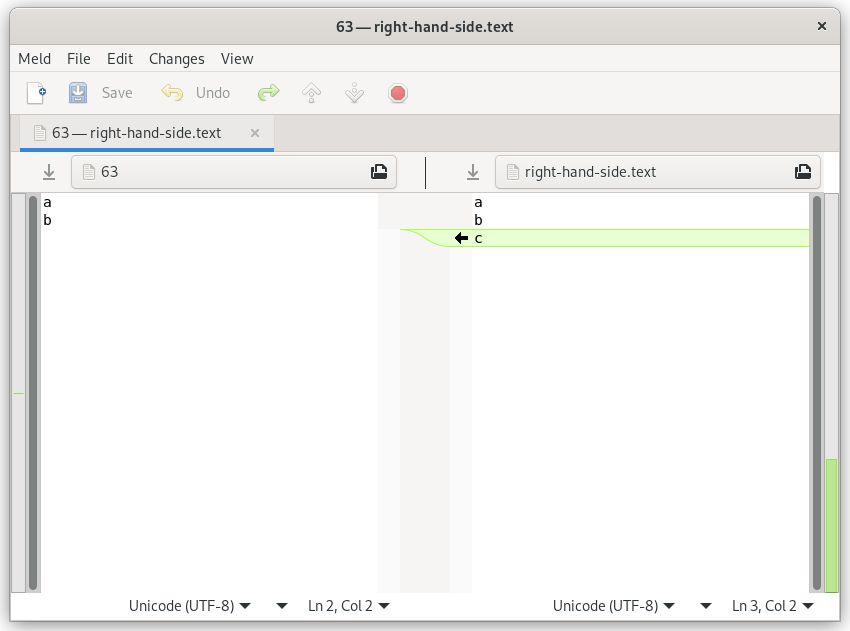
-
Download a file from the URL on the clipboard:
wget "$(cb)". -
Download a video from the YouTube URL on the clipboard:
youtube-dl "$(cb)".Expand for detail…
$ # Simulate copying a URL from a browser address bar with control or command-C. $ echo 'https://www.youtube.com/watch?v=92c8vW-AzAc'|cb $ # Download the address from the clipboard URL. $ youtube-dl "$(cb)" [youtube] 92c8vW-AzAc: Downloading webpage WARNING: Requested formats are incompatible for merge and will be merged into mkv. [download] Destination: Fritz roars-92c8vW-AzAc.f137.mp4 [download] 100% of 5.07MiB in 01:37 [download] Destination: Fritz roars-92c8vW-AzAc.f251.webm [download] 100% of 175.94KiB in 00:02 [ffmpeg] Merging formats into "Fritz roars-92c8vW-AzAc.mkv" Deleting original file Fritz roars-92c8vW-AzAc.f137.mp4 (pass -k to keep) Deleting original file Fritz roars-92c8vW-AzAc.f251.webm (pass -k to keep) $ ls Fritz\ roars-92c8vW-AzAc.mkv 'Fritz roars-92c8vW-AzAc.mkv' -
Copy from Chromium DevTools
copy($('table:has(> caption)'))andcb|html2text. -
Copy the version of Chromium to the clipboard:
chromium --version|cb.Expand for detail…
$ # Copy the version of Chromium installed into the clipboard. $ chromium --version|cb $ # Simulate pasting the version into another program with control or command-V. $ cb Chromium 97.0.4692.99 built on Debian bookworm/sid, running on Debian bookworm/sid -
Copy 10k numbered lines to the clipboard:
for ((i=0; i < 10000; i++)); do echo $i; done|cb.Expand for detail…
$ # Copy numbered lines from 0 to 10000 to the clipboard. $ for ((i=0; i < 10000; i++)); do echo $i; done|cb $ # Simulate pasting the text into another program with control or command-V. $ cb|head 0 1 2 3 4 5 6 7 8 9 -
Replace newlines on the clipboard with commas:
cb|node --input-type=module --eval 'import fs from "fs/promises"; const text = await fs.readFile("/dev/stdin", "utf-8"); console.log(text.split("\n").join())'|cb.Expand for detail…
$ # Simulate copying text delimited by newlines from another program with control or command-C. $ echo -ne 'a\nb\nc'|cb $ cb|node --input-type=module --eval 'import fs from "fs/promises"; const text = await fs.readFile("/dev/stdin", "utf-8"); console.log(text.split("\n").join())'|cb $ # Simulate pasting the CSV back to another program with control or command-V. $ cb a,b,c -
Pretty print JSON:
cb|node -pe 'JSON.stringify(JSON.parse(require("fs").readFileSync(0, "utf-8")), null, 2)'|cb.Expand for detail…
$ # Simulate copying a blob of JSON from another program with control or command-C. $ cb <<<'{"a":1,"b":2,"c":3}' $ cb|node -pe 'JSON.stringify(JSON.parse(require("fs").readFileSync(0, "utf-8")), null, 2)'|cb $ # Simulate pasting the JSON back to another program with control or command-V. $ cb { "a": 1, "b": 2, "c": 3 } -
Copy Git patch from one repo to another.
Expand for detail…
$ cd clone-a # Enter the repo directory. $ git diff|cb # Copy the patch. Run `git add .` first to include untracked files. $ cd ../clone-b # Enter the directory of another clone. $ cb|git apply # Paste the patch. -
Test if the random patch you found online and copied to your clipboard applies to your code:
git apply --check <(cb). -
Dump the HEAD revision of a file to the clipboard:
git show HEAD:readme.md|cb. -
Reverse clipboard line order:
cb|tac|cb. -
Copy an image to the clipboard:
cb < banana.png. -
Copy text to the clipboard:
cb < phonebook.csv. -
Wrap clipboard text at 72 characters:
cb|fold --spaces --width=72|sed 's% \+$%%'|cb. -
Find songs, shuffle them, and copy them to the clipboard:
find -iname \*.flac -printf %f\\n|shuf|cb. -
Copy the absolute path of a filename:
realpath --canonicalize-missing --no-symlinks "$(cb)"|cb. -
Voice the clipboard:
cb|espeak. -
Truncate the clipboard:
cb|tail|cb. -
Save the clipboard to a transient file:
t="$(mktemp)" && cb >| "$t" && echo "$t". -
Edit the clipboard contents in a temporary buffer:
cb|vim -. -
Compare Gzip and Brotli compressions of the clipboard:
cb|gzip --best|wc --bytes && cb|brotli --best|wc --bytes. -
Copy the most recent photo taken on an Android device to the clipboard:
adb exec-out 'cat "$(ls -c1 /sdcard/DCIM/Camera/IMG*.jpg|tail -n1)"'|cb. -
Convert richtext to plaintext:
cb|cb. -
Clear the clipboard:
cb < /dev/null.
License (Public Domain)
All code in this repository is public domain and may be used without limitation.
Contributors



Similar repos


Languages
Shell
100.0%
📋 Universal command-line clipboard with automatic copy and paste detection. Eg, `cb|sort|cb`. The missing link between GUIs and CLIs!
Shell
135
16 commits
updated Sep 7, 2025
README
📋 cb
Universal command-line clipboard with automatic copy and paste detection. Eg,
cb|sort|cb.
Purpose
cb is a clipboard for working between graphical and command-line interfaces (GUIs and CLIs). The clipboard is a surprisingly convenient integration between the two and doesn't use temporary files. cb automatically performs a copy or a paste based on the context.
Why you don't need cb
If any of the following are true, you do not need cb:
- You use GUIs exclusively.
- You use CLIs exclusively.
- You can use the system equivalent copy-and-paste CLIs directly. Eg,
XSel or
pbcopy/pbpaste. - You prefer using temporary files when working across GUIs and CLIs.
All cb provides is a consistent interface across operating systems. Any clipboard CLI will do. What's important is how you use the tool.
Usage
Supply standard input to copy:
$ echo abc|cb
Supply no input to paste:
$ cb
abc
Both copy and paste can appear in the same command:
$ curl "$(cb)"|cb
Contents on the clipboard can be used bidirectionally with other GUIs like graphical text editors or web browsers using the usual shortcut (control-c/v or command-c/v).
Installation
# Download the script to ~/bin/cb.
curl https://raw.githubusercontent.com/niedzielski/clipboard/main/cb -o ~/bin/cb &&

# Make the script executable.
chmod +x ~/bin/cb
cb also supports sourcing in Almquist-like shells like . cb or source ./cb.
The heart of cb is tiny so edit it however you like and discard the rest!
Dependencies
cb requires the following dependencies to be installed:
- Linux: xclip on X (eg,
sudo apt install xclip) and wl-clipboard on Wayland (sudo apt install wl-clipboard). - macOS: none (
pbcopy/pbpasteare installed by default). - Windows: CygUtils (install
putclip/getclipvia Cygwin GUI).
If in doubt, it's simplest to just try executing cb.
Troubleshooting
Is ~/bin in the PATH environment variable?
grep --only-matching ~/bin <<< "$PATH" should report a match. If not, add it
like PATH="$PATH":~/bin.
Examples
All of these examples appear trivial because copy-and-paste is ubiquitous. The intent is to demonstrate the understated usefulness of the system clipboard for CLI-GUI integration. You can work seamlessly across GUIs and CLIs with it.
-
Sort clipboard lines:
cb|sort|cb.Expand for detail…
$ # Simulate copying some lines of text from another program with control or command-C. $ printf 'c\nb\na'|cb $ cb c b a $ # Sort the clipboard's contents by line. $ cb|sort|cb $ # Simulate pasting the text back to another program with control or command-V. $ cb a b c -
Count the number of bytes, characters, and lines on the clipboard:
cb|wc --bytes --chars --lines.Expand for detail…
$ # Simulate copying text from another program with control or command-C. $ echo abc|cb $ cb|wc --bytes --chars --lines 1 4 4 -
Replace single quotes with double quotes on the clipboard:
cb|sed s%\'%\"%g|cb.Expand for detail…
$ # Simulate copying text from another program with control or command-C. $ cb <<<\'abc\' $ cb|sed s%\'%\"%g|cb $ # Simulate pasting the text back to another program with control or command-V. $ cb "abc" -
Diff the clipboard with a file:
diff <(cb) right-hand-side.text. Works with diff GUIs too:meld <(cb) right-hand-side.text.Expand for detail…
$ # Simulate copying some lines of text from another program with control or command-C. $ cb << 'eof' a b eof $ # Simulate a previously saved reference. $ cat << 'eof' > right-hand-side.text a b c eof $ # Diff the contents of the clipboard with the reference. $ diff <(cb) right-hand-side.text 2a3 > c $ # View the same diff in Meld, a graphical diffing program. $ meld <(cb) right-hand-side.text -
Download a file from the URL on the clipboard:
wget "$(cb)". -
Download a video from the YouTube URL on the clipboard:
youtube-dl "$(cb)".Expand for detail…
$ # Simulate copying a URL from a browser address bar with control or command-C. $ echo 'https://www.youtube.com/watch?v=92c8vW-AzAc'|cb $ # Download the address from the clipboard URL. $ youtube-dl "$(cb)" [youtube] 92c8vW-AzAc: Downloading webpage WARNING: Requested formats are incompatible for merge and will be merged into mkv. [download] Destination: Fritz roars-92c8vW-AzAc.f137.mp4 [download] 100% of 5.07MiB in 01:37 [download] Destination: Fritz roars-92c8vW-AzAc.f251.webm [download] 100% of 175.94KiB in 00:02 [ffmpeg] Merging formats into "Fritz roars-92c8vW-AzAc.mkv" Deleting original file Fritz roars-92c8vW-AzAc.f137.mp4 (pass -k to keep) Deleting original file Fritz roars-92c8vW-AzAc.f251.webm (pass -k to keep) $ ls Fritz\ roars-92c8vW-AzAc.mkv 'Fritz roars-92c8vW-AzAc.mkv' -
Copy from Chromium DevTools
copy($('table:has(> caption)'))andcb|html2text. -
Copy the version of Chromium to the clipboard:
chromium --version|cb.Expand for detail…
$ # Copy the version of Chromium installed into the clipboard. $ chromium --version|cb $ # Simulate pasting the version into another program with control or command-V. $ cb Chromium 97.0.4692.99 built on Debian bookworm/sid, running on Debian bookworm/sid -
Copy 10k numbered lines to the clipboard:
for ((i=0; i < 10000; i++)); do echo $i; done|cb.Expand for detail…
$ # Copy numbered lines from 0 to 10000 to the clipboard. $ for ((i=0; i < 10000; i++)); do echo $i; done|cb $ # Simulate pasting the text into another program with control or command-V. $ cb|head 0 1 2 3 4 5 6 7 8 9 -
Replace newlines on the clipboard with commas:
cb|node --input-type=module --eval 'import fs from "fs/promises"; const text = await fs.readFile("/dev/stdin", "utf-8"); console.log(text.split("\n").join())'|cb.Expand for detail…
$ # Simulate copying text delimited by newlines from another program with control or command-C. $ echo -ne 'a\nb\nc'|cb $ cb|node --input-type=module --eval 'import fs from "fs/promises"; const text = await fs.readFile("/dev/stdin", "utf-8"); console.log(text.split("\n").join())'|cb $ # Simulate pasting the CSV back to another program with control or command-V. $ cb a,b,c -
Pretty print JSON:
cb|node -pe 'JSON.stringify(JSON.parse(require("fs").readFileSync(0, "utf-8")), null, 2)'|cb.Expand for detail…
$ # Simulate copying a blob of JSON from another program with control or command-C. $ cb <<<'{"a":1,"b":2,"c":3}' $ cb|node -pe 'JSON.stringify(JSON.parse(require("fs").readFileSync(0, "utf-8")), null, 2)'|cb $ # Simulate pasting the JSON back to another program with control or command-V. $ cb { "a": 1, "b": 2, "c": 3 } -
Copy Git patch from one repo to another.
Expand for detail…
$ cd clone-a # Enter the repo directory. $ git diff|cb # Copy the patch. Run `git add .` first to include untracked files. $ cd ../clone-b # Enter the directory of another clone. $ cb|git apply # Paste the patch. -
Test if the random patch you found online and copied to your clipboard applies to your code:
git apply --check <(cb). -
Dump the HEAD revision of a file to the clipboard:
git show HEAD:readme.md|cb. -
Reverse clipboard line order:
cb|tac|cb. -
Copy an image to the clipboard:
cb < banana.png. -
Copy text to the clipboard:
cb < phonebook.csv. -
Wrap clipboard text at 72 characters:
cb|fold --spaces --width=72|sed 's% \+$%%'|cb. -
Find songs, shuffle them, and copy them to the clipboard:
find -iname \*.flac -printf %f\\n|shuf|cb. -
Copy the absolute path of a filename:
realpath --canonicalize-missing --no-symlinks "$(cb)"|cb. -
Voice the clipboard:
cb|espeak. -
Truncate the clipboard:
cb|tail|cb. -
Save the clipboard to a transient file:
t="$(mktemp)" && cb >| "$t" && echo "$t". -
Edit the clipboard contents in a temporary buffer:
cb|vim -. -
Compare Gzip and Brotli compressions of the clipboard:
cb|gzip --best|wc --bytes && cb|brotli --best|wc --bytes. -
Copy the most recent photo taken on an Android device to the clipboard:
adb exec-out 'cat "$(ls -c1 /sdcard/DCIM/Camera/IMG*.jpg|tail -n1)"'|cb. -
Convert richtext to plaintext:
cb|cb. -
Clear the clipboard:
cb < /dev/null.
License (Public Domain)
All code in this repository is public domain and may be used without limitation.
Similar repos
Contributors
Languages
Shell
100.0%