🚀 All-in-One Docker deployment for Tencent HunyuanMT 1.5 translation model with Web UI, REST API, and MCP Server support. 38 languages, streaming translation, dark/light theme.
Python
5
14 commits
updated Jan 3, 2026





🚀 All-in-One Docker deployment for Tencent HunyuanMT 1.5 translation model with Web UI, REST API, and MCP Server support.
| Model | VRAM | Speed | Quality | Recommendation |
|---|---|---|---|---|
| HY-MT 7B | 16GB | ⭐⭐⭐⭐ | ⭐⭐⭐⭐⭐ | 🏆 Best Choice - Highest quality, fast speed |
| HY-MT 1.8B | 6GB | ⭐⭐⭐⭐⭐ | ⭐⭐⭐⭐ | Good for limited VRAM |
| HY-MT 1.8B FP8 | 4GB | ⭐⭐⭐ | ⭐⭐⭐⭐ | For VRAM < 6GB |
| HY-MT 7B FP8 | 10GB | ⭐⭐ | ⭐⭐⭐⭐⭐ | 7B quality with less VRAM |
💡 Tip: If you have 16GB+ VRAM, use HY-MT 7B for best results. FP8 models save memory but are slower due to runtime decompression.
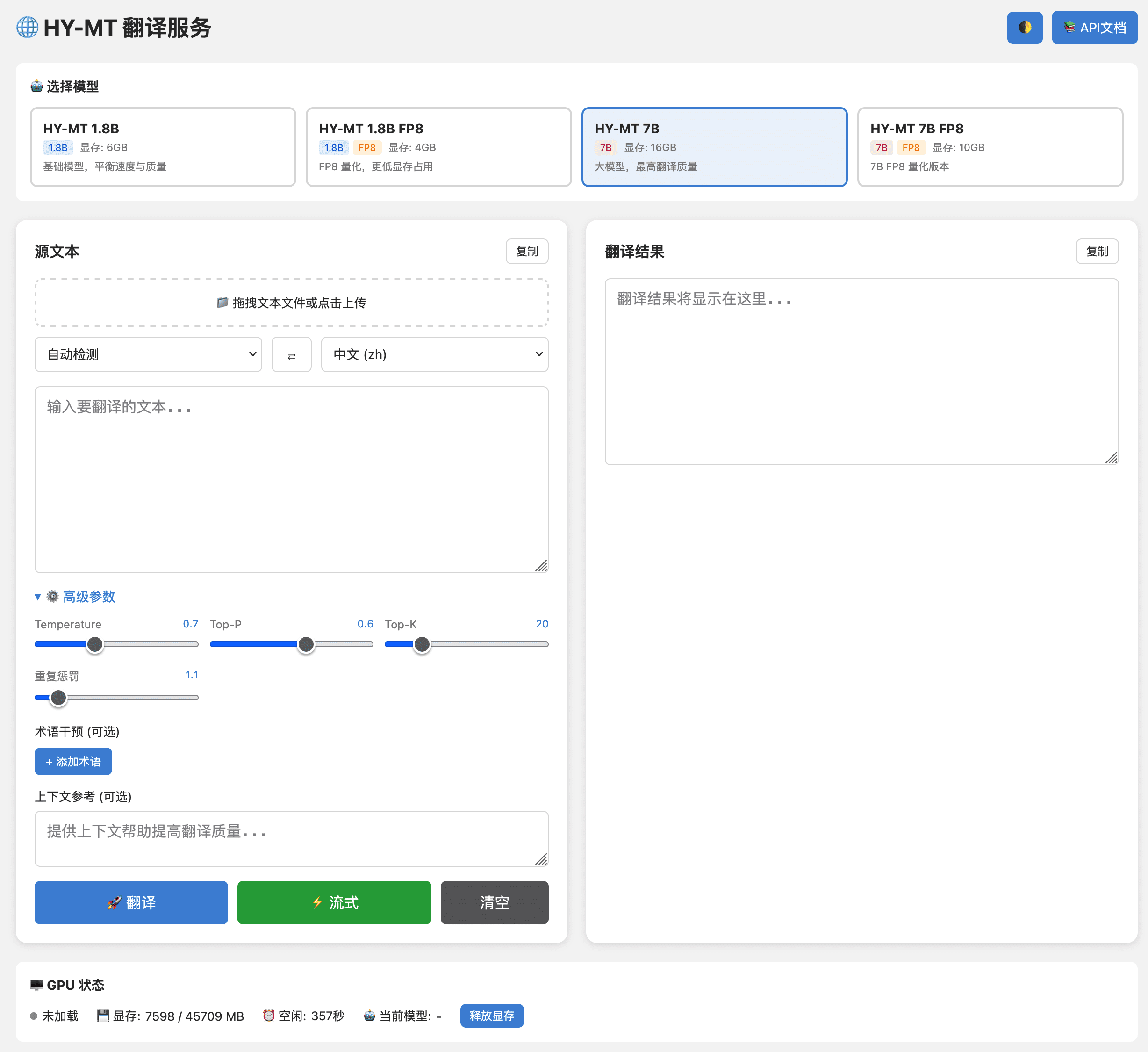
# One command to start (uses 7B model by default)
docker run -d --gpus all \
  -p 8021:8021 \
  -v ./models:/app/models \
  --name hy-mt \
  neosun/hy-mt:latest

# Access Web UI
open http://localhost:8021
The Docker image (~43GB) includes all 4 models pre-downloaded. No external downloads needed!
Create docker-compose.yml:
services:
  hy-mt:
    image: neosun/hy-mt:latest
    container_name: hy-mt
    ports:
      - "8021:8021"
    environment:
      - MODEL_NAME=tencent/HY-MT1.5-7B  # Recommended for 16GB+ VRAM
      - GPU_IDLE_TIMEOUT=300
      - HF_ENDPOINT=https://huggingface.co  # Use https://hf-mirror.com for China
    volumes:
      - ./models:/app/models
    deploy:
      resources:
        reservations:
          devices:
            - driver: nvidia
              count: 1
              capabilities: [gpu]
    restart: unless-stopped
docker compose up -d
| Requirement | Minimum | Recommended |
|---|---|---|
| GPU | NVIDIA GPU with 6GB+ VRAM | 16GB+ VRAM (for 7B model) |
| CUDA | 11.8+ | 12.4+ |
| Docker | 20.10+ | 24.0+ |
| nvidia-docker | Required | - |
# Check NVIDIA driver
nvidia-smi

# Check Docker GPU support
docker run --rm --gpus all nvidia/cuda:12.4.1-base-ubuntu22.04 nvidia-smi
Tested on NVIDIA L40S GPU, translating English to Chinese:
| Model | Short (61 chars) | Medium (530 chars) | Long (1.8K chars) | Extra Long (4.2K chars) |
|---|---|---|---|---|
| HY-MT 7B | 0.4s | 4.4s | 17.7s | 43.0s |
| HY-MT 1.8B | 0.4s | 3.6s | 14.0s | 32.3s |
| HY-MT 1.8B FP8 | 1.1s | 10.8s | 38.1s | 92.9s |
| HY-MT 7B FP8 | 2.9s | 28.5s | 115.6s | 274.1s |
This is counter-intuitive but technically correct:
| Comparison | Speed Change | Reason |
|---|---|---|
| 1.8B FP8 vs 1.8B | 2.7x slower | Runtime decompression overhead |
| 7B FP8 vs 7B | 6.4x slower | More parameters = more decompression |
FP8 quantization is designed to save VRAM, not to speed up inference. The model is stored in 8-bit format but needs to be decompressed to 16-bit for GPU computation at runtime. This decompression happens for every token generation.
When to use FP8:
See Benchmark Report for detailed analysis.
Critical finding: Smaller chunk size = Better translation quality
| Chunk Size | Quality | Notes |
|---|---|---|
| 500 chars | ❌ Poor | Mixed languages in output |
| 300 chars | ⚠️ Fair | Some untranslated residue |
| 150 chars | ✅ Excellent | Complete, accurate translation |
The service uses MAX_CHUNK_LENGTH=150 by default for optimal quality.
Why? HY-MT model tends to "slack off" on long inputs, only translating part of the content. Shorter chunks force the model to fully translate each segment.
See Optimization Guide for details.
| Variable | Default | Description |
|---|---|---|
PORT | 8021 | Service port |
MODEL_NAME | tencent/HY-MT1.5-7B | HuggingFace model name |
MODEL_PATH | ./models | Local model cache path |
GPU_IDLE_TIMEOUT | 300 | Auto-release GPU after idle (seconds) |
NVIDIA_VISIBLE_DEVICES | auto | GPU ID (empty = auto select) |
HF_ENDPOINT | https://huggingface.co | HuggingFace mirror URL |
# Copy example config
cp .env.example .env

# Edit as needed
vim .env
curl -X POST "http://localhost:8021/api/translate" \
  -H "Content-Type: application/json" \
  -d '{
    "text": "Hello, how are you?",
    "target_lang": "zh"
  }'
Response:
{
  "status": "success",
  "result": "你好,你好吗?",
  "elapsed_ms": 358,
  "model": "tencent/HY-MT1.5-7B",
  "chunks": 1
}
curl -N "http://localhost:8021/api/translate" \
  -H "Content-Type: application/json" \
  -d '{
    "text": "Long article to translate...",
    "target_lang": "en",
    "stream": true
  }'
curl -X POST "http://localhost:8021/api/translate" \
  -H "Content-Type: application/json" \
  -d '{
    "text": "Apple released iPhone 16",
    "target_lang": "zh",
    "terms": {"Apple": "苹果公司", "iPhone": "苹果手机"}
  }'
Output: 苹果公司发布了苹果手机16
curl "http://localhost:8021/api/translate/file" \
  -F "[email protected]" \
  -F "target_lang=zh" \
  -F "stream=true"
curl -X POST "http://localhost:8021/api/models/switch" \
  -H "Content-Type: application/json" \
  -d '{"model": "tencent/HY-MT1.5-1.8B"}'
| Endpoint | Method | Description |
|---|---|---|
/ | GET | Web UI |
/api/translate | POST | Translate text (supports streaming) |
/api/translate/file | POST | Upload and translate file |
/api/translate/batch | POST | Batch translation |
/api/translate/stream | POST | Streaming translation (SSE) |
/api/languages | GET | List supported languages |
/api/models | GET | List available models |
/api/models/switch | POST | Switch translation model |
/api/gpu/status | GET | GPU status and memory info |
/api/gpu/offload | POST | Release GPU memory |
/api/config | GET | Service configuration |
/health | GET | Health check |
/docs | GET | Swagger API documentation |
| Language | Code | Language | Code | Language | Code |
|---|---|---|---|---|---|
| Chinese | zh | English | en | Japanese | ja |
| Korean | ko | French | fr | German | de |
| Spanish | es | Portuguese | pt | Russian | ru |
| Arabic | ar | Thai | th | Vietnamese | vi |
| Italian | it | Dutch | nl | Polish | pl |
| Turkish | tr | Indonesian | id | Malay | ms |
| Hindi | hi | Traditional Chinese | zh-Hant | Cantonese | yue |
And 17 more languages. See /api/languages for full list.
hy-mt/
├── app_fastapi.py      # Main FastAPI application
├── mcp_server.py       # MCP Server for AI assistants
├── benchmark.py        # Performance benchmark script
├── templates/
│   └── index.html      # Web UI (Dark/Light theme)
├── docs/
│   ├── BENCHMARK_REPORT.md    # Performance test report
│   ├── OPTIMIZATION_GUIDE.md  # Long text optimization guide
│   └── QUICK_REFERENCE.md     # API quick reference
├── Dockerfile          # All-in-One Docker build
├── docker-compose.yml  # Docker Compose config
├── start.sh           # Quick start script
├── test_api.sh        # API test script
└── .env.example       # Environment config template
# Clone repository
git clone https://github.com/neosun100/hy-mt.git
cd hy-mt

# Install dependencies
pip install torch transformers accelerate fastapi uvicorn

# Run
python -m uvicorn app_fastapi:app --host 0.0.0.0 --port 8021
For AI assistants like Claude Desktop, add to MCP config:
{
  "mcpServers": {
    "hy-mt": {
      "command": "python",
      "args": ["/path/to/hy-mt/mcp_server.py"],
      "env": {
        "HY_MT_API": "http://localhost:8021"
      }
    }
  }
}
Available MCP tools:
translate - Translate textlist_languages - Get supported languageslist_models - Get available modelsswitch_model - Switch translation modelSee MCP_GUIDE.md for details.
| Issue | Solution |
|---|---|
| Model download slow | Set HF_ENDPOINT=https://hf-mirror.com (China mirror) |
| GPU out of memory | Use quantized model: tencent/HY-MT1.5-1.8B-FP8 |
| Container won't start | Check nvidia-smi and nvidia-docker installation |
| Translation incomplete | Already optimized with chunk size 150 |
| Container shows unhealthy | Wait 1-2 minutes for model loading |
(healthy) when readybenchmark.py for reproducible testinglist_models and switch_model toolsContributions are welcome! Please feel free to submit a Pull Request.
git checkout -b feature/AmazingFeature)git commit -m 'Add some AmazingFeature')git push origin feature/AmazingFeature)This project is based on Tencent HunyuanMT. See License.txt for details.

🚀 All-in-One Docker deployment for Tencent HunyuanMT 1.5 translation model with Web UI, REST API, and MCP Server support. 38 languages, streaming translation, dark/light theme.
Python
5
14 commits
updated Jan 3, 2026
🚀 All-in-One Docker deployment for Tencent HunyuanMT 1.5 translation model with Web UI, REST API, and MCP Server support.
| Model | VRAM | Speed | Quality | Recommendation |
|---|---|---|---|---|
| HY-MT 7B | 16GB | ⭐⭐⭐⭐ | ⭐⭐⭐⭐⭐ | 🏆 Best Choice - Highest quality, fast speed |
| HY-MT 1.8B | 6GB | ⭐⭐⭐⭐⭐ | ⭐⭐⭐⭐ | Good for limited VRAM |
| HY-MT 1.8B FP8 | 4GB | ⭐⭐⭐ | ⭐⭐⭐⭐ | For VRAM < 6GB |
| HY-MT 7B FP8 | 10GB | ⭐⭐ | ⭐⭐⭐⭐⭐ | 7B quality with less VRAM |
💡 Tip: If you have 16GB+ VRAM, use HY-MT 7B for best results. FP8 models save memory but are slower due to runtime decompression.
# One command to start (uses 7B model by default)
docker run -d --gpus all \
  -p 8021:8021 \
  -v ./models:/app/models \
  --name hy-mt \
  neosun/hy-mt:latest

# Access Web UI
open http://localhost:8021
The Docker image (~43GB) includes all 4 models pre-downloaded. No external downloads needed!
Create docker-compose.yml:
services:
  hy-mt:
    image: neosun/hy-mt:latest
    container_name: hy-mt
    ports:
      - "8021:8021"
    environment:
      - MODEL_NAME=tencent/HY-MT1.5-7B  # Recommended for 16GB+ VRAM
      - GPU_IDLE_TIMEOUT=300
      - HF_ENDPOINT=https://huggingface.co  # Use https://hf-mirror.com for China
    volumes:
      - ./models:/app/models
    deploy:
      resources:
        reservations:
          devices:
            - driver: nvidia
              count: 1
              capabilities: [gpu]
    restart: unless-stopped
docker compose up -d
| Requirement | Minimum | Recommended |
|---|---|---|
| GPU | NVIDIA GPU with 6GB+ VRAM | 16GB+ VRAM (for 7B model) |
| CUDA | 11.8+ | 12.4+ |
| Docker | 20.10+ | 24.0+ |
| nvidia-docker | Required | - |
# Check NVIDIA driver
nvidia-smi

# Check Docker GPU support
docker run --rm --gpus all nvidia/cuda:12.4.1-base-ubuntu22.04 nvidia-smi
Tested on NVIDIA L40S GPU, translating English to Chinese:
| Model | Short (61 chars) | Medium (530 chars) | Long (1.8K chars) | Extra Long (4.2K chars) |
|---|---|---|---|---|
| HY-MT 7B | 0.4s | 4.4s | 17.7s | 43.0s |
| HY-MT 1.8B | 0.4s | 3.6s | 14.0s | 32.3s |
| HY-MT 1.8B FP8 | 1.1s | 10.8s | 38.1s | 92.9s |
| HY-MT 7B FP8 | 2.9s | 28.5s | 115.6s | 274.1s |
This is counter-intuitive but technically correct:
| Comparison | Speed Change | Reason |
|---|---|---|
| 1.8B FP8 vs 1.8B | 2.7x slower | Runtime decompression overhead |
| 7B FP8 vs 7B | 6.4x slower | More parameters = more decompression |
FP8 quantization is designed to save VRAM, not to speed up inference. The model is stored in 8-bit format but needs to be decompressed to 16-bit for GPU computation at runtime. This decompression happens for every token generation.
When to use FP8:
See Benchmark Report for detailed analysis.
Critical finding: Smaller chunk size = Better translation quality
| Chunk Size | Quality | Notes |
|---|---|---|
| 500 chars | ❌ Poor | Mixed languages in output |
| 300 chars | ⚠️ Fair | Some untranslated residue |
| 150 chars | ✅ Excellent | Complete, accurate translation |
The service uses MAX_CHUNK_LENGTH=150 by default for optimal quality.
Why? HY-MT model tends to "slack off" on long inputs, only translating part of the content. Shorter chunks force the model to fully translate each segment.
See Optimization Guide for details.
| Variable | Default | Description |
|---|---|---|
PORT | 8021 | Service port |
MODEL_NAME | tencent/HY-MT1.5-7B | HuggingFace model name |
MODEL_PATH | ./models | Local model cache path |
GPU_IDLE_TIMEOUT | 300 | Auto-release GPU after idle (seconds) |
NVIDIA_VISIBLE_DEVICES | auto | GPU ID (empty = auto select) |
HF_ENDPOINT | https://huggingface.co | HuggingFace mirror URL |
# Copy example config
cp .env.example .env

# Edit as needed
vim .env
curl -X POST "http://localhost:8021/api/translate" \
  -H "Content-Type: application/json" \
  -d '{
    "text": "Hello, how are you?",
    "target_lang": "zh"
  }'
Response:
{
  "status": "success",
  "result": "你好,你好吗?",
  "elapsed_ms": 358,
  "model": "tencent/HY-MT1.5-7B",
  "chunks": 1
}
curl -N "http://localhost:8021/api/translate" \
  -H "Content-Type: application/json" \
  -d '{
    "text": "Long article to translate...",
    "target_lang": "en",
    "stream": true
  }'
curl -X POST "http://localhost:8021/api/translate" \
  -H "Content-Type: application/json" \
  -d '{
    "text": "Apple released iPhone 16",
    "target_lang": "zh",
    "terms": {"Apple": "苹果公司", "iPhone": "苹果手机"}
  }'
Output: 苹果公司发布了苹果手机16
curl "http://localhost:8021/api/translate/file" \
  -F "[email protected]" \
  -F "target_lang=zh" \
  -F "stream=true"
curl -X POST "http://localhost:8021/api/models/switch" \
  -H "Content-Type: application/json" \
  -d '{"model": "tencent/HY-MT1.5-1.8B"}'
| Endpoint | Method | Description |
|---|---|---|
/ | GET | Web UI |
/api/translate | POST | Translate text (supports streaming) |
/api/translate/file | POST | Upload and translate file |
/api/translate/batch | POST | Batch translation |
/api/translate/stream | POST | Streaming translation (SSE) |
/api/languages | GET | List supported languages |
/api/models | GET | List available models |
/api/models/switch | POST | Switch translation model |
/api/gpu/status | GET | GPU status and memory info |
/api/gpu/offload | POST | Release GPU memory |
/api/config | GET | Service configuration |
/health | GET | Health check |
/docs | GET | Swagger API documentation |
| Language | Code | Language | Code | Language | Code |
|---|---|---|---|---|---|
| Chinese | zh | English | en | Japanese | ja |
| Korean | ko | French | fr | German | de |
| Spanish | es | Portuguese | pt | Russian | ru |
| Arabic | ar | Thai | th | Vietnamese | vi |
| Italian | it | Dutch | nl | Polish | pl |
| Turkish | tr | Indonesian | id | Malay | ms |
| Hindi | hi | Traditional Chinese | zh-Hant | Cantonese | yue |
And 17 more languages. See /api/languages for full list.
hy-mt/
├── app_fastapi.py      # Main FastAPI application
├── mcp_server.py       # MCP Server for AI assistants
├── benchmark.py        # Performance benchmark script
├── templates/
│   └── index.html      # Web UI (Dark/Light theme)
├── docs/
│   ├── BENCHMARK_REPORT.md    # Performance test report
│   ├── OPTIMIZATION_GUIDE.md  # Long text optimization guide
│   └── QUICK_REFERENCE.md     # API quick reference
├── Dockerfile          # All-in-One Docker build
├── docker-compose.yml  # Docker Compose config
├── start.sh           # Quick start script
├── test_api.sh        # API test script
└── .env.example       # Environment config template
# Clone repository
git clone https://github.com/neosun100/hy-mt.git
cd hy-mt

# Install dependencies
pip install torch transformers accelerate fastapi uvicorn

# Run
python -m uvicorn app_fastapi:app --host 0.0.0.0 --port 8021
For AI assistants like Claude Desktop, add to MCP config:
{
  "mcpServers": {
    "hy-mt": {
      "command": "python",
      "args": ["/path/to/hy-mt/mcp_server.py"],
      "env": {
        "HY_MT_API": "http://localhost:8021"
      }
    }
  }
}
Available MCP tools:
translate - Translate textlist_languages - Get supported languageslist_models - Get available modelsswitch_model - Switch translation modelSee MCP_GUIDE.md for details.
| Issue | Solution |
|---|---|
| Model download slow | Set HF_ENDPOINT=https://hf-mirror.com (China mirror) |
| GPU out of memory | Use quantized model: tencent/HY-MT1.5-1.8B-FP8 |
| Container won't start | Check nvidia-smi and nvidia-docker installation |
| Translation incomplete | Already optimized with chunk size 150 |
| Container shows unhealthy | Wait 1-2 minutes for model loading |
(healthy) when readybenchmark.py for reproducible testinglist_models and switch_model toolsContributions are welcome! Please feel free to submit a Pull Request.
git checkout -b feature/AmazingFeature)git commit -m 'Add some AmazingFeature')git push origin feature/AmazingFeature)This project is based on Tencent HunyuanMT. See License.txt for details.



