Customizable popup menu for iOS.
QBPopupMenu version 2.0 is now available.
Its appearance is similar to UIMenuController of iOS 7, and it has several new features.
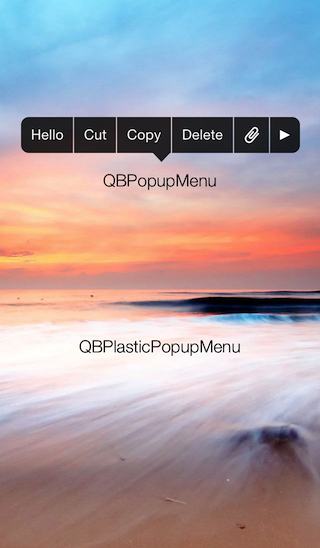
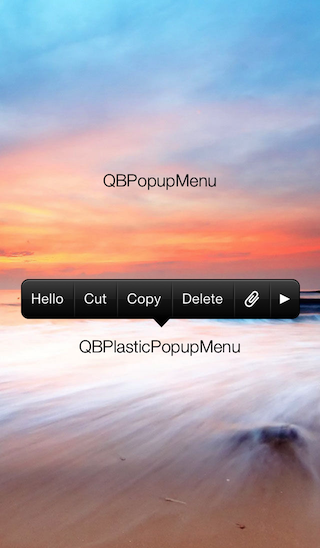
QBPopupMenu is available in CocoaPods.
pod 'QBPopupMenu'
If you want to install manually, download this repository and copy files in QBPopupMenu directory to your project.
QBPopupMenu is highly customizable, so you can create your own popup menu.
The simple way to customize is set color and highlightcolor property of QBPopupMenu.
If you want to customize deeply, you should create a subclass of QBPopupMenu and override some drawing methods.
QBPlasticPopupMenu class in this repository is a good example of subclassing.
If you add many items to QBPopupMenu, it create pages and pagenator automatically.
QBPopupMenu automatically adjust its frame depending on the frame of target view.
QBPopupMenuItem *item = [QBPopupMenuItem itemWithTitle:@"Text" target:self action:@selector(action:)];
QBPopupMenuItem *item2 = [QBPopupMenuItem itemWithImage:[UIImage imageNamed:@"image"] target:self action:@selector(action:)];

QBPopupMenu *popupMenu = [[QBPopupMenu alloc] initWithItems:@[item, item2]];

[popupMenu showInView:self.view targetRect:... animated:YES];
QBPopupMenu is released under the MIT License, see LICENSE.txt.
2,310 followers · starred Oct 2013
2,019 followers · starred Feb 2013
109 followers · starred Apr 2013
40 followers · starred Apr 2014
Customizable popup menu for iOS.
QBPopupMenu version 2.0 is now available.
Its appearance is similar to UIMenuController of iOS 7, and it has several new features.
QBPopupMenu is available in CocoaPods.
pod 'QBPopupMenu'
If you want to install manually, download this repository and copy files in QBPopupMenu directory to your project.
QBPopupMenu is highly customizable, so you can create your own popup menu.
The simple way to customize is set color and highlightcolor property of QBPopupMenu.
If you want to customize deeply, you should create a subclass of QBPopupMenu and override some drawing methods.
QBPlasticPopupMenu class in this repository is a good example of subclassing.
If you add many items to QBPopupMenu, it create pages and pagenator automatically.
QBPopupMenu automatically adjust its frame depending on the frame of target view.
QBPopupMenuItem *item = [QBPopupMenuItem itemWithTitle:@"Text" target:self action:@selector(action:)];
QBPopupMenuItem *item2 = [QBPopupMenuItem itemWithImage:[UIImage imageNamed:@"image"] target:self action:@selector(action:)];

QBPopupMenu *popupMenu = [[QBPopupMenu alloc] initWithItems:@[item, item2]];

[popupMenu showInView:self.view targetRect:... animated:YES];
QBPopupMenu is released under the MIT License, see LICENSE.txt.
2,310 followers · starred Oct 2013
2,019 followers · starred Feb 2013
109 followers · starred Apr 2013
40 followers · starred Apr 2014