
Windows kernel-mode Bluetooth Profile & Filter Drivers for PS3 peripherals
See the codeREADME
[!WARNING] No other official website exists for this project besides this GitHub repository (github.com/nefarius/BthPS3) and sites hosted on
*.nefarius.at(e.g. docs.nefarius.at, discord.nefarius.at).Anyone claiming otherwise is a scammer and a fraud. Do not trust other websites, download links, or people claiming to represent this project. Please be wary and only use the sources listed above.
 BthPS3





Windows kernel‑mode Bluetooth profile and filter drivers for PS3 peripherals.
Quick start
For end users who just want to use their PS3 controllers on Windows.
- Check requirements
- OS: Windows 10 or 11, x64 or ARM64 (see Environment).
- Bluetooth adapter: must meet the LMP version requirements (see Supported Bluetooth host devices in Environment).
- Controller: PlayStation(R) 3 peripherals (SIXAXIS/DualShock 3, PS Move Navigation & Motion Controllers).
- Download the installer
- Go to the latest release page.
- Download the current BthPS3 installer (
.msi).
- Install the drivers
- Close any applications using your Bluetooth adapter or controller.
- Run the downloaded installer as an administrator and follow the on‑screen instructions.
- Reboot Windows when prompted.
- Pair your controller (via companion tools, not Windows UI)
- Do not use the built‑in Windows Bluetooth pairing dialog for PS3 controllers; it will not work correctly and can interfere with proper operation.
- Use supported companion tools (such as DsHidMini) and follow the pairing instructions in the project documentation.
- Ensure the controller is first connected via USB if required, then let the companion tool handle Bluetooth pairing as described.
- Verify operation
If you run into issues, carefully read the documentation and FAQ before opening a GitHub issue.
Pronunciation
/biː θriː/
About
TL;DR: these drivers allow popular PlayStation(R) 3 gaming peripherals (SIXAXIS/DualShock 3, PS Move Navigation & Motion Controllers) to connect to Windows via Bluetooth without losing any standard functionality.
This set of Windows kernel‑mode drivers extends the standard (a.k.a. vanilla) Bluetooth stack (Microsoft/Broadcom/Toshiba/Intel/...) with an additional L2CAP server service (profile driver) and a Bluetooth lower‑filter driver, gracefully working around the reserved PSMs issue that causes PS3 peripheral connections to be denied on the default Windows stack. The profile driver attempts to distinguish incoming device types based on their reported remote names and exposes their HID Control and HID Interrupt channels via simple bus child devices (a.k.a. PDOs). The profile/bus driver supports both “regular” operation modes (requiring a proper function driver such as a HID minidriver) and “raw” mode (powering the PDO up without a function driver and exposing it to userland) for maximum flexibility and future‑proofing. The PSM filter attaches only to Bluetooth‑class devices and skips attachment if the underlying transport is neither USB nor the Bluetooth Extensibility Transport (BTHX, e.g. BthMini.sys-bound PCIe/UART radios).
The solution consists of the following individual projects:
BthPS3– multipurpose kernel‑mode driver: function driver for service PDO exposed byBTHENUM(Microsoft), Bluetooth profile (L2CAP server service), and bus driver for PS3 wireless peripherals.BthPS3PSM– lower‑filter driver for Bluetooth host radios (USB viaBTHUSB, or non‑USB via the Bluetooth Extensibility Transport/BthMini), patching L2CAP packets and rerouting L2CAP traffic to the profile driver.BthPS3CfgUI– userland GUI utility to safely edit driver settings.BthPS3Util– userland CLI utility to modify filter‑driver settings.BthPS3Installer– WiXSharp-based setup for driver installation and removal.
Licensing
This solution contains BSD‑3‑Clause and MIT licensed components:
- Drivers (
BthPS3.sys,BthPS3PSM.sys) – BSD‑3‑Clause - Installer/Setup (WiXSharp project and assets) – BSD‑3‑Clause
- Userland utilities (
BthPS3CfgUI.exe) – MIT
For details, please consult the individual LICENSE files.
This is a community project and is not affiliated with Sony Interactive Entertainment Inc. in any way. “PlayStation”, “PSP”, “PS2”, “PS one”, “DUALSHOCK” and “SIXAXIS” are registered trademarks of Sony Interactive Entertainment Inc.
Environment
BthPS3 components can run on Windows 10 version 1507 or newer (x64, ARM64).
Supported Bluetooth host devices
Supported Bluetooth host devices
The BthPS3 profile driver and supported devices have been tested successfully with host devices following Link Manager Protocol (LMP) core specification version 3 (which corresponds to Bluetooth 2.0 + EDR) and higher. Anything lower than that is not recommended and is not supported. Check your particular chip firmware version in Device Manager prior to installing the drivers:
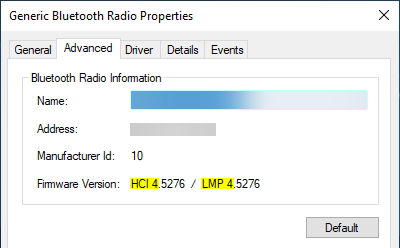
When loaded onto an unsupported host radio, device boot will fail with STATUS_DEVICE_POWER_FAILURE:
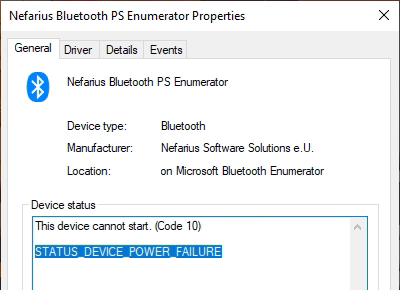
For a list of tested devices, consult the extended documentation.
Link Manager versions
| LMP | Bluetooth version |
|---|---|
| 0 | Bluetooth 1.0b |
| 1 | Bluetooth 1.1 |
| 2 | Bluetooth 1.2 |
| 3 | Bluetooth 2.0 + EDR |
| 4 | Bluetooth 2.1 + EDR |
| 5 | Bluetooth 3.0 + HS |
| 6 | Bluetooth 4.0 |
| 7 | Bluetooth 4.1 |
| 8 | Bluetooth 4.2 |
| 9 | Bluetooth 5 |
| 10 | Bluetooth 5.1 |
| 11 | Bluetooth 5.2 |
Installation
Prebuilt binaries and installation instructions are provided by Nefarius Software Solutions e.U. and are available via the setup. Official support covers Windows 10/11 x64/ARM64 only; issues filed for any other version or architecture will be discarded.
Check out the companion solution DsHidMini for using the controller in games.
How to build
Knowledge of how to build and (test-)sign Windows drivers is required for creating usable builds. This is outside the scope of the project documentation.
Build instructions and details
Prerequisites
- Step 1: Install Visual Studio 2026
- On the
Workloadstab underDesktop & Mobile, select at least.NET desktop developmentandDesktop development with C++.
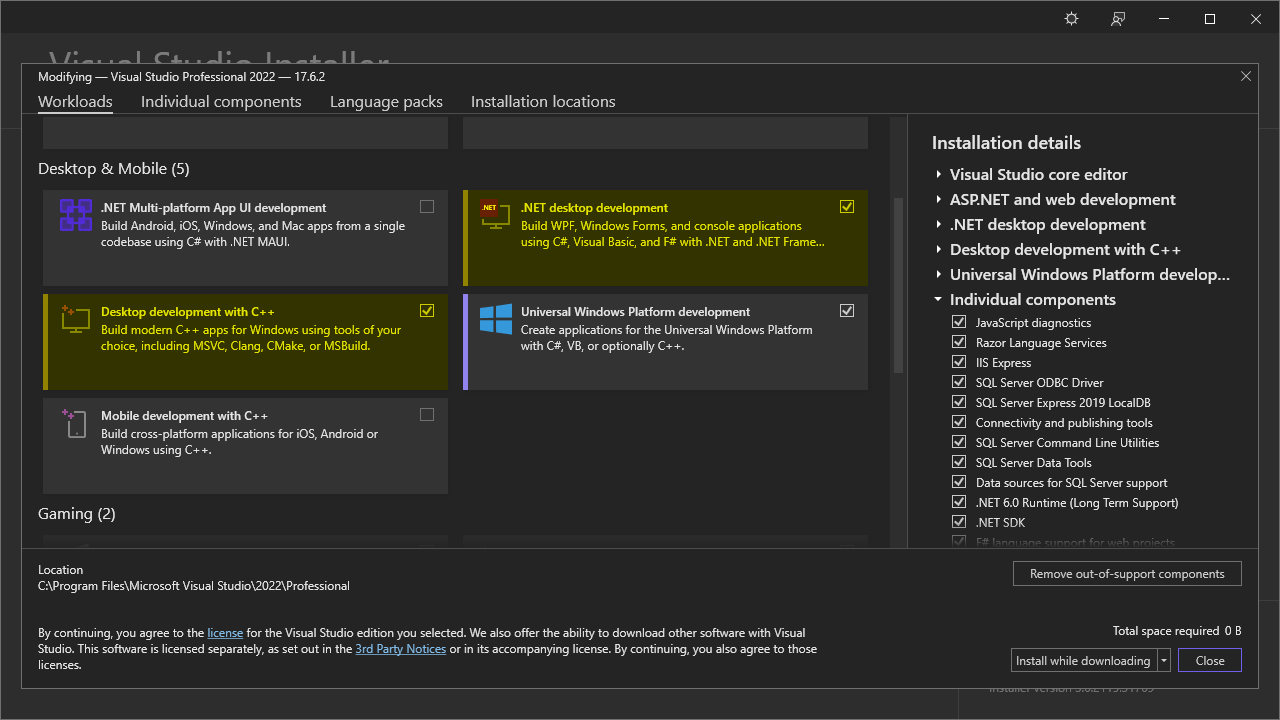
- On the
Individual componentstab, search for and select theSpectre-mitigate libs (Latest)for all architectures you wish to build for, plusWindows Driver Kit.
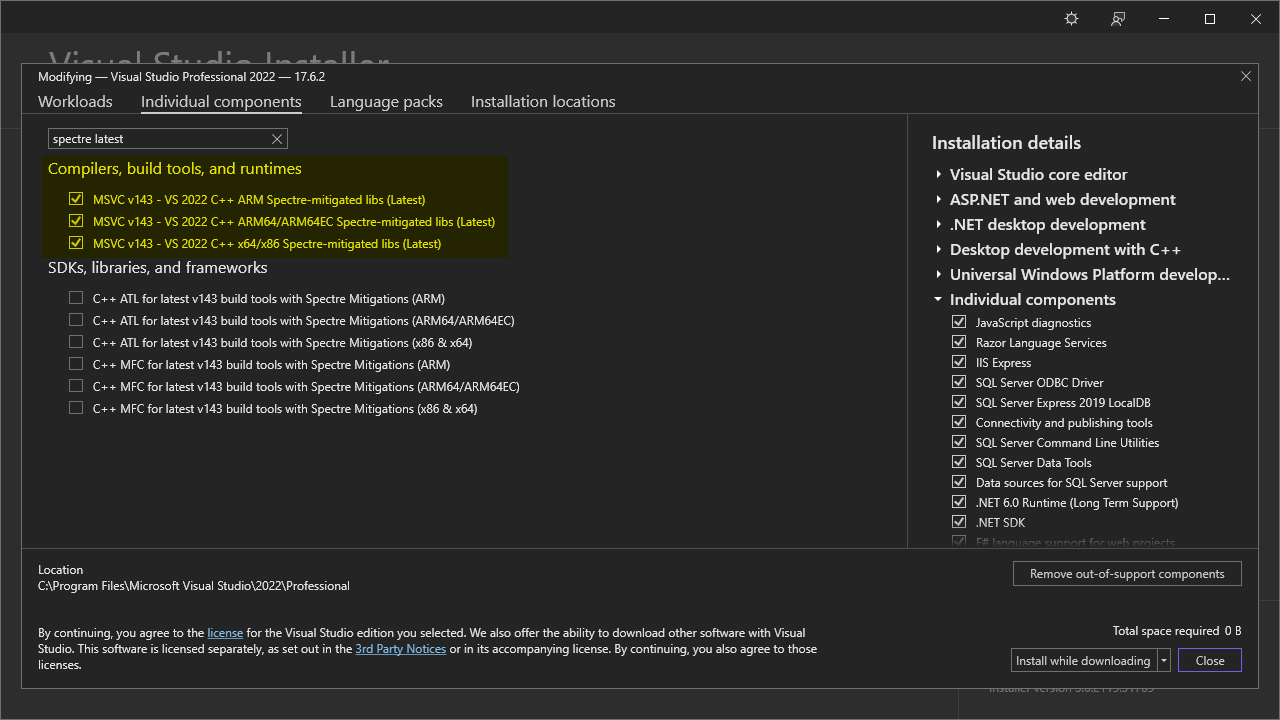
- On the
- Step 2: Install Windows SDK 10.0.28000
- Step 3: Install WDK 10.0.28000
- Step 4: Set up and build Microsoft DMF
- Step 5: Set up and build Domito
Building and signing the setup MSI is CI-only (see Setup/README.md); no local WiX Toolset install is needed.
You can build individual projects of the solution within Visual Studio.
Branches
The project uses the following branch strategy:
master– stable code base, in sync with tagged public releasesdevel– work‑in‑progress changes, mostly larger changes spanning a couple of PRs
Build artifacts
Tagged CI builds are mirrored to the buildbot web server; use at your own risk, no support provided.
Support & documentation
Everything you need to know is documented on the project page. Please read it carefully before considering filing an issue.
Not being able to connect your controller is not a bug report. Read the FAQ and accept what is written there.
Architecture overview
Device tree
The diagram below visualizes the relationships between the drivers and devices involved (host hardware at the bottom, exposed child devices towards the top):
     +----------------------+                                +----------------------+
     |    Navigation PDO    +<----------+         +--------->+      Motion PDO      |
     +----------------------+           |         |          +----------------------+
                                        |         |
                                        |         |
                                        |         |
                                        |         |
                                        |         |
+----------------------+          +-----+---------+------+         +----------------------+
|      SIXAXIS PDO     +<---------+ Profile & Bus Driver +-------->+     Wireless PDO     |
+----------------------+          |     (BthPS3.sys)     |         +----------------------+
                                  +----------+-----------+
                                             ^
                                             |
                                             v
                                  +----------+-----------+
                                  | Bluetooth Enumerator |
                                  |    (bthenum.sys)     |
                                  +----------+-----------+
                                             ^
                                             |
                                             v
                                  +----------+-----------+
                                  |     bthport.sys      |
                                  +----------+-----------+
                                             ^
                                             |
                     +-----------------------+-----------------------+
                     |                                               |
                     v                                               v
          +----------+-----------+                        +----------+-----------+
          |      bthusb.sys      |                        |      BthMini.sys     |
          +----------+-----------+                        +----------+-----------+
                     ^                                               ^
                     |                                               |
                     v                                               v
          +----------+-----------+                        +----------+-----------+
          | BthPS3PSM.sys filter |                        | BthPS3PSM.sys filter |
          +----------+-----------+                        +----------+-----------+
                     ^                                               ^
                     |                                               |
                     v                                               v
          +----------+-----------+                        +----------+-----------+
          |       USB Stack      |                        | Vendor transport PDO |
          +----------+-----------+                        | (e.g. iBtPciBus,     |
                     ^                                     |  UART, ...)          |
                     |                                     +----------------------+
                     v
          +----------+-----------+
          | USB Bluetooth dongle |
          +----------------------+
Sources & 3rd‑party credits
This application benefits from these awesome projects ❤ (in no particular order):
- ViGEm Forums - Bluetooth Filter Driver for DS3-compatibility - research notes
- Arduino - felis/USB_Host_Shield_2.0 - PS3 Information
- Emulate HID Device with Windows Desktop
- microsoft/Windows-driver-samples - Bluetooth Echo L2CAP Profile Driver
- Microsoft Bluetooth DDI - Reserved PSMs
- Eleccelerator Wiki - DualShock 3
- Link Manager Protocol (LMP)
- Nefarius' Domito Library
- NUKE Build Automation
- Nefarius.Tools.WDKWhere
- Nefarius.Utilities.Bluetooth
- WixSharp (WixSharp) - managed interface for WiX
Contributors


Similar repos


Languages
C
55.3%
PowerShell
18.7%
C#
17.3%
C++
4.6%
Roff
3.7%
Windows kernel-mode Bluetooth Profile & Filter Drivers for PS3 peripherals
See the codeREADME
[!WARNING] No other official website exists for this project besides this GitHub repository (github.com/nefarius/BthPS3) and sites hosted on
*.nefarius.at(e.g. docs.nefarius.at, discord.nefarius.at).Anyone claiming otherwise is a scammer and a fraud. Do not trust other websites, download links, or people claiming to represent this project. Please be wary and only use the sources listed above.
BthPS3
Windows kernel‑mode Bluetooth profile and filter drivers for PS3 peripherals.
Quick start
For end users who just want to use their PS3 controllers on Windows.
- Check requirements
- OS: Windows 10 or 11, x64 or ARM64 (see Environment).
- Bluetooth adapter: must meet the LMP version requirements (see Supported Bluetooth host devices in Environment).
- Controller: PlayStation(R) 3 peripherals (SIXAXIS/DualShock 3, PS Move Navigation & Motion Controllers).
- Download the installer
- Go to the latest release page.
- Download the current BthPS3 installer (
.msi).
- Install the drivers
- Close any applications using your Bluetooth adapter or controller.
- Run the downloaded installer as an administrator and follow the on‑screen instructions.
- Reboot Windows when prompted.
- Pair your controller (via companion tools, not Windows UI)
- Do not use the built‑in Windows Bluetooth pairing dialog for PS3 controllers; it will not work correctly and can interfere with proper operation.
- Use supported companion tools (such as DsHidMini) and follow the pairing instructions in the project documentation.
- Ensure the controller is first connected via USB if required, then let the companion tool handle Bluetooth pairing as described.
- Verify operation
If you run into issues, carefully read the documentation and FAQ before opening a GitHub issue.
Pronunciation
/biː θriː/
About
TL;DR: these drivers allow popular PlayStation(R) 3 gaming peripherals (SIXAXIS/DualShock 3, PS Move Navigation & Motion Controllers) to connect to Windows via Bluetooth without losing any standard functionality.
This set of Windows kernel‑mode drivers extends the standard (a.k.a. vanilla) Bluetooth stack (Microsoft/Broadcom/Toshiba/Intel/...) with an additional L2CAP server service (profile driver) and a Bluetooth lower‑filter driver, gracefully working around the reserved PSMs issue that causes PS3 peripheral connections to be denied on the default Windows stack. The profile driver attempts to distinguish incoming device types based on their reported remote names and exposes their HID Control and HID Interrupt channels via simple bus child devices (a.k.a. PDOs). The profile/bus driver supports both “regular” operation modes (requiring a proper function driver such as a HID minidriver) and “raw” mode (powering the PDO up without a function driver and exposing it to userland) for maximum flexibility and future‑proofing. The PSM filter attaches only to Bluetooth‑class devices and skips attachment if the underlying transport is neither USB nor the Bluetooth Extensibility Transport (BTHX, e.g. BthMini.sys-bound PCIe/UART radios).
The solution consists of the following individual projects:
BthPS3– multipurpose kernel‑mode driver: function driver for service PDO exposed byBTHENUM(Microsoft), Bluetooth profile (L2CAP server service), and bus driver for PS3 wireless peripherals.BthPS3PSM– lower‑filter driver for Bluetooth host radios (USB viaBTHUSB, or non‑USB via the Bluetooth Extensibility Transport/BthMini), patching L2CAP packets and rerouting L2CAP traffic to the profile driver.BthPS3CfgUI– userland GUI utility to safely edit driver settings.BthPS3Util– userland CLI utility to modify filter‑driver settings.BthPS3Installer– WiXSharp-based setup for driver installation and removal.
Licensing
This solution contains BSD‑3‑Clause and MIT licensed components:
- Drivers (
BthPS3.sys,BthPS3PSM.sys) – BSD‑3‑Clause - Installer/Setup (WiXSharp project and assets) – BSD‑3‑Clause
- Userland utilities (
BthPS3CfgUI.exe) – MIT
For details, please consult the individual LICENSE files.
This is a community project and is not affiliated with Sony Interactive Entertainment Inc. in any way. “PlayStation”, “PSP”, “PS2”, “PS one”, “DUALSHOCK” and “SIXAXIS” are registered trademarks of Sony Interactive Entertainment Inc.
Environment
BthPS3 components can run on Windows 10 version 1507 or newer (x64, ARM64).
Supported Bluetooth host devices
Supported Bluetooth host devices
The BthPS3 profile driver and supported devices have been tested successfully with host devices following Link Manager Protocol (LMP) core specification version 3 (which corresponds to Bluetooth 2.0 + EDR) and higher. Anything lower than that is not recommended and is not supported. Check your particular chip firmware version in Device Manager prior to installing the drivers:
When loaded onto an unsupported host radio, device boot will fail with STATUS_DEVICE_POWER_FAILURE:
For a list of tested devices, consult the extended documentation.
Link Manager versions
| LMP | Bluetooth version |
|---|---|
| 0 | Bluetooth 1.0b |
| 1 | Bluetooth 1.1 |
| 2 | Bluetooth 1.2 |
| 3 | Bluetooth 2.0 + EDR |
| 4 | Bluetooth 2.1 + EDR |
| 5 | Bluetooth 3.0 + HS |
| 6 | Bluetooth 4.0 |
| 7 | Bluetooth 4.1 |
| 8 | Bluetooth 4.2 |
| 9 | Bluetooth 5 |
| 10 | Bluetooth 5.1 |
| 11 | Bluetooth 5.2 |
Installation
Prebuilt binaries and installation instructions are provided by Nefarius Software Solutions e.U. and are available via the setup. Official support covers Windows 10/11 x64/ARM64 only; issues filed for any other version or architecture will be discarded.
Check out the companion solution DsHidMini for using the controller in games.
How to build
Knowledge of how to build and (test-)sign Windows drivers is required for creating usable builds. This is outside the scope of the project documentation.
Build instructions and details
Prerequisites
- Step 1: Install Visual Studio 2026
- On the
Workloadstab underDesktop & Mobile, select at least.NET desktop developmentandDesktop development with C++.
- On the
Individual componentstab, search for and select theSpectre-mitigate libs (Latest)for all architectures you wish to build for, plusWindows Driver Kit.
- On the
- Step 2: Install Windows SDK 10.0.28000
- Step 3: Install WDK 10.0.28000
- Step 4: Set up and build Microsoft DMF
- Step 5: Set up and build Domito
Building and signing the setup MSI is CI-only (see Setup/README.md); no local WiX Toolset install is needed.
You can build individual projects of the solution within Visual Studio.
Branches
The project uses the following branch strategy:
master– stable code base, in sync with tagged public releasesdevel– work‑in‑progress changes, mostly larger changes spanning a couple of PRs
Build artifacts
Tagged CI builds are mirrored to the buildbot web server; use at your own risk, no support provided.
Support & documentation
Everything you need to know is documented on the project page. Please read it carefully before considering filing an issue.
Not being able to connect your controller is not a bug report. Read the FAQ and accept what is written there.
Architecture overview
Device tree
The diagram below visualizes the relationships between the drivers and devices involved (host hardware at the bottom, exposed child devices towards the top):
     +----------------------+                                +----------------------+
     |    Navigation PDO    +<----------+         +--------->+      Motion PDO      |
     +----------------------+           |         |          +----------------------+
                                        |         |
                                        |         |
                                        |         |
                                        |         |
                                        |         |
+----------------------+          +-----+---------+------+         +----------------------+
|      SIXAXIS PDO     +<---------+ Profile & Bus Driver +-------->+     Wireless PDO     |
+----------------------+          |     (BthPS3.sys)     |         +----------------------+
                                  +----------+-----------+
                                             ^
                                             |
                                             v
                                  +----------+-----------+
                                  | Bluetooth Enumerator |
                                  |    (bthenum.sys)     |
                                  +----------+-----------+
                                             ^
                                             |
                                             v
                                  +----------+-----------+
                                  |     bthport.sys      |
                                  +----------+-----------+
                                             ^
                                             |
                     +-----------------------+-----------------------+
                     |                                               |
                     v                                               v
          +----------+-----------+                        +----------+-----------+
          |      bthusb.sys      |                        |      BthMini.sys     |
          +----------+-----------+                        +----------+-----------+
                     ^                                               ^
                     |                                               |
                     v                                               v
          +----------+-----------+                        +----------+-----------+
          | BthPS3PSM.sys filter |                        | BthPS3PSM.sys filter |
          +----------+-----------+                        +----------+-----------+
                     ^                                               ^
                     |                                               |
                     v                                               v
          +----------+-----------+                        +----------+-----------+
          |       USB Stack      |                        | Vendor transport PDO |
          +----------+-----------+                        | (e.g. iBtPciBus,     |
                     ^                                     |  UART, ...)          |
                     |                                     +----------------------+
                     v
          +----------+-----------+
          | USB Bluetooth dongle |
          +----------------------+
Sources & 3rd‑party credits
This application benefits from these awesome projects ❤ (in no particular order):
- ViGEm Forums - Bluetooth Filter Driver for DS3-compatibility - research notes
- Arduino - felis/USB_Host_Shield_2.0 - PS3 Information
- Emulate HID Device with Windows Desktop
- microsoft/Windows-driver-samples - Bluetooth Echo L2CAP Profile Driver
- Microsoft Bluetooth DDI - Reserved PSMs
- Eleccelerator Wiki - DualShock 3
- Link Manager Protocol (LMP)
- Nefarius' Domito Library
- NUKE Build Automation
- Nefarius.Tools.WDKWhere
- Nefarius.Utilities.Bluetooth
- WixSharp (WixSharp) - managed interface for WiX
Similar repos
Contributors
Languages
C
55.3%
PowerShell
18.7%
C#
17.3%
C++
4.6%
Roff
3.7%