
README
 Cell-o1: Training LLMs to Solve Single-Cell Reasoning Puzzles with Reinforcement Learning




📑 Contents
- 📖 Overview
- ⚙️ Installation
- ⚡️ Quick Start
- 🚀 Full Training Pipeline
- 🗺️ Project Info
📖 Overview
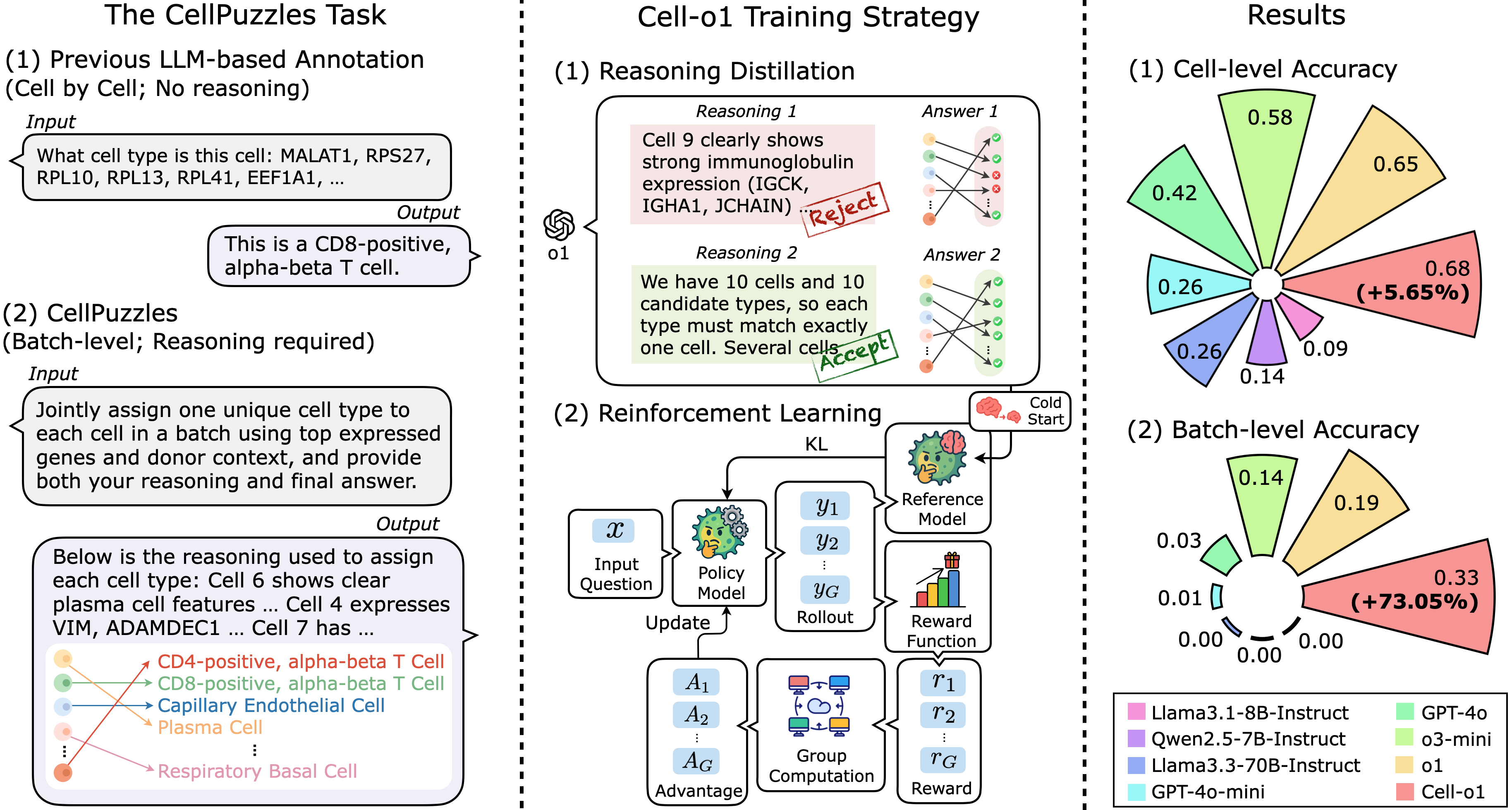
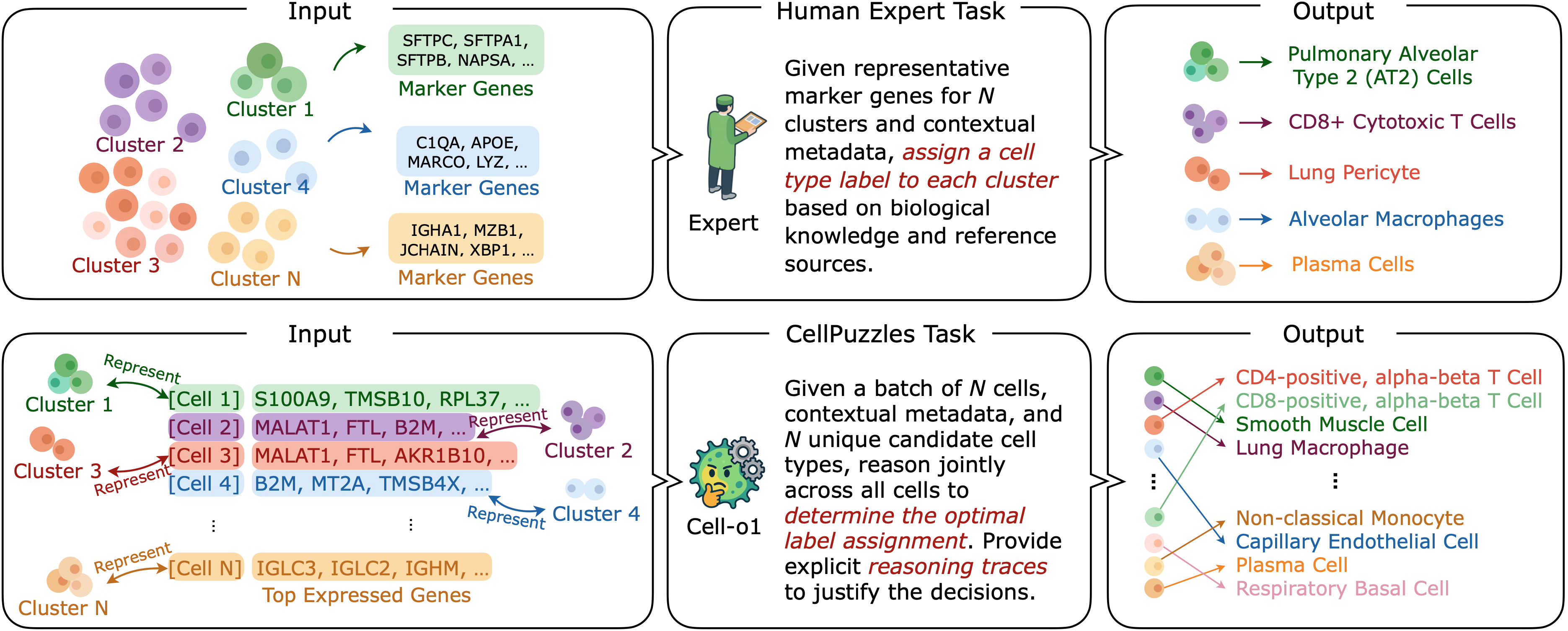
Cell type annotation is a key task in analyzing the heterogeneity of single-cell RNA sequencing data. Although recent foundation models automate this process, they typically annotate cells independently, without considering batch-level cellular context or providing explanatory reasoning. In contrast, human experts often annotate distinct cell types for different cell clusters based on their domain knowledge. To mimic this expert behavior, we introduce CellPuzzles—a benchmark requiring unique cell-type assignments across cell batches. Existing LLMs struggle with this task, with the best baseline (OpenAI's o1) achieving only 19.0% batch accuracy. To address this, we present Cell-o1, a reasoning-enhanced language model trained via SFT on distilled expert traces, followed by RL with batch-level rewards. Cell-o1 outperforms all baselines on both cell-level and batch-level metrics, and exhibits emergent behaviors such as self-reflection and curriculum reasoning, offering insights into its interpretability and generalization.
⚙️ Installation
conda create -n cello1 python=3.9
conda activate cello1

# install torch [or you can skip this step and let vllm to install the correct version for you]
pip install torch==2.4.0 --index-url https://download.pytorch.org/whl/cu121
pip install "https://files.pythonhosted.org/packages/6e/75/b424aebc9f2fc5db319d5df5fff62fa19254c8ef974c254588d48c480df2/pyairports-2.1.1-py3-none-any.whl"
pip install "numpy<2.0" "outlines==0.0.45"
# install vllm
pip3 install vllm==0.6.3 # or you can install 0.5.4, 0.4.2 and 0.3.1
pip3 install ray
pip install transformers==4.47.0
pip install trl==0.17.0

# verl
cd src/verl
pip install -e .

# flash attention 2
pip3 install flash-attn --no-build-isolation
# quality of life
pip install wandb IPython matplotlib
⚡️ Quick Start
The following example demonstrates how to quickly run Cell-o1 on a batch-level cell type annotation task using structured input. The model takes a system message with task instructions and a user message describing multiple cells and candidate cell types.
from transformers import AutoTokenizer, AutoModelForCausalLM, pipeline

# 1. Load the model and tokenizer from the Hugging Face Hub
model_name = "ncbi/Cell-o1"
tokenizer = AutoTokenizer.from_pretrained(model_name)
model = AutoModelForCausalLM.from_pretrained(model_name)
generator = pipeline("text-generation", model=model, tokenizer=tokenizer)

# 2. A minimal batch example with 3 cells and 3 candidate types
example = {
    "system_msg": (
        "You are an expert assistant specialized in cell type annotation. "
        "You will be given a batch of N cells from the same donor, where each cell represents a unique cell type. "
        "For each cell, the top expressed genes are provided in descending order of expression. "
        "Using both the gene expression data and donor information, determine the correct cell type for each cell. "
        "You will also receive a list of N candidate cell types, and each candidate must be assigned to exactly one cell. "
        "Ensure that you consider all cells and candidate types together, rather than annotating each cell individually. "
        "Include your detailed reasoning within <think> and </think> tags, and provide your final answer within <answer> and </answer> tags. "
        "The final answer should be a single string listing the assigned cell types in order, separated by ' | '."
    ),

    "user_msg": (
        "Context: The cell is from a female at the 73-year-old stage, originating from the lung. The patient has been diagnosed with chronic obstructive pulmonary disease. The patient is a smoker. There is no cancer present. \n\n"
        "Cell 1: MT2A, ACTB, MT1X, MTATP6P29, MYL9, MTND4LP30, CRIP1, DSTN, MTND2P13, MTCO2P22, S100A6, MTCYBP19, MALAT1, VIM, RPLP1, RGS5, TPT1, LGALS1, TPM2, MTND3P6, MTND1P22, PTMA, TMSB4X, STEAP1B, MT1M, LPP, RPL21\n"
        "Cell 2: MALAT1, FTL, MTCO2P22, TMSB4X, B2M, MTND4LP30, IL6ST, RPS19, RBFOX2, CCSER1, RPL41, RPS27, RPL10, ACTB, MTATP6P29, MTND2P13, RPS12, STEAP1B, RPL13A, S100A4, RPL34, TMSB10, RPL28, RPL32, RPL39, RPL13\n"
        "Cell 3: SCGB3A1, SCGB1A1, SLPI, WFDC2, TPT1, MTCO2P22, B2M, RPS18, RPS4X, RPS6, MTND4LP30, RPL34, RPS14, RPL31, STEAP1B, LCN2, RPLP1, IL6ST, S100A6, RPL21, RPL37A, ADGRL3, RPL37, RBFOX2, RPL41, RARRES1, RPL19\n\n"
        "Match the cells above to one of the following cell types:\n"
        "non-classical monocyte\nepithelial cell of lung\nsmooth muscle cell"
    )
}

# 3. Convert to chat-style messages
messages = [
    {"role": "system", "content": example["system_msg"]},
    {"role": "user",   "content": example["user_msg"]}
]

# 4. Run inference
response = generator(
    messages,
    max_new_tokens=1000,     # increase if your reasoning chain is longer
    do_sample=False         # deterministic decoding
)[0]["generated_text"]

# 5. Print the model’s reply (<think> + <answer>)
assistant_reply = response[-1]["content"] if isinstance(response, list) else response
print(assistant_reply)
🚀 Full Training Pipeline
We provide preprocessed training and test data so you can get started immediately with model fine-tuning and reinforcement learning.📦 Step 1: Preparing Preprocessed Data
We provide a benchmark dataset, CellPuzzles, designed to mimic expert-style reasoning in single-cell annotation. Each instance contains a batch of cells from the same donor, where each cell must be assigned a unique type from a shared candidate set. The model must reason over the full batch to ensure global consistency.
We provide two options for data preparation. You can either:
- ✅ Option A: Directly download our preprocessed dataset CellPuzzles from Hugging Face.
- ✅ Option B: Start from raw
.h5adfiles and run the full preprocessing pipeline.
✅ Option A: Download Preprocessed Data
You can load the dataset using the 🤗 datasets library:
from datasets import load_dataset
import json

# Load all splits
dataset = load_dataset("ncbi/CellPuzzles")

# Access each split
reasoning_data = dataset["reasoning"]   # For SFT
train_data = dataset["train"]           # For RL
test_data = dataset["test"]             # For evaluation

# Save each split to JSON
os.makedirs("processed_data", exist_ok=True)
with open("processed_data/sft_train.json", "w") as f:
    json.dump(reasoning_data, f, indent=2)
with open("processed_data/grpo_train.json", "w") as f:
    json.dump(train_data, f, indent=2)
with open("processed_data/test_data.json", "w") as f:
    json.dump(test_data, f, indent=2)
-
reasoning: Expert-like reasoning traces distilled from o1, used to cold start the model via SFT. -
train: Raw QA-style data used for RL, containing both user prompts and gold answers. -
test: Held-out data for evaluation, formatted similarly totrain.
✅ Option B: Build from Raw .h5ad Files
If you'd like to reproduce the preprocessing steps from scratch:
cd data
bash run_pipeline.sh
📌 Before running, edit the top section of
run_pipeline.shto specify your paths:# Path to input raw h5ad files RAW_H5AD_DIR="path/to/h5ad_dir" # Output directories CELL_JSON_DIR="path/to/output_cell_metadata" BATCH_QA_DIR="path/to/output_batch_qa" FINAL_OUTPUT_DIR="path/to/final_llm_input"
This script performs:
- Extracts cell-level metadata and top genes from
.h5ad. - Groups cells into batch-level QA format (N cells per batch).
- Converts QA into LLM-compatible format and splits into
train/test.
🧠 Step 2: Supervised Fine-Tuning
Use the reasoning split to cold start the model with expert-like reasoning traces.
cd sft
bash sft.sh
This will:
- Fine-tune the base model on
processed_data/sft_train.jsonusing LoRA adapters - Merge LoRA weights back into the base model for downstream reinforcement learning
📌 Edit
DATA_PATHin sft.sh if your file path differs from the default.
🎯 Step 3: Reinforcement Learning (GRPO / PPO)
Use the train split (processed_data/grpo_train.json) to train the model with batch-level rewards.
🧱 3.1 Preprocess Training Data
Convert the raw JSON data into Parquet format:cd verl
python examples/data_preprocess/cello1.py \
--train_file ../processed_data/grpo_train.json \
--local_dir ./parquet_output
This creates .parquet files in parquet_output/, used for training and validation.
🏋️♂️ 3.2 Run GRPO Training
Launch GRPO reinforcement learning:
bash examples/grpo_trainer/run_cello1_grpo.sh
📌 Before running, edit the script to set:
train_files/val_files: your .parquet pathsmodel.path: path to the merged SFT checkpoint from Step 2
🔁 3.3 Optional: Run PPO Instead
To use PPO instead of GRPO:
bash examples/ppo_trainer/run_cello1_ppo.sh
📤 3.4 Convert RL Checkpoint to Hugging Face Format
After RL training, if your model is saved in FSDP (Fully Sharded Data Parallel) format, you can convert it to Hugging Face format using:
python scripts/convert_fsdp_to_hf.py \
  /path/to/fsdp_checkpoint/actor \
  /path/to/huggingface_template_model \
  /path/to/save/huggingface_model
- First argument: path to the FSDP actor checkpoint (e.g.,
global_step_2500/actor) - Second argument: base model directory used to load config and tokenizer (e.g.,
Qwen/Qwen2.5-7B-Instruct) - Third argument: output directory to save the converted Hugging Face model (e.g.,
global_step_2500/huggingface)
🧪 Step 4: Run Inference on Test Set
After converting your model to Hugging Face format, run inference using scripts/test.py.
This script supports multi-shard decoding via --n (total shards) and --i (shard index).
CUDA_VISIBLE_DEVICES=0 python scripts/test.py \
  --n 1 \
  --i 0 \
  --llm_name /path/to/global_step_2500/huggingface \
  --folder prediction_output \
  --dataset /path/to/test_data.json
--n: Total number of shards (e.g.,1for single process)--i: Shard index (0-based, must be <n)--llm_name: Path to the converted Hugging Face model (e.g.,global_step_2500/huggingface)--folder: Output directory where predictions are saved (one JSON per example)--dataset: Path to the test set JSON file (e.g.,processed_data/test_data.json)
📌 To run multi-shard decoding (e.g., 16 shards across 8 GPUs), you can launch multiple instances of this script with different
--iandCUDA_VISIBLE_DEVICES. For example, to run 4 shards across 2 GPUs:# Example: Run 4 shards across 2 GPUs (2 processes per GPU) CUDA_VISIBLE_DEVICES=0 python scripts/test.py --n 4 --i 0 --llm_name path/to/model --folder prediction_output --dataset processed_data/test_data.json & CUDA_VISIBLE_DEVICES=0 python scripts/test.py --n 4 --i 1 --llm_name path/to/model --folder prediction_output --dataset processed_data/test_data.json & CUDA_VISIBLE_DEVICES=1 python scripts/test.py --n 4 --i 2 --llm_name path/to/model --folder prediction_output --dataset processed_data/test_data.json & CUDA_VISIBLE_DEVICES=1 python scripts/test.py --n 4 --i 3 --llm_name path/to/model --folder prediction_output --dataset processed_data/test_data.json & wait
📊 Step 5: Evaluate Model Predictions
To run the evaluation:
python eval.py --input_dir prediction_output/
Where prediction_output/ contains the JSON prediction files generated in Step 4.
It reports:
- Partial Accuracy (cell-level): proportion of correctly matched cell types per batch.
- Exact Match Accuracy (batch-level): proportion of batches with fully correct cell-type assignments.
- Legitimate Format Ratio: how often the prediction strictly follows the
<think>...</think>\n<answer>...</answer>format. - Uniqueness Score: diversity of predicted types (higher is better).
- Prediction Length: average number of tokens in each prediction.
Unseen Disease Test Data
The zero-shot unseen disease evaluation inputs reported in Table 3 are available in unseen_data/. These files contain the final prompt format used for inference, including the exact system_msg, user_msg, and gold answer.
| Disease | File | Examples |
|---|---|---|
| Breast cancer | breast_cancer_test.json | 125 |
| Colorectal cancer | colorectal_cancer_test.json | 251 |
| Melanoma | melanoma_test.json | 63 |
| Systemic lupus erythematosus | systemic_lupus_erythematosus_test.json | 100 |
Use any of these files as the --dataset input to scripts/test.py.
🗺️ Project Info
📜 Disclaimer
This tool shows the results of research conducted in the Computational Biology Branch, DIR/NLM. The information produced on this website is not intended for direct diagnostic use or medical decision-making without review and oversight by a clinical professional. Individuals should not change their health behavior solely on the basis of information produced on this website. NIH does not independently verify the validity or utility of the information produced by this tool. If you have questions about the information produced on this website, please see a health care professional. More information about NLM's disclaimer policy is available.
📚 References
If you use our repository, please cite the following related paper:@article{fang2026cell,
title={Cell-o1: Training llms to solve single-cell reasoning puzzles with reinforcement learning},
author={Fang, Yin and Jin, Qiao and Xiong, Guangzhi and Jin, Bowen and Zhong, Xianrui and Ouyang, Siru and Yang, Yifan and Zhang, Aidong and Han, Jiawei and Lu, Zhiyong},
journal={Bioinformatics},
volume={42},
number={5},
pages={btag208},
year={2026},
publisher={Oxford University Press}
}
🫱🏻🫲 Acknowledgements
We appreciate verl, TinyZero, Search-R1, ReCall, and many other related works for their open-source contributions. The logo of the model is automatically generated by GPT-4o. This research was supported by the Division of Intramural Research (DIR) of the National Library of Medicine (NLM), National Institutes of Health.
Similar repos



Languages
Python
99.4%
README
Cell-o1: Training LLMs to Solve Single-Cell Reasoning Puzzles with Reinforcement Learning
📑 Contents
- 📖 Overview
- ⚙️ Installation
- ⚡️ Quick Start
- 🚀 Full Training Pipeline
- 🗺️ Project Info
📖 Overview
Cell type annotation is a key task in analyzing the heterogeneity of single-cell RNA sequencing data. Although recent foundation models automate this process, they typically annotate cells independently, without considering batch-level cellular context or providing explanatory reasoning. In contrast, human experts often annotate distinct cell types for different cell clusters based on their domain knowledge. To mimic this expert behavior, we introduce CellPuzzles—a benchmark requiring unique cell-type assignments across cell batches. Existing LLMs struggle with this task, with the best baseline (OpenAI's o1) achieving only 19.0% batch accuracy. To address this, we present Cell-o1, a reasoning-enhanced language model trained via SFT on distilled expert traces, followed by RL with batch-level rewards. Cell-o1 outperforms all baselines on both cell-level and batch-level metrics, and exhibits emergent behaviors such as self-reflection and curriculum reasoning, offering insights into its interpretability and generalization.
⚙️ Installation
conda create -n cello1 python=3.9
conda activate cello1

# install torch [or you can skip this step and let vllm to install the correct version for you]
pip install torch==2.4.0 --index-url https://download.pytorch.org/whl/cu121
pip install "https://files.pythonhosted.org/packages/6e/75/b424aebc9f2fc5db319d5df5fff62fa19254c8ef974c254588d48c480df2/pyairports-2.1.1-py3-none-any.whl"
pip install "numpy<2.0" "outlines==0.0.45"
# install vllm
pip3 install vllm==0.6.3 # or you can install 0.5.4, 0.4.2 and 0.3.1
pip3 install ray
pip install transformers==4.47.0
pip install trl==0.17.0

# verl
cd src/verl
pip install -e .

# flash attention 2
pip3 install flash-attn --no-build-isolation
# quality of life
pip install wandb IPython matplotlib
⚡️ Quick Start
The following example demonstrates how to quickly run Cell-o1 on a batch-level cell type annotation task using structured input. The model takes a system message with task instructions and a user message describing multiple cells and candidate cell types.
from transformers import AutoTokenizer, AutoModelForCausalLM, pipeline

# 1. Load the model and tokenizer from the Hugging Face Hub
model_name = "ncbi/Cell-o1"
tokenizer = AutoTokenizer.from_pretrained(model_name)
model = AutoModelForCausalLM.from_pretrained(model_name)
generator = pipeline("text-generation", model=model, tokenizer=tokenizer)

# 2. A minimal batch example with 3 cells and 3 candidate types
example = {
    "system_msg": (
        "You are an expert assistant specialized in cell type annotation. "
        "You will be given a batch of N cells from the same donor, where each cell represents a unique cell type. "
        "For each cell, the top expressed genes are provided in descending order of expression. "
        "Using both the gene expression data and donor information, determine the correct cell type for each cell. "
        "You will also receive a list of N candidate cell types, and each candidate must be assigned to exactly one cell. "
        "Ensure that you consider all cells and candidate types together, rather than annotating each cell individually. "
        "Include your detailed reasoning within <think> and </think> tags, and provide your final answer within <answer> and </answer> tags. "
        "The final answer should be a single string listing the assigned cell types in order, separated by ' | '."
    ),

    "user_msg": (
        "Context: The cell is from a female at the 73-year-old stage, originating from the lung. The patient has been diagnosed with chronic obstructive pulmonary disease. The patient is a smoker. There is no cancer present. \n\n"
        "Cell 1: MT2A, ACTB, MT1X, MTATP6P29, MYL9, MTND4LP30, CRIP1, DSTN, MTND2P13, MTCO2P22, S100A6, MTCYBP19, MALAT1, VIM, RPLP1, RGS5, TPT1, LGALS1, TPM2, MTND3P6, MTND1P22, PTMA, TMSB4X, STEAP1B, MT1M, LPP, RPL21\n"
        "Cell 2: MALAT1, FTL, MTCO2P22, TMSB4X, B2M, MTND4LP30, IL6ST, RPS19, RBFOX2, CCSER1, RPL41, RPS27, RPL10, ACTB, MTATP6P29, MTND2P13, RPS12, STEAP1B, RPL13A, S100A4, RPL34, TMSB10, RPL28, RPL32, RPL39, RPL13\n"
        "Cell 3: SCGB3A1, SCGB1A1, SLPI, WFDC2, TPT1, MTCO2P22, B2M, RPS18, RPS4X, RPS6, MTND4LP30, RPL34, RPS14, RPL31, STEAP1B, LCN2, RPLP1, IL6ST, S100A6, RPL21, RPL37A, ADGRL3, RPL37, RBFOX2, RPL41, RARRES1, RPL19\n\n"
        "Match the cells above to one of the following cell types:\n"
        "non-classical monocyte\nepithelial cell of lung\nsmooth muscle cell"
    )
}

# 3. Convert to chat-style messages
messages = [
    {"role": "system", "content": example["system_msg"]},
    {"role": "user",   "content": example["user_msg"]}
]

# 4. Run inference
response = generator(
    messages,
    max_new_tokens=1000,     # increase if your reasoning chain is longer
    do_sample=False         # deterministic decoding
)[0]["generated_text"]

# 5. Print the model’s reply (<think> + <answer>)
assistant_reply = response[-1]["content"] if isinstance(response, list) else response
print(assistant_reply)
🚀 Full Training Pipeline
We provide preprocessed training and test data so you can get started immediately with model fine-tuning and reinforcement learning.📦 Step 1: Preparing Preprocessed Data
We provide a benchmark dataset, CellPuzzles, designed to mimic expert-style reasoning in single-cell annotation. Each instance contains a batch of cells from the same donor, where each cell must be assigned a unique type from a shared candidate set. The model must reason over the full batch to ensure global consistency.
We provide two options for data preparation. You can either:
- ✅ Option A: Directly download our preprocessed dataset CellPuzzles from Hugging Face.
- ✅ Option B: Start from raw
.h5adfiles and run the full preprocessing pipeline.
✅ Option A: Download Preprocessed Data
You can load the dataset using the 🤗 datasets library:
from datasets import load_dataset
import json

# Load all splits
dataset = load_dataset("ncbi/CellPuzzles")

# Access each split
reasoning_data = dataset["reasoning"]   # For SFT
train_data = dataset["train"]           # For RL
test_data = dataset["test"]             # For evaluation

# Save each split to JSON
os.makedirs("processed_data", exist_ok=True)
with open("processed_data/sft_train.json", "w") as f:
    json.dump(reasoning_data, f, indent=2)
with open("processed_data/grpo_train.json", "w") as f:
    json.dump(train_data, f, indent=2)
with open("processed_data/test_data.json", "w") as f:
    json.dump(test_data, f, indent=2)
-
reasoning: Expert-like reasoning traces distilled from o1, used to cold start the model via SFT. -
train: Raw QA-style data used for RL, containing both user prompts and gold answers. -
test: Held-out data for evaluation, formatted similarly totrain.
✅ Option B: Build from Raw .h5ad Files
If you'd like to reproduce the preprocessing steps from scratch:
cd data
bash run_pipeline.sh
📌 Before running, edit the top section of
run_pipeline.shto specify your paths:# Path to input raw h5ad files RAW_H5AD_DIR="path/to/h5ad_dir" # Output directories CELL_JSON_DIR="path/to/output_cell_metadata" BATCH_QA_DIR="path/to/output_batch_qa" FINAL_OUTPUT_DIR="path/to/final_llm_input"
This script performs:
- Extracts cell-level metadata and top genes from
.h5ad. - Groups cells into batch-level QA format (N cells per batch).
- Converts QA into LLM-compatible format and splits into
train/test.
🧠 Step 2: Supervised Fine-Tuning
Use the reasoning split to cold start the model with expert-like reasoning traces.
cd sft
bash sft.sh
This will:
- Fine-tune the base model on
processed_data/sft_train.jsonusing LoRA adapters - Merge LoRA weights back into the base model for downstream reinforcement learning
📌 Edit
DATA_PATHin sft.sh if your file path differs from the default.
🎯 Step 3: Reinforcement Learning (GRPO / PPO)
Use the train split (processed_data/grpo_train.json) to train the model with batch-level rewards.
🧱 3.1 Preprocess Training Data
Convert the raw JSON data into Parquet format:cd verl
python examples/data_preprocess/cello1.py \
--train_file ../processed_data/grpo_train.json \
--local_dir ./parquet_output
This creates .parquet files in parquet_output/, used for training and validation.
🏋️♂️ 3.2 Run GRPO Training
Launch GRPO reinforcement learning:
bash examples/grpo_trainer/run_cello1_grpo.sh
📌 Before running, edit the script to set:
train_files/val_files: your .parquet pathsmodel.path: path to the merged SFT checkpoint from Step 2
🔁 3.3 Optional: Run PPO Instead
To use PPO instead of GRPO:
bash examples/ppo_trainer/run_cello1_ppo.sh
📤 3.4 Convert RL Checkpoint to Hugging Face Format
After RL training, if your model is saved in FSDP (Fully Sharded Data Parallel) format, you can convert it to Hugging Face format using:
python scripts/convert_fsdp_to_hf.py \
  /path/to/fsdp_checkpoint/actor \
  /path/to/huggingface_template_model \
  /path/to/save/huggingface_model
- First argument: path to the FSDP actor checkpoint (e.g.,
global_step_2500/actor) - Second argument: base model directory used to load config and tokenizer (e.g.,
Qwen/Qwen2.5-7B-Instruct) - Third argument: output directory to save the converted Hugging Face model (e.g.,
global_step_2500/huggingface)
🧪 Step 4: Run Inference on Test Set
After converting your model to Hugging Face format, run inference using scripts/test.py.
This script supports multi-shard decoding via --n (total shards) and --i (shard index).
CUDA_VISIBLE_DEVICES=0 python scripts/test.py \
  --n 1 \
  --i 0 \
  --llm_name /path/to/global_step_2500/huggingface \
  --folder prediction_output \
  --dataset /path/to/test_data.json
--n: Total number of shards (e.g.,1for single process)--i: Shard index (0-based, must be <n)--llm_name: Path to the converted Hugging Face model (e.g.,global_step_2500/huggingface)--folder: Output directory where predictions are saved (one JSON per example)--dataset: Path to the test set JSON file (e.g.,processed_data/test_data.json)
📌 To run multi-shard decoding (e.g., 16 shards across 8 GPUs), you can launch multiple instances of this script with different
--iandCUDA_VISIBLE_DEVICES. For example, to run 4 shards across 2 GPUs:# Example: Run 4 shards across 2 GPUs (2 processes per GPU) CUDA_VISIBLE_DEVICES=0 python scripts/test.py --n 4 --i 0 --llm_name path/to/model --folder prediction_output --dataset processed_data/test_data.json & CUDA_VISIBLE_DEVICES=0 python scripts/test.py --n 4 --i 1 --llm_name path/to/model --folder prediction_output --dataset processed_data/test_data.json & CUDA_VISIBLE_DEVICES=1 python scripts/test.py --n 4 --i 2 --llm_name path/to/model --folder prediction_output --dataset processed_data/test_data.json & CUDA_VISIBLE_DEVICES=1 python scripts/test.py --n 4 --i 3 --llm_name path/to/model --folder prediction_output --dataset processed_data/test_data.json & wait
📊 Step 5: Evaluate Model Predictions
To run the evaluation:
python eval.py --input_dir prediction_output/
Where prediction_output/ contains the JSON prediction files generated in Step 4.
It reports:
- Partial Accuracy (cell-level): proportion of correctly matched cell types per batch.
- Exact Match Accuracy (batch-level): proportion of batches with fully correct cell-type assignments.
- Legitimate Format Ratio: how often the prediction strictly follows the
<think>...</think>\n<answer>...</answer>format. - Uniqueness Score: diversity of predicted types (higher is better).
- Prediction Length: average number of tokens in each prediction.
Unseen Disease Test Data
The zero-shot unseen disease evaluation inputs reported in Table 3 are available in unseen_data/. These files contain the final prompt format used for inference, including the exact system_msg, user_msg, and gold answer.
| Disease | File | Examples |
|---|---|---|
| Breast cancer | breast_cancer_test.json | 125 |
| Colorectal cancer | colorectal_cancer_test.json | 251 |
| Melanoma | melanoma_test.json | 63 |
| Systemic lupus erythematosus | systemic_lupus_erythematosus_test.json | 100 |
Use any of these files as the --dataset input to scripts/test.py.
🗺️ Project Info
📜 Disclaimer
This tool shows the results of research conducted in the Computational Biology Branch, DIR/NLM. The information produced on this website is not intended for direct diagnostic use or medical decision-making without review and oversight by a clinical professional. Individuals should not change their health behavior solely on the basis of information produced on this website. NIH does not independently verify the validity or utility of the information produced by this tool. If you have questions about the information produced on this website, please see a health care professional. More information about NLM's disclaimer policy is available.
📚 References
If you use our repository, please cite the following related paper:@article{fang2026cell,
title={Cell-o1: Training llms to solve single-cell reasoning puzzles with reinforcement learning},
author={Fang, Yin and Jin, Qiao and Xiong, Guangzhi and Jin, Bowen and Zhong, Xianrui and Ouyang, Siru and Yang, Yifan and Zhang, Aidong and Han, Jiawei and Lu, Zhiyong},
journal={Bioinformatics},
volume={42},
number={5},
pages={btag208},
year={2026},
publisher={Oxford University Press}
}
🫱🏻🫲 Acknowledgements
We appreciate verl, TinyZero, Search-R1, ReCall, and many other related works for their open-source contributions. The logo of the model is automatically generated by GPT-4o. This research was supported by the Division of Intramural Research (DIR) of the National Library of Medicine (NLM), National Institutes of Health.
Similar repos
Languages
Python
99.4%