A minimalist, powerful webhook server designed to easily trigger shell scripts and run external processes via HTTP requests.
Go
1,103
275 commits
updated Jun 20, 2026



A minimalist, powerful webhook server designed to easily trigger shell scripts and run external processes via HTTP requests.

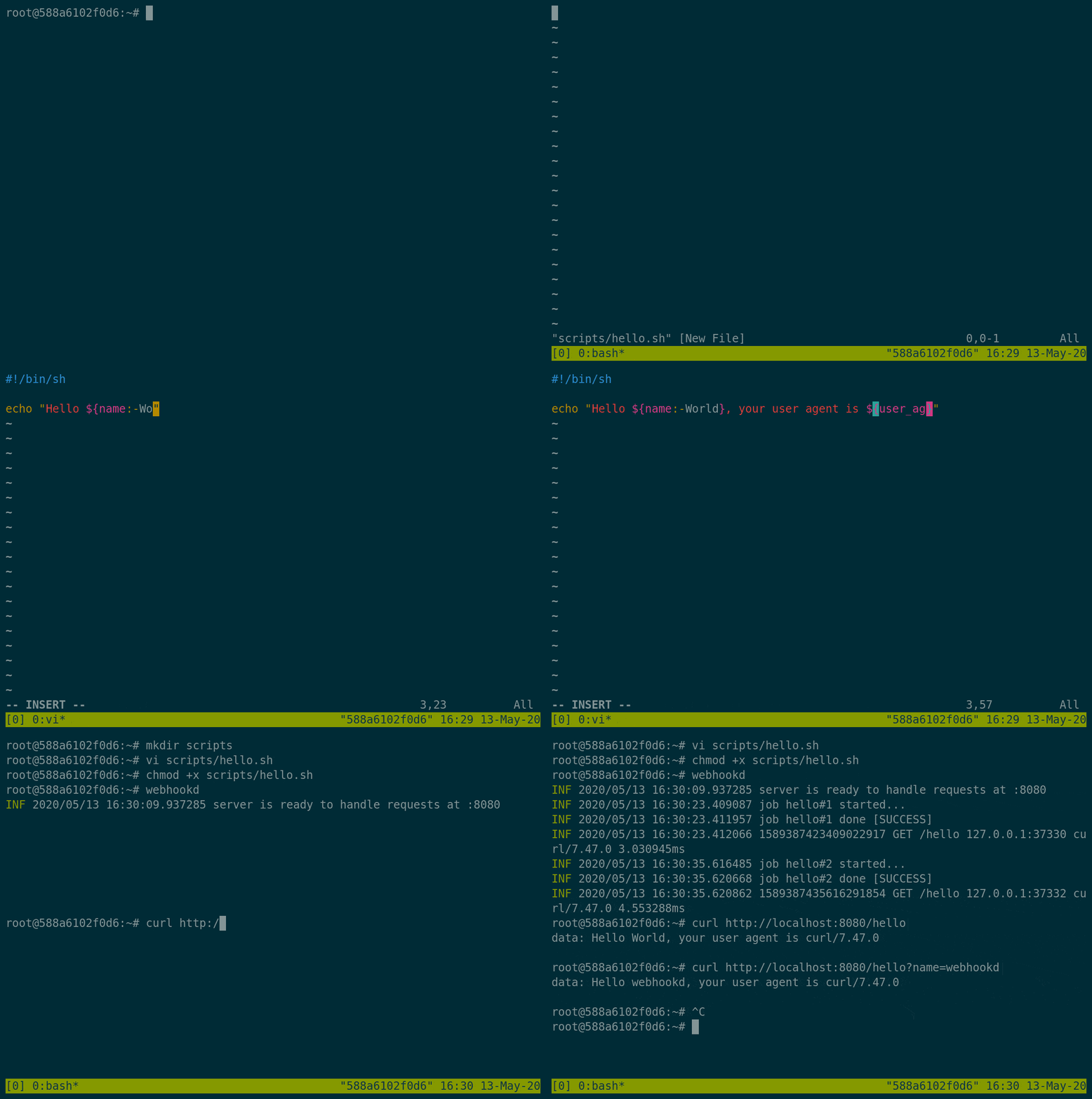
Choose the method that best suits your deployment environment:
For developers who have Go installed:
$ go install github.com/ncarlier/webhookd@latest
Download the binary for your architecture using one of these scripts:
Via curl and bash:
# Option A (General):
$ sudo curl -s https://raw.githubusercontent.com/ncarlier/webhookd/master/install.sh | bash

# Option B (Gobinary):
$ curl -sf https://gobinaries.com/ncarlier/webhookd | sh
Run webhookd in a container for quick setup:
$ docker run -d --name=webhookd \
  -v ${PWD}/scripts:/scripts \
  -p 8080:8080 \
  ncarlier/webhookd
Note on Docker: The official image is lightweight for simple scripts. For advanced needs (e.g., interacting with the Docker daemon), consider using
ncarlier/webhookd:edge-distrib.
For Debian users, install via our custom repository: Custom Repository Link
Systemd Setup: If installing system-wide, the service is pre-configured. You only need to start it with:
systemctl start webhookd. Custom environment variables can be set in/etc/webhookd.env.
Webhookd accepts configuration via command line flags or by setting environment variables. For a complete list, run webhookd -h.
All available parameters and environment variables are detailed in ./etc/default/webhookd.env.
Webhooks are defined as executable scripts within a specific directory structure.
./scripts directory.WHD_HOOK_SCRIPTS environment variable or the -hook-scripts parameter.Example Structure:
/scripts
|--> /github
  |--> /build.sh
  |--> /deploy.sh
|--> /push.js
|--> /echo.sh
|--> ...
Tip: Webhookd supports any executable file type, provided it has execute rights. For example, a Node.js script requires
#!/usr/bin/env nodeas its shebang line. Sample scripts are available in the example folder, including Gitlab and Github integrations.
The directory structure dictates the webhook URL (http://localhost:8080/<path>). You can omit the script extension; by default, webhookd will look for .sh. This default extension can be changed via WHD_HOOK_DEFAULT_EXT or -hook-default-ext.
How webhookd responds depends on your request headers:
Accept header is text/event-stream. Provides real-time, streamed output (see reference).X-Hook-Mode header is set to chunked. Also provides streamed output (see reference).X-Hook-Mode header to buffered. The request blocks until the script finishes, returning a summary payload.Webhookd maps the script's exit code (0-255) to an HTTP status code:
200 OK500 Internal Server ErrorExample Exit Code Calculation: An exit status of
118results in HTTP status418 I'm a teapot.
Streaming Examples:
Server-sent events (SSE):
$ curl -v --header "Accept: text/event-stream" -XGET http://localhost:8080/foo/bar
# ... output showing data: lines in real time ...
error: exit status 118
Chunked Transfer Coding (Default):
$ curl -v -XPOST --header "X-Hook-Mode: chunked" http://localhost:8080/foo/bar
# ... output showing data lines immediately ...
error: exit status 118
Blocking Request:
$ curl -v -XPOST --header "X-Hook-Mode: buffered" http://localhost:8080/foo/bar
# HTTP/1.1 418 I m a teapot (The status code)
# ... script output followed by error details...
Webhookd automatically converts various incoming request data into script variables:
CONTENT-TYPE becomes content_type).application/x-www-form-urlencoded: Keys/values are mapped to variables.text/* or application/json: The entire payload is passed as the first script parameter ($1).Built-in Parameters Added by Webhookd:
| Variable | Description |
|---|---|
hook_id | Unique hook ID (auto-increment) |
hook_name | Name associated with the webhook call |
hook_method | HTTP request method used |
x_forwarded_for | Client IP address |
x_webauth_user | Username if authentication is enabled |
Example Usage:
$ curl --data @test.json -H 'Content-Type: application/json' http://localhost:8080/echo?foo=bar
# Script output shows variables mapped correctly
Hook information: name=echo, id=1, method=POST
Query parameter: foo=bar
Header parameter: user-agent=curl/...
Script parameters: {"message": "this is a test"}
WHD_HOOK_TIMEOUT (seconds).X-Hook-Timeout (seconds) to override the global setting.$ curl -H "X-Hook-Timeout: 5" http://localhost:8080/echo?foo=bar
While logs stream in real time, you can retrieve historical output using the hook ID: http://localhost:8080/<NAME>/<ID>.
The current execution's unique ID is returned via the X-Hook-Id header. (Logs can also be redirected to the server output using WHD_LOG_MODULES=hook).
The script output can be collected and sent to external notification services.
WHD_NOTIFICATION_URI or use --notification-uri.?prefix="foo:").Example Script Snippet:
#!/bin/bash

echo "notify: Success message for deployment." # Will be notified
echo "This is debug output, will be ignored."  # Will not trigger notification
mailto:[email protected]prefix: Filter output log lines by this prefix.smtp, username, password: Credentials for the SMTP relay.conn: Connection type (tls, plain, etc.).http://example.org/endpoint{
"id": "42",
"name": "echo",
"text": "Script output content...",
"error": "Error details..."
}
Restrict access using standard HTTP basic authentication.
htpasswd -B -c .htpasswd apiexport WHD_PASSWD_FILE=/etc/webhookd/users.htpasswd$ curl -u api:test -XPOST "http://localhost:8080/echo?msg=hello"
In scenarios where authentication is handled by an upstream reverse proxy or API gateway (e.g., Authelia, Pomerium, Traefik), you can configure webhookd to rely on upstream headers.
Set the allowed upstream headers using WHD_ALLOWED_UPSTREAM_HEADERS (or --allowed-upstream-headers). By default this is Accept,Content-Type,Content-Length,User-Agent,X-Forwarded-For.
You can set * which forwards all HTTP headers to the webhook scripts.
For instance, to accept authentication from an upstream proxy using the x-webauthn-user header:
export WHD_ALLOWED_UPSTREAM_HEADERS="x-webauthn-user,content-type,user-agent"
Ensure message authenticity using cryptographic signatures. Webhookd supports two methods:
To activate, set the truststore file location:
$ export WHD_TRUSTSTORE_FILE=/etc/webhookd/pubkey.pem
# Or use command flag: webhookd --truststore-file /path/to/pubkey.pem
Calls must include appropriate headers (e.g., Signature: or X-Signature-Ed25519).
Secure communications by enabling SSL/TLS.
export WHD_TLS_ENABLED=true
# Or: webhookd --tls-enabled
-tls-cert-file and -tls-key-file.export WHD_TLS_ENABLED=true
export WHD_TLS_DOMAIN=hook.example.com
# Or: webhookd --tls-enabled --tls-domain=hook.example.com
⚠️ Networking Note: To listen on privileged ports (80/443) on Linux, remember to use setcap for the binary: sudo setcap CAP_NET_BIND_SERVICE+ep webhookd
This project is licensed under the MIT License. See LICENSE for details.
Overall
Maintained
Code review
Go module
Latest release
Releases this year
117 followers · starred Jun 2020
121 followers · starred Apr 2025
32 followers · starred Nov 2023
336 followers · starred Feb 2020
A minimalist, powerful webhook server designed to easily trigger shell scripts and run external processes via HTTP requests.
Go
1,103
275 commits
updated Jun 20, 2026
A minimalist, powerful webhook server designed to easily trigger shell scripts and run external processes via HTTP requests.
Choose the method that best suits your deployment environment:
For developers who have Go installed:
$ go install github.com/ncarlier/webhookd@latest
Download the binary for your architecture using one of these scripts:
Via curl and bash:
# Option A (General):
$ sudo curl -s https://raw.githubusercontent.com/ncarlier/webhookd/master/install.sh | bash

# Option B (Gobinary):
$ curl -sf https://gobinaries.com/ncarlier/webhookd | sh
Run webhookd in a container for quick setup:
$ docker run -d --name=webhookd \
  -v ${PWD}/scripts:/scripts \
  -p 8080:8080 \
  ncarlier/webhookd
Note on Docker: The official image is lightweight for simple scripts. For advanced needs (e.g., interacting with the Docker daemon), consider using
ncarlier/webhookd:edge-distrib.
For Debian users, install via our custom repository: Custom Repository Link
Systemd Setup: If installing system-wide, the service is pre-configured. You only need to start it with:
systemctl start webhookd. Custom environment variables can be set in/etc/webhookd.env.
Webhookd accepts configuration via command line flags or by setting environment variables. For a complete list, run webhookd -h.
All available parameters and environment variables are detailed in ./etc/default/webhookd.env.
Webhooks are defined as executable scripts within a specific directory structure.
./scripts directory.WHD_HOOK_SCRIPTS environment variable or the -hook-scripts parameter.Example Structure:
/scripts
|--> /github
  |--> /build.sh
  |--> /deploy.sh
|--> /push.js
|--> /echo.sh
|--> ...
Tip: Webhookd supports any executable file type, provided it has execute rights. For example, a Node.js script requires
#!/usr/bin/env nodeas its shebang line. Sample scripts are available in the example folder, including Gitlab and Github integrations.
The directory structure dictates the webhook URL (http://localhost:8080/<path>). You can omit the script extension; by default, webhookd will look for .sh. This default extension can be changed via WHD_HOOK_DEFAULT_EXT or -hook-default-ext.
How webhookd responds depends on your request headers:
Accept header is text/event-stream. Provides real-time, streamed output (see reference).X-Hook-Mode header is set to chunked. Also provides streamed output (see reference).X-Hook-Mode header to buffered. The request blocks until the script finishes, returning a summary payload.Webhookd maps the script's exit code (0-255) to an HTTP status code:
200 OK500 Internal Server ErrorExample Exit Code Calculation: An exit status of
118results in HTTP status418 I'm a teapot.
Streaming Examples:
Server-sent events (SSE):
$ curl -v --header "Accept: text/event-stream" -XGET http://localhost:8080/foo/bar
# ... output showing data: lines in real time ...
error: exit status 118
Chunked Transfer Coding (Default):
$ curl -v -XPOST --header "X-Hook-Mode: chunked" http://localhost:8080/foo/bar
# ... output showing data lines immediately ...
error: exit status 118
Blocking Request:
$ curl -v -XPOST --header "X-Hook-Mode: buffered" http://localhost:8080/foo/bar
# HTTP/1.1 418 I m a teapot (The status code)
# ... script output followed by error details...
Webhookd automatically converts various incoming request data into script variables:
CONTENT-TYPE becomes content_type).application/x-www-form-urlencoded: Keys/values are mapped to variables.text/* or application/json: The entire payload is passed as the first script parameter ($1).Built-in Parameters Added by Webhookd:
| Variable | Description |
|---|---|
hook_id | Unique hook ID (auto-increment) |
hook_name | Name associated with the webhook call |
hook_method | HTTP request method used |
x_forwarded_for | Client IP address |
x_webauth_user | Username if authentication is enabled |
Example Usage:
$ curl --data @test.json -H 'Content-Type: application/json' http://localhost:8080/echo?foo=bar
# Script output shows variables mapped correctly
Hook information: name=echo, id=1, method=POST
Query parameter: foo=bar
Header parameter: user-agent=curl/...
Script parameters: {"message": "this is a test"}
WHD_HOOK_TIMEOUT (seconds).X-Hook-Timeout (seconds) to override the global setting.$ curl -H "X-Hook-Timeout: 5" http://localhost:8080/echo?foo=bar
While logs stream in real time, you can retrieve historical output using the hook ID: http://localhost:8080/<NAME>/<ID>.
The current execution's unique ID is returned via the X-Hook-Id header. (Logs can also be redirected to the server output using WHD_LOG_MODULES=hook).
The script output can be collected and sent to external notification services.
WHD_NOTIFICATION_URI or use --notification-uri.?prefix="foo:").Example Script Snippet:
#!/bin/bash

echo "notify: Success message for deployment." # Will be notified
echo "This is debug output, will be ignored."  # Will not trigger notification
mailto:[email protected]prefix: Filter output log lines by this prefix.smtp, username, password: Credentials for the SMTP relay.conn: Connection type (tls, plain, etc.).http://example.org/endpoint{
"id": "42",
"name": "echo",
"text": "Script output content...",
"error": "Error details..."
}
Restrict access using standard HTTP basic authentication.
htpasswd -B -c .htpasswd apiexport WHD_PASSWD_FILE=/etc/webhookd/users.htpasswd$ curl -u api:test -XPOST "http://localhost:8080/echo?msg=hello"
In scenarios where authentication is handled by an upstream reverse proxy or API gateway (e.g., Authelia, Pomerium, Traefik), you can configure webhookd to rely on upstream headers.
Set the allowed upstream headers using WHD_ALLOWED_UPSTREAM_HEADERS (or --allowed-upstream-headers). By default this is Accept,Content-Type,Content-Length,User-Agent,X-Forwarded-For.
You can set * which forwards all HTTP headers to the webhook scripts.
For instance, to accept authentication from an upstream proxy using the x-webauthn-user header:
export WHD_ALLOWED_UPSTREAM_HEADERS="x-webauthn-user,content-type,user-agent"
Ensure message authenticity using cryptographic signatures. Webhookd supports two methods:
To activate, set the truststore file location:
$ export WHD_TRUSTSTORE_FILE=/etc/webhookd/pubkey.pem
# Or use command flag: webhookd --truststore-file /path/to/pubkey.pem
Calls must include appropriate headers (e.g., Signature: or X-Signature-Ed25519).
Secure communications by enabling SSL/TLS.
export WHD_TLS_ENABLED=true
# Or: webhookd --tls-enabled
-tls-cert-file and -tls-key-file.export WHD_TLS_ENABLED=true
export WHD_TLS_DOMAIN=hook.example.com
# Or: webhookd --tls-enabled --tls-domain=hook.example.com
⚠️ Networking Note: To listen on privileged ports (80/443) on Linux, remember to use setcap for the binary: sudo setcap CAP_NET_BIND_SERVICE+ep webhookd
This project is licensed under the MIT License. See LICENSE for details.
Overall
Maintained
Code review
Go module
Latest release
Releases this year
117 followers · starred Jun 2020
121 followers · starred Apr 2025
32 followers · starred Nov 2023
336 followers · starred Feb 2020