Run ruff, isort, pyupgrade, mypy, pylint, flake8, and more on Jupyter Notebooks
See the code




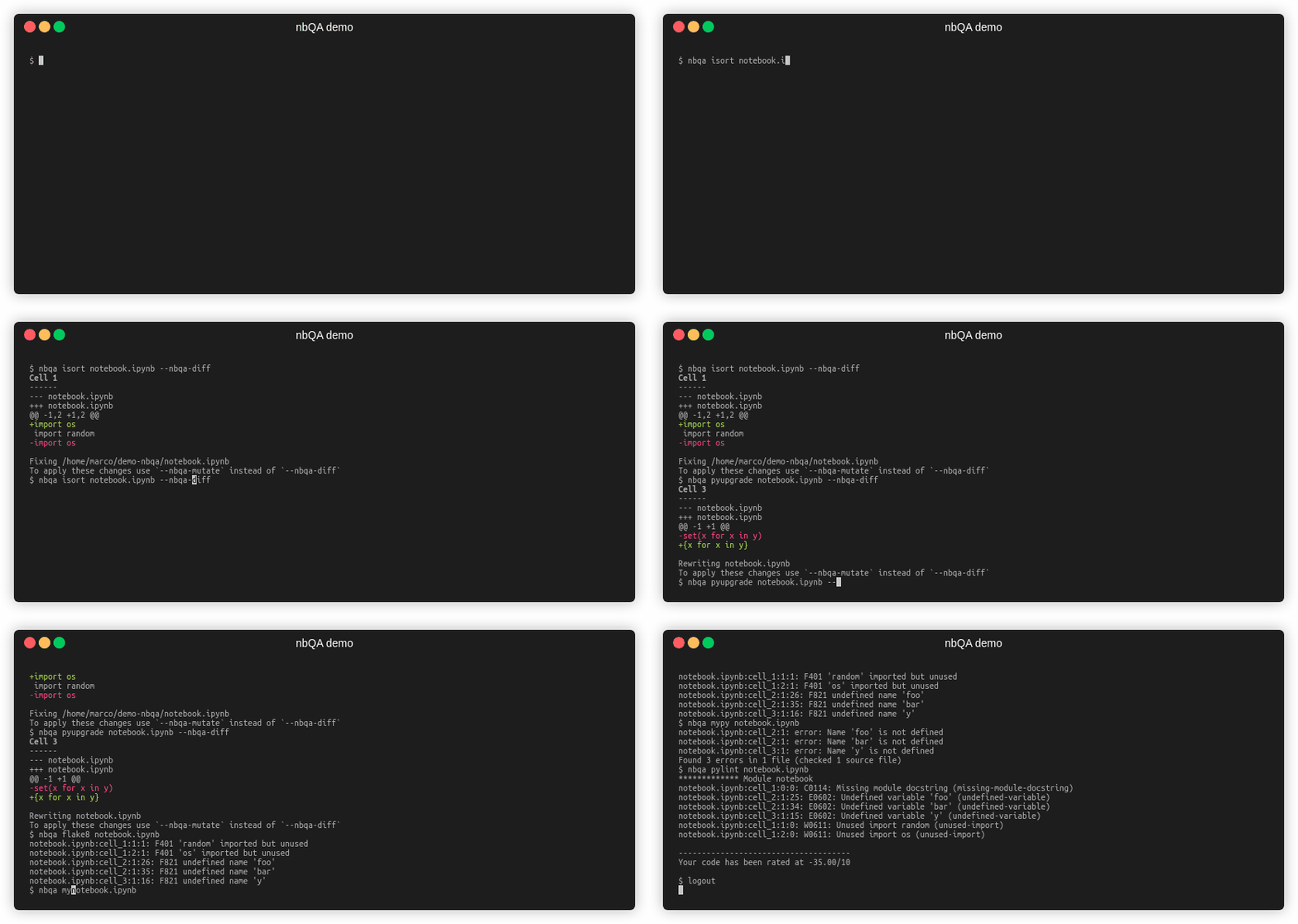
In your virtual environment, run (note: the $ is not part of the command):
$ python -m pip install -U nbqa
To also install all supported linters/formatters:
$ python -m pip install -U "nbqa[toolchain]"
Reformat your notebooks with black:
$ nbqa black my_notebook.ipynb
reformatted my_notebook.ipynb
All done! ✨ 🍰 ✨
1 files reformatted.
Sort your imports with isort:
$ nbqa isort my_notebook.ipynb --float-to-top
Fixing my_notebook.ipynb
Upgrade your syntax with pyupgrade:
$ nbqa pyupgrade my_notebook.ipynb --py37-plus
Rewriting my_notebook.ipynb
Format your markdown cells with blacken-docs:
$ nbqa blacken-docs my_notebook.ipynb --nbqa-md --nbqa-diff
Cell 2
------
--- my_notebook.ipynb
+++ my_notebook.ipynb
@@ -1,2 +1 @@
-First level heading
-===
+# First level heading

To apply these changes, remove the `--nbqa-diff` flag
Format .md files saved via Jupytext (requires jupytext to be installed):
$ nbqa black my_notebook.md
reformatted my_notebook.md
All done! ✨ 🍰 ✨
1 files reformatted.
See command-line examples for examples involving doctest, flake8, mypy, pylint, autopep8, pydocstyle, yapf, and ruff.
Here's an example of how to set up some pre-commit hooks: put this in your .pre-commit-config.yaml file (see usage as pre-commit hook)
- repo: https://github.com/nbQA-dev/nbQA
  rev: 1.9.1
  hooks:
    - id: nbqa-black
      additional_dependencies: [jupytext]  # optional, only if you're using Jupytext
    - id: nbqa-pyupgrade
      args: ["--py37-plus"]
    - id: nbqa-isort
      args: ["--float-to-top"]
If you need to select specific versions of these linters/formatters,
add them to additional_dependencies.
Is your project missing? Let us know, or open a pull request!
Michael Kennedy & Brian Okken, hosts of the Python Bytes podcast:
This is really cool. I think it brings so much of the code formatting and code analysis, clean up to notebooks, which I think had been really lacking
Nikita Sobolev, CTO at wemake.services:
It is amazing!
Alex Andorra, Data Scientist, ArviZ & PyMC Dev, Host of 'Learning Bayesian Statistics' Podcast:
well done on
nbqa@MarcoGorelli ! Will be super useful in CI
Matthew Feickert, Postdoc at University of Illinois working on LHC physics:
nbqa in your pre-commit hooks along with @codewithanthony 's pre-commit CI service is amazing! Everyone using Jupyter notebooks should be doing this.
Girish Pasupathy, Software engineer and now core-contributor:
thanks a lot for your effort to create such a useful tool
Simon Brugman, Data scientist & pandas-profiling dev:
nbQA helps us to keep notebooks to the same standards as the rest of the code. If you're serious about your code standards, you should keep them consistent across both notebooks and python scripts. Great addition to the ecosystem, thanks!
Bradley Dice, PhD Candidate in Physics & Scientific Computing:
nbqa is a clean, easy to use, and effective tool for notebook code style. Formatting and readability makes a huge difference when rendering notebooks in a project's documentation!
James Lamb, engineer @saturn_cloud, LightGBM maintainer
today I learned about
nbqa, a command-line tool to run linters likeflake8over #Python code in @ProjectJupyter notebooks. Thanks to @jayyqi for pointing me to it. So far, I really really like it.
Lars Yencken, Tech Lead @ Our World In Data
Super useful! I only wish it was built-in to Jupyterlab.
Vincent D. Warmerdam, maintainer @ calmcode.io
Nice. nbQA looks like a great way to prevent the Untitled12.ipynb-phenomenon. I like!
Mani Sarkar, Kaggle 3x expert, contributor
nbQA is an inspiring project, and the team behind it are very knowledgeable and think of things outside the box with ideas and solutions
I will give write-access to anyone who makes a useful pull request - see the contributing guide for details on how to do so.
Thanks goes to these wonderful people (emoji key):
This project follows the all-contributors specification. Contributions of any kind welcome!
Overall
Maintained
Code review
PyPI
Latest release
Releases this year
(top 24 of 33)
1,565 followers · starred Oct 2024
1,195 followers · starred Aug 2024
8,202 followers · starred Mar 2025
40,663 followers · starred Aug 2022
Run ruff, isort, pyupgrade, mypy, pylint, flake8, and more on Jupyter Notebooks
See the code
In your virtual environment, run (note: the $ is not part of the command):
$ python -m pip install -U nbqa
To also install all supported linters/formatters:
$ python -m pip install -U "nbqa[toolchain]"
Reformat your notebooks with black:
$ nbqa black my_notebook.ipynb
reformatted my_notebook.ipynb
All done! ✨ 🍰 ✨
1 files reformatted.
Sort your imports with isort:
$ nbqa isort my_notebook.ipynb --float-to-top
Fixing my_notebook.ipynb
Upgrade your syntax with pyupgrade:
$ nbqa pyupgrade my_notebook.ipynb --py37-plus
Rewriting my_notebook.ipynb
Format your markdown cells with blacken-docs:
$ nbqa blacken-docs my_notebook.ipynb --nbqa-md --nbqa-diff
Cell 2
------
--- my_notebook.ipynb
+++ my_notebook.ipynb
@@ -1,2 +1 @@
-First level heading
-===
+# First level heading

To apply these changes, remove the `--nbqa-diff` flag
Format .md files saved via Jupytext (requires jupytext to be installed):
$ nbqa black my_notebook.md
reformatted my_notebook.md
All done! ✨ 🍰 ✨
1 files reformatted.
See command-line examples for examples involving doctest, flake8, mypy, pylint, autopep8, pydocstyle, yapf, and ruff.
Here's an example of how to set up some pre-commit hooks: put this in your .pre-commit-config.yaml file (see usage as pre-commit hook)
- repo: https://github.com/nbQA-dev/nbQA
  rev: 1.9.1
  hooks:
    - id: nbqa-black
      additional_dependencies: [jupytext]  # optional, only if you're using Jupytext
    - id: nbqa-pyupgrade
      args: ["--py37-plus"]
    - id: nbqa-isort
      args: ["--float-to-top"]
If you need to select specific versions of these linters/formatters,
add them to additional_dependencies.
Is your project missing? Let us know, or open a pull request!
Michael Kennedy & Brian Okken, hosts of the Python Bytes podcast:
This is really cool. I think it brings so much of the code formatting and code analysis, clean up to notebooks, which I think had been really lacking
Nikita Sobolev, CTO at wemake.services:
It is amazing!
Alex Andorra, Data Scientist, ArviZ & PyMC Dev, Host of 'Learning Bayesian Statistics' Podcast:
well done on
nbqa@MarcoGorelli ! Will be super useful in CI
Matthew Feickert, Postdoc at University of Illinois working on LHC physics:
nbqa in your pre-commit hooks along with @codewithanthony 's pre-commit CI service is amazing! Everyone using Jupyter notebooks should be doing this.
Girish Pasupathy, Software engineer and now core-contributor:
thanks a lot for your effort to create such a useful tool
Simon Brugman, Data scientist & pandas-profiling dev:
nbQA helps us to keep notebooks to the same standards as the rest of the code. If you're serious about your code standards, you should keep them consistent across both notebooks and python scripts. Great addition to the ecosystem, thanks!
Bradley Dice, PhD Candidate in Physics & Scientific Computing:
nbqa is a clean, easy to use, and effective tool for notebook code style. Formatting and readability makes a huge difference when rendering notebooks in a project's documentation!
James Lamb, engineer @saturn_cloud, LightGBM maintainer
today I learned about
nbqa, a command-line tool to run linters likeflake8over #Python code in @ProjectJupyter notebooks. Thanks to @jayyqi for pointing me to it. So far, I really really like it.
Lars Yencken, Tech Lead @ Our World In Data
Super useful! I only wish it was built-in to Jupyterlab.
Vincent D. Warmerdam, maintainer @ calmcode.io
Nice. nbQA looks like a great way to prevent the Untitled12.ipynb-phenomenon. I like!
Mani Sarkar, Kaggle 3x expert, contributor
nbQA is an inspiring project, and the team behind it are very knowledgeable and think of things outside the box with ideas and solutions
I will give write-access to anyone who makes a useful pull request - see the contributing guide for details on how to do so.
Thanks goes to these wonderful people (emoji key):
This project follows the all-contributors specification. Contributions of any kind welcome!
Overall
Maintained
Code review
PyPI
Latest release
Releases this year
(top 24 of 33)
1,565 followers · starred Oct 2024
1,195 followers · starred Aug 2024
8,202 followers · starred Mar 2025
40,663 followers · starred Aug 2022