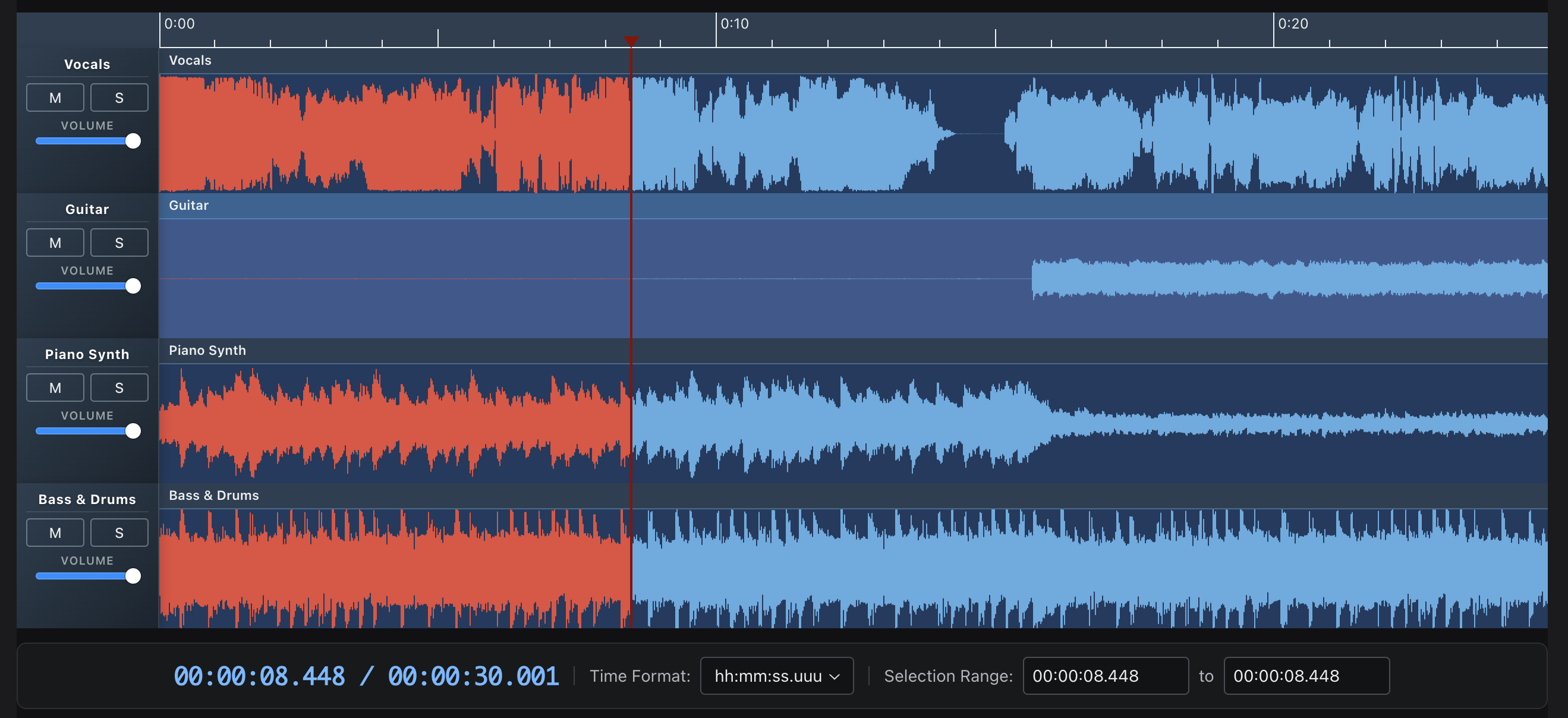
Multitrack Web Audio editor and player with canvas waveform preview. Set cues, fades and shift multiple tracks in time. Record audio tracks or provide audio annotations. Export your mix to AudioBuffer or WAV! Add effects from Tone.js. Project inspired by Audacity.
See the codeA multi-track audio editor and player built with React, Tone.js, and the Web Audio API. Features canvas-based waveform visualization, drag-and-drop clip editing, and professional audio effects.

npm install @waveform-playlist/browser tone @dnd-kit/react
Note:
toneand@dnd-kit/reactare peer dependencies and must be installed separately.@dnd-kit/domand@dnd-kit/abstractare also declared peers (they install automatically as dependencies of@dnd-kit/react).
v14: the playout engines are optional peers. Install the one(s) you use:
- WebAudio/Tone path:
npm install @waveform-playlist/browser @waveform-playlist/playout tone- MediaElement path:
npm install @waveform-playlist/browser @waveform-playlist/media-element-playout- Custom adapter:
npm install @waveform-playlist/browserand passcreateAdapter(notone).The
Toneconvenience re-export was removed in v14 —import * as Tone from 'tone'directly.v14: effects, WAV export, output metering, and the
useAudioTracks/useDynamicTracksloaders import from@waveform-playlist/browser/tone.v16:
@dnd-kit/*^0.5.0is required (^0.3is no longer supported).noDropAnimationPluginswas removed —Clip,AnnotationBox, andSortableTrackControlsconfigure their own@dnd-kitFeedback behavior, so a customDragDropProviderneeds nopluginsprop.@dnd-kit/domis now a declared peer ofui-componentsandannotations.
import { WaveformPlaylistProvider, Waveform, PlayButton, PauseButton, StopButton } from '@waveform-playlist/browser';
import { createTrack, createClipFromSeconds } from '@waveform-playlist/core';

function App() {
  const [tracks, setTracks] = useState([]);

  // Load audio and create tracks
  useEffect(() => {
    async function loadAudio() {
      const response = await fetch('/audio/song.mp3');
      const arrayBuffer = await response.arrayBuffer();
      const audioContext = new AudioContext();
      const audioBuffer = await audioContext.decodeAudioData(arrayBuffer);

      const track = createTrack({
        name: 'My Track',
        clips: [createClipFromSeconds({ audioBuffer, startTime: 0 })],
      });

      setTracks([track]);
    }
    loadAudio();
  }, []);

  return (
    <WaveformPlaylistProvider tracks={tracks}>
      <div>
        <PlayButton />
        <PauseButton />
        <StopButton />
      </div>
      <Waveform />
    </WaveformPlaylistProvider>
  );
}
| Example | Description |
|---|---|
| Stem Tracks | Multi-track playback with mute/solo/volume controls |
| Effects | 20 Tone.js effects with real-time parameter control |
| WAM! Kick It Up a Notch | Host WAM 2.0 plugins with community library, native GUIs, and mixed Tone+WAM chains |
| Recording | Live recording with VU meter and waveform preview |
| Multi-Clip | Drag-and-drop clip editing with trim handles |
| Annotations | Time-synced text with keyboard navigation |
| Waveform Data | Pre-computed peaks for fast loading |
| MIDI | MIDI file playback with piano roll and SoundFont samples |
| Beats & Bars | Tempo-synced timescale with beats and bars ruler |
| Fades | Fade in/out with configurable curves |
| Stereo | Stereo waveform rendering and pan controls |
| Spectrogram | FFT-based spectrogram visualization |
| Media Element | HTMLMediaElement playout with playback rate |
| Styling | Bar width, gaps, rounded bars, gradients, and theme colors |
| Flexible API | Custom playheads, timestamps, and full UI customization |
| Package | Description |
|---|---|
@waveform-playlist/browser | Main React components, hooks, and context |
@waveform-playlist/core | Types, utilities, and clip/track creation |
@waveform-playlist/engine | Framework-agnostic timeline engine with pure operations |
@waveform-playlist/ui-components | Styled UI components (buttons, sliders, etc.) |
@waveform-playlist/playout | Tone.js audio engine |
@waveform-playlist/webaudio-peaks | Peak extraction from AudioBuffer or sample arrays |
Optional packages:
| Package | Description |
|---|---|
@waveform-playlist/midi | React useMidiTracks hook + piano roll visualization with SoundFont/PolySynth playback. Re-exports the parser from @dawcore/midi. |
@waveform-playlist/annotations | Time-synced text annotations with drag editing |
@waveform-playlist/recording | AudioWorklet recording with live waveform preview (requires setup) |
@waveform-playlist/worklets | Shared AudioWorklet processors for metering and recording (auto-installed with recording) |
@waveform-playlist/spectrogram | React SpectrogramProvider + UI (menu items, settings modal). Computation/worker/orchestrator are imported from @dawcore/spectrogram. |
@waveform-playlist/media-element-playout | HTMLMediaElement-based playout with pitch-preserving playback rate |
// Load audio files into tracks
const { tracks, loading, error } = useAudioTracks([
  { src: '/audio/vocals.mp3', name: 'Vocals' },
  { src: '/audio/drums.mp3', name: 'Drums' },
]);

// Playback controls
const { play, pause, stop, seekTo } = usePlaylistControls();

// Playback animation (60fps updates)
const { currentTime, isPlaying } = usePlaybackAnimation();

// Zoom controls
const { zoomIn, zoomOut, samplesPerPixel } = useZoomControls();

// Master effects chain
const { masterEffects, toggleBypass, updateParameter } = useDynamicEffects();

// WAV export
const { exportWav, isExporting, progress } = useExportWav();

// Recording
const { startRecording, stopRecording, isRecording } = useIntegratedRecording(
  tracks, setTracks, selectedTrackId
);
@dawcore/components provides framework-agnostic Web Components for multi-track audio editing — no React required. Built with Lit, adapter-pluggable: choose between @dawcore/transport (native Web Audio) or @waveform-playlist/playout (Tone.js).
npm install @dawcore/components @waveform-playlist/core @waveform-playlist/engine
Audio backend (choose one):
npm install @dawcore/transport          # Native Web Audio (multi-tempo, multi-meter, metronome)
# or
npm install @waveform-playlist/playout tone  # Tone.js (effects, MIDI synths)
<script type="module">
  import '@dawcore/components';
  import { NativePlayoutAdapter } from '@dawcore/transport';

  const editor = document.querySelector('daw-editor');
  const adapter = new NativePlayoutAdapter(new AudioContext());
  editor.adapter = adapter;
</script>

<daw-editor id="editor" clip-headers interactive-clips timescale>
  <daw-track name="Vocals">
    <daw-clip src="/audio/vocals.mp3" start="0" duration="10"></daw-clip>
  </daw-track>
  <daw-keyboard-shortcuts playback splitting undo></daw-keyboard-shortcuts>
</daw-editor>

<daw-transport for="editor">
  <daw-play-button></daw-play-button>
  <daw-pause-button></daw-pause-button>
  <daw-stop-button></daw-stop-button>
  <daw-record-button></daw-record-button>
</daw-transport>
Features:
<daw-track> and <daw-clip> elements with auto-loadingeditor.addTrack/removeTrack/updateTrack/addClip/removeClip/updateClip and editor.ready() for engine bootstrap before any track loadsindefinite-playback rolls DAW-style until an explicit stop, fill-viewport fills the empty viewport so the ruler renders before any track (recording sessions suppress the auto-stop automatically)Packages:
| Package | Description |
|---|---|
@dawcore/components | Lit Web Components for multi-track editing |
@dawcore/transport | Native Web Audio transport — scheduling, looping, tempo automation, time signatures, metronome |
@dawcore/spectrogram | Framework-agnostic spectrogram orchestrator, FFT worker pool, and color maps — used by render-mode="spectrogram" |
@dawcore/midi | Framework-agnostic MIDI parser (parseMidiFile, parseMidiUrl) — used by editor.loadMidi() and re-exported by @waveform-playlist/midi |
@dawcore/wam | Web Audio Modules (WAM 2.0) plugin hosting and generic parameter GUIs — used by editor.addWamPlugin() and the effects chain (optional peer, loaded on demand) |
@dawcore/faust | In-browser Faust DSP → WAM 2.0 compilation — used by editor.addFaustEffect() (optional peer, loaded on demand) |
Run the examples locally:
pnpm example:dawcore-native  # Native Web Audio — localhost:5173
pnpm example:dawcore-tone    # Tone.js backend — localhost:5174
pnpm example:dawcore-wam     # WAM 2.0 plugins + Faust — localhost:5175
pnpm example:media-element   # MediaElement-only React starter (no Tone) — localhost:5176
pnpm example:react-starter   # Full multitrack React starter (Tone engine) — localhost:5177
The react-starter is the smallest correct setup for the full
multitrack editor — WaveformPlaylistProvider on the default Tone.js engine with mixer
controls, plus a README section explaining the "AudioContext was prevented from starting"
browser warning and how the provider's gesture-safe startup avoids it (see its
README).
The media-element-player starter is a minimal React
single-track player using only @waveform-playlist/browser + @waveform-playlist/media-element-playout
(no @waveform-playlist/playout, no tone) — see its README.
dawcore-native example pages:
basic.html — Basic playback with timescale and file dropmulticlip.html — Multi-clip editing with move, trim, and split, plus drag-to-reorder tracks with a live slot-snap drop previewprogrammatic.html — Imperative editor.addTrack / addClip / updateClip / removeClip plus declarative DOM mutation, side-by-sidebeats-grid.html — Beats & bars grid mode with snap-to-grid, plus bar-aligned tick-based annotation regions (start-tick/end-tick)beat-map-grid.html — Variable tempo from beat maps with metronomerecord.html — Recording with overdubmetronome.html — Metronome with mixed meters, tempo presets, and looping sequencesautomation.html — Tempo automation with step, linear, and curve presetsanalyser.html — Spectrum analyser connected to master outputspectrogram.html — Per-track FFT spectrograms via render-mode="spectrogram" with color-map and frequency-scale controlseffects.html — Per-track and master insert effects (native-* registry) with live parameter sliders, bypass, and daw-effect-* event logplayer.html — Lightweight <daw-player> single-track HTMLMediaElement player: waveform with peaks-src + timescale ruler, and a scrubber-only fallback (no peaks-src), with daw-ready/daw-timeupdate/daw-play/daw-stop event logannotations.html — <daw-annotation-track> lyric/section markers with dual-view sync between the timeline lane and <daw-annotation-list>, drag-to-resize boundaries, and keyboard navigation/playbacksonnet.html — Sonnet 1 parity demo: box-label="id" bars with the full text in <daw-annotation-list>dawcore-tone example pages:
basic.html — Basic playback with Tone.js adaptermulticlip.html — Multi-clip editing with Tone.js, plus drag-to-reorder tracks with a live slot-snap drop previewprogrammatic.html — Imperative editor.addTrack / addClip / updateClip / removeClip plus declarative DOM mutation, with the Tone.js adapterbeats-grid.html — Beats & bars grid with Tone.jsrecord.html — Mic recording with overdubanalyser.html — Spectrum analyser connected to master outputspectrogram.html — Per-track FFT spectrograms with the Tone.js adaptermidi.html — Programmatic MIDI clips with piano-roll render mode and Tone.js PolySynthmidi-load.html — Load .mid files (URL or file picker) via editor.loadMidi() and play them through Tone.js PolySynthsoundfont.html — MIDI through SoundFont samples: SoundFontCache.fromUrl() + createToneAdapter({ soundFontCache }), with PolySynth fallback when the .sf2 fails to loadannotations.html — <daw-annotation-track> lyric/section markers with dual-view sync between the timeline lane and <daw-annotation-list>, drag-to-resize boundaries, and keyboard navigation/playback with the Tone.js adapterdawcore-wam example pages:
index.html — WAM 2.0 plugin hosting end to end: insert plugins on any track or the master bus (one rack per track + master), with the target chosen from a dropdown that tracks every track — including stems dragged-and-dropped onto the editor (file-drop). Load community plugins by URL or from the webaudiomodules.com library, open plugin GUIs, reorder/bypass chains, save and restore chains (including state) via localStorage, export the mix to WAV through exportAudio(), and compile Faust DSP to a live effect in the browser (@dawcore/faust) — plus pre-compiled Faust effects served from this repoSpec & roadmap: docs/specs/web-components-migration.md — full element catalogue, attribute/property/event tables, programmatic API contracts, theming tokens, and migration phases.
Requires Web Audio API support: Chrome, Firefox, Safari, Edge (modern versions).
# Install dependencies
pnpm install

# Start dev server
pnpm website

# Run tests
pnpm test

# Build all packages
pnpm build
Visit http://localhost:3000/waveform-playlist to see the examples.
Currently writing: Mastering Tone.js

Originally created for the Airtime project at Sourcefabric.
Overall
Maintained
Code review
Latest release
Releases this year
606 followers · starred Apr 2022
69 followers · starred Oct 2023
25,619 followers · starred Jul 2021
476 followers · starred Jul 2015
Multitrack Web Audio editor and player with canvas waveform preview. Set cues, fades and shift multiple tracks in time. Record audio tracks or provide audio annotations. Export your mix to AudioBuffer or WAV! Add effects from Tone.js. Project inspired by Audacity.
See the codeA multi-track audio editor and player built with React, Tone.js, and the Web Audio API. Features canvas-based waveform visualization, drag-and-drop clip editing, and professional audio effects.
npm install @waveform-playlist/browser tone @dnd-kit/react
Note:
toneand@dnd-kit/reactare peer dependencies and must be installed separately.@dnd-kit/domand@dnd-kit/abstractare also declared peers (they install automatically as dependencies of@dnd-kit/react).
v14: the playout engines are optional peers. Install the one(s) you use:
- WebAudio/Tone path:
npm install @waveform-playlist/browser @waveform-playlist/playout tone- MediaElement path:
npm install @waveform-playlist/browser @waveform-playlist/media-element-playout- Custom adapter:
npm install @waveform-playlist/browserand passcreateAdapter(notone).The
Toneconvenience re-export was removed in v14 —import * as Tone from 'tone'directly.v14: effects, WAV export, output metering, and the
useAudioTracks/useDynamicTracksloaders import from@waveform-playlist/browser/tone.v16:
@dnd-kit/*^0.5.0is required (^0.3is no longer supported).noDropAnimationPluginswas removed —Clip,AnnotationBox, andSortableTrackControlsconfigure their own@dnd-kitFeedback behavior, so a customDragDropProviderneeds nopluginsprop.@dnd-kit/domis now a declared peer ofui-componentsandannotations.
import { WaveformPlaylistProvider, Waveform, PlayButton, PauseButton, StopButton } from '@waveform-playlist/browser';
import { createTrack, createClipFromSeconds } from '@waveform-playlist/core';

function App() {
  const [tracks, setTracks] = useState([]);

  // Load audio and create tracks
  useEffect(() => {
    async function loadAudio() {
      const response = await fetch('/audio/song.mp3');
      const arrayBuffer = await response.arrayBuffer();
      const audioContext = new AudioContext();
      const audioBuffer = await audioContext.decodeAudioData(arrayBuffer);

      const track = createTrack({
        name: 'My Track',
        clips: [createClipFromSeconds({ audioBuffer, startTime: 0 })],
      });

      setTracks([track]);
    }
    loadAudio();
  }, []);

  return (
    <WaveformPlaylistProvider tracks={tracks}>
      <div>
        <PlayButton />
        <PauseButton />
        <StopButton />
      </div>
      <Waveform />
    </WaveformPlaylistProvider>
  );
}
| Example | Description |
|---|---|
| Stem Tracks | Multi-track playback with mute/solo/volume controls |
| Effects | 20 Tone.js effects with real-time parameter control |
| WAM! Kick It Up a Notch | Host WAM 2.0 plugins with community library, native GUIs, and mixed Tone+WAM chains |
| Recording | Live recording with VU meter and waveform preview |
| Multi-Clip | Drag-and-drop clip editing with trim handles |
| Annotations | Time-synced text with keyboard navigation |
| Waveform Data | Pre-computed peaks for fast loading |
| MIDI | MIDI file playback with piano roll and SoundFont samples |
| Beats & Bars | Tempo-synced timescale with beats and bars ruler |
| Fades | Fade in/out with configurable curves |
| Stereo | Stereo waveform rendering and pan controls |
| Spectrogram | FFT-based spectrogram visualization |
| Media Element | HTMLMediaElement playout with playback rate |
| Styling | Bar width, gaps, rounded bars, gradients, and theme colors |
| Flexible API | Custom playheads, timestamps, and full UI customization |
| Package | Description |
|---|---|
@waveform-playlist/browser | Main React components, hooks, and context |
@waveform-playlist/core | Types, utilities, and clip/track creation |
@waveform-playlist/engine | Framework-agnostic timeline engine with pure operations |
@waveform-playlist/ui-components | Styled UI components (buttons, sliders, etc.) |
@waveform-playlist/playout | Tone.js audio engine |
@waveform-playlist/webaudio-peaks | Peak extraction from AudioBuffer or sample arrays |
Optional packages:
| Package | Description |
|---|---|
@waveform-playlist/midi | React useMidiTracks hook + piano roll visualization with SoundFont/PolySynth playback. Re-exports the parser from @dawcore/midi. |
@waveform-playlist/annotations | Time-synced text annotations with drag editing |
@waveform-playlist/recording | AudioWorklet recording with live waveform preview (requires setup) |
@waveform-playlist/worklets | Shared AudioWorklet processors for metering and recording (auto-installed with recording) |
@waveform-playlist/spectrogram | React SpectrogramProvider + UI (menu items, settings modal). Computation/worker/orchestrator are imported from @dawcore/spectrogram. |
@waveform-playlist/media-element-playout | HTMLMediaElement-based playout with pitch-preserving playback rate |
// Load audio files into tracks
const { tracks, loading, error } = useAudioTracks([
  { src: '/audio/vocals.mp3', name: 'Vocals' },
  { src: '/audio/drums.mp3', name: 'Drums' },
]);

// Playback controls
const { play, pause, stop, seekTo } = usePlaylistControls();

// Playback animation (60fps updates)
const { currentTime, isPlaying } = usePlaybackAnimation();

// Zoom controls
const { zoomIn, zoomOut, samplesPerPixel } = useZoomControls();

// Master effects chain
const { masterEffects, toggleBypass, updateParameter } = useDynamicEffects();

// WAV export
const { exportWav, isExporting, progress } = useExportWav();

// Recording
const { startRecording, stopRecording, isRecording } = useIntegratedRecording(
  tracks, setTracks, selectedTrackId
);
@dawcore/components provides framework-agnostic Web Components for multi-track audio editing — no React required. Built with Lit, adapter-pluggable: choose between @dawcore/transport (native Web Audio) or @waveform-playlist/playout (Tone.js).
npm install @dawcore/components @waveform-playlist/core @waveform-playlist/engine
Audio backend (choose one):
npm install @dawcore/transport          # Native Web Audio (multi-tempo, multi-meter, metronome)
# or
npm install @waveform-playlist/playout tone  # Tone.js (effects, MIDI synths)
<script type="module">
  import '@dawcore/components';
  import { NativePlayoutAdapter } from '@dawcore/transport';

  const editor = document.querySelector('daw-editor');
  const adapter = new NativePlayoutAdapter(new AudioContext());
  editor.adapter = adapter;
</script>

<daw-editor id="editor" clip-headers interactive-clips timescale>
  <daw-track name="Vocals">
    <daw-clip src="/audio/vocals.mp3" start="0" duration="10"></daw-clip>
  </daw-track>
  <daw-keyboard-shortcuts playback splitting undo></daw-keyboard-shortcuts>
</daw-editor>

<daw-transport for="editor">
  <daw-play-button></daw-play-button>
  <daw-pause-button></daw-pause-button>
  <daw-stop-button></daw-stop-button>
  <daw-record-button></daw-record-button>
</daw-transport>
Features:
<daw-track> and <daw-clip> elements with auto-loadingeditor.addTrack/removeTrack/updateTrack/addClip/removeClip/updateClip and editor.ready() for engine bootstrap before any track loadsindefinite-playback rolls DAW-style until an explicit stop, fill-viewport fills the empty viewport so the ruler renders before any track (recording sessions suppress the auto-stop automatically)Packages:
| Package | Description |
|---|---|
@dawcore/components | Lit Web Components for multi-track editing |
@dawcore/transport | Native Web Audio transport — scheduling, looping, tempo automation, time signatures, metronome |
@dawcore/spectrogram | Framework-agnostic spectrogram orchestrator, FFT worker pool, and color maps — used by render-mode="spectrogram" |
@dawcore/midi | Framework-agnostic MIDI parser (parseMidiFile, parseMidiUrl) — used by editor.loadMidi() and re-exported by @waveform-playlist/midi |
@dawcore/wam | Web Audio Modules (WAM 2.0) plugin hosting and generic parameter GUIs — used by editor.addWamPlugin() and the effects chain (optional peer, loaded on demand) |
@dawcore/faust | In-browser Faust DSP → WAM 2.0 compilation — used by editor.addFaustEffect() (optional peer, loaded on demand) |
Run the examples locally:
pnpm example:dawcore-native  # Native Web Audio — localhost:5173
pnpm example:dawcore-tone    # Tone.js backend — localhost:5174
pnpm example:dawcore-wam     # WAM 2.0 plugins + Faust — localhost:5175
pnpm example:media-element   # MediaElement-only React starter (no Tone) — localhost:5176
pnpm example:react-starter   # Full multitrack React starter (Tone engine) — localhost:5177
The react-starter is the smallest correct setup for the full
multitrack editor — WaveformPlaylistProvider on the default Tone.js engine with mixer
controls, plus a README section explaining the "AudioContext was prevented from starting"
browser warning and how the provider's gesture-safe startup avoids it (see its
README).
The media-element-player starter is a minimal React
single-track player using only @waveform-playlist/browser + @waveform-playlist/media-element-playout
(no @waveform-playlist/playout, no tone) — see its README.
dawcore-native example pages:
basic.html — Basic playback with timescale and file dropmulticlip.html — Multi-clip editing with move, trim, and split, plus drag-to-reorder tracks with a live slot-snap drop previewprogrammatic.html — Imperative editor.addTrack / addClip / updateClip / removeClip plus declarative DOM mutation, side-by-sidebeats-grid.html — Beats & bars grid mode with snap-to-grid, plus bar-aligned tick-based annotation regions (start-tick/end-tick)beat-map-grid.html — Variable tempo from beat maps with metronomerecord.html — Recording with overdubmetronome.html — Metronome with mixed meters, tempo presets, and looping sequencesautomation.html — Tempo automation with step, linear, and curve presetsanalyser.html — Spectrum analyser connected to master outputspectrogram.html — Per-track FFT spectrograms via render-mode="spectrogram" with color-map and frequency-scale controlseffects.html — Per-track and master insert effects (native-* registry) with live parameter sliders, bypass, and daw-effect-* event logplayer.html — Lightweight <daw-player> single-track HTMLMediaElement player: waveform with peaks-src + timescale ruler, and a scrubber-only fallback (no peaks-src), with daw-ready/daw-timeupdate/daw-play/daw-stop event logannotations.html — <daw-annotation-track> lyric/section markers with dual-view sync between the timeline lane and <daw-annotation-list>, drag-to-resize boundaries, and keyboard navigation/playbacksonnet.html — Sonnet 1 parity demo: box-label="id" bars with the full text in <daw-annotation-list>dawcore-tone example pages:
basic.html — Basic playback with Tone.js adaptermulticlip.html — Multi-clip editing with Tone.js, plus drag-to-reorder tracks with a live slot-snap drop previewprogrammatic.html — Imperative editor.addTrack / addClip / updateClip / removeClip plus declarative DOM mutation, with the Tone.js adapterbeats-grid.html — Beats & bars grid with Tone.jsrecord.html — Mic recording with overdubanalyser.html — Spectrum analyser connected to master outputspectrogram.html — Per-track FFT spectrograms with the Tone.js adaptermidi.html — Programmatic MIDI clips with piano-roll render mode and Tone.js PolySynthmidi-load.html — Load .mid files (URL or file picker) via editor.loadMidi() and play them through Tone.js PolySynthsoundfont.html — MIDI through SoundFont samples: SoundFontCache.fromUrl() + createToneAdapter({ soundFontCache }), with PolySynth fallback when the .sf2 fails to loadannotations.html — <daw-annotation-track> lyric/section markers with dual-view sync between the timeline lane and <daw-annotation-list>, drag-to-resize boundaries, and keyboard navigation/playback with the Tone.js adapterdawcore-wam example pages:
index.html — WAM 2.0 plugin hosting end to end: insert plugins on any track or the master bus (one rack per track + master), with the target chosen from a dropdown that tracks every track — including stems dragged-and-dropped onto the editor (file-drop). Load community plugins by URL or from the webaudiomodules.com library, open plugin GUIs, reorder/bypass chains, save and restore chains (including state) via localStorage, export the mix to WAV through exportAudio(), and compile Faust DSP to a live effect in the browser (@dawcore/faust) — plus pre-compiled Faust effects served from this repoSpec & roadmap: docs/specs/web-components-migration.md — full element catalogue, attribute/property/event tables, programmatic API contracts, theming tokens, and migration phases.
Requires Web Audio API support: Chrome, Firefox, Safari, Edge (modern versions).
# Install dependencies
pnpm install

# Start dev server
pnpm website

# Run tests
pnpm test

# Build all packages
pnpm build
Visit http://localhost:3000/waveform-playlist to see the examples.
Currently writing: Mastering Tone.js
Originally created for the Airtime project at Sourcefabric.
Overall
Maintained
Code review
Latest release
Releases this year
606 followers · starred Apr 2022
69 followers · starred Oct 2023
25,619 followers · starred Jul 2021
476 followers · starred Jul 2015