
README
Jellyfin Elsewhere


[!IMPORTANT] This feature now lives in Jellyfin Enhanced, as its "Elsewhere" module, a proper server-side Jellyfin plugin with no manual
index.html/userscript-manager setup required. New installs should use that instead.This repo is kept around for two reasons:
- The standalone userscript below still works for anyone who prefers it over a plugin.
- The
resources/directory (region and streaming-provider lists, refreshed from TMDB on a schedule, see badges above) is the shared data source both this script and the Jellyfin Enhanced plugin pull from.
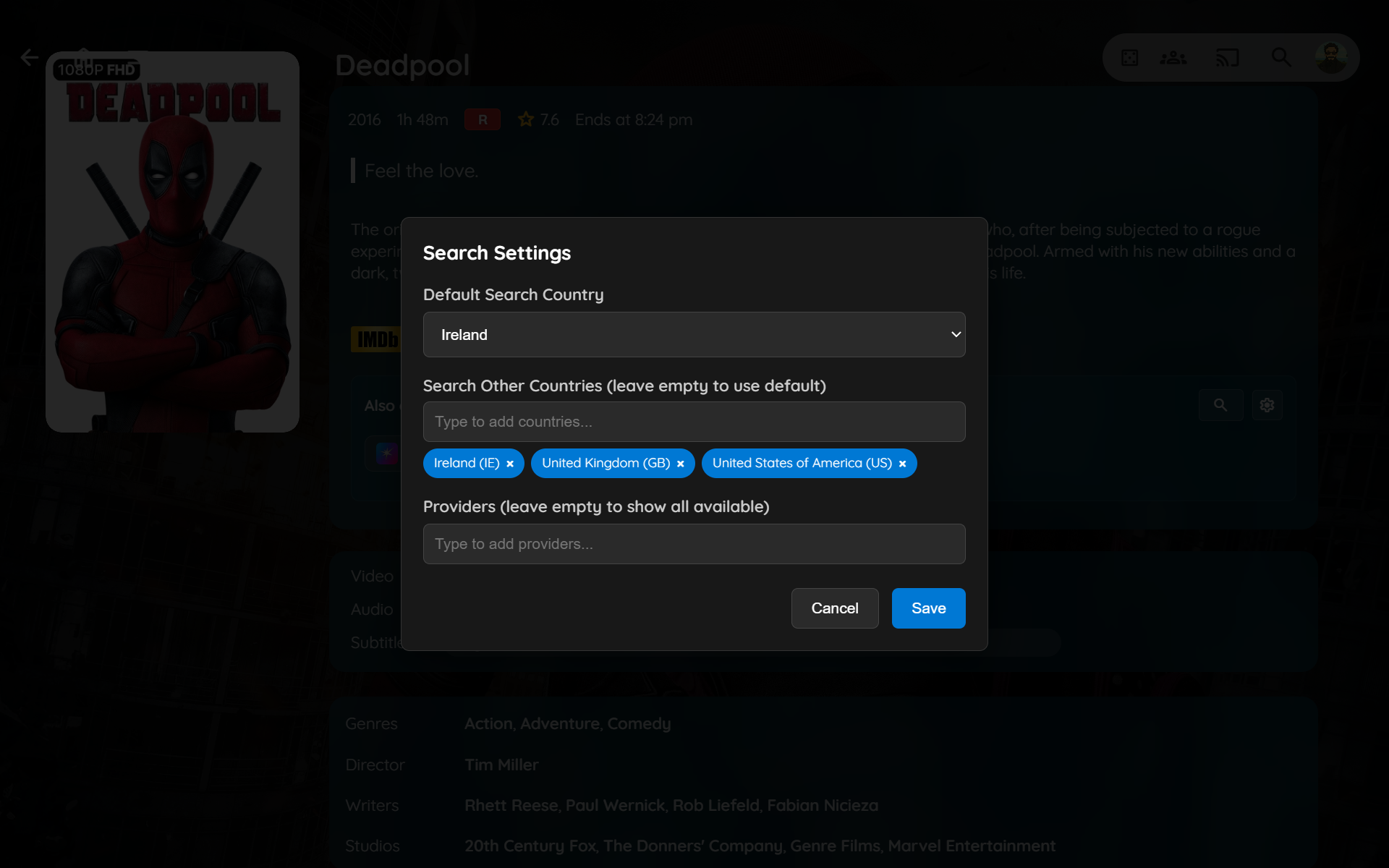
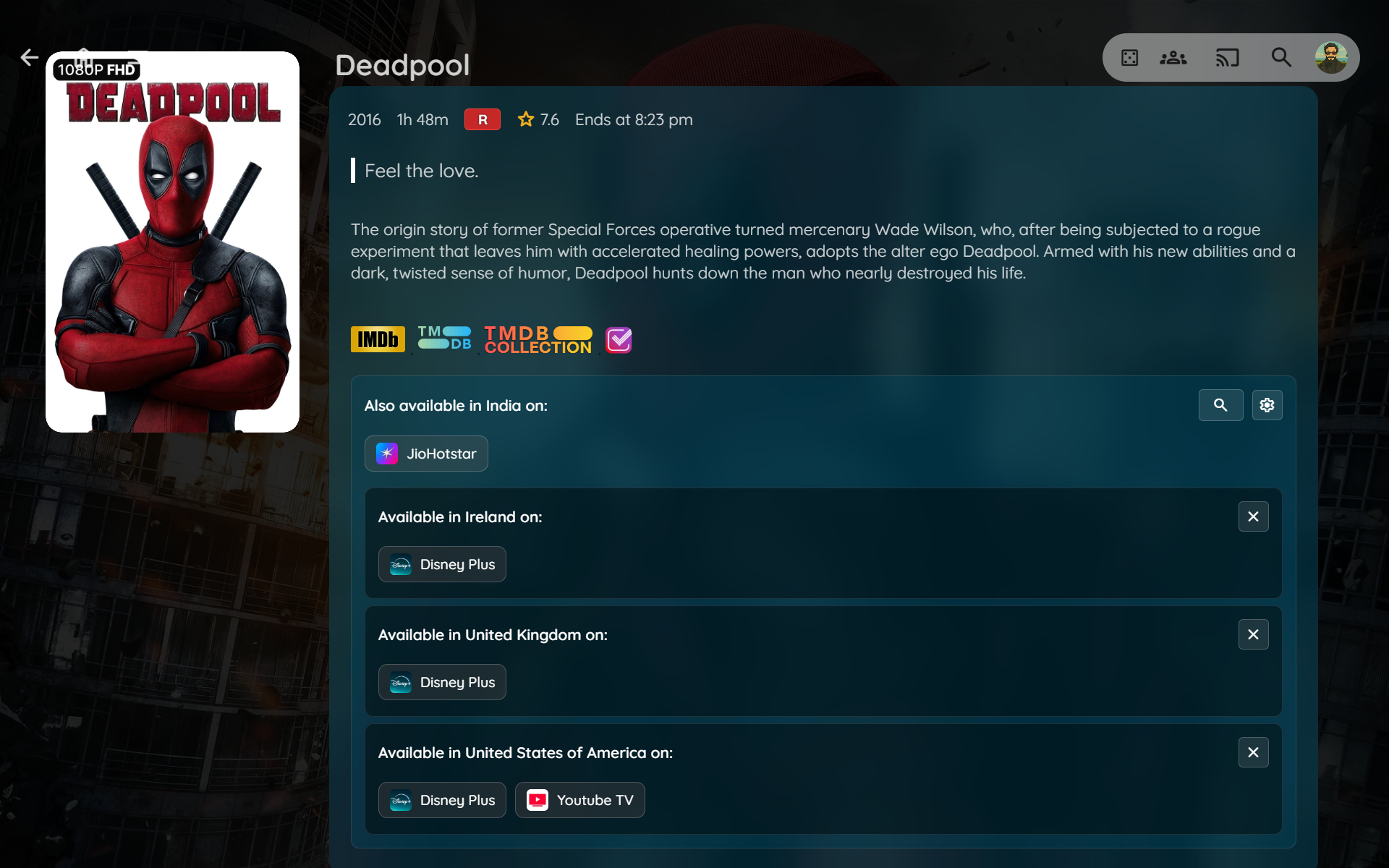
A script that seamlessly integrates with your Jellyfin interface to show you where else your movies and TV shows are available to stream. Using the TMDB API, it provides up-to-date streaming provider information directly on the item details page.

| Search Settings | Search Other Regions |
|---|---|
 |  |
Standalone userscript install & config (click to expand)
Prerequisites
TMDB API Key
- Visit The Movie Database (TMDB)
- Create a free account or sign in
- Go to your API settings
- Request an API key (choose "Developer" option)
🔧 Installation
You can install the script in one of below ways:
----
Method 1: Modify Web Root
-
Locate your Jellyfin web root directory:
# Common paths: # Ubuntu/Debian: /usr/share/jellyfin/web/ # Docker: /jellyfin/jellyfin-web/ # Windows: C:\Program Files\Jellyfin\Server\jellyfin-web\ -
Edit the index.html file:
sudo nano /usr/share/jellyfin/web/index.html -
Add the script reference before the closing
</head>tag:<script defer src="jf_elsewhere.js"></script> -
Download the script:
curl -o /usr/share/jellyfin/web/jf_elsewhere.js https://raw.githubusercontent.com/n00bcodr/jellyfin-elsewhere/main/jf_elsewhere.js[!Warning] Upgrading Jellyfin will wipe out all the modifications
-
Update your API Key and other configuration options
-
Clear browser cache and reload Jellyfin
[!TIP] Check your Jellyfin server logs to find the exact web directory path for your installation.
----
Method 2: Plugin (Server-Wide)
- Install the Jellyfin JavaScript Injector Plugin and reboot your Jellyfin server.
- Navigate to Dashboard -> Plugins -> JavaScript Injector.
- Click on "Add Script"
- Paste the contents of
jf_elsewhere.jsinto the script area. - Save and Refresh.
[!NOTE] Clear your cache if you do not see changes reflect.
----
Method 3: Browser Extension (User-Specific)
This method works only in your browser and is perfect for personal use.
-
Install a userscript manager:
- Tampermonkey (Recommended)
- Violentmonkey
- Greasemonkey (Firefox)
-
Install the script:
-
Update your API Key and other configuration options

----
🛠️ Configuration
Edit these variables at the top of the script:
-
TMDB_API_KEY: TMDB API Key from API settings
-
DEFAULT_REGION: The two-letter country code for the region you want to see results from by default.
List of available options in regions.txt
-
DEFAULT_PROVIDERS: A list of your preferred streaming providers. If you leave this list empty, it will show all available providers in the default region. If you add provider names, it will only show those.
List of available options in providers.txt
-
IGNORE_PROVIDERS: A list of streaming providers you want to hide from the default display. This is useful for filtering out services you don't use. Also supports Regex.
List of available options in providers.txt
Example Configs
    const TMDB_API_KEY = '0a1b2c3d4e5f6g7h8i9j';
    const DEFAULT_REGION = 'US';
    const DEFAULT_PROVIDERS = ['Netflix', 'Hulu']; // Will only show these two providers
    const IGNORE_PROVIDERS = [];
    const TMDB_API_KEY = '0a1b2c3d4e5f6g7h8i9j';
    const DEFAULT_REGION = 'IN';
    const DEFAULT_PROVIDERS = []; // Will show all available providers except the below
    const IGNORE_PROVIDERS = ['.*with Ads', 'Hulu']; // Does not display Hulu and anything that ends 'with Ads'
🙏 Acknowledgments
Made with 💜 for Jellyfin and the community
Enjoying Jellyfin Elsewhere?
Checkout my other repos!
Jellyfin-Enhanced (javascript) • Jellyfin-Elsewhere (javascript) • Jellyfin-Tweaks (plugin) • Jellyfin-JavaScript-Injector (plugin) • Jellyfish (theme)
Contributors

25 commits

17 commits
Similar repos


Languages
JavaScript
94.5%
Python
5.5%
README
Jellyfin Elsewhere
[!IMPORTANT] This feature now lives in Jellyfin Enhanced, as its "Elsewhere" module, a proper server-side Jellyfin plugin with no manual
index.html/userscript-manager setup required. New installs should use that instead.This repo is kept around for two reasons:
- The standalone userscript below still works for anyone who prefers it over a plugin.
- The
resources/directory (region and streaming-provider lists, refreshed from TMDB on a schedule, see badges above) is the shared data source both this script and the Jellyfin Enhanced plugin pull from.
A script that seamlessly integrates with your Jellyfin interface to show you where else your movies and TV shows are available to stream. Using the TMDB API, it provides up-to-date streaming provider information directly on the item details page.
| Search Settings | Search Other Regions |
|---|---|
| |
Standalone userscript install & config (click to expand)
Prerequisites
TMDB API Key
- Visit The Movie Database (TMDB)
- Create a free account or sign in
- Go to your API settings
- Request an API key (choose "Developer" option)
🔧 Installation
You can install the script in one of below ways:
----
Method 1: Modify Web Root
-
Locate your Jellyfin web root directory:
# Common paths: # Ubuntu/Debian: /usr/share/jellyfin/web/ # Docker: /jellyfin/jellyfin-web/ # Windows: C:\Program Files\Jellyfin\Server\jellyfin-web\ -
Edit the index.html file:
sudo nano /usr/share/jellyfin/web/index.html -
Add the script reference before the closing
</head>tag:<script defer src="jf_elsewhere.js"></script> -
Download the script:
curl -o /usr/share/jellyfin/web/jf_elsewhere.js https://raw.githubusercontent.com/n00bcodr/jellyfin-elsewhere/main/jf_elsewhere.js[!Warning] Upgrading Jellyfin will wipe out all the modifications
-
Update your API Key and other configuration options
-
Clear browser cache and reload Jellyfin
[!TIP] Check your Jellyfin server logs to find the exact web directory path for your installation.
----
Method 2: Plugin (Server-Wide)
- Install the Jellyfin JavaScript Injector Plugin and reboot your Jellyfin server.
- Navigate to Dashboard -> Plugins -> JavaScript Injector.
- Click on "Add Script"
- Paste the contents of
jf_elsewhere.jsinto the script area. - Save and Refresh.
[!NOTE] Clear your cache if you do not see changes reflect.
----
Method 3: Browser Extension (User-Specific)
This method works only in your browser and is perfect for personal use.
-
Install a userscript manager:
- Tampermonkey (Recommended)
- Violentmonkey
- Greasemonkey (Firefox)
-
Install the script:
-
Update your API Key and other configuration options
----
🛠️ Configuration
Edit these variables at the top of the script:
-
TMDB_API_KEY: TMDB API Key from API settings
-
DEFAULT_REGION: The two-letter country code for the region you want to see results from by default.
List of available options in regions.txt
-
DEFAULT_PROVIDERS: A list of your preferred streaming providers. If you leave this list empty, it will show all available providers in the default region. If you add provider names, it will only show those.
List of available options in providers.txt
-
IGNORE_PROVIDERS: A list of streaming providers you want to hide from the default display. This is useful for filtering out services you don't use. Also supports Regex.
List of available options in providers.txt
Example Configs
    const TMDB_API_KEY = '0a1b2c3d4e5f6g7h8i9j';
    const DEFAULT_REGION = 'US';
    const DEFAULT_PROVIDERS = ['Netflix', 'Hulu']; // Will only show these two providers
    const IGNORE_PROVIDERS = [];
    const TMDB_API_KEY = '0a1b2c3d4e5f6g7h8i9j';
    const DEFAULT_REGION = 'IN';
    const DEFAULT_PROVIDERS = []; // Will show all available providers except the below
    const IGNORE_PROVIDERS = ['.*with Ads', 'Hulu']; // Does not display Hulu and anything that ends 'with Ads'
🙏 Acknowledgments
Made with 💜 for Jellyfin and the community
Enjoying Jellyfin Elsewhere?
Checkout my other repos!
Jellyfin-Enhanced (javascript) • Jellyfin-Elsewhere (javascript) • Jellyfin-Tweaks (plugin) • Jellyfin-JavaScript-Injector (plugin) • Jellyfish (theme)
Similar repos
Contributors
25 commits
17 commits
Languages
JavaScript
94.5%
Python
5.5%