
Multi-user Matrix message search with real OIDC login - centralized sibling to matrix-search.
Python
0
29 commits
updated Sep 18, 2026
See what people are saying (1)
README
matrix-search-hub

A centralized, multi-user version of matrix-search: one deployment that any employee can sign into with their own company account, each getting their own searchable index of their own Matrix message history. Nobody else - including the person running this server - can read it without that user's own passphrase.
Screenshots
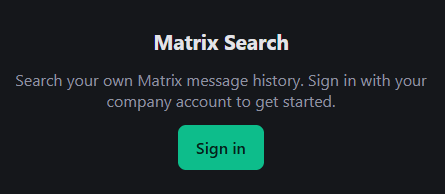 Sign in | 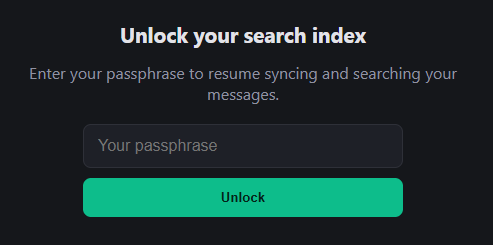 Unlock (after a restart) |
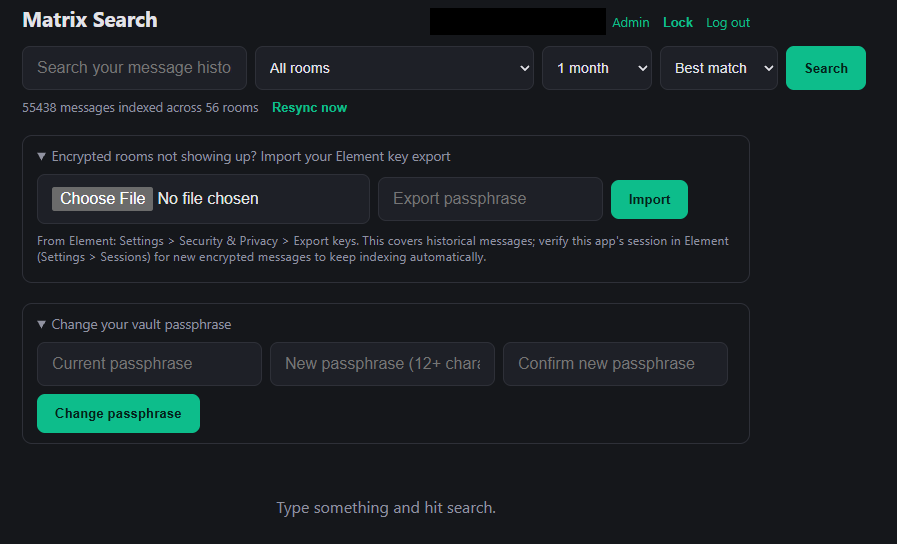 Search - range/sort/room filters, resync, key import, passphrase change | 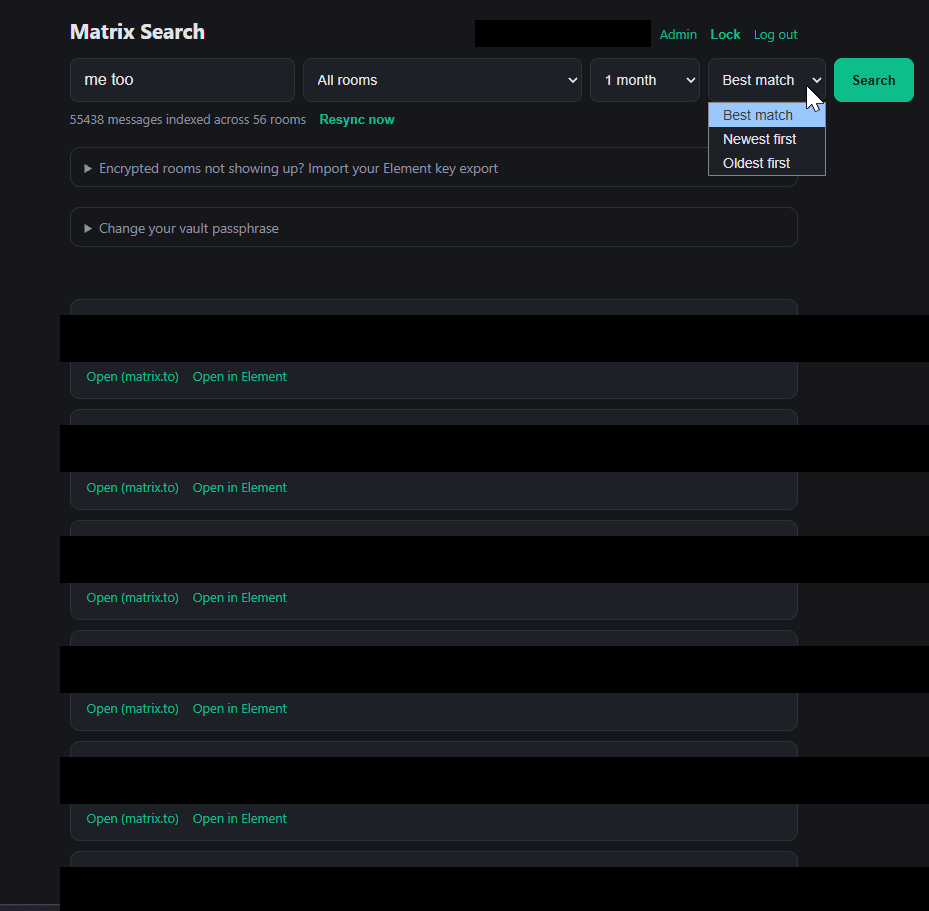 Results with highlighted matches (redacted for this README) |
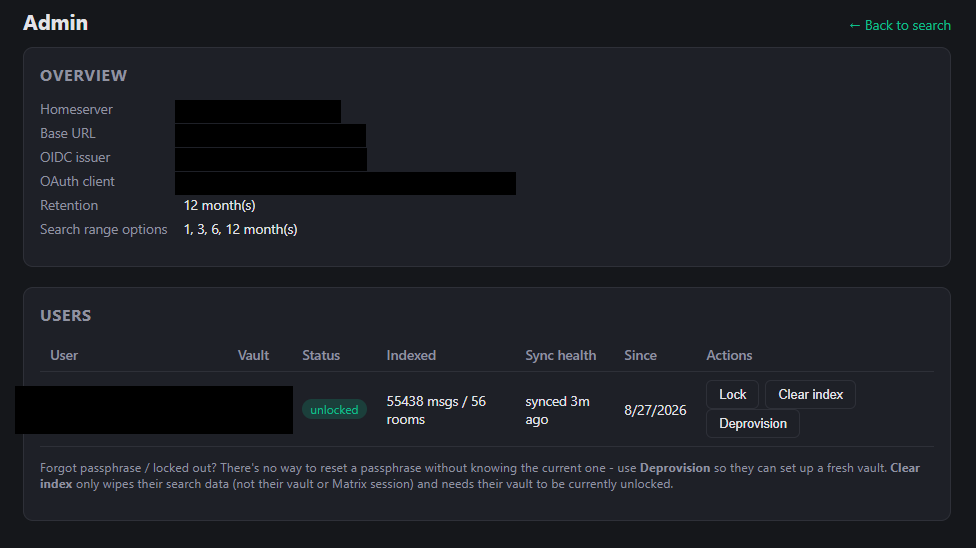
Admin panel - deployment overview and per-user sync health (redacted for this README).
How login works
- A user clicks Sign in, which redirects them to your identity provider's real login page with a PKCE challenge and a freshly generated Matrix device ID embedded in the OAuth scope, per MSC2967.
- They authenticate there exactly as they would signing into Element.
- The provider redirects back to
/auth/callbackwith an authorization code, exchanged server-side for an access token + refresh token - this becomes that user's own dedicated Matrix session/device. - The app registers itself as an OAuth client automatically on first
startup via dynamic client registration (no admin action needed) and
caches the result in
data/oauth_client.json.
This only works against a homeserver running OIDC-native auth (MSC2965 / Matrix Authentication Service). Check with:
curl -s https://<your-server-name>/.well-known/matrix/client
If the response has an org.matrix.msc2965.authentication block, you're
good. If not, this app can't use your homeserver's auth - use the
single-user matrix-search project instead.
Note that <your-server-name> above (the domain in user IDs, e.g.
example.com for @you:example.com) is frequently a different host
than MATRIX_HOMESERVER (e.g. matrix.example.com), since .well-known
delegation exists precisely so the client-server API can live somewhere
else. This app needs both: MATRIX_HOMESERVER for actual API calls, and
MATRIX_SERVER_NAME (defaults to MATRIX_HOMESERVER if unset) for this
.well-known/matrix/client discovery step specifically. Getting this
wrong is the most common startup failure - it shows up as a JSON decode
error fetching .well-known/matrix/client, because the API host still
returns HTTP 200 for that path instead of a clean 404.
Encryption model - read this before deploying
Every user's messages and Matrix session tokens are stored in a
per-user, passphrase-encrypted database (data/users/<user>/vault.db,
via SQLCipher). Nobody can read a user's data without that specific
passphrase - not an admin with full filesystem access, not a database
backup, not anyone else at the company. That passphrase:
- is set by the user themselves the first time they use the app (separate from their SSO password),
- is never sent anywhere but that one request, and never stored anywhere, not even hashed - the only proof it's correct is that it successfully decrypts that user's existing vault,
- lives only in server memory, only for as long as that user's sync worker is running.
What this actually defends against: someone pulling the database, a backup, or raw files off disk gets nothing readable. A "just export this person's messages" request has no technical answer unless that person unlocks it themselves.
What this does not defend against, and it's worth being honest about both:
- Someone directly compelling a user to type their own passphrase under pressure - that's a policy/HR/legal problem, not one encryption solves.
- Whoever controls what code actually runs on this server modifying it to capture passphrases as they're typed. If the same people you're protecting data from also control deployment of this app, no amount of application-level encryption closes that gap - it needs independent code review/audit, or hosting this somewhere that party doesn't control.
What this means day to day
- First time: after signing in, a user sets their passphrase and indexing starts immediately - full backfill, then live sync, same as before.
- Normal use: once unlocked, everything behaves exactly as you'd expect - instant search, live indexing, no repeated prompts. The passphrase stays resident in server memory for the life of the process.
- After a restart (deploy, host reboot, crash): every user's worker is paused - nothing auto-resumes, by design, since resuming would mean the key survived the restart somewhere, which defeats the point. Each person needs to visit the app and unlock again before their indexing picks back up. This is the entire cost of the model: an occasional re-unlock, not degraded search.
- If someone forgets their passphrase: there is no recovery. Their
vault is unreadable, by design - the whole guarantee rests on nobody but
them being able to open it. An admin can only delete their vault file
(
data/users/<user>/vault.db) so they can set up a fresh one; the old index is gone. - Users can also click Lock to proactively evict their key from server memory before walking away from a shared or untrusted machine.
- Users can change their own passphrase from the search UI ("Change your vault passphrase" panel) - this requires their current passphrase and rekeys the vault in place with no data loss. This is different from a forgotten passphrase, which nobody, including an admin, can recover or reset (see the Admin panel section).
Search range & retention
Two related but distinct settings:
- Search range - a dropdown in the search UI (1 / 3 / 6 / 12 months,
default 1 month) that limits how far back a given search scans, for
speed. Options beyond
RETENTION_MONTHSare hidden since there'd be nothing to find past that anyway. - Retention (
RETENTION_MONTHS, default12) - the actual cap on how much history is ever stored per user, admin-configured via env var. Backfill stops paging back once it reaches messages older than this, and a background job prunes anything already stored that ages out over time. Raising it only affects newly-indexed and future data - it does not retroactively recover messages that were already pruned or never backfilled under a lower setting.
This also has a privacy benefit worth noting given the encryption model above: less decrypted history ever sitting on disk at all, encrypted or not, is less exposure if anything ever does go wrong.
Usage metrics
A small stats strip on the search page, visible to every signed-in user (not just admins):
- Searches performed today and all-time.
- Messages/rooms indexed org-wide (summed across everyone's cached counts - see below).
- How many users currently have their vault unlocked, out of the total who've ever signed in.
This is deliberately counts only, never names - the whole point of keeping it on the shared page rather than admin-only is that it's meant to be a fun/transparency number everyone sees, and showing who specifically is or isn't using the tool would be a real privacy/social- pressure problem for a page like that. Named per-user status already lives in the admin panel, which is where it stays.
Implementation notes, since the design choices here matter for accuracy:
- Search counts live in a tiny
daily_metricstable incontrol.db(one row per day, incremented in place) rather than one row per search, so it stays a few hundred rows forever regardless of search volume - "all-time" is just aSUM()over it. - The org-wide message/room totals are a sum of last-known per-user
counts, cached into
control.dbopportunistically whenever a user's own/api/statusis polled. This means the total reflects each user's count as of whenever they were last active, not a live read of every vault - which is what makes it computable at all without touching anyone's encrypted data. It also means the "rooms" figure is a sum of each user's own room memberships, not a deduplicated org-wide room count - a room with 20 members indexing it counts 20 times. Treat both numbers as a usage/volume indicator, not a precise inventory.
Recent conversations
The search page shows your 10 most recently active direct messages (left sidebar) and 10 most recently active rooms (right sidebar), each linking straight into Element. This is per-user - it only ever reads from your own unlocked vault, same as search itself.
DM vs. room classification comes from Matrix's own m.direct account
data (via nio's list_direct_rooms()), refreshed on every full sync - the
same signal Element itself uses, not a guess based on member count. A room
that hasn't been classified yet (e.g. indexed before this feature existed,
not yet through a fresh sync) defaults to the "Rooms" bucket rather than
risking miscategorizing a real DM. Run Resync now to refresh
classification immediately instead of waiting for the next automatic sync.
Each entry also shows an avatar - the room's own icon for a group room, or
the other person's profile picture for a DM (nio's gen_avatar_url, the
same logic Element uses to decide which to show). Avatars are fetched
through /api/avatar, which proxies the request through your own unlocked
session rather than hitting the homeserver's media repo directly from the
browser - modern homeservers require an authenticated request for media,
and this keeps that authentication server-side instead of exposing your
access token to the browser. A room with no avatar set falls back to a
plain initial.
Both sidebars hide below ~1100px viewport width to keep the search column usable on narrower screens/tablets.
Setup
-
Copy the env file:
cp .env.example .env -
Set
MATRIX_HOMESERVER(the real API base URL - see above for how to find it, since it's often not your account's server name), andMATRIX_SERVER_NAMEif that server name differs from it (it usually does - see the note above). -
Set
BASE_URLto this app's actual public URL, e.g.https://matrix-search.internal.example.com. This becomes the OAuthredirect_uri({BASE_URL}/auth/callback), which must be reachable by every user's browser and generally needs to behttps://- put this behind a reverse proxy with a real certificate (Caddy/Traefik/nginx) rather than exposing plain HTTP directly.Once people are using the app, don't change
BASE_URLwithout also deletingdata/oauth_client.jsonto force re-registering the OAuth client with the new redirect URI. -
Generate a session secret:
openssl rand -hex 32Put the output in
SESSION_SECRET. Keep it stable - rotating it logs everyone out (their vaults are unaffected, they just need to unlock again). -
Optionally adjust
RETENTION_MONTHS(default12) and setADMIN_USER_IDS(comma-separated) if anyone should have admin access. -
Start it:
docker compose up -d
docker compose logs -f
By default this pulls the prebuilt image from Docker Hub (published automatically from this repo's
masterbranch). If you'd rather build from source - to audit exactly what's running, or to test a local change - editdocker-compose.yml: comment out theimage:line and uncommentbuild: ., then rundocker compose up -d --buildinstead.On first startup you should see
Discovered OIDC issuer: ...andDynamically registered new OAuth client .... If registration fails because the provider has noregistration_endpoint, an admin needs to register a client manually and you setOAUTH_CLIENT_ID/OAUTH_CLIENT_SECRETinstead (redirect URI:{BASE_URL}/auth/callback). -
Open
http://<host>:8080(or wherever you've mapped/proxied it), sign in, and set a passphrase.
Encrypted Matrix rooms
Separate from the vault passphrase above - this is about Matrix's own end-to-end encryption for individual rooms. Each user's login creates a brand-new Matrix device with none of the room keys needed to decrypt their encrypted (E2EE) rooms yet. From the search UI:
- Historical messages: the "Import your Element key export" panel - export keys from Element (Settings > Security & Privacy > Export keys) and upload the file with its passphrase (a different passphrase from the vault one). Triggers a background re-scan that picks up whatever's now decryptable.
- New messages going forward: each user should verify this app's
session from their own Element (Settings > Sessions, look for
matrix-search-hub) using their own recovery key, so their other devices share future room keys with it automatically.
Unencrypted rooms need none of this - they index automatically for everyone.
Troubleshooting
General approach: docker compose logs -f while reproducing the problem,
then grep for the relevant symptom below.
Login / OAuth failures
JSONDecodeErrorfetching.well-known/matrix/clientat startup - aMATRIX_SERVER_NAME/MATRIX_HOMESERVERmixup (see the note under "How login works" above). Verify with:curl -s https://<your-server-name>/.well-known/matrix/clientClient registration failed ... invalid redirect_uri; invalid client_uriclient_uri(defaults toBASE_URL) isn't an HTTPS URL your identity provider accepts. A bare LAN IP overhttp://typically fails this.
Client registration failed ... invalid redirect_uri(generic, no mention of client_uri) -client_uriandredirect_uri(built fromBASE_URL) must share the same origin. Don't pointOAUTH_CLIENT_URIsomewhere else unless you're sure your provider doesn't enforce this.- Browser shows
ERR_SSL_PROTOCOL_ERRORon the callback URL -BASE_URLhashttps://but nothing is actually terminating TLS in front of the app. Either fixBASE_URLto match reality, or put a real reverse proxy with TLS in front and pointBASE_URLat that (most identity providers reject plain-HTTP redirect URIs outright anyway, so you'll usually need the proxy regardless). Authorization grant ... already used- you reloaded or revisited a stale callback URL from an earlier attempt. Authorization codes are single-use and short-lived; start over from/auth/loginin a fresh tab rather than reloading an old one.- After fixing a
BASE_URL/OAuth config issue, the log still saysReusing previously registered OAuth client ...with the same old client ID -data/oauth_client.jsonwasn't actually deleted. It's often owned byroot(created by the Docker daemon), so a plainrmcan silently fail for a non-root user - confirm withls -la data/oauth_client.jsonafter deleting, and usesudo rm -fif needed.
Encrypted rooms / a specific message not showing up
If docker compose logs | grep -i "backfill complete" shows 0 events could not be decrypted but a message you know exists still isn't
findable:
- Check whether that event is being seen at all:
docker compose logs | grep -i "UNDECRYPTABLE\|no prev_batch" - Every event gets logged individually as it's processed -
indexing event,SKIP (older than retention cutoff), orUNDECRYPTABLE- so grepping for the room name or a snippet of the message text can confirm whether it was ever seen at all versus silently missed. - Per-room sync summaries (
sync timeline for <room>: N event(s), limited=...) show how many events came back for a room on a given sync pass, and whether aprev_batchtoken was present to page further back from. - A stale key export is the most common cause of "this recent message isn't found" even when decryption otherwise looks completely healthy - a key export only covers sessions that existed at the moment you created it. Re-export from Element immediately before importing again if you need current coverage.
General log filters
docker compose logs -f                                # live tail
docker compose logs | grep -i error                    # anything that errored
docker compose logs | grep -i "backfill complete"       # per-user summaries + undecryptable counts
docker compose logs | grep -i "backfill failed"         # per-room exceptions during backfill (caught, not fatal)
docker compose logs | grep -i "oauth client"            # confirms fresh vs. reused client registration
docker compose logs | grep -i "unlocked and started"    # confirms a user's vault actually unlocked
Admin panel
Anyone whose Matrix user ID is listed in ADMIN_USER_IDS sees an Admin
link in the search UI, leading to /admin.html. This isn't limited to one
person - ADMIN_USER_IDS takes a comma-separated list, so any number of
people can have admin access (ADMIN_USER_IDS=@a:example.com,@b:example.com).
It shows, and only shows, metadata:
- Deployment overview: homeserver, base URL, OIDC issuer, OAuth client, retention setting.
- A table of every user who's ever signed in: their device ID, whether they've set up a vault, whether it's currently unlocked, indexed message/room counts (only while unlocked, never content), and sync health - when their sync last actually succeeded, how many events couldn't be decrypted, and the last error if there's one currently.
- Lock - force-evicts a user's key from server memory right now, without deleting anything. Useful for incident response (e.g. a stolen laptop with an active session) without touching their data.
- Clear index - wipes a user's search data only (their vault and Matrix session/tokens are untouched) and starts a fresh resync automatically. Only available while their vault is unlocked, since clearing it means writing to their encrypted database. Useful when someone's search seems stuck or wrong and a resync alone (self-service, via the "Resync now" button they have themselves) doesn't fix it.
- Deprovision - permanently deletes a user's vault, indexed messages, and Matrix crypto store. Requires typing their user ID to confirm; there is no undo. Use this for offboarding, and for a forgotten passphrase - there is no way to reset or recover a passphrase without knowing the current one (see below), so starting over is the only option.
There is deliberately no way for an admin to read a user's messages or open their vault without their passphrase - that would defeat the entire point of the encryption model above. Admin here means "can manage accounts," not "can read anyone's data." This is also why there's no "reset passphrase" action: changing an encryption key requires already knowing the current one, so the only two real options for a locked-out user are (a) they remember it, or (b) Deprovision and start fresh.
Adding/removing admins
There are two tiers, on purpose:
ADMIN_USER_IDS(env var, comma-separated) - a permanent floor. Only changeable by editing.envand restarting. This exists so a mistake made in the GUI can never lock everyone out of the admin panel - there's always at least this list to fall back on.- GUI-managed admins - the Admins panel lets any current admin add or
remove additional admins by Matrix user ID, no restart needed, no
server access needed. This is purely additive on top of the env list,
never a replacement for it - the two are shown separately in the panel,
and an env-listed admin can't be removed from the GUI (you'll get an
error telling you to edit
.envinstead).
A user doesn't need to have signed in yet to be added as an admin - they just won't appear in the Users table (or be able to use the Admin link) until they actually do.
Company logo
The Branding panel lets an admin upload a logo shown on the sign-in
page, before anyone has a session - PNG, JPG, WEBP, or SVG, up to 3MB.
There's no required canvas size like 800x600 - a wordmark, a square icon,
whatever your logo actually is will all be scaled down to fit a small
header area (max-height: 80px) while keeping its own aspect ratio, so
don't worry about matching a specific pixel size, just keep the file
itself a reasonable size for fast loading.
The file is validated before being saved - real image data is confirmed
via Pillow (raster formats) or a basic sanity check plus a <script>
tag rejection (SVG) - and stored at data/branding/logo.<ext>, served
publicly and unauthenticated at /branding/logo.<ext> (it has to be, to
render on the pre-login screen). Uploading a new one replaces whatever
was there before; Remove logo clears it back to no logo.
Data & security notes
data/users/<user>/vault.dbholds that user's decrypted messages and Matrix OAuth tokens, encrypted at rest with their passphrase (SQLCipher). This is the only place either lives.data/control.dbis intentionally minimal and unencrypted: which user IDs have used the app and their device ID (so the UI can show "unlock" vs "set up"), the GUI-managed admin list, each user's last-known message/room counts (not content - see Usage metrics), and daily search-count totals. No tokens or message data.data/oauth_client.jsonholds this app's own OAuth client secret if one was issued. Don't commit it or expose it.data/branding/holds the uploaded logo file, if any - intentionally public (served unauthenticated at/branding/...) since it has to render on the pre-login screen. Nothing sensitive belongs in it.- Logging out only clears the browser session cookie - if the vault is still unlocked in server memory, the background sync worker keeps running so the index stays current. Use Lock (or a restart) to actually evict a user's key from memory.
- To fully deprovision someone who's left the company, use the admin panel's Deprovision button (or the API below) rather than deleting files by hand - it makes sure their sync worker is stopped first.
API
GET /api/me— current session's user_id and is_admin, or 401.GET /api/vault-status—{exists, unlocked, has_pending_login}for the logged-in user.POST /api/vault/setup—{passphrase}, first-time vault creation.POST /api/vault/unlock—{passphrase}, resumes an existing vault.POST /api/vault/lock— evicts the key from memory, stops syncing.POST /api/vault/change-passphrase—{current_passphrase, new_passphrase}, rekeys the vault in place; 401 if the current passphrase is wrong.GET /api/config— search range options and retention, for the UI.GET /api/metrics— any signed-in user; org-wide aggregate counts (searches today/all-time, indexed messages/rooms, users unlocked/total) for the shared stats strip. Never per-user detail.GET /api/rooms— distinct{room_id, room_name}pairs the logged-in user has indexed messages from, for the search UI's room filter.GET /api/search?q=...&limit=50&months=1&sort=relevance&room_id=...— search results for the logged-in user's unlocked vault only; 423 if locked.sortis one ofrelevance(default),newest, oroldest;room_id(optional) restricts to one room.GET /api/status— indexed message/room counts; 423 if locked.GET /api/recent-conversations?limit=10— the logged-in user's most recently active DMs and rooms (separately bucketed, each with a preview of the last message, anavatar_urlpointing at/api/avatar, and links into Element/matrix.to); 423 if locked.GET /api/avatar?mxc=mxc://...— proxies a Matrix avatar thumbnail through the logged-in user's own session; 400 for a malformedmxcvalue, 404 if the homeserver has no thumbnail for it, 423 if locked.POST /api/resync— re-runs a full sync + backfill in the background for the logged-in user, without needing a key import. Useful if you suspect indexing stalled or missed something.POST /api/import-keys— multipartfile+passphrase, imports a Matrix room-key export and triggers the same background re-scan as/api/resync.GET /api/branding— public, unauthenticated;{logo_url}(ornull) for the sign-in page.POST /api/admin/logo— admin-only, multipartfile; validates and saves a new logo, replacing any existing one.POST /api/admin/logo/remove— admin-only, clears the logo.GET /api/admin/overview,GET /api/admin/users— admin-only, metadata as described above (the latter includes each user's sync health).GET /api/admin/admins— admin-only,{env_admins, dynamic_admins}.POST /api/admin/admins— admin-only,{user_id}, adds a GUI-managed admin.POST /api/admin/admins/{user_id}/remove— admin-only; 409 ifuser_idis set viaADMIN_USER_IDSrather than the GUI.POST /api/admin/users/{user_id}/lock,POST /api/admin/users/{user_id}/clear-index(409 if that user is locked),POST /api/admin/users/{user_id}/deprovision— admin-only.
Contributors

29 commits
Similar repos


Languages
Python
65.3%
HTML
34.3%
Multi-user Matrix message search with real OIDC login - centralized sibling to matrix-search.
Python
0
29 commits
updated Sep 18, 2026
See what people are saying (1)
README
matrix-search-hub
A centralized, multi-user version of matrix-search: one deployment that any employee can sign into with their own company account, each getting their own searchable index of their own Matrix message history. Nobody else - including the person running this server - can read it without that user's own passphrase.
Screenshots
Sign in | Unlock (after a restart) |
Search - range/sort/room filters, resync, key import, passphrase change | Results with highlighted matches (redacted for this README) |
Admin panel - deployment overview and per-user sync health (redacted for this README).
How login works
- A user clicks Sign in, which redirects them to your identity provider's real login page with a PKCE challenge and a freshly generated Matrix device ID embedded in the OAuth scope, per MSC2967.
- They authenticate there exactly as they would signing into Element.
- The provider redirects back to
/auth/callbackwith an authorization code, exchanged server-side for an access token + refresh token - this becomes that user's own dedicated Matrix session/device. - The app registers itself as an OAuth client automatically on first
startup via dynamic client registration (no admin action needed) and
caches the result in
data/oauth_client.json.
This only works against a homeserver running OIDC-native auth (MSC2965 / Matrix Authentication Service). Check with:
curl -s https://<your-server-name>/.well-known/matrix/client
If the response has an org.matrix.msc2965.authentication block, you're
good. If not, this app can't use your homeserver's auth - use the
single-user matrix-search project instead.
Note that <your-server-name> above (the domain in user IDs, e.g.
example.com for @you:example.com) is frequently a different host
than MATRIX_HOMESERVER (e.g. matrix.example.com), since .well-known
delegation exists precisely so the client-server API can live somewhere
else. This app needs both: MATRIX_HOMESERVER for actual API calls, and
MATRIX_SERVER_NAME (defaults to MATRIX_HOMESERVER if unset) for this
.well-known/matrix/client discovery step specifically. Getting this
wrong is the most common startup failure - it shows up as a JSON decode
error fetching .well-known/matrix/client, because the API host still
returns HTTP 200 for that path instead of a clean 404.
Encryption model - read this before deploying
Every user's messages and Matrix session tokens are stored in a
per-user, passphrase-encrypted database (data/users/<user>/vault.db,
via SQLCipher). Nobody can read a user's data without that specific
passphrase - not an admin with full filesystem access, not a database
backup, not anyone else at the company. That passphrase:
- is set by the user themselves the first time they use the app (separate from their SSO password),
- is never sent anywhere but that one request, and never stored anywhere, not even hashed - the only proof it's correct is that it successfully decrypts that user's existing vault,
- lives only in server memory, only for as long as that user's sync worker is running.
What this actually defends against: someone pulling the database, a backup, or raw files off disk gets nothing readable. A "just export this person's messages" request has no technical answer unless that person unlocks it themselves.
What this does not defend against, and it's worth being honest about both:
- Someone directly compelling a user to type their own passphrase under pressure - that's a policy/HR/legal problem, not one encryption solves.
- Whoever controls what code actually runs on this server modifying it to capture passphrases as they're typed. If the same people you're protecting data from also control deployment of this app, no amount of application-level encryption closes that gap - it needs independent code review/audit, or hosting this somewhere that party doesn't control.
What this means day to day
- First time: after signing in, a user sets their passphrase and indexing starts immediately - full backfill, then live sync, same as before.
- Normal use: once unlocked, everything behaves exactly as you'd expect - instant search, live indexing, no repeated prompts. The passphrase stays resident in server memory for the life of the process.
- After a restart (deploy, host reboot, crash): every user's worker is paused - nothing auto-resumes, by design, since resuming would mean the key survived the restart somewhere, which defeats the point. Each person needs to visit the app and unlock again before their indexing picks back up. This is the entire cost of the model: an occasional re-unlock, not degraded search.
- If someone forgets their passphrase: there is no recovery. Their
vault is unreadable, by design - the whole guarantee rests on nobody but
them being able to open it. An admin can only delete their vault file
(
data/users/<user>/vault.db) so they can set up a fresh one; the old index is gone. - Users can also click Lock to proactively evict their key from server memory before walking away from a shared or untrusted machine.
- Users can change their own passphrase from the search UI ("Change your vault passphrase" panel) - this requires their current passphrase and rekeys the vault in place with no data loss. This is different from a forgotten passphrase, which nobody, including an admin, can recover or reset (see the Admin panel section).
Search range & retention
Two related but distinct settings:
- Search range - a dropdown in the search UI (1 / 3 / 6 / 12 months,
default 1 month) that limits how far back a given search scans, for
speed. Options beyond
RETENTION_MONTHSare hidden since there'd be nothing to find past that anyway. - Retention (
RETENTION_MONTHS, default12) - the actual cap on how much history is ever stored per user, admin-configured via env var. Backfill stops paging back once it reaches messages older than this, and a background job prunes anything already stored that ages out over time. Raising it only affects newly-indexed and future data - it does not retroactively recover messages that were already pruned or never backfilled under a lower setting.
This also has a privacy benefit worth noting given the encryption model above: less decrypted history ever sitting on disk at all, encrypted or not, is less exposure if anything ever does go wrong.
Usage metrics
A small stats strip on the search page, visible to every signed-in user (not just admins):
- Searches performed today and all-time.
- Messages/rooms indexed org-wide (summed across everyone's cached counts - see below).
- How many users currently have their vault unlocked, out of the total who've ever signed in.
This is deliberately counts only, never names - the whole point of keeping it on the shared page rather than admin-only is that it's meant to be a fun/transparency number everyone sees, and showing who specifically is or isn't using the tool would be a real privacy/social- pressure problem for a page like that. Named per-user status already lives in the admin panel, which is where it stays.
Implementation notes, since the design choices here matter for accuracy:
- Search counts live in a tiny
daily_metricstable incontrol.db(one row per day, incremented in place) rather than one row per search, so it stays a few hundred rows forever regardless of search volume - "all-time" is just aSUM()over it. - The org-wide message/room totals are a sum of last-known per-user
counts, cached into
control.dbopportunistically whenever a user's own/api/statusis polled. This means the total reflects each user's count as of whenever they were last active, not a live read of every vault - which is what makes it computable at all without touching anyone's encrypted data. It also means the "rooms" figure is a sum of each user's own room memberships, not a deduplicated org-wide room count - a room with 20 members indexing it counts 20 times. Treat both numbers as a usage/volume indicator, not a precise inventory.
Recent conversations
The search page shows your 10 most recently active direct messages (left sidebar) and 10 most recently active rooms (right sidebar), each linking straight into Element. This is per-user - it only ever reads from your own unlocked vault, same as search itself.
DM vs. room classification comes from Matrix's own m.direct account
data (via nio's list_direct_rooms()), refreshed on every full sync - the
same signal Element itself uses, not a guess based on member count. A room
that hasn't been classified yet (e.g. indexed before this feature existed,
not yet through a fresh sync) defaults to the "Rooms" bucket rather than
risking miscategorizing a real DM. Run Resync now to refresh
classification immediately instead of waiting for the next automatic sync.
Each entry also shows an avatar - the room's own icon for a group room, or
the other person's profile picture for a DM (nio's gen_avatar_url, the
same logic Element uses to decide which to show). Avatars are fetched
through /api/avatar, which proxies the request through your own unlocked
session rather than hitting the homeserver's media repo directly from the
browser - modern homeservers require an authenticated request for media,
and this keeps that authentication server-side instead of exposing your
access token to the browser. A room with no avatar set falls back to a
plain initial.
Both sidebars hide below ~1100px viewport width to keep the search column usable on narrower screens/tablets.
Setup
-
Copy the env file:
cp .env.example .env -
Set
MATRIX_HOMESERVER(the real API base URL - see above for how to find it, since it's often not your account's server name), andMATRIX_SERVER_NAMEif that server name differs from it (it usually does - see the note above). -
Set
BASE_URLto this app's actual public URL, e.g.https://matrix-search.internal.example.com. This becomes the OAuthredirect_uri({BASE_URL}/auth/callback), which must be reachable by every user's browser and generally needs to behttps://- put this behind a reverse proxy with a real certificate (Caddy/Traefik/nginx) rather than exposing plain HTTP directly.Once people are using the app, don't change
BASE_URLwithout also deletingdata/oauth_client.jsonto force re-registering the OAuth client with the new redirect URI. -
Generate a session secret:
openssl rand -hex 32Put the output in
SESSION_SECRET. Keep it stable - rotating it logs everyone out (their vaults are unaffected, they just need to unlock again). -
Optionally adjust
RETENTION_MONTHS(default12) and setADMIN_USER_IDS(comma-separated) if anyone should have admin access. -
Start it:
docker compose up -d
docker compose logs -f
By default this pulls the prebuilt image from Docker Hub (published automatically from this repo's
masterbranch). If you'd rather build from source - to audit exactly what's running, or to test a local change - editdocker-compose.yml: comment out theimage:line and uncommentbuild: ., then rundocker compose up -d --buildinstead.On first startup you should see
Discovered OIDC issuer: ...andDynamically registered new OAuth client .... If registration fails because the provider has noregistration_endpoint, an admin needs to register a client manually and you setOAUTH_CLIENT_ID/OAUTH_CLIENT_SECRETinstead (redirect URI:{BASE_URL}/auth/callback). -
Open
http://<host>:8080(or wherever you've mapped/proxied it), sign in, and set a passphrase.
Encrypted Matrix rooms
Separate from the vault passphrase above - this is about Matrix's own end-to-end encryption for individual rooms. Each user's login creates a brand-new Matrix device with none of the room keys needed to decrypt their encrypted (E2EE) rooms yet. From the search UI:
- Historical messages: the "Import your Element key export" panel - export keys from Element (Settings > Security & Privacy > Export keys) and upload the file with its passphrase (a different passphrase from the vault one). Triggers a background re-scan that picks up whatever's now decryptable.
- New messages going forward: each user should verify this app's
session from their own Element (Settings > Sessions, look for
matrix-search-hub) using their own recovery key, so their other devices share future room keys with it automatically.
Unencrypted rooms need none of this - they index automatically for everyone.
Troubleshooting
General approach: docker compose logs -f while reproducing the problem,
then grep for the relevant symptom below.
Login / OAuth failures
JSONDecodeErrorfetching.well-known/matrix/clientat startup - aMATRIX_SERVER_NAME/MATRIX_HOMESERVERmixup (see the note under "How login works" above). Verify with:curl -s https://<your-server-name>/.well-known/matrix/clientClient registration failed ... invalid redirect_uri; invalid client_uriclient_uri(defaults toBASE_URL) isn't an HTTPS URL your identity provider accepts. A bare LAN IP overhttp://typically fails this.
Client registration failed ... invalid redirect_uri(generic, no mention of client_uri) -client_uriandredirect_uri(built fromBASE_URL) must share the same origin. Don't pointOAUTH_CLIENT_URIsomewhere else unless you're sure your provider doesn't enforce this.- Browser shows
ERR_SSL_PROTOCOL_ERRORon the callback URL -BASE_URLhashttps://but nothing is actually terminating TLS in front of the app. Either fixBASE_URLto match reality, or put a real reverse proxy with TLS in front and pointBASE_URLat that (most identity providers reject plain-HTTP redirect URIs outright anyway, so you'll usually need the proxy regardless). Authorization grant ... already used- you reloaded or revisited a stale callback URL from an earlier attempt. Authorization codes are single-use and short-lived; start over from/auth/loginin a fresh tab rather than reloading an old one.- After fixing a
BASE_URL/OAuth config issue, the log still saysReusing previously registered OAuth client ...with the same old client ID -data/oauth_client.jsonwasn't actually deleted. It's often owned byroot(created by the Docker daemon), so a plainrmcan silently fail for a non-root user - confirm withls -la data/oauth_client.jsonafter deleting, and usesudo rm -fif needed.
Encrypted rooms / a specific message not showing up
If docker compose logs | grep -i "backfill complete" shows 0 events could not be decrypted but a message you know exists still isn't
findable:
- Check whether that event is being seen at all:
docker compose logs | grep -i "UNDECRYPTABLE\|no prev_batch" - Every event gets logged individually as it's processed -
indexing event,SKIP (older than retention cutoff), orUNDECRYPTABLE- so grepping for the room name or a snippet of the message text can confirm whether it was ever seen at all versus silently missed. - Per-room sync summaries (
sync timeline for <room>: N event(s), limited=...) show how many events came back for a room on a given sync pass, and whether aprev_batchtoken was present to page further back from. - A stale key export is the most common cause of "this recent message isn't found" even when decryption otherwise looks completely healthy - a key export only covers sessions that existed at the moment you created it. Re-export from Element immediately before importing again if you need current coverage.
General log filters
docker compose logs -f                                # live tail
docker compose logs | grep -i error                    # anything that errored
docker compose logs | grep -i "backfill complete"       # per-user summaries + undecryptable counts
docker compose logs | grep -i "backfill failed"         # per-room exceptions during backfill (caught, not fatal)
docker compose logs | grep -i "oauth client"            # confirms fresh vs. reused client registration
docker compose logs | grep -i "unlocked and started"    # confirms a user's vault actually unlocked
Admin panel
Anyone whose Matrix user ID is listed in ADMIN_USER_IDS sees an Admin
link in the search UI, leading to /admin.html. This isn't limited to one
person - ADMIN_USER_IDS takes a comma-separated list, so any number of
people can have admin access (ADMIN_USER_IDS=@a:example.com,@b:example.com).
It shows, and only shows, metadata:
- Deployment overview: homeserver, base URL, OIDC issuer, OAuth client, retention setting.
- A table of every user who's ever signed in: their device ID, whether they've set up a vault, whether it's currently unlocked, indexed message/room counts (only while unlocked, never content), and sync health - when their sync last actually succeeded, how many events couldn't be decrypted, and the last error if there's one currently.
- Lock - force-evicts a user's key from server memory right now, without deleting anything. Useful for incident response (e.g. a stolen laptop with an active session) without touching their data.
- Clear index - wipes a user's search data only (their vault and Matrix session/tokens are untouched) and starts a fresh resync automatically. Only available while their vault is unlocked, since clearing it means writing to their encrypted database. Useful when someone's search seems stuck or wrong and a resync alone (self-service, via the "Resync now" button they have themselves) doesn't fix it.
- Deprovision - permanently deletes a user's vault, indexed messages, and Matrix crypto store. Requires typing their user ID to confirm; there is no undo. Use this for offboarding, and for a forgotten passphrase - there is no way to reset or recover a passphrase without knowing the current one (see below), so starting over is the only option.
There is deliberately no way for an admin to read a user's messages or open their vault without their passphrase - that would defeat the entire point of the encryption model above. Admin here means "can manage accounts," not "can read anyone's data." This is also why there's no "reset passphrase" action: changing an encryption key requires already knowing the current one, so the only two real options for a locked-out user are (a) they remember it, or (b) Deprovision and start fresh.
Adding/removing admins
There are two tiers, on purpose:
ADMIN_USER_IDS(env var, comma-separated) - a permanent floor. Only changeable by editing.envand restarting. This exists so a mistake made in the GUI can never lock everyone out of the admin panel - there's always at least this list to fall back on.- GUI-managed admins - the Admins panel lets any current admin add or
remove additional admins by Matrix user ID, no restart needed, no
server access needed. This is purely additive on top of the env list,
never a replacement for it - the two are shown separately in the panel,
and an env-listed admin can't be removed from the GUI (you'll get an
error telling you to edit
.envinstead).
A user doesn't need to have signed in yet to be added as an admin - they just won't appear in the Users table (or be able to use the Admin link) until they actually do.
Company logo
The Branding panel lets an admin upload a logo shown on the sign-in
page, before anyone has a session - PNG, JPG, WEBP, or SVG, up to 3MB.
There's no required canvas size like 800x600 - a wordmark, a square icon,
whatever your logo actually is will all be scaled down to fit a small
header area (max-height: 80px) while keeping its own aspect ratio, so
don't worry about matching a specific pixel size, just keep the file
itself a reasonable size for fast loading.
The file is validated before being saved - real image data is confirmed
via Pillow (raster formats) or a basic sanity check plus a <script>
tag rejection (SVG) - and stored at data/branding/logo.<ext>, served
publicly and unauthenticated at /branding/logo.<ext> (it has to be, to
render on the pre-login screen). Uploading a new one replaces whatever
was there before; Remove logo clears it back to no logo.
Data & security notes
data/users/<user>/vault.dbholds that user's decrypted messages and Matrix OAuth tokens, encrypted at rest with their passphrase (SQLCipher). This is the only place either lives.data/control.dbis intentionally minimal and unencrypted: which user IDs have used the app and their device ID (so the UI can show "unlock" vs "set up"), the GUI-managed admin list, each user's last-known message/room counts (not content - see Usage metrics), and daily search-count totals. No tokens or message data.data/oauth_client.jsonholds this app's own OAuth client secret if one was issued. Don't commit it or expose it.data/branding/holds the uploaded logo file, if any - intentionally public (served unauthenticated at/branding/...) since it has to render on the pre-login screen. Nothing sensitive belongs in it.- Logging out only clears the browser session cookie - if the vault is still unlocked in server memory, the background sync worker keeps running so the index stays current. Use Lock (or a restart) to actually evict a user's key from memory.
- To fully deprovision someone who's left the company, use the admin panel's Deprovision button (or the API below) rather than deleting files by hand - it makes sure their sync worker is stopped first.
API
GET /api/me— current session's user_id and is_admin, or 401.GET /api/vault-status—{exists, unlocked, has_pending_login}for the logged-in user.POST /api/vault/setup—{passphrase}, first-time vault creation.POST /api/vault/unlock—{passphrase}, resumes an existing vault.POST /api/vault/lock— evicts the key from memory, stops syncing.POST /api/vault/change-passphrase—{current_passphrase, new_passphrase}, rekeys the vault in place; 401 if the current passphrase is wrong.GET /api/config— search range options and retention, for the UI.GET /api/metrics— any signed-in user; org-wide aggregate counts (searches today/all-time, indexed messages/rooms, users unlocked/total) for the shared stats strip. Never per-user detail.GET /api/rooms— distinct{room_id, room_name}pairs the logged-in user has indexed messages from, for the search UI's room filter.GET /api/search?q=...&limit=50&months=1&sort=relevance&room_id=...— search results for the logged-in user's unlocked vault only; 423 if locked.sortis one ofrelevance(default),newest, oroldest;room_id(optional) restricts to one room.GET /api/status— indexed message/room counts; 423 if locked.GET /api/recent-conversations?limit=10— the logged-in user's most recently active DMs and rooms (separately bucketed, each with a preview of the last message, anavatar_urlpointing at/api/avatar, and links into Element/matrix.to); 423 if locked.GET /api/avatar?mxc=mxc://...— proxies a Matrix avatar thumbnail through the logged-in user's own session; 400 for a malformedmxcvalue, 404 if the homeserver has no thumbnail for it, 423 if locked.POST /api/resync— re-runs a full sync + backfill in the background for the logged-in user, without needing a key import. Useful if you suspect indexing stalled or missed something.POST /api/import-keys— multipartfile+passphrase, imports a Matrix room-key export and triggers the same background re-scan as/api/resync.GET /api/branding— public, unauthenticated;{logo_url}(ornull) for the sign-in page.POST /api/admin/logo— admin-only, multipartfile; validates and saves a new logo, replacing any existing one.POST /api/admin/logo/remove— admin-only, clears the logo.GET /api/admin/overview,GET /api/admin/users— admin-only, metadata as described above (the latter includes each user's sync health).GET /api/admin/admins— admin-only,{env_admins, dynamic_admins}.POST /api/admin/admins— admin-only,{user_id}, adds a GUI-managed admin.POST /api/admin/admins/{user_id}/remove— admin-only; 409 ifuser_idis set viaADMIN_USER_IDSrather than the GUI.POST /api/admin/users/{user_id}/lock,POST /api/admin/users/{user_id}/clear-index(409 if that user is locked),POST /api/admin/users/{user_id}/deprovision— admin-only.
Similar repos
Contributors
29 commits
Languages
Python
65.3%
HTML
34.3%