
Open source harness for long-running coding agents.
0
stars
11
commits
TypeScript
primary language
Sep 13, 2026
updated
README

An open source harness for long-running coding agents.
Mouse is built on OpenCode.
www.mouse.dev



Benchmark · Install · How it works · Commands · Packages · Docs
FrontierHarness Eval
Mouse passed 25 of the 30 tasks on FrontierHarness Eval with Kimi K3 on 2026-09-08.
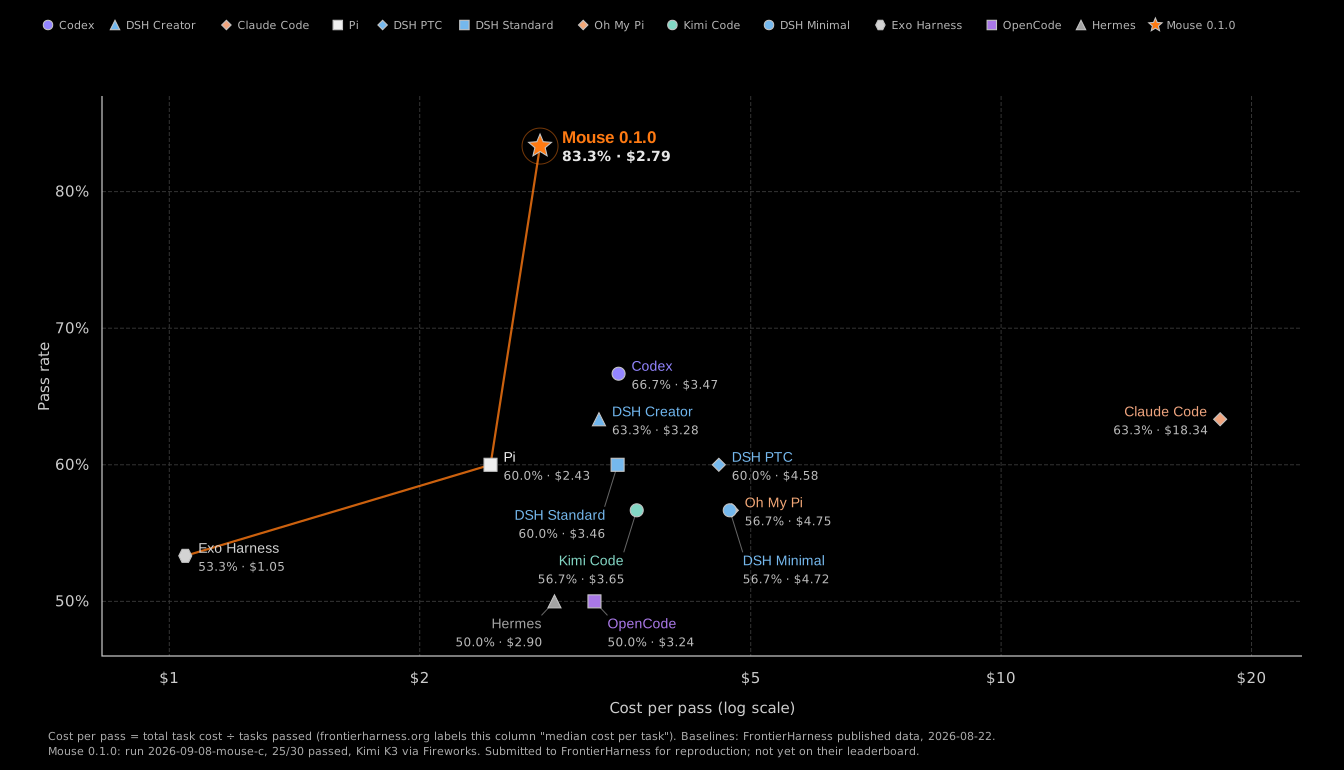
| Harness | Pass rate | Cost per pass | Cache hit, median | Time per task, median |
|---|---|---|---|---|
| Mouse 0.1.0 | 83.3% (25/30) | $2.79 | 90.6% | 6m 24s |
| Codex | 66.7% (20/30) | $3.47 | 88.0% | 6m 43s |
| Claude Code | 63.3% (19/30) | $18.34 | 67.8% | 9m 38s |
| DSH Creator | 63.3% (19/30) | $3.28 | 84.3% | 6m 44s |
| Pi | 60.0% (18/30) | $2.43 | 79.4% | 7m 33s |
| OpenCode | 50.0% (15/30) | $3.24 | 78.4% | 6m 27s |
FrontierHarness's published numbers. The benchmark uses the same model, Kimi K3, so the evaluation comes from the harness's ability to complete tasks.
Install
Mouse needs Node 22 and the opencode binary with a model provider configured. OpenCode 1.18.27 is the version the benchmark ran on; 1.14.22 is also exercised in CI.
From source, today:
git clone https://github.com/mousedev/mouse-harness && cd mouse-harness
pnpm install --frozen-lockfile --ignore-scripts
pnpm bundle                                    # -> packages/cli/dist/mouse.mjs, one file
npm i -g opencode-ai@1.18.27                   # OpenCode's postinstall links its binary; do not pass --ignore-scripts
alias mouse="node $PWD/packages/cli/dist/mouse.mjs"
From npm, once 0.1.1 is published (docs/releasing.md has the steps):
npm i -g --ignore-scripts @mousedev/harness
npm i -g opencode-ai@1.18.27
Then, in a repository:
mouse doctor --model openrouter/moonshotai/kimi-k3
mouse run "Add rate limiting to /api/upload and cover it with tests" --model openrouter/moonshotai/kimi-k3
doctor shows where it found OpenCode, whether the provider key is set, and which checks Mouse detected. Any OpenCode model id works with --model; MOUSE_MODEL in the environment sets it once. The quickstart walks through a first run and what the output means.
How it works
Mouse runs a completion loop after every model turn, which enforces a set of rules and verification that significantly improves the agents ability to correctly complete task. For this reason it generates the highest pass rate on difficult and long running tasks.
- Inspect the changes. The workspace is fingerprinted with
git statusand a diff against the starting commit. If nothing changed, the model is told so and asked to continue. - Run the checks. When files changed, the repository's checks run. Failing output goes back to the model with the instruction to fix the failure and leave the tests alone.
- Scan for deleted tests. Deleting a test, spec, or workflow file that existed at the starting commit ends the run as
blocked. Co-located tests (foo.test.ts,x_test.go,conftest.py) and check configuration (vitest.config.ts,pytest.ini,Makefile) count too. The loop enforces this in code, not in the prompt. - Audit the requirements. Once the checks pass, the model is asked to go back over the original task and end its reply with a
MOUSE_AUDITblock, one line per requirement, each markeddonewith the evidence ortodo. Anytodosends it round again.
A run is satisfied when the workspace changed, no checks have failed, and the audit has no more todo items. It stops early when progress stalls for a configurable number of rounds or step budget runs our. You can also hit Ctrl-C. Every stop reason has its own exit code, which is documented.
Mouse is designed to enforce certain behaviors from the agent, which prevents an agent from cheating or hallucinating on a task or goal. The Test scan is specifically useful for long running agents that try to hide their failed tests or work. Because Mouse stays in the same session, the majority of the re-work is cached, and cheap.
Each run writes a JSONL trace under ~/.mouse/runs/, outside the repository. Nothing is written into your repository, and with the default local profile nothing is written under ~/.config/opencode either.
Completion loop · Audit protocol · Trace format
Repository checks
Mouse detects checks from the repository's manifests. No Mouse configuration file is needed.
| Repository | Checks |
|---|---|
| JavaScript / TypeScript | package.json scripts: build or typecheck, test, lint, run with the package manager the lockfile names |
| Python | pytest, through uv or poetry when their lockfile is present |
| Go | go test ./... |
| Rust | cargo test |
| Make | make test, when nothing else was detected |
To declare your own, run mouse init. It writes a .mouse/policy.json skeleton with every default spelled out; docs/config.md has the field reference, the flags, and the environment variables.
Commands
| Command | Purpose |
|---|---|
mouse run | Run a task, from a string or --instruction-file |
mouse doctor | Report the engine, the model's key, the git state, the detected checks, and the trace directory |
mouse init | Write a .mouse/policy.json skeleton |
mouse config | Print the OpenCode config Mouse sends (local), or write the bench profile's opencode.json |
mouse --version | mouse/<version> opencode/<version> |
Flags
mouse run ["task" | --instruction-file F]
          [--model provider/model] [--workspace DIR]
          [--profile local|bench] [--yolo]
          [--format text|json] [--log FILE] [--session ID]
          [--max-wall-sec N] [--max-steps N]
          [--non-progress-rounds N] [--idle-timeout-sec N]
          [--config-home DIR] [--opencode-bin PATH]
mouse config [--profile local|bench] [--model M] [--out DIR]
mouse init [--workspace DIR]
mouse doctor [--model M] [--workspace DIR] [--strict-compat]
mouse --version
Defaults come from .mouse/policy.json or, without one, from the built-in policy: 780 seconds of wall clock, 600 model steps, 3 non-progress rounds, a 600 second idle watchdog per turn. Flags win over the policy file. Without a terminal, --format json is the default and OpenCode's event stream passes through on stdout unchanged, which is what benchmark runners parse.
Exit codes
| Code | Meaning |
|---|---|
| 0 | Satisfied: the workspace changed, no check failed, the audit is clean |
| 1 | Harness error |
| 2 | Invalid usage |
| 3 | Budget: stalled, wall clock, or step ceiling |
| 4 | Blocked: a test, spec, workflow, or check-configuration file was deleted |
| 130 | Interrupted |
Permissions
Mouse runs with the permissions of the user who starts it and has no sandbox of its own. Use a container for a repository you do not trust.
| How you run Mouse | What OpenCode enforces |
|---|---|
In a terminal, without --yolo | The build agent's permission block, including the bash deny patterns from .mouse/policy.json |
With --yolo | Nothing. Mouse passes --dangerously-skip-permissions to OpenCode |
Without a terminal on stdin (CI, cron, < /dev/null) | The same as --yolo, with one warning on stderr. opencode run reads no stdin, so a prompt could never be answered. Piping only stdout (mouse run ... | tee) keeps the prompts |
Packages
| Package | Contents | Runtime dependencies |
|---|---|---|
@mousedev/harness-core | The completion loop, task-state bookkeeping, the agent prompt, check detection, policy parsing, the workspace probe, the trace writer | None |
@mousedev/harness-opencode | The opencode run transport, the local and bench profiles, the compat manifest, the tool-output prune plugin, binary discovery | core, @opencode-ai/sdk |
@mousedev/harness | The mouse command, shipped as one bundled file | core, the OpenCode adapter |
The three share a version and release together. examples/sdk-run drives the loop from your own code in forty lines; examples/policy-file is a complete .mouse/policy.json; examples/harbor-run runs one benchmark task the way FrontierHarness does.
What Mouse is and is not
This repository is just for the harness. Skills live in .agents/skills/ inside your repository. There is no plugin system or marketplace, and no telemetry, install ping, or update check.
The hosted product at mouse.dev adds sandboxes, a relay, and a mobile app on top of this loop. That code is separate and closed source.
Roadmap
Not in 0.1, in rough order:
- Interactive permission prompts routed to the terminal, and an
--automode that answers them from the policy file. mouse servefor driving a run over a socket.
Changes to the loop, the prompt, or the profiles start as an issue; see CONTRIBUTING.md.
Contributing
Read CONTRIBUTING.md first. It is short, and the rules about prompt bytes and the golden snapshot are the ones that matter. Report security issues privately per SECURITY.md. Questions go to Discussions or SUPPORT.md.
Documentation · Changelog · Blog: Mouse on FrontierHarness
License
MIT. Attribution for the work Mouse builds on is in NOTICE. Mouse is an independent project, not affiliated with or endorsed by OpenCode or Anomaly.
Contributors

10 commits

1 commits
See what people are saying
Hacker News (2)
Similar repos


Languages
TypeScript
61.5%
Python
16.8%
JavaScript
9.1%
HTML
8.0%
Shell
4.6%
Open source harness for long-running coding agents.
0
stars
11
commits
TypeScript
primary language
Sep 13, 2026
updated
README
An open source harness for long-running coding agents.
Mouse is built on OpenCode.
www.mouse.dev
Benchmark · Install · How it works · Commands · Packages · Docs
FrontierHarness Eval
Mouse passed 25 of the 30 tasks on FrontierHarness Eval with Kimi K3 on 2026-09-08.
| Harness | Pass rate | Cost per pass | Cache hit, median | Time per task, median |
|---|---|---|---|---|
| Mouse 0.1.0 | 83.3% (25/30) | $2.79 | 90.6% | 6m 24s |
| Codex | 66.7% (20/30) | $3.47 | 88.0% | 6m 43s |
| Claude Code | 63.3% (19/30) | $18.34 | 67.8% | 9m 38s |
| DSH Creator | 63.3% (19/30) | $3.28 | 84.3% | 6m 44s |
| Pi | 60.0% (18/30) | $2.43 | 79.4% | 7m 33s |
| OpenCode | 50.0% (15/30) | $3.24 | 78.4% | 6m 27s |
FrontierHarness's published numbers. The benchmark uses the same model, Kimi K3, so the evaluation comes from the harness's ability to complete tasks.
Install
Mouse needs Node 22 and the opencode binary with a model provider configured. OpenCode 1.18.27 is the version the benchmark ran on; 1.14.22 is also exercised in CI.
From source, today:
git clone https://github.com/mousedev/mouse-harness && cd mouse-harness
pnpm install --frozen-lockfile --ignore-scripts
pnpm bundle                                    # -> packages/cli/dist/mouse.mjs, one file
npm i -g opencode-ai@1.18.27                   # OpenCode's postinstall links its binary; do not pass --ignore-scripts
alias mouse="node $PWD/packages/cli/dist/mouse.mjs"
From npm, once 0.1.1 is published (docs/releasing.md has the steps):
npm i -g --ignore-scripts @mousedev/harness
npm i -g opencode-ai@1.18.27
Then, in a repository:
mouse doctor --model openrouter/moonshotai/kimi-k3
mouse run "Add rate limiting to /api/upload and cover it with tests" --model openrouter/moonshotai/kimi-k3
doctor shows where it found OpenCode, whether the provider key is set, and which checks Mouse detected. Any OpenCode model id works with --model; MOUSE_MODEL in the environment sets it once. The quickstart walks through a first run and what the output means.
How it works
Mouse runs a completion loop after every model turn, which enforces a set of rules and verification that significantly improves the agents ability to correctly complete task. For this reason it generates the highest pass rate on difficult and long running tasks.
- Inspect the changes. The workspace is fingerprinted with
git statusand a diff against the starting commit. If nothing changed, the model is told so and asked to continue. - Run the checks. When files changed, the repository's checks run. Failing output goes back to the model with the instruction to fix the failure and leave the tests alone.
- Scan for deleted tests. Deleting a test, spec, or workflow file that existed at the starting commit ends the run as
blocked. Co-located tests (foo.test.ts,x_test.go,conftest.py) and check configuration (vitest.config.ts,pytest.ini,Makefile) count too. The loop enforces this in code, not in the prompt. - Audit the requirements. Once the checks pass, the model is asked to go back over the original task and end its reply with a
MOUSE_AUDITblock, one line per requirement, each markeddonewith the evidence ortodo. Anytodosends it round again.
A run is satisfied when the workspace changed, no checks have failed, and the audit has no more todo items. It stops early when progress stalls for a configurable number of rounds or step budget runs our. You can also hit Ctrl-C. Every stop reason has its own exit code, which is documented.
Mouse is designed to enforce certain behaviors from the agent, which prevents an agent from cheating or hallucinating on a task or goal. The Test scan is specifically useful for long running agents that try to hide their failed tests or work. Because Mouse stays in the same session, the majority of the re-work is cached, and cheap.
Each run writes a JSONL trace under ~/.mouse/runs/, outside the repository. Nothing is written into your repository, and with the default local profile nothing is written under ~/.config/opencode either.
Completion loop · Audit protocol · Trace format
Repository checks
Mouse detects checks from the repository's manifests. No Mouse configuration file is needed.
| Repository | Checks |
|---|---|
| JavaScript / TypeScript | package.json scripts: build or typecheck, test, lint, run with the package manager the lockfile names |
| Python | pytest, through uv or poetry when their lockfile is present |
| Go | go test ./... |
| Rust | cargo test |
| Make | make test, when nothing else was detected |
To declare your own, run mouse init. It writes a .mouse/policy.json skeleton with every default spelled out; docs/config.md has the field reference, the flags, and the environment variables.
Commands
| Command | Purpose |
|---|---|
mouse run | Run a task, from a string or --instruction-file |
mouse doctor | Report the engine, the model's key, the git state, the detected checks, and the trace directory |
mouse init | Write a .mouse/policy.json skeleton |
mouse config | Print the OpenCode config Mouse sends (local), or write the bench profile's opencode.json |
mouse --version | mouse/<version> opencode/<version> |
Flags
mouse run ["task" | --instruction-file F]
          [--model provider/model] [--workspace DIR]
          [--profile local|bench] [--yolo]
          [--format text|json] [--log FILE] [--session ID]
          [--max-wall-sec N] [--max-steps N]
          [--non-progress-rounds N] [--idle-timeout-sec N]
          [--config-home DIR] [--opencode-bin PATH]
mouse config [--profile local|bench] [--model M] [--out DIR]
mouse init [--workspace DIR]
mouse doctor [--model M] [--workspace DIR] [--strict-compat]
mouse --version
Defaults come from .mouse/policy.json or, without one, from the built-in policy: 780 seconds of wall clock, 600 model steps, 3 non-progress rounds, a 600 second idle watchdog per turn. Flags win over the policy file. Without a terminal, --format json is the default and OpenCode's event stream passes through on stdout unchanged, which is what benchmark runners parse.
Exit codes
| Code | Meaning |
|---|---|
| 0 | Satisfied: the workspace changed, no check failed, the audit is clean |
| 1 | Harness error |
| 2 | Invalid usage |
| 3 | Budget: stalled, wall clock, or step ceiling |
| 4 | Blocked: a test, spec, workflow, or check-configuration file was deleted |
| 130 | Interrupted |
Permissions
Mouse runs with the permissions of the user who starts it and has no sandbox of its own. Use a container for a repository you do not trust.
| How you run Mouse | What OpenCode enforces |
|---|---|
In a terminal, without --yolo | The build agent's permission block, including the bash deny patterns from .mouse/policy.json |
With --yolo | Nothing. Mouse passes --dangerously-skip-permissions to OpenCode |
Without a terminal on stdin (CI, cron, < /dev/null) | The same as --yolo, with one warning on stderr. opencode run reads no stdin, so a prompt could never be answered. Piping only stdout (mouse run ... | tee) keeps the prompts |
Packages
| Package | Contents | Runtime dependencies |
|---|---|---|
@mousedev/harness-core | The completion loop, task-state bookkeeping, the agent prompt, check detection, policy parsing, the workspace probe, the trace writer | None |
@mousedev/harness-opencode | The opencode run transport, the local and bench profiles, the compat manifest, the tool-output prune plugin, binary discovery | core, @opencode-ai/sdk |
@mousedev/harness | The mouse command, shipped as one bundled file | core, the OpenCode adapter |
The three share a version and release together. examples/sdk-run drives the loop from your own code in forty lines; examples/policy-file is a complete .mouse/policy.json; examples/harbor-run runs one benchmark task the way FrontierHarness does.
What Mouse is and is not
This repository is just for the harness. Skills live in .agents/skills/ inside your repository. There is no plugin system or marketplace, and no telemetry, install ping, or update check.
The hosted product at mouse.dev adds sandboxes, a relay, and a mobile app on top of this loop. That code is separate and closed source.
Roadmap
Not in 0.1, in rough order:
- Interactive permission prompts routed to the terminal, and an
--automode that answers them from the policy file. mouse servefor driving a run over a socket.
Changes to the loop, the prompt, or the profiles start as an issue; see CONTRIBUTING.md.
Contributing
Read CONTRIBUTING.md first. It is short, and the rules about prompt bytes and the golden snapshot are the ones that matter. Report security issues privately per SECURITY.md. Questions go to Discussions or SUPPORT.md.
Documentation · Changelog · Blog: Mouse on FrontierHarness
License
MIT. Attribution for the work Mouse builds on is in NOTICE. Mouse is an independent project, not affiliated with or endorsed by OpenCode or Anomaly.
See what people are saying
Hacker News (2)
Similar repos
Contributors
10 commits
1 commits
Languages
TypeScript
61.5%
Python
16.8%
JavaScript
9.1%
HTML
8.0%
Shell
4.6%