Open-source diskless boot server for Windows 11 & Linux. PXE/iSCSI from one golden image, clean on every boot. One static binary. Secure Boot + TPM, works with FACEIT. For internet cafés & labs.
See the code

Network-boot a room of PCs from one golden image — every reboot comes up clean. One static Rust binary on any Linux server, DHCP / TFTP / iSCSI / web admin built in. For internet cafés, gaming centers and school labs (≈10–30 PCs).
Guides: broom.hainth.edu.vn
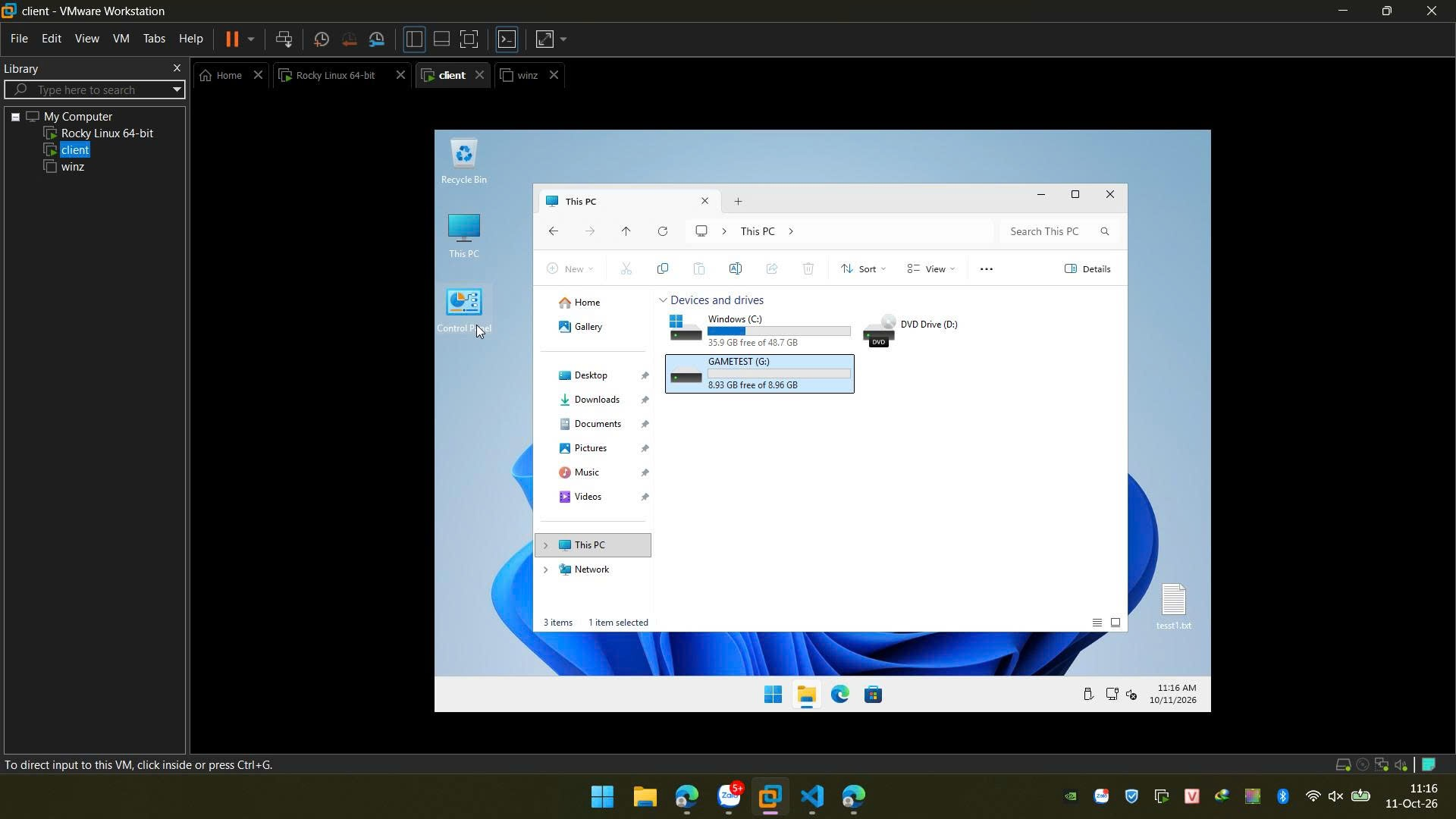
Windows 11 client booted from Broom — C: is the shared golden, G: a games disk:
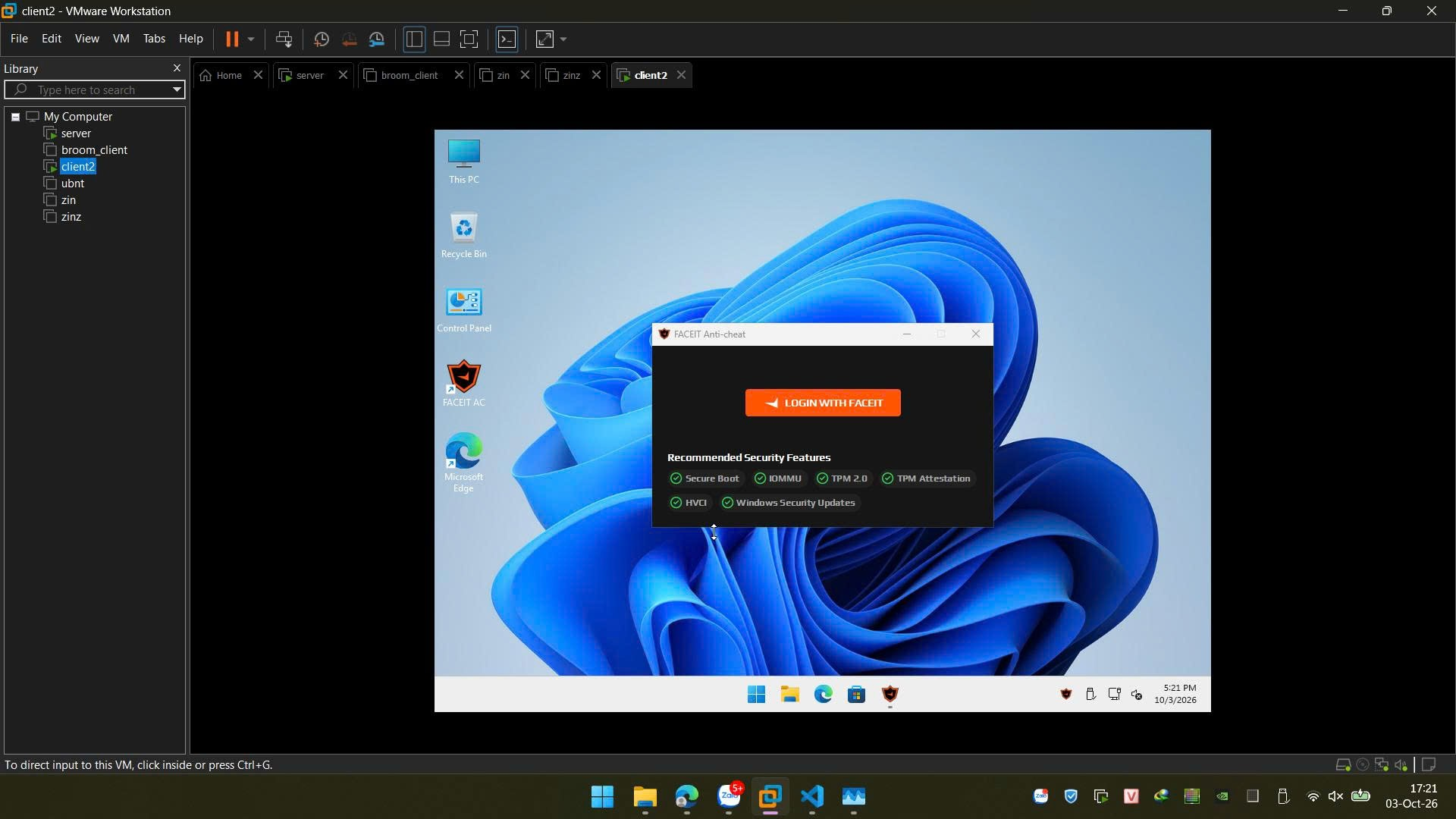
FACEIT Anti-Cheat on a Broom client — Secure Boot, IOMMU, TPM 2.0, TPM attestation and HVCI all pass:
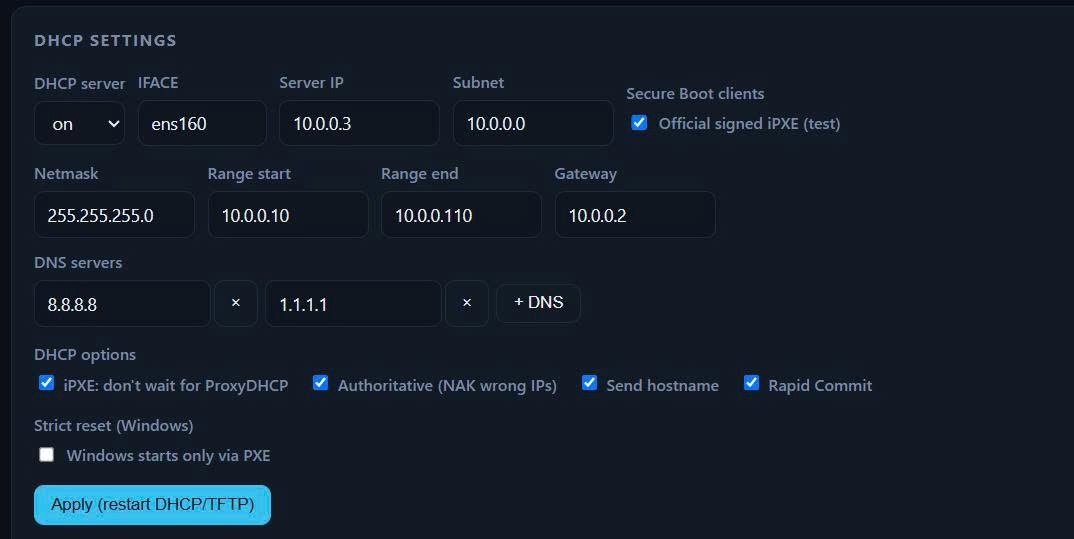
Web admin — DHCP settings:
| Broom | Commercial diskless suites (e.g. CCBoot) | LTSP | FOG Project | |
|---|---|---|---|---|
| Open source | yes (Apache-2.0) | no | yes | yes |
| Server | any x86_64 Linux, one binary | Windows | Linux | Linux |
| Windows clients | Windows 11 Pro | yes | no | yes |
| Linux clients | yes | — | yes | yes |
| Model | diskless, reset every boot | diskless | netboot thin/fat clients | imaging (clone onto the local disk) |
overlayroot (writeback on the SSD, reset every boot).golden.vhdx cached on the SSD, a child VHDX that resets every boot. The server never stores
golden.vhdx: it is made from the image's raw disk while it is downloaded (a VHDX is a small header + the raw
disk's blocks), so a publish costs one read of the image (its sha256), not a 50 GB copy. With the image's cache set
to RAM, the server keeps a compressed copy of golden.vhdx in memory and every download comes from it — a room
fetching a new golden at once never hammers the server's disk.What a Windows client loads on every boot, before Windows itself starts from its SSD:
| Step | Size / time |
|---|---|
| iPXE (TFTP, the only file over TFTP) | ~0.3 MB |
| Stage kernel + initrd (HTTP) | ~15 MB + ~38 MB |
| Stage work: reset the session, sync scripts / drivers, set the boot order | about 1 s |
Deploy into a fixed directory (images and the database live next to the binary — don't run from /tmp).
sudo mkdir -p /opt/bootrom && cd /opt/bootrom
sudo curl -fLO https://github.com/morningstar-sudo/broom/releases/latest/download/bootrom-mgmt
sudo chmod +x bootrom-mgmt
# First run with no network config: setup detects the network, then serves (nothing to install).
# Any old dnsmasq / tftpd-hpa / targetcli restore service is stopped and disabled automatically.
sudo ./bootrom-mgmt
On its first start a release binary downloads its broom-assets.zip (web UI, iPXE, scripts — ~1 MB) from the same
release, keeps it next to the binary and loads it into RAM at every start; without it the server does not start. The
Windows client stage (kernel + initrd + Secure Boot shim, broom-stage.tar.gz) is fetched the same way on the first
Windows publish. Offline server: download broom-assets.zip and broom-stage.tar.gz of the same release
elsewhere and copy them next to the binary; the stage is unpacked by the next Windows publish. A locally built binary
has the assets embedded and no pinned stage: see Build for making its bundle.
Then open http://<server-ip>/:
no admin password yet — open http://… and enter the setup token: …); the first-run page asks for it, so only
someone who can see the server's console/log can claim the install. Every admin action needs a login.snponly.efi (Secure Boot clients: sb/snponly-shim.efi). broom always serves iPXE over TFTP; iPXE
then fetches autoexec.ipxe from it, which chains the boot menu; or/boot*, /tftp, license, driver and cache-list fetch) stay open — a PXE client can't log in.Client machines: UEFI, Secure Boot off (or on — see Secure Boot below), PXE first in the boot order (required for the reset-on-boot). Register them (Machines page) before their first Windows boot: the stage partitions the SSD by itself only on a registered machine with exactly one internal disk. An unknown machine (or one with several disks) asks on its screen which disk to wipe — type its name, or press Enter to leave the disks alone. Linux images on such a machine keep their writes in RAM (zram) instead of touching a disk.
One Broom SSD per machine, shared by Windows and Linux images (other disks stay normal disks):
p1 BROOMEFI 512M | p2 BROOMWIN (Windows) | p3 broomwb 30G + p4 broomcache (Linux). Whichever OS boots first lays
it out; the other only formats its own partitions, so switching images never wipes the disk. Every image a machine
boots keeps its copy there, so switching back is instant: Windows images in broom\img.<image>\ (the one booting
sits at the top of broom\), Linux images as <image>.img in broomcache. On every boot the machine asks the server
which images it may keep (/api/cache-list) and removes the others (deleted, set to not use the SSD, republished);
when space runs out, the copy unused the longest goes.
SSD on/off per Linux image (Images page): off = "one-time" — nothing touches the SSD, the golden is read over the network and the session's writes stay in RAM. Windows images always use the SSD (they boot from a VHDX on it).
The Linux part is sized from the Linux goldens that use the SSD (30 GB writeback + their total + 5 GB); with none,
Windows gets the whole disk. The split is set when the disk is laid out and Windows comes first: the Linux side never
lays out a disk that holds Windows' partitions — on a disk laid out before any Linux image existed (or too small for
both) Linux images run from RAM (writeback in zram, golden over iSCSI), and Linux goldens that later outgrow their
part evict each other (or boot over iSCSI). To re-split, wipe the disk (wipefs -a) and boot again.
sudo ./bootrom-mgmt install-service            # flags after it (e.g. --port 8080) go into the unit
journalctl -u bootrom-mgmt -f                  # logs; the first-run setup token is printed here too
Writes /etc/systemd/system/bootrom-mgmt.service (runs the binary from its own directory, restarts on failure,
keeps any BOOTROM_* / RUST_LOG set in your shell), then enables and starts it. Stop a foreground instance first —
both want ports 67/69/80. To upgrade: systemctl stop bootrom-mgmt, replace the binary, systemctl start bootrom-mgmt.
Secure Boot: tick Secure Boot clients on the Network page. Clients then get the official iPXE signed
by the iPXE project (mgmt/ipxe/signed/, via its Microsoft-signed shim) instead of broom's own build, and the kernels
boot through Ubuntu's Microsoft-signed shim — no MOK enrollment, every link is signed by a key the shims already
trust: the Windows stage runs Ubuntu's Canonical-signed generic kernel from the
stage bundle (whatever distro/kernel the server has), and Ubuntu goldens' own kernels pass the same shim. Goldens of
other distros need their kernel signed for that shim. On the clients: enable
Secure Boot and the "Microsoft 3rd-party UEFI CA" (often off on Secured-core PCs). The menu footer (Host / IP / MAC)
then shows as lines under the images. Untick to go back to broom's own iPXE. TPM 2.0, VBS / Memory integrity (HVCI)
and IOMMU work on the clients too — broom-prep-win turns on VBS + HVCI in the golden (runs where the client has VT-x);
drivers in the golden must be HVCI-compatible (e.g. the VMware e1000 NIC driver is blocked — use e1000e).
Build the golden in a VM, power it off, then upload the whole VM folder (only .vmx / .vmdk are
sent, in parallel 8 MB chunks with retry) — or a single .vmdk / .img / .zip.
Linux — inside the VM:
curl -fsSL http://<server>/broom-prep | sudo bash
Power off → upload (OS = Linux, cache disk or RAM).
Windows 11 Pro — set the guest user + password (Settings → Guest user), then run inside the VM in Audit Mode (PowerShell as Admin; also shown on the Images page):
irm http://<server>/broom-prep-win | iex
The script carries the guest password and is readable by anyone on the boot LAN (like the golden itself). The VM syspreps and powers off by itself → upload (OS = Windows).
Base build on each machine: on its first boot (and after a new golden, a rename or a driver change) every Windows machine specializes the golden once and saves that as its base; every later boot resets to it. By default the base is saved automatically (the machine restarts by itself after the first logon). Tick Base mode on an image when a technician must set something up on each machine first (e.g. an anti-cheat's first run): the first logon then waits on the desktop, and the restart the technician does saves the base — so don't leave a machine in base mode to guests.
Strict reset (Network page): Windows can then only start through PXE — the SSD's Windows boot entries are kept out of the boot order and Windows deletes its boot loader from the SSD after each start (the stage puts it back on the next PXE boot). Without it, a machine whose PXE fails (cable out, server down) still boots Windows from the SSD, without the reset; the Machines page flags such boots ("not reset"). The guest account is a local administrator (games need it), so a determined guest can still interfere with the boot setup of the machine they sit at — keep the boot LAN segmented and check the flag.
A machine's group decides what it gets; everything set for no group goes to every machine (registered or not). The Groups page shows each group with its machines, images, games disks and driver packages, and edits them in one place (create / rename / delete a group; tick what belongs to it). Removing the last group of an image or games disk asks first: it would then go to every machine.
/api/cache-list answers per machine); an
image taken off its group is removed from its SSD at its next boot. Each image is downloaded once and kept (Windows:
broom\img.<image>\ with its base; Linux: the cache partition); the one unused the longest goes when space runs out.Everything a guest writes (C:, games drives) lands on the machine's SSD until the next boot. Settings → SSD room:
the stage frees Keep free GB at each boot (parked images, unused the longest first); during the session a watchdog
(broom-watch.ps1) checks the SSD every 15 s — below Warn it tells the guest and flags the machine (SSD full on the
Machines page), below Restart it restarts the machine after 60 s. Without it Windows stops with a blue screen once
the SSD is full (it can't grow its boot VHDX) — and C: shows the VHDX's virtual free space, so Windows never warns.
Big writes come mostly from launchers updating games on the machines: let only the games disk's update machine do it.
Images → Games disks: disks on the server (games/<name>/games.img, sparse) for the Windows machines — game
libraries live there instead of in the golden. A machine gets every disk of its group plus those for all machines, each
under its drive letter (two disks a machine could both get can't share one). The iSCSI daemon serves them read-only;
each machine opens the games.vhdx inside through a differencing VHDX on its own SSD (broom\games-<name>-child.vhdx,
deleted every boot), so a guest's writes stay on that machine until reboot and a games disk never changes. Mapping
changes apply at each machine's next boot; nothing in the golden changes.
To install or update games: pick the disk's update machine → (re)boot it → that drive is writable there (its writes
are kept apart on the server) → install → shut it down properly → Save: a new version (g1, g2…) at once, no
copy — the changed blocks become a layer over games.img. Each machine gets the new version at its next boot; machines
already playing keep theirs. Once no machine has used an older version for 10 minutes, the layers are merged into
games.img in the background. A new disk is formatted by its first update machine; the size can only grow (the update
machine extends the drive on its next boot). No rollback for a games disk — back up its games.img.
The Windows scripts (broom-done, broom-bootorder, broom-games, broom-watch) are the server's, not the images': written to
tftp/broom-scripts/ at every start and checked by the stage on every boot, so a new version reaches every machine
without a publish. Images published before this version need Publish once to switch over.
storage/files/): instant, and free until the image gets another golden — from then on each version kept
holds its whole golden on disk, until deleted. An upload's first golden is saved as v1 by itself. Versions made by
older releases (4 MB chunks) still restore. → New image turns a version into a separate image on the list (no
extra disk space) and publishes it.<name>.vmx + <name>.vmdk) to edit the golden again —
download both into one folder, open the .vmx, edit, run broom-prep again, upload. Needs free space on the server
≈ the golden size. Windows: works for images uploaded with this version or later (publish trims the boot partitions
from the golden; they are now kept aside for the export).Everything lives next to the binary:
/opt/bootrom/
├── bootrom-mgmt     # the binary
├── bootrom.db       # config, images, machines, leases (SQLite)
├── images/<name>/   # image.img = golden (raw, sparse)
├── storage/         # image versions (hard links to the goldens + manifests)
├── games/<name>/    # games.img = a Windows games disk; layer-N/ = newer versions not merged yet; update.* = unsaved
├── tftp/            # boot files (kernel/initrd, Windows templates, stage) — served over HTTP /tftp + TFTP
└── work/            # scratch for publish steps
Environment overrides: BOOTROM_HOME (the whole tree), BOOTROM_IMAGES_DIR / BOOTROM_STORAGE_DIR
(e.g. a bigger disk), BOOTROM_DB=sqlite:///path/bootrom.db.
Logs go to stdout (client boots, DHCP/TFTP, publish steps, config changes); warnings and errors to
stderr. RUST_LOG=debug also logs every external command. Under systemd: journalctl -u bootrom-mgmt -f.
| What | Why | How |
|---|---|---|
bootrom.db | config, admin password, machines + license keys, images list | sqlite3 bootrom.db ".backup /backup/bootrom.db" while running (apt install sqlite3 / dnf install sqlite), or stop the service and copy bootrom.db* (incl. -wal) |
images/ | the goldens (image.img, sparse) | stop the service or pick a time with no publish running; cp --sparse=always -a / rsync -S |
storage/ | image versions (hard links + manifests) | same as images/ — copy both together, with cp -a / rsync -H (keeps the links) |
tftp/ | boot files | optional: rebuilt by Publish on each image (back it up to skip that) |
work/ | scratch | no |
Restore: stop the service, put the files back in the same layout, start it — iSCSI targets and RAM copies are
rebuilt at startup. bootrom.db holds license keys and the shared guest password: keep backups private.
Forgot the admin password: stop the service,
sqlite3 bootrom.db "DELETE FROM config WHERE key='admin_pw'", start it again → a new setup token is printed.
The web admin and every /api/* route sit behind a login (argon2 password, signed session cookie) plus
a Host-header check. The first password needs the setup token from the server log. Wrong passwords are
throttled per client IP (after 5 failures: locked 1 s, doubling up to 5 min). Settings → Admin password
changes it and signs out every other session. A few properties are inherent to diskless boot on a shared LAN and are handled by
network setup, not the binary:
:3260) and the golden over HTTP are readable by any host
on that segment — that is how diskless clients read their root. Put the workstations on their own VLAN,
away from guest Wi-Fi / unknown laptops, and don't bake real secrets into a golden.disk-cache images off-hours. A disk image serves one shared golden file and refuses to
publish or roll back while clients are connected (they would read changed bytes). Use the RAM (zram) cache to
update live: each publish gets a fresh RAM copy + target, and the old one is kept until its clients drop.build.cmd (runs in WSL Ubuntu-24.04; override with BROOM_WSL)../build.sh.Builds iPXE only when its patches or pinned commit changed (--ipxe forces it), then the release binary + unit
tests (--no-test to skip; --live also runs the root-only NTFS/ping/LVM tests). Output:
mgmt/dist/bootrom-mgmt. Don't build with sudo.
A local build has no pinned Windows stage bundle. To publish Windows images with it, make one on a machine with
initramfs-tools fdisk ntfs-3g dosfstools efibootmgr wget zstd shim-signed and a -generic kernel installed (a
throw-away Ubuntu VM or the CI runner does), then copy it next to the binary on the server:
sudo mgmt/dist/bootrom-mgmt build-stage /tmp/stage --kernel "$(ls /lib/modules | grep -- -generic$ | sort -V | tail -1)"
scp /tmp/stage/broom-stage.tar.gz root@server:/opt/bootrom/   # next to bootrom-mgmt; the next Windows publish unpacks it
Requirements: Rust stable via rustup + musl-tools (the binary is built static
with musl → runs on any x86_64 Linux, no glibc version issues; edition 2024, toolchain pinned in
mgmt/rust-toolchain.toml), plus git, gcc, make, perl, liblzma-dev.
iPXE is not vendored: mgmt/ipxe/build.sh fetches upstream iPXE at the commit in mgmt/ipxe/IPXE_COMMIT
(network needed the first time), applies mgmt/ipxe/patches/*.patch (boot menu layout, one-line banner)
into mgmt/ipxe/ipxe-src/ and builds snponly.efi, which is embedded in the binary.
Neither is committed. To change iPXE: commit inside ipxe-src/, regenerate the patches (command at the top of
mgmt/ipxe/build.sh), rebuild.
CI (.github/workflows/build.yml) runs ./build.sh --ipxe on every push / PR, builds the Windows stage bundle
(bootrom-mgmt build-stage on Ubuntu's generic kernel + shim-signed) and the assets bundle (bootrom-mgmt pack-assets), rebuilds the binary pinned to both (sha256 + URL appended to mgmt/stage.pin / mgmt/assets.pin,
embedded in the binary; with a pin, build.sh leaves the assets out of it) and publishes bootrom-mgmt,
broom-stage.tar.gz, broom-assets.zip, snponly.efi and SHA256SUMS; pushes to main are tagged
with their push time in UTC (e.g. 2026-09-19T17-05-25Z, also the release title) and released.
broom/
├── build.sh / build.cmd     # one-step build (Linux/WSL, or Windows→WSL)
└── mgmt/                     # the app (Rust / axum, single binary, web UI embedded)
    ├── src/                  # boot menu, images + publish, overlay (Linux), winstage + vhdx (Windows),
    │   │                     # dhcp / tftp / iscsi, machines, monitor + WOL, setup / preflight, auth
    │   ├── iscsid/           # the iSCSI target daemon (protocol, SCSI, compressed RAM copies)
    │   └── db/               # storage: `Db` trait + SQLite (swap in another driver by adding a file)
    ├── static/               # web admin (embedded in the binary): index.html + app.js, page fragments, login
    └── ipxe/                 # IPXE_COMMIT + patches/ → build.sh → snponly.efi embedded in the binary;
                              # signed/ = official Secure Boot iPXE (fetch-signed.sh)
Can I run an internet café or school lab on Windows 11 without installing Windows on each PC? Yes. Install Windows 11 Pro once in a VM, upload it to Broom, and every PC network-boots that image. Each boot starts from the same clean state; nothing a guest does survives a reboot.
Do the clients need a disk? Windows images need a local SSD: the image is cached there and the session's writes go there, which keeps boots fast and the server load low. Linux images can run with no disk at all (golden over iSCSI, writes in RAM).
What does the server need? Any x86_64 Linux machine, run as root. Broom is a single static binary — nothing else to install.
How many machines? Broom is built for small sites, about 10–30 machines per server.
How are games handled? Put game libraries on a games disk instead of the golden. Update them once from one machine; every machine gets the new version at its next boot, while machines already playing keep theirs.
Does it work with anti-cheat (FACEIT)? Yes — FACEIT Anti-Cheat runs on Broom clients with Secure Boot, TPM 2.0 and HVCI on (Network page → Secure Boot clients), with no MOK enrollment on the clients. If an anti-cheat needs a first run on each machine, tick Base mode on the image (see Adding a golden).
Is it free? Yes — Apache-2.0, free for commercial use (e.g. a paid internet café).
Broom is licensed under the Apache License 2.0 — see LICENSE and NOTICE.
The binary embeds iPXE, © the iPXE authors and licensed GPLv2 (with the UBDL exception): its
complete source is upstream iPXE at mgmt/ipxe/IPXE_COMMIT plus the changes in mgmt/ipxe/patches/
(also GPLv2 / UBDL), and mgmt/ipxe/signed/ holds unmodified official iPXE builds. iPXE is not covered by the
Apache license; the two apply to their respective parts.
broom-stage.tar.gz (Releases) is made of unmodified Ubuntu binaries (Linux kernel, busybox, ntfs-3g, wget, …;
mostly GPL) under their own licenses: SOURCES.txt inside it lists each package + version, whose source is in the
Ubuntu archive. See NOTICE.
Open-source diskless boot server for Windows 11 & Linux. PXE/iSCSI from one golden image, clean on every boot. One static binary. Secure Boot + TPM, works with FACEIT. For internet cafés & labs.
See the code
Network-boot a room of PCs from one golden image — every reboot comes up clean. One static Rust binary on any Linux server, DHCP / TFTP / iSCSI / web admin built in. For internet cafés, gaming centers and school labs (≈10–30 PCs).
Guides: broom.hainth.edu.vn
Windows 11 client booted from Broom — C: is the shared golden, G: a games disk:
FACEIT Anti-Cheat on a Broom client — Secure Boot, IOMMU, TPM 2.0, TPM attestation and HVCI all pass:
Web admin — DHCP settings:
| Broom | Commercial diskless suites (e.g. CCBoot) | LTSP | FOG Project | |
|---|---|---|---|---|
| Open source | yes (Apache-2.0) | no | yes | yes |
| Server | any x86_64 Linux, one binary | Windows | Linux | Linux |
| Windows clients | Windows 11 Pro | yes | no | yes |
| Linux clients | yes | — | yes | yes |
| Model | diskless, reset every boot | diskless | netboot thin/fat clients | imaging (clone onto the local disk) |
overlayroot (writeback on the SSD, reset every boot).golden.vhdx cached on the SSD, a child VHDX that resets every boot. The server never stores
golden.vhdx: it is made from the image's raw disk while it is downloaded (a VHDX is a small header + the raw
disk's blocks), so a publish costs one read of the image (its sha256), not a 50 GB copy. With the image's cache set
to RAM, the server keeps a compressed copy of golden.vhdx in memory and every download comes from it — a room
fetching a new golden at once never hammers the server's disk.What a Windows client loads on every boot, before Windows itself starts from its SSD:
| Step | Size / time |
|---|---|
| iPXE (TFTP, the only file over TFTP) | ~0.3 MB |
| Stage kernel + initrd (HTTP) | ~15 MB + ~38 MB |
| Stage work: reset the session, sync scripts / drivers, set the boot order | about 1 s |
Deploy into a fixed directory (images and the database live next to the binary — don't run from /tmp).
sudo mkdir -p /opt/bootrom && cd /opt/bootrom
sudo curl -fLO https://github.com/morningstar-sudo/broom/releases/latest/download/bootrom-mgmt
sudo chmod +x bootrom-mgmt
# First run with no network config: setup detects the network, then serves (nothing to install).
# Any old dnsmasq / tftpd-hpa / targetcli restore service is stopped and disabled automatically.
sudo ./bootrom-mgmt
On its first start a release binary downloads its broom-assets.zip (web UI, iPXE, scripts — ~1 MB) from the same
release, keeps it next to the binary and loads it into RAM at every start; without it the server does not start. The
Windows client stage (kernel + initrd + Secure Boot shim, broom-stage.tar.gz) is fetched the same way on the first
Windows publish. Offline server: download broom-assets.zip and broom-stage.tar.gz of the same release
elsewhere and copy them next to the binary; the stage is unpacked by the next Windows publish. A locally built binary
has the assets embedded and no pinned stage: see Build for making its bundle.
Then open http://<server-ip>/:
no admin password yet — open http://… and enter the setup token: …); the first-run page asks for it, so only
someone who can see the server's console/log can claim the install. Every admin action needs a login.snponly.efi (Secure Boot clients: sb/snponly-shim.efi). broom always serves iPXE over TFTP; iPXE
then fetches autoexec.ipxe from it, which chains the boot menu; or/boot*, /tftp, license, driver and cache-list fetch) stay open — a PXE client can't log in.Client machines: UEFI, Secure Boot off (or on — see Secure Boot below), PXE first in the boot order (required for the reset-on-boot). Register them (Machines page) before their first Windows boot: the stage partitions the SSD by itself only on a registered machine with exactly one internal disk. An unknown machine (or one with several disks) asks on its screen which disk to wipe — type its name, or press Enter to leave the disks alone. Linux images on such a machine keep their writes in RAM (zram) instead of touching a disk.
One Broom SSD per machine, shared by Windows and Linux images (other disks stay normal disks):
p1 BROOMEFI 512M | p2 BROOMWIN (Windows) | p3 broomwb 30G + p4 broomcache (Linux). Whichever OS boots first lays
it out; the other only formats its own partitions, so switching images never wipes the disk. Every image a machine
boots keeps its copy there, so switching back is instant: Windows images in broom\img.<image>\ (the one booting
sits at the top of broom\), Linux images as <image>.img in broomcache. On every boot the machine asks the server
which images it may keep (/api/cache-list) and removes the others (deleted, set to not use the SSD, republished);
when space runs out, the copy unused the longest goes.
SSD on/off per Linux image (Images page): off = "one-time" — nothing touches the SSD, the golden is read over the network and the session's writes stay in RAM. Windows images always use the SSD (they boot from a VHDX on it).
The Linux part is sized from the Linux goldens that use the SSD (30 GB writeback + their total + 5 GB); with none,
Windows gets the whole disk. The split is set when the disk is laid out and Windows comes first: the Linux side never
lays out a disk that holds Windows' partitions — on a disk laid out before any Linux image existed (or too small for
both) Linux images run from RAM (writeback in zram, golden over iSCSI), and Linux goldens that later outgrow their
part evict each other (or boot over iSCSI). To re-split, wipe the disk (wipefs -a) and boot again.
sudo ./bootrom-mgmt install-service            # flags after it (e.g. --port 8080) go into the unit
journalctl -u bootrom-mgmt -f                  # logs; the first-run setup token is printed here too
Writes /etc/systemd/system/bootrom-mgmt.service (runs the binary from its own directory, restarts on failure,
keeps any BOOTROM_* / RUST_LOG set in your shell), then enables and starts it. Stop a foreground instance first —
both want ports 67/69/80. To upgrade: systemctl stop bootrom-mgmt, replace the binary, systemctl start bootrom-mgmt.
Secure Boot: tick Secure Boot clients on the Network page. Clients then get the official iPXE signed
by the iPXE project (mgmt/ipxe/signed/, via its Microsoft-signed shim) instead of broom's own build, and the kernels
boot through Ubuntu's Microsoft-signed shim — no MOK enrollment, every link is signed by a key the shims already
trust: the Windows stage runs Ubuntu's Canonical-signed generic kernel from the
stage bundle (whatever distro/kernel the server has), and Ubuntu goldens' own kernels pass the same shim. Goldens of
other distros need their kernel signed for that shim. On the clients: enable
Secure Boot and the "Microsoft 3rd-party UEFI CA" (often off on Secured-core PCs). The menu footer (Host / IP / MAC)
then shows as lines under the images. Untick to go back to broom's own iPXE. TPM 2.0, VBS / Memory integrity (HVCI)
and IOMMU work on the clients too — broom-prep-win turns on VBS + HVCI in the golden (runs where the client has VT-x);
drivers in the golden must be HVCI-compatible (e.g. the VMware e1000 NIC driver is blocked — use e1000e).
Build the golden in a VM, power it off, then upload the whole VM folder (only .vmx / .vmdk are
sent, in parallel 8 MB chunks with retry) — or a single .vmdk / .img / .zip.
Linux — inside the VM:
curl -fsSL http://<server>/broom-prep | sudo bash
Power off → upload (OS = Linux, cache disk or RAM).
Windows 11 Pro — set the guest user + password (Settings → Guest user), then run inside the VM in Audit Mode (PowerShell as Admin; also shown on the Images page):
irm http://<server>/broom-prep-win | iex
The script carries the guest password and is readable by anyone on the boot LAN (like the golden itself). The VM syspreps and powers off by itself → upload (OS = Windows).
Base build on each machine: on its first boot (and after a new golden, a rename or a driver change) every Windows machine specializes the golden once and saves that as its base; every later boot resets to it. By default the base is saved automatically (the machine restarts by itself after the first logon). Tick Base mode on an image when a technician must set something up on each machine first (e.g. an anti-cheat's first run): the first logon then waits on the desktop, and the restart the technician does saves the base — so don't leave a machine in base mode to guests.
Strict reset (Network page): Windows can then only start through PXE — the SSD's Windows boot entries are kept out of the boot order and Windows deletes its boot loader from the SSD after each start (the stage puts it back on the next PXE boot). Without it, a machine whose PXE fails (cable out, server down) still boots Windows from the SSD, without the reset; the Machines page flags such boots ("not reset"). The guest account is a local administrator (games need it), so a determined guest can still interfere with the boot setup of the machine they sit at — keep the boot LAN segmented and check the flag.
A machine's group decides what it gets; everything set for no group goes to every machine (registered or not). The Groups page shows each group with its machines, images, games disks and driver packages, and edits them in one place (create / rename / delete a group; tick what belongs to it). Removing the last group of an image or games disk asks first: it would then go to every machine.
/api/cache-list answers per machine); an
image taken off its group is removed from its SSD at its next boot. Each image is downloaded once and kept (Windows:
broom\img.<image>\ with its base; Linux: the cache partition); the one unused the longest goes when space runs out.Everything a guest writes (C:, games drives) lands on the machine's SSD until the next boot. Settings → SSD room:
the stage frees Keep free GB at each boot (parked images, unused the longest first); during the session a watchdog
(broom-watch.ps1) checks the SSD every 15 s — below Warn it tells the guest and flags the machine (SSD full on the
Machines page), below Restart it restarts the machine after 60 s. Without it Windows stops with a blue screen once
the SSD is full (it can't grow its boot VHDX) — and C: shows the VHDX's virtual free space, so Windows never warns.
Big writes come mostly from launchers updating games on the machines: let only the games disk's update machine do it.
Images → Games disks: disks on the server (games/<name>/games.img, sparse) for the Windows machines — game
libraries live there instead of in the golden. A machine gets every disk of its group plus those for all machines, each
under its drive letter (two disks a machine could both get can't share one). The iSCSI daemon serves them read-only;
each machine opens the games.vhdx inside through a differencing VHDX on its own SSD (broom\games-<name>-child.vhdx,
deleted every boot), so a guest's writes stay on that machine until reboot and a games disk never changes. Mapping
changes apply at each machine's next boot; nothing in the golden changes.
To install or update games: pick the disk's update machine → (re)boot it → that drive is writable there (its writes
are kept apart on the server) → install → shut it down properly → Save: a new version (g1, g2…) at once, no
copy — the changed blocks become a layer over games.img. Each machine gets the new version at its next boot; machines
already playing keep theirs. Once no machine has used an older version for 10 minutes, the layers are merged into
games.img in the background. A new disk is formatted by its first update machine; the size can only grow (the update
machine extends the drive on its next boot). No rollback for a games disk — back up its games.img.
The Windows scripts (broom-done, broom-bootorder, broom-games, broom-watch) are the server's, not the images': written to
tftp/broom-scripts/ at every start and checked by the stage on every boot, so a new version reaches every machine
without a publish. Images published before this version need Publish once to switch over.
storage/files/): instant, and free until the image gets another golden — from then on each version kept
holds its whole golden on disk, until deleted. An upload's first golden is saved as v1 by itself. Versions made by
older releases (4 MB chunks) still restore. → New image turns a version into a separate image on the list (no
extra disk space) and publishes it.<name>.vmx + <name>.vmdk) to edit the golden again —
download both into one folder, open the .vmx, edit, run broom-prep again, upload. Needs free space on the server
≈ the golden size. Windows: works for images uploaded with this version or later (publish trims the boot partitions
from the golden; they are now kept aside for the export).Everything lives next to the binary:
/opt/bootrom/
├── bootrom-mgmt     # the binary
├── bootrom.db       # config, images, machines, leases (SQLite)
├── images/<name>/   # image.img = golden (raw, sparse)
├── storage/         # image versions (hard links to the goldens + manifests)
├── games/<name>/    # games.img = a Windows games disk; layer-N/ = newer versions not merged yet; update.* = unsaved
├── tftp/            # boot files (kernel/initrd, Windows templates, stage) — served over HTTP /tftp + TFTP
└── work/            # scratch for publish steps
Environment overrides: BOOTROM_HOME (the whole tree), BOOTROM_IMAGES_DIR / BOOTROM_STORAGE_DIR
(e.g. a bigger disk), BOOTROM_DB=sqlite:///path/bootrom.db.
Logs go to stdout (client boots, DHCP/TFTP, publish steps, config changes); warnings and errors to
stderr. RUST_LOG=debug also logs every external command. Under systemd: journalctl -u bootrom-mgmt -f.
| What | Why | How |
|---|---|---|
bootrom.db | config, admin password, machines + license keys, images list | sqlite3 bootrom.db ".backup /backup/bootrom.db" while running (apt install sqlite3 / dnf install sqlite), or stop the service and copy bootrom.db* (incl. -wal) |
images/ | the goldens (image.img, sparse) | stop the service or pick a time with no publish running; cp --sparse=always -a / rsync -S |
storage/ | image versions (hard links + manifests) | same as images/ — copy both together, with cp -a / rsync -H (keeps the links) |
tftp/ | boot files | optional: rebuilt by Publish on each image (back it up to skip that) |
work/ | scratch | no |
Restore: stop the service, put the files back in the same layout, start it — iSCSI targets and RAM copies are
rebuilt at startup. bootrom.db holds license keys and the shared guest password: keep backups private.
Forgot the admin password: stop the service,
sqlite3 bootrom.db "DELETE FROM config WHERE key='admin_pw'", start it again → a new setup token is printed.
The web admin and every /api/* route sit behind a login (argon2 password, signed session cookie) plus
a Host-header check. The first password needs the setup token from the server log. Wrong passwords are
throttled per client IP (after 5 failures: locked 1 s, doubling up to 5 min). Settings → Admin password
changes it and signs out every other session. A few properties are inherent to diskless boot on a shared LAN and are handled by
network setup, not the binary:
:3260) and the golden over HTTP are readable by any host
on that segment — that is how diskless clients read their root. Put the workstations on their own VLAN,
away from guest Wi-Fi / unknown laptops, and don't bake real secrets into a golden.disk-cache images off-hours. A disk image serves one shared golden file and refuses to
publish or roll back while clients are connected (they would read changed bytes). Use the RAM (zram) cache to
update live: each publish gets a fresh RAM copy + target, and the old one is kept until its clients drop.build.cmd (runs in WSL Ubuntu-24.04; override with BROOM_WSL)../build.sh.Builds iPXE only when its patches or pinned commit changed (--ipxe forces it), then the release binary + unit
tests (--no-test to skip; --live also runs the root-only NTFS/ping/LVM tests). Output:
mgmt/dist/bootrom-mgmt. Don't build with sudo.
A local build has no pinned Windows stage bundle. To publish Windows images with it, make one on a machine with
initramfs-tools fdisk ntfs-3g dosfstools efibootmgr wget zstd shim-signed and a -generic kernel installed (a
throw-away Ubuntu VM or the CI runner does), then copy it next to the binary on the server:
sudo mgmt/dist/bootrom-mgmt build-stage /tmp/stage --kernel "$(ls /lib/modules | grep -- -generic$ | sort -V | tail -1)"
scp /tmp/stage/broom-stage.tar.gz root@server:/opt/bootrom/   # next to bootrom-mgmt; the next Windows publish unpacks it
Requirements: Rust stable via rustup + musl-tools (the binary is built static
with musl → runs on any x86_64 Linux, no glibc version issues; edition 2024, toolchain pinned in
mgmt/rust-toolchain.toml), plus git, gcc, make, perl, liblzma-dev.
iPXE is not vendored: mgmt/ipxe/build.sh fetches upstream iPXE at the commit in mgmt/ipxe/IPXE_COMMIT
(network needed the first time), applies mgmt/ipxe/patches/*.patch (boot menu layout, one-line banner)
into mgmt/ipxe/ipxe-src/ and builds snponly.efi, which is embedded in the binary.
Neither is committed. To change iPXE: commit inside ipxe-src/, regenerate the patches (command at the top of
mgmt/ipxe/build.sh), rebuild.
CI (.github/workflows/build.yml) runs ./build.sh --ipxe on every push / PR, builds the Windows stage bundle
(bootrom-mgmt build-stage on Ubuntu's generic kernel + shim-signed) and the assets bundle (bootrom-mgmt pack-assets), rebuilds the binary pinned to both (sha256 + URL appended to mgmt/stage.pin / mgmt/assets.pin,
embedded in the binary; with a pin, build.sh leaves the assets out of it) and publishes bootrom-mgmt,
broom-stage.tar.gz, broom-assets.zip, snponly.efi and SHA256SUMS; pushes to main are tagged
with their push time in UTC (e.g. 2026-09-19T17-05-25Z, also the release title) and released.
broom/
├── build.sh / build.cmd     # one-step build (Linux/WSL, or Windows→WSL)
└── mgmt/                     # the app (Rust / axum, single binary, web UI embedded)
    ├── src/                  # boot menu, images + publish, overlay (Linux), winstage + vhdx (Windows),
    │   │                     # dhcp / tftp / iscsi, machines, monitor + WOL, setup / preflight, auth
    │   ├── iscsid/           # the iSCSI target daemon (protocol, SCSI, compressed RAM copies)
    │   └── db/               # storage: `Db` trait + SQLite (swap in another driver by adding a file)
    ├── static/               # web admin (embedded in the binary): index.html + app.js, page fragments, login
    └── ipxe/                 # IPXE_COMMIT + patches/ → build.sh → snponly.efi embedded in the binary;
                              # signed/ = official Secure Boot iPXE (fetch-signed.sh)
Can I run an internet café or school lab on Windows 11 without installing Windows on each PC? Yes. Install Windows 11 Pro once in a VM, upload it to Broom, and every PC network-boots that image. Each boot starts from the same clean state; nothing a guest does survives a reboot.
Do the clients need a disk? Windows images need a local SSD: the image is cached there and the session's writes go there, which keeps boots fast and the server load low. Linux images can run with no disk at all (golden over iSCSI, writes in RAM).
What does the server need? Any x86_64 Linux machine, run as root. Broom is a single static binary — nothing else to install.
How many machines? Broom is built for small sites, about 10–30 machines per server.
How are games handled? Put game libraries on a games disk instead of the golden. Update them once from one machine; every machine gets the new version at its next boot, while machines already playing keep theirs.
Does it work with anti-cheat (FACEIT)? Yes — FACEIT Anti-Cheat runs on Broom clients with Secure Boot, TPM 2.0 and HVCI on (Network page → Secure Boot clients), with no MOK enrollment on the clients. If an anti-cheat needs a first run on each machine, tick Base mode on the image (see Adding a golden).
Is it free? Yes — Apache-2.0, free for commercial use (e.g. a paid internet café).
Broom is licensed under the Apache License 2.0 — see LICENSE and NOTICE.
The binary embeds iPXE, © the iPXE authors and licensed GPLv2 (with the UBDL exception): its
complete source is upstream iPXE at mgmt/ipxe/IPXE_COMMIT plus the changes in mgmt/ipxe/patches/
(also GPLv2 / UBDL), and mgmt/ipxe/signed/ holds unmodified official iPXE builds. iPXE is not covered by the
Apache license; the two apply to their respective parts.
broom-stage.tar.gz (Releases) is made of unmodified Ubuntu binaries (Linux kernel, busybox, ntfs-3g, wget, …;
mostly GPL) under their own licenses: SOURCES.txt inside it lists each package + version, whose source is in the
Ubuntu archive. See NOTICE.





