Yet another keyboard remapping tool for X environment
Python
910
150 commits
updated May 16, 2023
xkeysnail is yet another keyboard remapping tool for X environment written in Python. It's like
xmodmap but allows more flexible remappings.
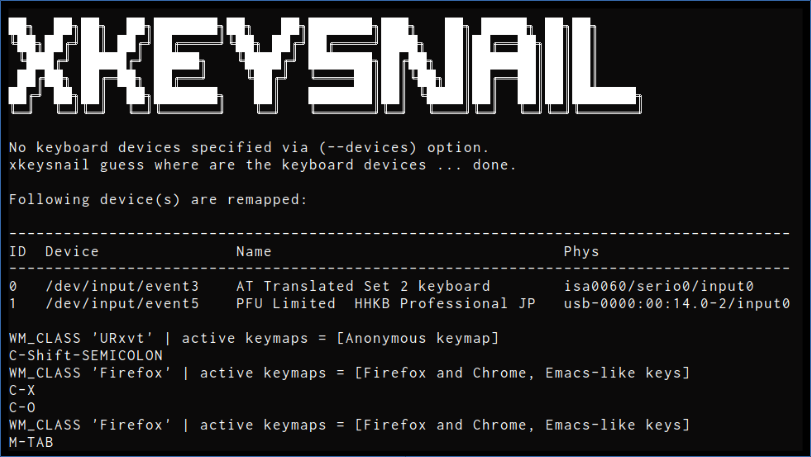
Ctrl+x Ctrl+c to Ctrl+qevdev and uinput), making remapping work in almost all the placessudo)The key remapping mechanism of xkeysnail is based on pykeymacs
(https://github.com/DreaminginCodeZH/pykeymacs).
Requires root privilege and Python 3.
sudo apt install python3-pip
sudo pip3 install xkeysnail

# If you plan to compile from source
sudo apt install python3-dev
sudo dnf install python3-pip
sudo pip3 install xkeysnail
# Add your user to input group if you don't want to run xkeysnail
# with sudo (log out and log in again to apply group change)
sudo usermod -a -G input $USER

# If you plan to compile from source
sudo dnf install python3-devel
# Some distros will need to compile evdev components
# and may fail to do so if gcc is not installed.
sudo pacman -Syy
sudo pacman -S gcc
# Some distros will need to compile evdev components
# and may fail to do so if gcc is not installed.
sudo eopkg install gcc
sudo eopkg install -c system.devel
git clone --depth 1 https://github.com/mooz/xkeysnail.git
cd xkeysnail
sudo pip3 install --upgrade .
sudo xkeysnail config.py
When you encounter the errors like Xlib.error.DisplayConnectionError: Can't connect to display ":0.0": b'No protocol specified\n' , try
xhost +SI:localuser:root
sudo xkeysnail config.py
If you want to specify keyboard devices, use --devices option:
sudo xkeysnail config.py --devices /dev/input/event3 'Topre Corporation HHKB Professional'
If you have hot-plugging keyboards, use --watch option.
If you want to suppress output of key events, use -q / --quiet option especially when running as a daemon.
config.py?(If you just need Emacs-like keybindings, consider to
use
example/config.py,
which contains Emacs-like keybindings).
Configuration file is a Python script that consists of several keymaps defined
by define_keymap(condition, mappings, name)
define_keymap(condition, mappings, name)Defines a keymap consists of mappings, which is activated when the condition
is satisfied.
Argument condition specifies the condition of activating the mappings on an
application and takes one of the following forms:
re.compile("YYY"))
mappings if the pattern YYY matches the WM_CLASS of the application.WM_CLASS via re.IGNORECASE (e.g. re.compile('Gnome-terminal', re.IGNORECASE))lambda wm_class: some_condition(wm_class)
mappings if the WM_CLASS of the application satisfies the condition specified by the lambda function.casefold() or lambda wm_class: wm_class.casefold() (see example below to see how to compare to a list of names)None: Refers to no condition. None-specified keymap will be a global keymap and is always enabled.Argument mappings is a dictionary in the form of {key: command, key2: command2, ...} where key and command take following forms:
key: Key to override specified by K("YYY")
command: one of the followings
K("YYY"): Dispatch custom key to the application.[command1, command2, ...]: Execute commands sequentially.{ ... }: Sub-keymap. Used to define multiple stroke keybindings. See multiple stroke keys for details.pass_through_key: Pass through key to the application. Useful to override the global mappings behavior on certain applications.escape_next_key: Escape next key.Argument name specifies the keymap name. This is an optional argument.
Key specification in a keymap is in a form of K("(<Modifier>-)*<Key>") where
<Modifier> is one of the followings
C or Ctrl -> Control keyM or Alt -> Alt keyShift -> Shift keySuper or Win -> Super/Windows keyYou can specify left/right modifiers by adding any one of prefixes L/R.
And <Key> is a key whose name is defined
in key.py.
Here is a list of key specification examples:
K("C-M-j"): Ctrl + Alt + jK("Ctrl-m"): Ctrl + mK("Win-o"): Super/Windows + oK("M-Shift-comma"): Alt + Shift + comma (= Alt + >)When you needs multiple stroke keys, define nested keymap. For example, the
following example remaps C-x C-c to C-q.
define_keymap(None, {
    K("C-x"): {
      K("C-c"): K("C-q"),
      K("C-f"): K("C-q"),
    }
})
WM_CLASS with xpropTo check WM_CLASS of the application you want to have custom keymap, use
xprop command:
xprop WM_CLASS
and then click the application. xprop tells WM_CLASS of the application as follows.
WM_CLASS(STRING) = "Navigator", "Firefox"
Use the second value (in this case Firefox) as the WM_CLASS value in your
config.py.
config.pySee example/config.py.
Here is an excerpt of example/config.py.
from xkeysnail.transform import *

define_keymap(re.compile("Firefox|Google-chrome"), {
    # Ctrl+Alt+j/k to switch next/previous tab
    K("C-M-j"): K("C-TAB"),
    K("C-M-k"): K("C-Shift-TAB"),
}, "Firefox and Chrome")

define_keymap(re.compile("Zeal"), {
    # Ctrl+s to focus search area
    K("C-s"): K("C-k"),
}, "Zeal")

define_keymap(lambda wm_class: wm_class not in ("Emacs", "URxvt"), {
    # Cancel
    K("C-g"): [K("esc"), set_mark(False)],
    # Escape
    K("C-q"): escape_next_key,
    # C-x YYY
    K("C-x"): {
        # C-x h (select all)
        K("h"): [K("C-home"), K("C-a"), set_mark(True)],
        # C-x C-f (open)
        K("C-f"): K("C-o"),
        # C-x C-s (save)
        K("C-s"): K("C-s"),
        # C-x k (kill tab)
        K("k"): K("C-f4"),
        # C-x C-c (exit)
        K("C-c"): K("M-f4"),
        # cancel
        K("C-g"): pass_through_key,
        # C-x u (undo)
        K("u"): [K("C-z"), set_mark(False)],
    }
}, "Emacs-like keys")
terminals = ["gnome-terminal","konsole","io.elementary.terminal","sakura"]
terminals = [term.casefold() for term in terminals]
termStr = "|".join(str(x) for x in terminals)

# [Conditional modmap] Change modifier keys in certain applications
define_conditional_modmap(lambda wm_class: wm_class.casefold() not in terminals,{
    # Default Mac/Win
    Key.LEFT_ALT: Key.RIGHT_CTRL,   # WinMac
    Key.LEFT_META: Key.LEFT_ALT,    # WinMac
    Key.LEFT_CTRL: Key.LEFT_META,   # WinMac
    Key.RIGHT_ALT: Key.RIGHT_CTRL,  # WinMac
    Key.RIGHT_META: Key.RIGHT_ALT,  # WinMac
    Key.RIGHT_CTRL: Key.RIGHT_META, # WinMac
})

# [Conditional modmap] Change modifier keys in certain applications
define_conditional_modmap(re.compile(termStr, re.IGNORECASE), {

    # Default Mac/Win
    Key.LEFT_ALT: Key.RIGHT_CTRL,   # WinMac
    Key.LEFT_META: Key.LEFT_ALT,    # WinMac
    Key.LEFT_CTRL: Key.LEFT_CTRL,   # WinMac
    Key.RIGHT_ALT: Key.RIGHT_CTRL,  # WinMac
    Key.RIGHT_META: Key.RIGHT_ALT,  # WinMac
    Key.RIGHT_CTRL: Key.LEFT_CTRL,  # WinMac
})
In the Firefox location bar, go to about:config, search for ui.key.menuAccessKeyFocuses, and set the Value to false.
xkeysnail is distributed under GPL.
xkeysnail
Copyright (C) 2018 Masafumi Oyamada

This program is free software: you can redistribute it and/or modify
it under the terms of the GNU General Public License as published by
the Free Software Foundation, either version 3 of the License, or
(at your option) any later version.

This program is distributed in the hope that it will be useful,
but WITHOUT ANY WARRANTY; without even the implied warranty of
MERCHANTABILITY or FITNESS FOR A PARTICULAR PURPOSE.  See the
GNU General Public License for more details.

You should have received a copy of the GNU General Public License
along with this program.  If not, see <http://www.gnu.org/licenses/>.
xkeysnail is based on pykeymacs
(https://github.com/DreaminginCodeZH/pykeymacs), which is distributed under
GPL.
pykeymacs
Copyright (C) 2015 Zhang Hai

This program is free software: you can redistribute it and/or modify
it under the terms of the GNU General Public License as published by
the Free Software Foundation, either version 3 of the License, or
(at your option) any later version.

This program is distributed in the hope that it will be useful,
but WITHOUT ANY WARRANTY; without even the implied warranty of
MERCHANTABILITY or FITNESS FOR A PARTICULAR PURPOSE.  See the
GNU General Public License for more details.

You should have received a copy of the GNU General Public License
along with this program.  If not, see <http://www.gnu.org/licenses/>.
Overall
Maintained
Code review
PyPI
Latest release
Releases this year
4,830 followers · starred May 2020
1,700 followers · starred Dec 2020
392 followers · starred Feb 2024
366 followers · starred Jun 2020
Yet another keyboard remapping tool for X environment
Python
910
150 commits
updated May 16, 2023
xkeysnail is yet another keyboard remapping tool for X environment written in Python. It's like
xmodmap but allows more flexible remappings.
Ctrl+x Ctrl+c to Ctrl+qevdev and uinput), making remapping work in almost all the placessudo)The key remapping mechanism of xkeysnail is based on pykeymacs
(https://github.com/DreaminginCodeZH/pykeymacs).
Requires root privilege and Python 3.
sudo apt install python3-pip
sudo pip3 install xkeysnail

# If you plan to compile from source
sudo apt install python3-dev
sudo dnf install python3-pip
sudo pip3 install xkeysnail
# Add your user to input group if you don't want to run xkeysnail
# with sudo (log out and log in again to apply group change)
sudo usermod -a -G input $USER

# If you plan to compile from source
sudo dnf install python3-devel
# Some distros will need to compile evdev components
# and may fail to do so if gcc is not installed.
sudo pacman -Syy
sudo pacman -S gcc
# Some distros will need to compile evdev components
# and may fail to do so if gcc is not installed.
sudo eopkg install gcc
sudo eopkg install -c system.devel
git clone --depth 1 https://github.com/mooz/xkeysnail.git
cd xkeysnail
sudo pip3 install --upgrade .
sudo xkeysnail config.py
When you encounter the errors like Xlib.error.DisplayConnectionError: Can't connect to display ":0.0": b'No protocol specified\n' , try
xhost +SI:localuser:root
sudo xkeysnail config.py
If you want to specify keyboard devices, use --devices option:
sudo xkeysnail config.py --devices /dev/input/event3 'Topre Corporation HHKB Professional'
If you have hot-plugging keyboards, use --watch option.
If you want to suppress output of key events, use -q / --quiet option especially when running as a daemon.
config.py?(If you just need Emacs-like keybindings, consider to
use
example/config.py,
which contains Emacs-like keybindings).
Configuration file is a Python script that consists of several keymaps defined
by define_keymap(condition, mappings, name)
define_keymap(condition, mappings, name)Defines a keymap consists of mappings, which is activated when the condition
is satisfied.
Argument condition specifies the condition of activating the mappings on an
application and takes one of the following forms:
re.compile("YYY"))
mappings if the pattern YYY matches the WM_CLASS of the application.WM_CLASS via re.IGNORECASE (e.g. re.compile('Gnome-terminal', re.IGNORECASE))lambda wm_class: some_condition(wm_class)
mappings if the WM_CLASS of the application satisfies the condition specified by the lambda function.casefold() or lambda wm_class: wm_class.casefold() (see example below to see how to compare to a list of names)None: Refers to no condition. None-specified keymap will be a global keymap and is always enabled.Argument mappings is a dictionary in the form of {key: command, key2: command2, ...} where key and command take following forms:
key: Key to override specified by K("YYY")
command: one of the followings
K("YYY"): Dispatch custom key to the application.[command1, command2, ...]: Execute commands sequentially.{ ... }: Sub-keymap. Used to define multiple stroke keybindings. See multiple stroke keys for details.pass_through_key: Pass through key to the application. Useful to override the global mappings behavior on certain applications.escape_next_key: Escape next key.Argument name specifies the keymap name. This is an optional argument.
Key specification in a keymap is in a form of K("(<Modifier>-)*<Key>") where
<Modifier> is one of the followings
C or Ctrl -> Control keyM or Alt -> Alt keyShift -> Shift keySuper or Win -> Super/Windows keyYou can specify left/right modifiers by adding any one of prefixes L/R.
And <Key> is a key whose name is defined
in key.py.
Here is a list of key specification examples:
K("C-M-j"): Ctrl + Alt + jK("Ctrl-m"): Ctrl + mK("Win-o"): Super/Windows + oK("M-Shift-comma"): Alt + Shift + comma (= Alt + >)When you needs multiple stroke keys, define nested keymap. For example, the
following example remaps C-x C-c to C-q.
define_keymap(None, {
    K("C-x"): {
      K("C-c"): K("C-q"),
      K("C-f"): K("C-q"),
    }
})
WM_CLASS with xpropTo check WM_CLASS of the application you want to have custom keymap, use
xprop command:
xprop WM_CLASS
and then click the application. xprop tells WM_CLASS of the application as follows.
WM_CLASS(STRING) = "Navigator", "Firefox"
Use the second value (in this case Firefox) as the WM_CLASS value in your
config.py.
config.pySee example/config.py.
Here is an excerpt of example/config.py.
from xkeysnail.transform import *

define_keymap(re.compile("Firefox|Google-chrome"), {
    # Ctrl+Alt+j/k to switch next/previous tab
    K("C-M-j"): K("C-TAB"),
    K("C-M-k"): K("C-Shift-TAB"),
}, "Firefox and Chrome")

define_keymap(re.compile("Zeal"), {
    # Ctrl+s to focus search area
    K("C-s"): K("C-k"),
}, "Zeal")

define_keymap(lambda wm_class: wm_class not in ("Emacs", "URxvt"), {
    # Cancel
    K("C-g"): [K("esc"), set_mark(False)],
    # Escape
    K("C-q"): escape_next_key,
    # C-x YYY
    K("C-x"): {
        # C-x h (select all)
        K("h"): [K("C-home"), K("C-a"), set_mark(True)],
        # C-x C-f (open)
        K("C-f"): K("C-o"),
        # C-x C-s (save)
        K("C-s"): K("C-s"),
        # C-x k (kill tab)
        K("k"): K("C-f4"),
        # C-x C-c (exit)
        K("C-c"): K("M-f4"),
        # cancel
        K("C-g"): pass_through_key,
        # C-x u (undo)
        K("u"): [K("C-z"), set_mark(False)],
    }
}, "Emacs-like keys")
terminals = ["gnome-terminal","konsole","io.elementary.terminal","sakura"]
terminals = [term.casefold() for term in terminals]
termStr = "|".join(str(x) for x in terminals)

# [Conditional modmap] Change modifier keys in certain applications
define_conditional_modmap(lambda wm_class: wm_class.casefold() not in terminals,{
    # Default Mac/Win
    Key.LEFT_ALT: Key.RIGHT_CTRL,   # WinMac
    Key.LEFT_META: Key.LEFT_ALT,    # WinMac
    Key.LEFT_CTRL: Key.LEFT_META,   # WinMac
    Key.RIGHT_ALT: Key.RIGHT_CTRL,  # WinMac
    Key.RIGHT_META: Key.RIGHT_ALT,  # WinMac
    Key.RIGHT_CTRL: Key.RIGHT_META, # WinMac
})

# [Conditional modmap] Change modifier keys in certain applications
define_conditional_modmap(re.compile(termStr, re.IGNORECASE), {

    # Default Mac/Win
    Key.LEFT_ALT: Key.RIGHT_CTRL,   # WinMac
    Key.LEFT_META: Key.LEFT_ALT,    # WinMac
    Key.LEFT_CTRL: Key.LEFT_CTRL,   # WinMac
    Key.RIGHT_ALT: Key.RIGHT_CTRL,  # WinMac
    Key.RIGHT_META: Key.RIGHT_ALT,  # WinMac
    Key.RIGHT_CTRL: Key.LEFT_CTRL,  # WinMac
})
In the Firefox location bar, go to about:config, search for ui.key.menuAccessKeyFocuses, and set the Value to false.
xkeysnail is distributed under GPL.
xkeysnail
Copyright (C) 2018 Masafumi Oyamada

This program is free software: you can redistribute it and/or modify
it under the terms of the GNU General Public License as published by
the Free Software Foundation, either version 3 of the License, or
(at your option) any later version.

This program is distributed in the hope that it will be useful,
but WITHOUT ANY WARRANTY; without even the implied warranty of
MERCHANTABILITY or FITNESS FOR A PARTICULAR PURPOSE.  See the
GNU General Public License for more details.

You should have received a copy of the GNU General Public License
along with this program.  If not, see <http://www.gnu.org/licenses/>.
xkeysnail is based on pykeymacs
(https://github.com/DreaminginCodeZH/pykeymacs), which is distributed under
GPL.
pykeymacs
Copyright (C) 2015 Zhang Hai

This program is free software: you can redistribute it and/or modify
it under the terms of the GNU General Public License as published by
the Free Software Foundation, either version 3 of the License, or
(at your option) any later version.

This program is distributed in the hope that it will be useful,
but WITHOUT ANY WARRANTY; without even the implied warranty of
MERCHANTABILITY or FITNESS FOR A PARTICULAR PURPOSE.  See the
GNU General Public License for more details.

You should have received a copy of the GNU General Public License
along with this program.  If not, see <http://www.gnu.org/licenses/>.
Overall
Maintained
Code review
PyPI
Latest release
Releases this year
4,830 followers · starred May 2020
1,700 followers · starred Dec 2020
392 followers · starred Feb 2024
366 followers · starred Jun 2020



