A license list generator of all your dependencies for iOS applications
Swift
2,534
867 commits
updated Sep 30, 2026
 LicensePlist





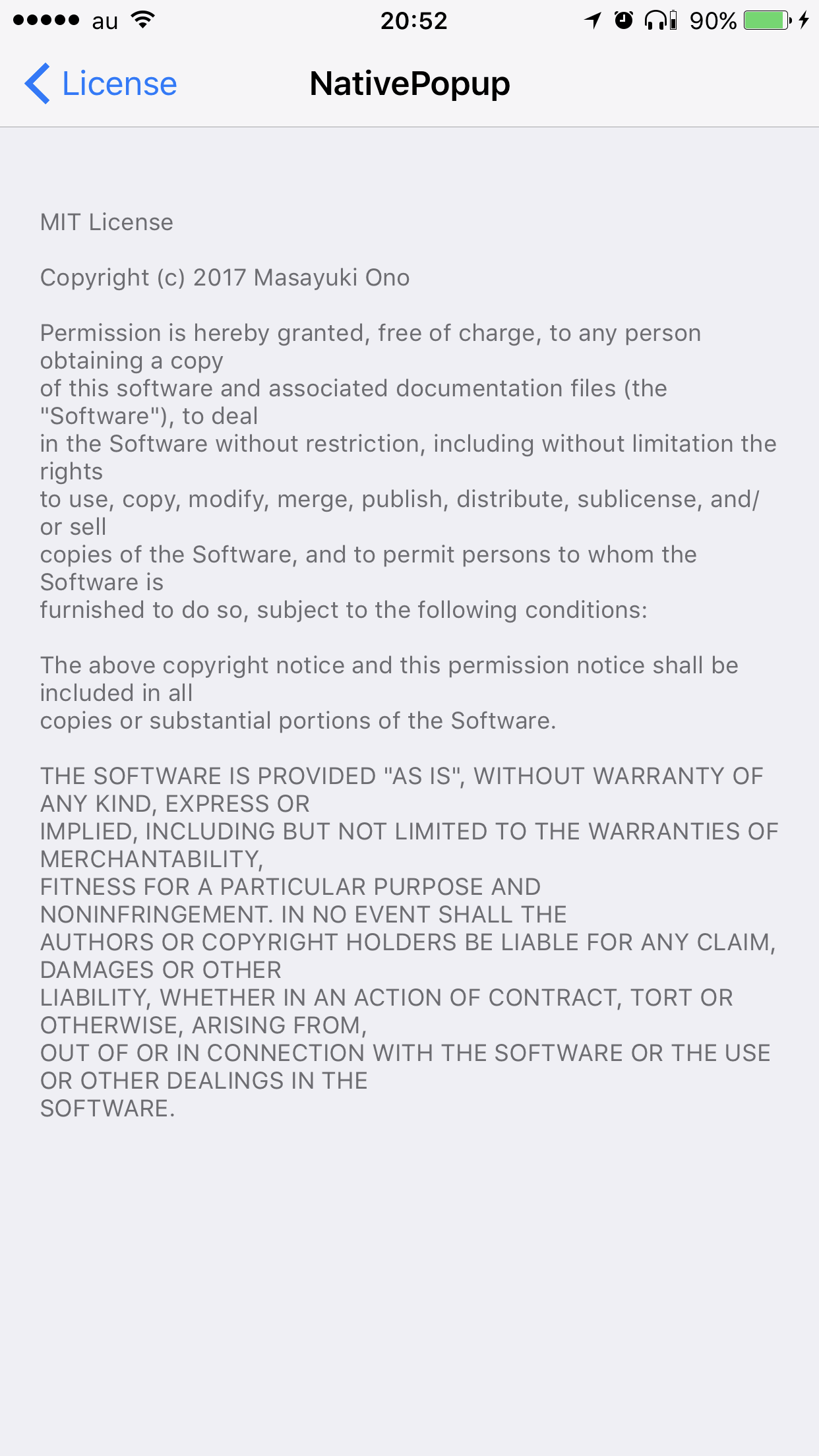
LicensePlist is a command-line tool that automatically generates a Plist of all your dependencies, including files added manually(specified by YAML config file) or using Carthage or CocoaPods. All these licenses then show up in the Settings app.
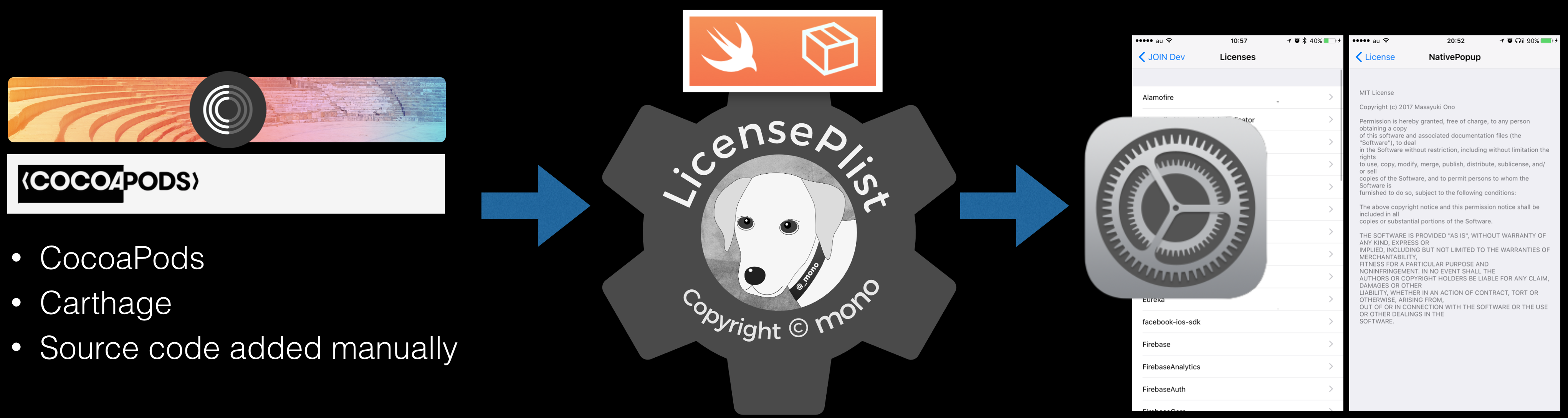

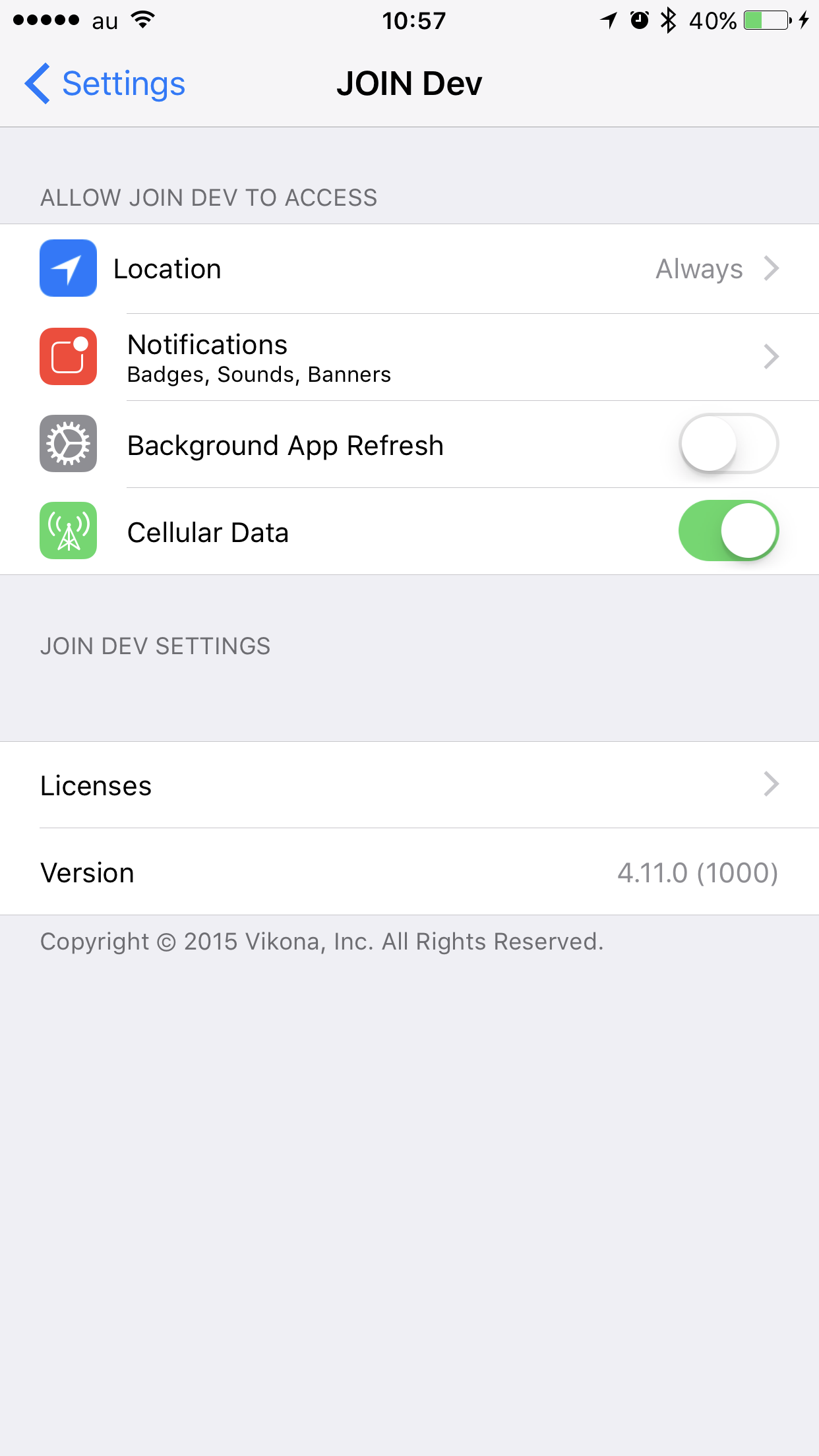
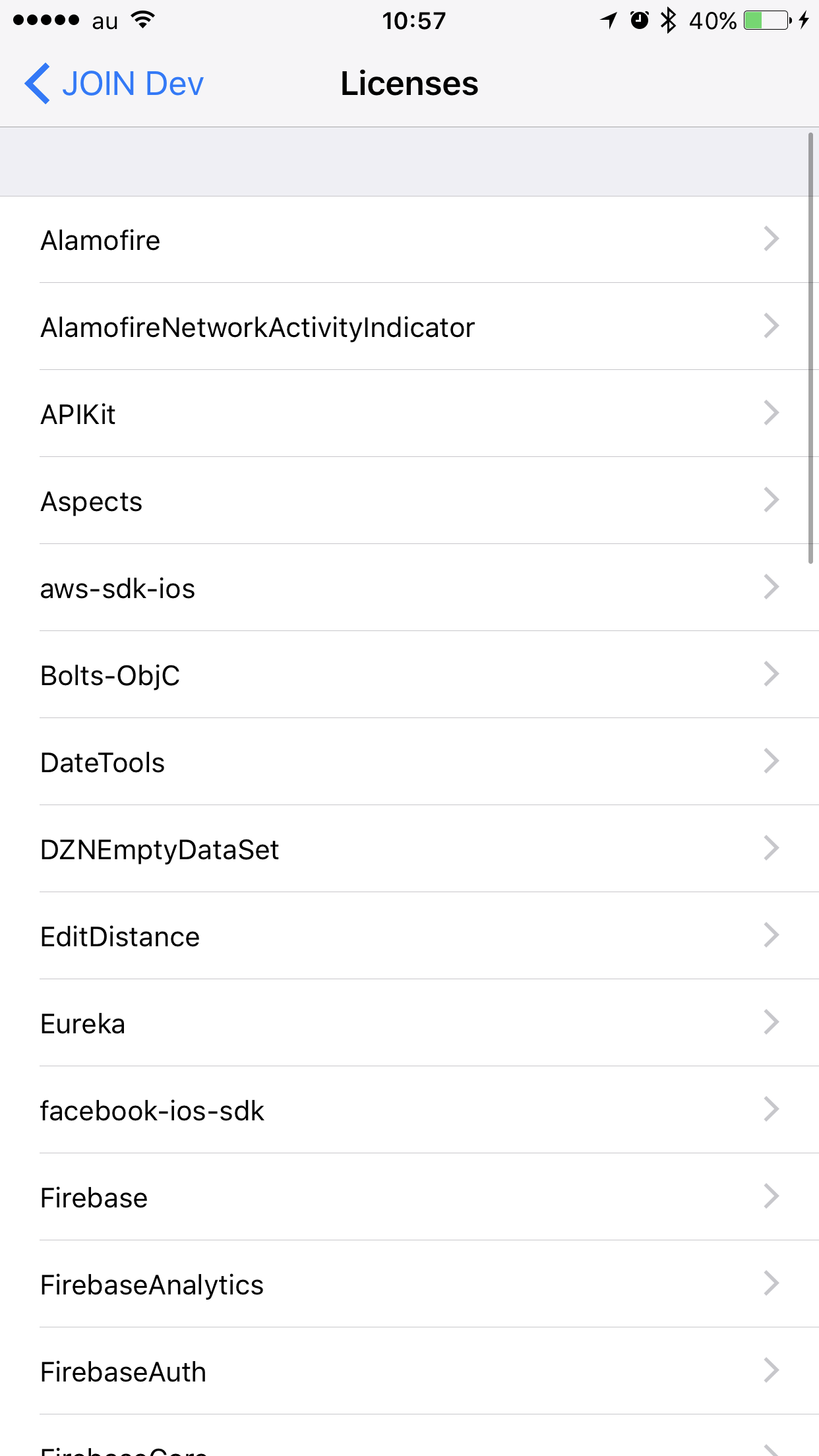
| App Setting Root | License List | License Detail |
|---|---|---|
 |  |  |
Warning
SPM(Swift Package Manager) are not supported.
pod 'LicensePlist'
# Installation path: `${PODS_ROOT}/LicensePlist/license-plist`
brew install licenseplist
mint run mono0926/LicensePlist
In Project Settings, on the tab "Package Dependencies", click "+" and add https://github.com/mono0926/LicensePlist.
Click "Add Package" without selecting any package products.
Download from Releases, then copy to /usr/local/bin/license-plist etc.
Or you can also download the latest binary and install it with a one-liner.
curl -fsSL https://raw.githubusercontent.com/mono0926/LicensePlist/master/install.sh | sh
Clone the master branch of the repository, then run make install.
git clone https://github.com/mono0926/LicensePlist.git
make install
Cartfile or Pods, simply execute license-plist.com.mono0926.LicensePlist.Output directory will be generated.Settings.bundle.
Settings.bundle
├── Root.plist
├── com.mono0926.LicensePlist
│   ├── APIKit.plist
│   ├── Alamofire.plist
│   └── EditDistance.plist
├── com.mono0926.LicensePlist.plist
├── en.lproj
│   └── Root.strings
└── ja.lproj
    └── Root.strings
You can see options by license-plist --help.
--root-path--cartfile-pathCartfile--mintfile-pathMintfile--nestfile-pathnestfile.yaml--mise-pathmise.toml[tools] table via the github:, ubi:, and aqua: backends (e.g. "github:SwiftGen/SwiftGen" = "6.6.3", [tools."ubi:BurntSushi/ripgrep"]). Other backends and plain tool names (e.g. node) are ignored since they don't map to a GitHub owner/repo.--pods-pathPods--package-pathPackage.swiftLicensePlist tries to find YourProjectName.xcodeproj/project.xcworkspace/xcshareddata/swiftpm/Package.resolved and YourProjectName.xcworkspace/xcshareddata/swiftpm/Package.resolved, then uses new one.--package-pathsPackage.swiftlicense-plist --package-paths /path/to/package1/Package.swift /path/to/package2/Package.swift--package-sources-pathLicensePlist uses cloned files instead of GitHub API. For more information, see parameter -clonedSourcePackagesDirPath of xcodebuild.license-plist --package-sources-path ./SourcePackages--xcodeproj-path"*.xcodeproj".xcodeproj LicensePlist will attempt to load the Package.resolved from that Xcode project. If you specify somedir/*.xcodeproj then LicensePlist will load from the first xcodeproj it finds in somedir.--xcworkspace-path"*.xcworkspace".xcworkspace LicensePlist will load the Package.resolved from that Xcode workspace. If you specify somedir/*.xcworkspace then LicensePlist will load from the first xcworkspace it finds in somedir.--xcworkspace-path supersedes any provided --xcodeproj-path.--output-pathcom.mono0926.LicensePlist.Output--output-path YOUR_PRODUCT_DIR/Settings.bundle--github-tokenrepo scope is needed.LICENSE_PLIST_GITHUB_TOKEN environment variable.--config-pathlicense_plist.yml--prefixcom.mono0926.LicensePlist--html-path--markdown-path--csv-path--license-file-namesLICENSE, LICENSE.*.FILENAME.* is specified.--package-sources-path.--forceLicensePlist saves latest result summary, so if there are no changes, the program interrupts.
LicensePlist at Run Script Phase every time 🎉--force flag.--add-version-numbersSomeLibrary, by adding --add-version-numbers flag, the name will be changed to SomeLibrary (X.Y.Z).
X.Y.Z is parsed from CocoaPods and Cartfile information, and GitHub libraries specified at Config YAML also support this flag.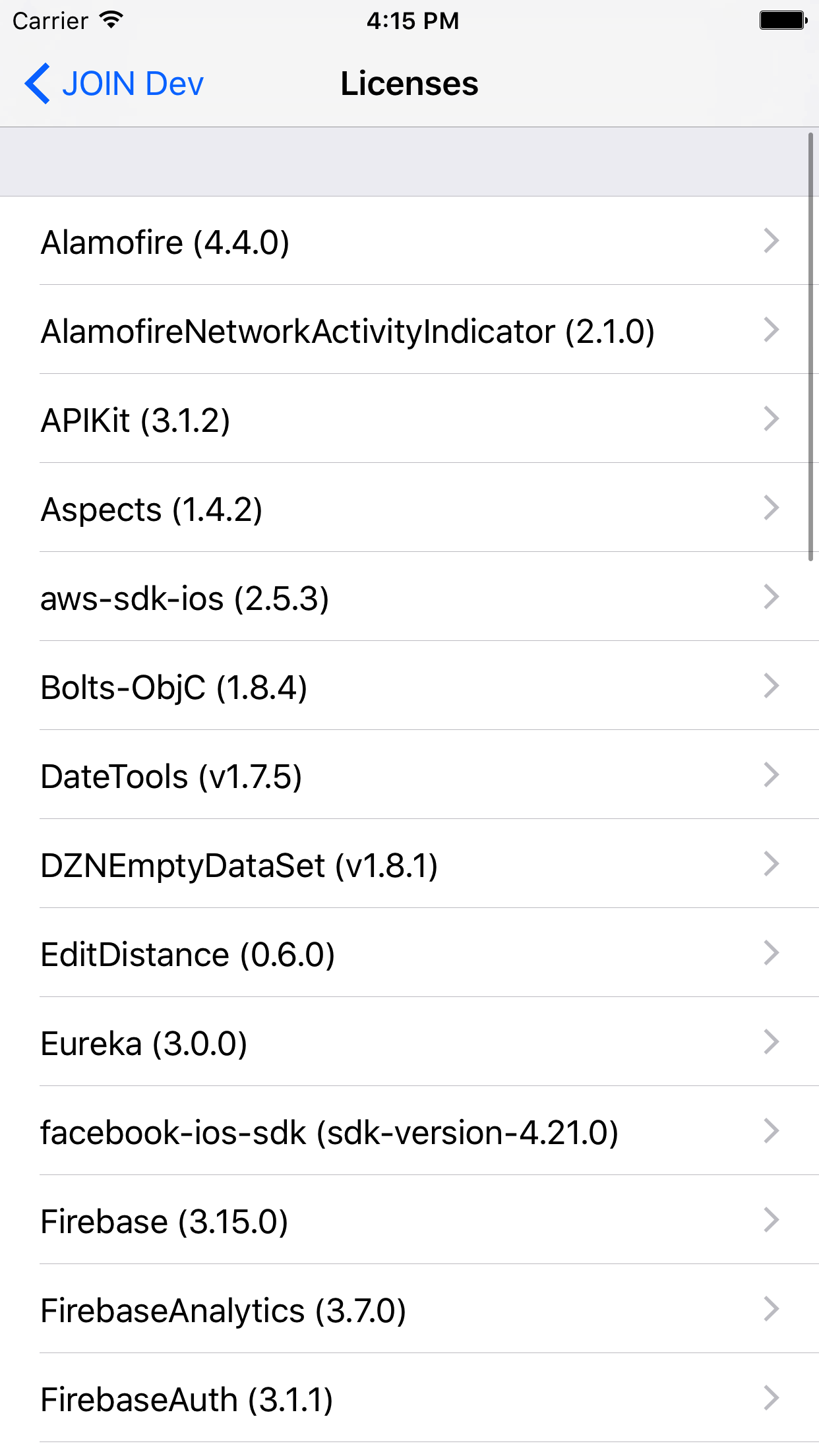
--add-sources--suppress-opening-directory--suppress-opening-directory flag, this behavior is suppressed.--sandbox-mode is specified.--single-page--fail-if-missing-license--silence-mode / --verbose--silence-mode flag, the logger's output will not print.--verbose flag.--silence-mode option and the --verbose option.--no-color / --color--no-color flag. If any escape characters in CI/CD log bother you, the --no-color option will help.--color flag, LicensePlist will always print the logger's output in color.--no-color option and the --color option.NO_COLOR environment variable. If you set the NO_COLOR environment variable to "1", LicensePlist runs without colors.--sandbox-mode / --no-sandbox-mode--package-sources-path must be specified.Add a Run Script Phase to Build Phases:
if [ $CONFIGURATION = "Debug" ]; then
cd $SRCROOT
/usr/local/bin/license-plist --output-path $PRODUCT_NAME/Settings.bundle --github-token YOUR_GITHUB_TOKEN
fi
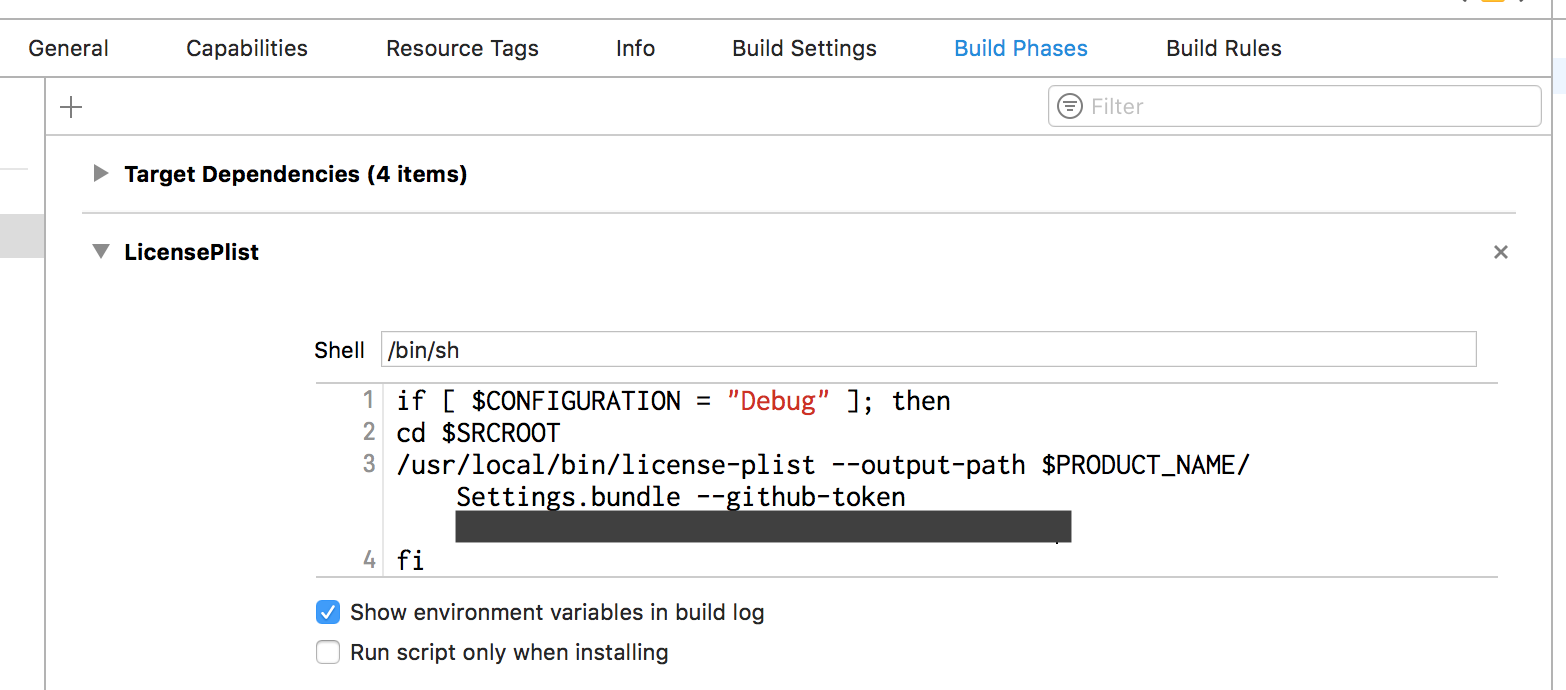
Alternatively, if you've installed LicensePlist via CocoaPods the script should look like this:
if [ $CONFIGURATION = "Debug" ]; then
${PODS_ROOT}/LicensePlist/license-plist --output-path $PRODUCT_NAME/Settings.bundle --github-token YOUR_GITHUB_TOKEN
fi
LicensePlist build tool plugins requires Swift package installation.
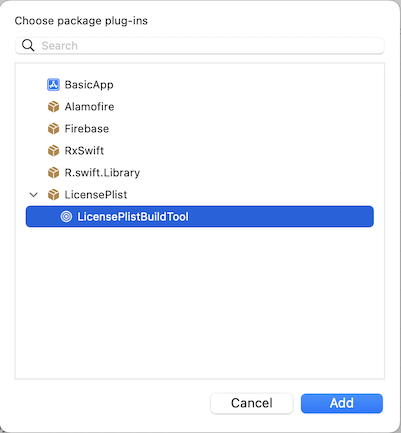
Select your target, on the tab "Build Phases", in the section "Run Build Tool Plug-ins", click "+" and add LicensePlistBuildTool.
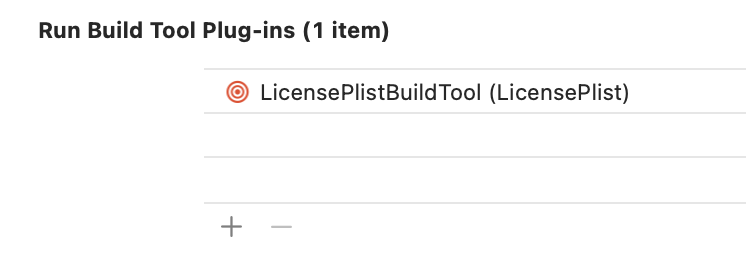
In the case of using the build tool plugin, define all the settings in license_plist.yml at the root of your project.
license_plist.yml example:
options:
  xcworkspacePath: "*.xcworkspace"
  prefix: Acknowledgements
  singlePage: true
Important: to process Swift Package licenses, the config must include one of the following parameters:
xcworkspacePath,xcodeprojPath,packagePaths.Note: outputPath and packageSourcesPath config parameters are ignored by the build tool plugin.
If package sources are not in the derived data directory (e.g. xcodebuild -clonedSourcePackagesDirPath), set their path with the LICENSE_PLIST_PACKAGE_SOURCES_PATH environment variable. A relative path is resolved against the project directory.
LICENSE_PLIST_PACKAGE_SOURCES_PATH=/path/to/SourcePackages xcodebuild -clonedSourcePackagesDirPath /path/to/SourcePackages ...
See the configuration section for more information.
If you need to put license files to Settings.bundle or any other specific place add the following script to build phases:
echo "Will copy acknowledgements"
ACKNOWLEDGEMENTS_DIR=${BUILT_PRODUCTS_DIR}/${CONTENTS_FOLDER_PATH}/com.mono0926.LicensePlist.Output
DESTINATION_PATH=${BUILT_PRODUCTS_DIR}/${CONTENTS_FOLDER_PATH}/Settings.bundle/
cp -r "${ACKNOWLEDGEMENTS_DIR}"/* "${DESTINATION_PATH}"
rm -rf "${ACKNOWLEDGEMENTS_DIR}"
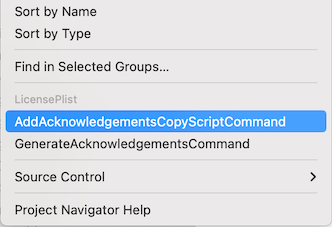
Or in project contextual menu click "AddAcknowledgementsCopyScriptCommand" and select application target to create the build phase automatically.
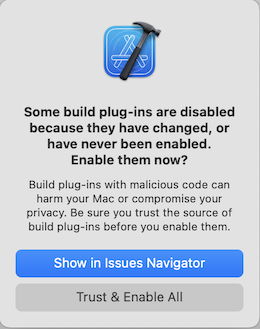
Build the app. At the first run, Xcode asks a permission to run the plugin. Click "Trust & Enable All"
For unattended use (e.g. on CI), you can disable the package validation dialog by
-skipPackagePluginValidation to xcodebuild ordefaults write com.apple.dt.Xcode IDESkipPackagePluginFingerprintValidatation -bool YES
for that user.Note: This implicitly trusts all Xcode package plugins and bypasses Xcode's package validation dialogs, which has security implications.
LicensePlist command requires Swift package installation.
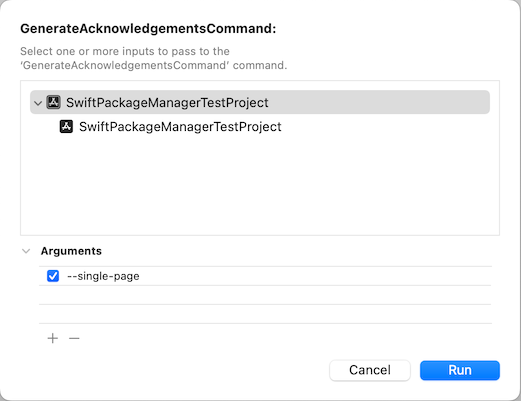
In the project contextual menu click "GenerateAcknowledgementsCommand".
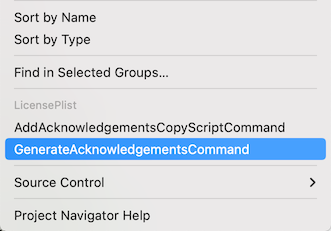
The command dialog allows to specify command line arguments. Since Xcode doesn't save the arguments for future use, it's recommended to use a configuration file.
Click "Run" to run LicensePlist.
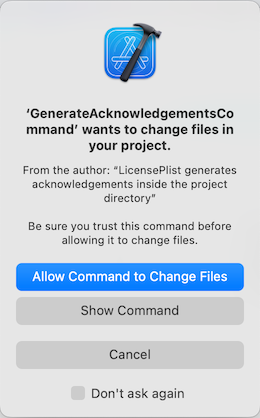
Click "Allow Command to Change files". This action provides LicensePlist write access to your project directory.
"Don't ask again" option prevents showing this dialog in the future.
Note: --package-sources-path option and packageSourcesPath config parameter are ignored by the command plugin.
The main parameters from the Options can be defined in the configuration file.
All the parameters are optional.
The tool uses the command line value if both the command line and the config specify values for the same attribute.
options:
  outputPath: "./com.mono0926.LicensePlist.Output"
  cartfilePath: Cartfile
  mintfilePath: Mintfile
  nestfilePath: nestfile.yaml
  misePath: mise.toml
  podsPath: Pods
  packagePaths:
    - Package.swift
  packageSourcesPath: "./SourcePackages"
  xcodeprojPath: "*.xcodeproj"
  xcworkspacePath: "*.xcworkspace"
  prefix: com.mono0926.LicensePlist
  gitHubToken: YOUR_GITHUB_TOKEN
  htmlPath: acknowledgements.html
  markdownPath: acknowledgements.md
  licenseFileNames:
    - LICENSE
    - LICENSE.*
  force: false
  addVersionNumbers: false
  suppressOpeningDirectory: false
  singlePage: false
  failIfMissingLicense: false
  addSources: false
  sandboxMode: false
A GitHub source can be explicitly defined to include the license in the scenario where it can't be inferred from your dependency files.
github:
  - owner: mono0926
    name: LicensePlist
    version: 1.2.0
If you need to include a license that isn't available on GitHub, you can place the license text in the config file to be included in the output. The license text can also be read from a local file, to keep the config file clean.
License body directly in the config file:
manual:
  - source: https://webrtc.googlesource.com/src
    name: WebRTC
    version: M61
    body: |-
      Copyright (c) 2011, The WebRTC project authors. All rights reserved.
      ...
      ...
      ...
License body in local file:
manual:
  - name: "Dummy License File"
    file: "dummy_license.txt"
Each entry can optionally include a licenseType (an SPDX identifier such as Apache-2.0 or MIT), which is reflected in the generated Plist/CSV output. See LicenseType.swift for the full list of recognized identifiers.
Excludes can be defined to exclude matching libraries from the final output.
An exclude is a dictionary containing any combination of name, source, owner, or licenseType.
When using the dictionary format:
(name: LicensePlist) AND (owner: mono0926)Exclude a package by name:
exclude:
  - name: LicensePlist
Exclude packages using a specific license:
exclude:
  - licenseType: "Apache 2.0"
Exclude packages using any matching licenses:
exclude:
  - licenseType: /BSD/
Exclude packages from a specific github owner:
exclude:
  - owner: mycompany
Owner matching is case insensitive, so MyCompany also matches an owner reported as mycompany.
Exclude packages from a specific github owner containing matching licenses:
exclude:
  - owner: mycompany
    licenseType: /^(?!.*MIT).*$/ # this regex excludes packages that do NOT use the MIT license
Exclude a package from a specific github owner and repo:
exclude:
  - owner: mycompany
    name: private-repo
If a library name is unsuitable for the output bundle, you can explicitly rename it. This can be used when a library name is too vague, or if more human-readable names are needed.
rename:
  LicensePlist: License Plist # Rename LicensePlist to "License Plist"
  WebRTC: Web RTC # Rename WebRTC to "Web RTC" (which is faulty, but used for test)
Execute swift package generate-xcodeproj or make xcode.

Donations are welcome if you like LicensePlist🤗

1,232 followers · starred Mar 2021
1,125 followers · starred Nov 2024
82 followers · starred Jun 2025
109 followers · starred May 2017
A license list generator of all your dependencies for iOS applications
Swift
2,534
867 commits
updated Sep 30, 2026
LicensePlist
LicensePlist is a command-line tool that automatically generates a Plist of all your dependencies, including files added manually(specified by YAML config file) or using Carthage or CocoaPods. All these licenses then show up in the Settings app.
| App Setting Root | License List | License Detail |
|---|---|---|
| | |
Warning
SPM(Swift Package Manager) are not supported.
pod 'LicensePlist'
# Installation path: `${PODS_ROOT}/LicensePlist/license-plist`
brew install licenseplist
mint run mono0926/LicensePlist
In Project Settings, on the tab "Package Dependencies", click "+" and add https://github.com/mono0926/LicensePlist.
Click "Add Package" without selecting any package products.
Download from Releases, then copy to /usr/local/bin/license-plist etc.
Or you can also download the latest binary and install it with a one-liner.
curl -fsSL https://raw.githubusercontent.com/mono0926/LicensePlist/master/install.sh | sh
Clone the master branch of the repository, then run make install.
git clone https://github.com/mono0926/LicensePlist.git
make install
Cartfile or Pods, simply execute license-plist.com.mono0926.LicensePlist.Output directory will be generated.Settings.bundle.
Settings.bundle
├── Root.plist
├── com.mono0926.LicensePlist
│   ├── APIKit.plist
│   ├── Alamofire.plist
│   └── EditDistance.plist
├── com.mono0926.LicensePlist.plist
├── en.lproj
│   └── Root.strings
└── ja.lproj
    └── Root.strings
You can see options by license-plist --help.
--root-path--cartfile-pathCartfile--mintfile-pathMintfile--nestfile-pathnestfile.yaml--mise-pathmise.toml[tools] table via the github:, ubi:, and aqua: backends (e.g. "github:SwiftGen/SwiftGen" = "6.6.3", [tools."ubi:BurntSushi/ripgrep"]). Other backends and plain tool names (e.g. node) are ignored since they don't map to a GitHub owner/repo.--pods-pathPods--package-pathPackage.swiftLicensePlist tries to find YourProjectName.xcodeproj/project.xcworkspace/xcshareddata/swiftpm/Package.resolved and YourProjectName.xcworkspace/xcshareddata/swiftpm/Package.resolved, then uses new one.--package-pathsPackage.swiftlicense-plist --package-paths /path/to/package1/Package.swift /path/to/package2/Package.swift--package-sources-pathLicensePlist uses cloned files instead of GitHub API. For more information, see parameter -clonedSourcePackagesDirPath of xcodebuild.license-plist --package-sources-path ./SourcePackages--xcodeproj-path"*.xcodeproj".xcodeproj LicensePlist will attempt to load the Package.resolved from that Xcode project. If you specify somedir/*.xcodeproj then LicensePlist will load from the first xcodeproj it finds in somedir.--xcworkspace-path"*.xcworkspace".xcworkspace LicensePlist will load the Package.resolved from that Xcode workspace. If you specify somedir/*.xcworkspace then LicensePlist will load from the first xcworkspace it finds in somedir.--xcworkspace-path supersedes any provided --xcodeproj-path.--output-pathcom.mono0926.LicensePlist.Output--output-path YOUR_PRODUCT_DIR/Settings.bundle--github-tokenrepo scope is needed.LICENSE_PLIST_GITHUB_TOKEN environment variable.--config-pathlicense_plist.yml--prefixcom.mono0926.LicensePlist--html-path--markdown-path--csv-path--license-file-namesLICENSE, LICENSE.*.FILENAME.* is specified.--package-sources-path.--forceLicensePlist saves latest result summary, so if there are no changes, the program interrupts.
LicensePlist at Run Script Phase every time 🎉--force flag.--add-version-numbersSomeLibrary, by adding --add-version-numbers flag, the name will be changed to SomeLibrary (X.Y.Z).
X.Y.Z is parsed from CocoaPods and Cartfile information, and GitHub libraries specified at Config YAML also support this flag.
--add-sources--suppress-opening-directory--suppress-opening-directory flag, this behavior is suppressed.--sandbox-mode is specified.--single-page--fail-if-missing-license--silence-mode / --verbose--silence-mode flag, the logger's output will not print.--verbose flag.--silence-mode option and the --verbose option.--no-color / --color--no-color flag. If any escape characters in CI/CD log bother you, the --no-color option will help.--color flag, LicensePlist will always print the logger's output in color.--no-color option and the --color option.NO_COLOR environment variable. If you set the NO_COLOR environment variable to "1", LicensePlist runs without colors.--sandbox-mode / --no-sandbox-mode--package-sources-path must be specified.Add a Run Script Phase to Build Phases:
if [ $CONFIGURATION = "Debug" ]; then
cd $SRCROOT
/usr/local/bin/license-plist --output-path $PRODUCT_NAME/Settings.bundle --github-token YOUR_GITHUB_TOKEN
fi
Alternatively, if you've installed LicensePlist via CocoaPods the script should look like this:
if [ $CONFIGURATION = "Debug" ]; then
${PODS_ROOT}/LicensePlist/license-plist --output-path $PRODUCT_NAME/Settings.bundle --github-token YOUR_GITHUB_TOKEN
fi
LicensePlist build tool plugins requires Swift package installation.
Select your target, on the tab "Build Phases", in the section "Run Build Tool Plug-ins", click "+" and add LicensePlistBuildTool.
In the case of using the build tool plugin, define all the settings in license_plist.yml at the root of your project.
license_plist.yml example:
options:
  xcworkspacePath: "*.xcworkspace"
  prefix: Acknowledgements
  singlePage: true
Important: to process Swift Package licenses, the config must include one of the following parameters:
xcworkspacePath,xcodeprojPath,packagePaths.Note: outputPath and packageSourcesPath config parameters are ignored by the build tool plugin.
If package sources are not in the derived data directory (e.g. xcodebuild -clonedSourcePackagesDirPath), set their path with the LICENSE_PLIST_PACKAGE_SOURCES_PATH environment variable. A relative path is resolved against the project directory.
LICENSE_PLIST_PACKAGE_SOURCES_PATH=/path/to/SourcePackages xcodebuild -clonedSourcePackagesDirPath /path/to/SourcePackages ...
See the configuration section for more information.
If you need to put license files to Settings.bundle or any other specific place add the following script to build phases:
echo "Will copy acknowledgements"
ACKNOWLEDGEMENTS_DIR=${BUILT_PRODUCTS_DIR}/${CONTENTS_FOLDER_PATH}/com.mono0926.LicensePlist.Output
DESTINATION_PATH=${BUILT_PRODUCTS_DIR}/${CONTENTS_FOLDER_PATH}/Settings.bundle/
cp -r "${ACKNOWLEDGEMENTS_DIR}"/* "${DESTINATION_PATH}"
rm -rf "${ACKNOWLEDGEMENTS_DIR}"
Or in project contextual menu click "AddAcknowledgementsCopyScriptCommand" and select application target to create the build phase automatically.
Build the app. At the first run, Xcode asks a permission to run the plugin. Click "Trust & Enable All"
For unattended use (e.g. on CI), you can disable the package validation dialog by
-skipPackagePluginValidation to xcodebuild ordefaults write com.apple.dt.Xcode IDESkipPackagePluginFingerprintValidatation -bool YES
for that user.Note: This implicitly trusts all Xcode package plugins and bypasses Xcode's package validation dialogs, which has security implications.
LicensePlist command requires Swift package installation.
In the project contextual menu click "GenerateAcknowledgementsCommand".
The command dialog allows to specify command line arguments. Since Xcode doesn't save the arguments for future use, it's recommended to use a configuration file.
Click "Run" to run LicensePlist.
Click "Allow Command to Change files". This action provides LicensePlist write access to your project directory.
"Don't ask again" option prevents showing this dialog in the future.
Note: --package-sources-path option and packageSourcesPath config parameter are ignored by the command plugin.
The main parameters from the Options can be defined in the configuration file.
All the parameters are optional.
The tool uses the command line value if both the command line and the config specify values for the same attribute.
options:
  outputPath: "./com.mono0926.LicensePlist.Output"
  cartfilePath: Cartfile
  mintfilePath: Mintfile
  nestfilePath: nestfile.yaml
  misePath: mise.toml
  podsPath: Pods
  packagePaths:
    - Package.swift
  packageSourcesPath: "./SourcePackages"
  xcodeprojPath: "*.xcodeproj"
  xcworkspacePath: "*.xcworkspace"
  prefix: com.mono0926.LicensePlist
  gitHubToken: YOUR_GITHUB_TOKEN
  htmlPath: acknowledgements.html
  markdownPath: acknowledgements.md
  licenseFileNames:
    - LICENSE
    - LICENSE.*
  force: false
  addVersionNumbers: false
  suppressOpeningDirectory: false
  singlePage: false
  failIfMissingLicense: false
  addSources: false
  sandboxMode: false
A GitHub source can be explicitly defined to include the license in the scenario where it can't be inferred from your dependency files.
github:
  - owner: mono0926
    name: LicensePlist
    version: 1.2.0
If you need to include a license that isn't available on GitHub, you can place the license text in the config file to be included in the output. The license text can also be read from a local file, to keep the config file clean.
License body directly in the config file:
manual:
  - source: https://webrtc.googlesource.com/src
    name: WebRTC
    version: M61
    body: |-
      Copyright (c) 2011, The WebRTC project authors. All rights reserved.
      ...
      ...
      ...
License body in local file:
manual:
  - name: "Dummy License File"
    file: "dummy_license.txt"
Each entry can optionally include a licenseType (an SPDX identifier such as Apache-2.0 or MIT), which is reflected in the generated Plist/CSV output. See LicenseType.swift for the full list of recognized identifiers.
Excludes can be defined to exclude matching libraries from the final output.
An exclude is a dictionary containing any combination of name, source, owner, or licenseType.
When using the dictionary format:
(name: LicensePlist) AND (owner: mono0926)Exclude a package by name:
exclude:
  - name: LicensePlist
Exclude packages using a specific license:
exclude:
  - licenseType: "Apache 2.0"
Exclude packages using any matching licenses:
exclude:
  - licenseType: /BSD/
Exclude packages from a specific github owner:
exclude:
  - owner: mycompany
Owner matching is case insensitive, so MyCompany also matches an owner reported as mycompany.
Exclude packages from a specific github owner containing matching licenses:
exclude:
  - owner: mycompany
    licenseType: /^(?!.*MIT).*$/ # this regex excludes packages that do NOT use the MIT license
Exclude a package from a specific github owner and repo:
exclude:
  - owner: mycompany
    name: private-repo
If a library name is unsuitable for the output bundle, you can explicitly rename it. This can be used when a library name is too vague, or if more human-readable names are needed.
rename:
  LicensePlist: License Plist # Rename LicensePlist to "License Plist"
  WebRTC: Web RTC # Rename WebRTC to "Web RTC" (which is faulty, but used for test)
Execute swift package generate-xcodeproj or make xcode.
Donations are welcome if you like LicensePlist🤗
1,232 followers · starred Mar 2021
1,125 followers · starred Nov 2024
82 followers · starred Jun 2025
109 followers · starred May 2017