
Any LLM, any MCP server, any agent (A2A / AG-UI). Chat, generative UI and a live inspector. npx @mokalabs/sandbox
See the codeSee what people are saying
README

Moka
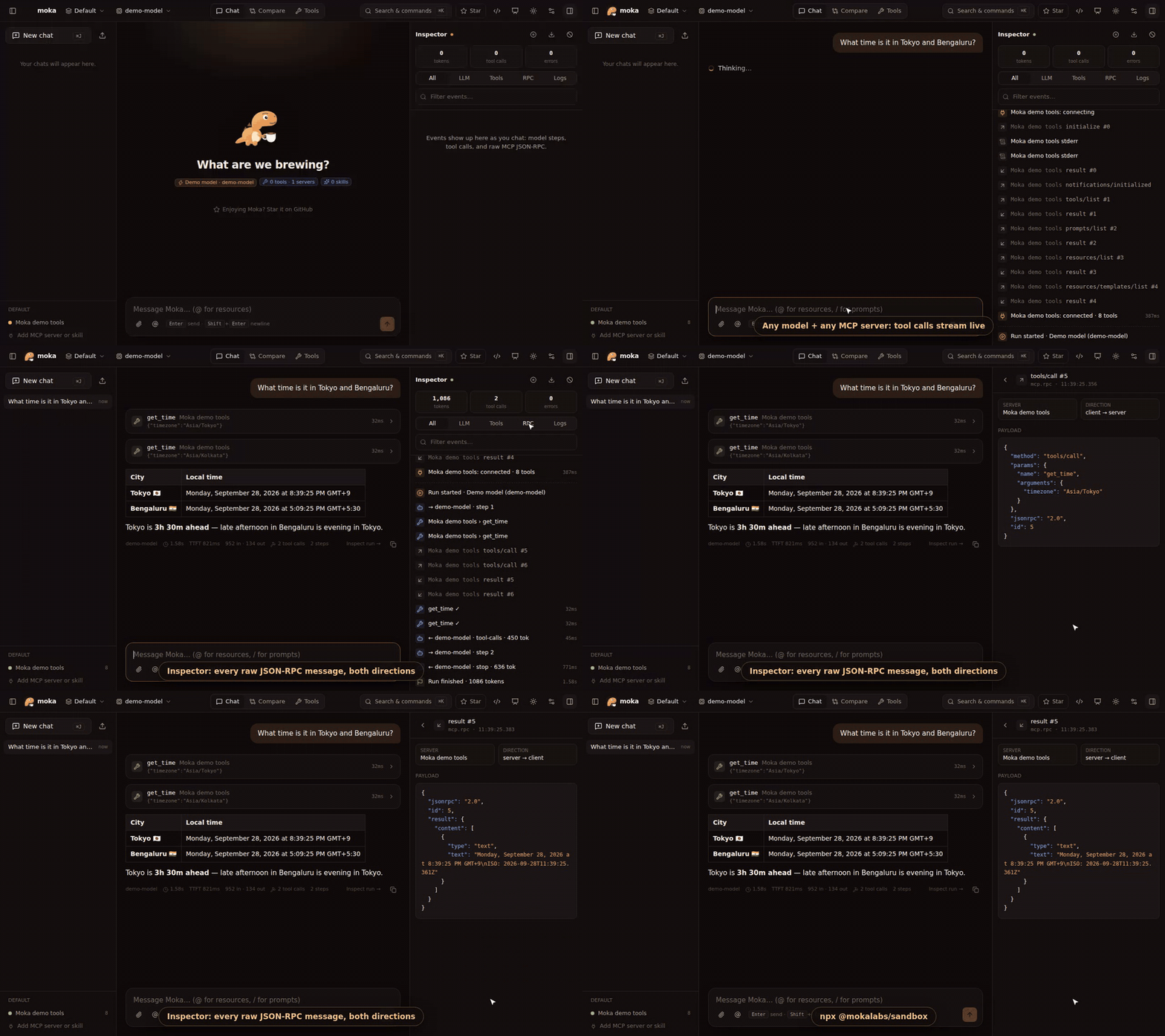
See every MCP message.
Chat with any LLM, plug in any MCP server, agent or skill, and inspect every call: raw JSON-RPC, tool calls, tokens and timings. One command, zero config.
Good pup. Strong brew. ☕



npx @mokalabs/sandbox
⭐ If Moka saves you time, a star helps other people find it.
Why Moka
Getting an LLM talking to MCP tools usually means wiring up a client, a provider SDK, a tool loop and some logging before you can even try one prompt. Moka does all of that for you:
- Zero config. Moka picks up
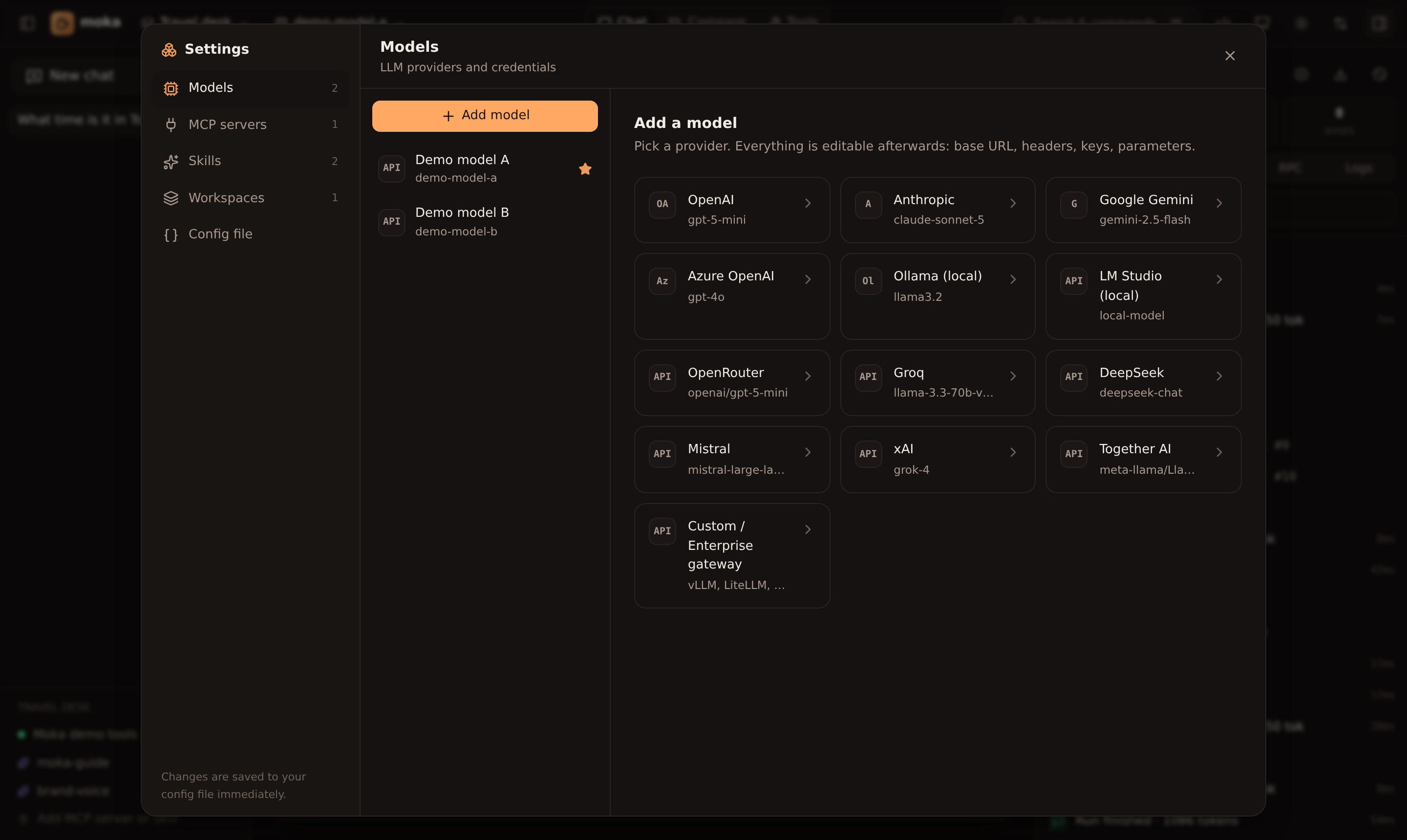
OPENAI_API_KEY,ANTHROPIC_API_KEY,GEMINI_API_KEY,OPENROUTER_API_KEY,GROQ_API_KEYand others from your environment, finds a local Ollama, and ships with a built-in demo MCP server, so the first run has working tools. - Any model. OpenAI, Anthropic, Gemini, Azure OpenAI, Ollama, LM Studio, OpenRouter, Groq, DeepSeek, Mistral, xAI and Together are built in. Any OpenAI-compatible gateway (vLLM, LiteLLM, a corporate proxy) also works, with custom base URLs, headers and provider options.
- Any MCP server. stdio, Streamable HTTP and SSE. Paste your Claude Desktop, Cursor or VS Code
mcp.json, or pick one from the gallery. - Agent Skills. Point Moka at a
SKILL.mdfolder (including~/.claude/skills). Skills load on demand, the same way Claude does it. - Inspector. Every LLM step, tool call, token count and raw MCP JSON-RPC message, with timings and a per-run waterfall.
- Forms for everything. Models, servers, skills and workspaces are all editable in the UI. Changes are written to a readable
moka.json. - Built for demos. Workspaces, starter prompts, presenter mode, side-by-side model comparison, and a ⌘K command palette.
- Generative UI. Moka renders MCP Apps (the official MCP UI extension) in a secure sandbox, supports legacy MCP-UI, and lets any model answer with native A2UI forms, cards and buttons through a built-in
render_uitool. - Your own components. Add A2UI catalogs of template or sandboxed-HTML components, rename and theme the render tool, and try it all in the Generative UI playground.
- Slow tools. Progress bars from
notifications/progress, per-server tool timeouts, a "60-second client" preset, and the exact moment a client gives up, in the inspector. - Tool approvals. Have the model ask before it runs a tool: per tool, per server, or a whole-workspace safe mode for live demos.
- Any agent, too. Point a workspace at an A2A or AG-UI agent (LangGraph, CopilotKit, ADK…) and get the chat, A2UI and inspector for it. AG-UI agents can even call your MCP tools.
- Full MCP client. OAuth sign-in for hosted servers, elicitation forms, sampling with your model,
@resources and/prompts. - Demo-proof. Attach images and files, and replay any saved chat offline, with no model calls.
- Works at work.
HTTPS_PROXY/NO_PROXY, custom CAs, and a zero-dependency package for curated registries. - Export to code. Turn any workspace into Vercel AI SDK (TypeScript) or LangGraph (Python) code, or an
mcp.json.
Quick start
# 1. Run it (Node 20+)
export OPENAI_API_KEY=sk-...       # optional: add keys in the UI instead
npx @mokalabs/sandbox

# 2. …or scaffold a shareable demo project
npm create moka@latest my-demo
cd my-demo && npm install && npm start

# 3. …or use Docker
docker run --rm -p 4000:4000 -e OPENAI_API_KEY ghcr.io/mokahq/moka
Moka prints a URL with a one-time access token and opens your browser.
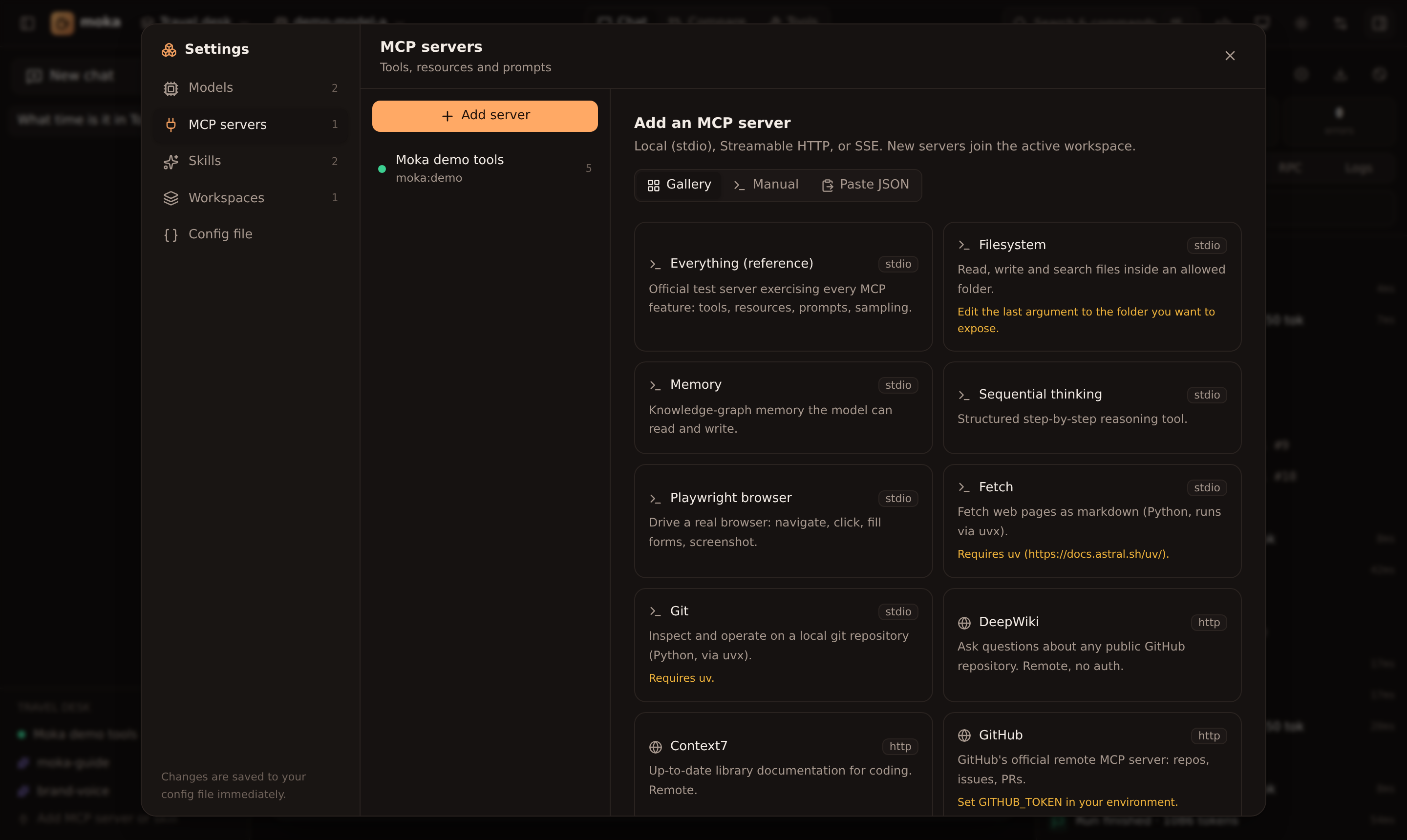 | 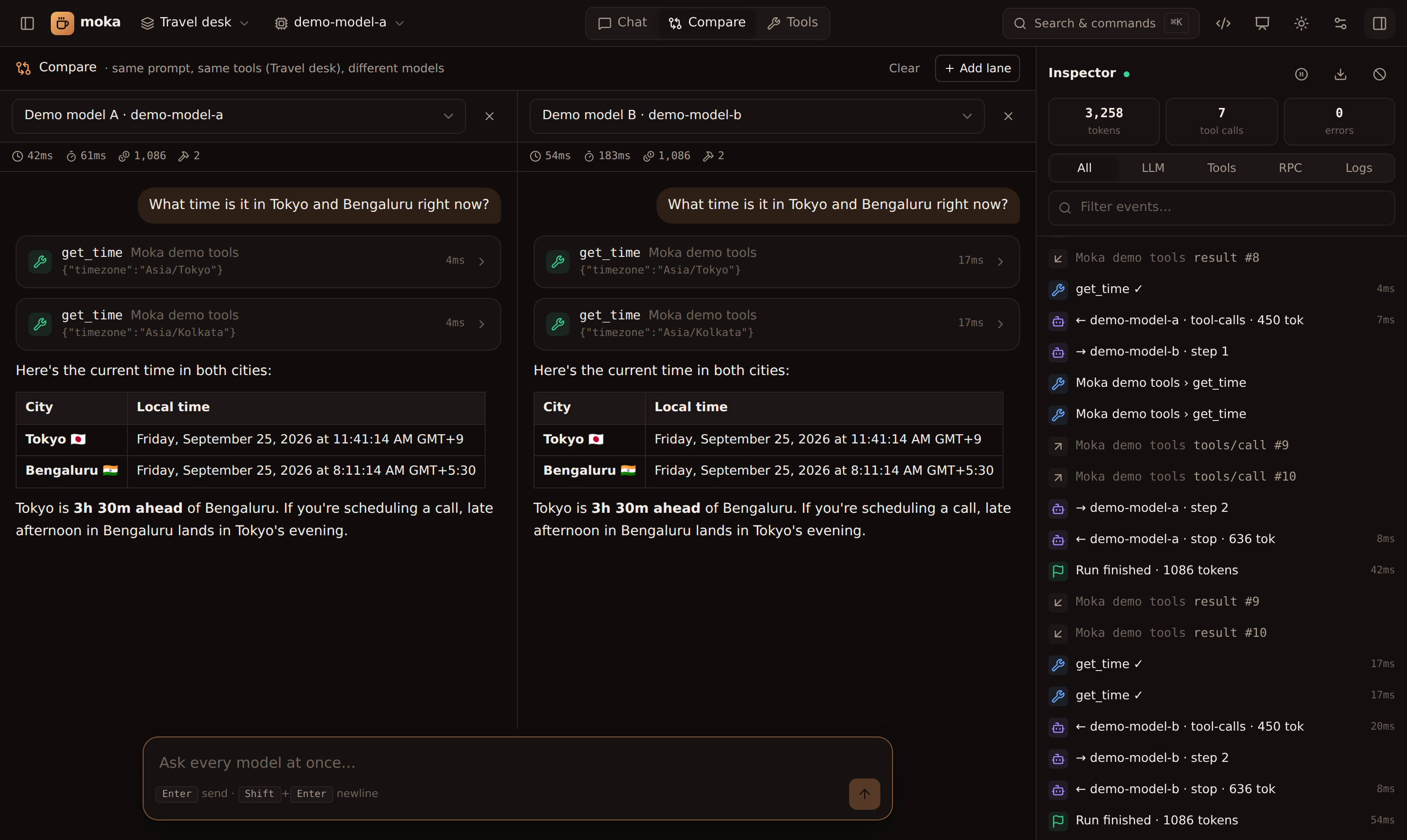 |
| Add MCP servers from a gallery, a form, or pasted JSON | Compare models on the same prompt and tools |
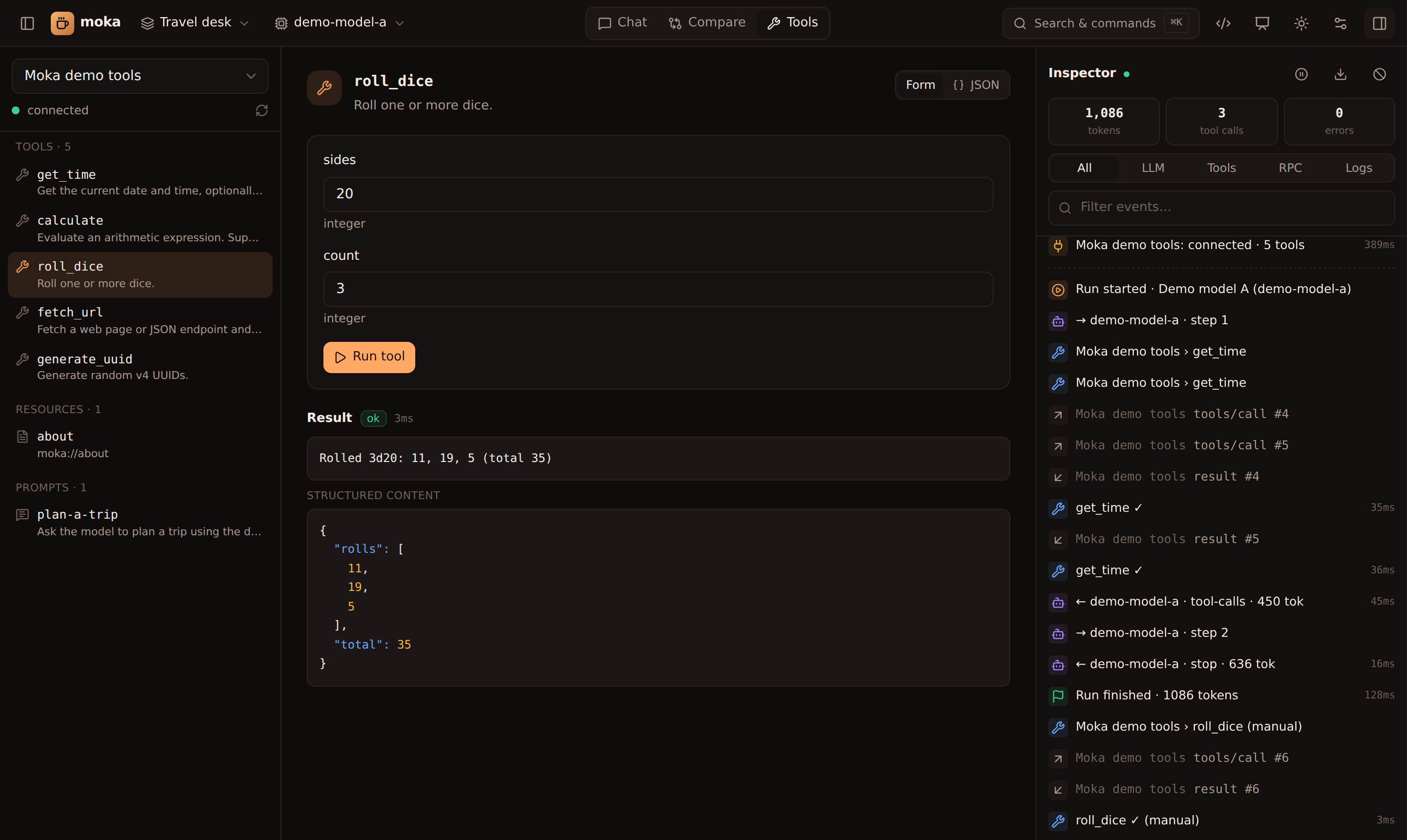 |  |
| Call tools directly with generated forms, no LLM needed | Configure any provider: keys, base URL, headers, options |
Using Moka
Models
Settings → Models → Add model and pick a preset. Every field can be edited: model, API key, base URL, headers, temperature, max tokens and raw AI SDK providerOptions. Use Fetch models to list what your key can reach and Test to check it works.
API keys can be pasted directly or referenced as env:OPENAI_API_KEY. References are resolved at request time and never written to disk, so moka.json stays safe to commit.
MCP servers
Settings → MCP servers → Add server gives you three options:
- Gallery: Everything, Filesystem, Memory, Playwright, Fetch, Git, DeepWiki, Context7, GitHub…
- Manual: stdio (command, args, env, cwd) or HTTP/SSE (URL, headers).
${VAR}expands from the environment. - Paste JSON: the
mcpServersblock from Claude Desktop, Claude Code, Cursor or Windsurf, or VS Code'sservers.
Once connected, you can switch individual tools on or off for the model, and call them manually from the Tools view. For HTTP servers, the HTTP section shows every header the last request actually carried (yours and the ones the client adds, secrets masked).
Skills
A skill is a folder containing a SKILL.md (YAML frontmatter with name and description, then instructions) plus optional reference files. Moka lists each skill's name and description in the system prompt. The model calls the built-in load_skill tool when a skill is relevant, and read_skill_file to read the skill's other files.
Settings → Skills lets you add one folder, scan a folder of skills, or write a skill inline.
Workspaces
A workspace combines model + MCP servers + skills + system prompt + starter prompts. Create one per demo and switch between them from the top bar.
Inspector
The right-hand panel streams everything Moka does:
run.start/run.finish: system prompt, tool list, total tokensllm.request/llm.response: per step, with provider request body, finish reason, usage and latencytool.call/tool.result/tool.error: arguments, outputs and durationsmcp.rpc: raw JSON-RPC in both directions, including theinitializehandshake, with each response paired to its request (latency, errors, cancellations, late replies)mcp.unanswered: requests still open when a connection closedmcp.http: failed HTTP requests to remote servers (status,WWW-Authenticate, masked headers)mcp.status/mcp.log: connections and server stderragent.*: A2A and AG-UI traffic (frameworkRAWevents are collapsed into one entry per run)
Click any event to see its full payload and the run's waterfall. Download trace exports everything as JSON.
Generative UI
Ask the demo server to "roll 3 dice" to get an MCP App: an interactive iframe that calls tools and posts messages back into the chat. Ask "book a table at Toit" to get A2UI returned by an MCP tool. Ask for "a signup form" and the model itself builds A2UI with render_ui. Button presses go back to the agent as [ui action] messages. Add your own components under Settings → Generative UI (custom catalogs). Full guide: docs → Generative UI.
Keyboard
⌘K | Command palette |
⌘J | New chat |
⌘B / ⌘I | Toggle sidebar / inspector |
⌘. | Presenter mode |
⌘, | Settings |
/ | Focus the composer |
CLI
npx @mokalabs/sandbox [config.json] [options]
moka [config.json] [options]          # after npm i -g @mokalabs/sandbox
moka init                             # write a starter moka.json here
moka demo-server                      # run the bundled demo MCP server on stdio

-p, --port <n>        port (default 4000, or $PORT; next free port if taken)
-H, --host <host>     bind address (default 127.0.0.1)
-c, --config <file>   config file (default ./moka.json, else ~/.moka/config.json)
    --token <t>       fixed access token (default: random, or $MOKA_TOKEN)
    --no-auth         disable the token (trusted machines only)
    --no-open         don't open a browser
Config lookup order: --config, then $MOKA_CONFIG, then ./moka.json, then ~/.moka/config.json. On first run Moka creates the file for you. Chat history lives in ~/.moka/sessions (override with $MOKA_HOME).
moka.json
{
  "$schema": "https://unpkg.com/@mokalabs/sandbox/dist/moka.schema.json",
  "version": 1,
  "activeWorkspaceId": "demo",
  "llms": [
    { "id": "gpt", "name": "OpenAI", "provider": "openai", "model": "gpt-5-mini", "apiKey": "env:OPENAI_API_KEY" },
    { "id": "gw", "name": "Company gateway", "provider": "openai-compatible", "model": "llama-3.3-70b",
      "baseURL": "https://llm.internal.example.com/v1", "headers": { "X-Team": "platform" }, "apiKey": "env:GATEWAY_KEY" }
  ],
  "mcpServers": [
    { "id": "fs", "name": "Filesystem", "transport": "stdio", "command": "npx",
      "args": ["-y", "@modelcontextprotocol/server-filesystem", "."] },
    { "id": "gh", "name": "GitHub", "transport": "http", "url": "https://api.githubcopilot.com/mcp/",
      "headers": { "Authorization": "Bearer ${GITHUB_TOKEN}" }, "disabledTools": ["delete_repository"] }
  ],
  "skills": [{ "id": "brand", "path": "./skills/brand-voice" }],
  "workspaces": [
    { "id": "demo", "name": "Demo", "llmId": "gpt", "mcpServerIds": ["fs", "gh"], "skillIds": ["brand"],
      "systemPrompt": "Be concise.", "starterPrompts": ["What's in this folder?"], "maxSteps": 12 }
  ]
}
Provider values: openai, anthropic, google, azure, ollama, openai-compatible. For the full field reference see docs/configuration.md.
Docker
# Zero config, with keys from your shell
docker run --rm -p 4000:4000 -e OPENAI_API_KEY -e ANTHROPIC_API_KEY ghcr.io/mokahq/moka

# Use a moka.json (and skills) from the current folder; keep history in a volume
docker run --rm -p 4000:4000 -v "$PWD:/workspace" -v moka-data:/data -e MOKA_TOKEN=change-me ghcr.io/mokahq/moka
The image includes npx and uvx, so both Node and Python MCP servers work. It binds 0.0.0.0 inside the container. Set MOKA_TOKEN or read the generated token from docker logs.
Embed the engine
The UI is a thin layer over @mokalabs/core, which you can use for tests, CLIs or your own UI:
import { MokaEngine, parseConfig } from "@mokalabs/core";

const engine = new MokaEngine({ config: parseConfig(myConfig) });
engine.bus.subscribe((e) => console.log(e.kind, e.title));

for await (const chunk of engine.chat({ messages: [{ role: "user", content: "What time is it in Tokyo?" }] })) {
  if (chunk.type === "text") process.stdout.write(chunk.text);
}
await engine.close();
Security
Moka runs MCP servers, which are local processes, for you, so treat it like a terminal:
- It binds to
127.0.0.1by default and every API call needs the random token printed at startup. --no-authand--host 0.0.0.0are opt-in. Only use them on trusted networks.- Keys referenced as
env:NAMEare never persisted. Download (keys redacted) strips literal secrets from exports.
See SECURITY.md to report a vulnerability.
Packages
| Package | |
|---|---|
@mokalabs/sandbox | The app: CLI (npx @mokalabs/sandbox, moka), HTTP server, web UI, demo MCP server |
@mokalabs/core | Headless engine: providers, MCP manager, skills, agent loop, event bus |
create-moka | npm create moka project scaffolder |
Documentation
Full docs live at mokahq.github.io/mokalabs (source in apps/docs, built with Astro Starlight and deployed by the Docs workflow).
Contributing
pnpm install
pnpm dev        # server on :4000 + Vite UI on :5173 with hot reload
pnpm test
pnpm --filter @mokalabs/docs dev   # docs site on :4321
See CONTRIBUTING.md. Releases are automated with Changesets: see docs/releasing.md.
License
Similar repos


Languages
TypeScript
84.1%
MDX
12.8%
JavaScript
1.9%
Any LLM, any MCP server, any agent (A2A / AG-UI). Chat, generative UI and a live inspector. npx @mokalabs/sandbox
See the codeSee what people are saying
README
Moka
See every MCP message.
Chat with any LLM, plug in any MCP server, agent or skill, and inspect every call: raw JSON-RPC, tool calls, tokens and timings. One command, zero config.
Good pup. Strong brew. ☕
npx @mokalabs/sandbox
⭐ If Moka saves you time, a star helps other people find it.
Why Moka
Getting an LLM talking to MCP tools usually means wiring up a client, a provider SDK, a tool loop and some logging before you can even try one prompt. Moka does all of that for you:
- Zero config. Moka picks up
OPENAI_API_KEY,ANTHROPIC_API_KEY,GEMINI_API_KEY,OPENROUTER_API_KEY,GROQ_API_KEYand others from your environment, finds a local Ollama, and ships with a built-in demo MCP server, so the first run has working tools. - Any model. OpenAI, Anthropic, Gemini, Azure OpenAI, Ollama, LM Studio, OpenRouter, Groq, DeepSeek, Mistral, xAI and Together are built in. Any OpenAI-compatible gateway (vLLM, LiteLLM, a corporate proxy) also works, with custom base URLs, headers and provider options.
- Any MCP server. stdio, Streamable HTTP and SSE. Paste your Claude Desktop, Cursor or VS Code
mcp.json, or pick one from the gallery. - Agent Skills. Point Moka at a
SKILL.mdfolder (including~/.claude/skills). Skills load on demand, the same way Claude does it. - Inspector. Every LLM step, tool call, token count and raw MCP JSON-RPC message, with timings and a per-run waterfall.
- Forms for everything. Models, servers, skills and workspaces are all editable in the UI. Changes are written to a readable
moka.json. - Built for demos. Workspaces, starter prompts, presenter mode, side-by-side model comparison, and a ⌘K command palette.
- Generative UI. Moka renders MCP Apps (the official MCP UI extension) in a secure sandbox, supports legacy MCP-UI, and lets any model answer with native A2UI forms, cards and buttons through a built-in
render_uitool. - Your own components. Add A2UI catalogs of template or sandboxed-HTML components, rename and theme the render tool, and try it all in the Generative UI playground.
- Slow tools. Progress bars from
notifications/progress, per-server tool timeouts, a "60-second client" preset, and the exact moment a client gives up, in the inspector. - Tool approvals. Have the model ask before it runs a tool: per tool, per server, or a whole-workspace safe mode for live demos.
- Any agent, too. Point a workspace at an A2A or AG-UI agent (LangGraph, CopilotKit, ADK…) and get the chat, A2UI and inspector for it. AG-UI agents can even call your MCP tools.
- Full MCP client. OAuth sign-in for hosted servers, elicitation forms, sampling with your model,
@resources and/prompts. - Demo-proof. Attach images and files, and replay any saved chat offline, with no model calls.
- Works at work.
HTTPS_PROXY/NO_PROXY, custom CAs, and a zero-dependency package for curated registries. - Export to code. Turn any workspace into Vercel AI SDK (TypeScript) or LangGraph (Python) code, or an
mcp.json.
Quick start
# 1. Run it (Node 20+)
export OPENAI_API_KEY=sk-...       # optional: add keys in the UI instead
npx @mokalabs/sandbox

# 2. …or scaffold a shareable demo project
npm create moka@latest my-demo
cd my-demo && npm install && npm start

# 3. …or use Docker
docker run --rm -p 4000:4000 -e OPENAI_API_KEY ghcr.io/mokahq/moka
Moka prints a URL with a one-time access token and opens your browser.
| |
| Add MCP servers from a gallery, a form, or pasted JSON | Compare models on the same prompt and tools |
| |
| Call tools directly with generated forms, no LLM needed | Configure any provider: keys, base URL, headers, options |
Using Moka
Models
Settings → Models → Add model and pick a preset. Every field can be edited: model, API key, base URL, headers, temperature, max tokens and raw AI SDK providerOptions. Use Fetch models to list what your key can reach and Test to check it works.
API keys can be pasted directly or referenced as env:OPENAI_API_KEY. References are resolved at request time and never written to disk, so moka.json stays safe to commit.
MCP servers
Settings → MCP servers → Add server gives you three options:
- Gallery: Everything, Filesystem, Memory, Playwright, Fetch, Git, DeepWiki, Context7, GitHub…
- Manual: stdio (command, args, env, cwd) or HTTP/SSE (URL, headers).
${VAR}expands from the environment. - Paste JSON: the
mcpServersblock from Claude Desktop, Claude Code, Cursor or Windsurf, or VS Code'sservers.
Once connected, you can switch individual tools on or off for the model, and call them manually from the Tools view. For HTTP servers, the HTTP section shows every header the last request actually carried (yours and the ones the client adds, secrets masked).
Skills
A skill is a folder containing a SKILL.md (YAML frontmatter with name and description, then instructions) plus optional reference files. Moka lists each skill's name and description in the system prompt. The model calls the built-in load_skill tool when a skill is relevant, and read_skill_file to read the skill's other files.
Settings → Skills lets you add one folder, scan a folder of skills, or write a skill inline.
Workspaces
A workspace combines model + MCP servers + skills + system prompt + starter prompts. Create one per demo and switch between them from the top bar.
Inspector
The right-hand panel streams everything Moka does:
run.start/run.finish: system prompt, tool list, total tokensllm.request/llm.response: per step, with provider request body, finish reason, usage and latencytool.call/tool.result/tool.error: arguments, outputs and durationsmcp.rpc: raw JSON-RPC in both directions, including theinitializehandshake, with each response paired to its request (latency, errors, cancellations, late replies)mcp.unanswered: requests still open when a connection closedmcp.http: failed HTTP requests to remote servers (status,WWW-Authenticate, masked headers)mcp.status/mcp.log: connections and server stderragent.*: A2A and AG-UI traffic (frameworkRAWevents are collapsed into one entry per run)
Click any event to see its full payload and the run's waterfall. Download trace exports everything as JSON.
Generative UI
Ask the demo server to "roll 3 dice" to get an MCP App: an interactive iframe that calls tools and posts messages back into the chat. Ask "book a table at Toit" to get A2UI returned by an MCP tool. Ask for "a signup form" and the model itself builds A2UI with render_ui. Button presses go back to the agent as [ui action] messages. Add your own components under Settings → Generative UI (custom catalogs). Full guide: docs → Generative UI.
Keyboard
⌘K | Command palette |
⌘J | New chat |
⌘B / ⌘I | Toggle sidebar / inspector |
⌘. | Presenter mode |
⌘, | Settings |
/ | Focus the composer |
CLI
npx @mokalabs/sandbox [config.json] [options]
moka [config.json] [options]          # after npm i -g @mokalabs/sandbox
moka init                             # write a starter moka.json here
moka demo-server                      # run the bundled demo MCP server on stdio

-p, --port <n>        port (default 4000, or $PORT; next free port if taken)
-H, --host <host>     bind address (default 127.0.0.1)
-c, --config <file>   config file (default ./moka.json, else ~/.moka/config.json)
    --token <t>       fixed access token (default: random, or $MOKA_TOKEN)
    --no-auth         disable the token (trusted machines only)
    --no-open         don't open a browser
Config lookup order: --config, then $MOKA_CONFIG, then ./moka.json, then ~/.moka/config.json. On first run Moka creates the file for you. Chat history lives in ~/.moka/sessions (override with $MOKA_HOME).
moka.json
{
  "$schema": "https://unpkg.com/@mokalabs/sandbox/dist/moka.schema.json",
  "version": 1,
  "activeWorkspaceId": "demo",
  "llms": [
    { "id": "gpt", "name": "OpenAI", "provider": "openai", "model": "gpt-5-mini", "apiKey": "env:OPENAI_API_KEY" },
    { "id": "gw", "name": "Company gateway", "provider": "openai-compatible", "model": "llama-3.3-70b",
      "baseURL": "https://llm.internal.example.com/v1", "headers": { "X-Team": "platform" }, "apiKey": "env:GATEWAY_KEY" }
  ],
  "mcpServers": [
    { "id": "fs", "name": "Filesystem", "transport": "stdio", "command": "npx",
      "args": ["-y", "@modelcontextprotocol/server-filesystem", "."] },
    { "id": "gh", "name": "GitHub", "transport": "http", "url": "https://api.githubcopilot.com/mcp/",
      "headers": { "Authorization": "Bearer ${GITHUB_TOKEN}" }, "disabledTools": ["delete_repository"] }
  ],
  "skills": [{ "id": "brand", "path": "./skills/brand-voice" }],
  "workspaces": [
    { "id": "demo", "name": "Demo", "llmId": "gpt", "mcpServerIds": ["fs", "gh"], "skillIds": ["brand"],
      "systemPrompt": "Be concise.", "starterPrompts": ["What's in this folder?"], "maxSteps": 12 }
  ]
}
Provider values: openai, anthropic, google, azure, ollama, openai-compatible. For the full field reference see docs/configuration.md.
Docker
# Zero config, with keys from your shell
docker run --rm -p 4000:4000 -e OPENAI_API_KEY -e ANTHROPIC_API_KEY ghcr.io/mokahq/moka

# Use a moka.json (and skills) from the current folder; keep history in a volume
docker run --rm -p 4000:4000 -v "$PWD:/workspace" -v moka-data:/data -e MOKA_TOKEN=change-me ghcr.io/mokahq/moka
The image includes npx and uvx, so both Node and Python MCP servers work. It binds 0.0.0.0 inside the container. Set MOKA_TOKEN or read the generated token from docker logs.
Embed the engine
The UI is a thin layer over @mokalabs/core, which you can use for tests, CLIs or your own UI:
import { MokaEngine, parseConfig } from "@mokalabs/core";

const engine = new MokaEngine({ config: parseConfig(myConfig) });
engine.bus.subscribe((e) => console.log(e.kind, e.title));

for await (const chunk of engine.chat({ messages: [{ role: "user", content: "What time is it in Tokyo?" }] })) {
  if (chunk.type === "text") process.stdout.write(chunk.text);
}
await engine.close();
Security
Moka runs MCP servers, which are local processes, for you, so treat it like a terminal:
- It binds to
127.0.0.1by default and every API call needs the random token printed at startup. --no-authand--host 0.0.0.0are opt-in. Only use them on trusted networks.- Keys referenced as
env:NAMEare never persisted. Download (keys redacted) strips literal secrets from exports.
See SECURITY.md to report a vulnerability.
Packages
| Package | |
|---|---|
@mokalabs/sandbox | The app: CLI (npx @mokalabs/sandbox, moka), HTTP server, web UI, demo MCP server |
@mokalabs/core | Headless engine: providers, MCP manager, skills, agent loop, event bus |
create-moka | npm create moka project scaffolder |
Documentation
Full docs live at mokahq.github.io/mokalabs (source in apps/docs, built with Astro Starlight and deployed by the Docs workflow).
Contributing
pnpm install
pnpm dev        # server on :4000 + Vite UI on :5173 with hot reload
pnpm test
pnpm --filter @mokalabs/docs dev   # docs site on :4321
See CONTRIBUTING.md. Releases are automated with Changesets: see docs/releasing.md.
License
Similar repos
Languages
TypeScript
84.1%
MDX
12.8%
JavaScript
1.9%