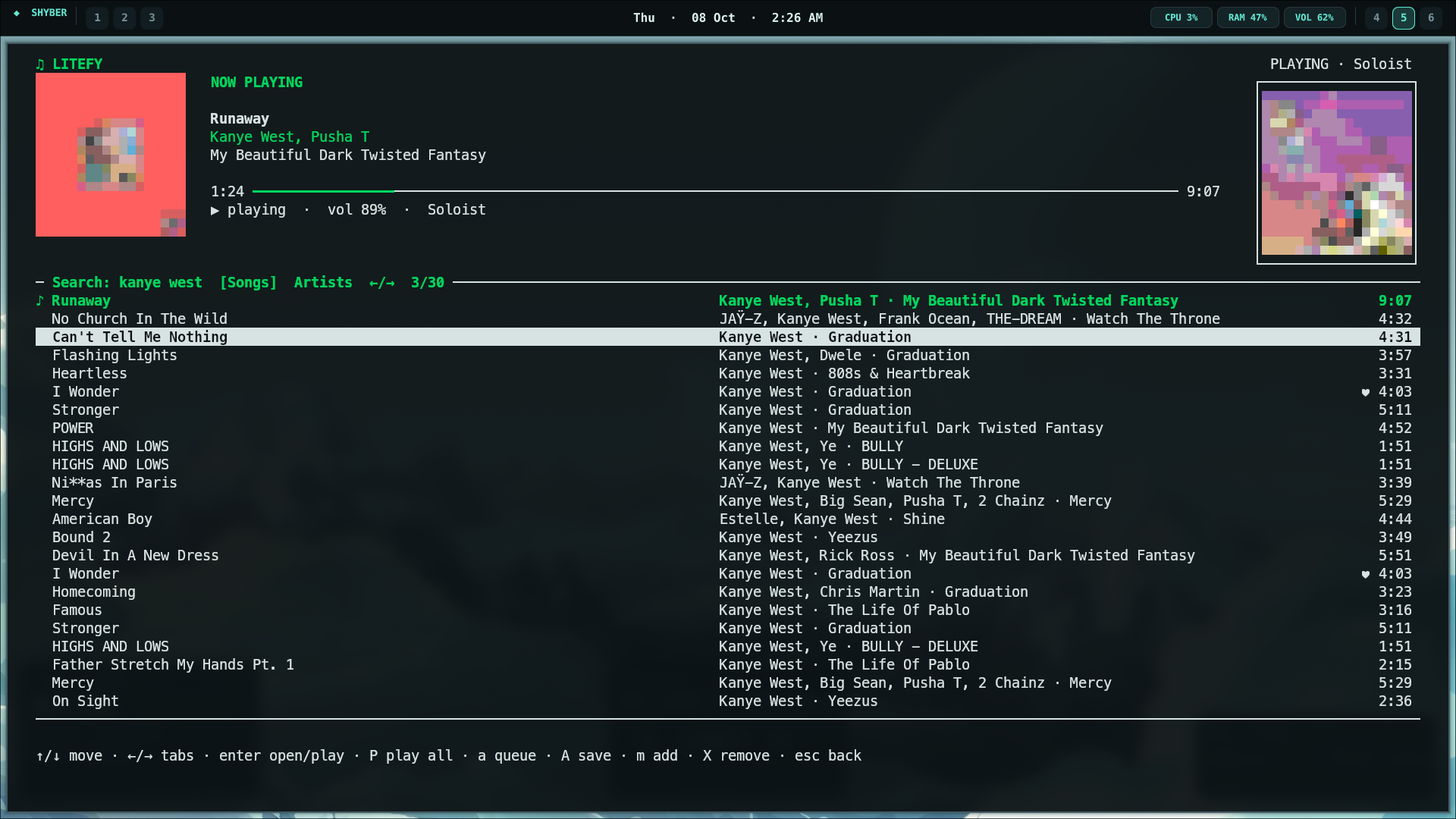
Litefy is a lightweight terminal music player for Spotify, built to use spotifyd for playback. Search for tracks and artists, explore artist releases, and control playback from your terminal.
Python
1
1 commits
updated Oct 8, 2026
A terminal Spotify music browser and player. Litefy controls the local spotifyd receiver for playback; it does not route playback to the Spotify desktop app, phone, or another Connect device.
Requirements: Linux, Python 3.10 or newer with venv/pip support, curl, tar, sha512sum, and a Spotify Premium account. On PipeWire desktops, the PulseAudio compatibility service (pipewire-pulse) is recommended.
Download or clone this project and open a terminal in its folder.
Run:
./install.sh
The installer creates a Python environment, installs Litefy's dependencies, downloads and checksum-verifies an official Spotifyd desktop binary if one is not installed, creates a local Spotifyd config if needed, and starts Spotifyd's one-time browser sign-in when no Spotifyd credentials are saved. It also installs a litefy launcher in ~/.local/bin.
Create a Spotify app in the Spotify Developer Dashboard. In the app settings, add this exact Redirect URI:
http://127.0.0.1:8888/callback
It must match Litefy's .env value exactly. Use the loopback IP 127.0.0.1, not localhost.
Copy the Spotify app's Client ID and Client Secret into .env:
SPOTIPY_CLIENT_ID=your_client_id
SPOTIPY_CLIENT_SECRET=your_client_secret
SPOTIPY_REDIRECT_URI=http://127.0.0.1:8888/callback
Keep .env private; it is ignored by Git. These Web API credentials are separate from the browser sign-in performed by Spotifyd. Use the same Spotify account for both sign-ins.
Start Litefy:
litefy
If your shell reports litefy: command not found, run ~/.local/bin/litefy or add ~/.local/bin to your PATH. You can also run ./litefy from the project folder. If you move the project, rerun ./install.sh to update the launcher.
On first launch, Litefy opens Spotify authorization in your browser. Approve access with the account you want to use. Litefy starts the local Spotifyd Connect receiver and targets only that device for playback.
install.sh runs setup_spotifyd.sh automatically. To repeat or repair the Spotifyd setup later, run:
./setup_spotifyd.sh
The helper installs the official full Linux release to ~/.local/bin/spotifyd when needed, verifies its published SHA-512 checksum, writes a default config to ~/.config/spotifyd/spotifyd.conf without replacing an existing config, and guides you through Spotifyd OAuth sign-in. The default device name is Litefy; an existing configured device_name is preserved and used by Litefy.
If Spotifyd cannot open audio, check that PulseAudio or PipeWire's PulseAudio compatibility layer is running. To choose a different Spotifyd backend, edit backend in ~/.config/spotifyd/spotifyd.conf and consult the Spotifyd configuration guide.
/ search songs and artists; use ←/→ to switch search tabs.SPOTIPY_* entries in .env..env both use http://127.0.0.1:8888/callback exactly../setup_spotifyd.sh, then check ~/.config/spotifyd/spotifyd.conf and the Spotifyd sign-in.Litefy is licensed under the MIT License. See LICENSE.
Litefy is a lightweight terminal music player for Spotify, built to use spotifyd for playback. Search for tracks and artists, explore artist releases, and control playback from your terminal.
Python
1
1 commits
updated Oct 8, 2026
A terminal Spotify music browser and player. Litefy controls the local spotifyd receiver for playback; it does not route playback to the Spotify desktop app, phone, or another Connect device.
Requirements: Linux, Python 3.10 or newer with venv/pip support, curl, tar, sha512sum, and a Spotify Premium account. On PipeWire desktops, the PulseAudio compatibility service (pipewire-pulse) is recommended.
Download or clone this project and open a terminal in its folder.
Run:
./install.sh
The installer creates a Python environment, installs Litefy's dependencies, downloads and checksum-verifies an official Spotifyd desktop binary if one is not installed, creates a local Spotifyd config if needed, and starts Spotifyd's one-time browser sign-in when no Spotifyd credentials are saved. It also installs a litefy launcher in ~/.local/bin.
Create a Spotify app in the Spotify Developer Dashboard. In the app settings, add this exact Redirect URI:
http://127.0.0.1:8888/callback
It must match Litefy's .env value exactly. Use the loopback IP 127.0.0.1, not localhost.
Copy the Spotify app's Client ID and Client Secret into .env:
SPOTIPY_CLIENT_ID=your_client_id
SPOTIPY_CLIENT_SECRET=your_client_secret
SPOTIPY_REDIRECT_URI=http://127.0.0.1:8888/callback
Keep .env private; it is ignored by Git. These Web API credentials are separate from the browser sign-in performed by Spotifyd. Use the same Spotify account for both sign-ins.
Start Litefy:
litefy
If your shell reports litefy: command not found, run ~/.local/bin/litefy or add ~/.local/bin to your PATH. You can also run ./litefy from the project folder. If you move the project, rerun ./install.sh to update the launcher.
On first launch, Litefy opens Spotify authorization in your browser. Approve access with the account you want to use. Litefy starts the local Spotifyd Connect receiver and targets only that device for playback.
install.sh runs setup_spotifyd.sh automatically. To repeat or repair the Spotifyd setup later, run:
./setup_spotifyd.sh
The helper installs the official full Linux release to ~/.local/bin/spotifyd when needed, verifies its published SHA-512 checksum, writes a default config to ~/.config/spotifyd/spotifyd.conf without replacing an existing config, and guides you through Spotifyd OAuth sign-in. The default device name is Litefy; an existing configured device_name is preserved and used by Litefy.
If Spotifyd cannot open audio, check that PulseAudio or PipeWire's PulseAudio compatibility layer is running. To choose a different Spotifyd backend, edit backend in ~/.config/spotifyd/spotifyd.conf and consult the Spotifyd configuration guide.
/ search songs and artists; use ←/→ to switch search tabs.SPOTIPY_* entries in .env..env both use http://127.0.0.1:8888/callback exactly../setup_spotifyd.sh, then check ~/.config/spotifyd/spotifyd.conf and the Spotifyd sign-in.Litefy is licensed under the MIT License. See LICENSE.



