
🎮🏭 AI plays the game Factorio with CV & LLM combined. Powered by YOLO / LLM.
TypeScript
100
76 commits
updated Feb 25, 2026
README
Factorio for Project AIRI
[!NOTE]
This project is part of the Project AIRI, we aim to build a wishing to achieve Neuro-sama's (subscribe if you didn't!) altitude, completely LLM and AI driven, capable of realtime voice chat, Minecraft playing, Factorio playing. If you are interested in, please do give it a try on live demo.
Development
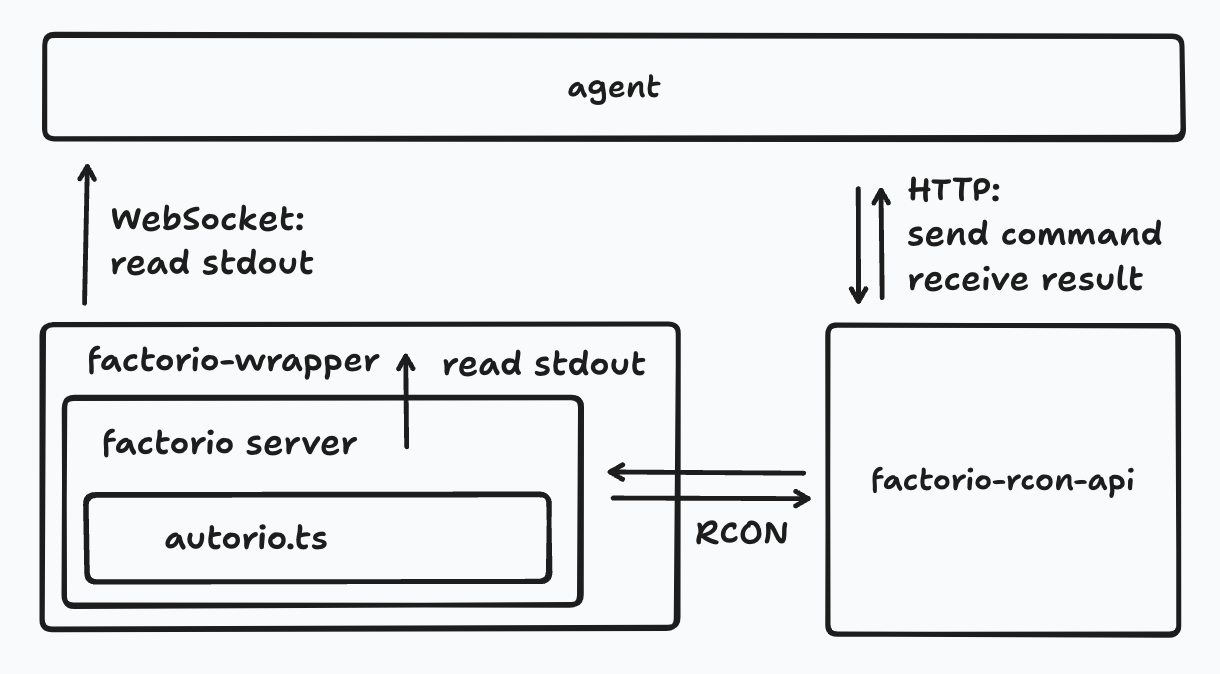
Project Structure
It's hard to describe the project structure in a few words, but it currently looks like this:
Start to develop
-
Clone the repository:
git clone https://github.com/moeru-ai/airi-factorio -
Install dependencies:
pnpm i -
Create a symlink for the
autoriomod:cd /path/to/airi-factorio ln -s /path/to/airi-factorio/packages/autorio/dist /path/to/factorio/data/autorio # If you are using DevContainer, you can use the following command: ln -s /workspace/airi-factorio/packages/autorio/dist /opt/factorio/data/autorio -
Copy and fill the
.envfile:cp packages/agent/.env.example packages/agent/.env.local cp packages/factorio-wrapper/.env.example packages/factorio-wrapper/.env.localIf you are using DevContainer, you can set
WS_SERVER_HOSTandFACTORIO_WS_HOSTandRCON_API_SERVER_HOSTtolocalhost. -
Create a game save file, the save file path should be the same as the one in the
.envfile:/path/to/factorio/bin/x64/factorio --create /path/to/factorio/the-save-file.zip # If you are using DevContainer, you can use the following command: /opt/factorio/bin/x64/factorio --create /path/to/factorio/the-save-file.zip # If your machine is not x64, you can use the following command: box64 /opt/factorio/bin/x64/factorio --create /path/to/factorio/the-save-file.zip -
Run the development script:
pnpm run dev
Now you can use the commands in Factorio, the script will be compiled automatically, but you need to exit and re-enter the game to see the changes(no need to restart the game).
Other side projects born from Project AIRI like this one
- Awesome AI VTuber: A curated list of AI VTubers and related projects
unspeech: Universal endpoint proxy server for/audio/transcriptionsand/audio/speech, like LiteLLM but for any ASR and TTShfup: tools to help on deploying, bundling to HuggingFace Spacesxsai-transformers: Experimental 🤗 Transformers.js provider for xsAI.- WebAI: Realtime Voice Chat: Full example of implementing ChatGPT's realtime voice from scratch with VAD + STT + LLM + TTS.
@proj-airi/drizzle-duckdb-wasm: Drizzle ORM driver for DuckDB WASM@proj-airi/duckdb-wasm: Easy to use wrapper for@duckdb/duckdb-wasm- Airi Factorio: Allow Airi to play Factorio
- Factorio RCON API: RESTful API wrapper for Factorio headless server console
autorio: Factorio automation librarytstl-plugin-reload-factorio-mod: Reload Factorio mod when developing@velin-dev/ml: Use Vue SFC and Markdown to write easy to manage stateful prompts for LLMdemodel: Easily boost the speed of pulling your models and datasets from various of inference runtimes.inventory: Centralized model catalog and default provider configurations backend service- MCP Launcher: Easy to use MCP builder & launcher for all possible MCP servers, just like Ollama for models!
- 🥺 SAD: Documentation and notes for self-host and browser running LLMs.
Credits
Thanks for the original idea and code: https://github.com/naklecha/factorio-automation
Significant stargazers

463 followers · starred Feb 2025
Similar repos


Languages
TypeScript
96.0%
Dockerfile
2.0%
Shell
1.6%
🎮🏭 AI plays the game Factorio with CV & LLM combined. Powered by YOLO / LLM.
TypeScript
100
76 commits
updated Feb 25, 2026
README
Factorio for Project AIRI
[!NOTE]
This project is part of the Project AIRI, we aim to build a wishing to achieve Neuro-sama's (subscribe if you didn't!) altitude, completely LLM and AI driven, capable of realtime voice chat, Minecraft playing, Factorio playing. If you are interested in, please do give it a try on live demo.
Development
Project Structure
It's hard to describe the project structure in a few words, but it currently looks like this:
Start to develop
-
Clone the repository:
git clone https://github.com/moeru-ai/airi-factorio -
Install dependencies:
pnpm i -
Create a symlink for the
autoriomod:cd /path/to/airi-factorio ln -s /path/to/airi-factorio/packages/autorio/dist /path/to/factorio/data/autorio # If you are using DevContainer, you can use the following command: ln -s /workspace/airi-factorio/packages/autorio/dist /opt/factorio/data/autorio -
Copy and fill the
.envfile:cp packages/agent/.env.example packages/agent/.env.local cp packages/factorio-wrapper/.env.example packages/factorio-wrapper/.env.localIf you are using DevContainer, you can set
WS_SERVER_HOSTandFACTORIO_WS_HOSTandRCON_API_SERVER_HOSTtolocalhost. -
Create a game save file, the save file path should be the same as the one in the
.envfile:/path/to/factorio/bin/x64/factorio --create /path/to/factorio/the-save-file.zip # If you are using DevContainer, you can use the following command: /opt/factorio/bin/x64/factorio --create /path/to/factorio/the-save-file.zip # If your machine is not x64, you can use the following command: box64 /opt/factorio/bin/x64/factorio --create /path/to/factorio/the-save-file.zip -
Run the development script:
pnpm run dev
Now you can use the commands in Factorio, the script will be compiled automatically, but you need to exit and re-enter the game to see the changes(no need to restart the game).
Other side projects born from Project AIRI like this one
- Awesome AI VTuber: A curated list of AI VTubers and related projects
unspeech: Universal endpoint proxy server for/audio/transcriptionsand/audio/speech, like LiteLLM but for any ASR and TTShfup: tools to help on deploying, bundling to HuggingFace Spacesxsai-transformers: Experimental 🤗 Transformers.js provider for xsAI.- WebAI: Realtime Voice Chat: Full example of implementing ChatGPT's realtime voice from scratch with VAD + STT + LLM + TTS.
@proj-airi/drizzle-duckdb-wasm: Drizzle ORM driver for DuckDB WASM@proj-airi/duckdb-wasm: Easy to use wrapper for@duckdb/duckdb-wasm- Airi Factorio: Allow Airi to play Factorio
- Factorio RCON API: RESTful API wrapper for Factorio headless server console
autorio: Factorio automation librarytstl-plugin-reload-factorio-mod: Reload Factorio mod when developing@velin-dev/ml: Use Vue SFC and Markdown to write easy to manage stateful prompts for LLMdemodel: Easily boost the speed of pulling your models and datasets from various of inference runtimes.inventory: Centralized model catalog and default provider configurations backend service- MCP Launcher: Easy to use MCP builder & launcher for all possible MCP servers, just like Ollama for models!
- 🥺 SAD: Documentation and notes for self-host and browser running LLMs.
Credits
Thanks for the original idea and code: https://github.com/naklecha/factorio-automation
Similar repos
Significant stargazers
463 followers · starred Feb 2025
Languages
TypeScript
96.0%
Dockerfile
2.0%
Shell
1.6%