modelteam-ai/modelteam.ai

Python

3

218 commits

updated May 1, 2025

See the code

README

modelteam: AI-Powered Skill Validation for Engineers

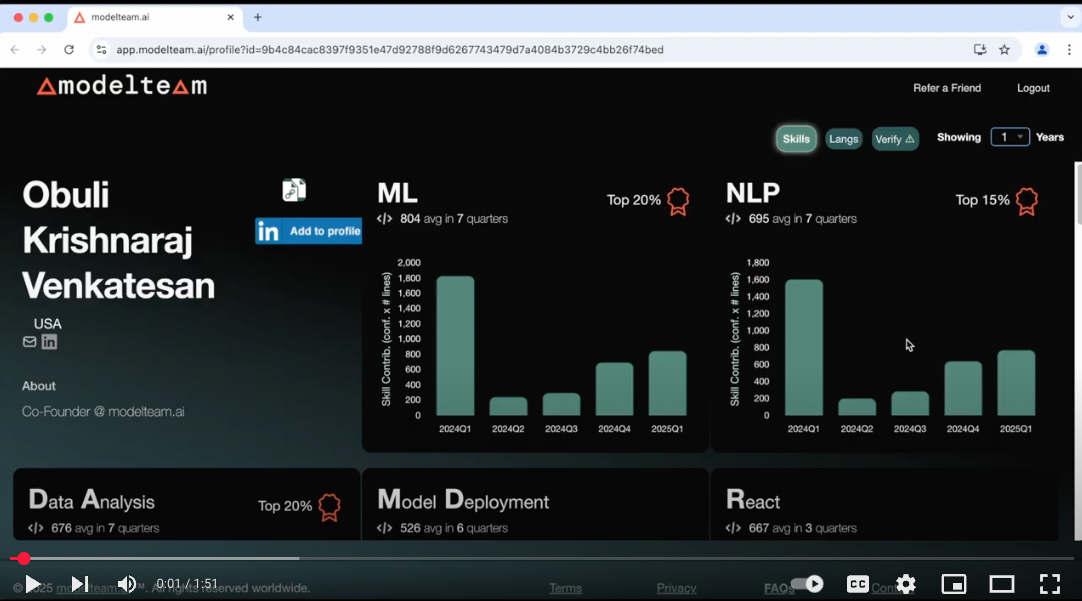
modelteam is an AI-driven platform that helps engineers validate and showcase their skills. By analyzing real-world coding contributions, modelteam provides insights into expertise and code quality.

View Sample Profile

modelteam is trained on contributions from over a million engineers across multiple open-source projects, supporting analysis in 15+ programming languages.

Security & Privacy

Your code and data remain on your local machine. The AI models run locally, ensuring no data is transferred externally. The generated profile contains only metadata and predicted skills, with an option to remove specific skills before uploading.

Supported Languages

Python, JavaScript, TypeScript, Java, Go, C, C++, PHP, Ruby, C#, Rust, Scala, Swift, Kotlin, Lua, Dart, Elixir

Prerequisites

  • Python 3.9 - 3.12
  • Pip
  • Python-venv (if not included in Python installation)
  • Git (command line)
  • Turn off sleep mode so the script can run without interruptions
    • Optional: caffeine (for linux)
  • Visual C++ Redistributable ( for Windows)
  • Minimum 8GB RAM
  • ~15GB free disk space
  • You should have made contributions for a minimum period of 3 months.

Getting Started

Video Tutorial

Build your Modelteam profile

Extract Skills & Stats from your Code to build your profile

  • Create an account in modelteam if you don't have one
  • Run the following commands to generate your profile.
    • Our AI models run locally on your machine and does not send any data outside your machine.
    • Generates PDF profile for your personal use and a JSON file for creating your modelteam.ai verified profile

1. Install modelteam Locally (in a virtual environment)

Mac/Linux
mkdir ~/modelteam && cd ~/modelteam
git clone https://github.com/modelteam-ai/modelteam.ai.git
cd ~/modelteam/modelteam.ai
python3 setup.py
Windows
mkdir %USERPROFILE%\modelteam && cd %USERPROFILE%\modelteam
git clone https://github.com/modelteam-ai/modelteam.ai.git
cd %USERPROFILE%\modelteam\modelteam.ai
python setup.py

This script:

  • Sets up a virtual environment. So, it doesn't affect your system Python
  • Installs dependencies in the virtual environment
  • Downloads AI models

Profile Builder Tool (Mac & Windows)

2. Profile Builder Tool

  • If you are using a Mac or Windows, you can use the GUI helper to run the scripts. It will guide you through the steps to build your profile.
    1. Select the repos
    2. Find your git email id
    3. Extract Skills
    4. Edit Skills
python3 user_profile_helper.py

or

python user_profile_helper.py

3. Upload

  • Create an account in modelteam if you don't have one
  • Upload the file(mt_metrics_yyyy-mm-dd_*****.json.gz) back to your experience
  • Our AI models will analyze the data and generate a profile for you (<30 minutes)

Detailed Profile Building Steps (Linux / CLI)

2. Gather your Git Repositories & Git Email ID to Analyze

2.1 Repo List

  • Clone the repos to your local machine and add the full paths to a text file, one line for each repo.
  • If all your repos are in a single directory, you can pass the directory path directly and skip the below step.
Mac/Linux

$ ls /Users/john/repos/
backend
frontend
api

find ~ 2>/dev/null | grep "/\.git$" | sed 's/\/\.git$//' > ~/modelteam/repo_list.txt

$ cat /Users/john/modelteam/repo_list.txt
/Users/john/backend
/Users/john/frontend
/Users/john/api

Windows

$ dir C:\Users\john\repos
backend
frontend
api

dir /s /b %USERPROFILE% | findstr "\\.git$" > %USERPROFILE%\modelteam\repo_list.txt

$ type C:\Users\john\modelteam\repo_list.txt
C:\Users\john\backend
C:\Users\john\frontend
C:\Users\john\api

2.2 Finding Your Git Email ID

  • git_email_id should be the id you have in your git commits.
  • You can get this by using git log command as shown below
    • Assuming your $USER (username) is there in your Author field
git config --get user.email

or

Mac/Linux
git log | grep Author | grep -i $USER | sed 's/.*<\(.*\)>.*/\1/' | sort | uniq 

$ git log | grep Author | grep $USER | sed 's/.*<\(.*\)>.*/\1/' | sort | uniq
[email protected]
[email protected]

Windows
git log --author=%USERNAME% --pretty=format:"%%ae"

3. Extract Skills from Your Code

  • This is to build profile for single user, to build team profile refer to Team Profile Generation
  • For this step, no internet access is required. The script will analyze your git history to extract skills and stats
Mac/Linux
cd ~/modelteam/modelteam.ai
python3 gen_git_stats.py -r <repo_list> -g <git_email_id> [-n <number_of_years_to_look_back>]
Windows
cd %USERPROFILE%\modelteam\modelteam.ai
python gen_git_stats.py -r <repo_list> -g <git_email_id> [-n <number_of_years_to_look_back>]
  • Number of years is optional and defaults to 5 years. It's recommended to change it to number of years you want to look back in git history

Examples

cd ~/modelteam/modelteam.ai
python3 gen_git_stats.py -r ~/modelteam/repo_list.txt -g [email protected] -n 5
cd ~/modelteam/modelteam.ai
python3 gen_git_stats.py -r /Users/john/repos/ -g [email protected] -n 5
  • If you have multiple git email ids, you need to run the entire flow (except for setup.py) for each git email id separately
  • To Force re-run the job, delete the folder model_team_profile/<git_email_id> and run the script again

4. Edit & Upload

Mac/Linux
python3 edit_skills.py -g <git_email_id> [--cli_mode]
Windows
python edit_skills.py -g <git_email_id> [--cli_mode]
- Verify the generated skill stats file and edit it using [edit_skills.py](edit_skills.py) (Don't edit the JSON file directly) - Remove any confidential skills. Marking skills as irrelevant will help us improve our models - Create an account in [modelteam](https://app.modelteam.ai/) if you don't have one - Upload the file(mt_metrics_yyyy-mm-dd_*****.json.gz) back to your [experience](https://app.modelteam.ai/experience) - Our AI models will analyze the data and generate a profile for you (<30 minutes) - If you are using linux server without GUI, use --cli_mode

Examples

Mac/Windows

python3 edit_skills.py -g [email protected]

Linux

python3 edit_skills.py -g [email protected] --cli_mode

modelteam-ai/modelteam.ai

Python

3

218 commits

updated May 1, 2025

See the code

README

modelteam: AI-Powered Skill Validation for Engineers

modelteam is an AI-driven platform that helps engineers validate and showcase their skills. By analyzing real-world coding contributions, modelteam provides insights into expertise and code quality.

View Sample Profile

modelteam is trained on contributions from over a million engineers across multiple open-source projects, supporting analysis in 15+ programming languages.

Security & Privacy

Your code and data remain on your local machine. The AI models run locally, ensuring no data is transferred externally. The generated profile contains only metadata and predicted skills, with an option to remove specific skills before uploading.

Supported Languages

Python, JavaScript, TypeScript, Java, Go, C, C++, PHP, Ruby, C#, Rust, Scala, Swift, Kotlin, Lua, Dart, Elixir


Prerequisites

  • Python 3.9 - 3.12
  • Pip
  • Python-venv (if not included in Python installation)
  • Git (command line)
  • Turn off sleep mode so the script can run without interruptions
    • Optional: caffeine (for linux)
  • Visual C++ Redistributable ( for Windows)
  • Minimum 8GB RAM
  • ~15GB free disk space
  • You should have made contributions for a minimum period of 3 months.

Getting Started

Video Tutorial

Build your Modelteam profile

Extract Skills & Stats from your Code to build your profile

  • Create an account in modelteam if you don't have one
  • Run the following commands to generate your profile.
    • Our AI models run locally on your machine and does not send any data outside your machine.
    • Generates PDF profile for your personal use and a JSON file for creating your modelteam.ai verified profile

1. Install modelteam Locally (in a virtual environment)

Mac/Linux
mkdir ~/modelteam && cd ~/modelteam
git clone https://github.com/modelteam-ai/modelteam.ai.git
cd ~/modelteam/modelteam.ai
python3 setup.py
Windows
mkdir %USERPROFILE%\modelteam && cd %USERPROFILE%\modelteam
git clone https://github.com/modelteam-ai/modelteam.ai.git
cd %USERPROFILE%\modelteam\modelteam.ai
python setup.py

This script:

  • Sets up a virtual environment. So, it doesn't affect your system Python
  • Installs dependencies in the virtual environment
  • Downloads AI models

Profile Builder Tool (Mac & Windows)

2. Profile Builder Tool

  • If you are using a Mac or Windows, you can use the GUI helper to run the scripts. It will guide you through the steps to build your profile.
    1. Select the repos
    2. Find your git email id
    3. Extract Skills
    4. Edit Skills
python3 user_profile_helper.py

or

python user_profile_helper.py

3. Upload

  • Create an account in modelteam if you don't have one
  • Upload the file(mt_metrics_yyyy-mm-dd_*****.json.gz) back to your experience
  • Our AI models will analyze the data and generate a profile for you (<30 minutes)

Detailed Profile Building Steps (Linux / CLI)

2. Gather your Git Repositories & Git Email ID to Analyze

2.1 Repo List

  • Clone the repos to your local machine and add the full paths to a text file, one line for each repo.
  • If all your repos are in a single directory, you can pass the directory path directly and skip the below step.
Mac/Linux

$ ls /Users/john/repos/
backend
frontend
api

find ~ 2>/dev/null | grep "/\.git$" | sed 's/\/\.git$//' > ~/modelteam/repo_list.txt

$ cat /Users/john/modelteam/repo_list.txt
/Users/john/backend
/Users/john/frontend
/Users/john/api

Windows

$ dir C:\Users\john\repos
backend
frontend
api

dir /s /b %USERPROFILE% | findstr "\\.git$" > %USERPROFILE%\modelteam\repo_list.txt

$ type C:\Users\john\modelteam\repo_list.txt
C:\Users\john\backend
C:\Users\john\frontend
C:\Users\john\api

2.2 Finding Your Git Email ID

  • git_email_id should be the id you have in your git commits.
  • You can get this by using git log command as shown below
    • Assuming your $USER (username) is there in your Author field
git config --get user.email

or

Mac/Linux
git log | grep Author | grep -i $USER | sed 's/.*<\(.*\)>.*/\1/' | sort | uniq 

$ git log | grep Author | grep $USER | sed 's/.*<\(.*\)>.*/\1/' | sort | uniq
[email protected]
[email protected]

Windows
git log --author=%USERNAME% --pretty=format:"%%ae"

3. Extract Skills from Your Code

  • This is to build profile for single user, to build team profile refer to Team Profile Generation
  • For this step, no internet access is required. The script will analyze your git history to extract skills and stats
Mac/Linux
cd ~/modelteam/modelteam.ai
python3 gen_git_stats.py -r <repo_list> -g <git_email_id> [-n <number_of_years_to_look_back>]
Windows
cd %USERPROFILE%\modelteam\modelteam.ai
python gen_git_stats.py -r <repo_list> -g <git_email_id> [-n <number_of_years_to_look_back>]
  • Number of years is optional and defaults to 5 years. It's recommended to change it to number of years you want to look back in git history

Examples

cd ~/modelteam/modelteam.ai
python3 gen_git_stats.py -r ~/modelteam/repo_list.txt -g [email protected] -n 5
cd ~/modelteam/modelteam.ai
python3 gen_git_stats.py -r /Users/john/repos/ -g [email protected] -n 5
  • If you have multiple git email ids, you need to run the entire flow (except for setup.py) for each git email id separately
  • To Force re-run the job, delete the folder model_team_profile/<git_email_id> and run the script again

4. Edit & Upload

Mac/Linux
python3 edit_skills.py -g <git_email_id> [--cli_mode]
Windows
python edit_skills.py -g <git_email_id> [--cli_mode]
- Verify the generated skill stats file and edit it using [edit_skills.py](edit_skills.py) (Don't edit the JSON file directly) - Remove any confidential skills. Marking skills as irrelevant will help us improve our models - Create an account in [modelteam](https://app.modelteam.ai/) if you don't have one - Upload the file(mt_metrics_yyyy-mm-dd_*****.json.gz) back to your [experience](https://app.modelteam.ai/experience) - Our AI models will analyze the data and generate a profile for you (<30 minutes) - If you are using linux server without GUI, use --cli_mode

Examples

Mac/Windows

python3 edit_skills.py -g [email protected]

Linux

python3 edit_skills.py -g [email protected] --cli_mode