
Your GitHub Issues as a live roadmap board in Claude Code.
Python
2
161 commits
updated Aug 20, 2026
See what people are saying
README
Sideboard
Your GitHub Issues as a live roadmap board in Claude Code.
Sideboard shows your repo's GitHub Issues as a live roadmap board that you and Claude Code drive together. Quickly log ideas for the backlog, start Claude on the next issue, and reason across your roadmap and codebase in context — no need to jump out of Claude Code to an external board.
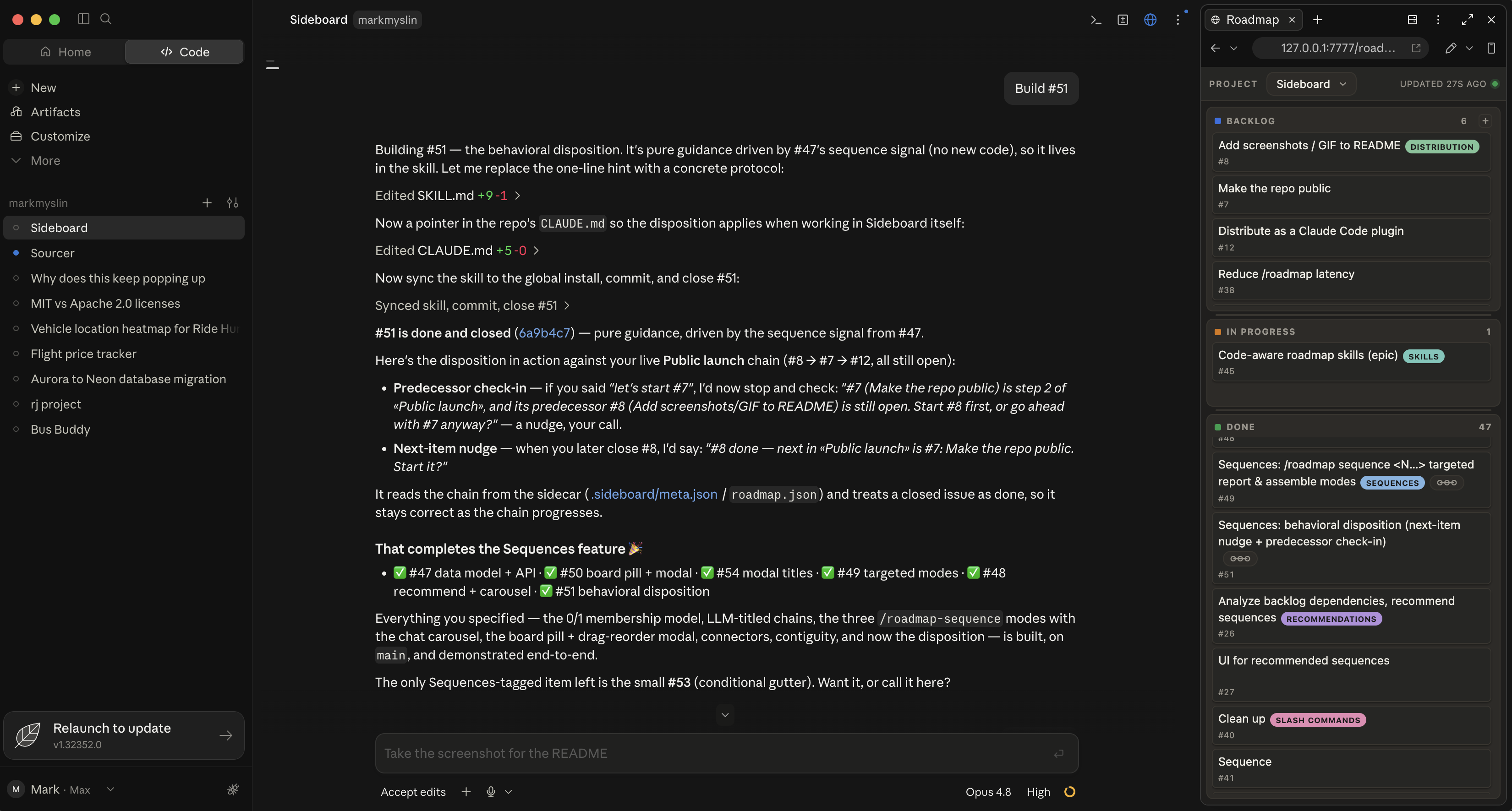
Claude Code has no API for custom side panels, but its desktop app lets you pin any local web page in the preview pane next to chat. Sideboard is that page: a zero-dependency HTML board whose source of truth is your GitHub Issues. A companion skill teaches Claude to keep the board current with gh during normal conversation — filing what you decide to build, moving cards to In Progress, closing them Done when work lands. It refreshes on its own — board edits show instantly, and changes made with gh directly appear on the next GitHub sync.
Code-aware roadmap skills
Because Claude holds your roadmap and your codebase in context, Sideboard ships commands that reason across both — and they always propose first, never acting until you accept. Installed as a plugin, the commands are namespaced sideboard::
/sideboard:roadmap-suggest— mines the repo for work the board is missing (TODOs, stubs, churn-heavy files, gaps, features the docs promise) and offers them as a checklist. On a brand-new project it bootstraps a starter backlog from scratch./sideboard:roadmap-sequence— finds dependency chains: report or assemble specific issues, or scan the board and recommend build-orders in a chat carousel. The board draws each chain as a connector down the lane./sideboard:roadmap-cleanup— flags issues that are already done (confirmed against the actual code) or redundant, and closes/merges them on your OK.
How it works
- GitHub Issues are the source of truth. Each card is an issue;
#Nis its number; a closed issue = Done. .sideboard/meta.json— a small committed sidecar — holds what GitHub doesn't: the Backlog↔In Progress split, card order, tag colors, and dependency sequences. The router reconciles it automatically — GitHub wins for content and open/closed; the sidecar wins for lane split and order.scripts/sideboard_router.pyserves the board on127.0.0.1:7777, rebuilding it fromgh issue list+ the sidecar on each sync. One router serves all your projects and follows whichever one you're working in.roadmap-board.html(at the repo root) is a zero-dependency kanban — three columns (Backlog → In Progress → Done), feature-tag chips, drag to move/reorder, add/edit inline. Light and dark themes are automatic.
What it runs on your machine
Claude Code plugins run with your user privileges, so it's worth knowing exactly what Sideboard does — it's deliberately narrow:
- A localhost-only HTTP server (
scripts/sideboard_router.py) bound to127.0.0.1:7777. It never listens on a public interface and makes no outbound network calls of its own. ghon your behalf —gh issue list/create/edit/closeandgh label— to read and update the roadmap. All GitHub access goes through your already-authenticatedgh; the plugin stores no GitHub tokens or credentials of its own.- Two hooks — on session start and on each prompt, a small bash script (
scripts/sideboard-active.sh) tells the running server which project is active (it POSTs the session title and working directory to127.0.0.1:7777over loopback so the board can follow the project you're in). It always exits 0, so it never fails your prompt, and atimeoutinhooks.jsonhard-caps how long it can add. Timing: normally two short (≤1s each) local requests per prompt; when the server is down, the hook also starts it — reclaiming the port only from a Sideboard router it identifies as its own (never an unrelated process) — which can add a few seconds, at most once per 60s. If something that isn't Sideboard already holds the port, the hook backs off and logs a note instead of touching it. - Local state under
~/.claude— a per-install write-auth token (sideboard-token,0600, readable only by you) that also gates the board's read requests, a title→project registry (sideboard-projects.json), a server log, and a few relaunch-throttle stamps. These files stay on your machine.
It doesn't download or execute remote code, phone home, or touch anything beyond your repos' issues and the committed .sideboard/meta.json. One caveat on "stays local": the /sideboard:roadmap command reads the local auth token and puts it in the board URL it hands to Claude — so, like anything in your chat, that token reaches whatever model backs your Claude Code session. It only authorizes writes to your local board server on 127.0.0.1; it is not a GitHub credential.
Prerequisites
- macOS or Linux. The board server and hooks are bash +
python3; on Windows you'd need a bash shell (Git Bash or WSL). - A git repo under
~/Documents/Projects/with a GitHub remote and Issues enabled. The router discovers projects in that root; to keep repos elsewhere, point it at them withSIDEBOARD_PROJECTS_ROOT=/path(or add a title→dir entry to~/.claude/sideboard-projects.json). ghinstalled and authenticated (gh auth login).python3on PATH (runs the local board server).curlon PATH (the hook and launcher talk to the local server).
Install
Sideboard is a Claude Code plugin. From inside Claude Code:
/plugin marketplace add mmyslin/sideboard
/plugin install sideboard@sideboard
That's it — no git clone, no settings.json editing. The plugin ships the skill, the four sideboard: commands, the board, the router, and the activity hook; the SessionStart hook starts the board server for you. Start (or restart) a session and the commands are available in every project.
Legacy install (without the plugin)
git clone https://github.com/mmyslin/sideboard.git
cd sideboard
./install.sh
Copies the skill, board, router, and activity hook into ~/.claude/skills/sideboard/ and merges the hook into your settings.json. Kept for users not on the plugin flow; the plugin is the supported path.
Switching from the legacy install to the plugin? Remove the old hook so it doesn't fire alongside the plugin's. It's harmless (the router is a single idempotent :7777 process — the duplicate just no-ops), but to keep things clean, delete the SessionStart/UserPromptSubmit entries pointing at ~/.claude/skills/sideboard/sideboard-active.sh from ~/.claude/settings.json.
Use
In any repo that meets the prerequisites, ask Claude to "set up the roadmap" (or run /sideboard:roadmap). Claude bootstraps the sidecar so the router discovers the project, and opens the board in the preview pane (the SessionStart hook already has the board server running). Always open it via /sideboard:roadmap — the board authenticates with a per-install token that the command puts in the URL (…/roadmap-board.html?token=…); a bare token-less URL renders but stays read-only and won't load your issues. Drag the pane beside your chat and save the layout — from then on, as you and Claude decide what to build and as gh issue changes land, the board keeps itself current. Re-open it any time with /sideboard:roadmap.
Uninstall
/plugin uninstall sideboard@sideboard removes the plugin, but the board server keeps running — the :7777 router was started by the session hook and nothing signals it to stop. Shut it down by killing exactly the process listening on the port (don't pkill by file name — that can hit an editor viewing the source):
lsof -ti tcp:7777 -sTCP:LISTEN | xargs kill
Your roadmap lives in GitHub Issues and the committed .sideboard/meta.json, so stopping the server loses nothing. To remove the local state Sideboard kept under ~/.claude (auth token, title→project registry, server log, throttle stamps):
rm -f ~/.claude/sideboard-token ~/.claude/sideboard-projects.json ~/.claude/sideboard-router.log ~/.claude/sideboard-router.pid ~/.claude/sideboard-*.stamp
(The sideboard-*.stamp glob covers every throttle stamp — relaunch, heal, code-version, and token-warning.)
(Repos keep their committed .sideboard/meta.json; if a corrupt or migrated sidecar was ever backed up you may also find meta.json.*.bak files beside it — safe to delete.)
Notes
- The board is served on
127.0.0.1(localhost only). Don't bind it to0.0.0.0. .sideboard/meta.jsonis meant to be committed — it carries your lane split, order, tag colors, and sequences. The board HTML is served by the router from the plugin's own directory; nothing needs to be copied into your repos.- Requires the Claude Code desktop app (the one with the preview pane) to pin the board beside chat. Any browser works too — it's just a local web page — but open it with the
?token=…URL from/sideboard:roadmap(or append?token=$(cat ~/.claude/sideboard-token)), or it loads read-only with no data.
License
MIT © 2026 Mark Myslin
Similar repos


Your GitHub Issues as a live roadmap board in Claude Code.
Python
2
161 commits
updated Aug 20, 2026
See what people are saying
README
Sideboard
Your GitHub Issues as a live roadmap board in Claude Code.
Sideboard shows your repo's GitHub Issues as a live roadmap board that you and Claude Code drive together. Quickly log ideas for the backlog, start Claude on the next issue, and reason across your roadmap and codebase in context — no need to jump out of Claude Code to an external board.
Claude Code has no API for custom side panels, but its desktop app lets you pin any local web page in the preview pane next to chat. Sideboard is that page: a zero-dependency HTML board whose source of truth is your GitHub Issues. A companion skill teaches Claude to keep the board current with gh during normal conversation — filing what you decide to build, moving cards to In Progress, closing them Done when work lands. It refreshes on its own — board edits show instantly, and changes made with gh directly appear on the next GitHub sync.
Code-aware roadmap skills
Because Claude holds your roadmap and your codebase in context, Sideboard ships commands that reason across both — and they always propose first, never acting until you accept. Installed as a plugin, the commands are namespaced sideboard::
/sideboard:roadmap-suggest— mines the repo for work the board is missing (TODOs, stubs, churn-heavy files, gaps, features the docs promise) and offers them as a checklist. On a brand-new project it bootstraps a starter backlog from scratch./sideboard:roadmap-sequence— finds dependency chains: report or assemble specific issues, or scan the board and recommend build-orders in a chat carousel. The board draws each chain as a connector down the lane./sideboard:roadmap-cleanup— flags issues that are already done (confirmed against the actual code) or redundant, and closes/merges them on your OK.
How it works
- GitHub Issues are the source of truth. Each card is an issue;
#Nis its number; a closed issue = Done. .sideboard/meta.json— a small committed sidecar — holds what GitHub doesn't: the Backlog↔In Progress split, card order, tag colors, and dependency sequences. The router reconciles it automatically — GitHub wins for content and open/closed; the sidecar wins for lane split and order.scripts/sideboard_router.pyserves the board on127.0.0.1:7777, rebuilding it fromgh issue list+ the sidecar on each sync. One router serves all your projects and follows whichever one you're working in.roadmap-board.html(at the repo root) is a zero-dependency kanban — three columns (Backlog → In Progress → Done), feature-tag chips, drag to move/reorder, add/edit inline. Light and dark themes are automatic.
What it runs on your machine
Claude Code plugins run with your user privileges, so it's worth knowing exactly what Sideboard does — it's deliberately narrow:
- A localhost-only HTTP server (
scripts/sideboard_router.py) bound to127.0.0.1:7777. It never listens on a public interface and makes no outbound network calls of its own. ghon your behalf —gh issue list/create/edit/closeandgh label— to read and update the roadmap. All GitHub access goes through your already-authenticatedgh; the plugin stores no GitHub tokens or credentials of its own.- Two hooks — on session start and on each prompt, a small bash script (
scripts/sideboard-active.sh) tells the running server which project is active (it POSTs the session title and working directory to127.0.0.1:7777over loopback so the board can follow the project you're in). It always exits 0, so it never fails your prompt, and atimeoutinhooks.jsonhard-caps how long it can add. Timing: normally two short (≤1s each) local requests per prompt; when the server is down, the hook also starts it — reclaiming the port only from a Sideboard router it identifies as its own (never an unrelated process) — which can add a few seconds, at most once per 60s. If something that isn't Sideboard already holds the port, the hook backs off and logs a note instead of touching it. - Local state under
~/.claude— a per-install write-auth token (sideboard-token,0600, readable only by you) that also gates the board's read requests, a title→project registry (sideboard-projects.json), a server log, and a few relaunch-throttle stamps. These files stay on your machine.
It doesn't download or execute remote code, phone home, or touch anything beyond your repos' issues and the committed .sideboard/meta.json. One caveat on "stays local": the /sideboard:roadmap command reads the local auth token and puts it in the board URL it hands to Claude — so, like anything in your chat, that token reaches whatever model backs your Claude Code session. It only authorizes writes to your local board server on 127.0.0.1; it is not a GitHub credential.
Prerequisites
- macOS or Linux. The board server and hooks are bash +
python3; on Windows you'd need a bash shell (Git Bash or WSL). - A git repo under
~/Documents/Projects/with a GitHub remote and Issues enabled. The router discovers projects in that root; to keep repos elsewhere, point it at them withSIDEBOARD_PROJECTS_ROOT=/path(or add a title→dir entry to~/.claude/sideboard-projects.json). ghinstalled and authenticated (gh auth login).python3on PATH (runs the local board server).curlon PATH (the hook and launcher talk to the local server).
Install
Sideboard is a Claude Code plugin. From inside Claude Code:
/plugin marketplace add mmyslin/sideboard
/plugin install sideboard@sideboard
That's it — no git clone, no settings.json editing. The plugin ships the skill, the four sideboard: commands, the board, the router, and the activity hook; the SessionStart hook starts the board server for you. Start (or restart) a session and the commands are available in every project.
Legacy install (without the plugin)
git clone https://github.com/mmyslin/sideboard.git
cd sideboard
./install.sh
Copies the skill, board, router, and activity hook into ~/.claude/skills/sideboard/ and merges the hook into your settings.json. Kept for users not on the plugin flow; the plugin is the supported path.
Switching from the legacy install to the plugin? Remove the old hook so it doesn't fire alongside the plugin's. It's harmless (the router is a single idempotent :7777 process — the duplicate just no-ops), but to keep things clean, delete the SessionStart/UserPromptSubmit entries pointing at ~/.claude/skills/sideboard/sideboard-active.sh from ~/.claude/settings.json.
Use
In any repo that meets the prerequisites, ask Claude to "set up the roadmap" (or run /sideboard:roadmap). Claude bootstraps the sidecar so the router discovers the project, and opens the board in the preview pane (the SessionStart hook already has the board server running). Always open it via /sideboard:roadmap — the board authenticates with a per-install token that the command puts in the URL (…/roadmap-board.html?token=…); a bare token-less URL renders but stays read-only and won't load your issues. Drag the pane beside your chat and save the layout — from then on, as you and Claude decide what to build and as gh issue changes land, the board keeps itself current. Re-open it any time with /sideboard:roadmap.
Uninstall
/plugin uninstall sideboard@sideboard removes the plugin, but the board server keeps running — the :7777 router was started by the session hook and nothing signals it to stop. Shut it down by killing exactly the process listening on the port (don't pkill by file name — that can hit an editor viewing the source):
lsof -ti tcp:7777 -sTCP:LISTEN | xargs kill
Your roadmap lives in GitHub Issues and the committed .sideboard/meta.json, so stopping the server loses nothing. To remove the local state Sideboard kept under ~/.claude (auth token, title→project registry, server log, throttle stamps):
rm -f ~/.claude/sideboard-token ~/.claude/sideboard-projects.json ~/.claude/sideboard-router.log ~/.claude/sideboard-router.pid ~/.claude/sideboard-*.stamp
(The sideboard-*.stamp glob covers every throttle stamp — relaunch, heal, code-version, and token-warning.)
(Repos keep their committed .sideboard/meta.json; if a corrupt or migrated sidecar was ever backed up you may also find meta.json.*.bak files beside it — safe to delete.)
Notes
- The board is served on
127.0.0.1(localhost only). Don't bind it to0.0.0.0. .sideboard/meta.jsonis meant to be committed — it carries your lane split, order, tag colors, and sequences. The board HTML is served by the router from the plugin's own directory; nothing needs to be copied into your repos.- Requires the Claude Code desktop app (the one with the preview pane) to pin the board beside chat. Any browser works too — it's just a local web page — but open it with the
?token=…URL from/sideboard:roadmap(or append?token=$(cat ~/.claude/sideboard-token)), or it loads read-only with no data.
License
MIT © 2026 Mark Myslin