Configure Logitech devices on Linux (Options+ clone)
C++
667
427 commits
updated Jul 31, 2026
A Linux configurator for Logitech peripherals — per-application profiles, gesture mapping, thumb wheel modes, and a dark-themed Qt Quick UI matching Logitech Options+.





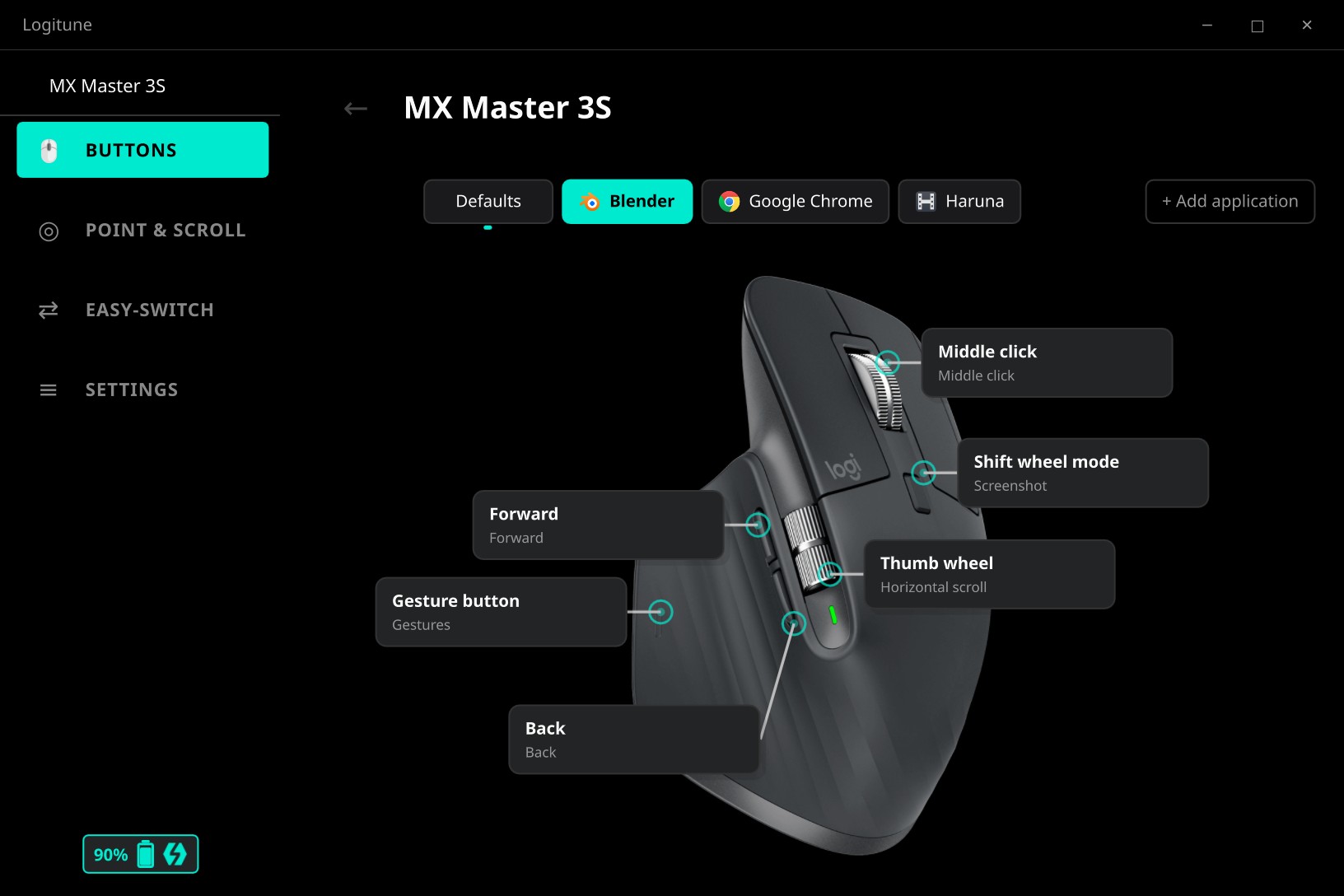
--edit to position hotspots, upload images, and tune labels without hand-editing JSON. Learn more
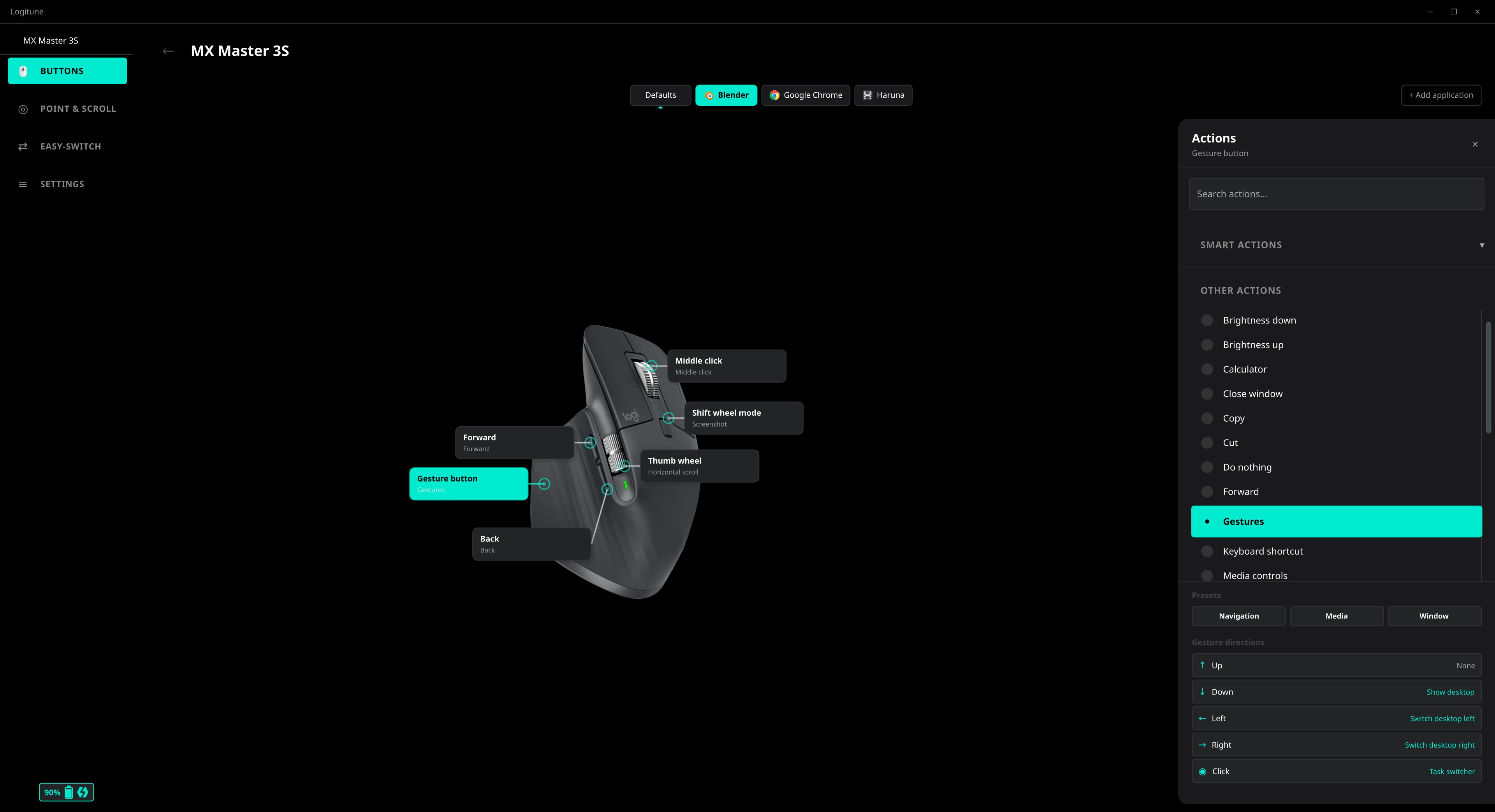
Action selection panel
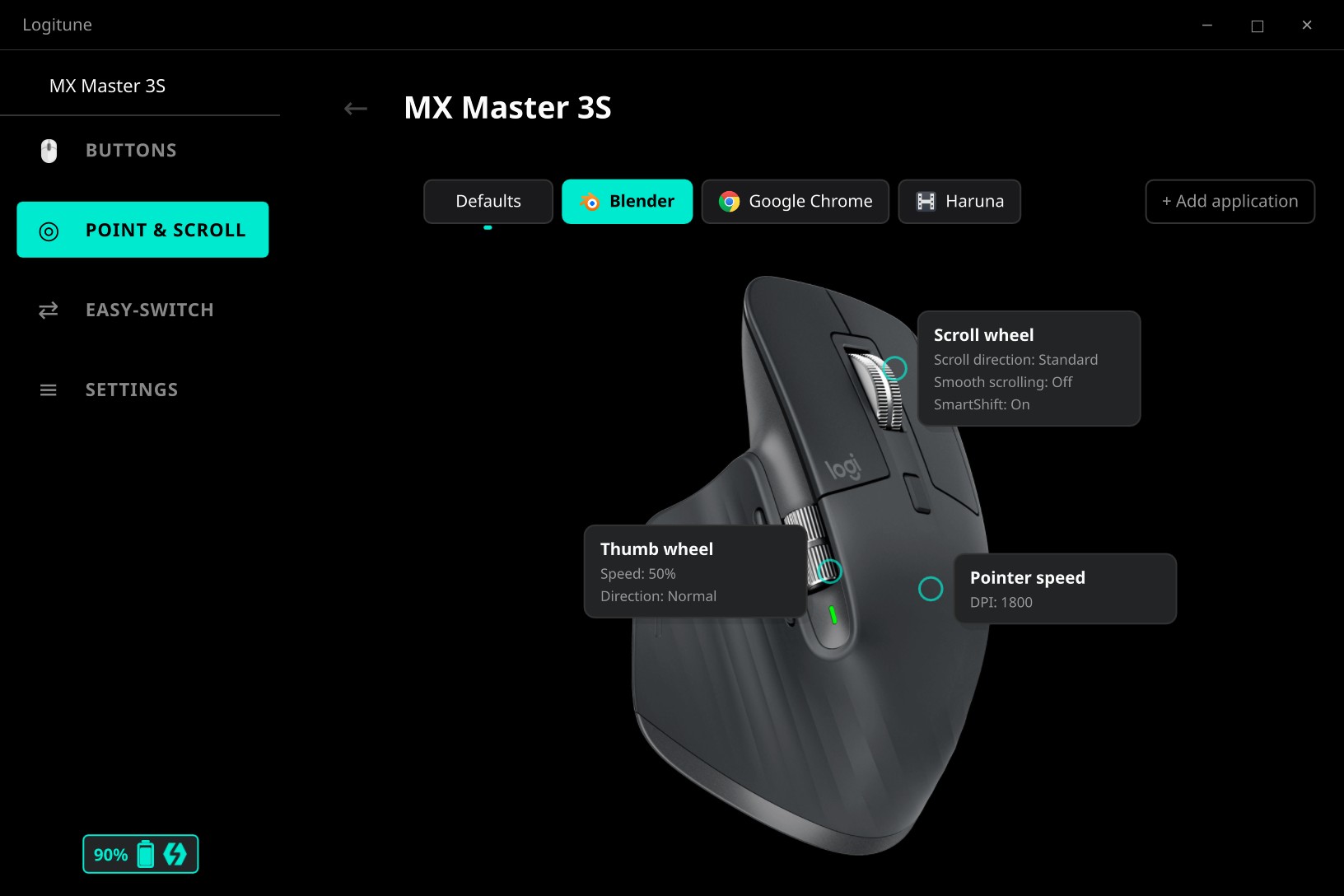
Scroll, thumb wheel & pointer speed
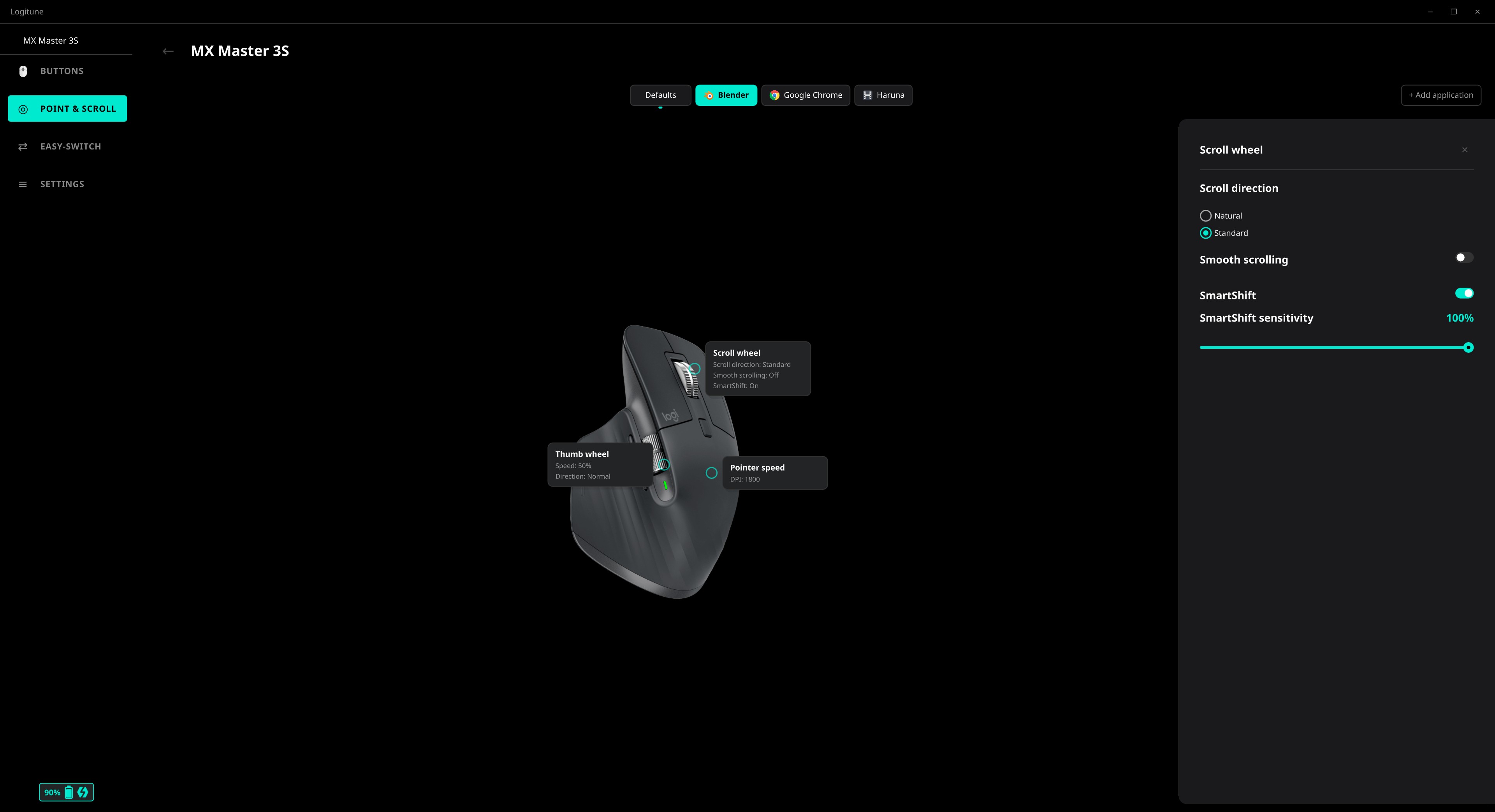
Scroll direction, SmartShift, smooth scrolling
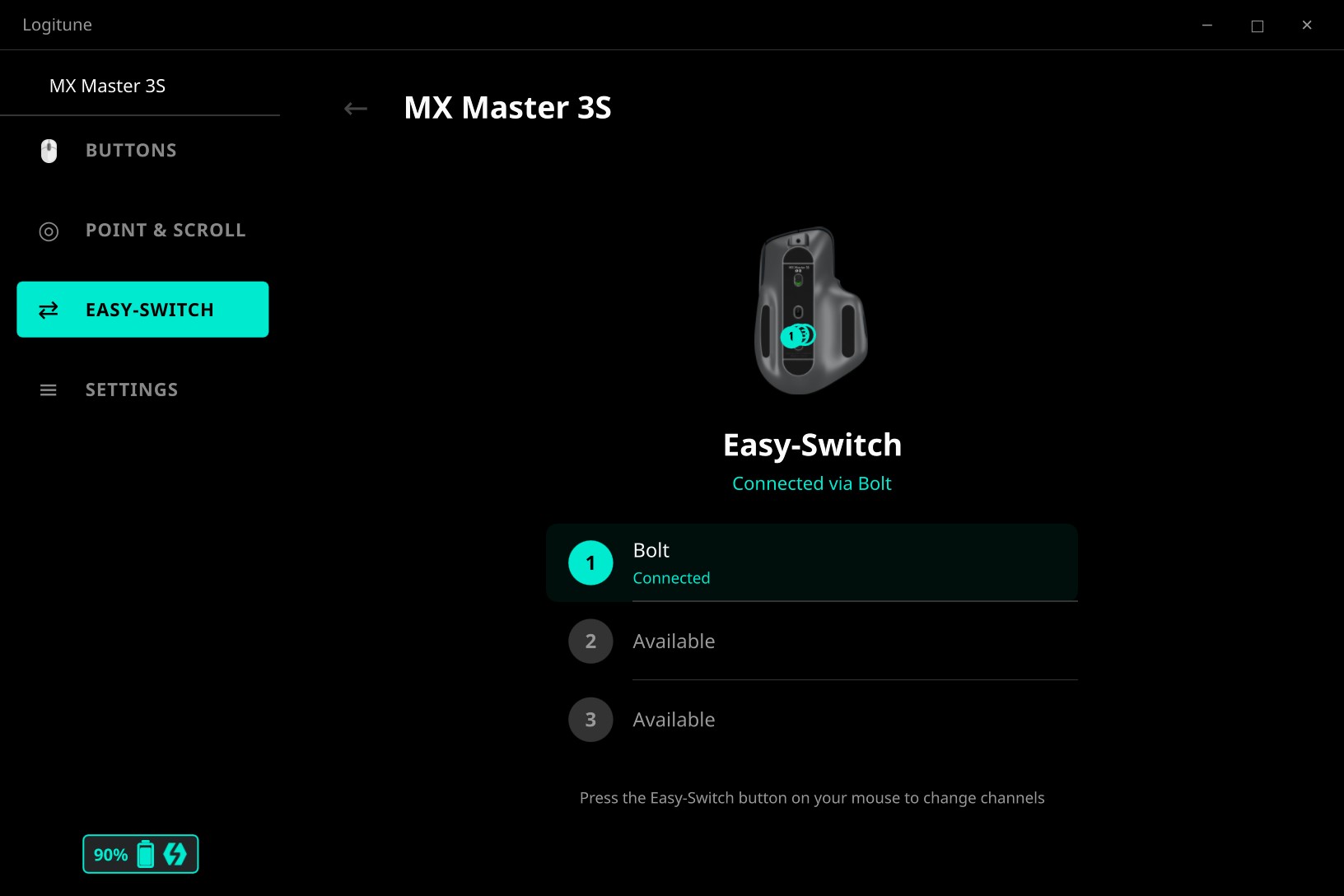
Easy-Switch channel management
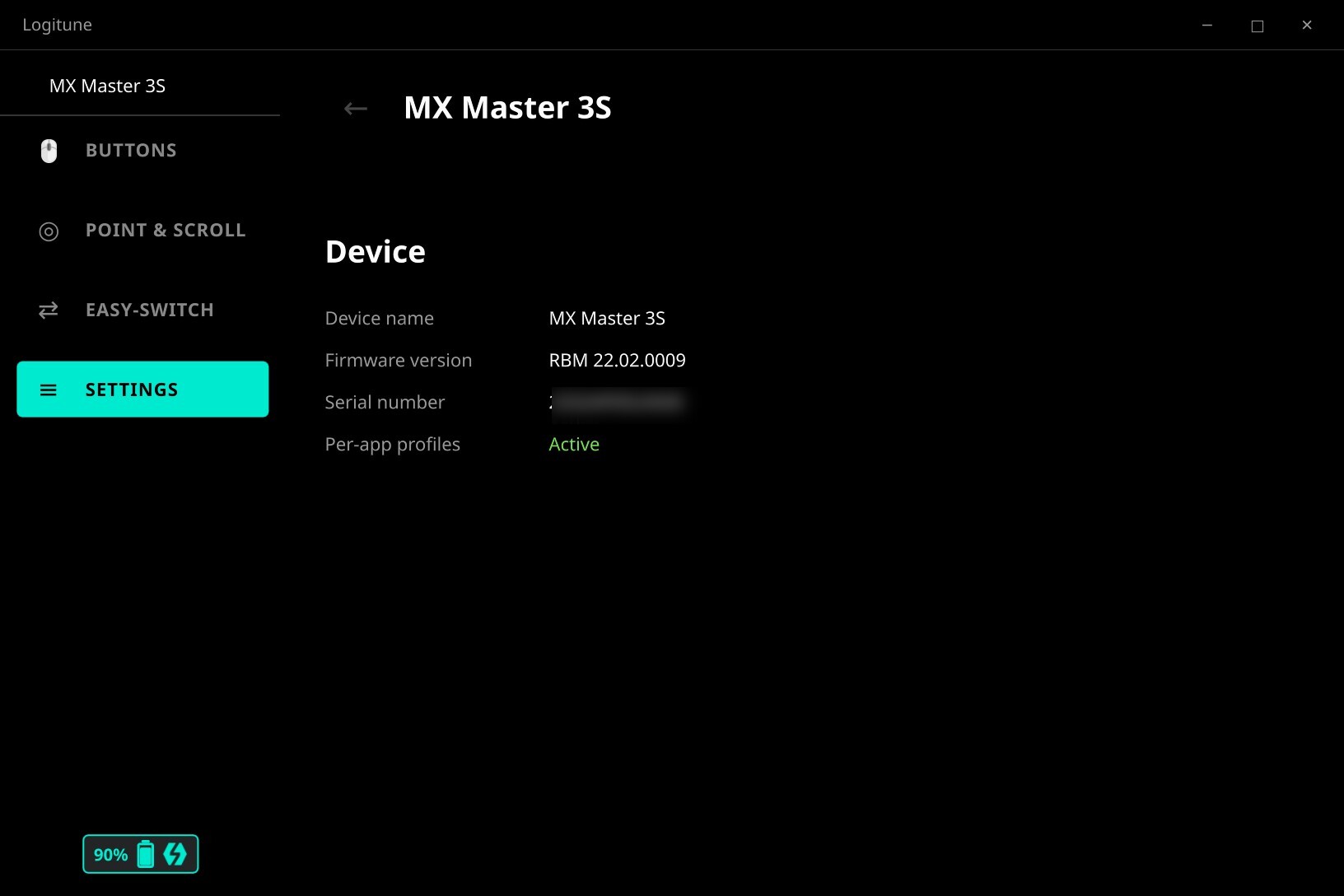
Device info, dark mode, debug logging
Ubuntu 24.04 (via OBS repo):
echo 'deb http://download.opensuse.org/repositories/home:/mmaher88:/logitune/xUbuntu_24.04/ /' | sudo tee /etc/apt/sources.list.d/logitune.list
wget -qO- https://download.opensuse.org/repositories/home:mmaher88:logitune/xUbuntu_24.04/Release.key | gpg --dearmor | sudo tee /etc/apt/trusted.gpg.d/logitune.gpg > /dev/null
sudo apt update && sudo apt install logitune
Fedora 42 (via OBS repo):
sudo dnf config-manager addrepo --from-repofile=https://download.opensuse.org/repositories/home:mmaher88:logitune/Fedora_42/home:mmaher88:logitune.repo
sudo dnf install logitune
Arch Linux (AUR):
yay -S logitune
From source:
cmake -B build -G Ninja -DCMAKE_BUILD_TYPE=Release -DCMAKE_INSTALL_PREFIX=/usr
cmake --build build
sudo cmake --install build
logitune
| Guide | Description |
|---|---|
| 🏁 Getting Started | Installation, permissions, UI overview |
| 🔨 Building | Prerequisites, build commands, native packages, devcontainer |
| 🏗️ Architecture | System design, signal flow, 14 Mermaid diagrams |
| 🖱️ Adding a Device | Step-by-step guide with code examples |
| 🖥️ Adding a Desktop Environment | KDE + GNOME implementation, adding new DEs |
| 🧪 Testing | Philosophy, 4 test tiers, writing tests |
| 📡 HID++ Protocol | Report format, features, Bolt receiver, async matching |
| 🤝 Contributing | Workflow, code style, commit format |
| Device | Status | Battery | DPI | SmartShift | Thumb wheel | Button remap | Gestures | Smooth scroll | Easy-Switch |
|---|---|---|---|---|---|---|---|---|---|
| MX Master 2S | ✅ Verified | ✅ | ✅ | ✅ | ✅ | ✅ | ✅ | ✅ | ✅ |
| MX Master 3 | ✅ Verified | ✅ | ✅ | ✅ | ✅ | ✅ | ✅ | ✅ | ✅ |
| MX Master 3S | ✅ Verified | ✅ | ✅ | ✅ | ✅ | ✅ | ✅ | ✅ | ✅ |
| MX Master 4 | ✅ Verified | ✅ | ✅ | ✅ | ✅ | ✅ | ✅ | — | ✅ |
| MX Anywhere 3 | 🧪 Beta | ✅ | ✅ | ✅ | — | ✅ | — | ✅ | ✅ |
| MX Anywhere 3 for Business | 🧪 Beta | ✅ | ✅ | ✅ | — | ✅ | — | ✅ | ✅ |
| MX Anywhere 3S | 🧪 Beta | ✅ | ✅ | ✅ | — | ✅ | — | ✅ | ✅ |
| MX Anywhere 3S for Business | 🧪 Beta | ✅ | ✅ | ✅ | — | ✅ | — | ✅ | ✅ |
| MX Vertical | 🧪 Beta | ✅ | ✅ | — | — | ✅ | — | ✅ | ✅ |
| MX Vertical for Business | 🧪 Beta | ✅ | ✅ | — | — | ✅ | — | ✅ | ✅ |
MX Master 4 smooth scrolling is disabled in the shipped descriptor: the hardware does not respond correctly to the HID++ configuration used on MX Master 2S / 3S. Regular scroll wheel and SmartShift work normally; only sub-tick smoothing is unavailable. Re-enable yourself by setting
"smoothScroll": trueindevices/mx-master-4/descriptor.jsonif your unit behaves differently; if it works we will promote the default.
The four MX Anywhere family descriptors ship as 🧪 Beta pending hardware confirmation. Issue #46 tracks the verification.
Other Logitech HID++ 2.0 devices can be added by contributing a device descriptor. See Device Support Status for what the badges mean.
| Feature | KDE Plasma 6 | GNOME 42+ (Wayland) | Hyprland | Other DEs |
|---|---|---|---|---|
| Button remapping | ✅ | ✅ | ✅ | ✅ |
| Media controls | ✅ | ✅ | ✅ | ✅ |
| DPI / SmartShift / Scroll | ✅ | ✅ | ✅ | ✅ |
| Thumb wheel modes | ✅ | ✅ | ✅ | ✅ |
| Gesture actions | ✅ | ✅ | ✅ | ✅ |
| Per-app profiles | ✅ | ✅ | ✅ | ❌ |
| Auto profile switching | ✅ | ✅ | ✅ | ❌ |
| Block shortcuts during capture | ✅ | ✅ | ❌ | ❌ |
| System tray | ✅ | ✅ | ✅ | ✅ |
Note: All device configuration (buttons, DPI, scroll, gestures, thumb wheel) works on every DE — it's pure HID++ over hidraw. Per-app profile switching requires desktop-specific focus tracking. KDE uses a KWin script, GNOME uses a Shell extension (auto-installed on first run), and Hyprland subscribes to the compositor's event socket. Hyprland has no stable compositor-wide shortcut-blocking API, so global bindings may still fire while capturing a keystroke — capture itself works. See Adding a Desktop Environment to contribute support for other DEs.
C++20 · Qt 6 Quick · CMake · HID++ 2.0 · GTest
598 followers · starred Sep 2026
80 followers · starred Apr 2026
122 followers · starred Apr 2026
292 followers · starred Apr 2026
Configure Logitech devices on Linux (Options+ clone)
C++
667
427 commits
updated Jul 31, 2026
A Linux configurator for Logitech peripherals — per-application profiles, gesture mapping, thumb wheel modes, and a dark-themed Qt Quick UI matching Logitech Options+.
--edit to position hotspots, upload images, and tune labels without hand-editing JSON. Learn more
Action selection panel
Scroll, thumb wheel & pointer speed
Scroll direction, SmartShift, smooth scrolling
Easy-Switch channel management
Device info, dark mode, debug logging
Ubuntu 24.04 (via OBS repo):
echo 'deb http://download.opensuse.org/repositories/home:/mmaher88:/logitune/xUbuntu_24.04/ /' | sudo tee /etc/apt/sources.list.d/logitune.list
wget -qO- https://download.opensuse.org/repositories/home:mmaher88:logitune/xUbuntu_24.04/Release.key | gpg --dearmor | sudo tee /etc/apt/trusted.gpg.d/logitune.gpg > /dev/null
sudo apt update && sudo apt install logitune
Fedora 42 (via OBS repo):
sudo dnf config-manager addrepo --from-repofile=https://download.opensuse.org/repositories/home:mmaher88:logitune/Fedora_42/home:mmaher88:logitune.repo
sudo dnf install logitune
Arch Linux (AUR):
yay -S logitune
From source:
cmake -B build -G Ninja -DCMAKE_BUILD_TYPE=Release -DCMAKE_INSTALL_PREFIX=/usr
cmake --build build
sudo cmake --install build
logitune
| Guide | Description |
|---|---|
| 🏁 Getting Started | Installation, permissions, UI overview |
| 🔨 Building | Prerequisites, build commands, native packages, devcontainer |
| 🏗️ Architecture | System design, signal flow, 14 Mermaid diagrams |
| 🖱️ Adding a Device | Step-by-step guide with code examples |
| 🖥️ Adding a Desktop Environment | KDE + GNOME implementation, adding new DEs |
| 🧪 Testing | Philosophy, 4 test tiers, writing tests |
| 📡 HID++ Protocol | Report format, features, Bolt receiver, async matching |
| 🤝 Contributing | Workflow, code style, commit format |
| Device | Status | Battery | DPI | SmartShift | Thumb wheel | Button remap | Gestures | Smooth scroll | Easy-Switch |
|---|---|---|---|---|---|---|---|---|---|
| MX Master 2S | ✅ Verified | ✅ | ✅ | ✅ | ✅ | ✅ | ✅ | ✅ | ✅ |
| MX Master 3 | ✅ Verified | ✅ | ✅ | ✅ | ✅ | ✅ | ✅ | ✅ | ✅ |
| MX Master 3S | ✅ Verified | ✅ | ✅ | ✅ | ✅ | ✅ | ✅ | ✅ | ✅ |
| MX Master 4 | ✅ Verified | ✅ | ✅ | ✅ | ✅ | ✅ | ✅ | — | ✅ |
| MX Anywhere 3 | 🧪 Beta | ✅ | ✅ | ✅ | — | ✅ | — | ✅ | ✅ |
| MX Anywhere 3 for Business | 🧪 Beta | ✅ | ✅ | ✅ | — | ✅ | — | ✅ | ✅ |
| MX Anywhere 3S | 🧪 Beta | ✅ | ✅ | ✅ | — | ✅ | — | ✅ | ✅ |
| MX Anywhere 3S for Business | 🧪 Beta | ✅ | ✅ | ✅ | — | ✅ | — | ✅ | ✅ |
| MX Vertical | 🧪 Beta | ✅ | ✅ | — | — | ✅ | — | ✅ | ✅ |
| MX Vertical for Business | 🧪 Beta | ✅ | ✅ | — | — | ✅ | — | ✅ | ✅ |
MX Master 4 smooth scrolling is disabled in the shipped descriptor: the hardware does not respond correctly to the HID++ configuration used on MX Master 2S / 3S. Regular scroll wheel and SmartShift work normally; only sub-tick smoothing is unavailable. Re-enable yourself by setting
"smoothScroll": trueindevices/mx-master-4/descriptor.jsonif your unit behaves differently; if it works we will promote the default.
The four MX Anywhere family descriptors ship as 🧪 Beta pending hardware confirmation. Issue #46 tracks the verification.
Other Logitech HID++ 2.0 devices can be added by contributing a device descriptor. See Device Support Status for what the badges mean.
| Feature | KDE Plasma 6 | GNOME 42+ (Wayland) | Hyprland | Other DEs |
|---|---|---|---|---|
| Button remapping | ✅ | ✅ | ✅ | ✅ |
| Media controls | ✅ | ✅ | ✅ | ✅ |
| DPI / SmartShift / Scroll | ✅ | ✅ | ✅ | ✅ |
| Thumb wheel modes | ✅ | ✅ | ✅ | ✅ |
| Gesture actions | ✅ | ✅ | ✅ | ✅ |
| Per-app profiles | ✅ | ✅ | ✅ | ❌ |
| Auto profile switching | ✅ | ✅ | ✅ | ❌ |
| Block shortcuts during capture | ✅ | ✅ | ❌ | ❌ |
| System tray | ✅ | ✅ | ✅ | ✅ |
Note: All device configuration (buttons, DPI, scroll, gestures, thumb wheel) works on every DE — it's pure HID++ over hidraw. Per-app profile switching requires desktop-specific focus tracking. KDE uses a KWin script, GNOME uses a Shell extension (auto-installed on first run), and Hyprland subscribes to the compositor's event socket. Hyprland has no stable compositor-wide shortcut-blocking API, so global bindings may still fire while capturing a keystroke — capture itself works. See Adding a Desktop Environment to contribute support for other DEs.
C++20 · Qt 6 Quick · CMake · HID++ 2.0 · GTest
598 followers · starred Sep 2026
80 followers · starred Apr 2026
122 followers · starred Apr 2026
292 followers · starred Apr 2026