
(CVPR 2024) 🧩 TokenCompose: Text-to-Image Diffusion with Token-level Supervision
See the codeREADME
🧩 TokenCompose: Text-to-Image Diffusion with Token-level Supervision
Zirui Wang1, 3 · Zhizhou Sha2, 3 · Zheng Ding3 · Yilin Wang2, 3 · Zhuowen Tu3
1Princeton University · 2Tsinghua University · 3University of California, San Diego
CVPR 2024
Project done while Zirui Wang, Zhizhou Sha and Yilin Wang interned at UC San Diego.
Project Page | arXiv | X (Twitter)
Updates
If you use our method and/or model for your research project, we are happy to provide cross-reference here in the updates. :)
[04/04/2024] 🔥 Our training methodology is incorporated into CoMat which shows enhanced text-to-image attribute assignments.
[02/26/2024] 🔥 TokenCompose is accepted to CVPR 2024!
[02/20/2024] 🔥 TokenCompose is used as a base model from the RealCompo paper for enhanced compositionality.
https://github.com/mlpc-ucsd/TokenCompose/assets/59942464/93feea16-4eac-49c3-b286-ee390a325b17
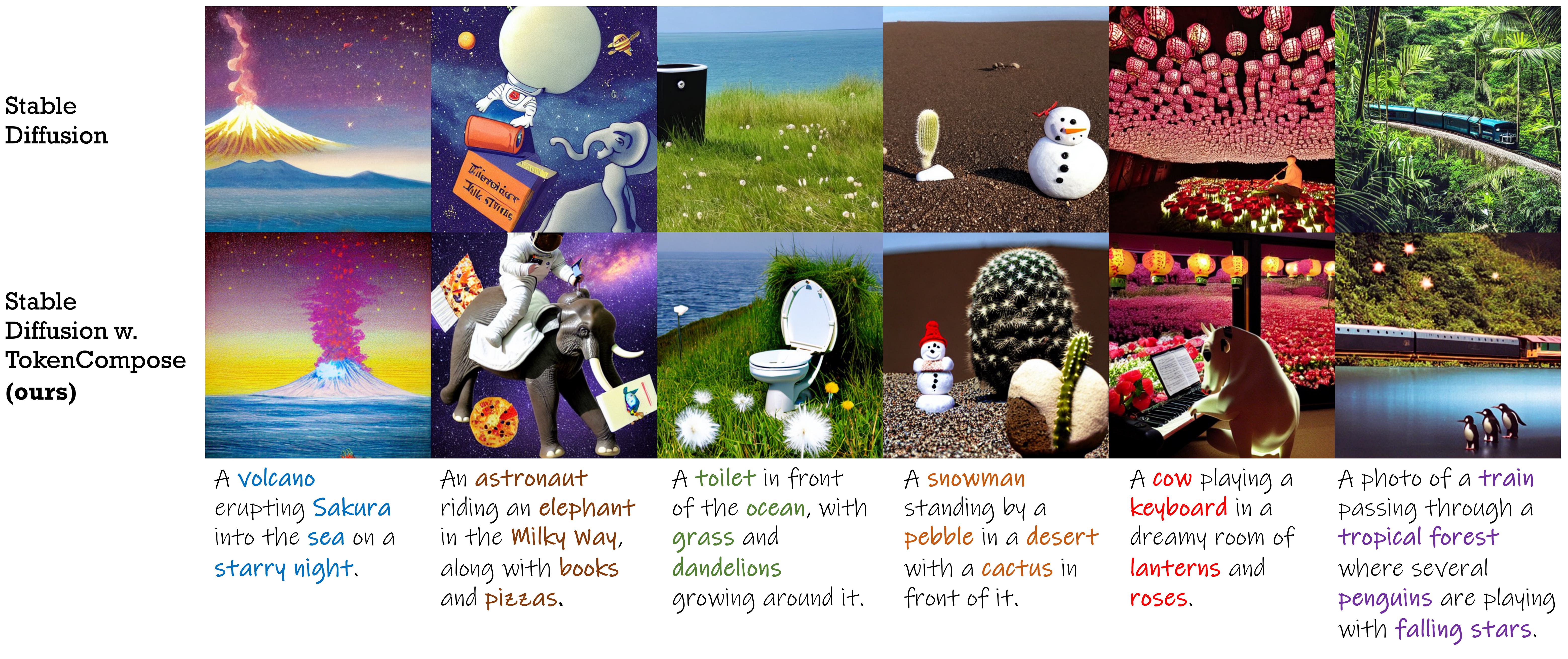
A Stable Diffusion model finetuned with token-level consistency terms for enhanced multi-category instance composition and photorealism.
| Method | Multi-category Instance Composition | Photorealism | Efficiency | |||||||||
|---|---|---|---|---|---|---|---|---|---|---|---|---|
| Object Accuracy | COCO | ADE20K | FID (COCO) | FID (Flickr30K) | Latency | |||||||
| MG2 | MG3 | MG4 | MG5 | MG2 | MG3 | MG4 | MG5 | |||||
| SD 1.4 | 29.86 | 90.721.33 | 50.740.89 | 11.680.45 | 0.880.21 | 89.810.40 | 53.961.14 | 16.521.13 | 1.890.34 | 20.88 | 71.46 | 7.540.17 |
| Composable | 27.83 | 63.330.59 | 21.871.01 | 3.250.45 | 0.230.18 | 69.610.99 | 29.960.84 | 6.890.38 | 0.730.22 | - | 75.57 | 13.810.15 |
| Layout | 43.59 | 93.220.69 | 60.151.58 | 19.490.88 | 2.270.44 | 96.050.34 | 67.830.90 | 21.931.34 | 2.350.41 | - | 74.00 | 18.890.20 |
| Structured | 29.64 | 90.401.06 | 48.641.32 | 10.710.92 | 0.680.25 | 89.250.72 | 53.051.20 | 15.760.86 | 1.740.49 | 21.13 | 71.68 | 7.740.17 |
| Attn-Exct | 45.13 | 93.640.76 | 65.101.24 | 28.010.90 | 6.010.61 | 91.740.49 | 62.510.94 | 26.120.78 | 5.890.40 | - | 71.68 | 25.434.89 |
| TokenCompose (Ours) | 52.15 | 98.080.40 | 76.161.04 | 28.810.95 | 3.280.48 | 97.750.34 | 76.931.09 | 33.921.47 | 6.210.62 | 20.19 | 71.13 | 7.560.14 |
🆕 Models
| Stable Diffusion Version | Checkpoint 1 | Checkpoint 2 |
|---|---|---|
| v1.4 | TokenCompose_SD14_A | TokenCompose_SD14_B |
| v2.1 | TokenCompose_SD21_A | TokenCompose_SD21_B |
Our finetuned models do not contain any extra modules and can be directly used in a standard diffusion model library (e.g., HuggingFace's Diffusers) by replacing the pretrained U-Net with our finetuned U-Net in a plug-and-play manner. We provide a demo jupyter notebook which uses our model checkpoint to generate images.
You can also use the following code to download our checkpoints and generate images:
import torch
from diffusers import StableDiffusionPipeline

model_id = "mlpc-lab/TokenCompose_SD14_A"
device = "cuda"

pipe = StableDiffusionPipeline.from_pretrained(model_id, torch_dtype=torch.float32)
pipe = pipe.to(device)

prompt = "A cat and a wine glass"
image = pipe(prompt).images[0]

image.save("cat_and_wine_glass.png")
📊 MultiGen
See MultiGen for details.
| Method | COCO | ADE20K | ||||||
|---|---|---|---|---|---|---|---|---|
| MG2 | MG3 | MG4 | MG5 | MG2 | MG3 | MG4 | MG5 | |
| SD 1.4 | 90.721.33 | 50.740.89 | 11.680.45 | 0.880.21 | 89.810.40 | 53.961.14 | 16.521.13 | 1.890.34 |
| Composable | 63.330.59 | 21.871.01 | 3.250.45 | 0.230.18 | 69.610.99 | 29.960.84 | 6.890.38 | 0.730.22 |
| Layout | 93.220.69 | 60.151.58 | 19.490.88 | 2.270.44 | 96.050.34 | 67.830.90 | 21.931.34 | 2.350.41 |
| Structured | 90.401.06 | 48.641.32 | 10.710.92 | 0.680.25 | 89.250.72 | 53.051.20 | 15.760.86 | 1.740.49 |
| Attn-Exct | 93.640.76 | 65.101.24 | 28.010.90 | 6.010.61 | 91.740.49 | 62.510.94 | 26.120.78 | 5.890.40 |
| Ours | 98.080.40 | 76.161.04 | 28.810.95 | 3.280.48 | 97.750.34 | 76.931.09 | 33.921.47 | 6.210.62 |
💻 Environment Setup
For those who want to use our codebase to train your own diffusion models with token-level objectives, follow the below instructions:
conda create -n TokenCompose python=3.8.5
conda activate TokenCompose
conda install pytorch==1.13.1 torchvision==0.14.1 torchaudio==0.13.1 pytorch-cuda=11.7 -c pytorch -c nvidia
pip install -r requirements.txt
We have verified the environment setup using this specific package versions, but we expect that it will also work for newer versions too!
🛠️ Dataset Setup
If you want to use your own data, please refer to preprocess_data for details.
If you want to use our training data as examples or for research purposes, please follow the below instructions:
1. Setup the COCO Image Data
cd train/data
# download COCO train2017
wget http://images.cocodataset.org/zips/train2017.zip
unzip train2017.zip
rm train2017.zip
bash coco_data_setup.sh
After this step, you should have the following structure under the train/data directory:
train/data/
    coco_gsam_img/
        train/
            000000000142.jpg
            000000000370.jpg
            ...
2. Setup Token-wise Grounded Segmentation Maps
Download COCO segmentation data from Google Drive and put it under train/data directory.
After this step, you should have the following structure under the train/data directory:
train/data/
    coco_gsam_img/
        train/
            000000000142.jpg
            000000000370.jpg
            ...
    coco_gsam_seg.tar
Then, run the following command to unzip the segmentation data:
cd train/data
tar -xvf coco_gsam_seg.tar
rm coco_gsam_seg.tar
After the setup, you should have the following structure under the train/data directory:
train/data/
    coco_gsam_img/
        train/
            000000000142.jpg
            000000000370.jpg
            ...
    coco_gsam_seg/
        000000000142/
            mask_000000000142_bananas.png
            mask_000000000142_bread.png
            ...
        000000000370/
            mask_000000000370_bananas.png
            mask_000000000370_bread.png
            ...
        ...
📈 Training
We use wandb to log some curves and visualizations. Login to wandb before running the scripts.
wandb login
Then, to run TokenCompose, use the following command:
cd train
bash train.sh
The results will be saved under train/results directory.
🏷️ License
This repository is released under the Apache 2.0 license.
🙏 Acknowledgement
Our code is built upon diffusers, prompt-to-prompt, VISOR, Grounded-Segment-Anything, and CLIP. We thank all these authors for their nicely open sourced code and their great contributions to the community.
📝 Citation
If you find our work useful, please consider citing:
@InProceedings{Wang2024TokenCompose,
    author    = {Wang, Zirui and Sha, Zhizhou and Ding, Zheng and Wang, Yilin and Tu, Zhuowen},
    title     = {TokenCompose: Text-to-Image Diffusion with Token-level Supervision},
    booktitle = {Proceedings of the IEEE/CVF Conference on Computer Vision and Pattern Recognition (CVPR)},
    month     = {June},
    year      = {2024},
    pages     = {8553-8564}
}
Similar repos



(CVPR 2024) 🧩 TokenCompose: Text-to-Image Diffusion with Token-level Supervision
See the codeREADME
🧩 TokenCompose: Text-to-Image Diffusion with Token-level Supervision
Zirui Wang1, 3 · Zhizhou Sha2, 3 · Zheng Ding3 · Yilin Wang2, 3 · Zhuowen Tu3
1Princeton University · 2Tsinghua University · 3University of California, San Diego
CVPR 2024
Project done while Zirui Wang, Zhizhou Sha and Yilin Wang interned at UC San Diego.
Project Page | arXiv | X (Twitter)
Updates
If you use our method and/or model for your research project, we are happy to provide cross-reference here in the updates. :)
[04/04/2024] 🔥 Our training methodology is incorporated into CoMat which shows enhanced text-to-image attribute assignments.
[02/26/2024] 🔥 TokenCompose is accepted to CVPR 2024!
[02/20/2024] 🔥 TokenCompose is used as a base model from the RealCompo paper for enhanced compositionality.
https://github.com/mlpc-ucsd/TokenCompose/assets/59942464/93feea16-4eac-49c3-b286-ee390a325b17
A Stable Diffusion model finetuned with token-level consistency terms for enhanced multi-category instance composition and photorealism.
| Method | Multi-category Instance Composition | Photorealism | Efficiency | |||||||||
|---|---|---|---|---|---|---|---|---|---|---|---|---|
| Object Accuracy | COCO | ADE20K | FID (COCO) | FID (Flickr30K) | Latency | |||||||
| MG2 | MG3 | MG4 | MG5 | MG2 | MG3 | MG4 | MG5 | |||||
| SD 1.4 | 29.86 | 90.721.33 | 50.740.89 | 11.680.45 | 0.880.21 | 89.810.40 | 53.961.14 | 16.521.13 | 1.890.34 | 20.88 | 71.46 | 7.540.17 |
| Composable | 27.83 | 63.330.59 | 21.871.01 | 3.250.45 | 0.230.18 | 69.610.99 | 29.960.84 | 6.890.38 | 0.730.22 | - | 75.57 | 13.810.15 |
| Layout | 43.59 | 93.220.69 | 60.151.58 | 19.490.88 | 2.270.44 | 96.050.34 | 67.830.90 | 21.931.34 | 2.350.41 | - | 74.00 | 18.890.20 |
| Structured | 29.64 | 90.401.06 | 48.641.32 | 10.710.92 | 0.680.25 | 89.250.72 | 53.051.20 | 15.760.86 | 1.740.49 | 21.13 | 71.68 | 7.740.17 |
| Attn-Exct | 45.13 | 93.640.76 | 65.101.24 | 28.010.90 | 6.010.61 | 91.740.49 | 62.510.94 | 26.120.78 | 5.890.40 | - | 71.68 | 25.434.89 |
| TokenCompose (Ours) | 52.15 | 98.080.40 | 76.161.04 | 28.810.95 | 3.280.48 | 97.750.34 | 76.931.09 | 33.921.47 | 6.210.62 | 20.19 | 71.13 | 7.560.14 |
🆕 Models
| Stable Diffusion Version | Checkpoint 1 | Checkpoint 2 |
|---|---|---|
| v1.4 | TokenCompose_SD14_A | TokenCompose_SD14_B |
| v2.1 | TokenCompose_SD21_A | TokenCompose_SD21_B |
Our finetuned models do not contain any extra modules and can be directly used in a standard diffusion model library (e.g., HuggingFace's Diffusers) by replacing the pretrained U-Net with our finetuned U-Net in a plug-and-play manner. We provide a demo jupyter notebook which uses our model checkpoint to generate images.
You can also use the following code to download our checkpoints and generate images:
import torch
from diffusers import StableDiffusionPipeline

model_id = "mlpc-lab/TokenCompose_SD14_A"
device = "cuda"

pipe = StableDiffusionPipeline.from_pretrained(model_id, torch_dtype=torch.float32)
pipe = pipe.to(device)

prompt = "A cat and a wine glass"
image = pipe(prompt).images[0]

image.save("cat_and_wine_glass.png")
📊 MultiGen
See MultiGen for details.
| Method | COCO | ADE20K | ||||||
|---|---|---|---|---|---|---|---|---|
| MG2 | MG3 | MG4 | MG5 | MG2 | MG3 | MG4 | MG5 | |
| SD 1.4 | 90.721.33 | 50.740.89 | 11.680.45 | 0.880.21 | 89.810.40 | 53.961.14 | 16.521.13 | 1.890.34 |
| Composable | 63.330.59 | 21.871.01 | 3.250.45 | 0.230.18 | 69.610.99 | 29.960.84 | 6.890.38 | 0.730.22 |
| Layout | 93.220.69 | 60.151.58 | 19.490.88 | 2.270.44 | 96.050.34 | 67.830.90 | 21.931.34 | 2.350.41 |
| Structured | 90.401.06 | 48.641.32 | 10.710.92 | 0.680.25 | 89.250.72 | 53.051.20 | 15.760.86 | 1.740.49 |
| Attn-Exct | 93.640.76 | 65.101.24 | 28.010.90 | 6.010.61 | 91.740.49 | 62.510.94 | 26.120.78 | 5.890.40 |
| Ours | 98.080.40 | 76.161.04 | 28.810.95 | 3.280.48 | 97.750.34 | 76.931.09 | 33.921.47 | 6.210.62 |
💻 Environment Setup
For those who want to use our codebase to train your own diffusion models with token-level objectives, follow the below instructions:
conda create -n TokenCompose python=3.8.5
conda activate TokenCompose
conda install pytorch==1.13.1 torchvision==0.14.1 torchaudio==0.13.1 pytorch-cuda=11.7 -c pytorch -c nvidia
pip install -r requirements.txt
We have verified the environment setup using this specific package versions, but we expect that it will also work for newer versions too!
🛠️ Dataset Setup
If you want to use your own data, please refer to preprocess_data for details.
If you want to use our training data as examples or for research purposes, please follow the below instructions:
1. Setup the COCO Image Data
cd train/data
# download COCO train2017
wget http://images.cocodataset.org/zips/train2017.zip
unzip train2017.zip
rm train2017.zip
bash coco_data_setup.sh
After this step, you should have the following structure under the train/data directory:
train/data/
    coco_gsam_img/
        train/
            000000000142.jpg
            000000000370.jpg
            ...
2. Setup Token-wise Grounded Segmentation Maps
Download COCO segmentation data from Google Drive and put it under train/data directory.
After this step, you should have the following structure under the train/data directory:
train/data/
    coco_gsam_img/
        train/
            000000000142.jpg
            000000000370.jpg
            ...
    coco_gsam_seg.tar
Then, run the following command to unzip the segmentation data:
cd train/data
tar -xvf coco_gsam_seg.tar
rm coco_gsam_seg.tar
After the setup, you should have the following structure under the train/data directory:
train/data/
    coco_gsam_img/
        train/
            000000000142.jpg
            000000000370.jpg
            ...
    coco_gsam_seg/
        000000000142/
            mask_000000000142_bananas.png
            mask_000000000142_bread.png
            ...
        000000000370/
            mask_000000000370_bananas.png
            mask_000000000370_bread.png
            ...
        ...
📈 Training
We use wandb to log some curves and visualizations. Login to wandb before running the scripts.
wandb login
Then, to run TokenCompose, use the following command:
cd train
bash train.sh
The results will be saved under train/results directory.
🏷️ License
This repository is released under the Apache 2.0 license.
🙏 Acknowledgement
Our code is built upon diffusers, prompt-to-prompt, VISOR, Grounded-Segment-Anything, and CLIP. We thank all these authors for their nicely open sourced code and their great contributions to the community.
📝 Citation
If you find our work useful, please consider citing:
@InProceedings{Wang2024TokenCompose,
    author    = {Wang, Zirui and Sha, Zhizhou and Ding, Zheng and Wang, Yilin and Tu, Zhuowen},
    title     = {TokenCompose: Text-to-Image Diffusion with Token-level Supervision},
    booktitle = {Proceedings of the IEEE/CVF Conference on Computer Vision and Pattern Recognition (CVPR)},
    month     = {June},
    year      = {2024},
    pages     = {8553-8564}
}