
Generate Kubernetes architecture diagrams from the actual state in a namespace
Go
337
64 commits
updated Aug 28, 2023
README
k8sviz
k8sviz is a tool to generate Kubernetes architecture diagrams from the actual state in a namespace. Currently, this only generates a diagram similar to https://github.com/kubernetes/community/tree/master/icons#usage-example by using graphviz. For examples of the generated diagrams, see Examples below.
Implementations
There are two implementations, bash script version and go version. Bash script version is just a wrapper to run go version inside container.
Prerequisites
Bash script version
k8sviz.sh requires:
- bash
- getopt
- docker
To build a container image (optional), it requires:
- make
Go version
k8sviz requires:
- dot (graphviz) command
To build binary, it requires:
- make
- go
Version compatibility matrix
| k8sviz version | k8s 1.20 or earlier | k8s 1.21 or later |
|---|---|---|
| k8sviz 0.3.2 or earlier | Yes | No |
| k8sviz 0.3.3 or later | No | Yes |
Installation
Bash script version
Just download k8sviz.sh file and add execute permission.
$ curl -LO https://raw.githubusercontent.com/mkimuram/k8sviz/master/k8sviz.sh
$ chmod u+x k8sviz.sh
Go version
Build the binary with below commands:
$ git clone https://github.com/mkimuram/k8sviz.git
$ cd k8sviz
$ make build
icons directory needs to be in the same directory to the k8sviz binary.
So, move them to the proper directory (Replace PATH_TO_INSTALL as you like).
$ PATH_TO_INSTALL=$HOME/bin
$ cp bin/k8sviz ${PATH_TO_INSTALL}
$ cp -r icons ${PATH_TO_INSTALL}
Usage
Bash script version
$ ./k8sviz.sh --help
USAGE: ./k8sviz.sh [flags] args
flags:
  -n,--namespace:  The namespace to visualize. (default: 'default')
  -o,--outfile:  The filename to output. (default: 'k8sviz.out')
  -t,--type:  The type of output. (default: 'dot')
  -k,--kubeconfig:  Path to kubeconfig file. (default: '/home/user1/.kube/config')
  -i,--image:  Image name of the container. (default: 'mkimuram/k8sviz:0.3')
  -h,--help:  show this help (default: false)
-
⚠️ WARNING
If you are using Mac, only short options can be used. If you would like to use long options, you can install gnu-getopt and enable it by defining
FLAGS_GETOPT_CMDenvironment variable.$ brew install gnu-getopt $ export FLAGS_GETOPT_CMD=/usr/local/opt/gnu-getopt/bin/getopt $ ./k8sviz.sh -h -
📝NOTE
If you can't pull the container image or need to build it by yourself, you can do it by
make image-build. It would be helpful if you specifyDEVEL_IMAGEandDEVEL_TAGto make the image name the same to the default one (Below example will set image name likemkimuram/k8sviz:0.3.4).$ DEVEL_IMAGE=mkimuram/k8sviz DEVEL_TAG=$(cat version.txt) make image-buildAn example use case of creating custom image is to include AWS SDK or Google Cloud SDK. To create a custom image that include AWS SDK, run below command:
$ DEVEL_IMAGE=mkimuram/k8sviz DEVEL_TAG=$(cat version.txt) TARGET=aws make image-buildTo create a custom image that include Google Cloud SDK, run below command:
$ DEVEL_IMAGE=mkimuram/k8sviz DEVEL_TAG=$(cat version.txt) TARGET=gcloud make image-build
Go version
$ ./k8sviz -h
Usage of ./k8sviz:
  -kubeconfig string
        absolute path to the kubeconfig file (default "/home/user1/.kube/config")
  -n string
        namespace to visualize (shorthand) (default "default")
  -namespace string
        namespace to visualize (default "default")
  -o string
        output filename (shorthand) (default "k8sviz.out")
  -outfile string
        output filename (default "k8sviz.out")
  -t string
        type of output (shorthand) (default "dot")
  -type string
        type of output (default "dot")
Examples
Examples are only shown for old bash script version, but current go version should work in the same way.
Examples for tutorial deployments in default namespace
- Generate dot file for namespace
default./k8sviz.sh -n default -o default.dot - Generate png file for namespace
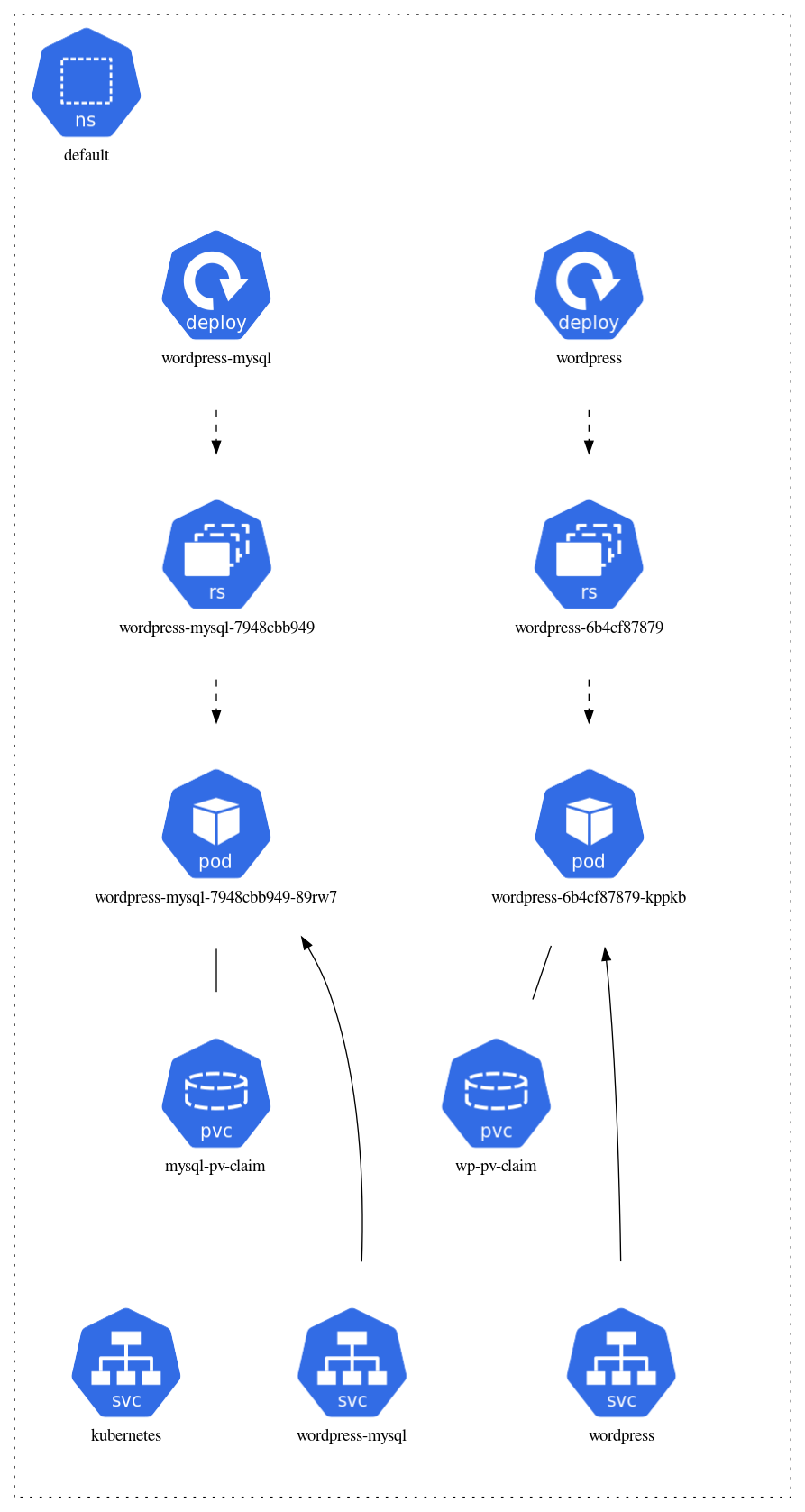
default$ ./k8sviz.sh -n default -t png -o default.png - Output for an example wordpress deployment will be like below:
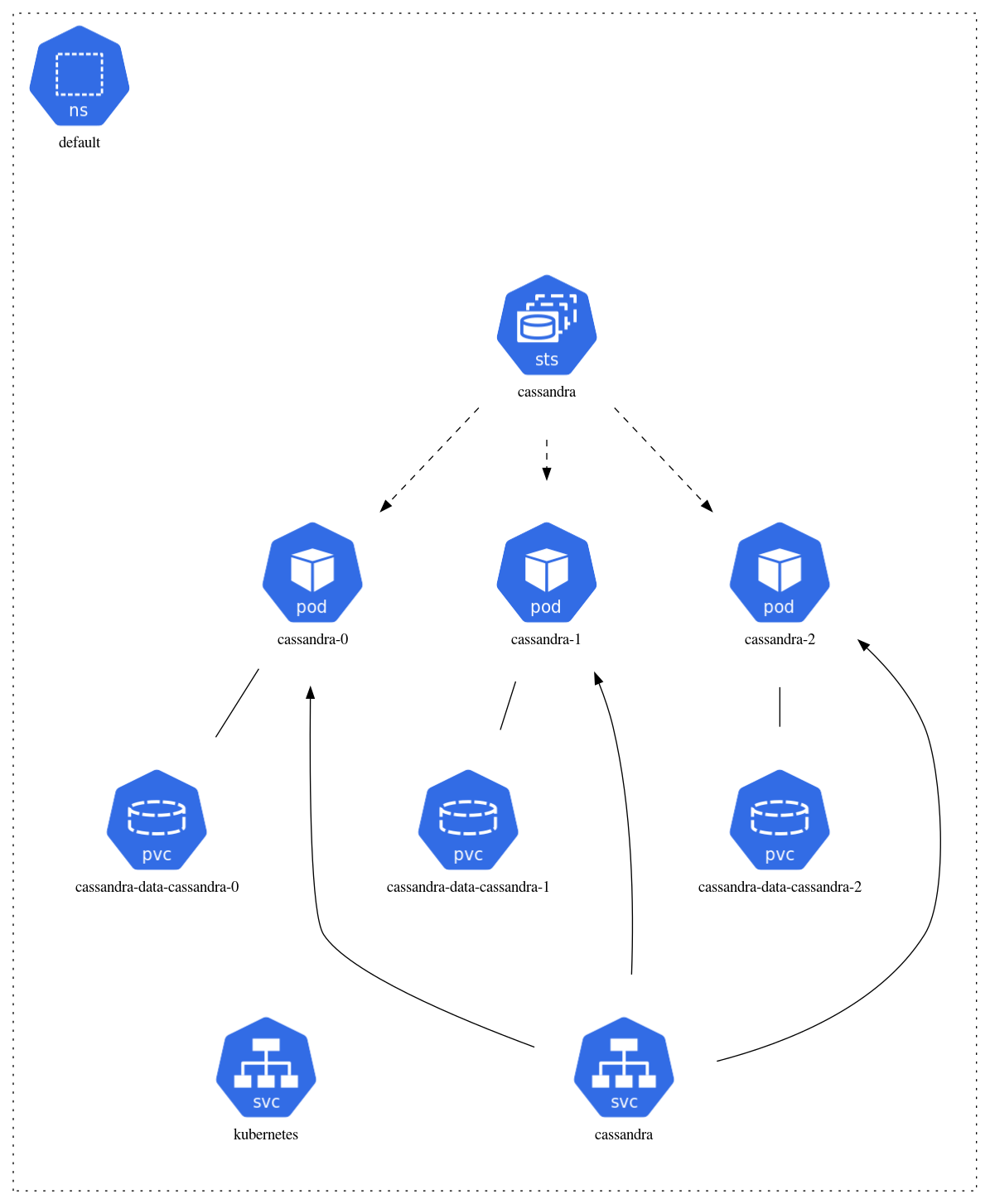
- Output for an example cassandra deployment with statefulset will be like below:
Examples for more complex deployment (kubeflow case)
-
Generate dot file for namespace
kubeflowandistio-system$ ./k8sviz.sh -n kubeflow -o examples/kubeflow/kubeflow.dot $ ./k8sviz.sh -n istio-system -o examples/kubeflow/istio-system.dot -
Generate png file for namespace
kubeflowandistio-system$ ./k8sviz.sh -n kubeflow -t png -o examples/kubeflow/kubeflow.png $ ./k8sviz.sh -n istio-system -t png -o examples/kubeflow/istio-system.png -
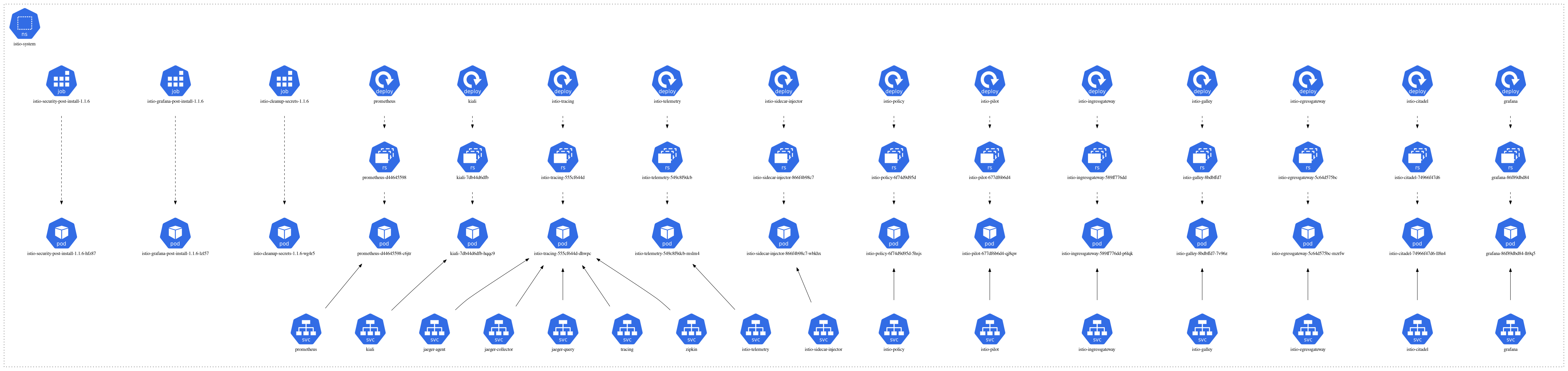
Output:

License
This project is licensed under the Apache License - see the LICENSE file for details
Contributors

63 commits

1 commits
Similar repos


Languages
Go
88.1%
Shell
8.4%
Makefile
1.8%
Dockerfile
1.7%
Generate Kubernetes architecture diagrams from the actual state in a namespace
Go
337
64 commits
updated Aug 28, 2023
README
k8sviz
k8sviz is a tool to generate Kubernetes architecture diagrams from the actual state in a namespace. Currently, this only generates a diagram similar to https://github.com/kubernetes/community/tree/master/icons#usage-example by using graphviz. For examples of the generated diagrams, see Examples below.
Implementations
There are two implementations, bash script version and go version. Bash script version is just a wrapper to run go version inside container.
Prerequisites
Bash script version
k8sviz.sh requires:
- bash
- getopt
- docker
To build a container image (optional), it requires:
- make
Go version
k8sviz requires:
- dot (graphviz) command
To build binary, it requires:
- make
- go
Version compatibility matrix
| k8sviz version | k8s 1.20 or earlier | k8s 1.21 or later |
|---|---|---|
| k8sviz 0.3.2 or earlier | Yes | No |
| k8sviz 0.3.3 or later | No | Yes |
Installation
Bash script version
Just download k8sviz.sh file and add execute permission.
$ curl -LO https://raw.githubusercontent.com/mkimuram/k8sviz/master/k8sviz.sh
$ chmod u+x k8sviz.sh
Go version
Build the binary with below commands:
$ git clone https://github.com/mkimuram/k8sviz.git
$ cd k8sviz
$ make build
icons directory needs to be in the same directory to the k8sviz binary.
So, move them to the proper directory (Replace PATH_TO_INSTALL as you like).
$ PATH_TO_INSTALL=$HOME/bin
$ cp bin/k8sviz ${PATH_TO_INSTALL}
$ cp -r icons ${PATH_TO_INSTALL}
Usage
Bash script version
$ ./k8sviz.sh --help
USAGE: ./k8sviz.sh [flags] args
flags:
  -n,--namespace:  The namespace to visualize. (default: 'default')
  -o,--outfile:  The filename to output. (default: 'k8sviz.out')
  -t,--type:  The type of output. (default: 'dot')
  -k,--kubeconfig:  Path to kubeconfig file. (default: '/home/user1/.kube/config')
  -i,--image:  Image name of the container. (default: 'mkimuram/k8sviz:0.3')
  -h,--help:  show this help (default: false)
-
⚠️ WARNING
If you are using Mac, only short options can be used. If you would like to use long options, you can install gnu-getopt and enable it by defining
FLAGS_GETOPT_CMDenvironment variable.$ brew install gnu-getopt $ export FLAGS_GETOPT_CMD=/usr/local/opt/gnu-getopt/bin/getopt $ ./k8sviz.sh -h -
📝NOTE
If you can't pull the container image or need to build it by yourself, you can do it by
make image-build. It would be helpful if you specifyDEVEL_IMAGEandDEVEL_TAGto make the image name the same to the default one (Below example will set image name likemkimuram/k8sviz:0.3.4).$ DEVEL_IMAGE=mkimuram/k8sviz DEVEL_TAG=$(cat version.txt) make image-buildAn example use case of creating custom image is to include AWS SDK or Google Cloud SDK. To create a custom image that include AWS SDK, run below command:
$ DEVEL_IMAGE=mkimuram/k8sviz DEVEL_TAG=$(cat version.txt) TARGET=aws make image-buildTo create a custom image that include Google Cloud SDK, run below command:
$ DEVEL_IMAGE=mkimuram/k8sviz DEVEL_TAG=$(cat version.txt) TARGET=gcloud make image-build
Go version
$ ./k8sviz -h
Usage of ./k8sviz:
  -kubeconfig string
        absolute path to the kubeconfig file (default "/home/user1/.kube/config")
  -n string
        namespace to visualize (shorthand) (default "default")
  -namespace string
        namespace to visualize (default "default")
  -o string
        output filename (shorthand) (default "k8sviz.out")
  -outfile string
        output filename (default "k8sviz.out")
  -t string
        type of output (shorthand) (default "dot")
  -type string
        type of output (default "dot")
Examples
Examples are only shown for old bash script version, but current go version should work in the same way.
Examples for tutorial deployments in default namespace
- Generate dot file for namespace
default./k8sviz.sh -n default -o default.dot - Generate png file for namespace
default$ ./k8sviz.sh -n default -t png -o default.png - Output for an example wordpress deployment will be like below:
- Output for an example cassandra deployment with statefulset will be like below:
Examples for more complex deployment (kubeflow case)
-
Generate dot file for namespace
kubeflowandistio-system$ ./k8sviz.sh -n kubeflow -o examples/kubeflow/kubeflow.dot $ ./k8sviz.sh -n istio-system -o examples/kubeflow/istio-system.dot -
Generate png file for namespace
kubeflowandistio-system$ ./k8sviz.sh -n kubeflow -t png -o examples/kubeflow/kubeflow.png $ ./k8sviz.sh -n istio-system -t png -o examples/kubeflow/istio-system.png -
Output:
License
This project is licensed under the Apache License - see the LICENSE file for details
Similar repos
Contributors
63 commits
1 commits
Languages
Go
88.1%
Shell
8.4%
Makefile
1.8%
Dockerfile
1.7%