
MJML preview, lint, compile for Visual Studio Code.
221
stars
91
commits
TypeScript
primary language
Sep 11, 2026
updated
README
MJML
This is a fork of original @attilabuti VSC extension : https://github.com/attilabuti/vscode-mjml
MJML preview, lint, compile for Visual Studio Code.
Features
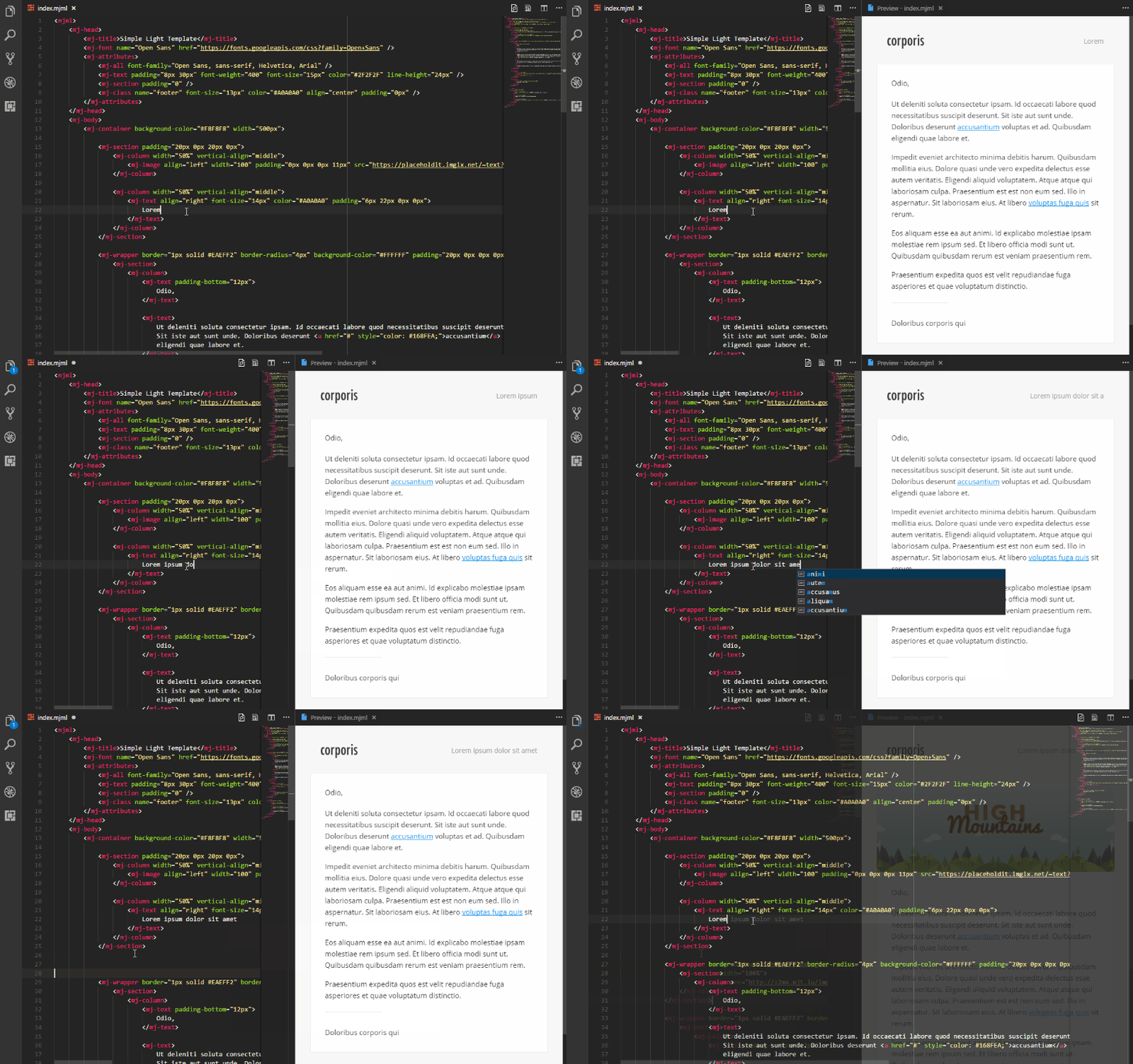
- Live preview for MJML files. Preview updates as you type.
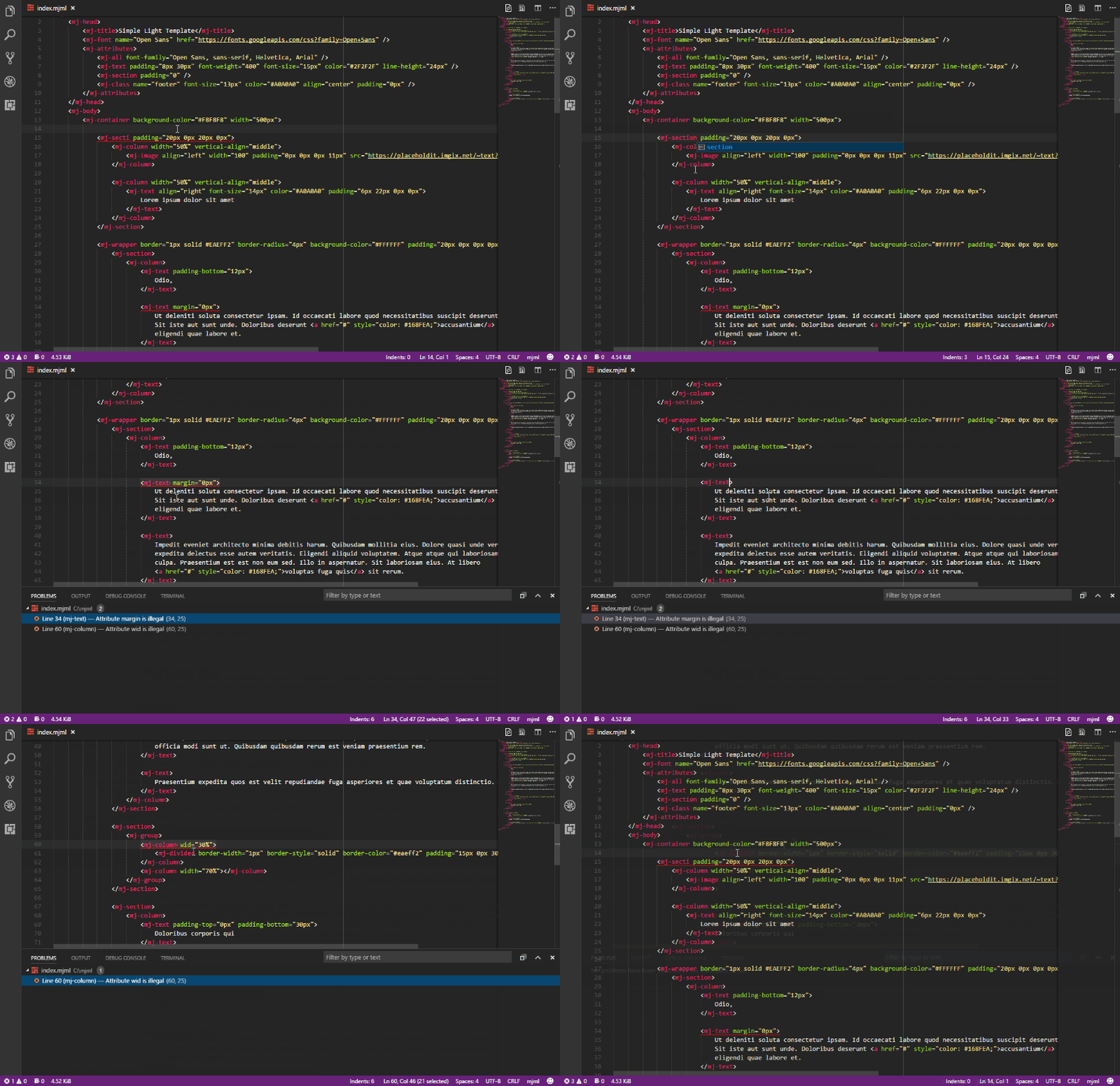
- Inline errors (squiggle underlines). Linter based on atom-linter-mjml.
- Export HTML file from MJML.
- Copy the result HTML to clipboard.
- Send email with Nodemailer or Mailjet.
- Code snippets for MJML. Based on mjml-syntax.
- Fetch official templates. Based on email-templates.
- Beautify MJML code.
- MJML syntax highlight. Based on mjml-syntax.
- Built-in MJML documentation with
Try it livesupport.
It looks like this
Installation
Press F1, type ext install vscode-mjml.
Usage
Start command palette (with Ctrl+Shift+P or F1) and start typing MJML.
Available commands
The following command is available:
- MJML: Beautify or Format Document Beautify MJML code.
- MJML: Copy HTML Copy the result HTML to clipboard.
- MJML: Export HTML Export HTML file from MJML.
- MJML: Open Preview to the Side Opens a preview in a column alongside the current document.
- MJML: Send Email Send email with Nodemailer or Mailjet.
- MJML: Template Fetch official templates.
- MJML: Documentation open the MJML documentation.
- MJML: Search in MJML documentation search for the selected mj-element in the MJML documentation.
- MJML: Version Shows the version of MJML.
Settings
| Name | Default | Description |
|---|---|---|
mjml.autoClosePreview | true | Automatically close preview when all open MJML documents have been closed. |
mjml.allowIncludes | false | Enable mj-include processing. Disabled by default for security. |
mjml.autoPreview | false | Automatically update preview when switching between MJML documents. |
mjml.beautify | {} | Prettier options for beautifying MJML. (Priority: .prettierrc > mjml.beautify > defaults). See Prettier options. |
mjml.beautifyHtmlOutput | false | Beautify HTML output. (Works when mjml.minifyHtmlOutput aren't enabled.) |
mjml.exportType | .html | Specifies the file type of the output file. |
mjml.includePath | [] | Additional directories to allow for <mj-include> lookups when mjml.allowIncludes is enabled. Supports absolute paths, or paths relative to the workspace root. |
mjml.keepComments | true | Keep custom comments in HTML output when exporting MJML files. |
mjml.lintEnable | true | Enable/disable MJML linter (requires restart). |
mjml.lintWhenTyping | true | Whether the linter is run on type or on save. |
mjml.mailer | mailjet | Send email with Nodemailer or Mailjet. Possible values are 'nodemailer' and 'mailjet'. See examples of Nodemailer config |
mjml.mailFromName | | Sender name. |
mjml.mailjetAPIKey | | Mailjet API Key. |
mjml.mailjetAPISecret | | Mailjet API Secret. |
mjml.mailRecipients | | Comma separated list of recipients email addresses. |
mjml.mailSender | | Sender email address. (Mailjet: must be a verified sender.) |
mjml.mailSubject | | Email subject. |
mjml.minifyHtmlOutput | true | Minify HTML output. |
mjml.mjmlConfigPath | | The path or directory of the .mjmlconfig (or .mjmlconfig.js) file (for custom components use) |
mjml.nodemailer | {} | Nodemailer configuration. Please see the Nodemailer documentation for more information. |
mjml.preserveFocus | true | Preserve focus of Text Editor after preview open. |
mjml.previewBackgroundColor | #FFFFFF | Preview background color. |
mjml.showSaveDialog | false | Show the save as dialog instead of input box. |
mjml.switchOnSeparateFileChange | true | Automatically switch previews when editing a different file. |
mjml.templateGallery | false | Show the template gallery instead of quick pick. |
mjml.templateGalleryAutoClose | true | Automatically close template gallery when selecting a template. |
mjml.updateWhenTyping | true | Update preview when typing. |
Include security settings (mjml.allowIncludes and mjml.includePath)
MJML 5 disables include processing by default for security.
- Set
mjml.allowIncludestotrueto enable<mj-include>processing. - Keep
mjml.allowIncludesasfalse(default) to ignore all includes. - Use
mjml.includePathto allow includes outside the current template base path.
When includes are enabled:
- Includes in the same folder (or subfolders) as the current MJML file are allowed.
- Includes outside that folder are denied unless the target folder is listed in
mjml.includePath.
mjml.includePath accepts absolute paths or workspace-relative paths.
Correct JSON example:
{
    "mjml.allowIncludes": true,
    "mjml.includePath": ["resources/templates", "shared/partials"]
}
Settings UI note:
- In the Settings UI, add each include path as a separate array item.
- Do not paste a full JSON array as one item (for example
"[\"resources/templates\"]").
Scope note:
- Workspace settings override User settings.
- If include behavior is unexpected, check both User and Workspace values for
mjml.allowIncludesandmjml.includePath.
Snippets
Each snippet can be triggered by its keyword (e.g. mjbody) or by typing the opening tag directly (e.g. <mj-body). Both trigger the same completion.
| Trigger | URL | Content |
|---|---|---|
mjall <mj-all | mj-all | <mj-all /> |
mjattributes <mj-attributes | mj-attributes | <mj-attributes></mj-attributes> |
mjhtmlattributes <mj-html-attributes | mj-html-attributes | <mj-html-attributes></mj-html-attributes> |
mjbody <mj-body | mj-body | <mj-body></mj-body> |
mjbreakpoint <mj-breakpoint | mj-breakpoint | <mj-breakpoint width="" /> |
mjbutton <mj-button | mj-button | <mj-button></mj-button> |
mjcarousel <mj-carousel | mj-carousel | <mj-carousel></mj-carousel> |
mjcarousel-image <mj-carousel-image | mj-carousel-image | <mj-carousel-image src="" /> |
mjclass <mj-class | mj-class | <mj-class name="" /> |
mjcolumn <mj-column | mj-column | <mj-column width=""></mj-column> |
mjdivider <mj-divider | mj-divider | <mj-divider /> |
mjfont <mj-font | mj-font | <mj-font name="" href="" /> |
mjgroup <mj-group | mj-group | <mj-group></mj-group> |
mjhead <mj-head | mj-head | <mj-head></mj-head> |
mjhero <mj-hero | mj-hero | <mj-hero></mj-hero> |
mjimage <mj-image | mj-image | <mj-image src="" alt="" /> |
mjinclude <mj-include | mj-include | <mj-include path="" /> |
mjraw <mj-raw | mj-raw | <mj-raw></mj-raw> |
mjsection <mj-section | mj-section | <mj-section></mj-section> |
mjsocial <mj-social | mj-social | <mj-social></mj-social> |
mjsocialelement <mj-social-element | mj-social-element | <mj-social-element></mj-social-element> |
mjstyle <mj-style | mj-style | <mj-style></mj-style> |
mjtable <mj-table | mj-table | <mj-table></mj-table> |
mjtext <mj-text | mj-text | <mj-text></mj-text> |
mjtitle <mj-title | mj-title | <mj-title></mj-title> |
mjml <mjml | mjml | <mjml></mjml> |
mjpreview <mj-preview | mj-preview | <mj-preview></mj-preview> |
mjspacer <mj-spacer | mj-spacer | <mj-spacer height="" /> |
mjwrapper <mj-wrapper | mj-wrapper | <mj-wrapper></mj-wrapper> |
mjaccordion <mj-accordion | mj-accordion | <mj-accordion></mj-accordion> |
mjaccordion-element <mj-accordion-element | mj-accordion-element | <mj-accordion-element>...</mj-accordion-element> |
mjnavbar <mj-navbar | mj-navbar | <mj-navbar></mj-navbar> |
mjnavbarlink <mj-navbar-link | mj-navbar-link | <mj-navbar-link></mj-navbar-link> |
mjml- | Basic MJML Template |
Nodemailer configuration
Please see the Nodemailer documentation for more information.
Gmail
"mjml.nodemailer": {
    "service": "Gmail",
    "auth": {
        "user": "youremail@gmail.com",
        "pass": "password"
    }
}
Mailtrap
"mjml.nodemailer": {
    "host": "smtp.mailtrap.io",
    "port": 2525,
    "auth": {
        "user": "username",
        "pass": "password"
    }
}
Ethereal
"mjml.nodemailer": {
    "host": "smtp.ethereal.email",
    "port": 587,
    "auth": {
        "user": "youremail@ethereal.email",
        "pass": "password"
    }
}
Change Log
https://github.com/mjmlio/vscode-mjml/blob/master/CHANGELOG.md
Issues
Submit the issues if you find any bug or have any suggestion.
Contribution
Fork the repo and submit pull requests.
Contributors
Main Author: Attila Buti (@attilabuti)
A big thanks to the people that have contributed to this project:
- Christian Brevik (@cbrevik) - contributions)
- Kevin Oliveira (@kvnol) - contributions)
- Joshua Skrzypek (@jskrzypek) - contributions)
License
This extension is licensed under the [MIT License][license-url].
Contributors


Similar repos


Languages
TypeScript
96.9%
HTML
2.2%
MJML preview, lint, compile for Visual Studio Code.
221
stars
91
commits
TypeScript
primary language
Sep 11, 2026
updated
README
MJML
This is a fork of original @attilabuti VSC extension : https://github.com/attilabuti/vscode-mjml
MJML preview, lint, compile for Visual Studio Code.
Features
- Live preview for MJML files. Preview updates as you type.
- Inline errors (squiggle underlines). Linter based on atom-linter-mjml.
- Export HTML file from MJML.
- Copy the result HTML to clipboard.
- Send email with Nodemailer or Mailjet.
- Code snippets for MJML. Based on mjml-syntax.
- Fetch official templates. Based on email-templates.
- Beautify MJML code.
- MJML syntax highlight. Based on mjml-syntax.
- Built-in MJML documentation with
Try it livesupport.
It looks like this
Installation
Press F1, type ext install vscode-mjml.
Usage
Start command palette (with Ctrl+Shift+P or F1) and start typing MJML.
Available commands
The following command is available:
- MJML: Beautify or Format Document Beautify MJML code.
- MJML: Copy HTML Copy the result HTML to clipboard.
- MJML: Export HTML Export HTML file from MJML.
- MJML: Open Preview to the Side Opens a preview in a column alongside the current document.
- MJML: Send Email Send email with Nodemailer or Mailjet.
- MJML: Template Fetch official templates.
- MJML: Documentation open the MJML documentation.
- MJML: Search in MJML documentation search for the selected mj-element in the MJML documentation.
- MJML: Version Shows the version of MJML.
Settings
| Name | Default | Description |
|---|---|---|
mjml.autoClosePreview | true | Automatically close preview when all open MJML documents have been closed. |
mjml.allowIncludes | false | Enable mj-include processing. Disabled by default for security. |
mjml.autoPreview | false | Automatically update preview when switching between MJML documents. |
mjml.beautify | {} | Prettier options for beautifying MJML. (Priority: .prettierrc > mjml.beautify > defaults). See Prettier options. |
mjml.beautifyHtmlOutput | false | Beautify HTML output. (Works when mjml.minifyHtmlOutput aren't enabled.) |
mjml.exportType | .html | Specifies the file type of the output file. |
mjml.includePath | [] | Additional directories to allow for <mj-include> lookups when mjml.allowIncludes is enabled. Supports absolute paths, or paths relative to the workspace root. |
mjml.keepComments | true | Keep custom comments in HTML output when exporting MJML files. |
mjml.lintEnable | true | Enable/disable MJML linter (requires restart). |
mjml.lintWhenTyping | true | Whether the linter is run on type or on save. |
mjml.mailer | mailjet | Send email with Nodemailer or Mailjet. Possible values are 'nodemailer' and 'mailjet'. See examples of Nodemailer config |
mjml.mailFromName | | Sender name. |
mjml.mailjetAPIKey | | Mailjet API Key. |
mjml.mailjetAPISecret | | Mailjet API Secret. |
mjml.mailRecipients | | Comma separated list of recipients email addresses. |
mjml.mailSender | | Sender email address. (Mailjet: must be a verified sender.) |
mjml.mailSubject | | Email subject. |
mjml.minifyHtmlOutput | true | Minify HTML output. |
mjml.mjmlConfigPath | | The path or directory of the .mjmlconfig (or .mjmlconfig.js) file (for custom components use) |
mjml.nodemailer | {} | Nodemailer configuration. Please see the Nodemailer documentation for more information. |
mjml.preserveFocus | true | Preserve focus of Text Editor after preview open. |
mjml.previewBackgroundColor | #FFFFFF | Preview background color. |
mjml.showSaveDialog | false | Show the save as dialog instead of input box. |
mjml.switchOnSeparateFileChange | true | Automatically switch previews when editing a different file. |
mjml.templateGallery | false | Show the template gallery instead of quick pick. |
mjml.templateGalleryAutoClose | true | Automatically close template gallery when selecting a template. |
mjml.updateWhenTyping | true | Update preview when typing. |
Include security settings (mjml.allowIncludes and mjml.includePath)
MJML 5 disables include processing by default for security.
- Set
mjml.allowIncludestotrueto enable<mj-include>processing. - Keep
mjml.allowIncludesasfalse(default) to ignore all includes. - Use
mjml.includePathto allow includes outside the current template base path.
When includes are enabled:
- Includes in the same folder (or subfolders) as the current MJML file are allowed.
- Includes outside that folder are denied unless the target folder is listed in
mjml.includePath.
mjml.includePath accepts absolute paths or workspace-relative paths.
Correct JSON example:
{
    "mjml.allowIncludes": true,
    "mjml.includePath": ["resources/templates", "shared/partials"]
}
Settings UI note:
- In the Settings UI, add each include path as a separate array item.
- Do not paste a full JSON array as one item (for example
"[\"resources/templates\"]").
Scope note:
- Workspace settings override User settings.
- If include behavior is unexpected, check both User and Workspace values for
mjml.allowIncludesandmjml.includePath.
Snippets
Each snippet can be triggered by its keyword (e.g. mjbody) or by typing the opening tag directly (e.g. <mj-body). Both trigger the same completion.
| Trigger | URL | Content |
|---|---|---|
mjall <mj-all | mj-all | <mj-all /> |
mjattributes <mj-attributes | mj-attributes | <mj-attributes></mj-attributes> |
mjhtmlattributes <mj-html-attributes | mj-html-attributes | <mj-html-attributes></mj-html-attributes> |
mjbody <mj-body | mj-body | <mj-body></mj-body> |
mjbreakpoint <mj-breakpoint | mj-breakpoint | <mj-breakpoint width="" /> |
mjbutton <mj-button | mj-button | <mj-button></mj-button> |
mjcarousel <mj-carousel | mj-carousel | <mj-carousel></mj-carousel> |
mjcarousel-image <mj-carousel-image | mj-carousel-image | <mj-carousel-image src="" /> |
mjclass <mj-class | mj-class | <mj-class name="" /> |
mjcolumn <mj-column | mj-column | <mj-column width=""></mj-column> |
mjdivider <mj-divider | mj-divider | <mj-divider /> |
mjfont <mj-font | mj-font | <mj-font name="" href="" /> |
mjgroup <mj-group | mj-group | <mj-group></mj-group> |
mjhead <mj-head | mj-head | <mj-head></mj-head> |
mjhero <mj-hero | mj-hero | <mj-hero></mj-hero> |
mjimage <mj-image | mj-image | <mj-image src="" alt="" /> |
mjinclude <mj-include | mj-include | <mj-include path="" /> |
mjraw <mj-raw | mj-raw | <mj-raw></mj-raw> |
mjsection <mj-section | mj-section | <mj-section></mj-section> |
mjsocial <mj-social | mj-social | <mj-social></mj-social> |
mjsocialelement <mj-social-element | mj-social-element | <mj-social-element></mj-social-element> |
mjstyle <mj-style | mj-style | <mj-style></mj-style> |
mjtable <mj-table | mj-table | <mj-table></mj-table> |
mjtext <mj-text | mj-text | <mj-text></mj-text> |
mjtitle <mj-title | mj-title | <mj-title></mj-title> |
mjml <mjml | mjml | <mjml></mjml> |
mjpreview <mj-preview | mj-preview | <mj-preview></mj-preview> |
mjspacer <mj-spacer | mj-spacer | <mj-spacer height="" /> |
mjwrapper <mj-wrapper | mj-wrapper | <mj-wrapper></mj-wrapper> |
mjaccordion <mj-accordion | mj-accordion | <mj-accordion></mj-accordion> |
mjaccordion-element <mj-accordion-element | mj-accordion-element | <mj-accordion-element>...</mj-accordion-element> |
mjnavbar <mj-navbar | mj-navbar | <mj-navbar></mj-navbar> |
mjnavbarlink <mj-navbar-link | mj-navbar-link | <mj-navbar-link></mj-navbar-link> |
mjml- | Basic MJML Template |
Nodemailer configuration
Please see the Nodemailer documentation for more information.
Gmail
"mjml.nodemailer": {
    "service": "Gmail",
    "auth": {
        "user": "youremail@gmail.com",
        "pass": "password"
    }
}
Mailtrap
"mjml.nodemailer": {
    "host": "smtp.mailtrap.io",
    "port": 2525,
    "auth": {
        "user": "username",
        "pass": "password"
    }
}
Ethereal
"mjml.nodemailer": {
    "host": "smtp.ethereal.email",
    "port": 587,
    "auth": {
        "user": "youremail@ethereal.email",
        "pass": "password"
    }
}
Change Log
https://github.com/mjmlio/vscode-mjml/blob/master/CHANGELOG.md
Issues
Submit the issues if you find any bug or have any suggestion.
Contribution
Fork the repo and submit pull requests.
Contributors
Main Author: Attila Buti (@attilabuti)
A big thanks to the people that have contributed to this project:
- Christian Brevik (@cbrevik) - contributions)
- Kevin Oliveira (@kvnol) - contributions)
- Joshua Skrzypek (@jskrzypek) - contributions)
License
This extension is licensed under the [MIT License][license-url].
Similar repos
Contributors
Languages
TypeScript
96.9%
HTML
2.2%