Track Instagram users' activities, profile changes and capture content with beautiful dashboards and instant notifications
See the code






Powerful, real-time OSINT suite for tracking every activity on Instagram - from story updates and bio changes to follower shifts, providing stunning dashboards and instant alerts to keep you in the loop.

New to Python or unsure what is installed? Follow the Python install walkthrough first.
pip install instagram_monitor
Run setup wizard:
instagram_monitor --setup
The wizard asks for the targets, the Instagram login, the interface and optional notifications. Review the settings before saving them. See Setup & First Run for the Instagram login options and the first monitoring run.
Use a macOS shell or Windows PowerShell with a Docker-compatible runtime that provides the docker CLI.
docker run --rm --pull=always -it --init -v "${PWD}:/data:z" -v instagram_monitor_session:/home/instagram/.config/instaloader misiektoja/instagram-monitor:latest --setup
In Windows Command Prompt replace ${PWD} with %cd% above.
Run the container with your numeric user and group IDs (--user "$(id -u):$(id -g)" below). This lets the container write files that your host account can edit.
docker run --rm --pull=always -it --init --user "$(id -u):$(id -g)" -v "$PWD:/data:z" -v instagram_monitor_session:/home/instagram/.config/instaloader misiektoja/instagram-monitor:latest --setup
Download the Compose file:
curl -fsSLO https://raw.githubusercontent.com/misiektoja/instagram_monitor/refs/heads/main/docker-compose.yml
Linux container engine requires to export your numeric user ID and group ID so files created in the current directory belong to you instead of root.
export INSTAGRAM_MONITOR_UID="$(id -u)"
export INSTAGRAM_MONITOR_GID="$(id -g)"
Docker-compatible runtimes on macOS and Windows normally do not need these values.
Run setup wizard:
docker compose run --rm --pull=always instagram_monitor --setup
For the manual single-file method, optional extras and upgrade commands, see Installation.
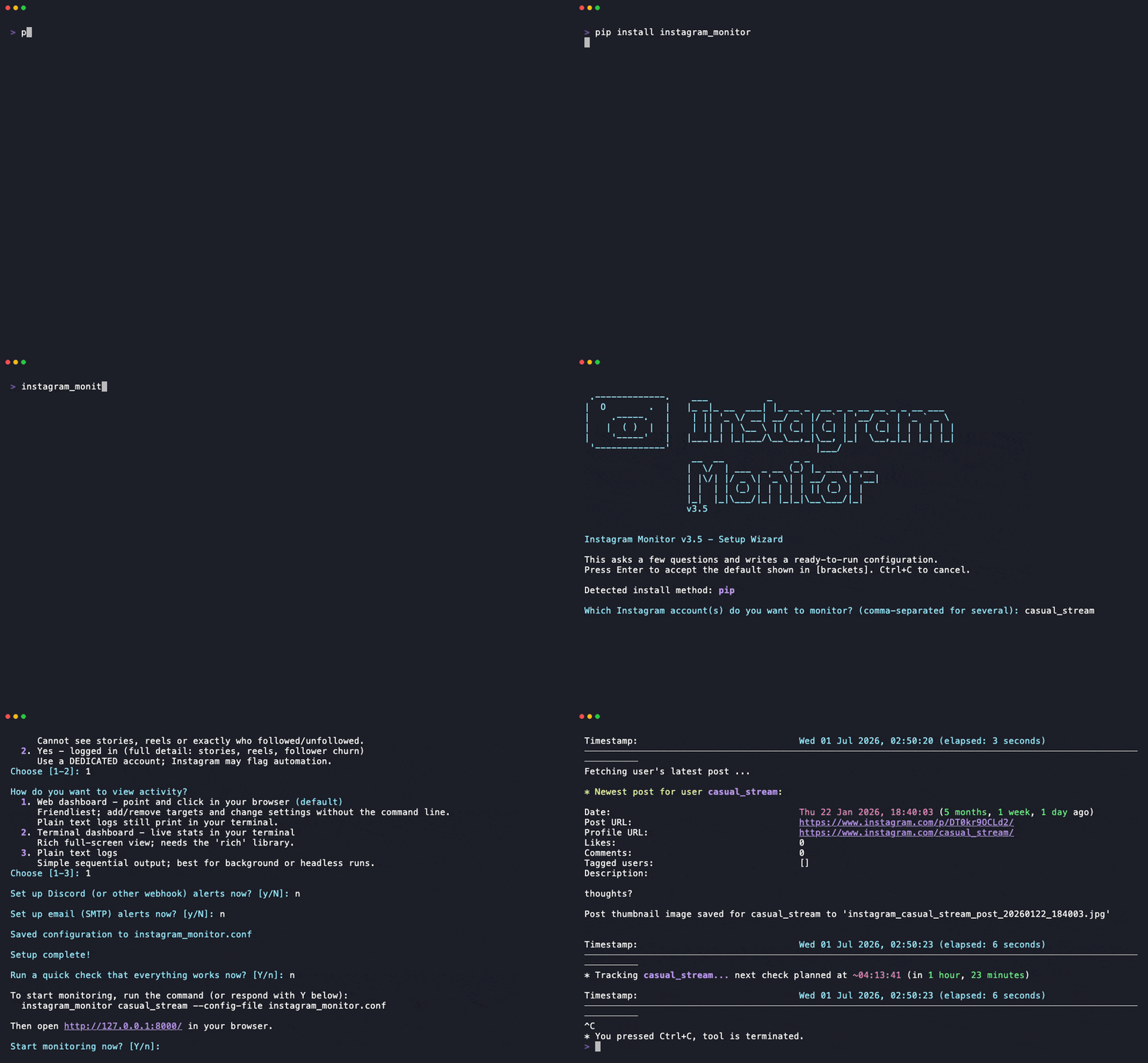
imgcat).--analyze-follows or the Web Dashboard.
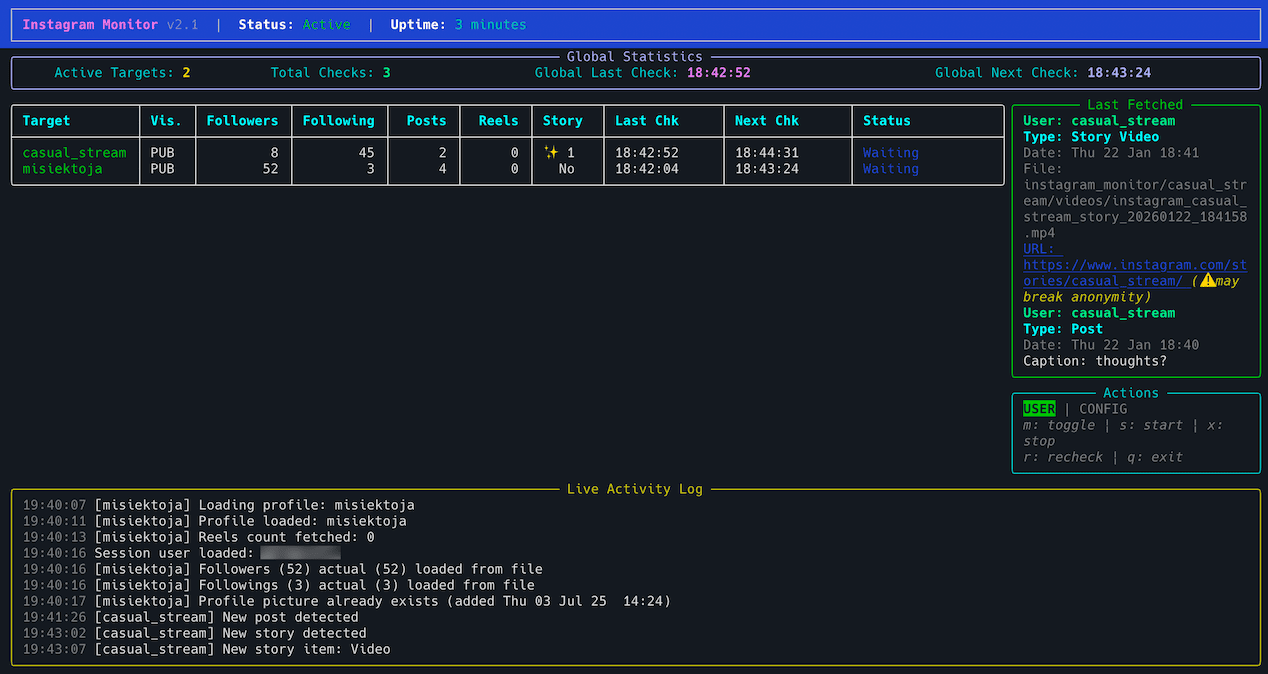

Use Quick Install & Run above for first-time setup. The table uses PyPI commands. For manual script, direct Docker and Docker Compose equivalents, see Run Individual Commands.
Replace the target placeholders with an Instagram username.
| I want to... | Run this |
|---|---|
| Configure the target, credentials and alerts | instagram_monitor --setup |
| Start monitoring a public target without a login | instagram_monitor <target_insta_user> |
| Start monitoring with an existing logged in session (stories, reels and follower details) | Import a browser session then run instagram_monitor -u <your_insta_user> <target_insta_user> |
| Check the selected login, connectivity and targets | instagram_monitor --doctor |
| Monitor several accounts without login | instagram_monitor target_1 target_2 or instagram_monitor --targets target_1,target_2 |
| Start a browser control panel without targets | instagram_monitor --web-dashboard |
| Import an Instagram login from Firefox | Sign in at instagram.com in Firefox then run instagram_monitor --import-browser-session --browser firefox |
| Configure and test webhook alerts | Use the setup wizard or follow Webhook Notifications |
| Save an SMTP password for email alerts | instagram_monitor --set-smtp-password |
| Send a test email | instagram_monitor --send-test-email |
| Save a new webhook URL | instagram_monitor --set-webhook-url |
| Send a test webhook | instagram_monitor --send-test-webhook |
| Write every change to a CSV file | instagram_monitor <target_insta_user> -b changes.csv |
| List every supported command-line flag | instagram_monitor --help |
Running the tool with no arguments offers the wizard if you have not saved any targets or enabled the Web Dashboard. If targets are already saved, it starts monitoring them.
The tool runs until interrupted (Ctrl+C). Use tmux or screen for persistence. One run can monitor several accounts through TARGET_USERNAMES or --targets, so a second copy is not needed.
For browser choices, saved targets, configuration backups and setup recovery, see the full Setup & First Run guide.
For container operation, browser profiles, email and webhook setup, see Configuration. For notification choices, proxy settings and output files, see Usage.
If a run fails, start with Doctor Preflight.
Full documentation is available at misiektoja.github.io/instagram_monitor:
| Page | What it covers |
|---|---|
| Installation | Python walkthrough, PyPI, manual script and Docker installation, upgrades |
| Setup & First Run | Setup wizard, login choices, the first monitoring run |
| Configuration | Settings precedence, saved targets, session login, SMTP, storing secrets, check intervals |
| View Modes | Text output, terminal dashboard and web dashboard |
| Usage | Command formats, monitoring, container operation, notifications, proxy, terminal output |
| Anti-detection | Avoiding challenges and account suspension |
| Troubleshooting | --doctor preflight checks, what to do when something fails, --verbose and --debug output |
| Testing | Running the offline suite, the linter and the docs build |
| About | Change log, contributing, security, license, support |
See RELEASE_NOTES.md for details.
Bug reports, documentation fixes and code contributions are welcome. See CONTRIBUTING.md for the development setup, the checks CI enforces and what a change needs before it is merged. Participation is covered by the Code of Conduct.
Report a suspected vulnerability privately through GitHub security advisories, never as a public issue. SECURITY.md covers the reporting process, the supported versions and the security posture of the Web Dashboard, stored secrets and monitored account data.
Licensed under GPLv3. See LICENSE. Dependency licenses are listed in THIRD_PARTY_NOTICES.md.
Questions, bug reports and vulnerability reports each have a place, listed in SUPPORT.md.
If the project is useful to you, you can support its development through GitHub Sponsors or Buy Me a Coffee.
Overall
Maintained
Code review
Contributors
Latest release
Releases this year
2,298 followers · starred Jun 2026
233 followers · starred Dec 2024
26 followers · starred Jul 2025
75 followers · starred Dec 2024
Track Instagram users' activities, profile changes and capture content with beautiful dashboards and instant notifications
See the code
Powerful, real-time OSINT suite for tracking every activity on Instagram - from story updates and bio changes to follower shifts, providing stunning dashboards and instant alerts to keep you in the loop.
New to Python or unsure what is installed? Follow the Python install walkthrough first.
pip install instagram_monitor
Run setup wizard:
instagram_monitor --setup
The wizard asks for the targets, the Instagram login, the interface and optional notifications. Review the settings before saving them. See Setup & First Run for the Instagram login options and the first monitoring run.
Use a macOS shell or Windows PowerShell with a Docker-compatible runtime that provides the docker CLI.
docker run --rm --pull=always -it --init -v "${PWD}:/data:z" -v instagram_monitor_session:/home/instagram/.config/instaloader misiektoja/instagram-monitor:latest --setup
In Windows Command Prompt replace ${PWD} with %cd% above.
Run the container with your numeric user and group IDs (--user "$(id -u):$(id -g)" below). This lets the container write files that your host account can edit.
docker run --rm --pull=always -it --init --user "$(id -u):$(id -g)" -v "$PWD:/data:z" -v instagram_monitor_session:/home/instagram/.config/instaloader misiektoja/instagram-monitor:latest --setup
Download the Compose file:
curl -fsSLO https://raw.githubusercontent.com/misiektoja/instagram_monitor/refs/heads/main/docker-compose.yml
Linux container engine requires to export your numeric user ID and group ID so files created in the current directory belong to you instead of root.
export INSTAGRAM_MONITOR_UID="$(id -u)"
export INSTAGRAM_MONITOR_GID="$(id -g)"
Docker-compatible runtimes on macOS and Windows normally do not need these values.
Run setup wizard:
docker compose run --rm --pull=always instagram_monitor --setup
For the manual single-file method, optional extras and upgrade commands, see Installation.
imgcat).--analyze-follows or the Web Dashboard.
Use Quick Install & Run above for first-time setup. The table uses PyPI commands. For manual script, direct Docker and Docker Compose equivalents, see Run Individual Commands.
Replace the target placeholders with an Instagram username.
| I want to... | Run this |
|---|---|
| Configure the target, credentials and alerts | instagram_monitor --setup |
| Start monitoring a public target without a login | instagram_monitor <target_insta_user> |
| Start monitoring with an existing logged in session (stories, reels and follower details) | Import a browser session then run instagram_monitor -u <your_insta_user> <target_insta_user> |
| Check the selected login, connectivity and targets | instagram_monitor --doctor |
| Monitor several accounts without login | instagram_monitor target_1 target_2 or instagram_monitor --targets target_1,target_2 |
| Start a browser control panel without targets | instagram_monitor --web-dashboard |
| Import an Instagram login from Firefox | Sign in at instagram.com in Firefox then run instagram_monitor --import-browser-session --browser firefox |
| Configure and test webhook alerts | Use the setup wizard or follow Webhook Notifications |
| Save an SMTP password for email alerts | instagram_monitor --set-smtp-password |
| Send a test email | instagram_monitor --send-test-email |
| Save a new webhook URL | instagram_monitor --set-webhook-url |
| Send a test webhook | instagram_monitor --send-test-webhook |
| Write every change to a CSV file | instagram_monitor <target_insta_user> -b changes.csv |
| List every supported command-line flag | instagram_monitor --help |
Running the tool with no arguments offers the wizard if you have not saved any targets or enabled the Web Dashboard. If targets are already saved, it starts monitoring them.
The tool runs until interrupted (Ctrl+C). Use tmux or screen for persistence. One run can monitor several accounts through TARGET_USERNAMES or --targets, so a second copy is not needed.
For browser choices, saved targets, configuration backups and setup recovery, see the full Setup & First Run guide.
For container operation, browser profiles, email and webhook setup, see Configuration. For notification choices, proxy settings and output files, see Usage.
If a run fails, start with Doctor Preflight.
Full documentation is available at misiektoja.github.io/instagram_monitor:
| Page | What it covers |
|---|---|
| Installation | Python walkthrough, PyPI, manual script and Docker installation, upgrades |
| Setup & First Run | Setup wizard, login choices, the first monitoring run |
| Configuration | Settings precedence, saved targets, session login, SMTP, storing secrets, check intervals |
| View Modes | Text output, terminal dashboard and web dashboard |
| Usage | Command formats, monitoring, container operation, notifications, proxy, terminal output |
| Anti-detection | Avoiding challenges and account suspension |
| Troubleshooting | --doctor preflight checks, what to do when something fails, --verbose and --debug output |
| Testing | Running the offline suite, the linter and the docs build |
| About | Change log, contributing, security, license, support |
See RELEASE_NOTES.md for details.
Bug reports, documentation fixes and code contributions are welcome. See CONTRIBUTING.md for the development setup, the checks CI enforces and what a change needs before it is merged. Participation is covered by the Code of Conduct.
Report a suspected vulnerability privately through GitHub security advisories, never as a public issue. SECURITY.md covers the reporting process, the supported versions and the security posture of the Web Dashboard, stored secrets and monitored account data.
Licensed under GPLv3. See LICENSE. Dependency licenses are listed in THIRD_PARTY_NOTICES.md.
Questions, bug reports and vulnerability reports each have a place, listed in SUPPORT.md.
If the project is useful to you, you can support its development through GitHub Sponsors or Buy Me a Coffee.
Overall
Maintained
Code review
Contributors
Latest release
Releases this year
2,298 followers · starred Jun 2026
233 followers · starred Dec 2024
26 followers · starred Jul 2025
75 followers · starred Dec 2024