
README
anti-ai-slop
A skill for Claude Code, Codex, and other coding agents that removes AI-writing tells from a draft and then checks the result before handing it back.
What it catches
Sentence patterns
- Negative parallelism. "It isn't a pricing problem. It's a trust problem."
- Throat-clearing openers. "Here's the thing," "Let me be honest"
- Faux-insight setups. "What most teams get wrong," "The part nobody mentions"
- Rhetorical setups. "Think about it:" "Sound familiar?"
- Colon reveals. "The clever part: it retries on its own."
- Trailing -ing analysis. "...adds dark mode, underscoring its focus on users"
- Importance puffery. "stands as a testament to," "cannot be overstated"
- Telling the reader what to think. "As you can see," "The key takeaway here is"
- Fake-strong verbs. "serves as a unified layer," "has the ability to"
- False agency. "The consensus emerged." "The data tells us"
- Dramatic fragments. "That's it. That's the product."
- Fake-profound endings. "And we're just getting started."
- Recap endings. "In conclusion," "To sum up"
- Vague declaratives. "The stakes are high." "The implications are significant."
- Stacked hedges. "could potentially," "it might be argued that"
- Half-and-half framing. "Pricing is half the story. The other half is..."
- Stiff wording. "only when the cheaper option will not do"
Habits that only show up in bulk
- Contrast on every claim. "a settings change rather than a code change," "instead of waiting." One is fine. Three in a short post gets flagged.
- Too many rhetorical questions that the post answers itself
Words and phrases
- AI vocabulary. "delve," "leverage," "seamless," "tapestry," and about 120 more
- Empty phrases. "at its core," "in today's fast-paced world," and about 100 more
- Canned openers. "Moreover," "Ultimately," "In essence"
- Chatbot leftovers. "Great question," "Hope this helps," "feel free to"
- Unsourced claims. "studies show," "experts agree"
- Vague crowds. "most companies," "we all know"
- Filler words. "truly," "basically," "incredibly"
- Sweeping words. "everyone," "nobody," "always"
Rhythm and formatting
- Same-length sentences four times in a row
- Short punchy sentences stacked four deep
- Em dashes everywhere
- Emoji used as headings or bullets
- Lists of three used for rhythm, over and over
- Adjective stacks. "powerful and intuitive"
- Random bold in the middle of sentences
- Headings over one or two sentences
- Title Case Headings
- Invisible characters like zero-width spaces
Things only a second reviewer catches
- Made-up facts. A number, source, or quote the original never had
- Made-up connections. A time frame, a cause, or a reaction added while smoothing a sentence, like "over several quarters" or "the feature customers ask about most"
- Synonym cycling. "The agent reviews the draft. The assistant scores it. The tool suggests fixes."
- Changed meaning. A dropped caveat, a claim made stronger than the original, or an argument that stops making sense after the cuts
How it works
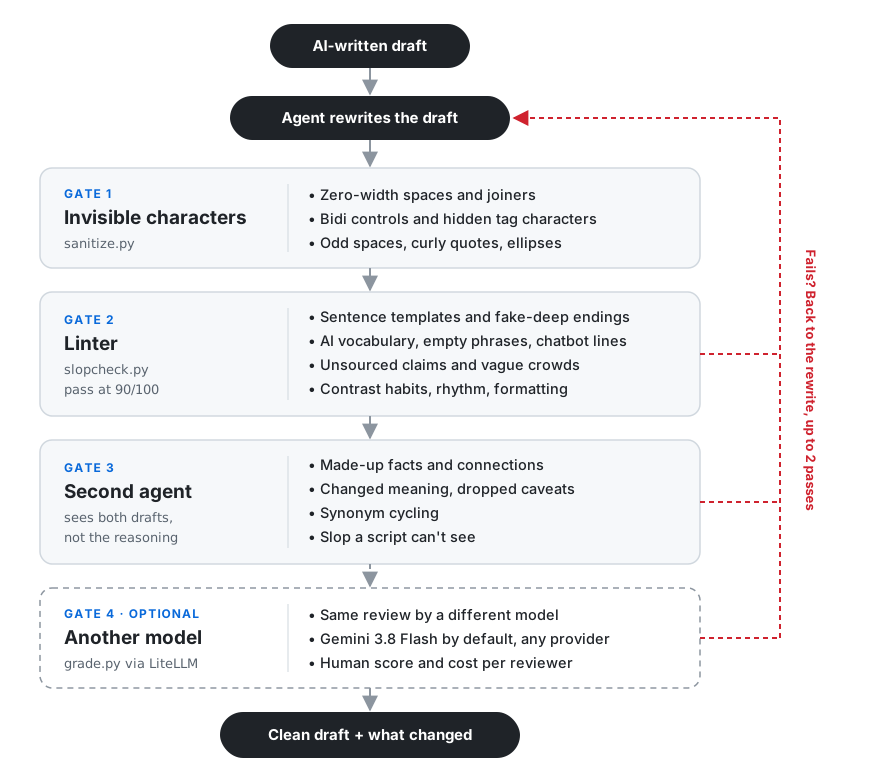
You give your agent a draft. It rewrites it, and then the draft has to get through four gates before you see it:
- Gate 1: invisible characters. Removes zero-width spaces, hidden tag characters, bidi controls, and odd spacing that come along with pasted AI text. Emoji and non-Latin text are left alone.
- Gate 2: the linter. A Python script scores the draft out of 100 against everything in the list above that a script can find. That covers sentence templates, AI vocabulary, empty phrases, chatbot leftovers, unsourced claims, contrast habits, rhythm, and formatting. It skips code and quotes, gives the same score every time, and needs 90 with no serious findings.
- Gate 3: a second agent. It gets the original and the rewrite, but not the first agent's reasoning. It catches what a script can't: made-up facts, made-up connections, changed meaning, dropped caveats, synonym cycling, and any slop the linter missed.
- Gate 4, optional: another model. The same review, run by Gemini 3.8 Flash by default through LiteLLM. You can swap in any provider or add several, and each one reports a human score and its cost.
If a check fails, the draft goes back for another pass, up to two times. Anything still unresolved is listed for you instead of hidden.
The second reviewer is there because the linter can't tell a real fact from an invented one. In testing, rewrites that scored 100 on the linter still had details the original never mentioned.
By default the skill assumes a model wrote the draft and cuts hard. If you say you wrote it yourself, it keeps your voice and only fixes the obvious tells.
Install
For Claude Code:
git clone https://github.com/misbahsy/anti-ai-slop.git
cp -r anti-ai-slop/skills/anti-ai-slop ~/.claude/skills/
For other agents, copy skills/anti-ai-slop into whatever folder your agent loads
skills from.
The checks need Python 3.8 or newer. The optional model review also needs LiteLLM:
pip install litellm
The first time you ask for a model review, the agent asks where your API key is stored and runs everything for you. It saves where the key lives, never the key itself.
Use it
Just ask your agent:
- "De-slop this blog post before I publish it."
- "ChatGPT wrote this email. Make it sound like me."
- "Does this read as AI-written? Point out the patterns but don't rewrite it."
- "Clean this up and have another model check it."
You get back the edited draft plus a short list of what changed, including anything it cut because there was no source for it.
Run the checks yourself
python3 skills/anti-ai-slop/scripts/sanitize.py draft.md --fix
python3 skills/anti-ai-slop/scripts/slopcheck.py draft.md
python3 skills/anti-ai-slop/scripts/grade.py original.md rewrite.md
slopcheck.py exits with 0 on a pass and 1 on a fail, so it works in a pre-commit
hook or CI.
If the linter flags something you want to keep, add a comment to that line:
Our leverage ratio fell to 2.1x. <!-- slop-ignore W1 -->
Tests
python3 skills/anti-ai-slop/tests/test_slopcheck.py
python3 skills/anti-ai-slop/tests/test_credentials.py
python3 skills/anti-ai-slop/tests/test_grade.py
No network or API keys needed. One of the tests checks that the skill's own docs pass the linter.
Adding rules
Everything the linter looks for lives in skills/anti-ai-slop/scripts/rules.json. Add
a word, phrase, or pattern there and rerun the tests. If the clean test file drops
below 95, the new rule is flagging normal writing.
Inspired by
- no-ai-slop by Peter Yang
- stop-slop by Hardik Pandya
- slop-cop by Shannon Tran
- clearmode by Eugeniu Ghelbur
License
MIT
Contributors

1 commits
See what people are saying
Similar repos


Languages
Python
100.0%
README
anti-ai-slop
A skill for Claude Code, Codex, and other coding agents that removes AI-writing tells from a draft and then checks the result before handing it back.
What it catches
Sentence patterns
- Negative parallelism. "It isn't a pricing problem. It's a trust problem."
- Throat-clearing openers. "Here's the thing," "Let me be honest"
- Faux-insight setups. "What most teams get wrong," "The part nobody mentions"
- Rhetorical setups. "Think about it:" "Sound familiar?"
- Colon reveals. "The clever part: it retries on its own."
- Trailing -ing analysis. "...adds dark mode, underscoring its focus on users"
- Importance puffery. "stands as a testament to," "cannot be overstated"
- Telling the reader what to think. "As you can see," "The key takeaway here is"
- Fake-strong verbs. "serves as a unified layer," "has the ability to"
- False agency. "The consensus emerged." "The data tells us"
- Dramatic fragments. "That's it. That's the product."
- Fake-profound endings. "And we're just getting started."
- Recap endings. "In conclusion," "To sum up"
- Vague declaratives. "The stakes are high." "The implications are significant."
- Stacked hedges. "could potentially," "it might be argued that"
- Half-and-half framing. "Pricing is half the story. The other half is..."
- Stiff wording. "only when the cheaper option will not do"
Habits that only show up in bulk
- Contrast on every claim. "a settings change rather than a code change," "instead of waiting." One is fine. Three in a short post gets flagged.
- Too many rhetorical questions that the post answers itself
Words and phrases
- AI vocabulary. "delve," "leverage," "seamless," "tapestry," and about 120 more
- Empty phrases. "at its core," "in today's fast-paced world," and about 100 more
- Canned openers. "Moreover," "Ultimately," "In essence"
- Chatbot leftovers. "Great question," "Hope this helps," "feel free to"
- Unsourced claims. "studies show," "experts agree"
- Vague crowds. "most companies," "we all know"
- Filler words. "truly," "basically," "incredibly"
- Sweeping words. "everyone," "nobody," "always"
Rhythm and formatting
- Same-length sentences four times in a row
- Short punchy sentences stacked four deep
- Em dashes everywhere
- Emoji used as headings or bullets
- Lists of three used for rhythm, over and over
- Adjective stacks. "powerful and intuitive"
- Random bold in the middle of sentences
- Headings over one or two sentences
- Title Case Headings
- Invisible characters like zero-width spaces
Things only a second reviewer catches
- Made-up facts. A number, source, or quote the original never had
- Made-up connections. A time frame, a cause, or a reaction added while smoothing a sentence, like "over several quarters" or "the feature customers ask about most"
- Synonym cycling. "The agent reviews the draft. The assistant scores it. The tool suggests fixes."
- Changed meaning. A dropped caveat, a claim made stronger than the original, or an argument that stops making sense after the cuts
How it works
You give your agent a draft. It rewrites it, and then the draft has to get through four gates before you see it:
- Gate 1: invisible characters. Removes zero-width spaces, hidden tag characters, bidi controls, and odd spacing that come along with pasted AI text. Emoji and non-Latin text are left alone.
- Gate 2: the linter. A Python script scores the draft out of 100 against everything in the list above that a script can find. That covers sentence templates, AI vocabulary, empty phrases, chatbot leftovers, unsourced claims, contrast habits, rhythm, and formatting. It skips code and quotes, gives the same score every time, and needs 90 with no serious findings.
- Gate 3: a second agent. It gets the original and the rewrite, but not the first agent's reasoning. It catches what a script can't: made-up facts, made-up connections, changed meaning, dropped caveats, synonym cycling, and any slop the linter missed.
- Gate 4, optional: another model. The same review, run by Gemini 3.8 Flash by default through LiteLLM. You can swap in any provider or add several, and each one reports a human score and its cost.
If a check fails, the draft goes back for another pass, up to two times. Anything still unresolved is listed for you instead of hidden.
The second reviewer is there because the linter can't tell a real fact from an invented one. In testing, rewrites that scored 100 on the linter still had details the original never mentioned.
By default the skill assumes a model wrote the draft and cuts hard. If you say you wrote it yourself, it keeps your voice and only fixes the obvious tells.
Install
For Claude Code:
git clone https://github.com/misbahsy/anti-ai-slop.git
cp -r anti-ai-slop/skills/anti-ai-slop ~/.claude/skills/
For other agents, copy skills/anti-ai-slop into whatever folder your agent loads
skills from.
The checks need Python 3.8 or newer. The optional model review also needs LiteLLM:
pip install litellm
The first time you ask for a model review, the agent asks where your API key is stored and runs everything for you. It saves where the key lives, never the key itself.
Use it
Just ask your agent:
- "De-slop this blog post before I publish it."
- "ChatGPT wrote this email. Make it sound like me."
- "Does this read as AI-written? Point out the patterns but don't rewrite it."
- "Clean this up and have another model check it."
You get back the edited draft plus a short list of what changed, including anything it cut because there was no source for it.
Run the checks yourself
python3 skills/anti-ai-slop/scripts/sanitize.py draft.md --fix
python3 skills/anti-ai-slop/scripts/slopcheck.py draft.md
python3 skills/anti-ai-slop/scripts/grade.py original.md rewrite.md
slopcheck.py exits with 0 on a pass and 1 on a fail, so it works in a pre-commit
hook or CI.
If the linter flags something you want to keep, add a comment to that line:
Our leverage ratio fell to 2.1x. <!-- slop-ignore W1 -->
Tests
python3 skills/anti-ai-slop/tests/test_slopcheck.py
python3 skills/anti-ai-slop/tests/test_credentials.py
python3 skills/anti-ai-slop/tests/test_grade.py
No network or API keys needed. One of the tests checks that the skill's own docs pass the linter.
Adding rules
Everything the linter looks for lives in skills/anti-ai-slop/scripts/rules.json. Add
a word, phrase, or pattern there and rerun the tests. If the clean test file drops
below 95, the new rule is flagging normal writing.
Inspired by
- no-ai-slop by Peter Yang
- stop-slop by Hardik Pandya
- slop-cop by Shannon Tran
- clearmode by Eugeniu Ghelbur
License
MIT
See what people are saying
Similar repos
Contributors
1 commits
Languages
Python
100.0%