
Big Calendar iOS calendar app
See the codeSee what people are saying (1)
README
Big Calendar
A big, easy-to-see calendar for iPhone.

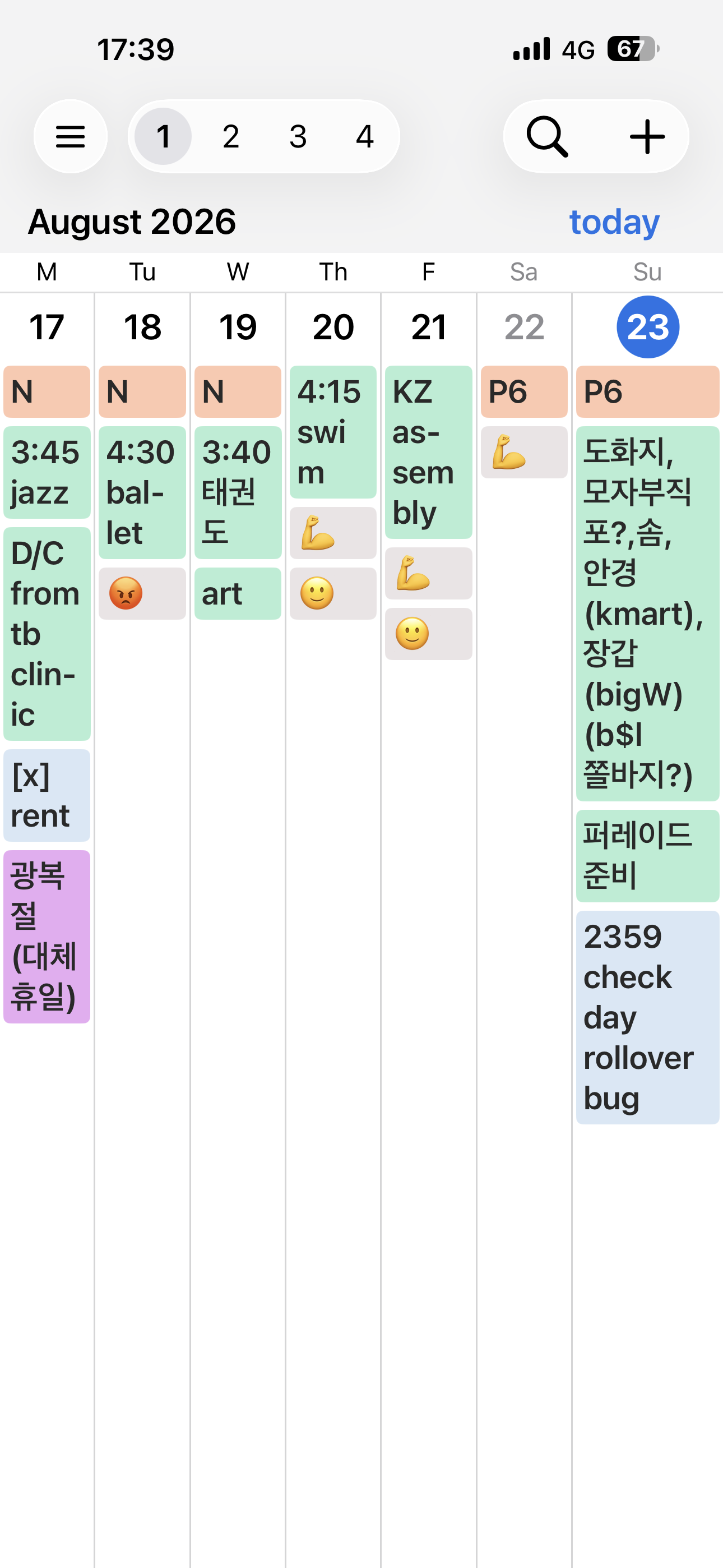
Big Calendar shows the calendars already on your device — iCloud, Google, and anything else synced through iOS — in a large, high-contrast layout that's easy to read at a glance.
Features
- Big, clear layout — your events shown large and easy to read.
- Choose how many weeks to see — view 1–2 weeks for free, or up to 4 weeks with a one-time Pro upgrade.
- Word replacements — shorten long words in event titles (e.g.
birthday -> bday,movie -> 🍿) so more fits on screen. - Pick which calendars show — turn calendars on/off and reorder them so the ones you care about appear first each day.
- Australian holidays by state — if you subscribe to the Australian Holidays calendar, show only the states you care about.
How events are ordered
Multi-day events always come first — they're drawn as bars at the top of each day. Your calendar order from Settings → calendars then applies to the remaining single-day events. So the calendar order isn't followed 100%: multi-day events take priority over it.
How event titles fit
How much of a long event title is shown depends on how many weeks you're viewing, so more weeks still stay readable:
- 1–2 weeks: titles wrap fully — no line limit.
- 3–4 weeks: tighter tiles — the top week shows up to 2 lines, every week below shows 1 line.
When a title doesn't fit, it's clipped at the edge of the tile (no trailing "…"),
matching Apple and Google Calendar. This layout is a design choice and may change.
(In code it's controlled by getLineLimit(weekRow:) in ViewModel.swift.)
Reminders
Reminders (from the iOS Reminders app) are not shown — Big Calendar displays calendar events only.
Pro
Big Calendar is free to use with a 1–2 week view. A single one-time purchase unlocks the multi-week (3–4 week) view and any future Pro features. No subscriptions.
Using with Google Calendar
Big Calendar shows the calendars already on your iPhone, so add your Google account to iOS first:
- Settings -> Apps -> Calendar -> Calendar Accounts -> Add Account -> Google, and sign in.
- Turn on the Calendars toggle.
Then open Big Calendar — your events appear. If the grid is empty, no account has been added yet (step 1).
For timely updates: Google calendars only refresh on a schedule, so if new events are slow to show, set Settings -> Apps -> Calendar -> Calendar Accounts -> Fetch New Data -> Every 15 Minutes.
Screenshot Comparison
| Apple Calendar | Google Calendar | Big Calendar |
|---|---|---|
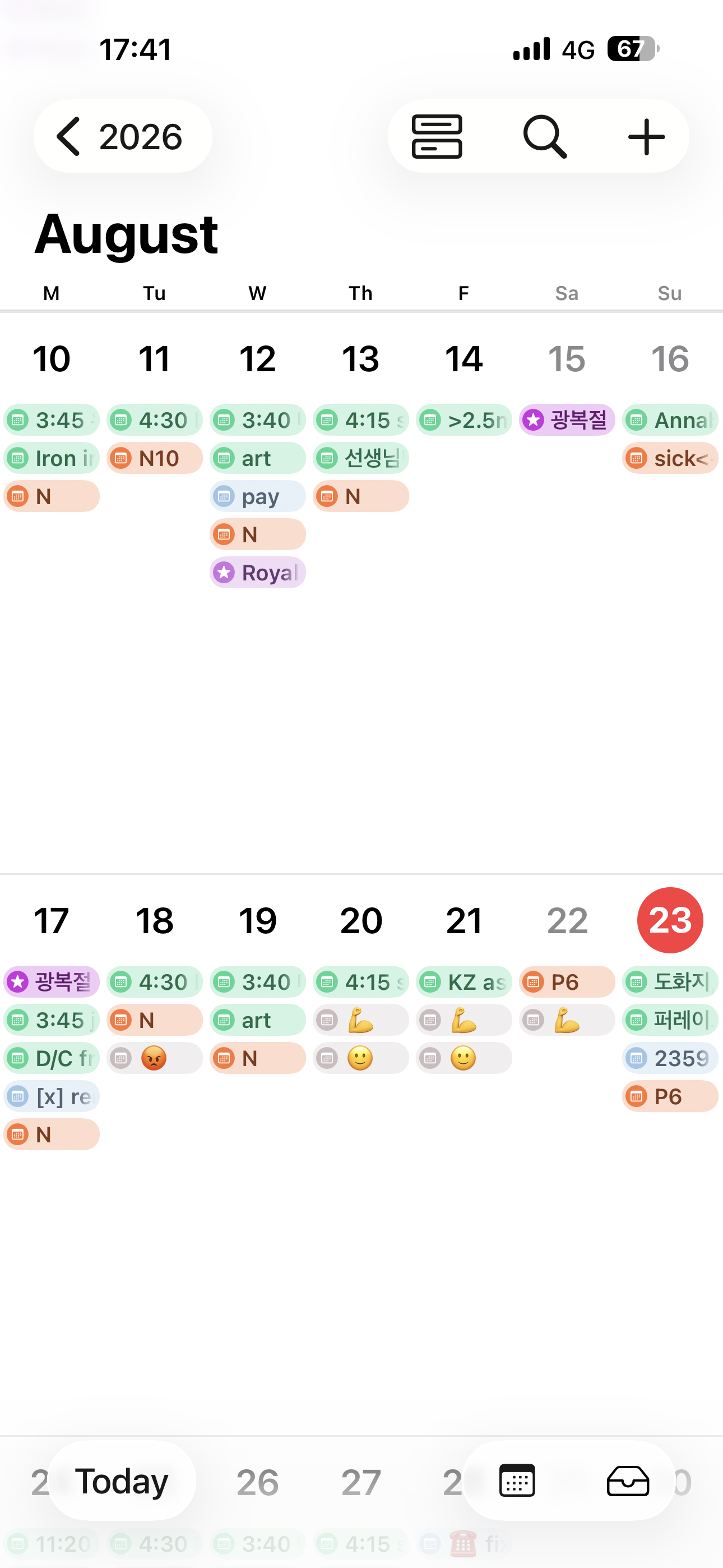 | 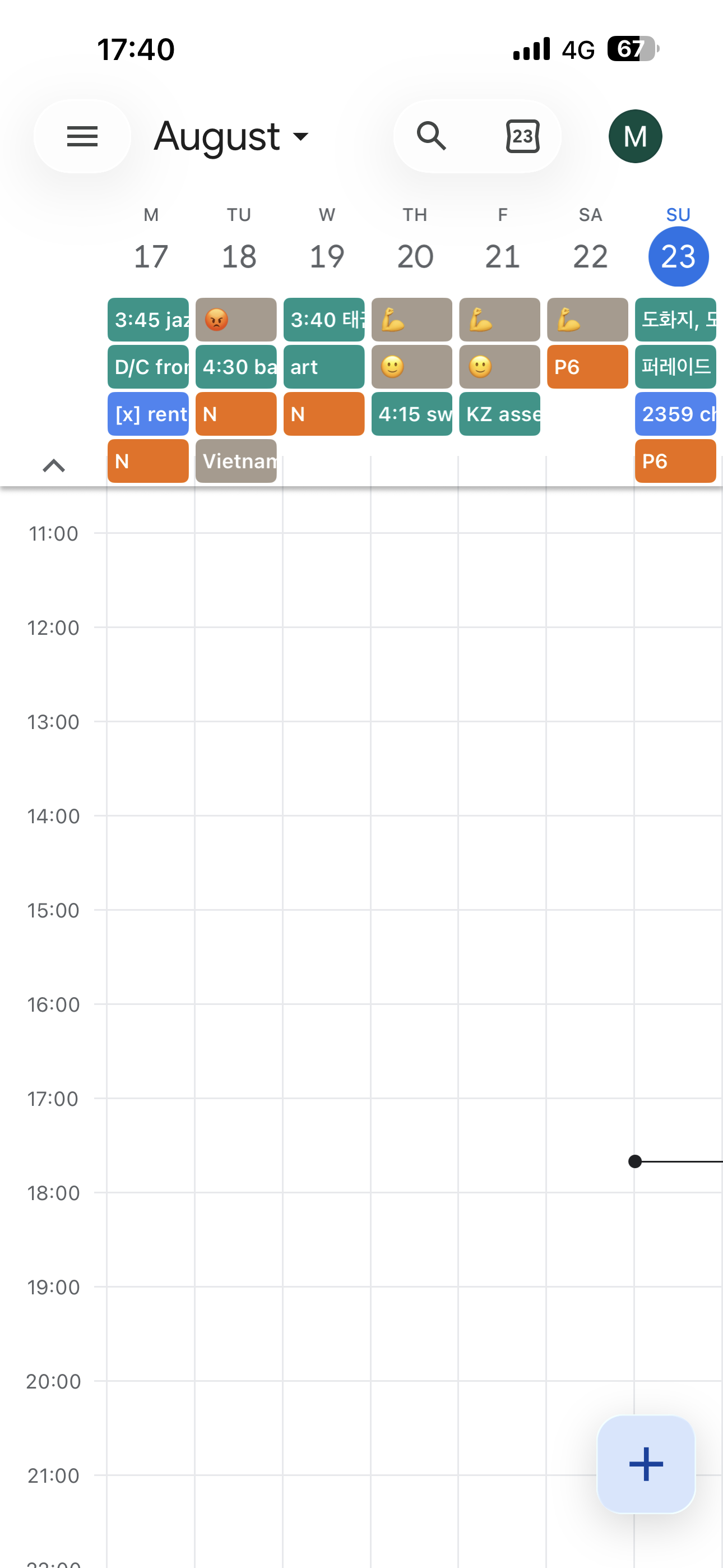 | |
Privacy
Big Calendar does not collect, store, or share any of your information. Your calendar events are read on your device only, to display them — they never leave your phone and are never sent to us or anyone else.
See the Privacy Policy for details.
Support
Contributors

18 commits
Similar repos


Big Calendar iOS calendar app
See the codeSee what people are saying (1)
README
Big Calendar
A big, easy-to-see calendar for iPhone.
Big Calendar shows the calendars already on your device — iCloud, Google, and anything else synced through iOS — in a large, high-contrast layout that's easy to read at a glance.
Features
- Big, clear layout — your events shown large and easy to read.
- Choose how many weeks to see — view 1–2 weeks for free, or up to 4 weeks with a one-time Pro upgrade.
- Word replacements — shorten long words in event titles (e.g.
birthday -> bday,movie -> 🍿) so more fits on screen. - Pick which calendars show — turn calendars on/off and reorder them so the ones you care about appear first each day.
- Australian holidays by state — if you subscribe to the Australian Holidays calendar, show only the states you care about.
How events are ordered
Multi-day events always come first — they're drawn as bars at the top of each day. Your calendar order from Settings → calendars then applies to the remaining single-day events. So the calendar order isn't followed 100%: multi-day events take priority over it.
How event titles fit
How much of a long event title is shown depends on how many weeks you're viewing, so more weeks still stay readable:
- 1–2 weeks: titles wrap fully — no line limit.
- 3–4 weeks: tighter tiles — the top week shows up to 2 lines, every week below shows 1 line.
When a title doesn't fit, it's clipped at the edge of the tile (no trailing "…"),
matching Apple and Google Calendar. This layout is a design choice and may change.
(In code it's controlled by getLineLimit(weekRow:) in ViewModel.swift.)
Reminders
Reminders (from the iOS Reminders app) are not shown — Big Calendar displays calendar events only.
Pro
Big Calendar is free to use with a 1–2 week view. A single one-time purchase unlocks the multi-week (3–4 week) view and any future Pro features. No subscriptions.
Using with Google Calendar
Big Calendar shows the calendars already on your iPhone, so add your Google account to iOS first:
- Settings -> Apps -> Calendar -> Calendar Accounts -> Add Account -> Google, and sign in.
- Turn on the Calendars toggle.
Then open Big Calendar — your events appear. If the grid is empty, no account has been added yet (step 1).
For timely updates: Google calendars only refresh on a schedule, so if new events are slow to show, set Settings -> Apps -> Calendar -> Calendar Accounts -> Fetch New Data -> Every 15 Minutes.
Screenshot Comparison
| Apple Calendar | Google Calendar | Big Calendar |
|---|---|---|
| | |
Privacy
Big Calendar does not collect, store, or share any of your information. Your calendar events are read on your device only, to display them — they never leave your phone and are never sent to us or anyone else.
See the Privacy Policy for details.
Support
Similar repos
Contributors
18 commits