Score identity Distillation with Long and Short Guidance for One-Step Text-to-Image Generation
Python
98
12 commits
updated Dec 4, 2025
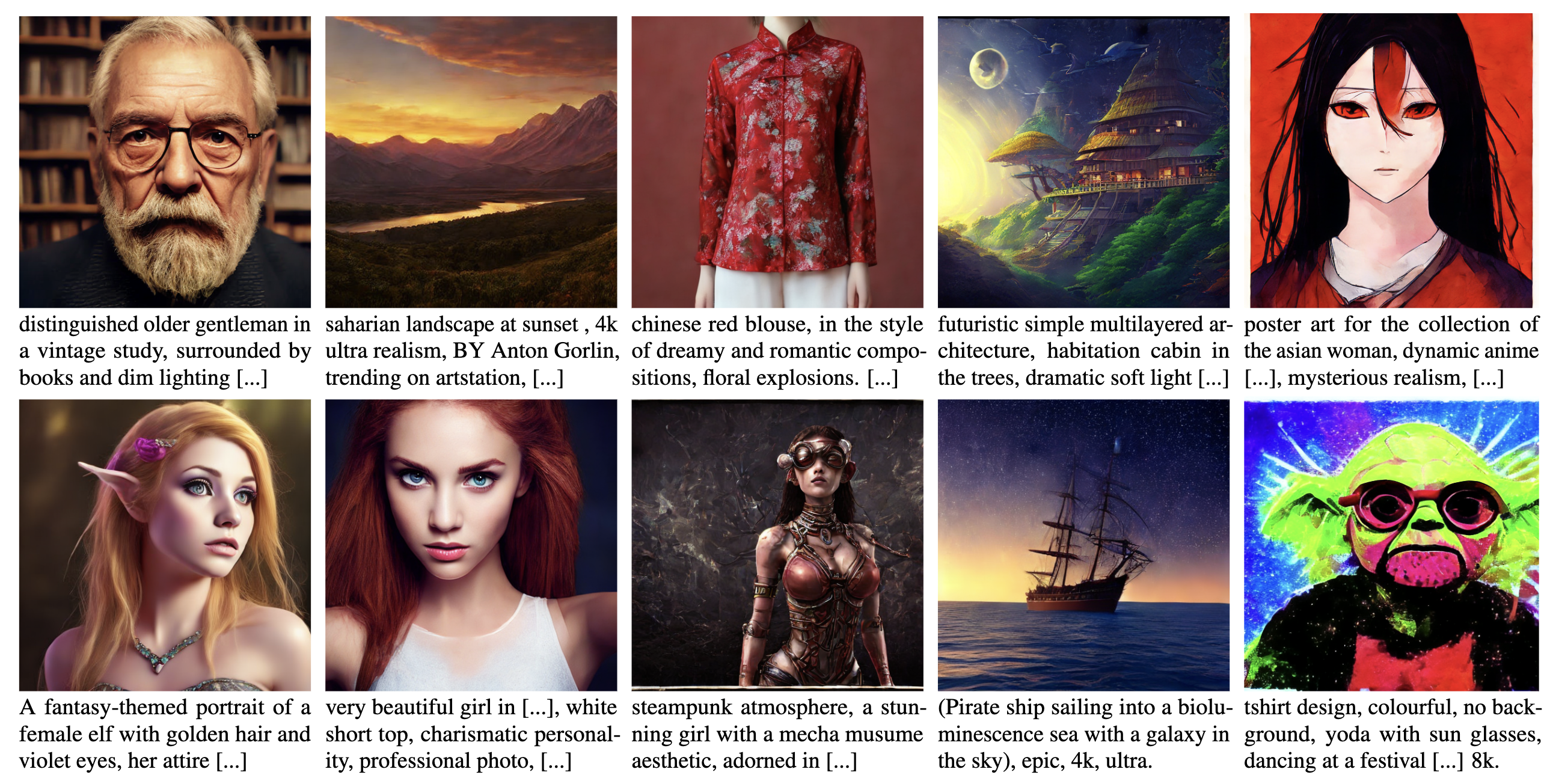
This SiD-LSG repository contains the code and model checkpoints necessary to replicate the findings of our ICLR 2025 paper: Guided Score identity Distillation for Data-Free One-Step Text-to-Image Generation. Note that this paper was originally titled "Long and Short Guidance in Score Identity Distillation for One-Step Text-to-Image Generation" and was first posted on arXiv in June 2024, alongside the release of the corresponding code and model checkpoints. The technique, Long and Short Guidance (LSG), is used with Score identity Distillation (SiD: ICML 2024 paper, Code) to distill Stable Diffusion models for one-step text-to-image generation in a data-free manner.
We are actively developing an improved version of SiD-LSG, which will be placed in a separate branch and introduce the following enhancements (Update: The features described below are now available in sid-dit code. Our team at UT Austin has released the SiD-DiT distilled checkpoints for SANA, SD3-Medium, SD3.5-Medium, SD3.5-Large, and FLUX.1-dev on Hugging Face: sid-dit project page:
If you find our work useful or incorporate our findings in your own research, please consider citing our paper:
@inproceedings{zhou2025guided,
title={Guided Score identity Distillation for Data-Free One-Step Text-to-Image Generation},
author={Mingyuan Zhou and Zhendong Wang and Huangjie Zheng and Hai Huang},
booktitle={The Thirteenth International Conference on Learning Representations},
year={2025},
url={https://arxiv.org/abs/2406.01561}
}
Our work on SiD-LSG builds on prior research on SiD. If relevant, you may also consider citing the following:
@inproceedings{zhou2024score,
  title={Score identity Distillation: Exponentially Fast Distillation of Pretrained Diffusion Models for One-Step Generation},
  author={Mingyuan Zhou and Huangjie Zheng and Zhendong Wang and Mingzhang Yin and Hai Huang},
  booktitle={International Conference on Machine Learning},
  url={https://arxiv.org/abs/2404.04057},
  year={2024}
}
SiD-LSG functions as a data-free distillation method capable of generating photo-realistic images in a single step. By employing a relatively low guidance scale, such as 1.5, it surpasses the teacher stable diffusion model in achieving lower zero-shot Fréchet Inception Distances (FID). This comparison involves 30k COCO2014 caption-prompted images against the COCO2014 validation set, though it does so at the cost of a reduced CLIP score.
The one-step generators distilled with SiD-LSG achieve the following FID and CLIP scores:
| Stable Diffusion 1.5 | Guidance Scale | FID | CLIP |
|---|---|---|---|
| 1.5 | 8.71 | 0.302 | |
| 1.5 (longer training) | 8.15 | 0.304 | |
| 2 | 9.56 | 0.313 | |
| 3 | 13.21 | 0.314 | |
| 4.5 | 16.59 | 0.317 | |
| Stable Diffusion 2.1-base | Guidance Scale | FID | CLIP |
| 1.5 | 9.52 | 0.308 | |
| 2 | 10.97 | 0.318 | |
| 3 | 13.50 | 0.321 | |
| 4.5 | 16.54 | 0.322 |
To install the necessary packages and set up the environment, follow these steps:
First, clone the repository to your local machine:
git clone https://github.com/mingyuanzhou/SiD-SLG.git
cd SiD-LSG
To create the Conda environment with all the required dependencies and activate it, run:
conda env create -f sid_lsg_environment.yml
conda activate sid_lsg
To train the model, you need to provide training prompts. By default, we use Aesthetic6+, but you can also choose Aesthetic6.25+, Aesthetic6.5+, or any other list of prompts, as long as they do not include COCO captions.
To obtain the Aesthetic6+ prompts from Hugging Face, follow their guidelines. Once you have the prompts, save them in the following path:
/data/datasets/aesthetics_6_plus/aesthetics_6_plus.txt.
Alternatively, you can download the prompts directly from this link and extract the .tar file to the specified directory.
To evaluate the zero-shot FID of the distilled one-step generator, you will first need to download the COCO2014 validation set from COCOdataset, and then prepare the COCO2014 validation set using the following command:
python cocodataset_tool.py --source=/path/to/COCO \
 --dest=MS-COCO-256 --resolution=256x256 --transform='center-crop' --phase='val'
Once prepared, place them into the /data/datasets/MS-COCO-256/val folder.
To make an apple-to-apple comparison with previous methods such as GigaGAN, you may use the captions.txt, obtained from GigaGAN/COCOevaluation, to generate 30k images and use them to compute the zero-shot COCO2014 FID.
After activating the environment, you can run the scripts or use the modules provided in the repository. Example:
sh run_sid.sh 'sid1.5'
Adjust the --batch-gpu parameter according to your GPU memory limitations. To save memory, such as fitting GPU with 24GB memomry, you may set --ema 0 to turn off EMA and set --fp16 1 to use mixed-precision training.
The one-step generators produced by SiD-LSG are provided in huggingface/UT-Austin-PML/SiD-LSG
You can first download the SiD-LSG one-step generators and place them into /data/Austin-PML/SiD-LSG/ or a folder you choose. Alternatively, you can replace /data/Austin-PML/SiD-LSG/ with 'https://huggingface.co/UT-Austin-PML/SiD-LSG/resolve/main/' to directly download the checkpoint from HuggingFace
Generate examples images using user-provided prompts and random seeds:
python generate_onestep.py --outdir='image_experiment/example_images/figure1' --seeds='8,8,2,3,2,1,2,4,3,4' --batch=16 --network='/data/Austin-PML/SiD-LSG/batch512_sd21_cfg4.54.54.5_t625_7168_v2.pkl' --repo_id='stabilityai/stable-diffusion-2-1-base' --text_prompts='prompts/fig1-captions.txt' --custom_seed=1
python generate_onestep.py --outdir='image_experiment/example_images/figure6/sd1.5' --seeds='668,329,291,288,057,165' --batch=6 --network='/data/Austin-PML/SiD-LSG/batch512_cfg4.54.54.5_t625_8380_v2.pkl' --text_prompts='prompts/fig6-captions.txt' --custom_seed=1
python generate_onestep.py --outdir='image_experiment/example_images/figure6/sd2.1base' --seeds='668,329,291,288,057,165' --batch=6 --network='/data/Austin-PML/SiD-LSG/batch512_sd21_cfg4.54.54.5_t625_7168_v2.pkl' --repo_id='stabilityai/stable-diffusion-2-1-base' --text_prompts='prompts/fig6-captions.txt' --custom_seed=1
python generate_onestep.py --outdir='image_experiment/example_images/figure8' --seeds='4,4,1,1,4,4,1,1,2,7,7,6,1,20,41,48' --batch=16 --network='/data/Austin-PML/SiD-LSG/batch512_sd21_cfg4.54.54.5_t625_7168_v2.pkl' --repo_id='stabilityai/stable-diffusion-2-1-base' --text_prompts='prompts/fig8-captions.txt' --custom_seed=1
#SLG guidance scale kappa1=kappa2=kappa3=kappa4 = 1.5, longer training
#FID 8.15, CLIP 0.304
torchrun --standalone --nproc_per_node=4 generate_onestep.py --outdir='image_experiment/sid_sd15_runs/sd1.5_kappa1.5_traininglonger/fake_images' --seeds=0-29999 --batch=16 --network='https://huggingface.co/UT-Austin-PML/SiD-LSG/resolve/main/batch512_cfg1.51.51.5_t625_18789_v2.pkl'
captions.txt into the user defined path for fake_dirDownload GigaGAN/evaluation
Place evaluate_SiD_t2i_coco256.sh into its folder: GigaGAN/evaluation/scripts
Modify fake_dir= inside evaluate_SiD_t2i_coco256.sh to point to the folder that consits of captions.txt and the fake_images folder with 30k fake images, and run:
bash scripts/evaluate_SiD_t2i_coco256.sh
The SiD-LSG code integrates functionalities from Hugging Face/Diffusers into the mingyuanzhou/SiD repository, which was build on NVlabs/edm and pkulwj1994/diff_instruct.
To contribute to this project, follow these steps:
git checkout -b <branch_name>.git commit -m '<commit_message>'git push origin <project_name>/<location>Alternatively, see the GitHub documentation on creating a pull request.
If you want to contact me, you can reach me at mingyuanzhou@gmail.com.
This project uses the following license: Apache-2.0 license.
380 followers · starred Jun 2024
103 followers · starred Sep 2024
Score identity Distillation with Long and Short Guidance for One-Step Text-to-Image Generation
Python
98
12 commits
updated Dec 4, 2025
This SiD-LSG repository contains the code and model checkpoints necessary to replicate the findings of our ICLR 2025 paper: Guided Score identity Distillation for Data-Free One-Step Text-to-Image Generation. Note that this paper was originally titled "Long and Short Guidance in Score Identity Distillation for One-Step Text-to-Image Generation" and was first posted on arXiv in June 2024, alongside the release of the corresponding code and model checkpoints. The technique, Long and Short Guidance (LSG), is used with Score identity Distillation (SiD: ICML 2024 paper, Code) to distill Stable Diffusion models for one-step text-to-image generation in a data-free manner.
We are actively developing an improved version of SiD-LSG, which will be placed in a separate branch and introduce the following enhancements (Update: The features described below are now available in sid-dit code. Our team at UT Austin has released the SiD-DiT distilled checkpoints for SANA, SD3-Medium, SD3.5-Medium, SD3.5-Large, and FLUX.1-dev on Hugging Face: sid-dit project page:
If you find our work useful or incorporate our findings in your own research, please consider citing our paper:
@inproceedings{zhou2025guided,
title={Guided Score identity Distillation for Data-Free One-Step Text-to-Image Generation},
author={Mingyuan Zhou and Zhendong Wang and Huangjie Zheng and Hai Huang},
booktitle={The Thirteenth International Conference on Learning Representations},
year={2025},
url={https://arxiv.org/abs/2406.01561}
}
Our work on SiD-LSG builds on prior research on SiD. If relevant, you may also consider citing the following:
@inproceedings{zhou2024score,
  title={Score identity Distillation: Exponentially Fast Distillation of Pretrained Diffusion Models for One-Step Generation},
  author={Mingyuan Zhou and Huangjie Zheng and Zhendong Wang and Mingzhang Yin and Hai Huang},
  booktitle={International Conference on Machine Learning},
  url={https://arxiv.org/abs/2404.04057},
  year={2024}
}
SiD-LSG functions as a data-free distillation method capable of generating photo-realistic images in a single step. By employing a relatively low guidance scale, such as 1.5, it surpasses the teacher stable diffusion model in achieving lower zero-shot Fréchet Inception Distances (FID). This comparison involves 30k COCO2014 caption-prompted images against the COCO2014 validation set, though it does so at the cost of a reduced CLIP score.
The one-step generators distilled with SiD-LSG achieve the following FID and CLIP scores:
| Stable Diffusion 1.5 | Guidance Scale | FID | CLIP |
|---|---|---|---|
| 1.5 | 8.71 | 0.302 | |
| 1.5 (longer training) | 8.15 | 0.304 | |
| 2 | 9.56 | 0.313 | |
| 3 | 13.21 | 0.314 | |
| 4.5 | 16.59 | 0.317 | |
| Stable Diffusion 2.1-base | Guidance Scale | FID | CLIP |
| 1.5 | 9.52 | 0.308 | |
| 2 | 10.97 | 0.318 | |
| 3 | 13.50 | 0.321 | |
| 4.5 | 16.54 | 0.322 |
To install the necessary packages and set up the environment, follow these steps:
First, clone the repository to your local machine:
git clone https://github.com/mingyuanzhou/SiD-SLG.git
cd SiD-LSG
To create the Conda environment with all the required dependencies and activate it, run:
conda env create -f sid_lsg_environment.yml
conda activate sid_lsg
To train the model, you need to provide training prompts. By default, we use Aesthetic6+, but you can also choose Aesthetic6.25+, Aesthetic6.5+, or any other list of prompts, as long as they do not include COCO captions.
To obtain the Aesthetic6+ prompts from Hugging Face, follow their guidelines. Once you have the prompts, save them in the following path:
/data/datasets/aesthetics_6_plus/aesthetics_6_plus.txt.
Alternatively, you can download the prompts directly from this link and extract the .tar file to the specified directory.
To evaluate the zero-shot FID of the distilled one-step generator, you will first need to download the COCO2014 validation set from COCOdataset, and then prepare the COCO2014 validation set using the following command:
python cocodataset_tool.py --source=/path/to/COCO \
 --dest=MS-COCO-256 --resolution=256x256 --transform='center-crop' --phase='val'
Once prepared, place them into the /data/datasets/MS-COCO-256/val folder.
To make an apple-to-apple comparison with previous methods such as GigaGAN, you may use the captions.txt, obtained from GigaGAN/COCOevaluation, to generate 30k images and use them to compute the zero-shot COCO2014 FID.
After activating the environment, you can run the scripts or use the modules provided in the repository. Example:
sh run_sid.sh 'sid1.5'
Adjust the --batch-gpu parameter according to your GPU memory limitations. To save memory, such as fitting GPU with 24GB memomry, you may set --ema 0 to turn off EMA and set --fp16 1 to use mixed-precision training.
The one-step generators produced by SiD-LSG are provided in huggingface/UT-Austin-PML/SiD-LSG
You can first download the SiD-LSG one-step generators and place them into /data/Austin-PML/SiD-LSG/ or a folder you choose. Alternatively, you can replace /data/Austin-PML/SiD-LSG/ with 'https://huggingface.co/UT-Austin-PML/SiD-LSG/resolve/main/' to directly download the checkpoint from HuggingFace
Generate examples images using user-provided prompts and random seeds:
python generate_onestep.py --outdir='image_experiment/example_images/figure1' --seeds='8,8,2,3,2,1,2,4,3,4' --batch=16 --network='/data/Austin-PML/SiD-LSG/batch512_sd21_cfg4.54.54.5_t625_7168_v2.pkl' --repo_id='stabilityai/stable-diffusion-2-1-base' --text_prompts='prompts/fig1-captions.txt' --custom_seed=1
python generate_onestep.py --outdir='image_experiment/example_images/figure6/sd1.5' --seeds='668,329,291,288,057,165' --batch=6 --network='/data/Austin-PML/SiD-LSG/batch512_cfg4.54.54.5_t625_8380_v2.pkl' --text_prompts='prompts/fig6-captions.txt' --custom_seed=1
python generate_onestep.py --outdir='image_experiment/example_images/figure6/sd2.1base' --seeds='668,329,291,288,057,165' --batch=6 --network='/data/Austin-PML/SiD-LSG/batch512_sd21_cfg4.54.54.5_t625_7168_v2.pkl' --repo_id='stabilityai/stable-diffusion-2-1-base' --text_prompts='prompts/fig6-captions.txt' --custom_seed=1
python generate_onestep.py --outdir='image_experiment/example_images/figure8' --seeds='4,4,1,1,4,4,1,1,2,7,7,6,1,20,41,48' --batch=16 --network='/data/Austin-PML/SiD-LSG/batch512_sd21_cfg4.54.54.5_t625_7168_v2.pkl' --repo_id='stabilityai/stable-diffusion-2-1-base' --text_prompts='prompts/fig8-captions.txt' --custom_seed=1
#SLG guidance scale kappa1=kappa2=kappa3=kappa4 = 1.5, longer training
#FID 8.15, CLIP 0.304
torchrun --standalone --nproc_per_node=4 generate_onestep.py --outdir='image_experiment/sid_sd15_runs/sd1.5_kappa1.5_traininglonger/fake_images' --seeds=0-29999 --batch=16 --network='https://huggingface.co/UT-Austin-PML/SiD-LSG/resolve/main/batch512_cfg1.51.51.5_t625_18789_v2.pkl'
captions.txt into the user defined path for fake_dirDownload GigaGAN/evaluation
Place evaluate_SiD_t2i_coco256.sh into its folder: GigaGAN/evaluation/scripts
Modify fake_dir= inside evaluate_SiD_t2i_coco256.sh to point to the folder that consits of captions.txt and the fake_images folder with 30k fake images, and run:
bash scripts/evaluate_SiD_t2i_coco256.sh
The SiD-LSG code integrates functionalities from Hugging Face/Diffusers into the mingyuanzhou/SiD repository, which was build on NVlabs/edm and pkulwj1994/diff_instruct.
To contribute to this project, follow these steps:
git checkout -b <branch_name>.git commit -m '<commit_message>'git push origin <project_name>/<location>Alternatively, see the GitHub documentation on creating a pull request.
If you want to contact me, you can reach me at mingyuanzhou@gmail.com.
This project uses the following license: Apache-2.0 license.
380 followers · starred Jun 2024
103 followers · starred Sep 2024



