
ShopClass: free, open-source, self-hosted classifieds software in PHP. Run a classifieds site, marketplace, job board, property or car listings. The modern successor to Osclass.
See the codeSee what people are saying
README

Open-source, self-hosted listing CMS, by Mindstellar.
Run classifieds, a job board, a property portal, a directory: any site built on listings.



What is ShopClass?
ShopClass is a PHP application for running a listing site on your own hosting: listings with photos, categories and locations, custom fields per category, user accounts, search and filtering, paid plans, pages, multi-language support, and an admin panel to run it all. Classifieds is where it started; the same parts fit any site where people post and browse listings. It ships as a zip you install on ordinary shared or VPS hosting; there is no build step or bundler to run on the server.
ShopClass is the modernised, maintained successor to Osclass. It
keeps Osclass's plugin and theme APIs (the osc_* helpers, hook names, and asset
paths) so existing extensions keep working, while replacing the legacy frontend:
a Bootstrap 5 admin theme, jQuery removed from the core, PHP 8 throughout, and a
first-class maintenance/cleanup toolset built in.
Coming from Osclass? What happened to Osclass, and how to upgrade walks through the history, what carries over, and the upgrade path from a 3.x or 5.x install.
What you can build
| Site | Listings are | Custom fields, for example |
|---|---|---|
| Classifieds | items for sale | condition, price, brand |
| Job board | job openings | salary, job type, company |
| Property portal | homes and rentals | rooms, rent or buy, area |
| Vehicle marketplace | cars and bikes | make, model, year, mileage |
| Business directory | local businesses | phone, opening hours, website |
| Services marketplace | tutors, trades, cleaners | rate, service area |
| Product catalogue | products | size, colour, stock |
Features
- 🗂️ Listings with photos, categories, and hierarchical locations
- 🧾 Custom fields per category, with inheritance, groups, and conditional logic
- 💳 Paid plans and listing upgrades: listing fees, photo limits, premium, bump, highlight
- 📄 Static pages with a page editor and page templates
- 🔍 Search, filtering, and SEO-friendly URLs
- 👥 User registration, accounts, and moderation
- 🎨 Themeable frontend + a modern, accessible (WCAG-checked) admin panel
- 🧩 Plugin & theme system, compatible with the Osclass extension API
- 🌎 Multi-language / i18n support
- 🔒 CSRF protection, CAPTCHA, admin two-step sign-in, and hardened sessions
- ☁️ Photo storage on disk or S3-compatible object storage
- 🧹 Built-in Tools → Cleanup for expired, spam, blocked, and unactivated content
- ♻️ One-click self-updater that pulls release packages
Requirements
- PHP 8.0+ with
mysqli,gd,curl,mbstring,openssl,zip,json,ctype,fileinfo, andposix - MySQL 5.7.5+ / MariaDB 10.2+
- Any web server (Apache or nginx)
Install
Deploy from a release zip, never from a branch.
master/developmay contain untested code, and releases carry the compiled CSS/JS the branches don't rebuild for you.
- Download the latest package from the Releases page and unpack it into your web root (e.g.
public_html). - Open your site in a browser (
https://example.com/) and the installer starts automatically (or go straight tooc-includes/osclass/install.php). - Follow the four steps below.
- Sign in at
https://example.com/oc-admin/with the admin password shown on the final screen.
The installer, step by step
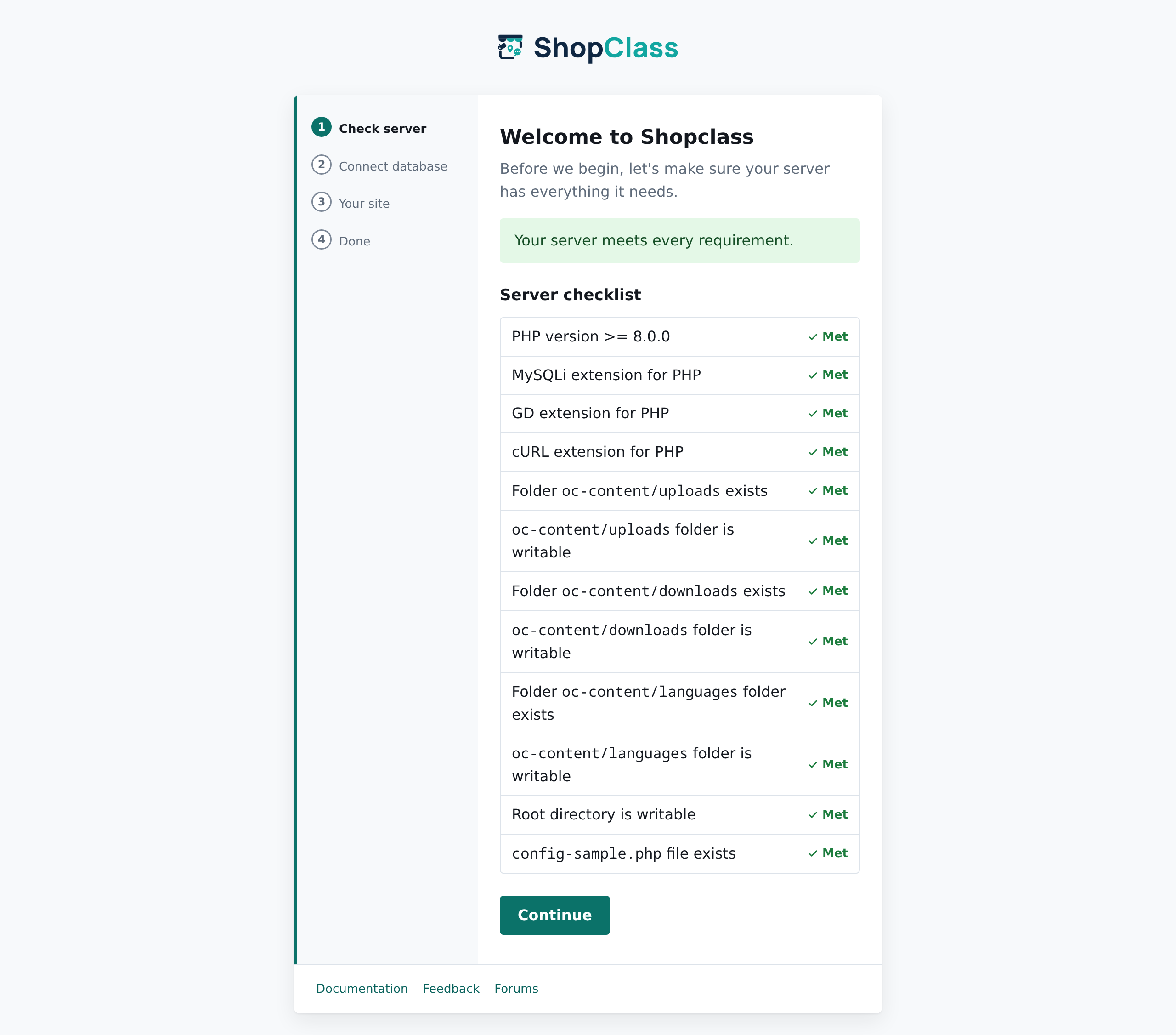
1 · Check server: the installer confirms your PHP version, extensions and folder permissions up front, so nothing fails halfway through.
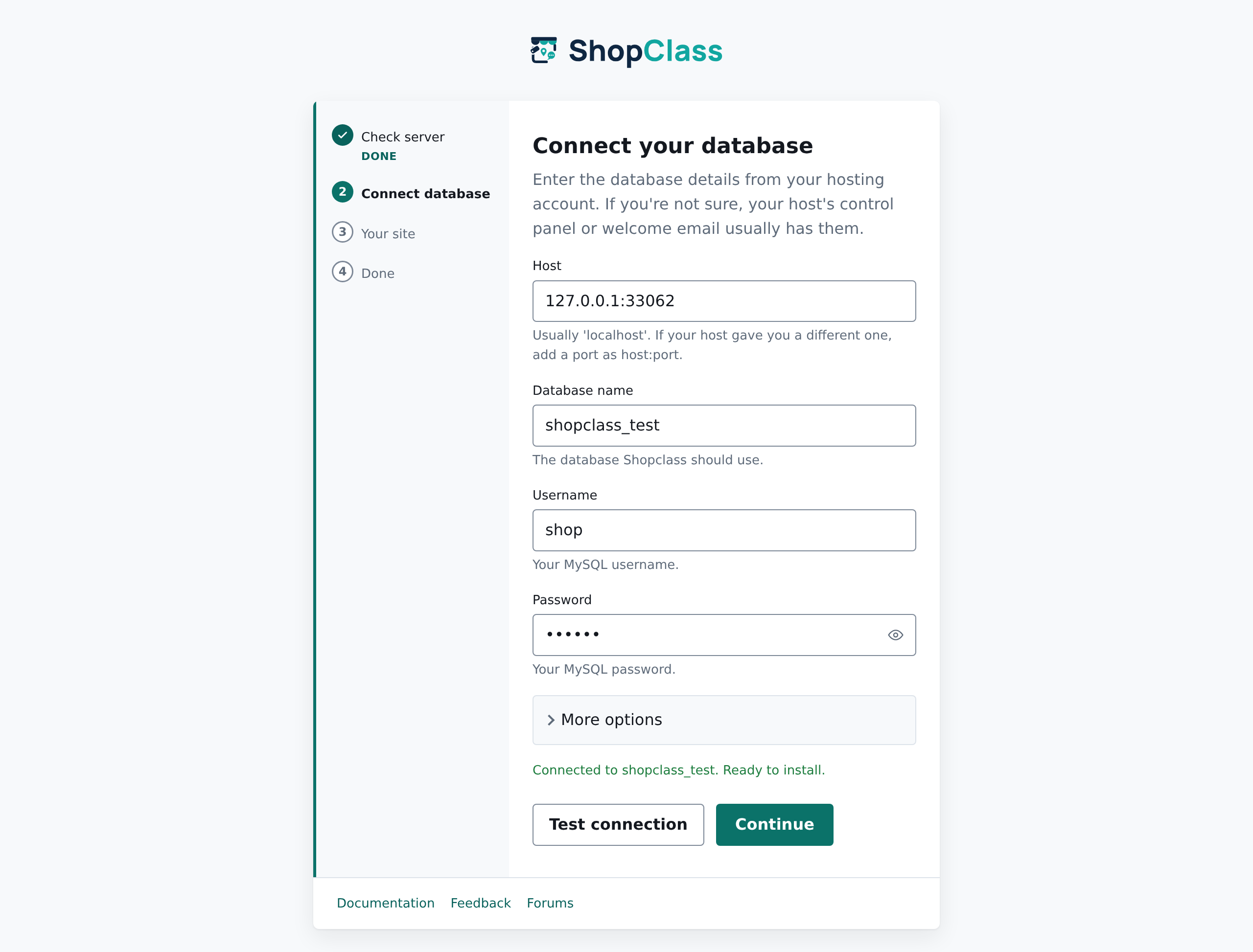
2 · Connect database: enter the details from your hosting panel and press Test connection to confirm they work before anything is written. A database on a non-default port can be entered as host:port.
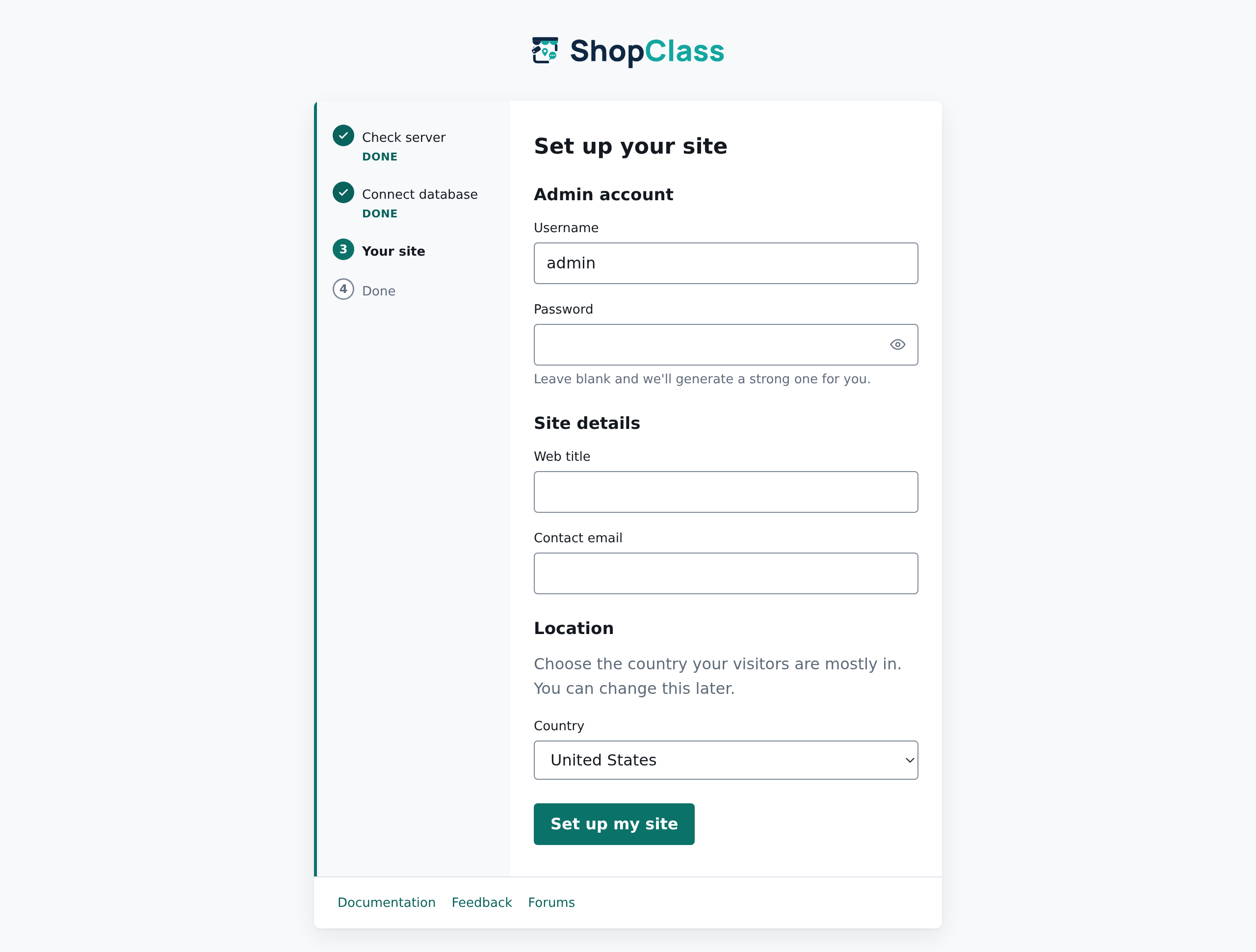
3 · Your site: pick an admin username (leave the password blank and a strong one is generated for you), your site title, contact e-mail and country.
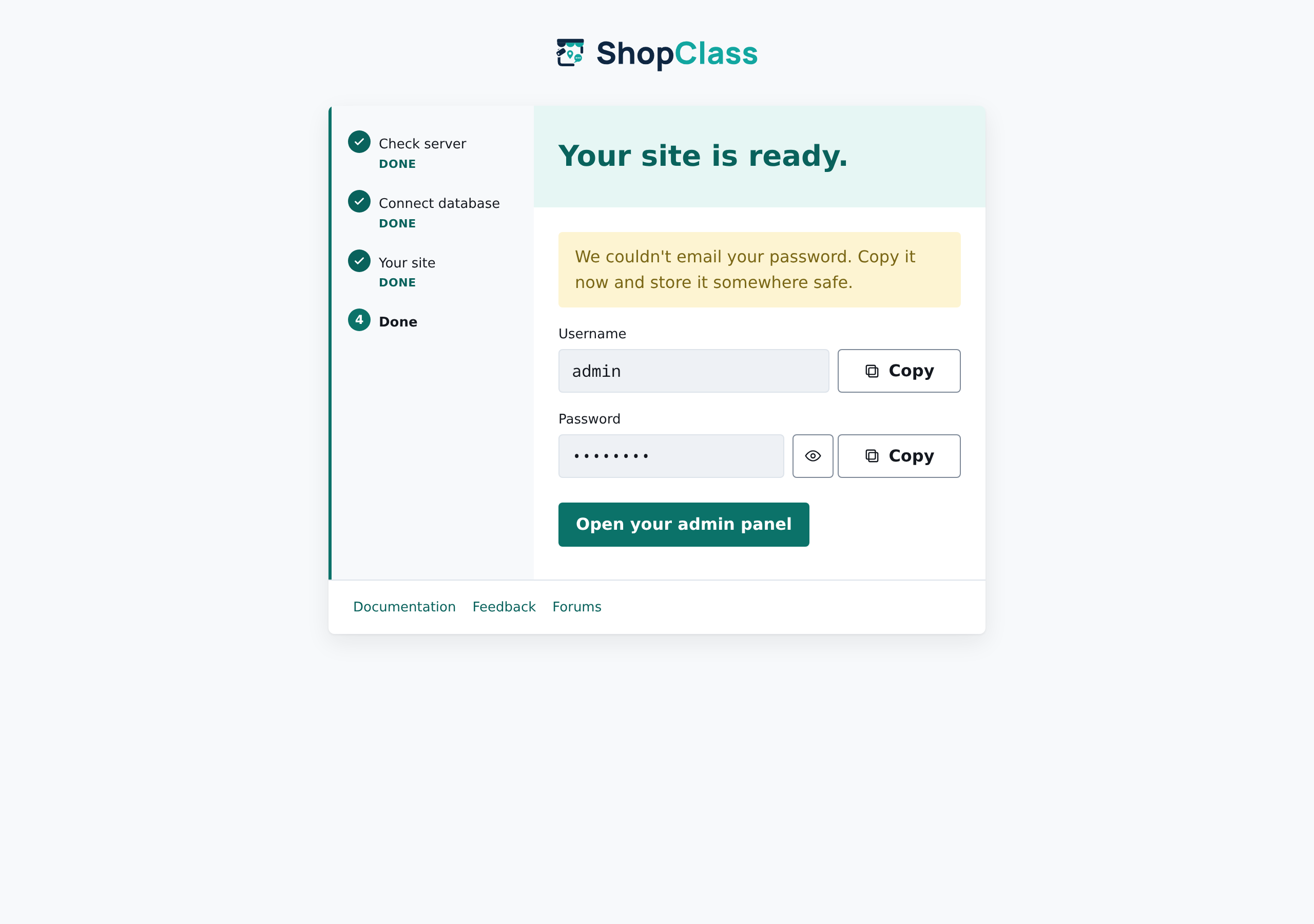
4 · Done: copy your admin password (it's also e-mailed to you) and open the admin panel.
The installer runs once; if the site is already set up it shows a short notice instead of re-running.
Command-line interface
ShopClass ships a small CLI for maintenance tasks, run from the install root with the PHP binary. It refuses to run over HTTP, so the commands are only reachable from a shell on the server.
php oc-cli.php <command> [options]
php oc-cli.php help          # list every command
| Command | What it does |
|---|---|
cron [--type=hourly|daily|weekly|all] | Run due scheduled tasks (alerts, cleanup, sitemap warm). Default runs all three. |
db:upgrade | Run pending migrations after an update. |
db:doctor [--strict] | Report where the database differs from what ShopClass declares, and whether the site is ready for strict SQL mode. Changes nothing. |
db:repair [--dry-run] | Add missing tables, columns, indexes and foreign keys, and correct column types and defaults. --dry-run only reports. |
package:reconcile | Install/refresh bundled plugins & themes onto a persistent oc-content. A no-op outside a container image. |
cache:flush | Flush the object cache. |
sitemap:warm | Pre-generate the XML sitemap into the cache. |
user:create-admin --user= --email= [--password=] [--name=] | Create an admin account. A password is generated and printed when --password is omitted. |
user:reset-password --user=|--email= [--password=] | Reset an admin's password: the way back in when you're locked out. |
user:2fa-off --user= | Turn off an admin's two-step sign-in, for one who lost their phone and backup codes. |
plugin:list | List plugins with their enabled/disabled status, version, and folder. |
plugin:activate --plugin=<folder> | Enable an installed plugin (accepts the folder name or folder/index.php). |
plugin:deactivate --plugin=<folder> | Disable an active plugin. |
theme:list | List installed public themes and mark the active one. |
theme:activate --theme=<name> | Set the active public theme. |
market:refresh [--type=plugin|theme] | Refresh the cached plugin/theme catalog from the registry. |
market:search <query> [--type=plugin|theme] | Search the catalog. |
market:info <slug> [--type=plugin|theme] | Show catalog details for a package. |
market:install <slug> [--type=plugin|theme] | Install a package from the catalog. |
market:update <slug>|--all [--type=plugin|theme] | Update installed packages from the catalog. |
doctor | Report on PHP version, extensions, database, writability, cron freshness, and cache. Exits non-zero if any check fails. |
version | Print the installed version. |
Every command sets a proper exit code (0 success, non-zero on failure), so they
slot into schedulers and monitoring. A typical crontab entry:
*/5 * * * * php /path/to/site/oc-cli.php cron >/dev/null 2>&1
The older
php index.php -p cron -t hourlyinvocation still works for existing crontabs, but new setups should useoc-cli.php.
Local development
The runtime needs no build tools, but the admin theme's CSS/JS are compiled from source. You only need Node to work on them.
git clone git@github.com:mindstellar/shopclass.git
cd shopclass
npm install
npm run build        # vendor assets + SCSS → CSS + JS
npm run watch        # rebuild CSS on change while developing
Compiled output (oc-admin/themes/modern/css/main.css, oc-includes/assets/…)
is committed. Releases are cut with git archive, so whatever is committed
is exactly what users receive. Rebuild and commit the output with any SCSS/JS
change.
The same applies to PHP dependencies. Nothing runs composer install at release,
so oc-includes/vendor/ is the library users actually get: a change to
composer.json that is not accompanied by a rebuilt vendor tree ships the old
code under the new version number. Run composer update <package> and commit
vendor/ alongside the manifest. CI fails the build otherwise.
Dependencies must also resolve on the PHP floor. config.platform pins composer
to 8.0.0, so a package requiring more is refused at resolution even when your own
PHP is newer.
Run it with Docker
A full local stack (PHP-FPM, MariaDB, Nginx, Memcached, Mailhog and phpMyAdmin)
ships in docker-compose.dev.yml, alongside docker-compose.prod.yml for the
production image:
npm run dev:build     # first run: builds the PHP-FPM image
npm run dev           # start
npm run dev:down      # stop
npm run dev:logs      # follow the logs
The first of those writes a .env from .env.example if you have none. It sets
COMPOSE_FILE, so plain docker compose up -d works too and brings up exactly the same
stack. .env is also where you change the database credentials and, on Linux, the
PUID/PGID the container writes files as.
Public themes live in their own repositories and oc-content/themes is gitignored, so a
fresh checkout starts without one. Install the default theme into the running stack:
docker compose exec php-fpm php oc-cli.php market:install storefront --type=theme
To work on a theme or plugin you have checked out locally, put the mounts in
docker-compose.local.yml and append it to COMPOSE_FILE. .env.example shows the
shape. Keep them out of the committed file: where the path is missing Docker creates an
empty directory at the mount point rather than failing, and an empty theme directory
looks broken rather than absent.
Then open http://localhost:8000 and run the installer with these database details (leave the admin password blank on step 3 for a generated one):
| Field | Value |
|---|---|
| Host | mariadb |
| Database | shopclass |
| User | shopclass |
| Password | shopclass |
Outgoing e-mail (including the installer's welcome message) is caught by Mailhog, so you can read it in a browser instead of it silently failing.
| Service | Address |
|---|---|
| Site | http://localhost:8000 |
| Mailhog inbox | http://localhost:8025 |
| phpMyAdmin | http://localhost:8081 (root / root) |
| MariaDB (from host) | 127.0.0.1:3307 |
Inside the compose network the services resolve as php-fpm:9000,
mariadb:3306, memcached:11211, and mailhog:1025. Override the database name and
credentials with the SHOPCLASS_DATABASE_NAME / SHOPCLASS_DATABASE_USER /
SHOPCLASS_DATABASE_PASSWORD variables and the root password with
MYSQL_ROOT_PASSWORD (export them, or put them in a .env file next to the
compose file).
Run the production image
For a deployment rather than development there is a self-contained image (Nginx, PHP-FPM and Supervisor in one container, with the Storefront theme baked in) that provisions itself on first boot. Bring it up with a database:
docker compose -f docker-compose.prod.yml up -d --build
Or skip the build and pull the published image (tagged per release, with :latest
tracking the newest stable):
docker pull ghcr.io/mindstellar/shopclass:latest
It comes up already installed at http://localhost:8080 (admin at
/oc-admin/). Everything is configured from the environment:
| Variable | Purpose |
|---|---|
DB_HOST / DB_NAME / DB_USER / DB_PASSWORD | Database connection |
WEB_PATH | Public base URL of the site |
OSC_ADMIN_USER / OSC_ADMIN_EMAIL / OSC_ADMIN_PASSWORD | First admin account. Leave the password unset to have one generated and printed to the logs |
OSC_DISABLE_PACKAGE_INSTALLS | Set to 1 to turn off installing/updating plugins and themes from the admin market and oc-cli.php market:*. Unset (the default) leaves them on |
For a real deployment, point DB_HOST at a managed database, set a strong admin
password, set WEB_PATH to your public URL, and offload uploads to S3 so more than
one instance can run.
Core vs. packages update differently. Core ships baked into the image, so core
updates come from deploying a newer image tag; the container migrates its own
schema on start, and the in-app core updater is off (OSC_DISABLE_SELF_UPDATE=1) so
it can't write over itself only to lose the write on the next redeploy. Plugins and
themes are different: docker-compose.prod.yml mounts oc-content/plugins and
oc-content/themes as named volumes alongside uploads/downloads, so a package
installed or updated from the admin market (or oc-cli.php market:install /
market:update) survives a redeploy. On every start, the entrypoint reconciles that
volume against the bundled packages baked into the new image. It installs any that
are missing and refreshes any the image ships a newer version of, without ever
touching a package installed through the market.
Upgrading from an image released before those two volumes existed: copy
oc-content/pluginsandoc-content/themesout of the running container before you redeploy. Those directories used to live in the container's writable layer, so anything installed there was already discarded on each redeploy; the new volumes are seeded from the image, which means packages from the old container are not carried across and cannot be recovered once it is gone. Reinstall them after upgrading. Zip installs are unaffected.
Brand
Logos, the mark, the favicon set, and the palette live in the shopclass-brand repository.
| Role | Color | Hex |
|---|---|---|
| Deep Navy | dark / headings | #0F2742 |
| Teal | brand / identity | #12A6A0 |
| Slate Gray | neutral | #435466 |
| Warm Off-White | surface | #F7F5F1 |
| Coral | accent | #FF6B4A |
Brand assets are licensed CC BY-ND 4.0: use them to refer to ShopClass, but please don't modify the marks or imply endorsement.
Documentation
mindstellar.com/docs: installing, configuring
and extending ShopClass. The pages are written in docs/site/ and
published from there, so corrections are a pull request against this repository.
- Changelog: what changed in each release; also the source for the admin upgrade screen.
- Security policy: supported versions and how to report a vulnerability.
Guides
- Caching contract: how ShopClass drives a reverse-proxy/CDN cache: the cookie allowlist, the
Cache-Controlit emits, and the reference nginx micro-cache config. - Page builder: the page-template registry and the widget-based page composition model.
- Custom fields: field inheritance down the category tree, reusable groups, conditional logic, and the field-type registry.
- Market: the GitHub-native plugin & theme ecosystem: the
shopclass-plugins/shopclass-themesregistries, the static catalog they publish, and how core browses, installs, and updates from it. - Package spec: the contract a plugin or theme must satisfy to be listed in the market: header fields, compatibility, versioning, artwork, and security requirements.
Installation, local development, and the production image are covered in the sections above.
Contributing
Contributions are welcome: bug fixes, features, translations, docs.
- Open an issue describing the change before you start.
- Branch from
develop(never targetmaster). - Make your change; if it touches the admin theme, run
npm run buildand commit the compiled output. - Open a pull request against
develop.
Because ShopClass runs on installs with third-party themes and plugins, treat the
osc_* helpers, hook names, admin CSS class names, and oc-includes/assets/
paths as a public API. Restyle freely, but don't rename or remove them.
Support
Questions, help, and discussion happen on GitHub Discussions. For reproducible bugs, open an issue.
License
ShopClass is distributed under the GNU General Public License v3.0 or later (LICENSE). It derives from Osclass, whose original code is licensed under the Apache License 2.0 (LICENSE-APACHE); those notices are retained in NOTICE as that license requires.
Links
- 🏠 Website · Live demo
- 🧭 Coming from Osclass
- 📦 Releases
- 🐛 Issues
- 💬 Discussions
- 🎨 Brand kit
Significant stargazers

155 followers · starred Jan 2020
Similar repos


Languages
PHP
86.9%
CSS
5.3%
JavaScript
3.3%
SCSS
3.2%
ShopClass: free, open-source, self-hosted classifieds software in PHP. Run a classifieds site, marketplace, job board, property or car listings. The modern successor to Osclass.
See the codeSee what people are saying
README
Open-source, self-hosted listing CMS, by Mindstellar.
Run classifieds, a job board, a property portal, a directory: any site built on listings.
What is ShopClass?
ShopClass is a PHP application for running a listing site on your own hosting: listings with photos, categories and locations, custom fields per category, user accounts, search and filtering, paid plans, pages, multi-language support, and an admin panel to run it all. Classifieds is where it started; the same parts fit any site where people post and browse listings. It ships as a zip you install on ordinary shared or VPS hosting; there is no build step or bundler to run on the server.
ShopClass is the modernised, maintained successor to Osclass. It
keeps Osclass's plugin and theme APIs (the osc_* helpers, hook names, and asset
paths) so existing extensions keep working, while replacing the legacy frontend:
a Bootstrap 5 admin theme, jQuery removed from the core, PHP 8 throughout, and a
first-class maintenance/cleanup toolset built in.
Coming from Osclass? What happened to Osclass, and how to upgrade walks through the history, what carries over, and the upgrade path from a 3.x or 5.x install.
What you can build
| Site | Listings are | Custom fields, for example |
|---|---|---|
| Classifieds | items for sale | condition, price, brand |
| Job board | job openings | salary, job type, company |
| Property portal | homes and rentals | rooms, rent or buy, area |
| Vehicle marketplace | cars and bikes | make, model, year, mileage |
| Business directory | local businesses | phone, opening hours, website |
| Services marketplace | tutors, trades, cleaners | rate, service area |
| Product catalogue | products | size, colour, stock |
Features
- 🗂️ Listings with photos, categories, and hierarchical locations
- 🧾 Custom fields per category, with inheritance, groups, and conditional logic
- 💳 Paid plans and listing upgrades: listing fees, photo limits, premium, bump, highlight
- 📄 Static pages with a page editor and page templates
- 🔍 Search, filtering, and SEO-friendly URLs
- 👥 User registration, accounts, and moderation
- 🎨 Themeable frontend + a modern, accessible (WCAG-checked) admin panel
- 🧩 Plugin & theme system, compatible with the Osclass extension API
- 🌎 Multi-language / i18n support
- 🔒 CSRF protection, CAPTCHA, admin two-step sign-in, and hardened sessions
- ☁️ Photo storage on disk or S3-compatible object storage
- 🧹 Built-in Tools → Cleanup for expired, spam, blocked, and unactivated content
- ♻️ One-click self-updater that pulls release packages
Requirements
- PHP 8.0+ with
mysqli,gd,curl,mbstring,openssl,zip,json,ctype,fileinfo, andposix - MySQL 5.7.5+ / MariaDB 10.2+
- Any web server (Apache or nginx)
Install
Deploy from a release zip, never from a branch.
master/developmay contain untested code, and releases carry the compiled CSS/JS the branches don't rebuild for you.
- Download the latest package from the Releases page and unpack it into your web root (e.g.
public_html). - Open your site in a browser (
https://example.com/) and the installer starts automatically (or go straight tooc-includes/osclass/install.php). - Follow the four steps below.
- Sign in at
https://example.com/oc-admin/with the admin password shown on the final screen.
The installer, step by step
1 · Check server: the installer confirms your PHP version, extensions and folder permissions up front, so nothing fails halfway through.
2 · Connect database: enter the details from your hosting panel and press Test connection to confirm they work before anything is written. A database on a non-default port can be entered as host:port.
3 · Your site: pick an admin username (leave the password blank and a strong one is generated for you), your site title, contact e-mail and country.
4 · Done: copy your admin password (it's also e-mailed to you) and open the admin panel.
The installer runs once; if the site is already set up it shows a short notice instead of re-running.
Command-line interface
ShopClass ships a small CLI for maintenance tasks, run from the install root with the PHP binary. It refuses to run over HTTP, so the commands are only reachable from a shell on the server.
php oc-cli.php <command> [options]
php oc-cli.php help          # list every command
| Command | What it does |
|---|---|
cron [--type=hourly|daily|weekly|all] | Run due scheduled tasks (alerts, cleanup, sitemap warm). Default runs all three. |
db:upgrade | Run pending migrations after an update. |
db:doctor [--strict] | Report where the database differs from what ShopClass declares, and whether the site is ready for strict SQL mode. Changes nothing. |
db:repair [--dry-run] | Add missing tables, columns, indexes and foreign keys, and correct column types and defaults. --dry-run only reports. |
package:reconcile | Install/refresh bundled plugins & themes onto a persistent oc-content. A no-op outside a container image. |
cache:flush | Flush the object cache. |
sitemap:warm | Pre-generate the XML sitemap into the cache. |
user:create-admin --user= --email= [--password=] [--name=] | Create an admin account. A password is generated and printed when --password is omitted. |
user:reset-password --user=|--email= [--password=] | Reset an admin's password: the way back in when you're locked out. |
user:2fa-off --user= | Turn off an admin's two-step sign-in, for one who lost their phone and backup codes. |
plugin:list | List plugins with their enabled/disabled status, version, and folder. |
plugin:activate --plugin=<folder> | Enable an installed plugin (accepts the folder name or folder/index.php). |
plugin:deactivate --plugin=<folder> | Disable an active plugin. |
theme:list | List installed public themes and mark the active one. |
theme:activate --theme=<name> | Set the active public theme. |
market:refresh [--type=plugin|theme] | Refresh the cached plugin/theme catalog from the registry. |
market:search <query> [--type=plugin|theme] | Search the catalog. |
market:info <slug> [--type=plugin|theme] | Show catalog details for a package. |
market:install <slug> [--type=plugin|theme] | Install a package from the catalog. |
market:update <slug>|--all [--type=plugin|theme] | Update installed packages from the catalog. |
doctor | Report on PHP version, extensions, database, writability, cron freshness, and cache. Exits non-zero if any check fails. |
version | Print the installed version. |
Every command sets a proper exit code (0 success, non-zero on failure), so they
slot into schedulers and monitoring. A typical crontab entry:
*/5 * * * * php /path/to/site/oc-cli.php cron >/dev/null 2>&1
The older
php index.php -p cron -t hourlyinvocation still works for existing crontabs, but new setups should useoc-cli.php.
Local development
The runtime needs no build tools, but the admin theme's CSS/JS are compiled from source. You only need Node to work on them.
git clone git@github.com:mindstellar/shopclass.git
cd shopclass
npm install
npm run build        # vendor assets + SCSS → CSS + JS
npm run watch        # rebuild CSS on change while developing
Compiled output (oc-admin/themes/modern/css/main.css, oc-includes/assets/…)
is committed. Releases are cut with git archive, so whatever is committed
is exactly what users receive. Rebuild and commit the output with any SCSS/JS
change.
The same applies to PHP dependencies. Nothing runs composer install at release,
so oc-includes/vendor/ is the library users actually get: a change to
composer.json that is not accompanied by a rebuilt vendor tree ships the old
code under the new version number. Run composer update <package> and commit
vendor/ alongside the manifest. CI fails the build otherwise.
Dependencies must also resolve on the PHP floor. config.platform pins composer
to 8.0.0, so a package requiring more is refused at resolution even when your own
PHP is newer.
Run it with Docker
A full local stack (PHP-FPM, MariaDB, Nginx, Memcached, Mailhog and phpMyAdmin)
ships in docker-compose.dev.yml, alongside docker-compose.prod.yml for the
production image:
npm run dev:build     # first run: builds the PHP-FPM image
npm run dev           # start
npm run dev:down      # stop
npm run dev:logs      # follow the logs
The first of those writes a .env from .env.example if you have none. It sets
COMPOSE_FILE, so plain docker compose up -d works too and brings up exactly the same
stack. .env is also where you change the database credentials and, on Linux, the
PUID/PGID the container writes files as.
Public themes live in their own repositories and oc-content/themes is gitignored, so a
fresh checkout starts without one. Install the default theme into the running stack:
docker compose exec php-fpm php oc-cli.php market:install storefront --type=theme
To work on a theme or plugin you have checked out locally, put the mounts in
docker-compose.local.yml and append it to COMPOSE_FILE. .env.example shows the
shape. Keep them out of the committed file: where the path is missing Docker creates an
empty directory at the mount point rather than failing, and an empty theme directory
looks broken rather than absent.
Then open http://localhost:8000 and run the installer with these database details (leave the admin password blank on step 3 for a generated one):
| Field | Value |
|---|---|
| Host | mariadb |
| Database | shopclass |
| User | shopclass |
| Password | shopclass |
Outgoing e-mail (including the installer's welcome message) is caught by Mailhog, so you can read it in a browser instead of it silently failing.
| Service | Address |
|---|---|
| Site | http://localhost:8000 |
| Mailhog inbox | http://localhost:8025 |
| phpMyAdmin | http://localhost:8081 (root / root) |
| MariaDB (from host) | 127.0.0.1:3307 |
Inside the compose network the services resolve as php-fpm:9000,
mariadb:3306, memcached:11211, and mailhog:1025. Override the database name and
credentials with the SHOPCLASS_DATABASE_NAME / SHOPCLASS_DATABASE_USER /
SHOPCLASS_DATABASE_PASSWORD variables and the root password with
MYSQL_ROOT_PASSWORD (export them, or put them in a .env file next to the
compose file).
Run the production image
For a deployment rather than development there is a self-contained image (Nginx, PHP-FPM and Supervisor in one container, with the Storefront theme baked in) that provisions itself on first boot. Bring it up with a database:
docker compose -f docker-compose.prod.yml up -d --build
Or skip the build and pull the published image (tagged per release, with :latest
tracking the newest stable):
docker pull ghcr.io/mindstellar/shopclass:latest
It comes up already installed at http://localhost:8080 (admin at
/oc-admin/). Everything is configured from the environment:
| Variable | Purpose |
|---|---|
DB_HOST / DB_NAME / DB_USER / DB_PASSWORD | Database connection |
WEB_PATH | Public base URL of the site |
OSC_ADMIN_USER / OSC_ADMIN_EMAIL / OSC_ADMIN_PASSWORD | First admin account. Leave the password unset to have one generated and printed to the logs |
OSC_DISABLE_PACKAGE_INSTALLS | Set to 1 to turn off installing/updating plugins and themes from the admin market and oc-cli.php market:*. Unset (the default) leaves them on |
For a real deployment, point DB_HOST at a managed database, set a strong admin
password, set WEB_PATH to your public URL, and offload uploads to S3 so more than
one instance can run.
Core vs. packages update differently. Core ships baked into the image, so core
updates come from deploying a newer image tag; the container migrates its own
schema on start, and the in-app core updater is off (OSC_DISABLE_SELF_UPDATE=1) so
it can't write over itself only to lose the write on the next redeploy. Plugins and
themes are different: docker-compose.prod.yml mounts oc-content/plugins and
oc-content/themes as named volumes alongside uploads/downloads, so a package
installed or updated from the admin market (or oc-cli.php market:install /
market:update) survives a redeploy. On every start, the entrypoint reconciles that
volume against the bundled packages baked into the new image. It installs any that
are missing and refreshes any the image ships a newer version of, without ever
touching a package installed through the market.
Upgrading from an image released before those two volumes existed: copy
oc-content/pluginsandoc-content/themesout of the running container before you redeploy. Those directories used to live in the container's writable layer, so anything installed there was already discarded on each redeploy; the new volumes are seeded from the image, which means packages from the old container are not carried across and cannot be recovered once it is gone. Reinstall them after upgrading. Zip installs are unaffected.
Brand
Logos, the mark, the favicon set, and the palette live in the shopclass-brand repository.
| Role | Color | Hex |
|---|---|---|
| Deep Navy | dark / headings | #0F2742 |
| Teal | brand / identity | #12A6A0 |
| Slate Gray | neutral | #435466 |
| Warm Off-White | surface | #F7F5F1 |
| Coral | accent | #FF6B4A |
Brand assets are licensed CC BY-ND 4.0: use them to refer to ShopClass, but please don't modify the marks or imply endorsement.
Documentation
mindstellar.com/docs: installing, configuring
and extending ShopClass. The pages are written in docs/site/ and
published from there, so corrections are a pull request against this repository.
- Changelog: what changed in each release; also the source for the admin upgrade screen.
- Security policy: supported versions and how to report a vulnerability.
Guides
- Caching contract: how ShopClass drives a reverse-proxy/CDN cache: the cookie allowlist, the
Cache-Controlit emits, and the reference nginx micro-cache config. - Page builder: the page-template registry and the widget-based page composition model.
- Custom fields: field inheritance down the category tree, reusable groups, conditional logic, and the field-type registry.
- Market: the GitHub-native plugin & theme ecosystem: the
shopclass-plugins/shopclass-themesregistries, the static catalog they publish, and how core browses, installs, and updates from it. - Package spec: the contract a plugin or theme must satisfy to be listed in the market: header fields, compatibility, versioning, artwork, and security requirements.
Installation, local development, and the production image are covered in the sections above.
Contributing
Contributions are welcome: bug fixes, features, translations, docs.
- Open an issue describing the change before you start.
- Branch from
develop(never targetmaster). - Make your change; if it touches the admin theme, run
npm run buildand commit the compiled output. - Open a pull request against
develop.
Because ShopClass runs on installs with third-party themes and plugins, treat the
osc_* helpers, hook names, admin CSS class names, and oc-includes/assets/
paths as a public API. Restyle freely, but don't rename or remove them.
Support
Questions, help, and discussion happen on GitHub Discussions. For reproducible bugs, open an issue.
License
ShopClass is distributed under the GNU General Public License v3.0 or later (LICENSE). It derives from Osclass, whose original code is licensed under the Apache License 2.0 (LICENSE-APACHE); those notices are retained in NOTICE as that license requires.
Links
- 🏠 Website · Live demo
- 🧭 Coming from Osclass
- 📦 Releases
- 🐛 Issues
- 💬 Discussions
- 🎨 Brand kit
Similar repos
Significant stargazers
155 followers · starred Jan 2020
Languages
PHP
86.9%
CSS
5.3%
JavaScript
3.3%
SCSS
3.2%