A new schemafull, Postgres compatible, high-performance database written from scratch in Rust. https://crates.io/crates/rasterizeddb_core
Rust
233
713 commits
updated Oct 17, 2026
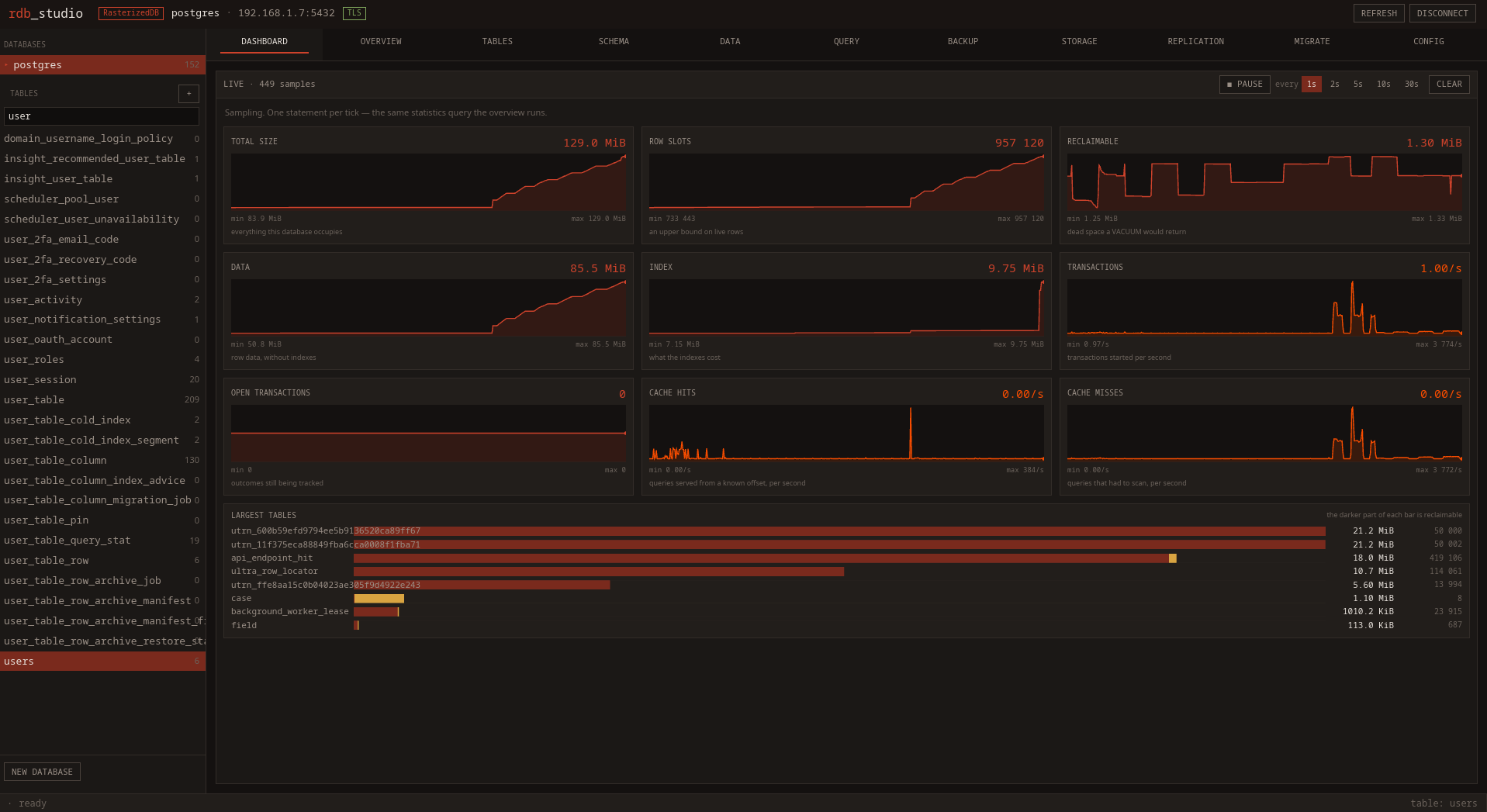
rdb_studio, the desktop console, watching a live server: size and row counts, reclaimable space, transaction rate, cache hits against scans, and where the bytes actually are.
RasterizedDB is a schema-full storage engine that speaks the PostgreSQL wire
protocol, so psql, any driver and any ORM connect to it unmodified. It is
transactional (MVCC, real BEGIN/COMMIT/ROLLBACK, savepoints), crash-safe
through a write-ahead log, and it reclaims its own dead space. Rows are scanned
through a bit-sliced SIMD filter index rather than a B-tree.
| PostgreSQL wire protocol | Simple and extended query protocols, bound parameters, SCRAM-SHA-256, TLS. Drivers and ORMs work as-is — see SQL surface |
| Transactions | MVCC snapshots, READ COMMITTED / REPEATABLE READ, savepoints, first-updater-wins conflicts |
| Durability | Write-ahead log with checkpoints, and a synchronous_commit knob with the trade stated exactly |
| Filter index | Bit-sliced fingerprints, 512 rows per SIMD register, plus zone maps for ranges. Adaptive and runtime-tunable |
| Space reclamation | Background vacuum publishing a free list the write path allocates from; VACUUM and VACUUM FULL |
| JSON | Documents stored as binary values, with path indexing |
| Replication | Multi-primary, statement-shipping, HLC-ordered, over TLS 1.3 |
| Backup | Snapshot and point-in-time recovery to any S3-compatible store |
| Storage pools | One database across several directories, with a placement policy and mirrored backups |
| PostgreSQL import | One-shot migration of a live PostgreSQL database |
| rdb_studio | A desktop console that also speaks to PostgreSQL |
Design notes for each subsystem live in docs/ — they cover the reasoning, the alternatives that were measured and rejected, and the parts deliberately not built.
rasterizeddb_server-PLATFORM-x64.exe --location /your-location/bla-bla --concurrent_threads 16 --batch_size 16000
batch_size: recommended value is 16K, but you can play around with more or less depending on your case. The lesser the number of rows, the lower the batch size must be. concurrent_threads: must equal to the number of CPU threads of lower.
The heavier subsystems are Cargo features, so a build that does not want one does not carry its code, its dependencies, or its match arms. The current default set turns most of them on:
default = ["memory_pool_reuse", "replication_compression",
           "s3_backup", "pg_import", "storage_pools"]
| Feature | Default | What it adds |
|---|---|---|
s3_backup | on | Backup, restore and PITR to an object store, and the BACKUP/RESTORE statements |
pg_import | on | The PostgreSQL frontend client and IMPORT DATABASE FROM POSTGRES |
storage_pools | on | Multi-directory placement, mirroring, and the STORAGE statements |
replication_compression | on | Zstd on replication links; a node without it still interoperates, uncompressed |
memory_pool_reuse | on | Thread-local free lists in the buffer pool |
enable_long_row | off | Rows above the standard width cap |
enable_data_verification | off | Extra checksums on the read path |
Replication itself needs no feature — it is compiled in and switched on with
--replication. To build without the optional subsystems:
cargo build --release -p rasterizeddb_core --no-default-features \
    --features memory_pool_reuse,replication_compression
The server speaks the PostgreSQL v3 wire protocol ("pgwire"), so psql, any
driver and any ORM can connect to it. See docs/postgres-compatibility.md for
what the SQL layer does and does not support.
Start it, and connect with an ordinary connection string:
cargo run -p rasterizeddb_core -- --location <PATH> --protocol pgwire \
    --pg-addr 0.0.0.0 --pg-tls disable \
    --pg-user superuser --pg-password <password>

psql "postgresql://superuser:<password>@127.0.0.1:5432/postgres?sslmode=disable"
Every part of that string matters:
/postgres names a database. --pg-default-db sets which one the
location directory holds (postgres by default); others are created with
CREATE DATABASE and live in subdirectories of it. A name that does not exist
is refused rather than silently served the default.sslmode=disable needs --pg-tls disable or prefer. The default is
require, which refuses a cleartext connection instead of downgrading it. With
no certificate given, a self-signed one is generated at start-up.superuser must be a role. --pg-user/--pg-password seed one the first
time a database's role catalogue is empty; after that, use CREATE USER.
Roles are per database.--pg-addr defaults to 127.0.0.1, which is not reachable from another
host.Authentication defaults to SCRAM-SHA-256; --pg-auth also accepts md5,
password and trust. Both the simple and the extended query protocols are
implemented, which is what lets prepared statements and ORMs work.
The dialect is PostgreSQL's. What is implemented:
*, column lists, AS aliases, qualified and quoted names,
case-insensitive resolution, arithmetic, SELECT DISTINCT.AND/OR
with parentheses, IN, NOT IN, BETWEEN, LIKE and ILIKE with the full
pattern language.INNER and LEFT JOIN, any number of relations, aliases, and
composite keys (ON a.x = b.x AND a.y = b.y), which every junction table
needs. Executed as a hash join over materialised rows, each relation scanned
once with its own share of the WHERE pushed down, so filter pruning still
applies per relation.COUNT, SUM, MIN, MAX, AVG with GROUP BY and
HAVING, over a single table or a join. SUM and AVG over an exact type
stay exact, so a money column keeps its cents.ROW_NUMBER() OVER (PARTITION BY … ORDER BY …). Not an
aggregate: every row survives and gains a column computed from the rows
around it.WITH name AS (SELECT …), materialised, which gives PostgreSQL's
pre-12 semantics: an optimisation fence, evaluated once however many times it
is referenced.IN (SELECT …), folded into the outer statement
as a literal list so filter pruning still applies.ORDER BY over several keys each with its own
direction, including expressions and keys that are not selected; LIMIT,
OFFSET, and the FETCH FIRST … ROWS ONLY spellings.INSERT (single and multi-row), INSERT … SELECT, UPDATE,
DELETE, DELETE … USING, ON CONFLICT DO UPDATE, and RETURNING on all of
them — where a returned item may be an expression, not only a column.CASE WHEN, COALESCE, NULLIF, LEAST, GREATEST,
MOD, and :: casts, in projections, predicates and RETURNING.NOT NULL, defaults (kept as text, so
DEFAULT CURRENT_TIMESTAMP means the time of the insert), primary keys,
single- and multi-column UNIQUE, and foreign keys, which are enforced
rather than merely accepted.CREATE/DROP TABLE, CREATE DATABASE, ALTER TABLE including
ADD/DROP/RENAME COLUMN and ALTER … TYPE … USING.pg_catalog work.See docs/postgres-compatibility.md for the type mapping, the exact semantics, and what is not supported.
BEGIN, COMMIT and ROLLBACK do what they say. They used to be accepted and
ignored — each statement committed as it ran, so an application that rolled a
transaction back had already committed every statement in it, with no way to
find out.
The engine is MVCC: an update writes a new row version rather than overwriting
one a reader might still be looking at, and each statement reads through a
snapshot. Uncommitted work is invisible to other sessions, a rollback undoes
inserts, updates and deletes alike, and two transactions updating the same row
get a serialization failure (40001) rather than one silently losing.
READ COMMITTED (the default) takes a fresh snapshot per statement;
REPEATABLE READ fixes one for the transaction. SERIALIZABLE is accepted and
behaves as REPEATABLE READ — it does not detect write skew, which needs
predicate locking.
Savepoints work — SAVEPOINT, ROLLBACK TO SAVEPOINT, RELEASE — which is
what an ORM's nested transactions are built from. A failed statement poisons
the block until it is closed or rolled back to a savepoint. SELECT … FOR UPDATE and FOR SHARE take row locks.
See docs/mvcc.md.
Writes go through a write-ahead log. Without one, every durable write has to
reach storage on its own: an INSERT appends row bytes to one file and a
pointer record to another, paying two device flushes, and a crash between them
leaves the row half-written with no way to tell. The log turns that into one
sequential append plus one flush of a single file — and because a flush
persists everything written before it, concurrent writers share it.
synchronous_commit is PostgreSQL's knob and the same trade:
rasterizeddb_core --location <PATH> --synchronous-commit off --wal-writer-delay-ms 200
On (default), nothing is acknowledged until its records are durable, which
costs one fdatasync per writing statement — on a drive without a
power-loss-protected cache that is most of what the statement takes.
Off, a commit returns once the bytes are in the kernel's page cache. The
server process dying then loses nothing — kill -9 and a panic are both
survivable — and only an operating system crash or power loss costs the last
--wal-writer-delay-ms of transactions. Records are appended in order and
replay stops at the first one it cannot read whole, so what is lost is whole
transactions off the end of the log, never half of one. It is a durability
knob, not a consistency one.
Scans are pruned by a bit-level index rather than a B-tree. It is a positional shadow of the row-pointer file — bit i describes slot i — so no key-to-slot map is needed and the structure costs bits per row rather than bytes per entry. Values are stored as fingerprints, bit-sliced across bitplanes per 512-row zone, so one SIMD register tests 512 rows at once (AVX-512 where the CPU has it, AVX2 otherwise). Zone maps carry min/max bounds for the ranges a fingerprint cannot answer.
The safety property is one-sided: the index may say a zone might match when it does not, and the scan then confirms. It must never say a zone cannot match when a matching row is there — so a predicate the extractor is not certain it models exactly is dropped rather than approximated.
It is adaptive and tunable while the server runs:
SHOW CONFIG;                    -- every knob, and whether it is hot-reloadable
SET CONFIG filter.max_f = 14;   -- applied live
rasterizeddb_core --location <PATH> --filter true --filter-max-f 14 \
    --filter-min-table-rows 50000 --filter-min-selectivity 0.05
See docs/bit-bloom-filter-design.md for the cost model, the measured skip-versus-fetch ratio, and the tiers not built.
A DELETE tombstones a pointer record, and an UPDATE that outgrows its slot
tombstones the old one and appends a replacement. Neither touches the row bytes,
so without reclamation the rows file only ever grows: a table that deletes and
reinserts the same working set doubles on disk every cycle even though its live
size never changes.
A background task scans the pointer file, works out which byte ranges no pointer refers to any more, and publishes them as a free list the write path allocates from before falling back to appending. Nothing moves, so no offset changes, and the pass can be interrupted at any point. Reclamation is snapshot-aware: an extent is not reused while any open query could still read it.
VACUUM;             -- reclaim into the free list
VACUUM FULL;        -- compact in place and return space to the filesystem
SHOW TABLE STATS users;   -- includes how much is reclaimable
See docs/space-reclamation.md.
A JSON column is stored as one binary value. It used to be shredded — each key became a column, each nested object a further table — which does not survive contact with real documents, for a structural reason: shredding makes the schema a function of the data. A document keyed by data (statistics keyed by column name, a row keyed by a user-defined field) has unboundedly many keys, so the table grows a column per distinct key.
Shredding survives as a knob (--json-shadow-tables) for the workloads it did
suit, but it is no longer the default. Reaching into a document from SQL, and
indexing a particular path so a predicate over it does not parse every document,
are both supported — the path index reuses the same filter machinery rather than
adding a second index structure.
The native protocol — what DbClient speaks — reads the same role catalogue as
pgwire, so one CREATE USER works for both:
cargo run -p rasterizeddb_core -- --location <PATH> \
    --rdb-user superuser --rdb-password <password>
let client = DbClient::new_authenticated(Some("127.0.0.1"), "superuser", "<password>").await?;
Prefer the RASTERIZEDDB_PASSWORD environment variable to --rdb-password: a
password on the command line is visible in ps to every other user on the
machine.
What it insists on, and why:
md5 and cleartext exist in the PostgreSQL listener
for drivers that speak nothing else; --rdb-auth takes scram-sha-256
(default) or trust and refuses the other two.tls-exporter). This is what makes
the exchange safe even though the client does not verify the server's
self-signed certificate by default: an attacker who intercepts the connection
cannot relay the exchange onto their own connection to the real server,
because the proof is bound to the connection it was made on.With no password configured and no account in the database holding one, the loopback listener accepts any caller and says so loudly at start-up: a database nobody can open is not a secure database. It starts requiring a password the moment there is one to require, and never stops again.
A pgAdmin-style console for RasterizedDB, written in iced. It also speaks to PostgreSQL, because both answer the same wire protocol.
cargo run -p rdb_studio                # pick a connection
cargo run -p rdb_studio -- my-profile  # open a saved one straight away
Live dashboard, database and table statistics, a schema map drawn from the foreign keys, an editable data browser, a SQL editor, S3 backup and restore, a storage view for placing tables across disks, a replication view, and a configuration screen that knows which settings a running server can actually change. See rdb_studio/README.md.
It reads the introspection statements the engine gained for it —
SHOW TABLES, SHOW DATABASE STATS, SHOW SCHEMA MAP, SHOW CONFIG,
SET CONFIG and the rest — which work from psql too:
SHOW DATABASE STATS;
SHOW TABLES;
SHOW TABLE STATS users;
SHOW COLUMNS FROM users;      -- or DESCRIBE users
SHOW SCHEMA MAP;
SHOW DATABASES;
SHOW CONFIG;                  -- with a hot_reload column per setting
SET CONFIG filter.max_f = 14; -- applied live
SHOW BACKUP STATUS;           -- configured? healthy? how far can a restore reach?
SHOW REPLICATION STATS;       -- node state and counters, as rows
SHOW REPLICATION PEER STATUS; -- a row per peer
SHOW STORAGE STATS;           -- the pool, as rows
SHOW STORAGE LOCATIONS;       -- a row per directory, with free space
SHOW STORAGE PLACEMENTS;      -- which directory holds each table
See docs/introspection.md for what each figure means
and why the surface is statements rather than an information_schema.
Every node accepts reads and writes. A transaction committed on one is shipped to the others and applied there, so the cluster converges without any node being designated the writer and without a failover step when one goes away.
# node 1
rasterizeddb_core --location /data --replication --node-id 1 \
    --peer '[email protected]:61171' --peer '[email protected]:61171'

# node 2
rasterizeddb_core --location /data --replication --node-id 2 \
    --peer '[email protected]:61171' --peer '[email protected]:61171'
What travels is a committed transaction as the statements that made it up, stamped with the node that took it, its sequence number, and a hybrid logical clock reading. Statements rather than pages, so the nodes are not tied to one physical layout. The clock is what makes the ordering agreeable: wall-clock time alone does not give one, since two nodes a second apart disagree about which commit came first, and a clock that steps backwards makes a node disagree with itself.
Links run over TLS 1.3 with mutual certificate pinning or a cluster CA, batch
and compress (zstd, negotiated per link, falling back to uncompressed against a
node built without it), and catch a peer up from the replication log after a
disconnect. Conflict policy is abort by default, with skip and
last-writer-wins available.
From SQL, over either protocol:
REPLICATION ENABLE;
REPLICATION ADD PEER 'berlin' ADDRESS '10.0.0.2:61171';
REPLICATION ADD PEER 'tokyo' ADDRESS '10.0.1.7:61171' WITH (COMPRESSION = 'zstd:3');
REPLICATION PAUSE PEER 'berlin';
REPLICATION RESYNC PEER 'berlin' FROM 0;
REPLICATION SET conflict = 'last-writer-wins';

SHOW REPLICATION;           -- summary and a line per peer
SHOW REPLICATION STATUS;    -- counters
SHOW REPLICATION PEERS;
SHOW REPLICATION SETTINGS;
Unlike the storage statements these are not persisted: a peer added with a statement is gone after a restart unless the flag is added too, so what a node comes up as is always what its command line says.
See docs/replication.md for the wire format, the measured compression and batching figures, the authentication setup, and — the part worth reading before relying on it — what it guarantees and what it does not.
On in the default feature set (storage_pools). A database that has only
ever been given one directory keeps behaving exactly as it did — the whole
subsystem compiles away without the feature.
Name the disks on the command line:
rasterizeddb_core --location /var/lib/rasterized \
  --storage-location /mnt/nvme1 \
  --storage-location /mnt/nvme2:primary:2 \
  --storage-location /mnt/backup:backup \
  --storage-policy free-space --storage-min-free 4GiB
Each location is PATH, PATH:ROLE or PATH:ROLE:WEIGHT. A primary holds
tables; a backup receives a mirrored copy of every write, including the
catalogue, so the directory opens as a database on its own rather than as an
archive that has to be restored first. WEIGHT multiplies a primary's share
under the free-space policy — a location with weight 2 is chosen while it has
half as much free space as one with weight 1.
Three policies decide where a new table's files are created:
| policy | what it does |
|---|---|
primary (default) | always the first enabled primary |
round-robin | the enabled primary holding the fewest tables |
free-space | the enabled primary with the most available bytes, weighted |
--storage-min-free is a floor: a location below it is skipped. "Primary +
backup" is one primary and one backup; "balance across four disks, all mirrored
to a fifth" is four primaries and one backup. There is no separate mode switch
for either.
From SQL, over either protocol:
STORAGE ADD LOCATION '/mnt/nvme2' WITH (ROLE = 'primary', WEIGHT = 2);
STORAGE ADD LOCATION '/mnt/backup' WITH (ROLE = 'backup');
STORAGE SET POLICY = 'free-space';        -- primary | round-robin | free-space
STORAGE SET MIN_FREE = '4GiB';

STORAGE DISABLE LOCATION '/mnt/nvme1';    -- drain: keeps its tables, takes no new ones
STORAGE MOVE TABLE orders TO '/mnt/nvme2';
STORAGE REBALANCE DRY RUN;                -- what it would move, and why
STORAGE REBALANCE;                        -- do it
STORAGE DROP LOCATION '/mnt/nvme1';       -- refused while it still holds tables

SHOW STORAGE;                             -- a line per location, with free space
SHOW STORAGE STATS;                       -- pool-wide figures as columns
SHOW STORAGE LOCATIONS;                   -- a row per location
SHOW STORAGE PLACEMENTS;                  -- which directory each table is in
SHOW STORAGE POLICY;
SHOW STORAGE KEYS;
Unlike the replication statements, these are persisted: where each table
lives is recorded in db_storage.cfg in the database directory, and a location
forgotten at restart would leave every table created into it unfindable. The
flags are applied on top of that file rather than replacing it, so a service
unit can name its disks on every start.
Placement is recorded, never recomputed. Changing the policy or adding a disk
moves nothing on its own — STORAGE REBALANCE is the statement that moves
tables, and it can be asked what it would do first. Nothing is moved onto a
location that would itself drop below the free-space floor as a result.
The STORAGE tab in rdb_studio is the same thing with the free space drawn in: a row per directory with how full it is, a row per table saying which directory holds it and whether its writes are reaching a backup, and buttons for the policy, the floor, draining a disk, moving one table, and running a rebalance — with the plan shown before it runs. Against PostgreSQL the same page reports tablespaces, read-only, because PostgreSQL has no placement policy to change.
See docs/storage-pools.md for the on-disk format, what a crash leaves behind at each step, and what a mirrored backup does and does not guarantee.
On in the default feature set (s3_backup). Name a bucket:
rasterizeddb_core --location /var/lib/rasterized \
  --s3-bucket my-backups --s3-region eu-central-1 --s3-prefix prod/orders
That takes a daily snapshot of the whole database (zstd, single object) and
archives the write-ahead log every five minutes, so recovery to any commit in
between is possible. Credentials come from the usual AWS_ACCESS_KEY_ID /
AWS_SECRET_ACCESS_KEY environment variables. --s3-endpoint points it at
MinIO, Cloudflare R2, Backblaze B2 or Wasabi instead of AWS.
From SQL, over either protocol:
BACKUP DATABASE;                  -- snapshot now
BACKUP WAL;                       -- point-in-time barrier
SHOW BACKUPS;                     -- what the catalogue holds
RESTORE DATABASE FROM S3 TO '/var/lib/rasterized-restored';
RESTORE DATABASE FROM S3 TO '/tmp/verify' AT LSN 918273;
RESTORE DATABASE FROM S3 TO '/tmp/verify' AT TIME '2026-08-20T10:00:00Z';
To replace a database after a major fault, restore before the server opens anything:
rasterizeddb_core --location /var/lib/rasterized \
  --s3-bucket my-backups --s3-prefix prod/orders \
  --restore-from-s3 --restore-replace --restore-at-time '2026-08-20T09:55:00Z'
--restore-replace renames the existing directory aside rather than deleting
it. See docs/s3-backup.md for the design, the full flag
list, and what it costs in API requests.
On in the default feature set (pg_import).
Against a server that is already running — the usual case, and the one that needs no coordination — send it a statement over either protocol:
IMPORT DATABASE FROM POSTGRES 'postgresql://user:[email protected]:5432/shop'
    INTO analytics;

IMPORT DATABASE FROM POSTGRES
    HOST 'db.internal' DATABASE 'shop'
    USER 'migrator' PASSWORD 'secret' SSLMODE 'verify-full'
    EXCLUDE TABLES (audit_log, sessions)
    INTO analytics;
That reads the schema, creates a database called analytics, and streams every
row of every table into it — about 87 000 rows a second, primary keys and unique
constraints included. Add DRY RUN to see what it would do without creating
anything.
Or as a one-shot command, on a host where nothing is serving that data directory — from the tree:
cargo run --release -p rasterizeddb_core --features pg_import -- \
  --location /var/lib/rasterized \
  --pg-import-from 'postgresql://user:[email protected]:5432/shop' \
  --pg-import-into analytics
or, on a machine deploy.sh has installed (where the binary is
/usr/local/bin/rasterizeddb and the service owns the data directory, so it has
to be stopped first):
sudo systemctl stop rasterizeddb
sudo -u "$(stat -c %U /var/lib/rasterizeddb)" rasterizeddb \
  --location /var/lib/rasterizeddb \
  --pg-import-from 'postgresql://user:[email protected]:5432/shop' \
  --pg-import-into analytics
sudo systemctl start rasterizeddb
The process exits when the import is done, unless --pg-import-and-serve is
given. deploy.sh builds with pg_import by default (RDB_FEATURES overrides
it); a binary built without the feature has no --pg-import-* flags at all.
It carries over tables, columns, types, NOT NULL, constant defaults, primary
keys, unique constraints and single-column foreign keys. Everything that does
not come across unchanged — an enum that became TEXT, a sequence default
that could not be reproduced, a partial index — is named in the report at the
end rather than left for you to find. Values are validated against the storage
encoder before they are written, so a number this engine cannot hold exactly
fails the import instead of being quietly stored as zero.
See docs/postgres-import.md for the type mapping, the full grammar, and what it does not do.
Refer to test_client/src/main.rs for examples!
Rasterized DB has recently undergone a complete rewrite from the ground up and is still in an active state of redevelopment. This major overhaul has brought significant architectural changes to improve stability, performance, and developer experience. Many components are being redesigned for long-term maintainability, and the database will continue to evolve rapidly until its core design reaches maturity.
Originally conceived as a schemaless database, Rasterized DB is now schema-full. The database itself now manages and enforces the schema, reducing complexity for client applications and enabling stronger data consistency. This change also opens the door to richer query capabilities and deeper optimizations at the storage and execution layers.
To make adoption easier, Rasterized DB aims for compatibility with the PostgreSQL SQL dialect, the most widely used and supported SQL standard in production environments. While not all PostgreSQL features are currently implemented, this compatibility goal ensures developers can leverage familiar syntax and tools without learning a proprietary query language from scratch.
Rasterized DB takes inspiration from how the web handles caching. Just like a browser reuses files when their cache headers indicate they’re still valid, Rasterized DB hashes each query so repeated requests can instantly fetch results from a known storage offset without rescanning the dataset.
Future updates will introduce in-memory row caching, allowing certain queries to bypass disk entirely. This approach will merge the speed of in-memory stores like Redis with the persistence of a traditional database.
Rust combines zero-cost abstractions with low-level performance control, making it ideal for building a database that is both fast and safe. Its memory safety guarantees reduce the risk of crashes or data corruption, while still enabling optimizations close to the hardware.
Rasterized DB is designed to handle virtually unlimited data sizes, row counts, and column counts. Planned features include:
An official Rust ORM is in development, with a C# ORM planned afterward. These tools will provide a seamless experience when integrating Rasterized DB into applications.
Currently, Rasterized DB is not stable. Table formats, storage engines, and query processing internals are likely to change until version 1.0.0. Use it at your own risk in production environments.
// COMING SOON
// Please refer to the main.rs and core/mock_table.rs and core/mock_helpers.rs to see API in use.

Everything in this directory is distributed under GNU GENERAL PUBLIC LICENSE version 3.
1,431 followers · starred Aug 2025
112 followers · starred Jul 2025
419 followers · starred Jul 2025
148 followers · starred Jan 2026
A new schemafull, Postgres compatible, high-performance database written from scratch in Rust. https://crates.io/crates/rasterizeddb_core
Rust
233
713 commits
updated Oct 17, 2026
rdb_studio, the desktop console, watching a live server: size and row counts, reclaimable space, transaction rate, cache hits against scans, and where the bytes actually are.
RasterizedDB is a schema-full storage engine that speaks the PostgreSQL wire
protocol, so psql, any driver and any ORM connect to it unmodified. It is
transactional (MVCC, real BEGIN/COMMIT/ROLLBACK, savepoints), crash-safe
through a write-ahead log, and it reclaims its own dead space. Rows are scanned
through a bit-sliced SIMD filter index rather than a B-tree.
| PostgreSQL wire protocol | Simple and extended query protocols, bound parameters, SCRAM-SHA-256, TLS. Drivers and ORMs work as-is — see SQL surface |
| Transactions | MVCC snapshots, READ COMMITTED / REPEATABLE READ, savepoints, first-updater-wins conflicts |
| Durability | Write-ahead log with checkpoints, and a synchronous_commit knob with the trade stated exactly |
| Filter index | Bit-sliced fingerprints, 512 rows per SIMD register, plus zone maps for ranges. Adaptive and runtime-tunable |
| Space reclamation | Background vacuum publishing a free list the write path allocates from; VACUUM and VACUUM FULL |
| JSON | Documents stored as binary values, with path indexing |
| Replication | Multi-primary, statement-shipping, HLC-ordered, over TLS 1.3 |
| Backup | Snapshot and point-in-time recovery to any S3-compatible store |
| Storage pools | One database across several directories, with a placement policy and mirrored backups |
| PostgreSQL import | One-shot migration of a live PostgreSQL database |
| rdb_studio | A desktop console that also speaks to PostgreSQL |
Design notes for each subsystem live in docs/ — they cover the reasoning, the alternatives that were measured and rejected, and the parts deliberately not built.
rasterizeddb_server-PLATFORM-x64.exe --location /your-location/bla-bla --concurrent_threads 16 --batch_size 16000
batch_size: recommended value is 16K, but you can play around with more or less depending on your case. The lesser the number of rows, the lower the batch size must be. concurrent_threads: must equal to the number of CPU threads of lower.
The heavier subsystems are Cargo features, so a build that does not want one does not carry its code, its dependencies, or its match arms. The current default set turns most of them on:
default = ["memory_pool_reuse", "replication_compression",
           "s3_backup", "pg_import", "storage_pools"]
| Feature | Default | What it adds |
|---|---|---|
s3_backup | on | Backup, restore and PITR to an object store, and the BACKUP/RESTORE statements |
pg_import | on | The PostgreSQL frontend client and IMPORT DATABASE FROM POSTGRES |
storage_pools | on | Multi-directory placement, mirroring, and the STORAGE statements |
replication_compression | on | Zstd on replication links; a node without it still interoperates, uncompressed |
memory_pool_reuse | on | Thread-local free lists in the buffer pool |
enable_long_row | off | Rows above the standard width cap |
enable_data_verification | off | Extra checksums on the read path |
Replication itself needs no feature — it is compiled in and switched on with
--replication. To build without the optional subsystems:
cargo build --release -p rasterizeddb_core --no-default-features \
    --features memory_pool_reuse,replication_compression
The server speaks the PostgreSQL v3 wire protocol ("pgwire"), so psql, any
driver and any ORM can connect to it. See docs/postgres-compatibility.md for
what the SQL layer does and does not support.
Start it, and connect with an ordinary connection string:
cargo run -p rasterizeddb_core -- --location <PATH> --protocol pgwire \
    --pg-addr 0.0.0.0 --pg-tls disable \
    --pg-user superuser --pg-password <password>

psql "postgresql://superuser:<password>@127.0.0.1:5432/postgres?sslmode=disable"
Every part of that string matters:
/postgres names a database. --pg-default-db sets which one the
location directory holds (postgres by default); others are created with
CREATE DATABASE and live in subdirectories of it. A name that does not exist
is refused rather than silently served the default.sslmode=disable needs --pg-tls disable or prefer. The default is
require, which refuses a cleartext connection instead of downgrading it. With
no certificate given, a self-signed one is generated at start-up.superuser must be a role. --pg-user/--pg-password seed one the first
time a database's role catalogue is empty; after that, use CREATE USER.
Roles are per database.--pg-addr defaults to 127.0.0.1, which is not reachable from another
host.Authentication defaults to SCRAM-SHA-256; --pg-auth also accepts md5,
password and trust. Both the simple and the extended query protocols are
implemented, which is what lets prepared statements and ORMs work.
The dialect is PostgreSQL's. What is implemented:
*, column lists, AS aliases, qualified and quoted names,
case-insensitive resolution, arithmetic, SELECT DISTINCT.AND/OR
with parentheses, IN, NOT IN, BETWEEN, LIKE and ILIKE with the full
pattern language.INNER and LEFT JOIN, any number of relations, aliases, and
composite keys (ON a.x = b.x AND a.y = b.y), which every junction table
needs. Executed as a hash join over materialised rows, each relation scanned
once with its own share of the WHERE pushed down, so filter pruning still
applies per relation.COUNT, SUM, MIN, MAX, AVG with GROUP BY and
HAVING, over a single table or a join. SUM and AVG over an exact type
stay exact, so a money column keeps its cents.ROW_NUMBER() OVER (PARTITION BY … ORDER BY …). Not an
aggregate: every row survives and gains a column computed from the rows
around it.WITH name AS (SELECT …), materialised, which gives PostgreSQL's
pre-12 semantics: an optimisation fence, evaluated once however many times it
is referenced.IN (SELECT …), folded into the outer statement
as a literal list so filter pruning still applies.ORDER BY over several keys each with its own
direction, including expressions and keys that are not selected; LIMIT,
OFFSET, and the FETCH FIRST … ROWS ONLY spellings.INSERT (single and multi-row), INSERT … SELECT, UPDATE,
DELETE, DELETE … USING, ON CONFLICT DO UPDATE, and RETURNING on all of
them — where a returned item may be an expression, not only a column.CASE WHEN, COALESCE, NULLIF, LEAST, GREATEST,
MOD, and :: casts, in projections, predicates and RETURNING.NOT NULL, defaults (kept as text, so
DEFAULT CURRENT_TIMESTAMP means the time of the insert), primary keys,
single- and multi-column UNIQUE, and foreign keys, which are enforced
rather than merely accepted.CREATE/DROP TABLE, CREATE DATABASE, ALTER TABLE including
ADD/DROP/RENAME COLUMN and ALTER … TYPE … USING.pg_catalog work.See docs/postgres-compatibility.md for the type mapping, the exact semantics, and what is not supported.
BEGIN, COMMIT and ROLLBACK do what they say. They used to be accepted and
ignored — each statement committed as it ran, so an application that rolled a
transaction back had already committed every statement in it, with no way to
find out.
The engine is MVCC: an update writes a new row version rather than overwriting
one a reader might still be looking at, and each statement reads through a
snapshot. Uncommitted work is invisible to other sessions, a rollback undoes
inserts, updates and deletes alike, and two transactions updating the same row
get a serialization failure (40001) rather than one silently losing.
READ COMMITTED (the default) takes a fresh snapshot per statement;
REPEATABLE READ fixes one for the transaction. SERIALIZABLE is accepted and
behaves as REPEATABLE READ — it does not detect write skew, which needs
predicate locking.
Savepoints work — SAVEPOINT, ROLLBACK TO SAVEPOINT, RELEASE — which is
what an ORM's nested transactions are built from. A failed statement poisons
the block until it is closed or rolled back to a savepoint. SELECT … FOR UPDATE and FOR SHARE take row locks.
See docs/mvcc.md.
Writes go through a write-ahead log. Without one, every durable write has to
reach storage on its own: an INSERT appends row bytes to one file and a
pointer record to another, paying two device flushes, and a crash between them
leaves the row half-written with no way to tell. The log turns that into one
sequential append plus one flush of a single file — and because a flush
persists everything written before it, concurrent writers share it.
synchronous_commit is PostgreSQL's knob and the same trade:
rasterizeddb_core --location <PATH> --synchronous-commit off --wal-writer-delay-ms 200
On (default), nothing is acknowledged until its records are durable, which
costs one fdatasync per writing statement — on a drive without a
power-loss-protected cache that is most of what the statement takes.
Off, a commit returns once the bytes are in the kernel's page cache. The
server process dying then loses nothing — kill -9 and a panic are both
survivable — and only an operating system crash or power loss costs the last
--wal-writer-delay-ms of transactions. Records are appended in order and
replay stops at the first one it cannot read whole, so what is lost is whole
transactions off the end of the log, never half of one. It is a durability
knob, not a consistency one.
Scans are pruned by a bit-level index rather than a B-tree. It is a positional shadow of the row-pointer file — bit i describes slot i — so no key-to-slot map is needed and the structure costs bits per row rather than bytes per entry. Values are stored as fingerprints, bit-sliced across bitplanes per 512-row zone, so one SIMD register tests 512 rows at once (AVX-512 where the CPU has it, AVX2 otherwise). Zone maps carry min/max bounds for the ranges a fingerprint cannot answer.
The safety property is one-sided: the index may say a zone might match when it does not, and the scan then confirms. It must never say a zone cannot match when a matching row is there — so a predicate the extractor is not certain it models exactly is dropped rather than approximated.
It is adaptive and tunable while the server runs:
SHOW CONFIG;                    -- every knob, and whether it is hot-reloadable
SET CONFIG filter.max_f = 14;   -- applied live
rasterizeddb_core --location <PATH> --filter true --filter-max-f 14 \
    --filter-min-table-rows 50000 --filter-min-selectivity 0.05
See docs/bit-bloom-filter-design.md for the cost model, the measured skip-versus-fetch ratio, and the tiers not built.
A DELETE tombstones a pointer record, and an UPDATE that outgrows its slot
tombstones the old one and appends a replacement. Neither touches the row bytes,
so without reclamation the rows file only ever grows: a table that deletes and
reinserts the same working set doubles on disk every cycle even though its live
size never changes.
A background task scans the pointer file, works out which byte ranges no pointer refers to any more, and publishes them as a free list the write path allocates from before falling back to appending. Nothing moves, so no offset changes, and the pass can be interrupted at any point. Reclamation is snapshot-aware: an extent is not reused while any open query could still read it.
VACUUM;             -- reclaim into the free list
VACUUM FULL;        -- compact in place and return space to the filesystem
SHOW TABLE STATS users;   -- includes how much is reclaimable
See docs/space-reclamation.md.
A JSON column is stored as one binary value. It used to be shredded — each key became a column, each nested object a further table — which does not survive contact with real documents, for a structural reason: shredding makes the schema a function of the data. A document keyed by data (statistics keyed by column name, a row keyed by a user-defined field) has unboundedly many keys, so the table grows a column per distinct key.
Shredding survives as a knob (--json-shadow-tables) for the workloads it did
suit, but it is no longer the default. Reaching into a document from SQL, and
indexing a particular path so a predicate over it does not parse every document,
are both supported — the path index reuses the same filter machinery rather than
adding a second index structure.
The native protocol — what DbClient speaks — reads the same role catalogue as
pgwire, so one CREATE USER works for both:
cargo run -p rasterizeddb_core -- --location <PATH> \
    --rdb-user superuser --rdb-password <password>
let client = DbClient::new_authenticated(Some("127.0.0.1"), "superuser", "<password>").await?;
Prefer the RASTERIZEDDB_PASSWORD environment variable to --rdb-password: a
password on the command line is visible in ps to every other user on the
machine.
What it insists on, and why:
md5 and cleartext exist in the PostgreSQL listener
for drivers that speak nothing else; --rdb-auth takes scram-sha-256
(default) or trust and refuses the other two.tls-exporter). This is what makes
the exchange safe even though the client does not verify the server's
self-signed certificate by default: an attacker who intercepts the connection
cannot relay the exchange onto their own connection to the real server,
because the proof is bound to the connection it was made on.With no password configured and no account in the database holding one, the loopback listener accepts any caller and says so loudly at start-up: a database nobody can open is not a secure database. It starts requiring a password the moment there is one to require, and never stops again.
A pgAdmin-style console for RasterizedDB, written in iced. It also speaks to PostgreSQL, because both answer the same wire protocol.
cargo run -p rdb_studio                # pick a connection
cargo run -p rdb_studio -- my-profile  # open a saved one straight away
Live dashboard, database and table statistics, a schema map drawn from the foreign keys, an editable data browser, a SQL editor, S3 backup and restore, a storage view for placing tables across disks, a replication view, and a configuration screen that knows which settings a running server can actually change. See rdb_studio/README.md.
It reads the introspection statements the engine gained for it —
SHOW TABLES, SHOW DATABASE STATS, SHOW SCHEMA MAP, SHOW CONFIG,
SET CONFIG and the rest — which work from psql too:
SHOW DATABASE STATS;
SHOW TABLES;
SHOW TABLE STATS users;
SHOW COLUMNS FROM users;      -- or DESCRIBE users
SHOW SCHEMA MAP;
SHOW DATABASES;
SHOW CONFIG;                  -- with a hot_reload column per setting
SET CONFIG filter.max_f = 14; -- applied live
SHOW BACKUP STATUS;           -- configured? healthy? how far can a restore reach?
SHOW REPLICATION STATS;       -- node state and counters, as rows
SHOW REPLICATION PEER STATUS; -- a row per peer
SHOW STORAGE STATS;           -- the pool, as rows
SHOW STORAGE LOCATIONS;       -- a row per directory, with free space
SHOW STORAGE PLACEMENTS;      -- which directory holds each table
See docs/introspection.md for what each figure means
and why the surface is statements rather than an information_schema.
Every node accepts reads and writes. A transaction committed on one is shipped to the others and applied there, so the cluster converges without any node being designated the writer and without a failover step when one goes away.
# node 1
rasterizeddb_core --location /data --replication --node-id 1 \
    --peer '[email protected]:61171' --peer '[email protected]:61171'

# node 2
rasterizeddb_core --location /data --replication --node-id 2 \
    --peer '[email protected]:61171' --peer '[email protected]:61171'
What travels is a committed transaction as the statements that made it up, stamped with the node that took it, its sequence number, and a hybrid logical clock reading. Statements rather than pages, so the nodes are not tied to one physical layout. The clock is what makes the ordering agreeable: wall-clock time alone does not give one, since two nodes a second apart disagree about which commit came first, and a clock that steps backwards makes a node disagree with itself.
Links run over TLS 1.3 with mutual certificate pinning or a cluster CA, batch
and compress (zstd, negotiated per link, falling back to uncompressed against a
node built without it), and catch a peer up from the replication log after a
disconnect. Conflict policy is abort by default, with skip and
last-writer-wins available.
From SQL, over either protocol:
REPLICATION ENABLE;
REPLICATION ADD PEER 'berlin' ADDRESS '10.0.0.2:61171';
REPLICATION ADD PEER 'tokyo' ADDRESS '10.0.1.7:61171' WITH (COMPRESSION = 'zstd:3');
REPLICATION PAUSE PEER 'berlin';
REPLICATION RESYNC PEER 'berlin' FROM 0;
REPLICATION SET conflict = 'last-writer-wins';

SHOW REPLICATION;           -- summary and a line per peer
SHOW REPLICATION STATUS;    -- counters
SHOW REPLICATION PEERS;
SHOW REPLICATION SETTINGS;
Unlike the storage statements these are not persisted: a peer added with a statement is gone after a restart unless the flag is added too, so what a node comes up as is always what its command line says.
See docs/replication.md for the wire format, the measured compression and batching figures, the authentication setup, and — the part worth reading before relying on it — what it guarantees and what it does not.
On in the default feature set (storage_pools). A database that has only
ever been given one directory keeps behaving exactly as it did — the whole
subsystem compiles away without the feature.
Name the disks on the command line:
rasterizeddb_core --location /var/lib/rasterized \
  --storage-location /mnt/nvme1 \
  --storage-location /mnt/nvme2:primary:2 \
  --storage-location /mnt/backup:backup \
  --storage-policy free-space --storage-min-free 4GiB
Each location is PATH, PATH:ROLE or PATH:ROLE:WEIGHT. A primary holds
tables; a backup receives a mirrored copy of every write, including the
catalogue, so the directory opens as a database on its own rather than as an
archive that has to be restored first. WEIGHT multiplies a primary's share
under the free-space policy — a location with weight 2 is chosen while it has
half as much free space as one with weight 1.
Three policies decide where a new table's files are created:
| policy | what it does |
|---|---|
primary (default) | always the first enabled primary |
round-robin | the enabled primary holding the fewest tables |
free-space | the enabled primary with the most available bytes, weighted |
--storage-min-free is a floor: a location below it is skipped. "Primary +
backup" is one primary and one backup; "balance across four disks, all mirrored
to a fifth" is four primaries and one backup. There is no separate mode switch
for either.
From SQL, over either protocol:
STORAGE ADD LOCATION '/mnt/nvme2' WITH (ROLE = 'primary', WEIGHT = 2);
STORAGE ADD LOCATION '/mnt/backup' WITH (ROLE = 'backup');
STORAGE SET POLICY = 'free-space';        -- primary | round-robin | free-space
STORAGE SET MIN_FREE = '4GiB';

STORAGE DISABLE LOCATION '/mnt/nvme1';    -- drain: keeps its tables, takes no new ones
STORAGE MOVE TABLE orders TO '/mnt/nvme2';
STORAGE REBALANCE DRY RUN;                -- what it would move, and why
STORAGE REBALANCE;                        -- do it
STORAGE DROP LOCATION '/mnt/nvme1';       -- refused while it still holds tables

SHOW STORAGE;                             -- a line per location, with free space
SHOW STORAGE STATS;                       -- pool-wide figures as columns
SHOW STORAGE LOCATIONS;                   -- a row per location
SHOW STORAGE PLACEMENTS;                  -- which directory each table is in
SHOW STORAGE POLICY;
SHOW STORAGE KEYS;
Unlike the replication statements, these are persisted: where each table
lives is recorded in db_storage.cfg in the database directory, and a location
forgotten at restart would leave every table created into it unfindable. The
flags are applied on top of that file rather than replacing it, so a service
unit can name its disks on every start.
Placement is recorded, never recomputed. Changing the policy or adding a disk
moves nothing on its own — STORAGE REBALANCE is the statement that moves
tables, and it can be asked what it would do first. Nothing is moved onto a
location that would itself drop below the free-space floor as a result.
The STORAGE tab in rdb_studio is the same thing with the free space drawn in: a row per directory with how full it is, a row per table saying which directory holds it and whether its writes are reaching a backup, and buttons for the policy, the floor, draining a disk, moving one table, and running a rebalance — with the plan shown before it runs. Against PostgreSQL the same page reports tablespaces, read-only, because PostgreSQL has no placement policy to change.
See docs/storage-pools.md for the on-disk format, what a crash leaves behind at each step, and what a mirrored backup does and does not guarantee.
On in the default feature set (s3_backup). Name a bucket:
rasterizeddb_core --location /var/lib/rasterized \
  --s3-bucket my-backups --s3-region eu-central-1 --s3-prefix prod/orders
That takes a daily snapshot of the whole database (zstd, single object) and
archives the write-ahead log every five minutes, so recovery to any commit in
between is possible. Credentials come from the usual AWS_ACCESS_KEY_ID /
AWS_SECRET_ACCESS_KEY environment variables. --s3-endpoint points it at
MinIO, Cloudflare R2, Backblaze B2 or Wasabi instead of AWS.
From SQL, over either protocol:
BACKUP DATABASE;                  -- snapshot now
BACKUP WAL;                       -- point-in-time barrier
SHOW BACKUPS;                     -- what the catalogue holds
RESTORE DATABASE FROM S3 TO '/var/lib/rasterized-restored';
RESTORE DATABASE FROM S3 TO '/tmp/verify' AT LSN 918273;
RESTORE DATABASE FROM S3 TO '/tmp/verify' AT TIME '2026-08-20T10:00:00Z';
To replace a database after a major fault, restore before the server opens anything:
rasterizeddb_core --location /var/lib/rasterized \
  --s3-bucket my-backups --s3-prefix prod/orders \
  --restore-from-s3 --restore-replace --restore-at-time '2026-08-20T09:55:00Z'
--restore-replace renames the existing directory aside rather than deleting
it. See docs/s3-backup.md for the design, the full flag
list, and what it costs in API requests.
On in the default feature set (pg_import).
Against a server that is already running — the usual case, and the one that needs no coordination — send it a statement over either protocol:
IMPORT DATABASE FROM POSTGRES 'postgresql://user:[email protected]:5432/shop'
    INTO analytics;

IMPORT DATABASE FROM POSTGRES
    HOST 'db.internal' DATABASE 'shop'
    USER 'migrator' PASSWORD 'secret' SSLMODE 'verify-full'
    EXCLUDE TABLES (audit_log, sessions)
    INTO analytics;
That reads the schema, creates a database called analytics, and streams every
row of every table into it — about 87 000 rows a second, primary keys and unique
constraints included. Add DRY RUN to see what it would do without creating
anything.
Or as a one-shot command, on a host where nothing is serving that data directory — from the tree:
cargo run --release -p rasterizeddb_core --features pg_import -- \
  --location /var/lib/rasterized \
  --pg-import-from 'postgresql://user:[email protected]:5432/shop' \
  --pg-import-into analytics
or, on a machine deploy.sh has installed (where the binary is
/usr/local/bin/rasterizeddb and the service owns the data directory, so it has
to be stopped first):
sudo systemctl stop rasterizeddb
sudo -u "$(stat -c %U /var/lib/rasterizeddb)" rasterizeddb \
  --location /var/lib/rasterizeddb \
  --pg-import-from 'postgresql://user:[email protected]:5432/shop' \
  --pg-import-into analytics
sudo systemctl start rasterizeddb
The process exits when the import is done, unless --pg-import-and-serve is
given. deploy.sh builds with pg_import by default (RDB_FEATURES overrides
it); a binary built without the feature has no --pg-import-* flags at all.
It carries over tables, columns, types, NOT NULL, constant defaults, primary
keys, unique constraints and single-column foreign keys. Everything that does
not come across unchanged — an enum that became TEXT, a sequence default
that could not be reproduced, a partial index — is named in the report at the
end rather than left for you to find. Values are validated against the storage
encoder before they are written, so a number this engine cannot hold exactly
fails the import instead of being quietly stored as zero.
See docs/postgres-import.md for the type mapping, the full grammar, and what it does not do.
Refer to test_client/src/main.rs for examples!
Rasterized DB has recently undergone a complete rewrite from the ground up and is still in an active state of redevelopment. This major overhaul has brought significant architectural changes to improve stability, performance, and developer experience. Many components are being redesigned for long-term maintainability, and the database will continue to evolve rapidly until its core design reaches maturity.
Originally conceived as a schemaless database, Rasterized DB is now schema-full. The database itself now manages and enforces the schema, reducing complexity for client applications and enabling stronger data consistency. This change also opens the door to richer query capabilities and deeper optimizations at the storage and execution layers.
To make adoption easier, Rasterized DB aims for compatibility with the PostgreSQL SQL dialect, the most widely used and supported SQL standard in production environments. While not all PostgreSQL features are currently implemented, this compatibility goal ensures developers can leverage familiar syntax and tools without learning a proprietary query language from scratch.
Rasterized DB takes inspiration from how the web handles caching. Just like a browser reuses files when their cache headers indicate they’re still valid, Rasterized DB hashes each query so repeated requests can instantly fetch results from a known storage offset without rescanning the dataset.
Future updates will introduce in-memory row caching, allowing certain queries to bypass disk entirely. This approach will merge the speed of in-memory stores like Redis with the persistence of a traditional database.
Rust combines zero-cost abstractions with low-level performance control, making it ideal for building a database that is both fast and safe. Its memory safety guarantees reduce the risk of crashes or data corruption, while still enabling optimizations close to the hardware.
Rasterized DB is designed to handle virtually unlimited data sizes, row counts, and column counts. Planned features include:
An official Rust ORM is in development, with a C# ORM planned afterward. These tools will provide a seamless experience when integrating Rasterized DB into applications.
Currently, Rasterized DB is not stable. Table formats, storage engines, and query processing internals are likely to change until version 1.0.0. Use it at your own risk in production environments.
// COMING SOON
// Please refer to the main.rs and core/mock_table.rs and core/mock_helpers.rs to see API in use.
Everything in this directory is distributed under GNU GENERAL PUBLIC LICENSE version 3.
1,431 followers · starred Aug 2025
112 followers · starred Jul 2025
419 followers · starred Jul 2025
148 followers · starred Jan 2026



