
Command-line tool for extracting DINO, CLIP, SigLIP2, TIPSv2, RADIO, features for images and videos
Python
76
71 commits
updated Jun 12, 2026
README


🦕 DINOtool
DINOtool is a command-line tool for extracting visual features using state-of-the-art foundation models like DINOv3, DINOv2, CLIP, SigLIP2, TIPSv2, and AM-RADIO. It supports the extraction global (frame-level) and local (patch-level) features from images, videos and image directories, and can optionally visualize feature maps using PCA.
Use from the command line
pip install dinotool
dinotool test.jpg -o out.jpg
Use as a package:
from dinotool import DinoToolModel
from PIL import Image
import matplotlib.pyplot as plt

model = DinoToolModel("dinov3-s") # Unified API for multiple model backends
img = Image.open("../test/data/bird1.jpg")
transform = model.get_transform(img.size) # Loads model-specific transforms
img_tensor = transform.transform(img).unsqueeze(0)

local_features = model(img_tensor)
local_features.tensor.shape # torch.Size([1, 56, 56, 384])

global_features = model(img_tensor, features="frame")
global_features.tensor.shape # torch.Size([1, 384])

plt.imshow(model.pca(local_features)) # PCA visualization
Features
-
Works with:
- 📷 Single images
- 🎞️ Video files
- 📁 Folders of images of various sizes and extensions
-
💾 Outputs standard formats for downstream processing:
- .parquet (global features / local features in a list)
- .zarr / .nc (local features in 2D)
-
🌈 PCA-based visualizations for images and video
Supported models
- DINOv2
- DINOv3 (Gated model - requires logging in to Hugginface Hub and applying access at each model page)
- SigLIP
- SigLIP 2
- CLIP
- C-RADIO / AM-RADIO
- TIPSv2
List available models and their shortcuts with dinotool --models.
Examples:
dinotool input.mp4 -o output.mp4
produces output:
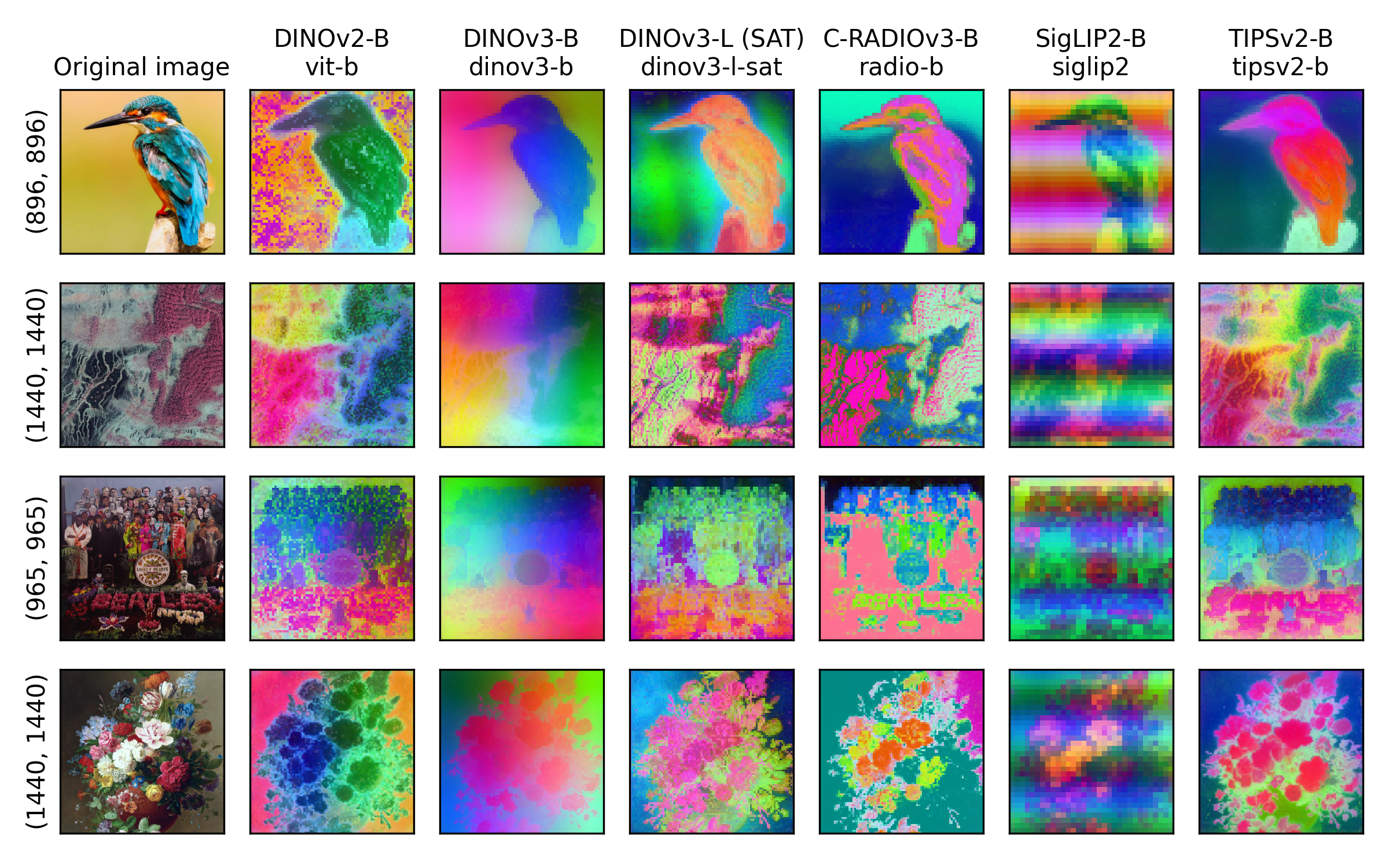
Changing the model with --model-name/-m:
dinotool bird.jpg out.jpg --model-name dinov3-s
uses a different foundation model to extract the features:
Global features for image folders:
Feature vectors can be saved with --save-features.
Processing image directories and extracting global or local features for each image is easy with DINOtool:
dinotool image_folder/ -o global_features --save-features 'frame'
produces a global_features.parquet file with global features:
| filename | feature_0 | feature_1 | feature_2 | ... | feature_383 |
|---|---|---|---|---|---|
cat_001.jpg | 0.123 | -0.045 | 0.211 | ... | 0.009 |
dog_002.jpg | 0.097 | 0.033 | 0.187 | ... | -0.012 |
tree_003.jpg | -0.056 | 0.140 | 0.092 | ... | 0.034 |
car_004.jpg | 0.301 | -0.202 | 0.144 | ... | -0.019 |
Similar files can be also produced for local patch features, for videos etc.
More examples:
More example commands for different situations can be found in test/test_cases.md
Example of reading output file formats is in docs/reading_outputs.ipynb
Example of using DINOtool as a package is in docs/api_example.ipynb
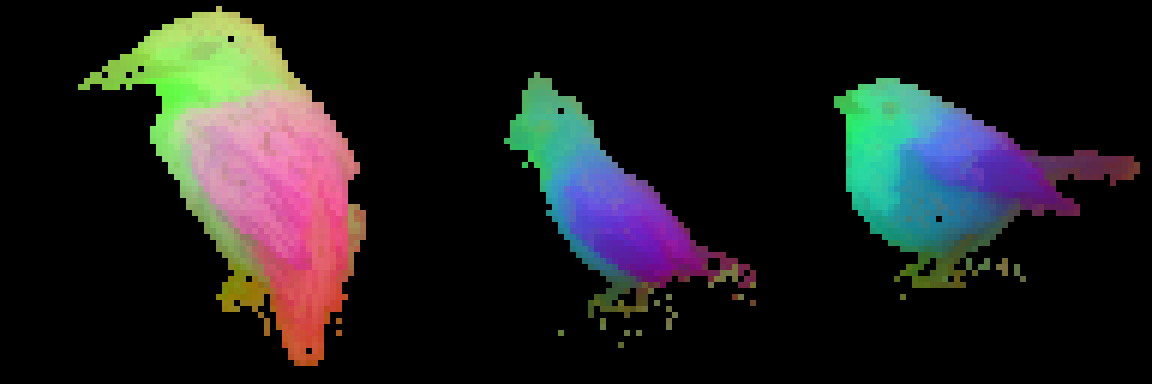
Example of PCA feature visualization by first masking objects using the first PCA features, similar to DINOv2 demos is in docs/masked_pca_demo.ipynb:
📦 Installation
Basic install (Linux/WSL2)
If you do not have ffmpeg installed:
sudo apt install ffmpeg
Install via pip:
pip install dinotool
You can check that dinotool is properly installed by testing it on an image:
dinotool test.jpg -o out.jpg
CUDA 12
PyTorch now ships with CUDA 13 by default. If your system has CUDA 12, install a compatible torch version first (example, change version based on your system):
pip install torch==2.10.0 torchvision==0.25.0 --index-url https://download.pytorch.org/whl/cu126
pip install dinotool
uv
If you have uv installed, you can simply run DINOtool with
uv run --with dinotool dinotool test.jpg -o out.jpg
You still have to have ffmpeg installed. uvx does not work on linux due to xformers dependencies.
🐍 Conda Environment (Recommended)
If you want an isolated setup, especially useful for managing ffmpeg and dependencies:
Install Miniforge.
conda create -n dinotool python=3.12
conda activate dinotool
conda install -c conda-forge ffmpeg
pip install dinotool
Windows notes:
- Windows is supported only for CPU usage. If you want GPU support on Windows, we recommend using WSL2 + Ubuntu, or managing the environment yourself by first installing a GPU torch version and then dinotool.
- The conda method above is recommended for Windows CPU setups.
🚀 Basic usage
📷 Single images
Extract and visualize DINO features from an image:
dinotool input.jpg -o output.jpg
This produces a .jpg similar to the examples above.
For a easy-to-process Parquet file of the local features without visualization, run
dinotool input.jpg -o out_features --save-features 'flat' --no-vis
🎞️ Video:
Extract global features from a video using SigLIP2:
dinotool input.mp4 -o features --model-name siglip2 --save-features frame
This produces a features.parquet file with a row for each frame of the video.
📁 Folder of Images (or folders of video frames)
Process a folder of images with patch-level output:
dinotool images/ -o results --save-features full
This produces a folder results with visualization .jpg and a NetCDF file for each image separately.
If the images in the folder can be resized to a fixed size, you can use batch processing by setting a fixed resize size (--input-size W H) and --no-vis:
dinotool images/ -o results2 --save-features 'frame' --input-size 512 512 --batch-size 4 --no-vis
This produces a parquet file with global features for each image.
💾 Feature extraction options
Use --save-features to export features for downstream tasks.
| Mode | Format | Output shape | Best for |
|---|---|---|---|
full | .nc (image) / .zarr (video, batched image folders) | (frames, height, width, feature) | Keeps spatial structure of patches. |
flat | partitioned .parquet | (frames * height * width, feature) | Reliable long video processing. Faster patch-level analysis |
frame | .parquet | (frames, feature) | One global feature vector per frame |
all | .parquet (flat local) + .parquet / .txt (global) | both of the above (flat and frame) | Single-pass extraction of both local and global features |
full - Spatial local features
- Saves full patch feature maps from the ViT (one vector per image patch).
- Useful for reconstructing spatial attention maps or for downstream tasks like segmentation.
- Stored as netCDF for single images,
.zarrfor video sequences. zarrsaving can be memory-intensive and might still fail for large videos.
dinotool input.mp4 -o output.mp4 --save-features full
flat - Flattened local features
- Saves same vectors as above, but discards 2D spatial layout and saves output in
parquetformat. - More reliable for longer videos.
- Useful for faster computations for statistics, patch-level similarity and clustering.
- For single image input saves a
.parquetfile with one row per patch. - For video inputs saves a partitioned
.parquetdirectory, with indices for frames and patches.
dinotool input.mp4 -o output.mp4 --save-features flat
frame - Global features
- Saves one global feature vector per frame/image.
- Useful for temporal tasks, and creating vector databases.
- For single image input saves a
.txtfile with a single vector - For image folder and video input saves a
.parquetfile with one row per frame/image.
# For a video
dinotool input.mp4 -o output.mp4 --save-features frame

# For an image
dinotool input.jpg -o output.jpg --save-features frame
The output is a side-by-side visualization with PCA of the patch-level features.
all - Both local and global features in one pass
- Combines
flatandframe: saves flattened patch features and global CLS token features in a single model forward pass. - Useful when you need both patch-level and frame-level representations without running the model twice.
- Output files per input type:
| Input | Local (flat patches) | Global (frame) |
|---|---|---|
| Single image | <output>.parquet | <output>.txt |
| Video / batched image folder | <output>.parquet/ | <output>_frame.parquet/ |
| Image folder (variable sizes) | <outdir>/<image>.parquet per image | <outdir>.parquet (combined) |
# Single image — produces out.parquet (patches) and out.txt (global)
dinotool input.jpg -o out --save-features all --no-vis

# Video — produces out.parquet/ (patches) and out_frame.parquet/ (global)
dinotool input.mp4 -o out.mp4 --save-features all --no-vis

# Image folder — per-image parquets + combined global parquet
dinotool images/ -o results --save-features all --no-vis
🧪 Additional Options
--model-name
List available models and their shortcuts with dinotool --models.
By default, the value passed to --model-name argument is loaded from facebookresearch/dinov2, meaning that the possible DINOv2 models are:
dinov2_vits14dinov2_vitb14dinov2_vitl14dinov2_vitg14
and their reg variants (recommended): i.e. dinov2_vits14_reg.
See the DINOv2 github repo for more information.
DINOv3 models:
Model names with prefix facebook/dinov3/<model name> are downloaded from the DINOv3 respository in Huggingface Hub. See a list of available models here.
[!IMPORTANT]
The DINOv3 models are gated models and need authorized access. You have to apply for access on the model page when logged in to Huggingface, and log in on the HF CLI: hf auth login.
AM-RADIO models:
Model names with prefix NVlabs/RADIO/ are downloaded from the RADIO family of models. See all available models here
OpenCLIP models:
DINOtool supports also ViT models that follow the OpenCLIP/timm model API for feature extraction. These models are for example the SigLIP2 models in Huggingface hub. Additionally, other models in the Hub should also work, but have not been fully tested. These include SigLIP and CLIP models.
The OpenCLIP/timm model name has to be passed in the format hf-hub:timm/<model name>.
Shortcuts:
There are some predefined shortcuts for popular models. These can be passed to --model-name
# DINOv2
"vit-s": "dinov2_vits14_reg"
"vit-b": "dinov2_vitb14_reg"
"vit-l": "dinov2_vitl14_reg"
"vit-g": "dinov2_vitg14_reg"

# SigLIP2
"siglip2": "hf-hub:timm/ViT-B-16-SigLIP2-512"
"siglip2-so400m-384": "hf-hub:timm/ViT-SO400M-16-SigLIP2-384"
"siglip2-so400m-512": "hf-hub:timm/ViT-SO400M-16-SigLIP2-512"
"siglip2-b16-256": "hf-hub:timm/ViT-B-16-SigLIP2-256"
"siglip2-b16-512": "hf-hub:timm/ViT-B-16-SigLIP2-512"
"siglip2-b32-256": "hf-hub:timm/ViT-B-32-SigLIP2-256"
"siglip2-b32-512": "hf-hub:timm/ViT-B-32-SigLIP2-512"

# CLIP
"clip": "hf-hub:timm/vit_base_patch16_clip_224.openai"

# DINOv3
"dinov3-s": "facebook/dinov3-vits14-pretrain-lvd1689m"
"dinov3-splus": "facebook/dinov3-vits14plus-pretrain-lvd1689m"
"dinov3-b": "facebook/dinov3-vitb14-pretrain-lvd1689m"
"dinov3-l": "facebook/dinov3-vitl16-pretrain-lvd1689m"
"dinov3-hplus": "facebook/dinov3-vith16plus-pretrain-lvd1689m"
"dinov3-l-sat": "facebook/dinov3-vitl16-pretrain-sat493m"

# AM-RADIO
"radio-b": "NVlabs/RADIO/c-radio_v3-b"
"radio-l": "NVlabs/RADIO/c-radio_v3-l"
"radio-h": "NVlabs/RADIO/c-radio_v3-h"
"radio-g": "NVlabs/RADIO/c-radio_v3-g"

# TIPSv2
"tipsv2-b": "google/tipsv2-b14"
"tipsv2-l": "google/tipsv2-l14"
"tipsv2-so400m": "google/tipsv2-so400m14"
"tipsv2-g": "google/tipsv2-g14"
--input-size
Setting input size fixes the resolution for all inputs. This is useful for processing HD videos, and mandatory for batch processing of image folders.
# Processing a HD video faster:
dinotool input.mp4 -o output.mp4 --input-size 920 540 --batch-size 16
--batch-size
For faster processing, set batch size as large as your GPU memory allows. Batch processing is possible for video files and directories of video frames (following naming where each imagename can be converted to an integer, like 00001.jpg), where all inputs are assumed to be the same size.
dinotool input.mp4 -o output.mp4 --batch-size 16
For batch processing image folders, --input-size must be set. Visualization is also not possible.
--resume / -r
Resume a previously interrupted --save-features run on a video or image directory.
If processing is interrupted (Ctrl-C, crash, etc.), DINOtool keeps the partial results in a temporary directory named <output_stem>.dinotool_tmp/. Re-running the same command with --resume skips already-processed batches and continues from where it stopped:
# Original command (interrupted mid-way)
dinotool long_video.mp4 -o output.mp4 --save-features flat --batch-size 16

# Resume after interruption — skips already-processed batches
dinotool long_video.mp4 -o output.mp4 --save-features flat --batch-size 16 --resume
The temporary directory is deleted automatically once processing completes successfully. Running without --resume when a stale tmpdir exists discards it and starts fresh.
--tmpdir DIR
Override the parent directory for the temporary working directory used during batched processing. By default the tmpdir is placed next to the output file.
dinotool long_video.mp4 -o output.mp4 --save-features flat --tmpdir /scratch/tmp

# Also works with --resume. Pass the same --tmpdir both times
dinotool long_video.mp4 -o output.mp4 --save-features flat --tmpdir /scratch/tmp --resume
The tmpdir is always named <output_stem>.dinotool_tmp inside the specified directory.
🧑💻 Usage reference
🦕 DINOtool: Extract and visualize ViT features from images and videos.

Usage:
  dinotool input_path -o output_path [options]

Arguments:
  input                   Path to image, video file, or folder of frames.
  -o, --output            Path for the output (required).

Options:
  -s, --save-features MODE    Save extracted features: full, flat, frame, or all
  -m, --model-name MODEL      Model to use (default: dinov2_vits14_reg)
  --input-size W H        Resize input before processing. Must be set for batch
                          processing of image folders
  -b, --batch-size N          Batch size for faster processing
  --only-pca              Only visualize PCA features.
  --no-vis                Only output features with no visualization.
                          --save features must be set.
  -r, --resume            Resume a previously interrupted run (video/image-dir
                          with --save-features). Skips already-processed batches.
  --tmpdir DIR            Parent directory for the temporary working directory
                          (default: same directory as output).
  -f, --force             Force overwrite output file if it exists.
  --models                List available models and their shortcuts.
  --version               Show the version of DINOtool.
Contributors

71 commits
Similar repos






Languages
Python
99.3%
Command-line tool for extracting DINO, CLIP, SigLIP2, TIPSv2, RADIO, features for images and videos
Python
76
71 commits
updated Jun 12, 2026
README
🦕 DINOtool
DINOtool is a command-line tool for extracting visual features using state-of-the-art foundation models like DINOv3, DINOv2, CLIP, SigLIP2, TIPSv2, and AM-RADIO. It supports the extraction global (frame-level) and local (patch-level) features from images, videos and image directories, and can optionally visualize feature maps using PCA.
Use from the command line
pip install dinotool
dinotool test.jpg -o out.jpg
Use as a package:
from dinotool import DinoToolModel
from PIL import Image
import matplotlib.pyplot as plt

model = DinoToolModel("dinov3-s") # Unified API for multiple model backends
img = Image.open("../test/data/bird1.jpg")
transform = model.get_transform(img.size) # Loads model-specific transforms
img_tensor = transform.transform(img).unsqueeze(0)

local_features = model(img_tensor)
local_features.tensor.shape # torch.Size([1, 56, 56, 384])

global_features = model(img_tensor, features="frame")
global_features.tensor.shape # torch.Size([1, 384])

plt.imshow(model.pca(local_features)) # PCA visualization
Features
-
Works with:
- 📷 Single images
- 🎞️ Video files
- 📁 Folders of images of various sizes and extensions
-
💾 Outputs standard formats for downstream processing:
- .parquet (global features / local features in a list)
- .zarr / .nc (local features in 2D)
-
🌈 PCA-based visualizations for images and video
Supported models
- DINOv2
- DINOv3 (Gated model - requires logging in to Hugginface Hub and applying access at each model page)
- SigLIP
- SigLIP 2
- CLIP
- C-RADIO / AM-RADIO
- TIPSv2
List available models and their shortcuts with dinotool --models.
Examples:
dinotool input.mp4 -o output.mp4
produces output:
Changing the model with --model-name/-m:
dinotool bird.jpg out.jpg --model-name dinov3-s
uses a different foundation model to extract the features:
Global features for image folders:
Feature vectors can be saved with --save-features.
Processing image directories and extracting global or local features for each image is easy with DINOtool:
dinotool image_folder/ -o global_features --save-features 'frame'
produces a global_features.parquet file with global features:
| filename | feature_0 | feature_1 | feature_2 | ... | feature_383 |
|---|---|---|---|---|---|
cat_001.jpg | 0.123 | -0.045 | 0.211 | ... | 0.009 |
dog_002.jpg | 0.097 | 0.033 | 0.187 | ... | -0.012 |
tree_003.jpg | -0.056 | 0.140 | 0.092 | ... | 0.034 |
car_004.jpg | 0.301 | -0.202 | 0.144 | ... | -0.019 |
Similar files can be also produced for local patch features, for videos etc.
More examples:
More example commands for different situations can be found in test/test_cases.md
Example of reading output file formats is in docs/reading_outputs.ipynb
Example of using DINOtool as a package is in docs/api_example.ipynb
Example of PCA feature visualization by first masking objects using the first PCA features, similar to DINOv2 demos is in docs/masked_pca_demo.ipynb:
📦 Installation
Basic install (Linux/WSL2)
If you do not have ffmpeg installed:
sudo apt install ffmpeg
Install via pip:
pip install dinotool
You can check that dinotool is properly installed by testing it on an image:
dinotool test.jpg -o out.jpg
CUDA 12
PyTorch now ships with CUDA 13 by default. If your system has CUDA 12, install a compatible torch version first (example, change version based on your system):
pip install torch==2.10.0 torchvision==0.25.0 --index-url https://download.pytorch.org/whl/cu126
pip install dinotool
uv
If you have uv installed, you can simply run DINOtool with
uv run --with dinotool dinotool test.jpg -o out.jpg
You still have to have ffmpeg installed. uvx does not work on linux due to xformers dependencies.
🐍 Conda Environment (Recommended)
If you want an isolated setup, especially useful for managing ffmpeg and dependencies:
Install Miniforge.
conda create -n dinotool python=3.12
conda activate dinotool
conda install -c conda-forge ffmpeg
pip install dinotool
Windows notes:
- Windows is supported only for CPU usage. If you want GPU support on Windows, we recommend using WSL2 + Ubuntu, or managing the environment yourself by first installing a GPU torch version and then dinotool.
- The conda method above is recommended for Windows CPU setups.
🚀 Basic usage
📷 Single images
Extract and visualize DINO features from an image:
dinotool input.jpg -o output.jpg
This produces a .jpg similar to the examples above.
For a easy-to-process Parquet file of the local features without visualization, run
dinotool input.jpg -o out_features --save-features 'flat' --no-vis
🎞️ Video:
Extract global features from a video using SigLIP2:
dinotool input.mp4 -o features --model-name siglip2 --save-features frame
This produces a features.parquet file with a row for each frame of the video.
📁 Folder of Images (or folders of video frames)
Process a folder of images with patch-level output:
dinotool images/ -o results --save-features full
This produces a folder results with visualization .jpg and a NetCDF file for each image separately.
If the images in the folder can be resized to a fixed size, you can use batch processing by setting a fixed resize size (--input-size W H) and --no-vis:
dinotool images/ -o results2 --save-features 'frame' --input-size 512 512 --batch-size 4 --no-vis
This produces a parquet file with global features for each image.
💾 Feature extraction options
Use --save-features to export features for downstream tasks.
| Mode | Format | Output shape | Best for |
|---|---|---|---|
full | .nc (image) / .zarr (video, batched image folders) | (frames, height, width, feature) | Keeps spatial structure of patches. |
flat | partitioned .parquet | (frames * height * width, feature) | Reliable long video processing. Faster patch-level analysis |
frame | .parquet | (frames, feature) | One global feature vector per frame |
all | .parquet (flat local) + .parquet / .txt (global) | both of the above (flat and frame) | Single-pass extraction of both local and global features |
full - Spatial local features
- Saves full patch feature maps from the ViT (one vector per image patch).
- Useful for reconstructing spatial attention maps or for downstream tasks like segmentation.
- Stored as netCDF for single images,
.zarrfor video sequences. zarrsaving can be memory-intensive and might still fail for large videos.
dinotool input.mp4 -o output.mp4 --save-features full
flat - Flattened local features
- Saves same vectors as above, but discards 2D spatial layout and saves output in
parquetformat. - More reliable for longer videos.
- Useful for faster computations for statistics, patch-level similarity and clustering.
- For single image input saves a
.parquetfile with one row per patch. - For video inputs saves a partitioned
.parquetdirectory, with indices for frames and patches.
dinotool input.mp4 -o output.mp4 --save-features flat
frame - Global features
- Saves one global feature vector per frame/image.
- Useful for temporal tasks, and creating vector databases.
- For single image input saves a
.txtfile with a single vector - For image folder and video input saves a
.parquetfile with one row per frame/image.
# For a video
dinotool input.mp4 -o output.mp4 --save-features frame

# For an image
dinotool input.jpg -o output.jpg --save-features frame
The output is a side-by-side visualization with PCA of the patch-level features.
all - Both local and global features in one pass
- Combines
flatandframe: saves flattened patch features and global CLS token features in a single model forward pass. - Useful when you need both patch-level and frame-level representations without running the model twice.
- Output files per input type:
| Input | Local (flat patches) | Global (frame) |
|---|---|---|
| Single image | <output>.parquet | <output>.txt |
| Video / batched image folder | <output>.parquet/ | <output>_frame.parquet/ |
| Image folder (variable sizes) | <outdir>/<image>.parquet per image | <outdir>.parquet (combined) |
# Single image — produces out.parquet (patches) and out.txt (global)
dinotool input.jpg -o out --save-features all --no-vis

# Video — produces out.parquet/ (patches) and out_frame.parquet/ (global)
dinotool input.mp4 -o out.mp4 --save-features all --no-vis

# Image folder — per-image parquets + combined global parquet
dinotool images/ -o results --save-features all --no-vis
🧪 Additional Options
--model-name
List available models and their shortcuts with dinotool --models.
By default, the value passed to --model-name argument is loaded from facebookresearch/dinov2, meaning that the possible DINOv2 models are:
dinov2_vits14dinov2_vitb14dinov2_vitl14dinov2_vitg14
and their reg variants (recommended): i.e. dinov2_vits14_reg.
See the DINOv2 github repo for more information.
DINOv3 models:
Model names with prefix facebook/dinov3/<model name> are downloaded from the DINOv3 respository in Huggingface Hub. See a list of available models here.
[!IMPORTANT]
The DINOv3 models are gated models and need authorized access. You have to apply for access on the model page when logged in to Huggingface, and log in on the HF CLI: hf auth login.
AM-RADIO models:
Model names with prefix NVlabs/RADIO/ are downloaded from the RADIO family of models. See all available models here
OpenCLIP models:
DINOtool supports also ViT models that follow the OpenCLIP/timm model API for feature extraction. These models are for example the SigLIP2 models in Huggingface hub. Additionally, other models in the Hub should also work, but have not been fully tested. These include SigLIP and CLIP models.
The OpenCLIP/timm model name has to be passed in the format hf-hub:timm/<model name>.
Shortcuts:
There are some predefined shortcuts for popular models. These can be passed to --model-name
# DINOv2
"vit-s": "dinov2_vits14_reg"
"vit-b": "dinov2_vitb14_reg"
"vit-l": "dinov2_vitl14_reg"
"vit-g": "dinov2_vitg14_reg"

# SigLIP2
"siglip2": "hf-hub:timm/ViT-B-16-SigLIP2-512"
"siglip2-so400m-384": "hf-hub:timm/ViT-SO400M-16-SigLIP2-384"
"siglip2-so400m-512": "hf-hub:timm/ViT-SO400M-16-SigLIP2-512"
"siglip2-b16-256": "hf-hub:timm/ViT-B-16-SigLIP2-256"
"siglip2-b16-512": "hf-hub:timm/ViT-B-16-SigLIP2-512"
"siglip2-b32-256": "hf-hub:timm/ViT-B-32-SigLIP2-256"
"siglip2-b32-512": "hf-hub:timm/ViT-B-32-SigLIP2-512"

# CLIP
"clip": "hf-hub:timm/vit_base_patch16_clip_224.openai"

# DINOv3
"dinov3-s": "facebook/dinov3-vits14-pretrain-lvd1689m"
"dinov3-splus": "facebook/dinov3-vits14plus-pretrain-lvd1689m"
"dinov3-b": "facebook/dinov3-vitb14-pretrain-lvd1689m"
"dinov3-l": "facebook/dinov3-vitl16-pretrain-lvd1689m"
"dinov3-hplus": "facebook/dinov3-vith16plus-pretrain-lvd1689m"
"dinov3-l-sat": "facebook/dinov3-vitl16-pretrain-sat493m"

# AM-RADIO
"radio-b": "NVlabs/RADIO/c-radio_v3-b"
"radio-l": "NVlabs/RADIO/c-radio_v3-l"
"radio-h": "NVlabs/RADIO/c-radio_v3-h"
"radio-g": "NVlabs/RADIO/c-radio_v3-g"

# TIPSv2
"tipsv2-b": "google/tipsv2-b14"
"tipsv2-l": "google/tipsv2-l14"
"tipsv2-so400m": "google/tipsv2-so400m14"
"tipsv2-g": "google/tipsv2-g14"
--input-size
Setting input size fixes the resolution for all inputs. This is useful for processing HD videos, and mandatory for batch processing of image folders.
# Processing a HD video faster:
dinotool input.mp4 -o output.mp4 --input-size 920 540 --batch-size 16
--batch-size
For faster processing, set batch size as large as your GPU memory allows. Batch processing is possible for video files and directories of video frames (following naming where each imagename can be converted to an integer, like 00001.jpg), where all inputs are assumed to be the same size.
dinotool input.mp4 -o output.mp4 --batch-size 16
For batch processing image folders, --input-size must be set. Visualization is also not possible.
--resume / -r
Resume a previously interrupted --save-features run on a video or image directory.
If processing is interrupted (Ctrl-C, crash, etc.), DINOtool keeps the partial results in a temporary directory named <output_stem>.dinotool_tmp/. Re-running the same command with --resume skips already-processed batches and continues from where it stopped:
# Original command (interrupted mid-way)
dinotool long_video.mp4 -o output.mp4 --save-features flat --batch-size 16

# Resume after interruption — skips already-processed batches
dinotool long_video.mp4 -o output.mp4 --save-features flat --batch-size 16 --resume
The temporary directory is deleted automatically once processing completes successfully. Running without --resume when a stale tmpdir exists discards it and starts fresh.
--tmpdir DIR
Override the parent directory for the temporary working directory used during batched processing. By default the tmpdir is placed next to the output file.
dinotool long_video.mp4 -o output.mp4 --save-features flat --tmpdir /scratch/tmp

# Also works with --resume. Pass the same --tmpdir both times
dinotool long_video.mp4 -o output.mp4 --save-features flat --tmpdir /scratch/tmp --resume
The tmpdir is always named <output_stem>.dinotool_tmp inside the specified directory.
🧑💻 Usage reference
🦕 DINOtool: Extract and visualize ViT features from images and videos.

Usage:
  dinotool input_path -o output_path [options]

Arguments:
  input                   Path to image, video file, or folder of frames.
  -o, --output            Path for the output (required).

Options:
  -s, --save-features MODE    Save extracted features: full, flat, frame, or all
  -m, --model-name MODEL      Model to use (default: dinov2_vits14_reg)
  --input-size W H        Resize input before processing. Must be set for batch
                          processing of image folders
  -b, --batch-size N          Batch size for faster processing
  --only-pca              Only visualize PCA features.
  --no-vis                Only output features with no visualization.
                          --save features must be set.
  -r, --resume            Resume a previously interrupted run (video/image-dir
                          with --save-features). Skips already-processed batches.
  --tmpdir DIR            Parent directory for the temporary working directory
                          (default: same directory as output).
  -f, --force             Force overwrite output file if it exists.
  --models                List available models and their shortcuts.
  --version               Show the version of DINOtool.
Similar repos
Contributors
71 commits
Languages
Python
99.3%