Video Diffusion Alignment via Reward Gradients. We improve a variety of video diffusion models such as VideoCrafter, OpenSora, ModelScope and StableVideoDiffusion by finetuning them using various reward models such as HPS, PickScore, VideoMAE, VJEPA, YOLO, Aesthetics etc.
See the code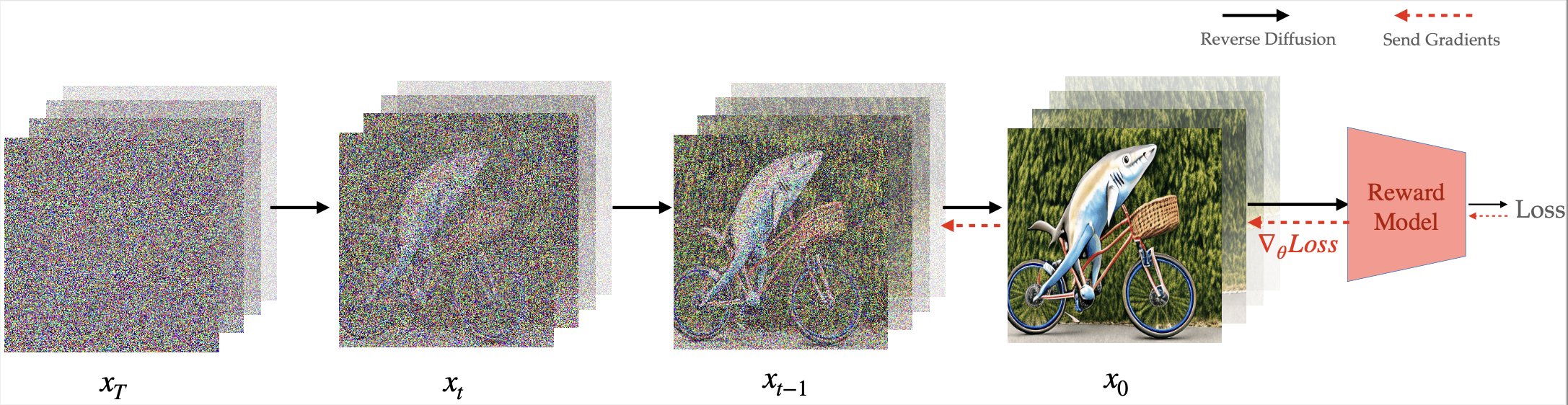


This is the official implementation of our paper Video Diffusion Alignment via Reward Gradient by
Mihir Prabhudesai*, Zheyang Qin*, Russell Mendonca*, Katerina Fragkiadaki, Deepak Pathak .
We have made significant progress towards building foundational video diffusion models. As these models are trained using large-scale unsupervised data, it has become crucial to adapt these models to specific downstream tasks, such as video-text alignment or ethical video generation. Adapting these models via supervised fine-tuning requires collecting target datasets of videos, which is challenging and tedious. In this work, we instead utilize pre-trained reward models that are learned via preferences on top of powerful discriminative models. These models contain dense gradient information with respect to generated RGB pixels, which is critical to be able to learn efficiently in complex search spaces, such as videos. We show that our approach can enable alignment of video diffusion for aesthetic generations, similarity between text context and video, as well long horizon video generations that are 3X longer than the training sequence length. We show our approach can learn much more efficiently in terms of reward queries and compute than previous gradient-free approaches for video generation.
 |  |  |
 |  |  |
 |  |  |
We highly recommend proceeding with the VADER-VideoCrafter model first, which performs better.
Assuming you are in the VADER/ directory, you are able to create a Conda environments for VADER-VideoCrafter using the following commands:
cd VADER-VideoCrafter
conda create -n vader_videocrafter python=3.10
conda activate vader_videocrafter
conda install pytorch==2.3.0 torchvision==0.18.0 torchaudio==2.3.0 pytorch-cuda=12.1 -c pytorch -c nvidia
conda install xformers -c xformers
pip install -r requirements.txt
git clone https://github.com/tgxs002/HPSv2.git
cd HPSv2/
pip install -e .
cd ..
We are using the pretrained Text-to-Video VideoCrafter2 model via Hugging Face. If you unfortunately find the model is not automatically downloaded when you running inference or training script, you can manually download it and put the model.ckpt in VADER/VADER-VideoCrafter/checkpoints/base_512_v2/model.ckpt.
We provided pretrained LoRA weights on HuggingFace. The vader_videocrafter_pickscore.pt is the model fine-tuned using PickScore function on chatgpt_custom_animal.txt with LoRA rank of 16, while vader_videocrafter_hps_aesthetic.pt is the model fine-tuned using a combination of HPSv2.1 and Aesthetic function on chatgpt_custom_instruments.txt with LoRA rank of 8.
Please run accelerate config as the first step to configure accelerator settings. If you are not familiar with the accelerator configuration, you can refer to VADER-VideoCrafter documentation.
Assuming you are in the VADER/ directory, you are able to do inference using the following commands:
cd VADER-VideoCrafter
sh scripts/run_text2video_inference.sh
val_batch_size=1 and use fp16 mixed precision. It should also work with recent PyTorch and CUDA versions.VADER/VADER-VideoCrafter/scripts/main/train_t2v_lora.py is a script for inference of the VideoCrafter2 using VADER via LoRA.
--inference_only should be set to True.--lora_ckpt_path is required to set to the path of the pretrained LoRA model. Specially, if the lora_ckpt_path is set to 'huggingface-pickscore' or 'huggingface-hps-aesthetic', it will download the pretrained LoRA model from the respective HuggingFace model hub, VADER_VideoCrafter_PickScore or VADER_VideoCrafter_HPS_Aesthetic. Otherwise, it will load the pretrained LoRA model from the path you provided. If you do not provide any lora_ckpt_path, the original VideoCrafter2 model will be used for inference. Note that if you use 'huggingface-pickscore' you need to set --lora_rank 16, whereas if you use 'huggingface-hps-aesthetic' you need to set --lora_rank 8.Please run accelerate config as the first step to configure accelerator settings. If you are not familiar with the accelerator configuration, you can refer to VADER-VideoCrafter documentation.
Assuming you are in the VADER/ directory, you are able to train the model using the following commands:
cd VADER-VideoCrafter
sh scripts/run_text2video_train.sh
train_batch_size=1 val_batch_size=1 and use fp16 mixed precision.VADER/VADER-VideoCrafter/scripts/main/train_t2v_lora.py is also a script for fine-tuning the VideoCrafter2 using VADER via LoRA.
Assuming you are in the VADER/ directory, you are able to create a Conda environments for VADER-Open-Sora using the following commands:
cd VADER-Open-Sora
conda create -n vader_opensora python=3.10
conda activate vader_opensora
conda install pytorch==2.3.0 torchvision==0.18.0 torchaudio==2.3.0 pytorch-cuda=12.1 -c pytorch -c nvidia
conda install xformers -c xformers
pip install -v -e .
git clone https://github.com/tgxs002/HPSv2.git
cd HPSv2/
pip install -e .
cd ..
Please run accelerate config as the first step to configure accelerator settings. If you are not familiar with the accelerator configuration, you can refer to VADER-Open-Sora documentation.
Assuming you are in the VADER/ directory, you are able to do inference using the following commands:
cd VADER-Open-Sora
sh scripts/run_text2video_inference.sh
resolution is set as 360p, a GPU with 40GBs of VRAM is required when we set val_batch_size=1 and use bf16 mixed precision . It should also work with recent PyTorch and CUDA versions. Please refer to the original Open-Sora repository for more details about the GPU requirements and the model settings.VADER/VADER-Open-Sora/scripts/train_t2v_lora.py is a script for do inference via the Open-Sora 1.2 using VADER.
--num-frames, '--resolution', 'fps' and 'aspect-ratio' are inherited from the original Open-Sora model. In short, you can set '--num-frames' as '2s', '4s', '8s', and '16s'. Available values for --resolution are '240p', '360p', '480p', and '720p'. The default value of 'fps' is 24 and 'aspect-ratio' is 3:4. Please refer to the original Open-Sora repository for more details. One thing to keep in mind, for instance, is that if you set --num-frames to 2s and --resolution to '240p', it is better to use bf16 mixed precision instead of fp16. Otherwise, the model may generate noise videos.--prompt-path is the path of the prompt file. Unlike VideoCrafter, we do not provide prompt function for Open-Sora. Instead, you can provide a prompt file, which contains a list of prompts.--num-processes is the number of processes for Accelerator. It is recommended to set it to the number of GPUs.VADER/VADER-Open-Sora/configs/opensora-v1-2/vader/vader_inferece.py is the configuration file for inference. You can modify the configuration file to change the inference settings following the guidance in the documentation.
is_vader_training should be set to False. The --lora_ckpt_path should be set to the path of the pretrained LoRA model. Otherwise, the original Open-Sora model will be used for inference.Please run accelerate config as the first step to configure accelerator settings. If you are not familiar with the accelerator configuration, you can refer to VADER-Open-Sora documentation.
Assuming you are in the VADER/ directory, you are able to train the model using the following commands:
cd VADER-Open-Sora
sh scripts/run_text2video_train.sh
bf16 mixed precision as resolution is set as 360p and num_frames is set as 2s.VADER/VADER-Open-Sora/scripts/train_t2v_lora.py is a script for fine-tuning the Open-Sora 1.2 using VADER via LoRA.
VADER/VADER-Open-Sora/configs/opensora-v1-2/vader/vader_train.py is the configuration file for training. You can modify the configuration file to change the training settings.
Assuming you are in the VADER/ directory, you are able to create a Conda environments for VADER-ModelScope using the following commands:
cd VADER-ModelScope
conda create -n vader_modelscope python=3.10
conda activate vader_modelscope
pip install torch==2.6.0 torchvision==0.21.0 torchaudio==2.6.0
pip install -r requirements.txt
git clone https://github.com/tgxs002/HPSv2.git
cd HPSv2/
pip install -e .
cd ..
Please run accelerate config as the first step to configure accelerator settings. If you are not familiar with the accelerator configuration, you can refer to VADER-ModelScope documentation.
Assuming you are in the VADER/ directory, you are able to do inference using the following commands:
cd VADER-ModelScope
sh run_text2video_inference.sh
lora_path in the original inference script. You can set lora_path to the path of the pretrained LoRA model if you have one.Please run accelerate config as the first step to configure accelerator settings. If you are not familiar with the accelerator configuration, you can refer to VADER-ModelScope documentation.
Assuming you are in the VADER/ directory, you are able to train the model using the following commands:
cd VADER-ModelScope
sh run_text2video_train.sh
VADER/VADER-ModelScope/train_t2v_lora.py is a script for fine-tuning ModelScope using VADER via LoRA.
gradient_accumulation_steps can be increased while reducing the --num_processes of the accelerator to alleviate bottleneck caused by the number of GPUs. We tested with gradient_accumulation_steps=4 and --num_processes=4 on 4 A100s- 40GB RAM.prompt_fn is the prompt function, which can be the name of any functions in Core/prompts.py, like 'chatgpt_custom_instruments', 'chatgpt_custom_animal_technology', 'chatgpt_custom_ice', 'nouns_activities', etc. Note: If you set --prompt_fn 'nouns_activities', you have to provide--nouns_file and --nouns_file, which will randomly select a noun and an activity from the files and form them into a single sentence as a prompt.reward_fn is the reward function, which can be selected from 'aesthetic', 'hps', and 'actpred'.VADER/VADER-ModelScope/config_t2v/config.yaml is the configuration file for training. You can modify the configuration file to change the training settings following the comments in that file.Please run accelerate config as the first step to configure accelerator settings. If you are not familiar with the accelerator configuration, you can refer to VADER-ModelScope documentation.
Assuming you are in the VADER/ directory:
cd VADER-ModelScope
sh run_t2vid_dpo_train.sh
cd VADER-ModelScope
sh run_t2vid_ddpo_train.sh
This section is to provide a tutorial on how to implement the VADER method on VideoCrafter and Open-Sora by yourself. We will provide a step-by-step guide to help you understand the modification details. Thus, you can easily adapt the VADER method to later versions of VideCrafter.
Our codebase is directly built on top of VideoCrafter, Open-Sora, and Animate Anything. We would like to thank the authors for open-sourcing their code.
If you find this work useful in your research, please cite:
@misc{prabhudesai2024videodiffusionalignmentreward,
      title={Video Diffusion Alignment via Reward Gradients},
      author={Mihir Prabhudesai and Russell Mendonca and Zheyang Qin and Katerina Fragkiadaki and Deepak Pathak},
      year={2024},
      eprint={2407.08737},
      archivePrefix={arXiv},
      primaryClass={cs.CV},
      url={https://arxiv.org/abs/2407.08737},
}
722 followers · starred Jul 2024
198 followers · starred Sep 2025
380 followers · starred Aug 2024
259 followers · starred Jun 2025
Video Diffusion Alignment via Reward Gradients. We improve a variety of video diffusion models such as VideoCrafter, OpenSora, ModelScope and StableVideoDiffusion by finetuning them using various reward models such as HPS, PickScore, VideoMAE, VJEPA, YOLO, Aesthetics etc.
See the code
This is the official implementation of our paper Video Diffusion Alignment via Reward Gradient by
Mihir Prabhudesai*, Zheyang Qin*, Russell Mendonca*, Katerina Fragkiadaki, Deepak Pathak .
We have made significant progress towards building foundational video diffusion models. As these models are trained using large-scale unsupervised data, it has become crucial to adapt these models to specific downstream tasks, such as video-text alignment or ethical video generation. Adapting these models via supervised fine-tuning requires collecting target datasets of videos, which is challenging and tedious. In this work, we instead utilize pre-trained reward models that are learned via preferences on top of powerful discriminative models. These models contain dense gradient information with respect to generated RGB pixels, which is critical to be able to learn efficiently in complex search spaces, such as videos. We show that our approach can enable alignment of video diffusion for aesthetic generations, similarity between text context and video, as well long horizon video generations that are 3X longer than the training sequence length. We show our approach can learn much more efficiently in terms of reward queries and compute than previous gradient-free approaches for video generation.
| | |
| | |
| | |
We highly recommend proceeding with the VADER-VideoCrafter model first, which performs better.
Assuming you are in the VADER/ directory, you are able to create a Conda environments for VADER-VideoCrafter using the following commands:
cd VADER-VideoCrafter
conda create -n vader_videocrafter python=3.10
conda activate vader_videocrafter
conda install pytorch==2.3.0 torchvision==0.18.0 torchaudio==2.3.0 pytorch-cuda=12.1 -c pytorch -c nvidia
conda install xformers -c xformers
pip install -r requirements.txt
git clone https://github.com/tgxs002/HPSv2.git
cd HPSv2/
pip install -e .
cd ..
We are using the pretrained Text-to-Video VideoCrafter2 model via Hugging Face. If you unfortunately find the model is not automatically downloaded when you running inference or training script, you can manually download it and put the model.ckpt in VADER/VADER-VideoCrafter/checkpoints/base_512_v2/model.ckpt.
We provided pretrained LoRA weights on HuggingFace. The vader_videocrafter_pickscore.pt is the model fine-tuned using PickScore function on chatgpt_custom_animal.txt with LoRA rank of 16, while vader_videocrafter_hps_aesthetic.pt is the model fine-tuned using a combination of HPSv2.1 and Aesthetic function on chatgpt_custom_instruments.txt with LoRA rank of 8.
Please run accelerate config as the first step to configure accelerator settings. If you are not familiar with the accelerator configuration, you can refer to VADER-VideoCrafter documentation.
Assuming you are in the VADER/ directory, you are able to do inference using the following commands:
cd VADER-VideoCrafter
sh scripts/run_text2video_inference.sh
val_batch_size=1 and use fp16 mixed precision. It should also work with recent PyTorch and CUDA versions.VADER/VADER-VideoCrafter/scripts/main/train_t2v_lora.py is a script for inference of the VideoCrafter2 using VADER via LoRA.
--inference_only should be set to True.--lora_ckpt_path is required to set to the path of the pretrained LoRA model. Specially, if the lora_ckpt_path is set to 'huggingface-pickscore' or 'huggingface-hps-aesthetic', it will download the pretrained LoRA model from the respective HuggingFace model hub, VADER_VideoCrafter_PickScore or VADER_VideoCrafter_HPS_Aesthetic. Otherwise, it will load the pretrained LoRA model from the path you provided. If you do not provide any lora_ckpt_path, the original VideoCrafter2 model will be used for inference. Note that if you use 'huggingface-pickscore' you need to set --lora_rank 16, whereas if you use 'huggingface-hps-aesthetic' you need to set --lora_rank 8.Please run accelerate config as the first step to configure accelerator settings. If you are not familiar with the accelerator configuration, you can refer to VADER-VideoCrafter documentation.
Assuming you are in the VADER/ directory, you are able to train the model using the following commands:
cd VADER-VideoCrafter
sh scripts/run_text2video_train.sh
train_batch_size=1 val_batch_size=1 and use fp16 mixed precision.VADER/VADER-VideoCrafter/scripts/main/train_t2v_lora.py is also a script for fine-tuning the VideoCrafter2 using VADER via LoRA.
Assuming you are in the VADER/ directory, you are able to create a Conda environments for VADER-Open-Sora using the following commands:
cd VADER-Open-Sora
conda create -n vader_opensora python=3.10
conda activate vader_opensora
conda install pytorch==2.3.0 torchvision==0.18.0 torchaudio==2.3.0 pytorch-cuda=12.1 -c pytorch -c nvidia
conda install xformers -c xformers
pip install -v -e .
git clone https://github.com/tgxs002/HPSv2.git
cd HPSv2/
pip install -e .
cd ..
Please run accelerate config as the first step to configure accelerator settings. If you are not familiar with the accelerator configuration, you can refer to VADER-Open-Sora documentation.
Assuming you are in the VADER/ directory, you are able to do inference using the following commands:
cd VADER-Open-Sora
sh scripts/run_text2video_inference.sh
resolution is set as 360p, a GPU with 40GBs of VRAM is required when we set val_batch_size=1 and use bf16 mixed precision . It should also work with recent PyTorch and CUDA versions. Please refer to the original Open-Sora repository for more details about the GPU requirements and the model settings.VADER/VADER-Open-Sora/scripts/train_t2v_lora.py is a script for do inference via the Open-Sora 1.2 using VADER.
--num-frames, '--resolution', 'fps' and 'aspect-ratio' are inherited from the original Open-Sora model. In short, you can set '--num-frames' as '2s', '4s', '8s', and '16s'. Available values for --resolution are '240p', '360p', '480p', and '720p'. The default value of 'fps' is 24 and 'aspect-ratio' is 3:4. Please refer to the original Open-Sora repository for more details. One thing to keep in mind, for instance, is that if you set --num-frames to 2s and --resolution to '240p', it is better to use bf16 mixed precision instead of fp16. Otherwise, the model may generate noise videos.--prompt-path is the path of the prompt file. Unlike VideoCrafter, we do not provide prompt function for Open-Sora. Instead, you can provide a prompt file, which contains a list of prompts.--num-processes is the number of processes for Accelerator. It is recommended to set it to the number of GPUs.VADER/VADER-Open-Sora/configs/opensora-v1-2/vader/vader_inferece.py is the configuration file for inference. You can modify the configuration file to change the inference settings following the guidance in the documentation.
is_vader_training should be set to False. The --lora_ckpt_path should be set to the path of the pretrained LoRA model. Otherwise, the original Open-Sora model will be used for inference.Please run accelerate config as the first step to configure accelerator settings. If you are not familiar with the accelerator configuration, you can refer to VADER-Open-Sora documentation.
Assuming you are in the VADER/ directory, you are able to train the model using the following commands:
cd VADER-Open-Sora
sh scripts/run_text2video_train.sh
bf16 mixed precision as resolution is set as 360p and num_frames is set as 2s.VADER/VADER-Open-Sora/scripts/train_t2v_lora.py is a script for fine-tuning the Open-Sora 1.2 using VADER via LoRA.
VADER/VADER-Open-Sora/configs/opensora-v1-2/vader/vader_train.py is the configuration file for training. You can modify the configuration file to change the training settings.
Assuming you are in the VADER/ directory, you are able to create a Conda environments for VADER-ModelScope using the following commands:
cd VADER-ModelScope
conda create -n vader_modelscope python=3.10
conda activate vader_modelscope
pip install torch==2.6.0 torchvision==0.21.0 torchaudio==2.6.0
pip install -r requirements.txt
git clone https://github.com/tgxs002/HPSv2.git
cd HPSv2/
pip install -e .
cd ..
Please run accelerate config as the first step to configure accelerator settings. If you are not familiar with the accelerator configuration, you can refer to VADER-ModelScope documentation.
Assuming you are in the VADER/ directory, you are able to do inference using the following commands:
cd VADER-ModelScope
sh run_text2video_inference.sh
lora_path in the original inference script. You can set lora_path to the path of the pretrained LoRA model if you have one.Please run accelerate config as the first step to configure accelerator settings. If you are not familiar with the accelerator configuration, you can refer to VADER-ModelScope documentation.
Assuming you are in the VADER/ directory, you are able to train the model using the following commands:
cd VADER-ModelScope
sh run_text2video_train.sh
VADER/VADER-ModelScope/train_t2v_lora.py is a script for fine-tuning ModelScope using VADER via LoRA.
gradient_accumulation_steps can be increased while reducing the --num_processes of the accelerator to alleviate bottleneck caused by the number of GPUs. We tested with gradient_accumulation_steps=4 and --num_processes=4 on 4 A100s- 40GB RAM.prompt_fn is the prompt function, which can be the name of any functions in Core/prompts.py, like 'chatgpt_custom_instruments', 'chatgpt_custom_animal_technology', 'chatgpt_custom_ice', 'nouns_activities', etc. Note: If you set --prompt_fn 'nouns_activities', you have to provide--nouns_file and --nouns_file, which will randomly select a noun and an activity from the files and form them into a single sentence as a prompt.reward_fn is the reward function, which can be selected from 'aesthetic', 'hps', and 'actpred'.VADER/VADER-ModelScope/config_t2v/config.yaml is the configuration file for training. You can modify the configuration file to change the training settings following the comments in that file.Please run accelerate config as the first step to configure accelerator settings. If you are not familiar with the accelerator configuration, you can refer to VADER-ModelScope documentation.
Assuming you are in the VADER/ directory:
cd VADER-ModelScope
sh run_t2vid_dpo_train.sh
cd VADER-ModelScope
sh run_t2vid_ddpo_train.sh
This section is to provide a tutorial on how to implement the VADER method on VideoCrafter and Open-Sora by yourself. We will provide a step-by-step guide to help you understand the modification details. Thus, you can easily adapt the VADER method to later versions of VideCrafter.
Our codebase is directly built on top of VideoCrafter, Open-Sora, and Animate Anything. We would like to thank the authors for open-sourcing their code.
If you find this work useful in your research, please cite:
@misc{prabhudesai2024videodiffusionalignmentreward,
      title={Video Diffusion Alignment via Reward Gradients},
      author={Mihir Prabhudesai and Russell Mendonca and Zheyang Qin and Katerina Fragkiadaki and Deepak Pathak},
      year={2024},
      eprint={2407.08737},
      archivePrefix={arXiv},
      primaryClass={cs.CV},
      url={https://arxiv.org/abs/2407.08737},
}
722 followers · starred Jul 2024
198 followers · starred Sep 2025
380 followers · starred Aug 2024
259 followers · starred Jun 2025