A modern web interface for managing and interacting with vLLM servers (www.github.com/vllm-project/vllm). Supports both GPU and CPU modes, with special optimizations for macOS Apple Silicon and enterprise deployment on OpenShift/Kubernetes.
See the codeA modern web interface for managing and interacting with vLLM servers (www.github.com/vllm-project/vllm). Supports GPU and CPU modes, with special optimizations for macOS Apple Silicon and enterprise deployment on OpenShift/Kubernetes.
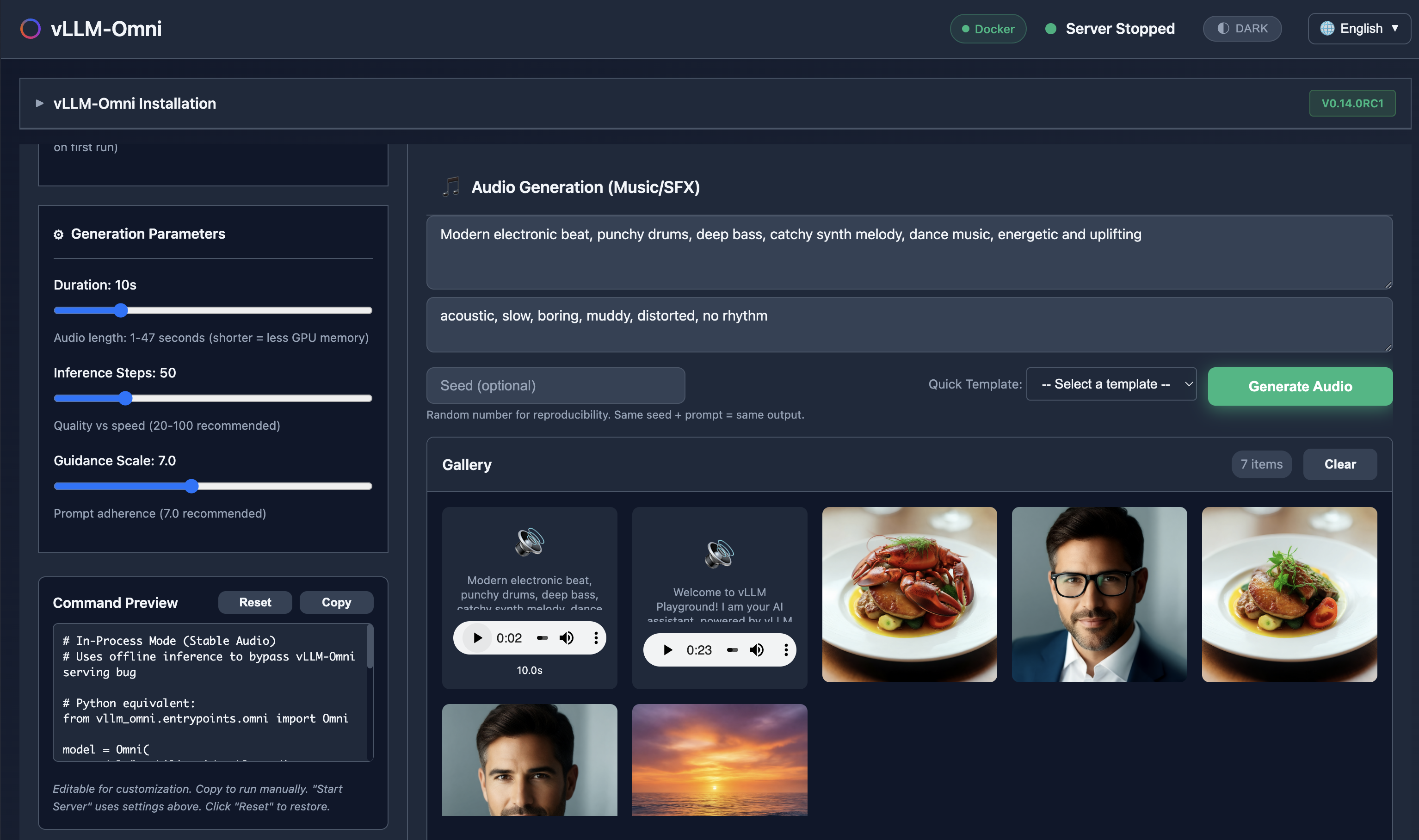
Generate images, edit photos, create speech, and produce music - all with vLLM-Omni integration.
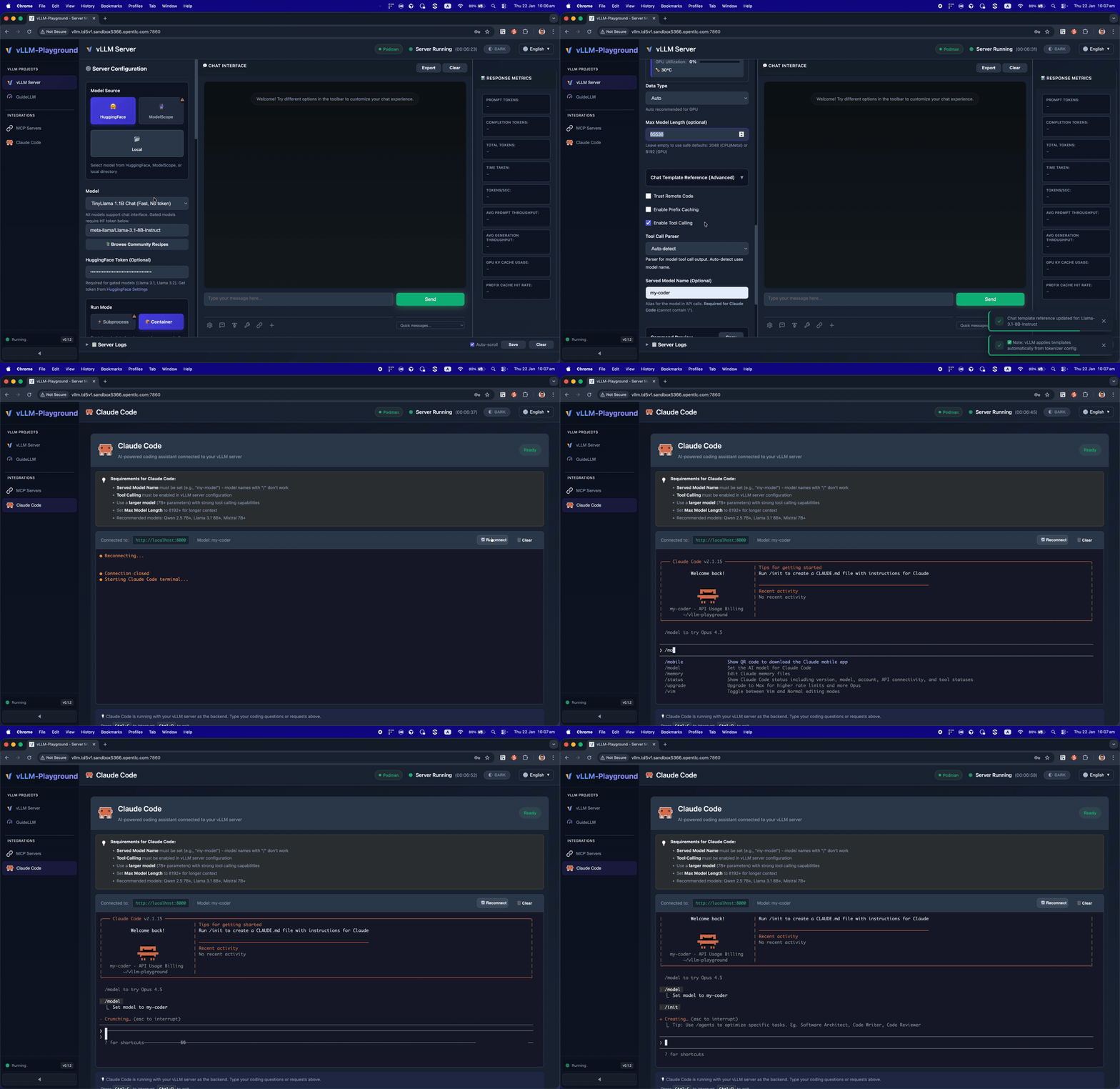
Run Claude Code with open-source models served by vLLM - your private, local coding assistant.
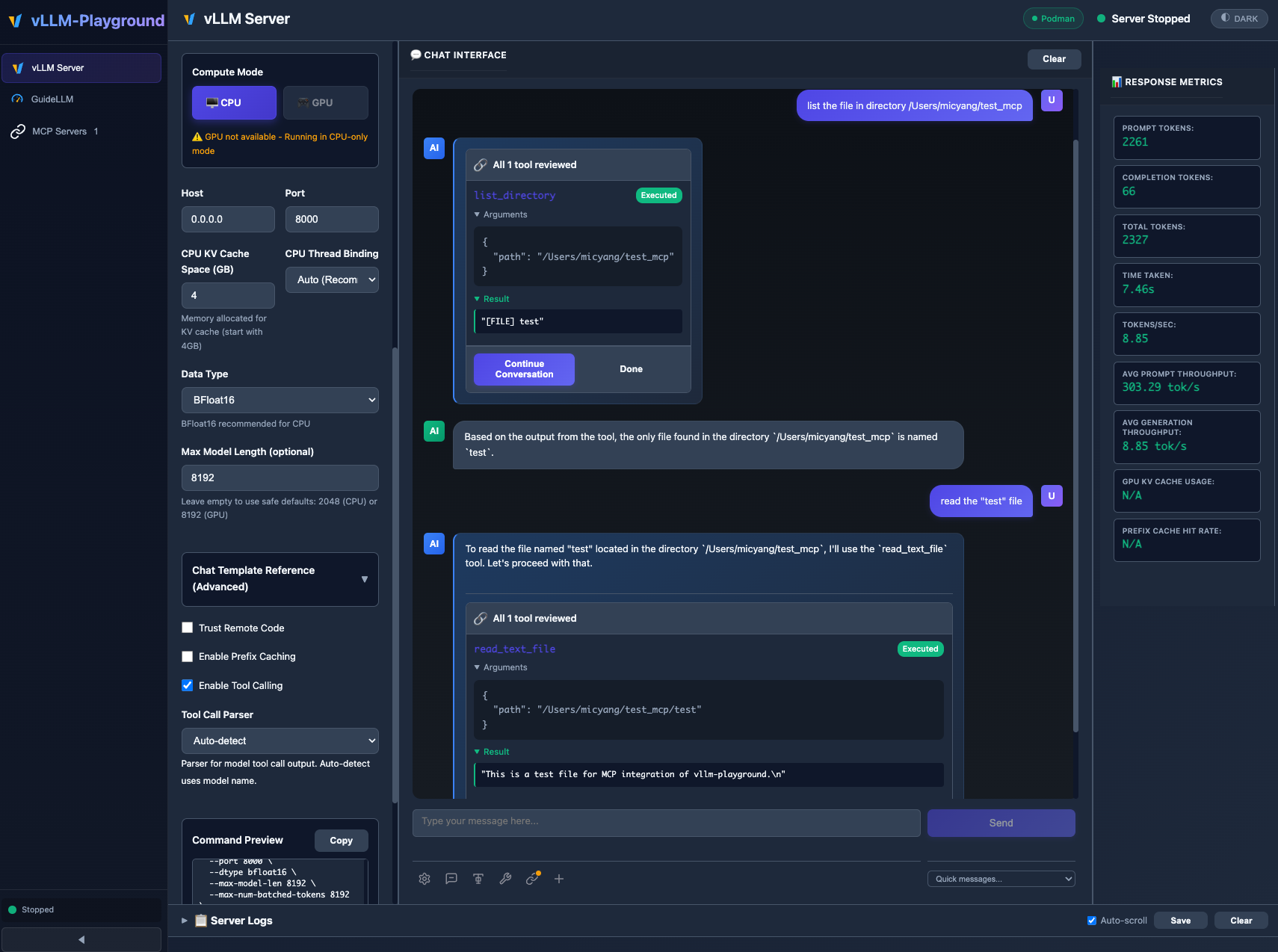
MCP (Model Context Protocol) integration enables models to use external tools with human-in-the-loop approval.
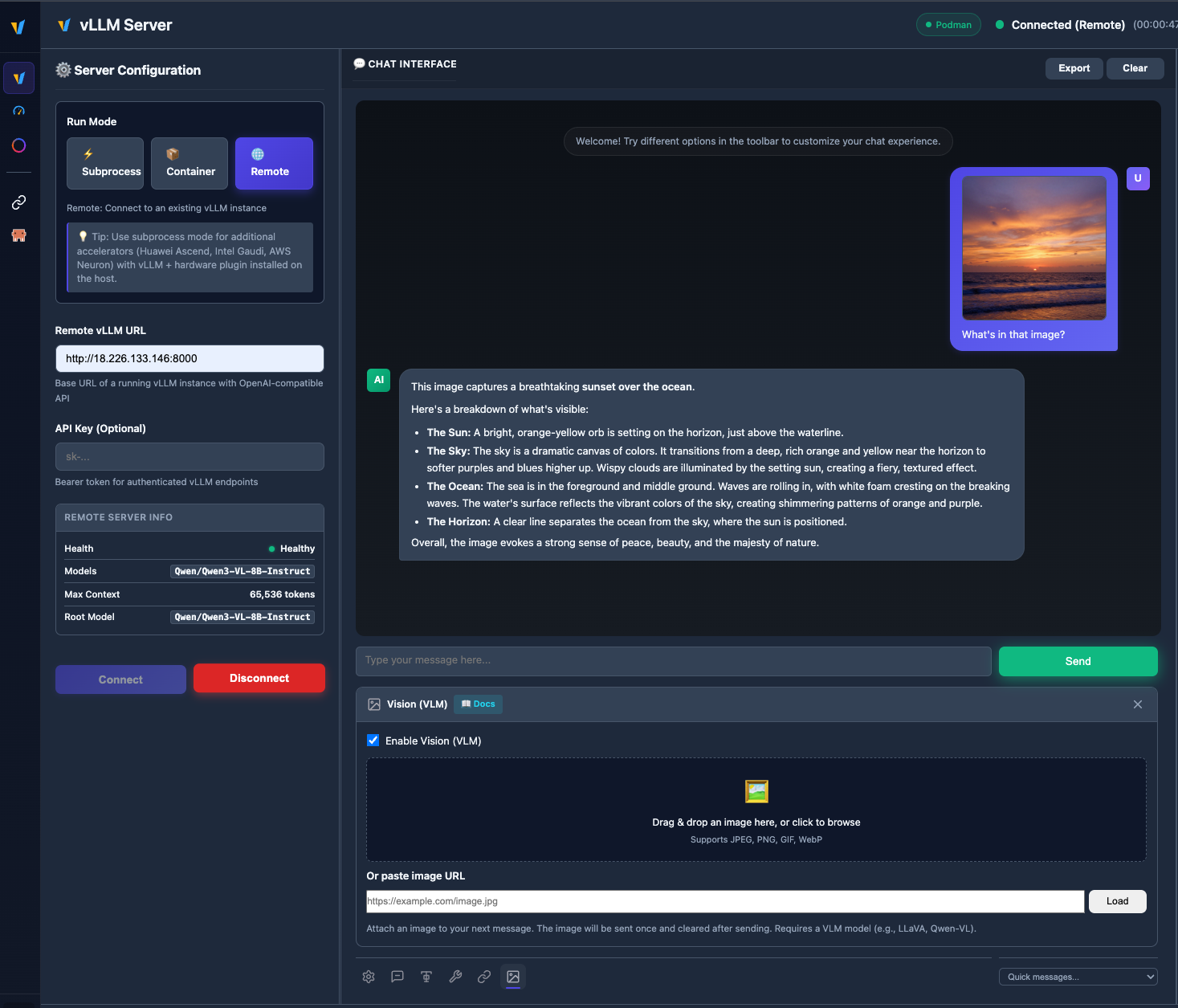
Upload images and chat with vision models like Qwen2.5-VL, LLaVA, and more.
Run subprocess, container, and remote vLLM servers side by side; switch tabs, save configs, and manage everything from Management → Instances. See Multi-Instance Guide for details.
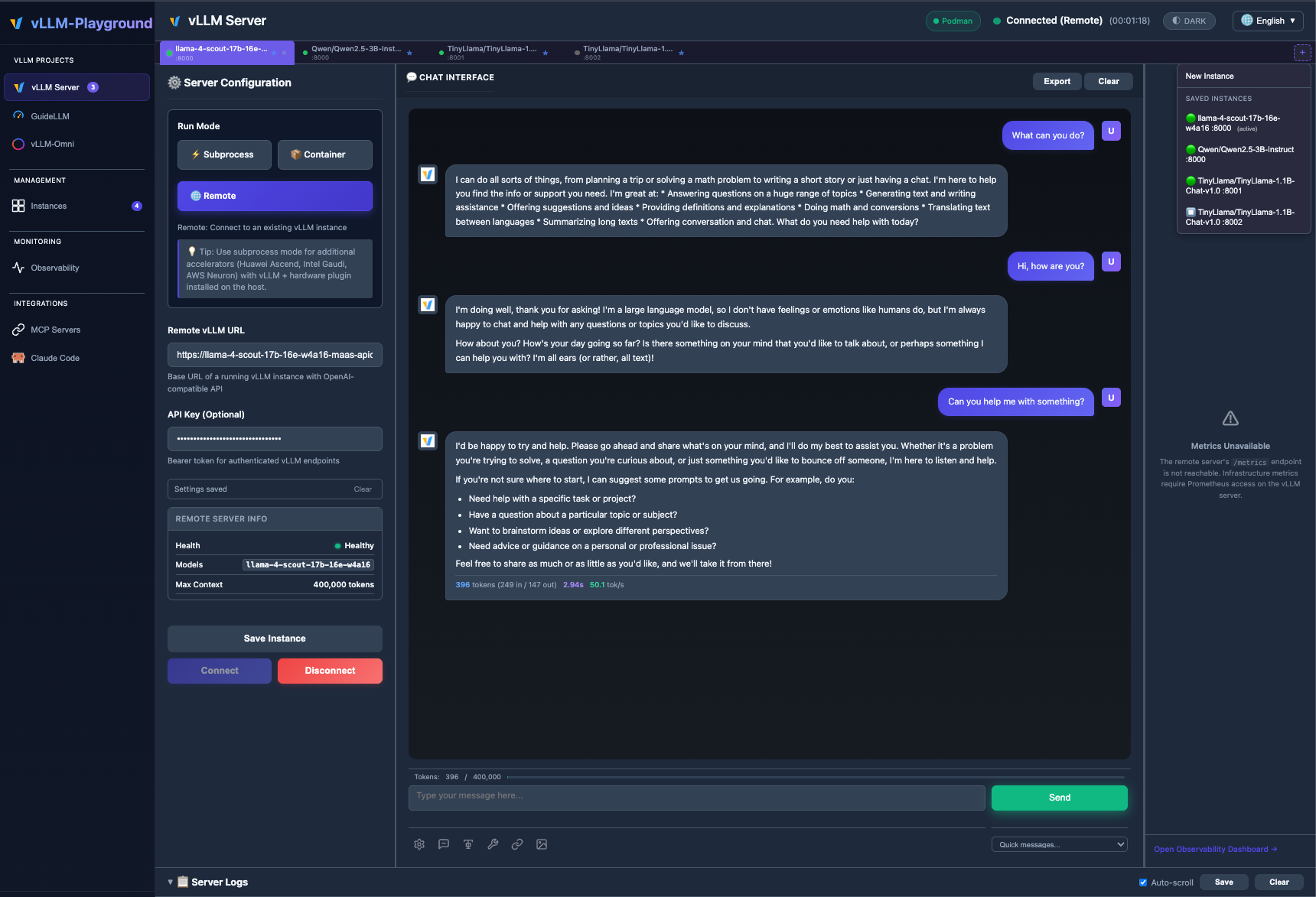
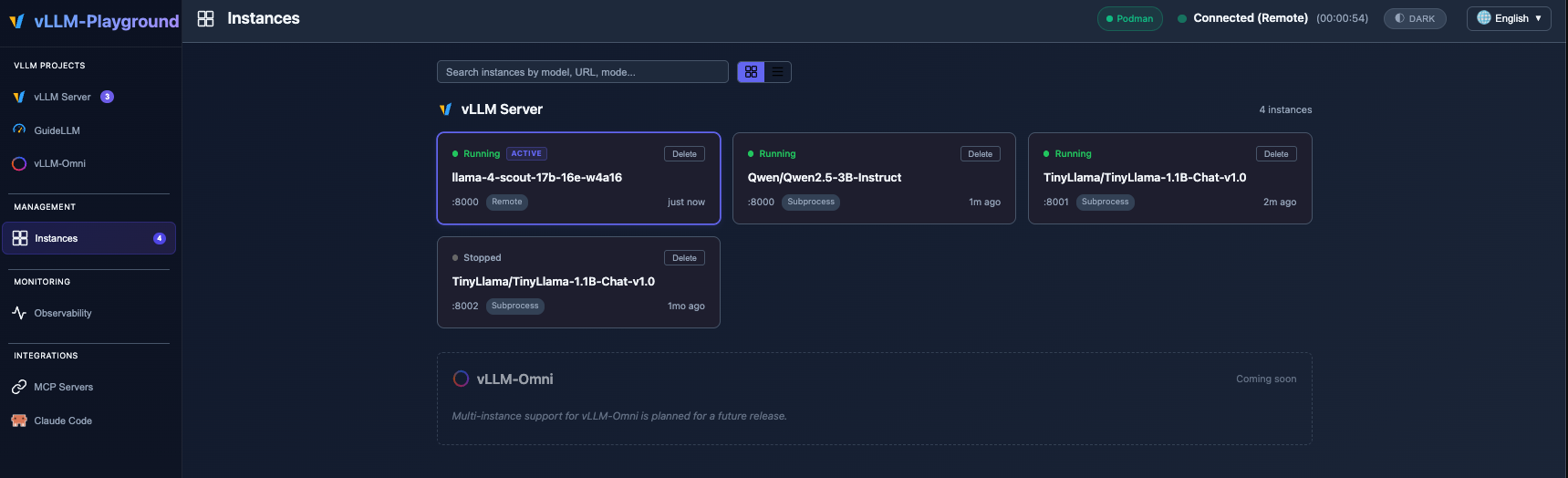
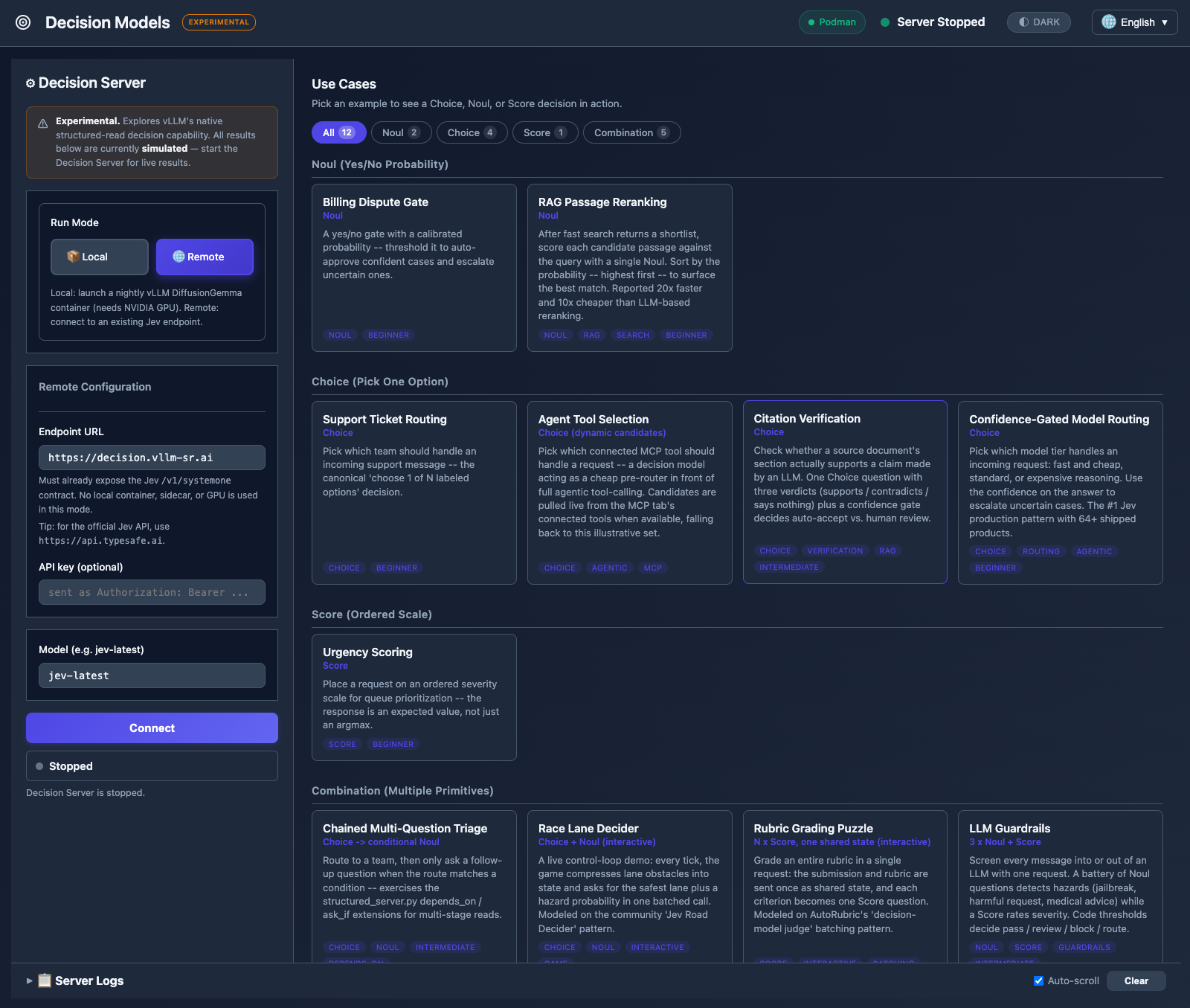
https://api.typesafe.ai) with API key authentication. Credentials are validated at connect time with a probe request, not just a reachability check.v0.1.9 added CI/CD pipeline, configurable container images, and remote mode fixes; v0.1.8 added multi-instance backends — see Changelog for the full history.
# Install from PyPI
pip install vllm-playground

# Pre-download container image (~10GB for GPU)
vllm-playground pull

# Start the playground
vllm-playground
Open http://localhost:7860 and click "Start Server" - that's it! 🎉
vllm-playground pull                # Pre-download GPU image (NVIDIA)
vllm-playground pull --nvidia       # Pre-download NVIDIA GPU image
vllm-playground pull --amd          # Pre-download AMD ROCm image
vllm-playground pull --tpu          # Pre-download Google TPU image
vllm-playground pull --cpu          # Pre-download CPU image
vllm-playground pull --all          # Pre-download all images
vllm-playground --port 8080         # Custom port
vllm-playground stop                # Stop running instance
vllm-playground status              # Check status
| Feature | Description |
|---|---|
| 🧠 Decision Models | Structured-read decisions (Noul, Choice, Score) with Jev/DiffusionGemma — local or remote |
| 🌐 Remote Server | Connect to any remote vLLM instance via URL + API key |
| 🧩 Multi-instance | Several backends at once (subprocess, container, remote); tabs + Instances page |
| 🖼️ VLM Support | Upload images and chat with vision models (Qwen2.5-VL, LLaVA) |
| 🤖 Claude Code | Use open-source models as Claude Code backend via vLLM |
| 💬 Modern Chat UI | Markdown-rendered chat with streaming responses |
| 🔧 Tool Calling | Function calling with Llama, Mistral, Qwen, and more |
| 🔗 MCP Integration | Connect to MCP servers for agentic capabilities |
| 🏗️ Structured Outputs | Constrain responses to JSON Schema, Regex, or Grammar |
| 🐳 Container Mode | Zero-setup vLLM via automatic container management |
| ☸️ OpenShift/K8s | Enterprise deployment with dynamic pod creation |
| 📊 Benchmarking | GuideLLM integration for load testing |
| 📚 Recipes | One-click configs from vLLM community recipes |
| Method | Command | Best For |
|---|---|---|
| PyPI | pip install vllm-playground | Most users |
| With Benchmarking | pip install vllm-playground[benchmark] | Load testing |
| From Source | git clone + python run.py | Development |
| OpenShift/K8s | ./openshift/deploy.sh | Enterprise |
📖 See Installation Guide for detailed instructions.
Enable in Server Configuration before starting:
Supported Models:
llama3_json)mistral)hermes)hermes)Use vLLM to serve open-source models as a backend for Claude Code:
Requirements:
Recommended Model for most GPUs:
meta-llama/Llama-3.1-8B-Instruct
--max-model-len 65536 --enable-auto-tool-choice --tool-call-parser llama3_json
Note: This integration demonstrates using vLLM as a backend for Claude Code. Claude Code is a separate product by Anthropic - users must install it independently and comply with Anthropic's Commercial Terms of Service. vLLM Playground provides the terminal interface only.
Connect to external tools via Model Context Protocol:
⚠️ MCP requires Python 3.10+
Edit config/vllm_cpu.env:
export VLLM_CPU_KVCACHE_SPACE=40
export VLLM_CPU_OMP_THREADS_BIND=auto
vLLM Playground supports Apple Silicon GPU acceleration:
~/.venv-vllm-metal (or your installation path)See macOS Metal Guide for details.
Use specific vLLM versions or custom builds:
/path/to/your/venvSee Custom venv Guide for details.
┌──────────────────┐
│   User Browser   │
└────────┬─────────┘
         │ http://localhost:7860
         ↓
┌──────────────────┐
│   Web UI (Host)  │  ← FastAPI + JavaScript
└────────┬─────────┘
         │
    ┌────┴────┐
    ↓         ↓
┌───────-─┐ ┌────────┐
│ vLLM    │ │  MCP   │  ← Containers / External Servers
│Container│ │Servers │
└────────-┘ └────────┘
📖 See Architecture Overview for details.
| Issue | Solution |
|---|---|
| Port in use | vllm-playground stop |
| Container won't start | podman logs vllm-service |
| Tool calling fails | Restart with "Enable Tool Calling" checked |
| Image pull errors | vllm-playground pull --all |
📖 See Troubleshooting Guide for more.
Apache 2.0 License - See LICENSE file for details.
Contributions welcome! Please see CONTRIBUTING.md for setup instructions and guidelines.
Made with ❤️ for the vLLM community
3,911 followers · starred Nov 2025
6,861 followers · starred Nov 2025
470 followers · starred Jan 2026
872 followers · starred Dec 2025
A modern web interface for managing and interacting with vLLM servers (www.github.com/vllm-project/vllm). Supports both GPU and CPU modes, with special optimizations for macOS Apple Silicon and enterprise deployment on OpenShift/Kubernetes.
See the codeA modern web interface for managing and interacting with vLLM servers (www.github.com/vllm-project/vllm). Supports GPU and CPU modes, with special optimizations for macOS Apple Silicon and enterprise deployment on OpenShift/Kubernetes.
Generate images, edit photos, create speech, and produce music - all with vLLM-Omni integration.
Run Claude Code with open-source models served by vLLM - your private, local coding assistant.
MCP (Model Context Protocol) integration enables models to use external tools with human-in-the-loop approval.
Upload images and chat with vision models like Qwen2.5-VL, LLaVA, and more.
Run subprocess, container, and remote vLLM servers side by side; switch tabs, save configs, and manage everything from Management → Instances. See Multi-Instance Guide for details.
https://api.typesafe.ai) with API key authentication. Credentials are validated at connect time with a probe request, not just a reachability check.v0.1.9 added CI/CD pipeline, configurable container images, and remote mode fixes; v0.1.8 added multi-instance backends — see Changelog for the full history.
# Install from PyPI
pip install vllm-playground

# Pre-download container image (~10GB for GPU)
vllm-playground pull

# Start the playground
vllm-playground
Open http://localhost:7860 and click "Start Server" - that's it! 🎉
vllm-playground pull                # Pre-download GPU image (NVIDIA)
vllm-playground pull --nvidia       # Pre-download NVIDIA GPU image
vllm-playground pull --amd          # Pre-download AMD ROCm image
vllm-playground pull --tpu          # Pre-download Google TPU image
vllm-playground pull --cpu          # Pre-download CPU image
vllm-playground pull --all          # Pre-download all images
vllm-playground --port 8080         # Custom port
vllm-playground stop                # Stop running instance
vllm-playground status              # Check status
| Feature | Description |
|---|---|
| 🧠 Decision Models | Structured-read decisions (Noul, Choice, Score) with Jev/DiffusionGemma — local or remote |
| 🌐 Remote Server | Connect to any remote vLLM instance via URL + API key |
| 🧩 Multi-instance | Several backends at once (subprocess, container, remote); tabs + Instances page |
| 🖼️ VLM Support | Upload images and chat with vision models (Qwen2.5-VL, LLaVA) |
| 🤖 Claude Code | Use open-source models as Claude Code backend via vLLM |
| 💬 Modern Chat UI | Markdown-rendered chat with streaming responses |
| 🔧 Tool Calling | Function calling with Llama, Mistral, Qwen, and more |
| 🔗 MCP Integration | Connect to MCP servers for agentic capabilities |
| 🏗️ Structured Outputs | Constrain responses to JSON Schema, Regex, or Grammar |
| 🐳 Container Mode | Zero-setup vLLM via automatic container management |
| ☸️ OpenShift/K8s | Enterprise deployment with dynamic pod creation |
| 📊 Benchmarking | GuideLLM integration for load testing |
| 📚 Recipes | One-click configs from vLLM community recipes |
| Method | Command | Best For |
|---|---|---|
| PyPI | pip install vllm-playground | Most users |
| With Benchmarking | pip install vllm-playground[benchmark] | Load testing |
| From Source | git clone + python run.py | Development |
| OpenShift/K8s | ./openshift/deploy.sh | Enterprise |
📖 See Installation Guide for detailed instructions.
Enable in Server Configuration before starting:
Supported Models:
llama3_json)mistral)hermes)hermes)Use vLLM to serve open-source models as a backend for Claude Code:
Requirements:
Recommended Model for most GPUs:
meta-llama/Llama-3.1-8B-Instruct
--max-model-len 65536 --enable-auto-tool-choice --tool-call-parser llama3_json
Note: This integration demonstrates using vLLM as a backend for Claude Code. Claude Code is a separate product by Anthropic - users must install it independently and comply with Anthropic's Commercial Terms of Service. vLLM Playground provides the terminal interface only.
Connect to external tools via Model Context Protocol:
⚠️ MCP requires Python 3.10+
Edit config/vllm_cpu.env:
export VLLM_CPU_KVCACHE_SPACE=40
export VLLM_CPU_OMP_THREADS_BIND=auto
vLLM Playground supports Apple Silicon GPU acceleration:
~/.venv-vllm-metal (or your installation path)See macOS Metal Guide for details.
Use specific vLLM versions or custom builds:
/path/to/your/venvSee Custom venv Guide for details.
┌──────────────────┐
│   User Browser   │
└────────┬─────────┘
         │ http://localhost:7860
         ↓
┌──────────────────┐
│   Web UI (Host)  │  ← FastAPI + JavaScript
└────────┬─────────┘
         │
    ┌────┴────┐
    ↓         ↓
┌───────-─┐ ┌────────┐
│ vLLM    │ │  MCP   │  ← Containers / External Servers
│Container│ │Servers │
└────────-┘ └────────┘
📖 See Architecture Overview for details.
| Issue | Solution |
|---|---|
| Port in use | vllm-playground stop |
| Container won't start | podman logs vllm-service |
| Tool calling fails | Restart with "Enable Tool Calling" checked |
| Image pull errors | vllm-playground pull --all |
📖 See Troubleshooting Guide for more.
Apache 2.0 License - See LICENSE file for details.
Contributions welcome! Please see CONTRIBUTING.md for setup instructions and guidelines.
Made with ❤️ for the vLLM community
3,911 followers · starred Nov 2025
6,861 followers · starred Nov 2025
470 followers · starred Jan 2026
872 followers · starred Dec 2025



