This repository is for providing feedback and documentation on the Pylance language server extension in Visual Studio Code. You can use the repository to report issues or submit feature requests. The Pylance codebase is not open-source but you can contribute to Pyright to make improvements to the core typing engine that powers the Pylance experience.
Pylance is the default language support for Python in Visual Studio Code and is shipped as part of that extension as an optional dependency.
The Pylance name is a small ode to Monty Python's Lancelot who was the first knight to answer the bridgekeeper's questions in the Holy Grail.
Note: If you've previously set a language server and want to try Pylance, make sure you've set "python.languageServer": "Default" or "Pylance" in your settings.json file using the text editor, or using the Settings Editor UI.
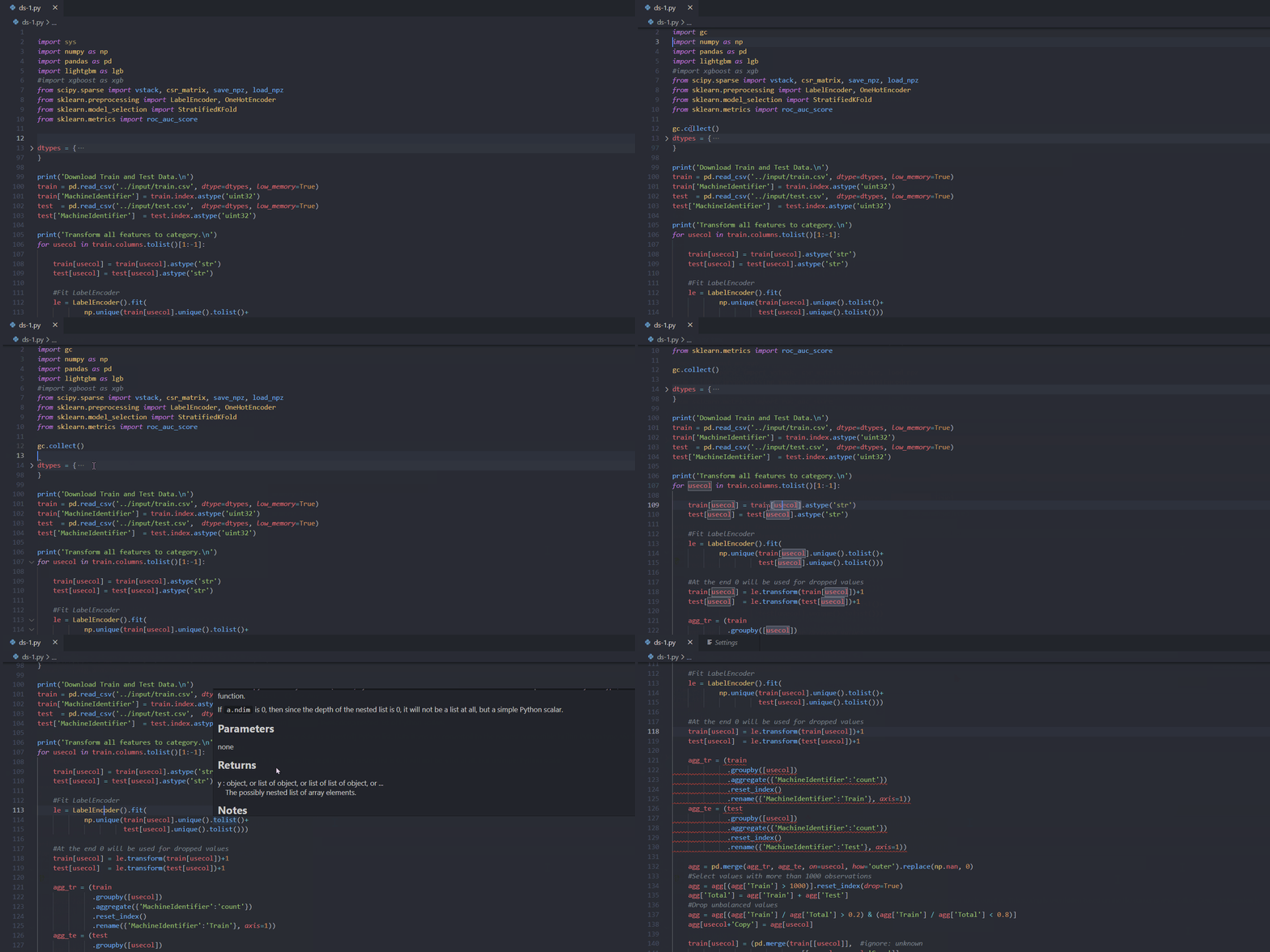
Pylance provides some awesome features for Python 3, including:
Pylance: Generate Dependency File)Pylance: Toggle Block Comment)Pylance: Install Matching Type Stubs)See the changelog for the latest release.
Pylance provides users with the ability to customize their Python language support via a host of settings which can either be placed in the settings.json file in your workspace, or edited through the Settings Editor UI.
python.analysis.languageServerMode
Offers predefined configurations to help users optimize Pylance's performance based on their development needs. It controls how many IntelliSense features Pylance provides, allowing you to choose between full language service functionality or a lightweight experience optimized for performance.
Default value: default
Available values:
lightdefault (default)fullDescription:
default: Provides a balanced experience with many useful features enabled by default. It ensures that the language server delivers sufficient functionality for most users without overloading the system. Advanced features can be enabled as needed, allowing for further customization at the cost of performance.light: Designed for users seeking a lightweight, memory-efficient setup. This mode disables various features to make Pylance function more like a streamlined text editor. Ideal for those who do not require the full breadth of IntelliSense capabilities and prefer Pylance to be as resource-friendly as possible.full: Designed for users seeking the most extensive feature set. This mode enables most of Pylance's features, offering the richest IntelliSense experience. Ideal for those who want access to the full range of available functionality.Individual settings can be configured to override the defaults set by languageServerMode.
Default settings based on mode are:
| Mode | light | default | full |
|---|---|---|---|
| python.analysis.exclude | ["**"] | [] | [] |
| python.analysis.useLibraryCodeForTypes | false | true | true |
| python.analysis.enablePytestSupport | false | true | true |
| python.analysis.indexing | false | true | true |
| python.analysis.userFileIndexFollowSymlinkedFolders | true | true | true |
| python.analysis.autoImportCompletions | false | false | true |
| python.analysis.showOnlyDirectDependenciesInAutoImport | false | false | true |
| python.analysis.packageIndexDepths | See | settings | below |
| python.analysis.regenerateStdLibIndices | false | false | true |
| python.analysis.userFileIndexingLimit | 2000 | 2000 | -1 |
| python.analysis.includeAliasesFromUserFiles | false | false | true |
| python.analysis.functionReturnTypes | false | false | true |
| python.analysis.pytestParameters | false | false | true |
| python.analysis.supportRestructuredText | false | true | true |
| python.analysis.supportDocstringTemplate | false | false | true |
| python.analysis.nodeExecutable | "" | "" | "auto" |
python.analysis.typeCheckingMode
off.
Note that the value of this setting can be overridden by having a pyrightconfig.json or a pyproject.toml. For more information see this link.
off: No type checking analysis is conducted; unresolved imports/variables diagnostics are produced.basic: All rules from off + basic type checking rules.standard: All rules from basic + standard type checking rules.strict: All rules from standard + strict type checking rules.You can refer to pyright documentation to reference the default type checking rules for each of the type checking modes.
python.analysis.typeCheckingMode to off can improve performance by disabling type checking analysis, which can be resource-intensive, especially in large codebases.python.analysis.diagnosticMode
workspaceopenFilesOnly (default)python.analysis.diagnosticMode to openFilesOnly limits analysis to open files, improving performance by reducing the amount of code Pylance needs to process in large workspaces.** (a directory or multiple levels of directories), * (a sequence of zero or more characters), or ? (a single character).** (a directory or multiple levels of directories), * (a sequence of zero or more characters), or ? (a single character). If no exclude paths are specified, Pylance automatically excludes the following: **/node_modules, **/__pycache__, .git and any virtual environment directories.["**"] in light mode)python.analysis.exclude to ["**"] will exclude all files except those currently open, minimizing resource consumption.python.analysis.useDefaultExcludes
python.analysis.exclude: **/node_modules, **/__pycache__, **/__editable__.*, hidden directories (dotfiles), and auto-detected virtual environment directories. These defaults take precedence over python.analysis.include, so a directory auto-detected as a virtual environment stays excluded even if it is explicitly included.false to disable all of these built-in excludes — including virtual environment auto-detection — so that only the paths listed in python.analysis.exclude are excluded. Disabling this can slow analysis significantly if your workspace contains large dependency or environment directories.truepython.analysis.useNearestConfiguration (Experimental)
pyrightconfig.json or pyproject.toml files in subdirectories, creating virtual workspaces for each configuration. This allows different type-checking settings for different parts of your codebase.falsetruefalse (default)python.analysis.exclude patterns.pyproject.toml files containing [tool.pyright] sections are discovered.extraPaths in your pyrightconfig.json or pyproject.toml to reference the other workspace directories. For example:
{
  "extraPaths": ["../other-workspace"]
}
python.analysis.usePerProjectEnvironments
python-envs.pythonProjects. This ensures that each sub-project in a single-root workspace is type checked against its own interpreter.falsetruefalse (default)extraPaths configuration so that cross-project imports resolve correctly. To have Pylance configure these automatically, enable python.analysis.addExtraPathsForPythonProjects.python.analysis.addFoldersForPythonProjects, which continues to work for backwards compatibility.python.analysis.addExtraPathsForPythonProjects
python-envs.pythonProjects to extraPaths, so cross-project imports between sub-projects of a monorepo resolve without configuring extraPaths manually.src directory if present, otherwise the project's parent directory when the project folder is itself a package (contains __init__.py), otherwise the project folder.pyproject.toml are followed transitively, so a registered project that imports sibling packages as editable installs picks up their source roots too. This is what makes monorepos such as dagster resolve without registering every package individually. The following dependency-manager formats are recognized:
[tool.uv.sources] entries with a local path.path/develop entries in [tool.poetry.dependencies], [tool.poetry.dev-dependencies], and [tool.poetry.group.<group>.dependencies].file: direct references (including ${PROJECT_ROOT} and {root:uri} root tokens, and -e/--editable entries) in [project].dependencies, [project.optional-dependencies], [dependency-groups], [tool.pdm.dev-dependencies], and [tool.rye.dev-dependencies].extraPaths you configure are preserved; the detected source roots are appended.falsetruefalse (default)** (a directory or multiple levels of directories), * (a sequence of zero or more characters), or ? (a single character).python.analysis.excludeLibraryDiagnostics
falsepython.analysis.stubPath
./typingspython.analysis.autoSearchPaths
src).true (default)falsepython.autoComplete.extraPaths setting.python.analysis.ignoredPackages
"PIL" rather than "Pillow"). Files in ignored packages return empty content during analysis while the directory structure is preserved for import resolution.python.analysis.disableBundledStubs
true to disable all bundled stubs, or provide a list of package names to disable only those.falsepython.analysis.includeExtraPathSymbolsInSymbolSearch
python.analysis.extraPaths in Workspace Symbol search.falsepy.typed libraries, only symbols exported via a package __init__.py __all__ are included.python.analysis.includeVenvInWorkspaceSymbols
site-packages) in Workspace Symbol search.falsepython.analysis.indexing is enabled.site-packages (or dist-packages on Debian/Ubuntu) are included. Standard library symbols are excluded.py.typed libraries, only symbols exported via a package __init__.py __all__ are included.python.analysis.packageIndexDepths. By default, only top-level modules (depth 1) are indexed. To include symbols from deeper sub-modules (e.g., django.views), increase the depth for the corresponding package in packageIndexDepths.python.analysis.diagnosticSeverityOverrides
error (red squiggle)warning (yellow squiggle)information (blue squiggle)none (disables the rule){
"python.analysis.diagnosticSeverityOverrides": {
"reportUnboundVariable": "information",
"reportImplicitStringConcatenation": "warning"
}
}
python.analysis.typeEvaluation
{
    "python.analysis.typeEvaluation.enableReachabilityAnalysis": true,
    "python.analysis.typeEvaluation.strictDictionaryInference": false
}
python.analysis.disableTaggedHints
truefalse (default)python.analysis.useLibraryCodeForTypes
true (or false in light mode)true (default)falsepython.analysis.useLibraryCodeForTypes to false can improve performance by preventing Pylance from parsing the source code of third-party libraries when type stubs are unavailable, thereby reducing resource usage.true (or false in light mode)true (default)falsepython.analysis.indexing to false can improve performance by reducing resource consumption, especially in large projects, at the cost of making features like auto-imports and workspace symbol search find fewer symbols.python.analysis.userFileIndexFollowSymlinkedFolders
true, workspace symbol search (Ctrl+T) includes symbols from linked package folders, even when their targets are outside the workspace.truetrue (default)falsesite-packages or dist-packages.python.analysis.indexing is enabled.from lib import Symbol or from symlinked import Symbol, turning this setting off can prevent from symlinked import Symbol from being offered when symlinked is reached through a symlinked folder.python.analysis.userFileIndexingLimit
full mode)python.analysis.packageIndexDepths
depth is set to 0, the entry is treated as an exclude prefix and is removed from the index. Exclusions are module-boundary aware: pydantic.v1 excludes pydantic.v1 and pydantic.v1.*, but does not exclude pydantic.v10.[
{ "name": "sklearn", "depth": 2 },
{ "name": "matplotlib", "depth": 2 },
{ "name": "scipy", "depth": 2 },
{ "name": "django", "depth": 4 },
{ "name": "flask", "depth": 2 },
{ "name": "fastapi", "depth": 2 },
{ "name": "cuda", "depth": 3, "includeAllSymbols": true }
]
full mode
[
    { "name": "", "depth": 4,  "includeAllSymbols": true }
]
{
    "name": "package name (str)",
    "depth": "depth to scan (int)",
    "includeAllSymbols": "whether to include all symbols (bool)"
}
includeAllSymbols is set to false, only symbols in each package's __all__ are included. When it's set to true, Pylance will index every module/top level symbol declarations in the file.[
{ "name": "sklearn", "depth": 2, "includeAllSymbols": true },
{ "name": "matplotlib", "depth": 3, "includeAllSymbols": false }
]
[
    { "name": "ctypes", "depth": 0 },
    { "name": "pydantic.v1", "depth": 0 }
]
python.analysis.persistAllIndices
truepython.analysis.regenerateStdLibIndices
stdlib.json indices for all Python versions, generate unique indices tailored to each workspace's specific Python version and platform. This regeneration process will affect performance, unlike using the prebuilt stdlib indices.false (or true in full mode)truefalse (default)python.analysis.includeAliasesFromUserFiles
add import and auto import.false (or true in full mode)truefalse (default)python.analysis.autoImportCompletions
false (or true in full mode)truefalse (default)python.analysis.autoImportCompletions can impact performance by increasing the number of completion items and resource usage. Disabling it can improve performance by reducing the computational overhead during code completion.python.analysis.showOnlyDirectDependenciesInAutoImport
requirements.txt or pyproject.toml in auto import suggestions, if they exist. This only affects auto import for completions. The add import code action will continue to show all possible imports.false (or true in full mode)truefalse (default)python.analysis.importFormat
absolute (default)relativepython.analysis.completeFunctionParens
truefalse (default)python.analysis.completeFunctionParens can slightly improve performance by reducing the overhead during code completion, though the impact is minimal.python.analysis.renameInDocstrings
truefalse (default)python.analysis.inlayHints.variableTypes
truefalse (default)python.analysis.inlayHints.variableTypes to false can improve performance by reducing the processing required to generate these hints, which can be beneficial in large codebases.python.analysis.inlayHints.functionReturnTypes
false (or true in full mode)truefalse (default)python.analysis.inlayHints.callArgumentNames
off (default)partialallpython.analysis.inlayHints.callArgumentNames to off can improve performance by reducing the processing needed to display argument names during function calls.python.analysis.inlayHints.pytestParameters
false (or true in full mode)truefalse (default)def test_foo(my_fixture):
assert(my_fixture)
def test_foo(my_fixture: str):
    assert(my_fixture)
python.analysis.fixAll
source.unusedImportssource.convertImportFormatsource.convertImportStarsource.addTypeAnnotationpython.analysis.enablePytestSupport
true (or false in light mode)true (default)falsepython.analysis.enablePytestSupport to false can improve performance by reducing the overhead associated with providing IntelliSense features for pytest fixtures.python.analysis.enableDjangoSupport [Experimental]
objects, reverse relations, and field descriptors) by merging virtual content into your source files via a file overlay.falsetruefalse (default)python.analysis.enableTreeSitterColorization [Experimental]
true and enable editor.semanticHighlighting.enabled to use it. Requires a trusted workspace and a supported native binary.falsetruefalse (default)python.analysis.enablePydanticSupport [Experimental]
create_model calls.falsetruefalse (default)python.analysis.autoFormatStrings
{ in a string, automatically puts an f on the front of the string.truefalse (default)python.analysis.autoFormatStrings can slightly improve performance by reducing the processing required during string formatting, though the impact is minimal.python.analysis.nodeExecutable
auto, it will automatically download a version from nodejsany executable path or autopython.analysis.nodeArguments
python.analysis.nodeExecutable. Defaults to --max-old-space-size=8192Any argument that node acceptspython.analysis.autoIndent
true (default)falsepython.analysis.autoSplitStrings
true (default)falsepython.analysis.formatOnTypeStyle (Experimental)
editor.formatOnType is enabled for Python.pep8pep8 (default): Use PEP 8-style continuation indentation when auto-indenting wrapped brackets (an extra level of indentation on a function definition's parameter list).black: Use Black-compatible continuation indentation when auto-indenting wrapped brackets (a single level of indentation on a function definition's parameter list).python.analysis.autoTranslateDocstrings
github.copilot.chat.localeOverride). If set to auto, Pylance will use the VS Code display language. Translations preserve Python code blocks, keywords, and markdown formatting.falsetruefalse (default)python.analysis.autoTranslateDocstrings may make hover tooltips display significantly slower due to the time required to call GitHub Copilot for AI-powered translation before showing the hover content.python.analysis.supportRestructuredText
false (or true in full mode)true (default)falsepython.analysis.supportRestructuredText to false can improve performance by reducing the overhead of parsing complex docstrings.python.analysis.aiCodeActions
true or false to enable or disable each action.convertFormatStringconvertLambdaToNamedFunctiongenerateDocstringgenerateSymbolimplementAbstractClasses{
"python.analysis.aiCodeActions": {
"implementAbstractClasses": true,
"generateSymbol": true,
"generateDocstring": true
}
}
python.analysis.supportDocstringTemplate
false (or true in full mode)truefalse (default)def foo(arg):
"""|<Trigger completion or code action here"""
python.analysis.displayEnglishDiagnostics
truefalse (default)python.analysis.generateWithTypeAnnotation
false for type checking mode off, and true for other modes.truefalse (default)python.analysis.diagnosticsSource
Pylance (default) - Use Pylance for diagnostics.Pylance + Pyright - Use a different version of Pyright for diagnostics. Allows running a different Pyright than the one shipped with the Pylance extension. Pyright diagnostics will completely replace the diagnostics from Pylance. See the python.analysis.pyrightVersion setting.Pylance + Pyrefly - Use Pyrefly for diagnostics. Pylance will search for a Pyrefly installation in your virtual environments or download it automatically. See the python.analysis.pyreflyVersion setting.python.analysis.pyrightVersion
python.analysis.diagnosticsSource is set to Pylance + Pyright. Minimum version required is 1.1.397 or higher.1.1.397~/.cache/pyright-python/1.1.397/node_modules/pyright/dist/pyright-langserver.jspython.analysis.pyreflyVersion
python.analysis.diagnosticsSource is set to Pylance + Pyrefly. Minimum version allowed is 1.1.1.1.1.1 — download and use that specific versionpython.analysis.enableColorPicker
true (default) — enables the color picker; eight-digit hex strings use the default RRGGBBAA orderingfalseRRGGBBAA — same eight-digit behavior as trueAARRGGBBpython.analysis.enableTroubleshootMissingImports
truefalse (default)python.analysis.gotoOverrideCodeLens (Experimental)
truefalse (default)python.analysis.supportHtmlEmbeddedPython (Experimental)
<py-script>/<script type="py"> blocks.truefalse (default)python.analysis.cellMagicLanguages (Experimental)
%%, to VS Code language identifiers. In mapped Python notebook cells, Pylance forwards completions, hover, and go to definition for the cell body to the extension that provides the configured language.{}{"sql": "sql", "kql": "kusto", "cypher": "cypher"}python.analysis.enablePyreflyNotificationForAll (Experimental)
off, even if Pyrefly is not installed or configured. Pylance downloads Pyrefly if needed after you accept the offer.python.analysis.enablePyreflyNotification and respects a previous dismissal of the offer.truefalse (default)python.analysis.enablePyreflyShadowExperiment (Experimental)
truefalse (default)Visual Studio Code uses TextMate grammars as the main tokenization engine. TextMate grammars work on a single file as input and break it up based on lexical rules expressed in regular expressions.
Semantic tokenization allows language servers to provide additional token information based on the language server's knowledge on how to resolve symbols in the context of a project. Themes can opt-in to use semantic tokens to improve and refine the syntax highlighting from grammars. The editor applies the highlighting from semantic tokens on top of the highlighting from grammars.
Here's an example of what semantic highlighting can add:
Without semantic highlighting:
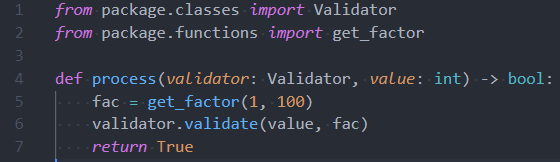
With semantic highlighting:
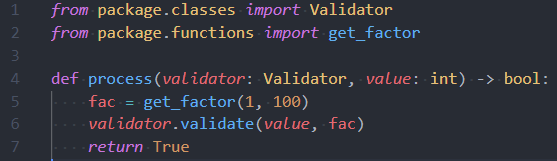
Semantic colors can be customized in settings.json by associating the Pylance semantic token types and modifiers with the desired colors.
Semantic token types
Semantic token modifiers
The scope inspector tool allows you to explore what semantic tokens are present in a source file and what theme rules they match to.
Example of customizing semantic colors in settings.json:
{
    "editor.semanticTokenColorCustomizations": {
        "[One Dark Pro]": { // Apply to this theme only
            "enabled": true,
            "rules": {
                "magicFunction:python": "#ee0000",
                "function.declaration:python": "#990000",
                "*.decorator:python": "#0000dd",
                "*.library:python": "#008000",
                "*.typeHint:python": "#5500aa",
                "*.typeHintComment:python": "#aaaaaa"
            }
        }
    }
}
Pylance provides a set of code actions that are available through the lightbulb menu (or Ctrl+. / Cmd+.).
The exact titles can vary depending on context (e.g. the unresolved symbol name), but the actions below are what
Pylance can offer.
... (adds a missing import for an unresolved symbol)... (may also add an import when the best match is an auto-import)# type: ignore / # pyright: ignore[...] for a diagnostic... to python.analysis.extraPaths (for unresolved imports)from module import *)from x import y)... / Generate class ......source.unusedImports
source.convertImportFormat
python.analysis.importFormat.source.convertImportStar
from module import *) to explicit imports listing all imported symbols.source.convertImportToModule
from x import y style imports into module imports.source.addTypeAnnotation
source.renameShadowedStdlibImports
source.fixAll.pylance
python.analysis.fixAll settingKnown issues are documented in TROUBLESHOOTING.
In desktop VS Code, Pylance automatically restarts after an unexpected server exit. To avoid an endless crash loop, it stops restarting after five crashes unless the server has run continuously for at least 10 minutes between failures. Reaching a ready state briefly does not reset this count; time spent starting or stopped does not count toward recovery. The five-crashes-in-three-minutes limit also remains in effect.
If Pylance stops restarting, inspect the Pylance output channel for crash details and address the reported cause before reloading the VS Code window to try again. The restart limits prevent repeated failures from continuing indefinitely; they do not fix the cause of a crash.
Pylance leverages Microsoft's open-source static type checking tool, Pyright, to provide performant language support for Python.
Code contributions are welcomed via the Pyright repo.
Pylance ships with a collection of type stubs for popular modules to provide fast and accurate auto-completions and type checking. Our type stubs are sourced from typeshed and our work-in-progress stub repository, microsoft/python-type-stubs. Type stubs in microsoft/python-type-stubs will be contributed back to typeshed or added inline to source packages once they are of high enough quality.
For information on getting started, refer to the CONTRIBUTING instructions.
See Pylance's license and the pylance-release repository's license for more information.
111 followers · starred Nov 2020
94 followers · starred Jul 2026
38 followers · starred Mar 2023
502 followers · starred Aug 2021
This repository is for providing feedback and documentation on the Pylance language server extension in Visual Studio Code. You can use the repository to report issues or submit feature requests. The Pylance codebase is not open-source but you can contribute to Pyright to make improvements to the core typing engine that powers the Pylance experience.
Pylance is the default language support for Python in Visual Studio Code and is shipped as part of that extension as an optional dependency.
The Pylance name is a small ode to Monty Python's Lancelot who was the first knight to answer the bridgekeeper's questions in the Holy Grail.
Note: If you've previously set a language server and want to try Pylance, make sure you've set "python.languageServer": "Default" or "Pylance" in your settings.json file using the text editor, or using the Settings Editor UI.
Pylance provides some awesome features for Python 3, including:
Pylance: Generate Dependency File)Pylance: Toggle Block Comment)Pylance: Install Matching Type Stubs)See the changelog for the latest release.
Pylance provides users with the ability to customize their Python language support via a host of settings which can either be placed in the settings.json file in your workspace, or edited through the Settings Editor UI.
python.analysis.languageServerMode
Offers predefined configurations to help users optimize Pylance's performance based on their development needs. It controls how many IntelliSense features Pylance provides, allowing you to choose between full language service functionality or a lightweight experience optimized for performance.
Default value: default
Available values:
lightdefault (default)fullDescription:
default: Provides a balanced experience with many useful features enabled by default. It ensures that the language server delivers sufficient functionality for most users without overloading the system. Advanced features can be enabled as needed, allowing for further customization at the cost of performance.light: Designed for users seeking a lightweight, memory-efficient setup. This mode disables various features to make Pylance function more like a streamlined text editor. Ideal for those who do not require the full breadth of IntelliSense capabilities and prefer Pylance to be as resource-friendly as possible.full: Designed for users seeking the most extensive feature set. This mode enables most of Pylance's features, offering the richest IntelliSense experience. Ideal for those who want access to the full range of available functionality.Individual settings can be configured to override the defaults set by languageServerMode.
Default settings based on mode are:
| Mode | light | default | full |
|---|---|---|---|
| python.analysis.exclude | ["**"] | [] | [] |
| python.analysis.useLibraryCodeForTypes | false | true | true |
| python.analysis.enablePytestSupport | false | true | true |
| python.analysis.indexing | false | true | true |
| python.analysis.userFileIndexFollowSymlinkedFolders | true | true | true |
| python.analysis.autoImportCompletions | false | false | true |
| python.analysis.showOnlyDirectDependenciesInAutoImport | false | false | true |
| python.analysis.packageIndexDepths | See | settings | below |
| python.analysis.regenerateStdLibIndices | false | false | true |
| python.analysis.userFileIndexingLimit | 2000 | 2000 | -1 |
| python.analysis.includeAliasesFromUserFiles | false | false | true |
| python.analysis.functionReturnTypes | false | false | true |
| python.analysis.pytestParameters | false | false | true |
| python.analysis.supportRestructuredText | false | true | true |
| python.analysis.supportDocstringTemplate | false | false | true |
| python.analysis.nodeExecutable | "" | "" | "auto" |
python.analysis.typeCheckingMode
off.
Note that the value of this setting can be overridden by having a pyrightconfig.json or a pyproject.toml. For more information see this link.
off: No type checking analysis is conducted; unresolved imports/variables diagnostics are produced.basic: All rules from off + basic type checking rules.standard: All rules from basic + standard type checking rules.strict: All rules from standard + strict type checking rules.You can refer to pyright documentation to reference the default type checking rules for each of the type checking modes.
python.analysis.typeCheckingMode to off can improve performance by disabling type checking analysis, which can be resource-intensive, especially in large codebases.python.analysis.diagnosticMode
workspaceopenFilesOnly (default)python.analysis.diagnosticMode to openFilesOnly limits analysis to open files, improving performance by reducing the amount of code Pylance needs to process in large workspaces.** (a directory or multiple levels of directories), * (a sequence of zero or more characters), or ? (a single character).** (a directory or multiple levels of directories), * (a sequence of zero or more characters), or ? (a single character). If no exclude paths are specified, Pylance automatically excludes the following: **/node_modules, **/__pycache__, .git and any virtual environment directories.["**"] in light mode)python.analysis.exclude to ["**"] will exclude all files except those currently open, minimizing resource consumption.python.analysis.useDefaultExcludes
python.analysis.exclude: **/node_modules, **/__pycache__, **/__editable__.*, hidden directories (dotfiles), and auto-detected virtual environment directories. These defaults take precedence over python.analysis.include, so a directory auto-detected as a virtual environment stays excluded even if it is explicitly included.false to disable all of these built-in excludes — including virtual environment auto-detection — so that only the paths listed in python.analysis.exclude are excluded. Disabling this can slow analysis significantly if your workspace contains large dependency or environment directories.truepython.analysis.useNearestConfiguration (Experimental)
pyrightconfig.json or pyproject.toml files in subdirectories, creating virtual workspaces for each configuration. This allows different type-checking settings for different parts of your codebase.falsetruefalse (default)python.analysis.exclude patterns.pyproject.toml files containing [tool.pyright] sections are discovered.extraPaths in your pyrightconfig.json or pyproject.toml to reference the other workspace directories. For example:
{
  "extraPaths": ["../other-workspace"]
}
python.analysis.usePerProjectEnvironments
python-envs.pythonProjects. This ensures that each sub-project in a single-root workspace is type checked against its own interpreter.falsetruefalse (default)extraPaths configuration so that cross-project imports resolve correctly. To have Pylance configure these automatically, enable python.analysis.addExtraPathsForPythonProjects.python.analysis.addFoldersForPythonProjects, which continues to work for backwards compatibility.python.analysis.addExtraPathsForPythonProjects
python-envs.pythonProjects to extraPaths, so cross-project imports between sub-projects of a monorepo resolve without configuring extraPaths manually.src directory if present, otherwise the project's parent directory when the project folder is itself a package (contains __init__.py), otherwise the project folder.pyproject.toml are followed transitively, so a registered project that imports sibling packages as editable installs picks up their source roots too. This is what makes monorepos such as dagster resolve without registering every package individually. The following dependency-manager formats are recognized:
[tool.uv.sources] entries with a local path.path/develop entries in [tool.poetry.dependencies], [tool.poetry.dev-dependencies], and [tool.poetry.group.<group>.dependencies].file: direct references (including ${PROJECT_ROOT} and {root:uri} root tokens, and -e/--editable entries) in [project].dependencies, [project.optional-dependencies], [dependency-groups], [tool.pdm.dev-dependencies], and [tool.rye.dev-dependencies].extraPaths you configure are preserved; the detected source roots are appended.falsetruefalse (default)** (a directory or multiple levels of directories), * (a sequence of zero or more characters), or ? (a single character).python.analysis.excludeLibraryDiagnostics
falsepython.analysis.stubPath
./typingspython.analysis.autoSearchPaths
src).true (default)falsepython.autoComplete.extraPaths setting.python.analysis.ignoredPackages
"PIL" rather than "Pillow"). Files in ignored packages return empty content during analysis while the directory structure is preserved for import resolution.python.analysis.disableBundledStubs
true to disable all bundled stubs, or provide a list of package names to disable only those.falsepython.analysis.includeExtraPathSymbolsInSymbolSearch
python.analysis.extraPaths in Workspace Symbol search.falsepy.typed libraries, only symbols exported via a package __init__.py __all__ are included.python.analysis.includeVenvInWorkspaceSymbols
site-packages) in Workspace Symbol search.falsepython.analysis.indexing is enabled.site-packages (or dist-packages on Debian/Ubuntu) are included. Standard library symbols are excluded.py.typed libraries, only symbols exported via a package __init__.py __all__ are included.python.analysis.packageIndexDepths. By default, only top-level modules (depth 1) are indexed. To include symbols from deeper sub-modules (e.g., django.views), increase the depth for the corresponding package in packageIndexDepths.python.analysis.diagnosticSeverityOverrides
error (red squiggle)warning (yellow squiggle)information (blue squiggle)none (disables the rule){
"python.analysis.diagnosticSeverityOverrides": {
"reportUnboundVariable": "information",
"reportImplicitStringConcatenation": "warning"
}
}
python.analysis.typeEvaluation
{
    "python.analysis.typeEvaluation.enableReachabilityAnalysis": true,
    "python.analysis.typeEvaluation.strictDictionaryInference": false
}
python.analysis.disableTaggedHints
truefalse (default)python.analysis.useLibraryCodeForTypes
true (or false in light mode)true (default)falsepython.analysis.useLibraryCodeForTypes to false can improve performance by preventing Pylance from parsing the source code of third-party libraries when type stubs are unavailable, thereby reducing resource usage.true (or false in light mode)true (default)falsepython.analysis.indexing to false can improve performance by reducing resource consumption, especially in large projects, at the cost of making features like auto-imports and workspace symbol search find fewer symbols.python.analysis.userFileIndexFollowSymlinkedFolders
true, workspace symbol search (Ctrl+T) includes symbols from linked package folders, even when their targets are outside the workspace.truetrue (default)falsesite-packages or dist-packages.python.analysis.indexing is enabled.from lib import Symbol or from symlinked import Symbol, turning this setting off can prevent from symlinked import Symbol from being offered when symlinked is reached through a symlinked folder.python.analysis.userFileIndexingLimit
full mode)python.analysis.packageIndexDepths
depth is set to 0, the entry is treated as an exclude prefix and is removed from the index. Exclusions are module-boundary aware: pydantic.v1 excludes pydantic.v1 and pydantic.v1.*, but does not exclude pydantic.v10.[
{ "name": "sklearn", "depth": 2 },
{ "name": "matplotlib", "depth": 2 },
{ "name": "scipy", "depth": 2 },
{ "name": "django", "depth": 4 },
{ "name": "flask", "depth": 2 },
{ "name": "fastapi", "depth": 2 },
{ "name": "cuda", "depth": 3, "includeAllSymbols": true }
]
full mode
[
    { "name": "", "depth": 4,  "includeAllSymbols": true }
]
{
    "name": "package name (str)",
    "depth": "depth to scan (int)",
    "includeAllSymbols": "whether to include all symbols (bool)"
}
includeAllSymbols is set to false, only symbols in each package's __all__ are included. When it's set to true, Pylance will index every module/top level symbol declarations in the file.[
{ "name": "sklearn", "depth": 2, "includeAllSymbols": true },
{ "name": "matplotlib", "depth": 3, "includeAllSymbols": false }
]
[
    { "name": "ctypes", "depth": 0 },
    { "name": "pydantic.v1", "depth": 0 }
]
python.analysis.persistAllIndices
truepython.analysis.regenerateStdLibIndices
stdlib.json indices for all Python versions, generate unique indices tailored to each workspace's specific Python version and platform. This regeneration process will affect performance, unlike using the prebuilt stdlib indices.false (or true in full mode)truefalse (default)python.analysis.includeAliasesFromUserFiles
add import and auto import.false (or true in full mode)truefalse (default)python.analysis.autoImportCompletions
false (or true in full mode)truefalse (default)python.analysis.autoImportCompletions can impact performance by increasing the number of completion items and resource usage. Disabling it can improve performance by reducing the computational overhead during code completion.python.analysis.showOnlyDirectDependenciesInAutoImport
requirements.txt or pyproject.toml in auto import suggestions, if they exist. This only affects auto import for completions. The add import code action will continue to show all possible imports.false (or true in full mode)truefalse (default)python.analysis.importFormat
absolute (default)relativepython.analysis.completeFunctionParens
truefalse (default)python.analysis.completeFunctionParens can slightly improve performance by reducing the overhead during code completion, though the impact is minimal.python.analysis.renameInDocstrings
truefalse (default)python.analysis.inlayHints.variableTypes
truefalse (default)python.analysis.inlayHints.variableTypes to false can improve performance by reducing the processing required to generate these hints, which can be beneficial in large codebases.python.analysis.inlayHints.functionReturnTypes
false (or true in full mode)truefalse (default)python.analysis.inlayHints.callArgumentNames
off (default)partialallpython.analysis.inlayHints.callArgumentNames to off can improve performance by reducing the processing needed to display argument names during function calls.python.analysis.inlayHints.pytestParameters
false (or true in full mode)truefalse (default)def test_foo(my_fixture):
assert(my_fixture)
def test_foo(my_fixture: str):
    assert(my_fixture)
python.analysis.fixAll
source.unusedImportssource.convertImportFormatsource.convertImportStarsource.addTypeAnnotationpython.analysis.enablePytestSupport
true (or false in light mode)true (default)falsepython.analysis.enablePytestSupport to false can improve performance by reducing the overhead associated with providing IntelliSense features for pytest fixtures.python.analysis.enableDjangoSupport [Experimental]
objects, reverse relations, and field descriptors) by merging virtual content into your source files via a file overlay.falsetruefalse (default)python.analysis.enableTreeSitterColorization [Experimental]
true and enable editor.semanticHighlighting.enabled to use it. Requires a trusted workspace and a supported native binary.falsetruefalse (default)python.analysis.enablePydanticSupport [Experimental]
create_model calls.falsetruefalse (default)python.analysis.autoFormatStrings
{ in a string, automatically puts an f on the front of the string.truefalse (default)python.analysis.autoFormatStrings can slightly improve performance by reducing the processing required during string formatting, though the impact is minimal.python.analysis.nodeExecutable
auto, it will automatically download a version from nodejsany executable path or autopython.analysis.nodeArguments
python.analysis.nodeExecutable. Defaults to --max-old-space-size=8192Any argument that node acceptspython.analysis.autoIndent
true (default)falsepython.analysis.autoSplitStrings
true (default)falsepython.analysis.formatOnTypeStyle (Experimental)
editor.formatOnType is enabled for Python.pep8pep8 (default): Use PEP 8-style continuation indentation when auto-indenting wrapped brackets (an extra level of indentation on a function definition's parameter list).black: Use Black-compatible continuation indentation when auto-indenting wrapped brackets (a single level of indentation on a function definition's parameter list).python.analysis.autoTranslateDocstrings
github.copilot.chat.localeOverride). If set to auto, Pylance will use the VS Code display language. Translations preserve Python code blocks, keywords, and markdown formatting.falsetruefalse (default)python.analysis.autoTranslateDocstrings may make hover tooltips display significantly slower due to the time required to call GitHub Copilot for AI-powered translation before showing the hover content.python.analysis.supportRestructuredText
false (or true in full mode)true (default)falsepython.analysis.supportRestructuredText to false can improve performance by reducing the overhead of parsing complex docstrings.python.analysis.aiCodeActions
true or false to enable or disable each action.convertFormatStringconvertLambdaToNamedFunctiongenerateDocstringgenerateSymbolimplementAbstractClasses{
"python.analysis.aiCodeActions": {
"implementAbstractClasses": true,
"generateSymbol": true,
"generateDocstring": true
}
}
python.analysis.supportDocstringTemplate
false (or true in full mode)truefalse (default)def foo(arg):
"""|<Trigger completion or code action here"""
python.analysis.displayEnglishDiagnostics
truefalse (default)python.analysis.generateWithTypeAnnotation
false for type checking mode off, and true for other modes.truefalse (default)python.analysis.diagnosticsSource
Pylance (default) - Use Pylance for diagnostics.Pylance + Pyright - Use a different version of Pyright for diagnostics. Allows running a different Pyright than the one shipped with the Pylance extension. Pyright diagnostics will completely replace the diagnostics from Pylance. See the python.analysis.pyrightVersion setting.Pylance + Pyrefly - Use Pyrefly for diagnostics. Pylance will search for a Pyrefly installation in your virtual environments or download it automatically. See the python.analysis.pyreflyVersion setting.python.analysis.pyrightVersion
python.analysis.diagnosticsSource is set to Pylance + Pyright. Minimum version required is 1.1.397 or higher.1.1.397~/.cache/pyright-python/1.1.397/node_modules/pyright/dist/pyright-langserver.jspython.analysis.pyreflyVersion
python.analysis.diagnosticsSource is set to Pylance + Pyrefly. Minimum version allowed is 1.1.1.1.1.1 — download and use that specific versionpython.analysis.enableColorPicker
true (default) — enables the color picker; eight-digit hex strings use the default RRGGBBAA orderingfalseRRGGBBAA — same eight-digit behavior as trueAARRGGBBpython.analysis.enableTroubleshootMissingImports
truefalse (default)python.analysis.gotoOverrideCodeLens (Experimental)
truefalse (default)python.analysis.supportHtmlEmbeddedPython (Experimental)
<py-script>/<script type="py"> blocks.truefalse (default)python.analysis.cellMagicLanguages (Experimental)
%%, to VS Code language identifiers. In mapped Python notebook cells, Pylance forwards completions, hover, and go to definition for the cell body to the extension that provides the configured language.{}{"sql": "sql", "kql": "kusto", "cypher": "cypher"}python.analysis.enablePyreflyNotificationForAll (Experimental)
off, even if Pyrefly is not installed or configured. Pylance downloads Pyrefly if needed after you accept the offer.python.analysis.enablePyreflyNotification and respects a previous dismissal of the offer.truefalse (default)python.analysis.enablePyreflyShadowExperiment (Experimental)
truefalse (default)Visual Studio Code uses TextMate grammars as the main tokenization engine. TextMate grammars work on a single file as input and break it up based on lexical rules expressed in regular expressions.
Semantic tokenization allows language servers to provide additional token information based on the language server's knowledge on how to resolve symbols in the context of a project. Themes can opt-in to use semantic tokens to improve and refine the syntax highlighting from grammars. The editor applies the highlighting from semantic tokens on top of the highlighting from grammars.
Here's an example of what semantic highlighting can add:
Without semantic highlighting:
With semantic highlighting:
Semantic colors can be customized in settings.json by associating the Pylance semantic token types and modifiers with the desired colors.
Semantic token types
Semantic token modifiers
The scope inspector tool allows you to explore what semantic tokens are present in a source file and what theme rules they match to.
Example of customizing semantic colors in settings.json:
{
    "editor.semanticTokenColorCustomizations": {
        "[One Dark Pro]": { // Apply to this theme only
            "enabled": true,
            "rules": {
                "magicFunction:python": "#ee0000",
                "function.declaration:python": "#990000",
                "*.decorator:python": "#0000dd",
                "*.library:python": "#008000",
                "*.typeHint:python": "#5500aa",
                "*.typeHintComment:python": "#aaaaaa"
            }
        }
    }
}
Pylance provides a set of code actions that are available through the lightbulb menu (or Ctrl+. / Cmd+.).
The exact titles can vary depending on context (e.g. the unresolved symbol name), but the actions below are what
Pylance can offer.
... (adds a missing import for an unresolved symbol)... (may also add an import when the best match is an auto-import)# type: ignore / # pyright: ignore[...] for a diagnostic... to python.analysis.extraPaths (for unresolved imports)from module import *)from x import y)... / Generate class ......source.unusedImports
source.convertImportFormat
python.analysis.importFormat.source.convertImportStar
from module import *) to explicit imports listing all imported symbols.source.convertImportToModule
from x import y style imports into module imports.source.addTypeAnnotation
source.renameShadowedStdlibImports
source.fixAll.pylance
python.analysis.fixAll settingKnown issues are documented in TROUBLESHOOTING.
In desktop VS Code, Pylance automatically restarts after an unexpected server exit. To avoid an endless crash loop, it stops restarting after five crashes unless the server has run continuously for at least 10 minutes between failures. Reaching a ready state briefly does not reset this count; time spent starting or stopped does not count toward recovery. The five-crashes-in-three-minutes limit also remains in effect.
If Pylance stops restarting, inspect the Pylance output channel for crash details and address the reported cause before reloading the VS Code window to try again. The restart limits prevent repeated failures from continuing indefinitely; they do not fix the cause of a crash.
Pylance leverages Microsoft's open-source static type checking tool, Pyright, to provide performant language support for Python.
Code contributions are welcomed via the Pyright repo.
Pylance ships with a collection of type stubs for popular modules to provide fast and accurate auto-completions and type checking. Our type stubs are sourced from typeshed and our work-in-progress stub repository, microsoft/python-type-stubs. Type stubs in microsoft/python-type-stubs will be contributed back to typeshed or added inline to source packages once they are of high enough quality.
For information on getting started, refer to the CONTRIBUTING instructions.
See Pylance's license and the pylance-release repository's license for more information.
111 followers · starred Nov 2020
94 followers · starred Jul 2026
38 followers · starred Mar 2023
502 followers · starred Aug 2021