a family of versatile and state-of-the-art video tokenizers.
Python
460
37 commits
updated Sep 1, 2025


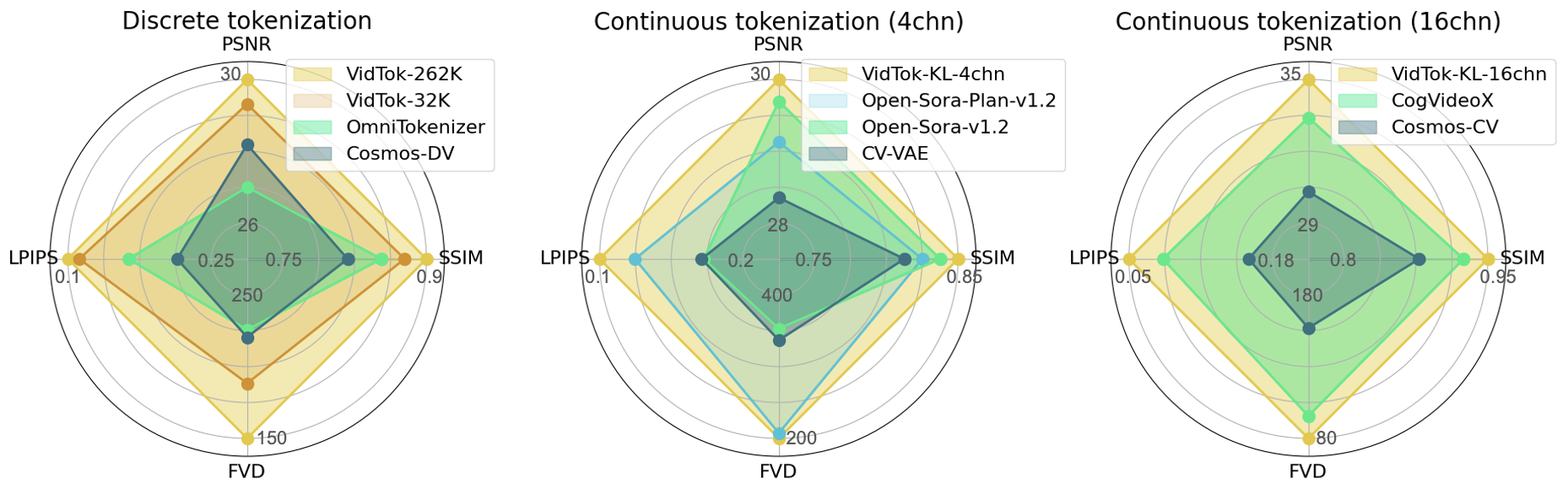
We introduce VidTok, a cutting-edge family of video tokenizers that excels in both continuous and discrete tokenizations. VidTok incorporates several key advancements over existing approaches:
VidTok, trained on a large-scale video dataset, outperforms previous models across all metrics, including PSNR, SSIM, LPIPS, and FVD.
https://github.com/user-attachments/assets/a3341037-130d-4a83-aba6-c3daeaf66932
VidTok v1.1 is an update for causal models. We fine-tuned all causal models on long videos to support tokenization and reconstruction of videos of arbitrary length with fine temporal smoothness. See performance here.
Run the following inference script to reconstruct an input video:
python scripts/inference_reconstruct.py --config CONFIG_v1_1 --ckpt CKPT_v1_1 --input_video_path VIDEO_PATH --input_height 256 --input_width 256 --sample_fps 30 --chunk_size CHUNK_SIZE --output_video_dir OUTPUT_DIR --read_long_video
# Set `CHUNK_SIZE` according to your GPU memory, recommendly 16.
and run the following inference script to evaluate the reconstruction performance:
python scripts/inference_evaluate.py --config CONFIG_v1_1 --ckpt CKPT_v1_1 --data_dir DATA_DIR --input_height 256 --input_width 256 --sample_fps 30 --chunk_size CHUNK_SIZE --read_long_video
# Set `CHUNK_SIZE` according to your GPU memory, recommendly 16.
For an easy usage of VidTok v1.1 models, refer to this script and make the following revision:
# Use VidTok v1.1 models
cfg_path = "configs/vidtok_v1_1/vidtok_kl_causal_488_4chn_v1_1.yaml"
ckpt_path = "checkpoints/vidtok_v1_1/vidtok_kl_causal_488_4chn_v1_1.ckpt"

...

model.to('cuda').eval()
# Using tiling inference to save memory usage
model.use_tiling = True
model.t_chunk_enc = 16
model.t_chunk_dec = model.t_chunk_enc // model.encoder.time_downsample_factor
model.use_overlap = True
# random input: long video
x_input = (torch.rand(1, 3, 129, 256, 256) * 2 - 1).to('cuda')

...

if x_recon.shape[2] != x_input.shape[2]:
    x_recon = x_recon[:, :, -x_input.shape[2]:, ...]
Follow this training guidance to fine-tune on your custom long video data and note that:
NUM_FRAMES_1 to 33, 49, or larger).| Model | Regularizer | Causal | VCR | PSNR | SSIM | LPIPS | FVD |
|---|---|---|---|---|---|---|---|
| vidtok_kl_causal_488_16chn_v1_1 | KL-16chn | ✔️ | 4x8x8 | 35.13 | 0.941 | 0.049 | 87.4 |
| vidtok_kl_causal_41616_16chn_v1_1 | KL-16chn | ✔️ | 4x16x16 | 29.61 | 0.854 | 0.113 | 162.7 |
| vidtok_kl_causal_288_8chn_v1_1 | KL-8chn | ✔️ | 2x8x8 | 34.59 | 0.935 | 0.051 | 78.2 |
| vidtok_fsq_causal_488_32768_v1_1 | FSQ-32,768 | ✔️ | 4x8x8 | 29.39 | 0.856 | 0.114 | 168.5 |
| vidtok_fsq_causal_888_32768_v1_1 | FSQ-32,768 | ✔️ | 8x8x8 | 27.95 | 0.817 | 0.142 | 293.2 |
256x256.git clone https://github.com/microsoft/VidTok
cd VidTok
environment.yaml file for setting up a Conda environment. Conda's installation instructions are available here.# 1. Prepare conda environment
conda env create -f environment.yaml
# 2. Activate the environment
conda activate vidtok
We recommend using 1+ high-end GPU for training and inference. We have done all testing and development using A100 and MI300X GPUs. For convenience, we also provide prebuilt Docker images with required dependencies. You can use it as follows:
# NVIDIA GPUs
docker run -it --gpus all --shm-size 256G --rm -v `pwd`:/workspace --workdir /workspace \
    deeptimhe/ubuntu22.04-cuda12.1-python3.10-pytorch2.5:orig-vidtok bash
# AMD GPUs
docker run -it --gpus all --shm-size 256G --rm -v `pwd`:/workspace --workdir /workspace \
    deeptimhe/ubuntu22.04-rocm6.2.4-python3.10-pytorch2.5:orig-vidtok bash
Download pre-trained models here, and put them in checkpoints folder, like:
└── checkpoints
    ├── vidtok_v1_1
    │   ├── vidtok_kl_causal_488_16chn_v1_1.ckpt
    │   └── ...
    ├── vidtok_fsq_causal_41616_262144.ckpt
    ├── vidtok_fsq_causal_488_262144.ckpt
    ├── vidtok_fsq_causal_488_32768.ckpt
    ├── vidtok_fsq_causal_488_4096.ckpt
    ├── vidtok_fsq_noncausal_41616_262144.ckpt
    ├── vidtok_fsq_noncausal_488_262144.ckpt
    ├── vidtok_kl_causal_288_8chn.ckpt
    ├── vidtok_kl_causal_41616_4chn.ckpt
    ├── vidtok_kl_causal_444_4chn.ckpt
    ├── vidtok_kl_causal_488_16chn.ckpt
    ├── vidtok_kl_causal_488_4chn.ckpt
    ├── vidtok_kl_causal_488_8chn.ckpt
    ├── vidtok_kl_noncausal_41616_16chn.ckpt
    ├── vidtok_kl_noncausal_41616_4chn.ckpt
    ├── vidtok_kl_noncausal_488_16chn.ckpt
    └── vidtok_kl_noncausal_488_4chn.ckpt
Each checkpoint has a corresponding config file with the same name in configs folder.
| Model | Regularizer | Causal | VCR | PSNR | SSIM | LPIPS | FVD |
|---|---|---|---|---|---|---|---|
| vidtok_kl_causal_488_4chn | KL-4chn | ✔️ | 4x8x8 | 29.64 | 0.852 | 0.114 | 194.2 |
| vidtok_kl_causal_488_8chn | KL-8chn | ✔️ | 4x8x8 | 31.83 | 0.897 | 0.083 | 109.3 |
| vidtok_kl_causal_488_16chn | KL-16chn | ✔️ | 4x8x8 | 35.04 | 0.942 | 0.047 | 78.9 |
| vidtok_kl_causal_288_8chn | KL-8chn | ✔️ | 2x8x8 | 33.86 | 0.928 | 0.057 | 80.7 |
| vidtok_kl_causal_444_4chn | KL-4chn | ✔️ | 4x4x4 | 34.78 | 0.941 | 0.051 | 87.2 |
| vidtok_kl_causal_41616_4chn | KL-4chn | ✔️ | 4x16x16 | 25.05 | 0.711 | 0.228 | 549.1 |
| vidtok_kl_noncausal_488_4chn | KL-4chn | ✖️ | 4x8x8 | 30.60 | 0.876 | 0.098 | 157.9 |
| vidtok_kl_noncausal_488_16chn | KL-16chn | ✖️ | 4x8x8 | 36.13 | 0.950 | 0.044 | 60.5 |
| vidtok_kl_noncausal_41616_4chn | KL-4chn | ✖️ | 4x16x16 | 26.06 | 0.751 | 0.190 | 423.2 |
| vidtok_kl_noncausal_41616_16chn | KL-16chn | ✖️ | 4x16x16 | 30.69 | 0.878 | 0.095 | 147.1 |
| vidtok_fsq_causal_488_262144 | FSQ-262,144 | ✔️ | 4x8x8 | 29.82 | 0.867 | 0.106 | 160.1 |
| vidtok_fsq_causal_488_32768 | FSQ-32,768 | ✔️ | 4x8x8 | 29.16 | 0.854 | 0.117 | 196.9 |
| vidtok_fsq_causal_488_4096 | FSQ-4096 | ✔️ | 4x8x8 | 28.36 | 0.832 | 0.133 | 218.1 |
| vidtok_fsq_causal_41616_262144 | FSQ-262,144 | ✔️ | 4x16x16 | 25.38 | 0.738 | 0.206 | 430.1 |
| vidtok_fsq_noncausal_488_262144 | FSQ-262,144 | ✖️ | 4x8x8 | 30.78 | 0.889 | 0.091 | 132.1 |
| vidtok_fsq_noncausal_41616_262144 | FSQ-262,144 | ✖️ | 4x16x16 | 26.37 | 0.772 | 0.171 | 357.0 |
VCR indicates the video compression ratio TxHxW.17x256x256 for causal models and 16x256x256 for non-causal models.DATA_DIR:└── DATA_DIR
├── subset1
│ ├── videoname11.mp4
│ └── videoname12.mp4
├── subset2
│ ├── videoname21.mp4
│ ├── videoname22.mp4
│ └── subsubset1
│ ├── videoname211.mp4
│ └── videoname212.mp4
└── ...
.csv meta file to record the relative paths of these videos with respect to DATA_DIR, like:videos
subset1/videoname11.mp4
subset2/videoname21.mp4
subset2/subsubset1/videoname211.mp4
Validation data is also prepared following the above steps.
CONFIG file from configs folder based on your needs, and modify the following parameters:ckpt_path parameter to initialize the model with pre-trained checkpoint parameters:model:
params:
ckpt_path: PATH_TO_CHECKPOINT # train from existing checkpoint
data section to use your own training and validation data: train:
target: vidtok.data.vidtok.VidTokDataset
params:
data_dir: DATA_DIR_1 # DATA_DIR for training data
meta_path: META_PATH_1 # path to the .csv meta file of training data
video_params:
input_height: INPUT_HEIGHT_1
input_width: INPUT_WIDTH_1
sample_num_frames: NUM_FRAMES_1 # typically set to 17 for causal models and 16 for non-causal models
sample_fps: SAMPLE_FPS_1 # sample fps for training data
validation:
target: vidtok.data.vidtok.VidTokDataset
params:
data_dir: DATA_DIR_2 # DATA_DIR for validation data
meta_path: META_PATH_2 # path to the .csv meta file of validation data
video_params:
input_height: INPUT_HEIGHT_2
input_width: INPUT_WIDTH_2
sample_num_frames: NUM_FRAMES_2 # typically set to 17 for causal models and 16 for non-causal models
sample_fps: SAMPLE_FPS_2 # sample fps for validation data
start_index: 0 # fixed value to ensure the same sampled data
fix_encoder and fix_decoder to be False to enable full model fine-tuning:model:
params:
encoder_config:
params:
fix_encoder: false
fix_decoder: false
python main.py -b CONFIG --logdir LOGDIR

# You can also use `torchrun` to start the training code.
Training logs and checkpoints are saved in LOGDIR.
It is recommended to use Weights & Biases as the data visualization tool (TensorBoard by default). Use wandb login to log in first, and then run:
python main.py -b CONFIG --logdir LOGDIR --wandb --wandb_entity ENTITY --wandb_project PROJECT
| First Stage | Second Stage | Fix encoder | PSNR | SSIM | LPIPS | GPU Hours |
|---|---|---|---|---|---|---|
| 256 x 256 | - | - | 29.19 | 0.843 | 0.127 | 3,072 |
| 128 x 128 | 256 x 256 | ✔️ | 29.21 | 0.843 | 0.125 | 1,536 |
CONFIG file from configs folder based on your needs, and specify the data section to use your own training and validation data: train:
target: vidtok.data.vidtok.VidTokDataset
params:
data_dir: DATA_DIR_1 # DATA_DIR for training data
meta_path: META_PATH_1 # path to the .csv meta file of training data
video_params:
input_height: INPUT_HEIGHT_1 # vary in different training stages
input_width: INPUT_WIDTH_1 # vary in different training stages
sample_num_frames: NUM_FRAMES_1 # typically set to 17 for causal models and 16 for non-causal models
sample_fps: SAMPLE_FPS_1 # sample fps for training data
validation:
target: vidtok.data.vidtok.VidTokDataset
params:
data_dir: DATA_DIR_2 # DATA_DIR for validation data
meta_path: META_PATH_2 # path to the .csv meta file of validation data
video_params:
input_height: INPUT_HEIGHT_2
input_width: INPUT_WIDTH_2
sample_num_frames: NUM_FRAMES_2 # typically set to 17 for causal models and 16 for non-causal models
sample_fps: SAMPLE_FPS_2 # sample fps for validation data
start_index: 0 # fixed value to ensure the same sampled data
CONFIG file to enable full model training with low-resolution data:model:
params:
# ckpt_path: # disable this parameter so as to train from scratch
encoder_config:
params:
fix_encoder: false
fix_decoder: false
data:
params:
train:
params:
video_params:
input_height: 128
input_width: 128
Then revise other hyperparameters according to your needs, and run the training command to start training as in Fine-tune on Custom Data. We train VidTok for 50,000 steps with batch size 16 in this stage.
CONFIG file to enable the fine-tuning of the decoder with high-resolution data:model:
params:
ckpt_path: CKPT_PATH # path to the saved checkpoint after the first stage of training
encoder_config:
params:
fix_encoder: true
fix_decoder: false
data:
params:
train:
params:
video_params:
input_height: 256
input_width: 256
Then revise other hyperparameters according to your needs, and run the training command to start training as in Fine-tune on Custom Data. We train VidTok for 30,000 steps with batch size 8 in this stage.
We provide the following example for a quick usage of our models. It works for both continuous and discrete tokenization and both causal and non-causal models.
Just provide the path to the configuration file cfg_path and checkpoint file ckpt_path.
import torch
from scripts.inference_evaluate import load_model_from_config

cfg_path = "configs/vidtok_kl_causal_488_4chn.yaml"
ckpt_path = "checkpoints/vidtok_kl_causal_488_4chn.ckpt"

# load pre-trained model
model = load_model_from_config(cfg_path, ckpt_path)
model.to('cuda').eval()
# random input
num_frames = 17 if model.is_causal else 16
x_input = (torch.rand(1, 3, num_frames, 256, 256) * 2 - 1).to('cuda')  # [B,C,T,H,W], range -1~1
# model forward
with torch.no_grad(), torch.autocast(device_type='cuda', dtype=torch.float16):
    _, x_recon, _ = model(x_input)
assert x_input.shape == x_recon.shape
If you want to directly infer from latent tokens, run the following code:
z, reg_log = model.encode(x_input, return_reg_log=True)
# infer from continuous latent space
x_recon = model.decode(z)
# infer from discrete latent tokens
x_recon = model.decode(reg_log['indices'], decode_from_indices=True)
Use compiled components in VidTok can speed up inference by as much as 2X. The following code snippet demonstrates how to compile our models.
import torch
from scripts.inference_evaluate import load_model_from_config

torch._inductor.config.cpp.weight_prepack=True
torch._inductor.config.freezing=True

cfg_path = "configs/vidtok_kl_causal_488_4chn.yaml"
ckpt_path = "checkpoints/vidtok_kl_causal_488_4chn.ckpt"

# load pre-trained model
model = load_model_from_config(cfg_path, ckpt_path)
model.to('cuda').eval()
model.encoder = torch.compile(model.encoder)
model.decoder = torch.compile(model.decoder)

# random input
num_frames = 17 if model.is_causal else 16
x_input = (torch.rand(1, 3, num_frames, 256, 256) * 2 - 1).to('cuda')  # [B,C,T,H,W], range -1~1

# Warm Up
with torch.no_grad(), torch.autocast(device_type='cuda', dtype=torch.float16):
    _, x_recon, _ = model(x_input)

torch.cuda.synchronize()
import time
start = time.time()
with torch.no_grad(), torch.autocast(device_type='cuda', dtype=torch.float16):
    for i in range(10):
        _, x_recon, _ = model(x_input)
torch.cuda.synchronize()
print(f"Average inference time: {(time.time() - start)/10 :.4f} seconds")
python scripts/inference_reconstruct.py --config CONFIG --ckpt CKPT --input_video_path VIDEO_PATH --input_height 256 --input_width 256 --sample_fps 30 --output_video_dir OUTPUT_DIR
VIDEO_PATH to the path of your test video. We provide an example video in assets/example.mp4.OUTPUT_DIR.--pad_gen_frames to the command line, which may improve the smoothness of the reconstructed video.We also provide a manuscript scripts/inference_evaluate.py to evaluate the video reconstruction performance in PSNR, SSIM and LPIPS.
DATA_DIR..mp4 videos under DATA_DIR will be tested:python scripts/inference_evaluate.py --config CONFIG --ckpt CKPT --data_dir DATA_DIR --input_height 256 --input_width 256 --sample_fps 30
(Optional) If you only want to test certain videos under DATA_DIR, you need to prepare a .csv meta file
to indicate the video files to be tested (refer to Data Preparation). And add --meta_path META_PATH to the above command to specify the path to the .csv meta file.
We are sharing our model with the research community to foster further research in this area:
Our models are not specifically designed or evaluated for all downstream purposes. Developers should consider common limitations of video tokenizers (e.g., performance degradation on out-of-domain data) as they select use cases, and evaluate and mitigate for privacy, safety, and fairness before using within a specific downstream use case, particularly for high-risk scenarios.
Developers should be aware of and adhere to applicable laws or regulations (including privacy, trade compliance laws, etc.) that are relevant to their use case.
Some of the limitations of this model to be aware of include:
This codebase borrows code from generative-models. We thank Stability AI for its efforts and innovations, which have made the development process more efficient and convenient.
Thank you to everyone who contributed their wisdom and efforts to this project.
@article{tang2024vidtok,
  title={VidTok: A Versatile and Open-Source Video Tokenizer},
  author={Tang, Anni and He, Tianyu and Guo, Junliang and Cheng, Xinle and Song, Li and Bian, Jiang},
  year={2024},
  journal={arXiv preprint arXiv:2412.13061},
}
We welcome feedback and collaboration from our audience. If you have suggestions, questions, or observe unexpected/offensive behavior in our technology, please contact us at [email protected].
This project welcomes contributions and suggestions. Most contributions require you to agree to a Contributor License Agreement (CLA) declaring that you have the right to, and actually do, grant us the rights to use your contribution. For details, visit https://cla.opensource.microsoft.com.
When you submit a pull request, a CLA bot will automatically determine whether you need to provide a CLA and decorate the PR appropriately (e.g., status check, comment). Simply follow the instructions provided by the bot. You will only need to do this once across all repos using our CLA.
This project has adopted the Microsoft Open Source Code of Conduct. For more information see the Code of Conduct FAQ or contact [email protected] with any additional questions or comments.
This project may contain trademarks or logos for projects, products, or services. Authorized use of Microsoft trademarks or logos is subject to and must follow Microsoft's Trademark & Brand Guidelines. Use of Microsoft trademarks or logos in modified versions of this project must not cause confusion or imply Microsoft sponsorship. Any use of third-party trademarks or logos are subject to those third-party's policies.
69 followers · starred Dec 2024
499 followers · starred Dec 2024
290 followers · starred Dec 2024
192 followers · starred Dec 2024
a family of versatile and state-of-the-art video tokenizers.
Python
460
37 commits
updated Sep 1, 2025
We introduce VidTok, a cutting-edge family of video tokenizers that excels in both continuous and discrete tokenizations. VidTok incorporates several key advancements over existing approaches:
VidTok, trained on a large-scale video dataset, outperforms previous models across all metrics, including PSNR, SSIM, LPIPS, and FVD.
https://github.com/user-attachments/assets/a3341037-130d-4a83-aba6-c3daeaf66932
VidTok v1.1 is an update for causal models. We fine-tuned all causal models on long videos to support tokenization and reconstruction of videos of arbitrary length with fine temporal smoothness. See performance here.
Run the following inference script to reconstruct an input video:
python scripts/inference_reconstruct.py --config CONFIG_v1_1 --ckpt CKPT_v1_1 --input_video_path VIDEO_PATH --input_height 256 --input_width 256 --sample_fps 30 --chunk_size CHUNK_SIZE --output_video_dir OUTPUT_DIR --read_long_video
# Set `CHUNK_SIZE` according to your GPU memory, recommendly 16.
and run the following inference script to evaluate the reconstruction performance:
python scripts/inference_evaluate.py --config CONFIG_v1_1 --ckpt CKPT_v1_1 --data_dir DATA_DIR --input_height 256 --input_width 256 --sample_fps 30 --chunk_size CHUNK_SIZE --read_long_video
# Set `CHUNK_SIZE` according to your GPU memory, recommendly 16.
For an easy usage of VidTok v1.1 models, refer to this script and make the following revision:
# Use VidTok v1.1 models
cfg_path = "configs/vidtok_v1_1/vidtok_kl_causal_488_4chn_v1_1.yaml"
ckpt_path = "checkpoints/vidtok_v1_1/vidtok_kl_causal_488_4chn_v1_1.ckpt"

...

model.to('cuda').eval()
# Using tiling inference to save memory usage
model.use_tiling = True
model.t_chunk_enc = 16
model.t_chunk_dec = model.t_chunk_enc // model.encoder.time_downsample_factor
model.use_overlap = True
# random input: long video
x_input = (torch.rand(1, 3, 129, 256, 256) * 2 - 1).to('cuda')

...

if x_recon.shape[2] != x_input.shape[2]:
    x_recon = x_recon[:, :, -x_input.shape[2]:, ...]
Follow this training guidance to fine-tune on your custom long video data and note that:
NUM_FRAMES_1 to 33, 49, or larger).| Model | Regularizer | Causal | VCR | PSNR | SSIM | LPIPS | FVD |
|---|---|---|---|---|---|---|---|
| vidtok_kl_causal_488_16chn_v1_1 | KL-16chn | ✔️ | 4x8x8 | 35.13 | 0.941 | 0.049 | 87.4 |
| vidtok_kl_causal_41616_16chn_v1_1 | KL-16chn | ✔️ | 4x16x16 | 29.61 | 0.854 | 0.113 | 162.7 |
| vidtok_kl_causal_288_8chn_v1_1 | KL-8chn | ✔️ | 2x8x8 | 34.59 | 0.935 | 0.051 | 78.2 |
| vidtok_fsq_causal_488_32768_v1_1 | FSQ-32,768 | ✔️ | 4x8x8 | 29.39 | 0.856 | 0.114 | 168.5 |
| vidtok_fsq_causal_888_32768_v1_1 | FSQ-32,768 | ✔️ | 8x8x8 | 27.95 | 0.817 | 0.142 | 293.2 |
256x256.git clone https://github.com/microsoft/VidTok
cd VidTok
environment.yaml file for setting up a Conda environment. Conda's installation instructions are available here.# 1. Prepare conda environment
conda env create -f environment.yaml
# 2. Activate the environment
conda activate vidtok
We recommend using 1+ high-end GPU for training and inference. We have done all testing and development using A100 and MI300X GPUs. For convenience, we also provide prebuilt Docker images with required dependencies. You can use it as follows:
# NVIDIA GPUs
docker run -it --gpus all --shm-size 256G --rm -v `pwd`:/workspace --workdir /workspace \
    deeptimhe/ubuntu22.04-cuda12.1-python3.10-pytorch2.5:orig-vidtok bash
# AMD GPUs
docker run -it --gpus all --shm-size 256G --rm -v `pwd`:/workspace --workdir /workspace \
    deeptimhe/ubuntu22.04-rocm6.2.4-python3.10-pytorch2.5:orig-vidtok bash
Download pre-trained models here, and put them in checkpoints folder, like:
└── checkpoints
    ├── vidtok_v1_1
    │   ├── vidtok_kl_causal_488_16chn_v1_1.ckpt
    │   └── ...
    ├── vidtok_fsq_causal_41616_262144.ckpt
    ├── vidtok_fsq_causal_488_262144.ckpt
    ├── vidtok_fsq_causal_488_32768.ckpt
    ├── vidtok_fsq_causal_488_4096.ckpt
    ├── vidtok_fsq_noncausal_41616_262144.ckpt
    ├── vidtok_fsq_noncausal_488_262144.ckpt
    ├── vidtok_kl_causal_288_8chn.ckpt
    ├── vidtok_kl_causal_41616_4chn.ckpt
    ├── vidtok_kl_causal_444_4chn.ckpt
    ├── vidtok_kl_causal_488_16chn.ckpt
    ├── vidtok_kl_causal_488_4chn.ckpt
    ├── vidtok_kl_causal_488_8chn.ckpt
    ├── vidtok_kl_noncausal_41616_16chn.ckpt
    ├── vidtok_kl_noncausal_41616_4chn.ckpt
    ├── vidtok_kl_noncausal_488_16chn.ckpt
    └── vidtok_kl_noncausal_488_4chn.ckpt
Each checkpoint has a corresponding config file with the same name in configs folder.
| Model | Regularizer | Causal | VCR | PSNR | SSIM | LPIPS | FVD |
|---|---|---|---|---|---|---|---|
| vidtok_kl_causal_488_4chn | KL-4chn | ✔️ | 4x8x8 | 29.64 | 0.852 | 0.114 | 194.2 |
| vidtok_kl_causal_488_8chn | KL-8chn | ✔️ | 4x8x8 | 31.83 | 0.897 | 0.083 | 109.3 |
| vidtok_kl_causal_488_16chn | KL-16chn | ✔️ | 4x8x8 | 35.04 | 0.942 | 0.047 | 78.9 |
| vidtok_kl_causal_288_8chn | KL-8chn | ✔️ | 2x8x8 | 33.86 | 0.928 | 0.057 | 80.7 |
| vidtok_kl_causal_444_4chn | KL-4chn | ✔️ | 4x4x4 | 34.78 | 0.941 | 0.051 | 87.2 |
| vidtok_kl_causal_41616_4chn | KL-4chn | ✔️ | 4x16x16 | 25.05 | 0.711 | 0.228 | 549.1 |
| vidtok_kl_noncausal_488_4chn | KL-4chn | ✖️ | 4x8x8 | 30.60 | 0.876 | 0.098 | 157.9 |
| vidtok_kl_noncausal_488_16chn | KL-16chn | ✖️ | 4x8x8 | 36.13 | 0.950 | 0.044 | 60.5 |
| vidtok_kl_noncausal_41616_4chn | KL-4chn | ✖️ | 4x16x16 | 26.06 | 0.751 | 0.190 | 423.2 |
| vidtok_kl_noncausal_41616_16chn | KL-16chn | ✖️ | 4x16x16 | 30.69 | 0.878 | 0.095 | 147.1 |
| vidtok_fsq_causal_488_262144 | FSQ-262,144 | ✔️ | 4x8x8 | 29.82 | 0.867 | 0.106 | 160.1 |
| vidtok_fsq_causal_488_32768 | FSQ-32,768 | ✔️ | 4x8x8 | 29.16 | 0.854 | 0.117 | 196.9 |
| vidtok_fsq_causal_488_4096 | FSQ-4096 | ✔️ | 4x8x8 | 28.36 | 0.832 | 0.133 | 218.1 |
| vidtok_fsq_causal_41616_262144 | FSQ-262,144 | ✔️ | 4x16x16 | 25.38 | 0.738 | 0.206 | 430.1 |
| vidtok_fsq_noncausal_488_262144 | FSQ-262,144 | ✖️ | 4x8x8 | 30.78 | 0.889 | 0.091 | 132.1 |
| vidtok_fsq_noncausal_41616_262144 | FSQ-262,144 | ✖️ | 4x16x16 | 26.37 | 0.772 | 0.171 | 357.0 |
VCR indicates the video compression ratio TxHxW.17x256x256 for causal models and 16x256x256 for non-causal models.DATA_DIR:└── DATA_DIR
├── subset1
│ ├── videoname11.mp4
│ └── videoname12.mp4
├── subset2
│ ├── videoname21.mp4
│ ├── videoname22.mp4
│ └── subsubset1
│ ├── videoname211.mp4
│ └── videoname212.mp4
└── ...
.csv meta file to record the relative paths of these videos with respect to DATA_DIR, like:videos
subset1/videoname11.mp4
subset2/videoname21.mp4
subset2/subsubset1/videoname211.mp4
Validation data is also prepared following the above steps.
CONFIG file from configs folder based on your needs, and modify the following parameters:ckpt_path parameter to initialize the model with pre-trained checkpoint parameters:model:
params:
ckpt_path: PATH_TO_CHECKPOINT # train from existing checkpoint
data section to use your own training and validation data: train:
target: vidtok.data.vidtok.VidTokDataset
params:
data_dir: DATA_DIR_1 # DATA_DIR for training data
meta_path: META_PATH_1 # path to the .csv meta file of training data
video_params:
input_height: INPUT_HEIGHT_1
input_width: INPUT_WIDTH_1
sample_num_frames: NUM_FRAMES_1 # typically set to 17 for causal models and 16 for non-causal models
sample_fps: SAMPLE_FPS_1 # sample fps for training data
validation:
target: vidtok.data.vidtok.VidTokDataset
params:
data_dir: DATA_DIR_2 # DATA_DIR for validation data
meta_path: META_PATH_2 # path to the .csv meta file of validation data
video_params:
input_height: INPUT_HEIGHT_2
input_width: INPUT_WIDTH_2
sample_num_frames: NUM_FRAMES_2 # typically set to 17 for causal models and 16 for non-causal models
sample_fps: SAMPLE_FPS_2 # sample fps for validation data
start_index: 0 # fixed value to ensure the same sampled data
fix_encoder and fix_decoder to be False to enable full model fine-tuning:model:
params:
encoder_config:
params:
fix_encoder: false
fix_decoder: false
python main.py -b CONFIG --logdir LOGDIR

# You can also use `torchrun` to start the training code.
Training logs and checkpoints are saved in LOGDIR.
It is recommended to use Weights & Biases as the data visualization tool (TensorBoard by default). Use wandb login to log in first, and then run:
python main.py -b CONFIG --logdir LOGDIR --wandb --wandb_entity ENTITY --wandb_project PROJECT
| First Stage | Second Stage | Fix encoder | PSNR | SSIM | LPIPS | GPU Hours |
|---|---|---|---|---|---|---|
| 256 x 256 | - | - | 29.19 | 0.843 | 0.127 | 3,072 |
| 128 x 128 | 256 x 256 | ✔️ | 29.21 | 0.843 | 0.125 | 1,536 |
CONFIG file from configs folder based on your needs, and specify the data section to use your own training and validation data: train:
target: vidtok.data.vidtok.VidTokDataset
params:
data_dir: DATA_DIR_1 # DATA_DIR for training data
meta_path: META_PATH_1 # path to the .csv meta file of training data
video_params:
input_height: INPUT_HEIGHT_1 # vary in different training stages
input_width: INPUT_WIDTH_1 # vary in different training stages
sample_num_frames: NUM_FRAMES_1 # typically set to 17 for causal models and 16 for non-causal models
sample_fps: SAMPLE_FPS_1 # sample fps for training data
validation:
target: vidtok.data.vidtok.VidTokDataset
params:
data_dir: DATA_DIR_2 # DATA_DIR for validation data
meta_path: META_PATH_2 # path to the .csv meta file of validation data
video_params:
input_height: INPUT_HEIGHT_2
input_width: INPUT_WIDTH_2
sample_num_frames: NUM_FRAMES_2 # typically set to 17 for causal models and 16 for non-causal models
sample_fps: SAMPLE_FPS_2 # sample fps for validation data
start_index: 0 # fixed value to ensure the same sampled data
CONFIG file to enable full model training with low-resolution data:model:
params:
# ckpt_path: # disable this parameter so as to train from scratch
encoder_config:
params:
fix_encoder: false
fix_decoder: false
data:
params:
train:
params:
video_params:
input_height: 128
input_width: 128
Then revise other hyperparameters according to your needs, and run the training command to start training as in Fine-tune on Custom Data. We train VidTok for 50,000 steps with batch size 16 in this stage.
CONFIG file to enable the fine-tuning of the decoder with high-resolution data:model:
params:
ckpt_path: CKPT_PATH # path to the saved checkpoint after the first stage of training
encoder_config:
params:
fix_encoder: true
fix_decoder: false
data:
params:
train:
params:
video_params:
input_height: 256
input_width: 256
Then revise other hyperparameters according to your needs, and run the training command to start training as in Fine-tune on Custom Data. We train VidTok for 30,000 steps with batch size 8 in this stage.
We provide the following example for a quick usage of our models. It works for both continuous and discrete tokenization and both causal and non-causal models.
Just provide the path to the configuration file cfg_path and checkpoint file ckpt_path.
import torch
from scripts.inference_evaluate import load_model_from_config

cfg_path = "configs/vidtok_kl_causal_488_4chn.yaml"
ckpt_path = "checkpoints/vidtok_kl_causal_488_4chn.ckpt"

# load pre-trained model
model = load_model_from_config(cfg_path, ckpt_path)
model.to('cuda').eval()
# random input
num_frames = 17 if model.is_causal else 16
x_input = (torch.rand(1, 3, num_frames, 256, 256) * 2 - 1).to('cuda')  # [B,C,T,H,W], range -1~1
# model forward
with torch.no_grad(), torch.autocast(device_type='cuda', dtype=torch.float16):
    _, x_recon, _ = model(x_input)
assert x_input.shape == x_recon.shape
If you want to directly infer from latent tokens, run the following code:
z, reg_log = model.encode(x_input, return_reg_log=True)
# infer from continuous latent space
x_recon = model.decode(z)
# infer from discrete latent tokens
x_recon = model.decode(reg_log['indices'], decode_from_indices=True)
Use compiled components in VidTok can speed up inference by as much as 2X. The following code snippet demonstrates how to compile our models.
import torch
from scripts.inference_evaluate import load_model_from_config

torch._inductor.config.cpp.weight_prepack=True
torch._inductor.config.freezing=True

cfg_path = "configs/vidtok_kl_causal_488_4chn.yaml"
ckpt_path = "checkpoints/vidtok_kl_causal_488_4chn.ckpt"

# load pre-trained model
model = load_model_from_config(cfg_path, ckpt_path)
model.to('cuda').eval()
model.encoder = torch.compile(model.encoder)
model.decoder = torch.compile(model.decoder)

# random input
num_frames = 17 if model.is_causal else 16
x_input = (torch.rand(1, 3, num_frames, 256, 256) * 2 - 1).to('cuda')  # [B,C,T,H,W], range -1~1

# Warm Up
with torch.no_grad(), torch.autocast(device_type='cuda', dtype=torch.float16):
    _, x_recon, _ = model(x_input)

torch.cuda.synchronize()
import time
start = time.time()
with torch.no_grad(), torch.autocast(device_type='cuda', dtype=torch.float16):
    for i in range(10):
        _, x_recon, _ = model(x_input)
torch.cuda.synchronize()
print(f"Average inference time: {(time.time() - start)/10 :.4f} seconds")
python scripts/inference_reconstruct.py --config CONFIG --ckpt CKPT --input_video_path VIDEO_PATH --input_height 256 --input_width 256 --sample_fps 30 --output_video_dir OUTPUT_DIR
VIDEO_PATH to the path of your test video. We provide an example video in assets/example.mp4.OUTPUT_DIR.--pad_gen_frames to the command line, which may improve the smoothness of the reconstructed video.We also provide a manuscript scripts/inference_evaluate.py to evaluate the video reconstruction performance in PSNR, SSIM and LPIPS.
DATA_DIR..mp4 videos under DATA_DIR will be tested:python scripts/inference_evaluate.py --config CONFIG --ckpt CKPT --data_dir DATA_DIR --input_height 256 --input_width 256 --sample_fps 30
(Optional) If you only want to test certain videos under DATA_DIR, you need to prepare a .csv meta file
to indicate the video files to be tested (refer to Data Preparation). And add --meta_path META_PATH to the above command to specify the path to the .csv meta file.
We are sharing our model with the research community to foster further research in this area:
Our models are not specifically designed or evaluated for all downstream purposes. Developers should consider common limitations of video tokenizers (e.g., performance degradation on out-of-domain data) as they select use cases, and evaluate and mitigate for privacy, safety, and fairness before using within a specific downstream use case, particularly for high-risk scenarios.
Developers should be aware of and adhere to applicable laws or regulations (including privacy, trade compliance laws, etc.) that are relevant to their use case.
Some of the limitations of this model to be aware of include:
This codebase borrows code from generative-models. We thank Stability AI for its efforts and innovations, which have made the development process more efficient and convenient.
Thank you to everyone who contributed their wisdom and efforts to this project.
@article{tang2024vidtok,
  title={VidTok: A Versatile and Open-Source Video Tokenizer},
  author={Tang, Anni and He, Tianyu and Guo, Junliang and Cheng, Xinle and Song, Li and Bian, Jiang},
  year={2024},
  journal={arXiv preprint arXiv:2412.13061},
}
We welcome feedback and collaboration from our audience. If you have suggestions, questions, or observe unexpected/offensive behavior in our technology, please contact us at [email protected].
This project welcomes contributions and suggestions. Most contributions require you to agree to a Contributor License Agreement (CLA) declaring that you have the right to, and actually do, grant us the rights to use your contribution. For details, visit https://cla.opensource.microsoft.com.
When you submit a pull request, a CLA bot will automatically determine whether you need to provide a CLA and decorate the PR appropriately (e.g., status check, comment). Simply follow the instructions provided by the bot. You will only need to do this once across all repos using our CLA.
This project has adopted the Microsoft Open Source Code of Conduct. For more information see the Code of Conduct FAQ or contact [email protected] with any additional questions or comments.
This project may contain trademarks or logos for projects, products, or services. Authorized use of Microsoft trademarks or logos is subject to and must follow Microsoft's Trademark & Brand Guidelines. Use of Microsoft trademarks or logos in modified versions of this project must not cause confusion or imply Microsoft sponsorship. Any use of third-party trademarks or logos are subject to those third-party's policies.
69 followers · starred Dec 2024
499 followers · starred Dec 2024
290 followers · starred Dec 2024
192 followers · starred Dec 2024