Rust Library Recognition Project for Rust Malware by the MSTIC-MIRAGE Team
Python
389
43 commits
updated Oct 17, 2026
⚠️ Security Warning
This tool is intended to be used only within a dedicated virtual machine (VM) environment. Running it outside of a controlled VM may expose your system to security risks, including potential malware execution or data leakage.
Please ensure all analysis is conducted in an isolated, sandboxed VM with no access to production networks or sensitive data.
🧪 Experimental Build
This branch is under active development. Functionality may be incomplete or subject to change. The FLIRT path has been tested on Windows only. Behaviour on Linux or macOS is untested and not guaranteed. The Ghidra Function ID path is newly added and has not yet been validated against a real toolchain build.
RIFT (Rust Interactive Function Tool) is a toolsuite to assist reverse engineers in identifying library code in rust malware. It is a research project developed by the MIRAGE Team, explores library recognition techniques conducted on rust binaries and was presented at RECON 2025.
This branch is an updated version, generating signatures for both IDA Pro and Ghidra: FLIRT
signatures (.sig) and Ghidra Function ID databases (.fidb). Pick either or both per run with the
--flirt and --fidb flags. Neither disassembler is mandatory — IDA's pcf/sigmake are needed
only for FLIRT output, a Ghidra installation only for Function ID output.
For the original version presented at RECON 2025 and also supports BinaryDiffing, see the version_1_stable(https://github.com/microsoft/RIFT/tree/version_1_stable) build.
Binary Metadata Extraction: Extract metadata from Rust binaries including:
FLIRT Signature Generation: Create FLIRT signatures (.sig, IDA Pro) for:
Function ID Generation: Create Function ID databases (.fidb, Ghidra) for the same targets,
driven by Ghidra's analyzeHeadless. Requires a Ghidra installation and a JDK, but no IDA Pro.
Multiple Operating Modes:
Integration in Ida:
Integration in Ghidra:
scripts/RiftApplyFidFromFolder.java attaches a folder of generated .fidb files and
re-applies Function ID matching to the open programpy -m pip install -r requirements.txtpcf, sigmake) and strings.exe from preferably SysInternals Suite in the bin/ directory.fidb) output, install Ghidra and a JDK, and set AnalyzeHeadlessPath in the config to the analyzeHeadless launcher inside Ghidra's support/ folderrift_config.cfg with correct pathsIDA and Ghidra are both optional, but at least one is required to generate signatures. pcf and
sigmake are only needed for --flirt, AnalyzeHeadlessPath only for --fidb. RIFT still extracts
metadata (--only-meta) with neither installed.
Furthermore, RIFT depends on data/rustc_hashes.json to determine the rust version of the corresponding commit hash. This file should be updated regularily.
To update the rustc_hashes.json file, one can simply always pull the latest RIFT version or generate it by themselves via running update_rustc_hashes.ps1 or update_rustc_hashes.sh, depending on the environment.
RIFT can either run as a command line application to generate signatures on demand or as an API server appliance, communicating with an Ida Pro Plugin directly. Both modes emit FLIRT signatures (.sig) for IDA Pro, Function ID databases (.fidb) for Ghidra, or both at once.
| Argument | Short | Description | Default |
|---|---|---|---|
--file | -f | Path to binary file to analyze | - |
--json | - | Input JSON configuration file | - |
--cfg | -c | Path to config file | ./rift_config.cfg |
--log | -l | Log file path | None |
--verbose | -v | Enable verbose logging | False |
--output | -o | Output folder for signatures | ./Output |
--only-meta | - | Print metadata only (file mode) | False |
--flirt | - | Generate FLIRT signatures (.sig, IDA Pro) | False |
--fidb | - | Generate Function ID databases (.fidb, Ghidra) | False |
The two output flags combine: passing both generates both artifacts from a single cargo build. Passing neither generates FLIRT signatures, so existing commands keep working unchanged.
Run rift_cli.py directly on a binary and extract metadata or generate signatures on demand:
python rift_cli.py -f sample.exe --only-meta
Analyze a binary and generate FLIRT signatures:
python rift_cli.py -f sample.exe -o ./output
Input a JSON configuration and generate FLIRT signatures as configured in JSON:
python rift_cli.py --json config.json -o ./output
Input either a crate and a compiler or simply a compiler toolchain:
Generate FLIRT for a specific crate and compiler:
python rift_cli.py [email protected] 1.75.0-x86_64-pc-windows-msvc -o ./output
Generate FLIRT for a compiler toolchain only:
python rift_cli.py 1.75.0-x86_64-pc-windows-msvc -o ./output
Generate a Ghidra Function ID database instead of FLIRT signatures:
python rift_cli.py --fidb 1.75.0-x86_64-pc-windows-msvc -o ./output
Generate both artifacts from one build:
python rift_cli.py --flirt --fidb [email protected] 1.75.0-x86_64-pc-windows-msvc -o ./output
RIFT includes a lightweight HTTP API server (rift_server.py) that accepts signature generation jobs from remote clients (e.g. the IDA Pro plugin) and processes them asynchronously in the background. Clients select FLIRT, Function ID or both per request.
Note: Function ID (
.fidb) generation has not been tested in server mode so far. It has only been validated throughrift_cli.py.
python rift_server.py -o ./Output --cfg rift_config.cfg
| Argument | Description | Default |
|---|---|---|
-o | Output folder for generated signatures. When set, overrides any output_folder value sent by the client. | ./Output/ |
--cfg | Path to rift_config.cfg | ./rift_config.cfg |
--log | Log file path | None (stdout only) |
--verbose | Enable DEBUG-level logging | False |
The server binds to the IP and port configured in rift_config.cfg under [RiftServer] (Ip and Port). Default is 127.0.0.1:5001.
| Method | Path | Description |
|---|---|---|
POST | /flirt | Submit a signature generation job. Returns a job_id immediately. |
POST | /signatures | Format-neutral alias of /flirt, identical behaviour. |
GET | /job?id=<job_id> | Get the status and result of a specific job. |
GET | /jobs[?status=<status>] | List all jobs, optionally filtered by status (pending, running, completed, failed). |
GET | /health | Health check — returns server status and worker state. |
{
  "commithash": "a55dd71",
  "arch": "x86_64",
  "filetype": "PE",
  "crates": [{"name": "reqwest", "version": "0.11.0"}],
  "target_triple": "x86_64-pc-windows-msvc",
  "output_folder": "/optional/client/path",
  "flirt": true,
  "fidb": false
}
Note:
output_folderin the request body is ignored when the server is started with-o.
The optional flirt and fidb booleans mirror the CLI flags and combine the same way. A request
that sets neither gets FLIRT signatures, which is what the shipped IDA plugin sends. Requesting a
format the server has no toolchain for is rejected at submission time rather than failing the job.
{
  "job_id": "abc123",
  "status": "completed",
  "result_files": ["/path/to/output/reqwest-0.11.0-1.75.0-x86_64-pc-windows-msvc.sig"]
}
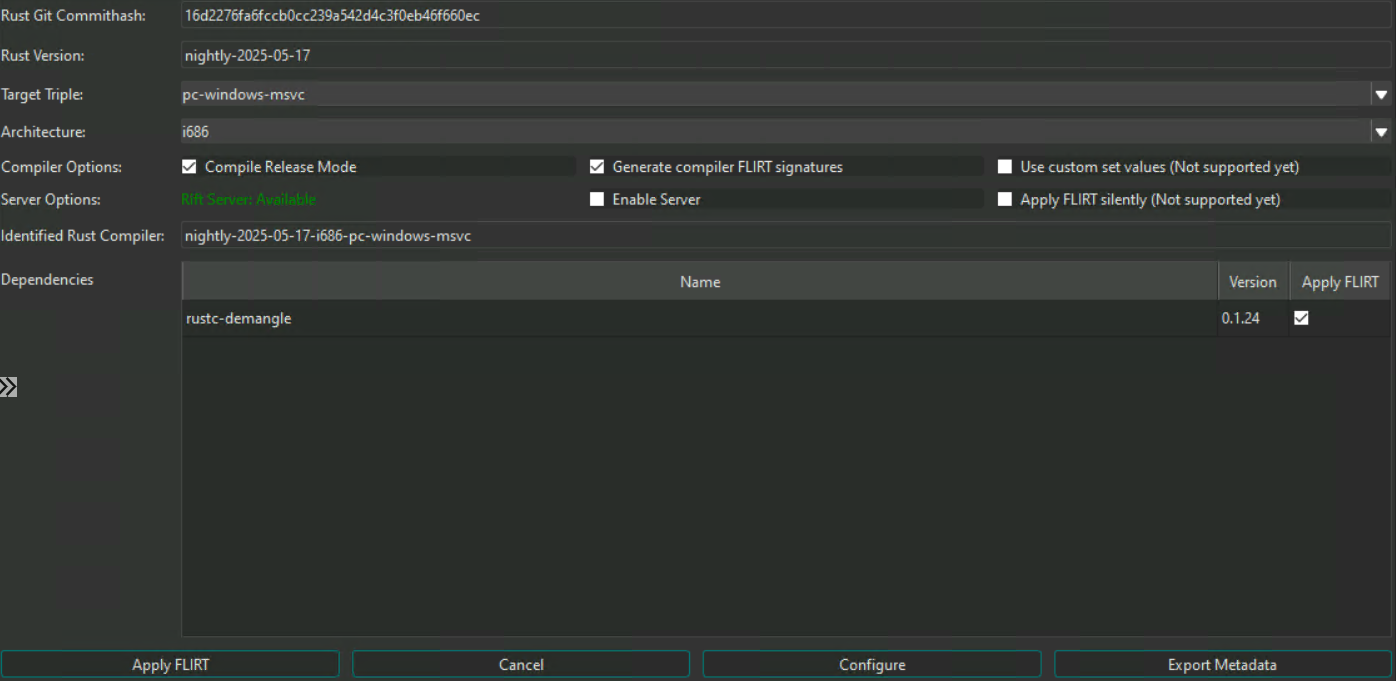
The RIFT IDA Pro plugin allows FLIRT signatures to be generated and optionally applied directly from within an active reverse engineering session, without leaving IDA Pro.
rift_config.cfg configured with the correct server IP and portRun the installer script, passing the path to your IDA Pro plugins folder:
installUpdateIdaPlugin.bat "%APPDATA%\Hex-Rays\IDA Pro\plugins"
This copies the following layout into your plugins folder:
plugins/
├── rift_plugin.py          ← IDA plugin entry point
├── librift_ida/
│   ├── rift_form.py        ← Plugin UI (PySide6)
│   ├── rift_ida_core.py    ← Core logic (arch detection, server comms)
│   └── rift_controller.py  ← Background thread controller
├── librift/                ← Shared RIFT core library
└── rift_essentials/
    └── rift_config.cfg     ← Server connection config
Edit rift_essentials/rift_config.cfg in the plugins folder and set the server address:
[RiftServer]
Ip = 127.0.0.1
Port = 5001
.sig files can be applied to the database via IDA's signature manager or the ida_apply_flirt_from_folder.py script in the scripts/ folder.Ghidra consumes RIFT output as Function ID databases (.fidb). There is no Ghidra plugin: RIFT
generates the databases on the host, and a bundled script attaches them to your project.
For the full configuration reference, re-running Function ID matching and troubleshooting, see the Ghidra usage guide.
AnalyzeHeadlessPath in rift_config.cfg pointing at the launcher, e.g.
/path/to/ghidra/support/analyzeHeadless (analyzeHeadless.bat on Windows)RIFT builds each database by invoking analyzeHeadless twice against one throwaway project: once to
import and analyze the extracted object files, and once to run scripts/RiftPopulateFid.java, which
populates the database. The project is created under the configured WorkFolder and deleted
afterwards.
python rift_cli.py --fidb -f sample.exe -o ./output
Each crate and the toolchain produce one .fidb holding a single Function ID library, named after
the crate, its version and the toolchain:
rustc-1.75.0-x86_64-pc-windows-msvc.fidb
reqwest-0.11.0-1.75.0-x86_64-pc-windows-msvc.fidb
scripts/RiftApplyFidFromFolder.java into your Ghidra scripts directory (by default
~/ghidra_scripts), or add scripts/ as a script path in the Script Manager..fidb files. The script attaches every database in
it and re-applies Function ID matching to the open program.Attached databases persist in your Ghidra configuration, so subsequent programs are matched automatically by the Function ID analyzer. They can be managed under Tools → Function ID → Choose active FidDbs.
1,853 followers · starred Jul 2025
223 followers · starred Jul 2025
329 followers · starred May 2026
1,192 followers · starred Jun 2025
Rust Library Recognition Project for Rust Malware by the MSTIC-MIRAGE Team
Python
389
43 commits
updated Oct 17, 2026
⚠️ Security Warning
This tool is intended to be used only within a dedicated virtual machine (VM) environment. Running it outside of a controlled VM may expose your system to security risks, including potential malware execution or data leakage.
Please ensure all analysis is conducted in an isolated, sandboxed VM with no access to production networks or sensitive data.
🧪 Experimental Build
This branch is under active development. Functionality may be incomplete or subject to change. The FLIRT path has been tested on Windows only. Behaviour on Linux or macOS is untested and not guaranteed. The Ghidra Function ID path is newly added and has not yet been validated against a real toolchain build.
RIFT (Rust Interactive Function Tool) is a toolsuite to assist reverse engineers in identifying library code in rust malware. It is a research project developed by the MIRAGE Team, explores library recognition techniques conducted on rust binaries and was presented at RECON 2025.
This branch is an updated version, generating signatures for both IDA Pro and Ghidra: FLIRT
signatures (.sig) and Ghidra Function ID databases (.fidb). Pick either or both per run with the
--flirt and --fidb flags. Neither disassembler is mandatory — IDA's pcf/sigmake are needed
only for FLIRT output, a Ghidra installation only for Function ID output.
For the original version presented at RECON 2025 and also supports BinaryDiffing, see the version_1_stable(https://github.com/microsoft/RIFT/tree/version_1_stable) build.
Binary Metadata Extraction: Extract metadata from Rust binaries including:
FLIRT Signature Generation: Create FLIRT signatures (.sig, IDA Pro) for:
Function ID Generation: Create Function ID databases (.fidb, Ghidra) for the same targets,
driven by Ghidra's analyzeHeadless. Requires a Ghidra installation and a JDK, but no IDA Pro.
Multiple Operating Modes:
Integration in Ida:
Integration in Ghidra:
scripts/RiftApplyFidFromFolder.java attaches a folder of generated .fidb files and
re-applies Function ID matching to the open programpy -m pip install -r requirements.txtpcf, sigmake) and strings.exe from preferably SysInternals Suite in the bin/ directory.fidb) output, install Ghidra and a JDK, and set AnalyzeHeadlessPath in the config to the analyzeHeadless launcher inside Ghidra's support/ folderrift_config.cfg with correct pathsIDA and Ghidra are both optional, but at least one is required to generate signatures. pcf and
sigmake are only needed for --flirt, AnalyzeHeadlessPath only for --fidb. RIFT still extracts
metadata (--only-meta) with neither installed.
Furthermore, RIFT depends on data/rustc_hashes.json to determine the rust version of the corresponding commit hash. This file should be updated regularily.
To update the rustc_hashes.json file, one can simply always pull the latest RIFT version or generate it by themselves via running update_rustc_hashes.ps1 or update_rustc_hashes.sh, depending on the environment.
RIFT can either run as a command line application to generate signatures on demand or as an API server appliance, communicating with an Ida Pro Plugin directly. Both modes emit FLIRT signatures (.sig) for IDA Pro, Function ID databases (.fidb) for Ghidra, or both at once.
| Argument | Short | Description | Default |
|---|---|---|---|
--file | -f | Path to binary file to analyze | - |
--json | - | Input JSON configuration file | - |
--cfg | -c | Path to config file | ./rift_config.cfg |
--log | -l | Log file path | None |
--verbose | -v | Enable verbose logging | False |
--output | -o | Output folder for signatures | ./Output |
--only-meta | - | Print metadata only (file mode) | False |
--flirt | - | Generate FLIRT signatures (.sig, IDA Pro) | False |
--fidb | - | Generate Function ID databases (.fidb, Ghidra) | False |
The two output flags combine: passing both generates both artifacts from a single cargo build. Passing neither generates FLIRT signatures, so existing commands keep working unchanged.
Run rift_cli.py directly on a binary and extract metadata or generate signatures on demand:
python rift_cli.py -f sample.exe --only-meta
Analyze a binary and generate FLIRT signatures:
python rift_cli.py -f sample.exe -o ./output
Input a JSON configuration and generate FLIRT signatures as configured in JSON:
python rift_cli.py --json config.json -o ./output
Input either a crate and a compiler or simply a compiler toolchain:
Generate FLIRT for a specific crate and compiler:
python rift_cli.py [email protected] 1.75.0-x86_64-pc-windows-msvc -o ./output
Generate FLIRT for a compiler toolchain only:
python rift_cli.py 1.75.0-x86_64-pc-windows-msvc -o ./output
Generate a Ghidra Function ID database instead of FLIRT signatures:
python rift_cli.py --fidb 1.75.0-x86_64-pc-windows-msvc -o ./output
Generate both artifacts from one build:
python rift_cli.py --flirt --fidb [email protected] 1.75.0-x86_64-pc-windows-msvc -o ./output
RIFT includes a lightweight HTTP API server (rift_server.py) that accepts signature generation jobs from remote clients (e.g. the IDA Pro plugin) and processes them asynchronously in the background. Clients select FLIRT, Function ID or both per request.
Note: Function ID (
.fidb) generation has not been tested in server mode so far. It has only been validated throughrift_cli.py.
python rift_server.py -o ./Output --cfg rift_config.cfg
| Argument | Description | Default |
|---|---|---|
-o | Output folder for generated signatures. When set, overrides any output_folder value sent by the client. | ./Output/ |
--cfg | Path to rift_config.cfg | ./rift_config.cfg |
--log | Log file path | None (stdout only) |
--verbose | Enable DEBUG-level logging | False |
The server binds to the IP and port configured in rift_config.cfg under [RiftServer] (Ip and Port). Default is 127.0.0.1:5001.
| Method | Path | Description |
|---|---|---|
POST | /flirt | Submit a signature generation job. Returns a job_id immediately. |
POST | /signatures | Format-neutral alias of /flirt, identical behaviour. |
GET | /job?id=<job_id> | Get the status and result of a specific job. |
GET | /jobs[?status=<status>] | List all jobs, optionally filtered by status (pending, running, completed, failed). |
GET | /health | Health check — returns server status and worker state. |
{
  "commithash": "a55dd71",
  "arch": "x86_64",
  "filetype": "PE",
  "crates": [{"name": "reqwest", "version": "0.11.0"}],
  "target_triple": "x86_64-pc-windows-msvc",
  "output_folder": "/optional/client/path",
  "flirt": true,
  "fidb": false
}
Note:
output_folderin the request body is ignored when the server is started with-o.
The optional flirt and fidb booleans mirror the CLI flags and combine the same way. A request
that sets neither gets FLIRT signatures, which is what the shipped IDA plugin sends. Requesting a
format the server has no toolchain for is rejected at submission time rather than failing the job.
{
  "job_id": "abc123",
  "status": "completed",
  "result_files": ["/path/to/output/reqwest-0.11.0-1.75.0-x86_64-pc-windows-msvc.sig"]
}
The RIFT IDA Pro plugin allows FLIRT signatures to be generated and optionally applied directly from within an active reverse engineering session, without leaving IDA Pro.
rift_config.cfg configured with the correct server IP and portRun the installer script, passing the path to your IDA Pro plugins folder:
installUpdateIdaPlugin.bat "%APPDATA%\Hex-Rays\IDA Pro\plugins"
This copies the following layout into your plugins folder:
plugins/
├── rift_plugin.py          ← IDA plugin entry point
├── librift_ida/
│   ├── rift_form.py        ← Plugin UI (PySide6)
│   ├── rift_ida_core.py    ← Core logic (arch detection, server comms)
│   └── rift_controller.py  ← Background thread controller
├── librift/                ← Shared RIFT core library
└── rift_essentials/
    └── rift_config.cfg     ← Server connection config
Edit rift_essentials/rift_config.cfg in the plugins folder and set the server address:
[RiftServer]
Ip = 127.0.0.1
Port = 5001
.sig files can be applied to the database via IDA's signature manager or the ida_apply_flirt_from_folder.py script in the scripts/ folder.Ghidra consumes RIFT output as Function ID databases (.fidb). There is no Ghidra plugin: RIFT
generates the databases on the host, and a bundled script attaches them to your project.
For the full configuration reference, re-running Function ID matching and troubleshooting, see the Ghidra usage guide.
AnalyzeHeadlessPath in rift_config.cfg pointing at the launcher, e.g.
/path/to/ghidra/support/analyzeHeadless (analyzeHeadless.bat on Windows)RIFT builds each database by invoking analyzeHeadless twice against one throwaway project: once to
import and analyze the extracted object files, and once to run scripts/RiftPopulateFid.java, which
populates the database. The project is created under the configured WorkFolder and deleted
afterwards.
python rift_cli.py --fidb -f sample.exe -o ./output
Each crate and the toolchain produce one .fidb holding a single Function ID library, named after
the crate, its version and the toolchain:
rustc-1.75.0-x86_64-pc-windows-msvc.fidb
reqwest-0.11.0-1.75.0-x86_64-pc-windows-msvc.fidb
scripts/RiftApplyFidFromFolder.java into your Ghidra scripts directory (by default
~/ghidra_scripts), or add scripts/ as a script path in the Script Manager..fidb files. The script attaches every database in
it and re-applies Function ID matching to the open program.Attached databases persist in your Ghidra configuration, so subsequent programs are matched automatically by the Function ID analyzer. They can be managed under Tools → Function ID → Choose active FidDbs.
1,853 followers · starred Jul 2025
223 followers · starred Jul 2025
329 followers · starred May 2026
1,192 followers · starred Jun 2025