Control the platform power state of your Apple Silicon Mac.
Swift
2,465
362 commits
updated Sep 25, 2025

Control the platform power state of your Apple Silicon Mac.
Features • Install • Usage • Uninstall • Limitations • Technical Details • Donate
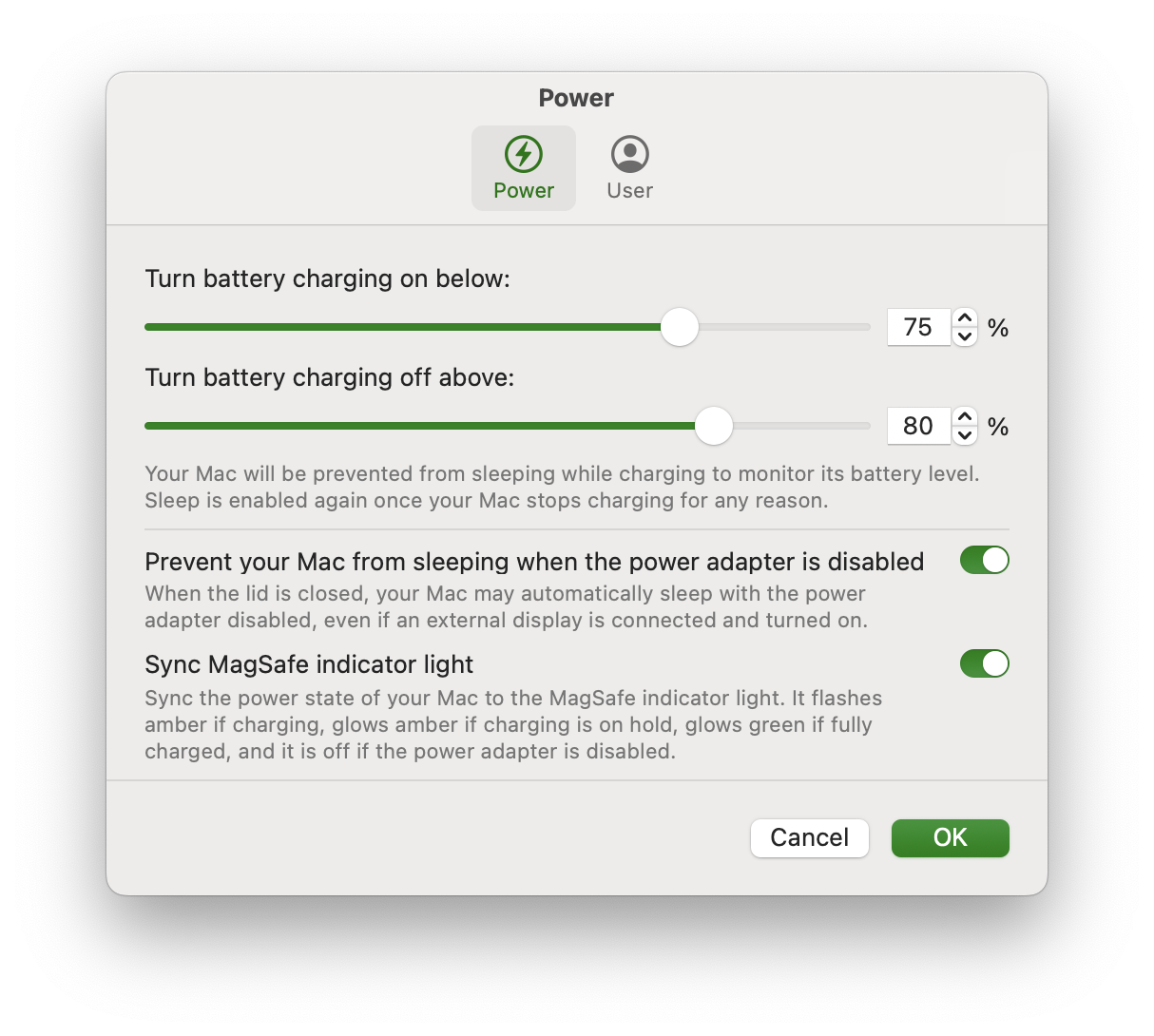
Modern batteries deteriorate more when always kept at full charge. For this reason, Apple introduced the “Optimized Charging“ feature for all their portable devices, including Macs. However, its limit cannot be changed, and you cannot force charging to be put on hold. Battery Toolkit allows specifying a hard limit past which battery charging will be turned off. For safety reasons, this limit cannot be lower than 50 %.
Even when connected to power, your Mac's battery may slowly lose battery charge for various reasons. Short battery charging bursts can further deteriorate batteries. For this reason, Battery Toolkit allows specifying a limit only below which battery charging will be turned on. For safety reasons, this limit cannot be lower than 20 %.
Note: This setting is not honoured for cold boots or reboots, because Apple Silicon Macs reset their platform state in these cases. As battery charging will already be ongoing when Battery Toolkit starts, it lets charging proceed to the upper limit to not cause further short bursts across reboots.
If you want to discharge the battery of your Mac, e.g., to recalibrate it, you can turn off the power adapter without actually unplugging it. You can also have Battery Toolkit disable sleeping when the power adapter is disabled.
Note: Your Mac may go to sleep immediately after enabling the power adapter again. This is a software bug in macOS and cannot easily be worked around.
 |
|---|
| Fig. 1. Power Settings |
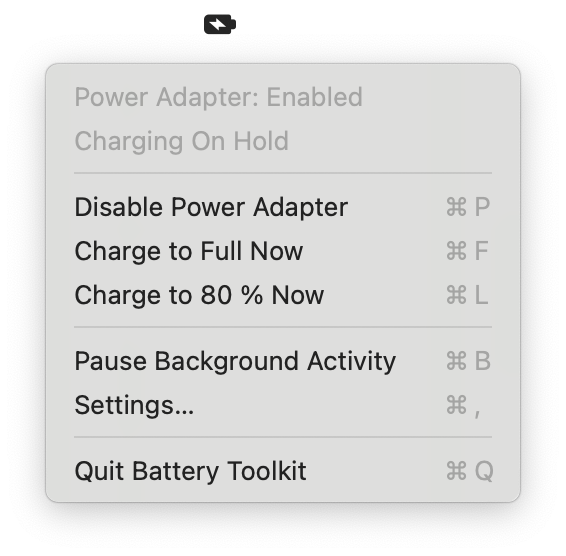
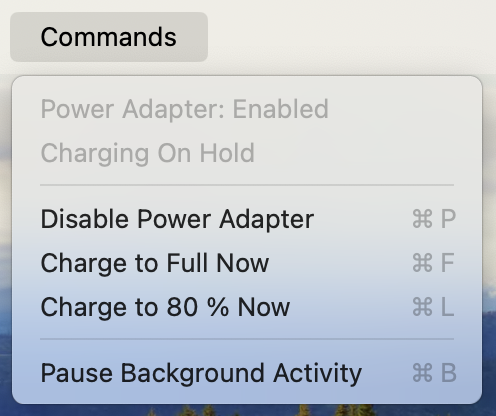
The Battery Toolkit "Commands" menu and its menu bar extra allow you to issue various commands related to the power state of your Mac. These include:
 |
|---|
| Fig. 2. Menu Bar Extra |
[!IMPORTANT] Battery Toolkit currently only supports Apple Silicon Macs #15
Battery-Toolkit-X.Y.zip)Battery Toolkit.app into your Applications folderbrew tap mhaeuser/mhaeuserbrew install battery-toolkitYou may want to add the --no-quarantine flag onto the end of the install command to bypass Gatekeeper more conveniently, but beware the potential security risks of doing so.
Otherwise, follow the steps mentioned below.
[!IMPORTANT] This step is necessary, because the app has not been notarized by Apple due to the membership fees of the Apple Developer Program. "Apple could not verify 'Battery Toolkit.app' is free of malware" refers to the lack of notarizaion, not to any anomalies detected.
On macOS 14 Sonoma or below:
Battery Toolkit.appOn macOS 15 Sequoia or above:
System Settings > Privacy & Security and scroll to the bottom[!CAUTION] To ensure there is no chance of interference, please turn “Optimized Charging” off when Battery Toolkit is in use.
Go to macOS System Settings > Battery > the (i) next to Battery Health > Optimized Battery Charging > toggle off
 |  |
|---|---|
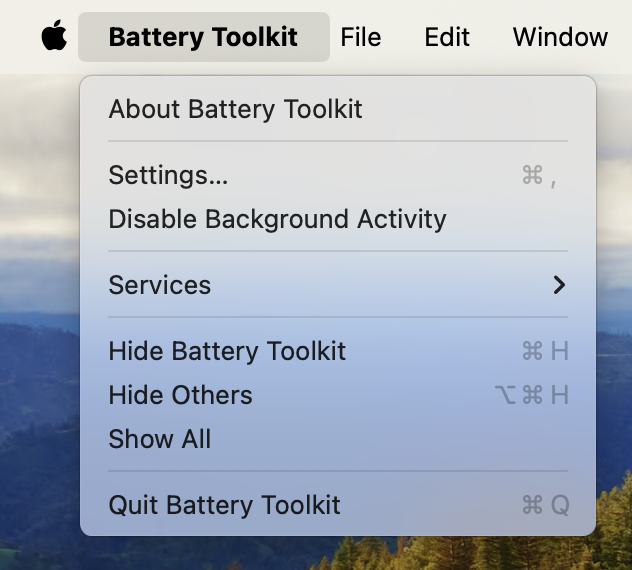
| Fig. 3. Main Menu | Fig. 4. Menu Bar Commands |
If you prefer, you can quit the GUI to hide the menu bar extra and Battery Toolkit will keep running in the background. If you want to change any settings, simply re-open the app.
Battery Toolkit disables sleep while it is charging, because it has to actively disable charging once reaching the maximum. Sleep is re-enabled once charging is stopped for any reason, e.g., reaching the maximum charge level, manual cancellation, or unplugging the MacBook.
Apps, including Battery Toolkit, cannot control the charge state when the machine is shut down. If the charger remains plugged in while the Mac is off, the battery will charge to 100 %.
Note that sleep should usually be disabled when the power adapter is disabled, as this will exit Clamshell mode and the machine will sleep immediately if the lid is closed. Refer to the toggle in the Settings dialog (see Fig. 1).
For various reasons, I will not accept personal donations. However, if you would like to support my work with the Kinderschutzbund Kaiserslautern-Kusel child protection association, you may donate here.
3,272 followers · starred Mar 2025
911 followers · starred Oct 2022
201 followers · starred Nov 2025
73 followers · starred Mar 2025
Control the platform power state of your Apple Silicon Mac.
Swift
2,465
362 commits
updated Sep 25, 2025
Control the platform power state of your Apple Silicon Mac.
Features • Install • Usage • Uninstall • Limitations • Technical Details • Donate
Modern batteries deteriorate more when always kept at full charge. For this reason, Apple introduced the “Optimized Charging“ feature for all their portable devices, including Macs. However, its limit cannot be changed, and you cannot force charging to be put on hold. Battery Toolkit allows specifying a hard limit past which battery charging will be turned off. For safety reasons, this limit cannot be lower than 50 %.
Even when connected to power, your Mac's battery may slowly lose battery charge for various reasons. Short battery charging bursts can further deteriorate batteries. For this reason, Battery Toolkit allows specifying a limit only below which battery charging will be turned on. For safety reasons, this limit cannot be lower than 20 %.
Note: This setting is not honoured for cold boots or reboots, because Apple Silicon Macs reset their platform state in these cases. As battery charging will already be ongoing when Battery Toolkit starts, it lets charging proceed to the upper limit to not cause further short bursts across reboots.
If you want to discharge the battery of your Mac, e.g., to recalibrate it, you can turn off the power adapter without actually unplugging it. You can also have Battery Toolkit disable sleeping when the power adapter is disabled.
Note: Your Mac may go to sleep immediately after enabling the power adapter again. This is a software bug in macOS and cannot easily be worked around.
|
|---|
| Fig. 1. Power Settings |
The Battery Toolkit "Commands" menu and its menu bar extra allow you to issue various commands related to the power state of your Mac. These include:
|
|---|
| Fig. 2. Menu Bar Extra |
[!IMPORTANT] Battery Toolkit currently only supports Apple Silicon Macs #15
Battery-Toolkit-X.Y.zip)Battery Toolkit.app into your Applications folderbrew tap mhaeuser/mhaeuserbrew install battery-toolkitYou may want to add the --no-quarantine flag onto the end of the install command to bypass Gatekeeper more conveniently, but beware the potential security risks of doing so.
Otherwise, follow the steps mentioned below.
[!IMPORTANT] This step is necessary, because the app has not been notarized by Apple due to the membership fees of the Apple Developer Program. "Apple could not verify 'Battery Toolkit.app' is free of malware" refers to the lack of notarizaion, not to any anomalies detected.
On macOS 14 Sonoma or below:
Battery Toolkit.appOn macOS 15 Sequoia or above:
System Settings > Privacy & Security and scroll to the bottom[!CAUTION] To ensure there is no chance of interference, please turn “Optimized Charging” off when Battery Toolkit is in use.
Go to macOS System Settings > Battery > the (i) next to Battery Health > Optimized Battery Charging > toggle off
| |
|---|---|
| Fig. 3. Main Menu | Fig. 4. Menu Bar Commands |
If you prefer, you can quit the GUI to hide the menu bar extra and Battery Toolkit will keep running in the background. If you want to change any settings, simply re-open the app.
Battery Toolkit disables sleep while it is charging, because it has to actively disable charging once reaching the maximum. Sleep is re-enabled once charging is stopped for any reason, e.g., reaching the maximum charge level, manual cancellation, or unplugging the MacBook.
Apps, including Battery Toolkit, cannot control the charge state when the machine is shut down. If the charger remains plugged in while the Mac is off, the battery will charge to 100 %.
Note that sleep should usually be disabled when the power adapter is disabled, as this will exit Clamshell mode and the machine will sleep immediately if the lid is closed. Refer to the toggle in the Settings dialog (see Fig. 1).
For various reasons, I will not accept personal donations. However, if you would like to support my work with the Kinderschutzbund Kaiserslautern-Kusel child protection association, you may donate here.
3,272 followers · starred Mar 2025
911 followers · starred Oct 2022
201 followers · starred Nov 2025
73 followers · starred Mar 2025