[!NOTE]
Roam Navigator is now archived - I no longer maintain it. Let me know if you would like to take over maintenance, and I can have this page redirect to your fork.
 Roam Navigator
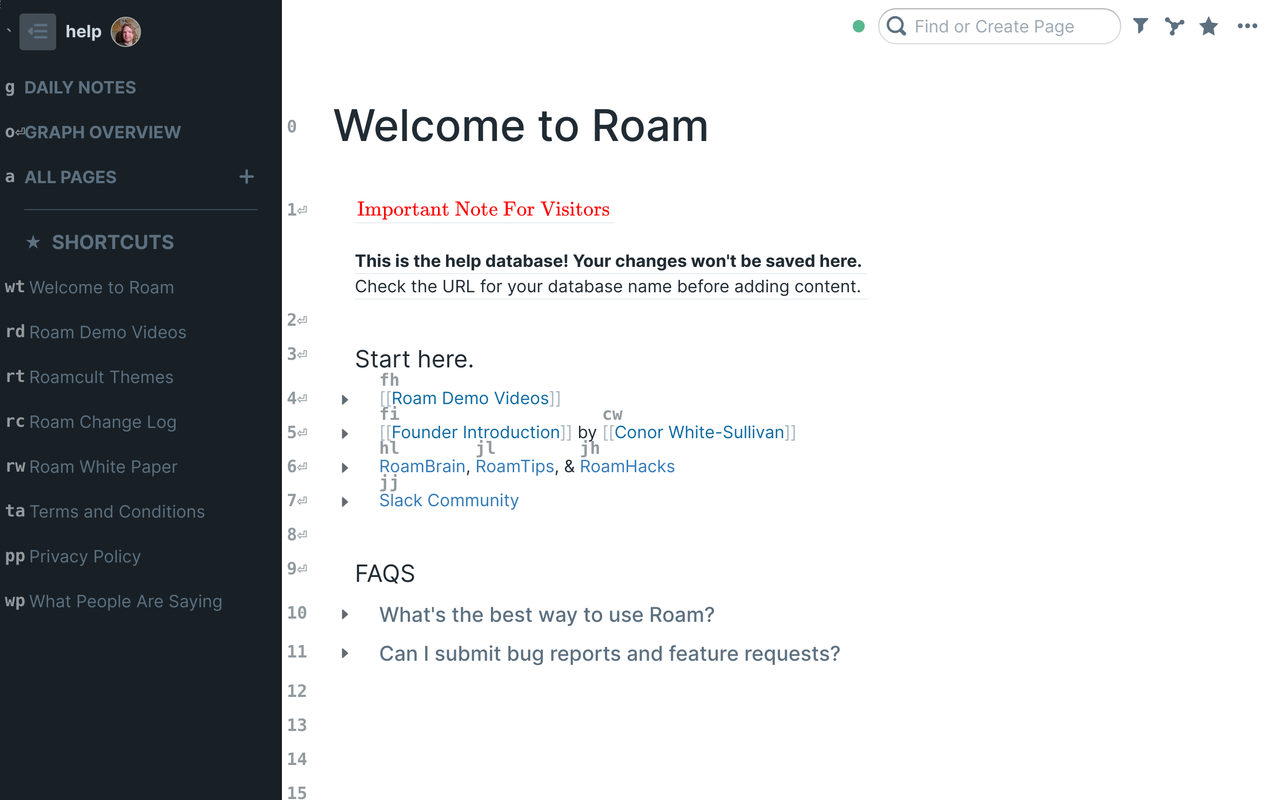
Wherever you may Roam 🤘, it is essential to have an efficient navigator. This browser extension adds a navigation mode to Roam Research which presents visual navigation hints, that can be typed in order to select the corresponding link, block, or button. It also adds topbar "breadcrumbs" which allow you to quickly navigate to recent pages.
By default, navigation mode will be active when no input is focused.
It can also be initiated by pressing Alt+g, or just g when not
editing text. Visual navigation hints will then appear, allowing you
to select links, starred pages, and select blocks to edit.
If you find this extension useful, feel free to show your appreciation on Buy Me a Coffee.
Navigation mode is similar to the generic link clicking feature found in extensions like Vimium or SurfingKeys, but it does the following things better for the Roam usecase:
Uses stable key sequences for left sidebar and editing blocks in your page. Attempts to use stable key assignments for clicking links in your page.
You can open pages in the sidebar, by holding Shift while typing
the last character of the navigation hint.
It attempts to have more integrated visual layout of the hints, fitting them into the margins.
Position of the hints update with scrolling and other page
updates. In particular, when in navigation mode you can use the
keyboard to scroll the main page with Spaceor Shift+Space to
scroll half a page, and Down / Up arrows to scroll a bit.
s followed by the above
scrolling shortcuts. s is used as a prefix for selecting links
/ blocks in the sidebar.By default, navigation mode is enabled on start, and enabled when
focus exits input. You can then press Escape while editing a
block to enter into navigation mode. This behavior can be disabled
in the options if you prefer to press Alt+g / g.
To load this repo as an extension, perhaps to make modifications (contributions welcome!), you can load it directly as an unpacked extension:
Roam Navigator's icon was made by Pixel perfect from www.flaticon.com.
The top bar breadcrumbs was inspired by shodty's idea and code - see roam_breadcrumbs script.
[!NOTE]
Roam Navigator is now archived - I no longer maintain it. Let me know if you would like to take over maintenance, and I can have this page redirect to your fork.
Roam NavigatorWherever you may Roam 🤘, it is essential to have an efficient navigator. This browser extension adds a navigation mode to Roam Research which presents visual navigation hints, that can be typed in order to select the corresponding link, block, or button. It also adds topbar "breadcrumbs" which allow you to quickly navigate to recent pages.
By default, navigation mode will be active when no input is focused.
It can also be initiated by pressing Alt+g, or just g when not
editing text. Visual navigation hints will then appear, allowing you
to select links, starred pages, and select blocks to edit.
If you find this extension useful, feel free to show your appreciation on Buy Me a Coffee.
Navigation mode is similar to the generic link clicking feature found in extensions like Vimium or SurfingKeys, but it does the following things better for the Roam usecase:
Uses stable key sequences for left sidebar and editing blocks in your page. Attempts to use stable key assignments for clicking links in your page.
You can open pages in the sidebar, by holding Shift while typing
the last character of the navigation hint.
It attempts to have more integrated visual layout of the hints, fitting them into the margins.
Position of the hints update with scrolling and other page
updates. In particular, when in navigation mode you can use the
keyboard to scroll the main page with Spaceor Shift+Space to
scroll half a page, and Down / Up arrows to scroll a bit.
s followed by the above
scrolling shortcuts. s is used as a prefix for selecting links
/ blocks in the sidebar.By default, navigation mode is enabled on start, and enabled when
focus exits input. You can then press Escape while editing a
block to enter into navigation mode. This behavior can be disabled
in the options if you prefer to press Alt+g / g.
To load this repo as an extension, perhaps to make modifications (contributions welcome!), you can load it directly as an unpacked extension:
Roam Navigator's icon was made by Pixel perfect from www.flaticon.com.
The top bar breadcrumbs was inspired by shodty's idea and code - see roam_breadcrumbs script.



