User-friendly, cross-platform SSH connection manager
See the codeSSH Pilot is a user-friendly SSH and SFTP client for Linux and macOS

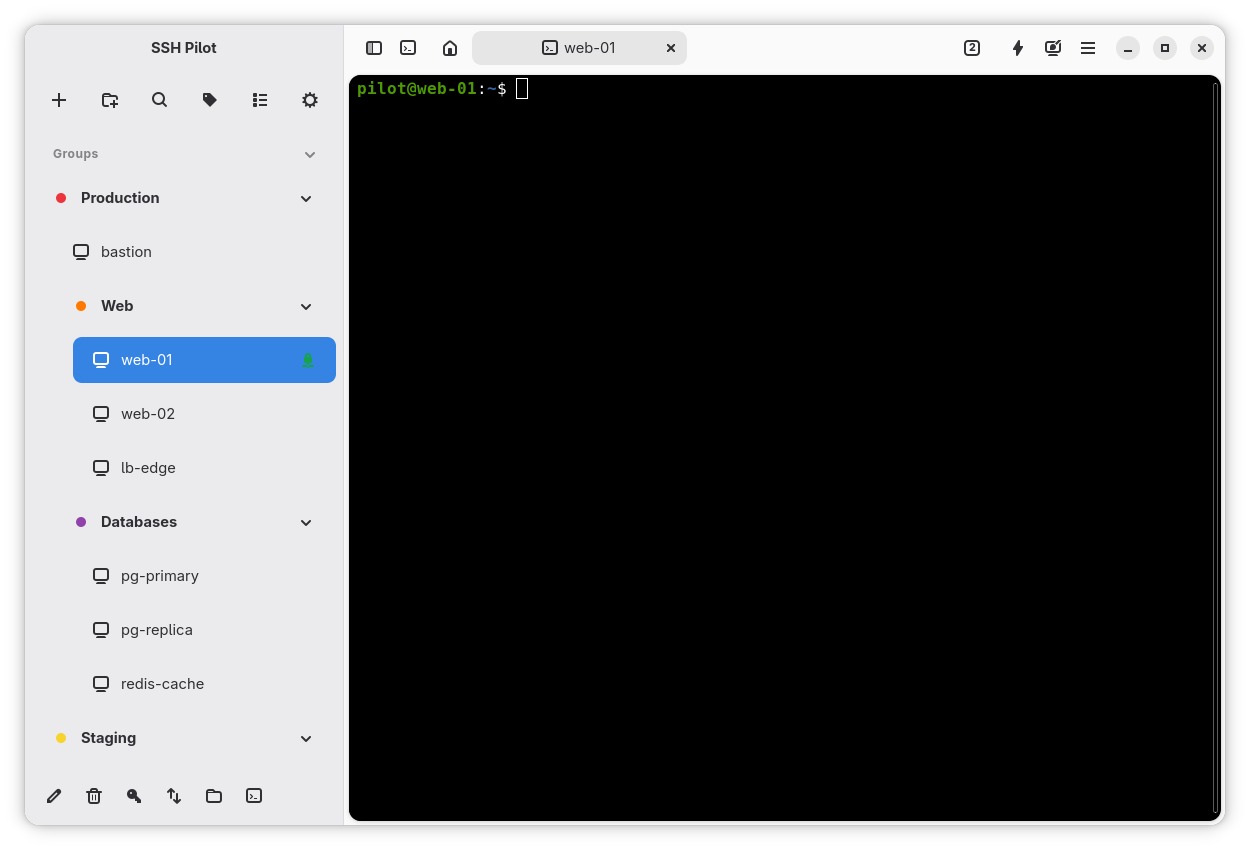
Connections sidebar with a terminal session
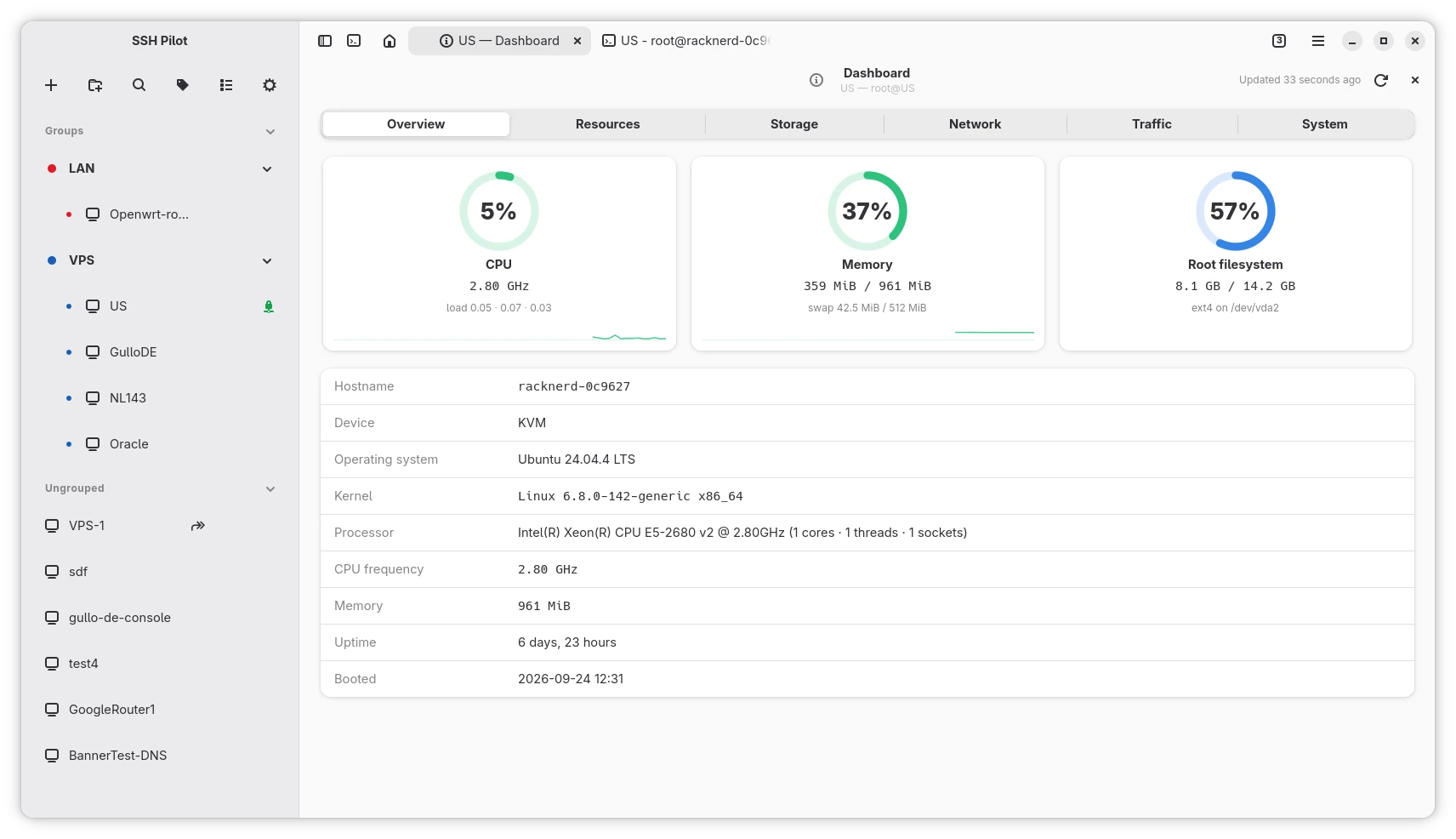
Server dashboard with live resource usage and system details
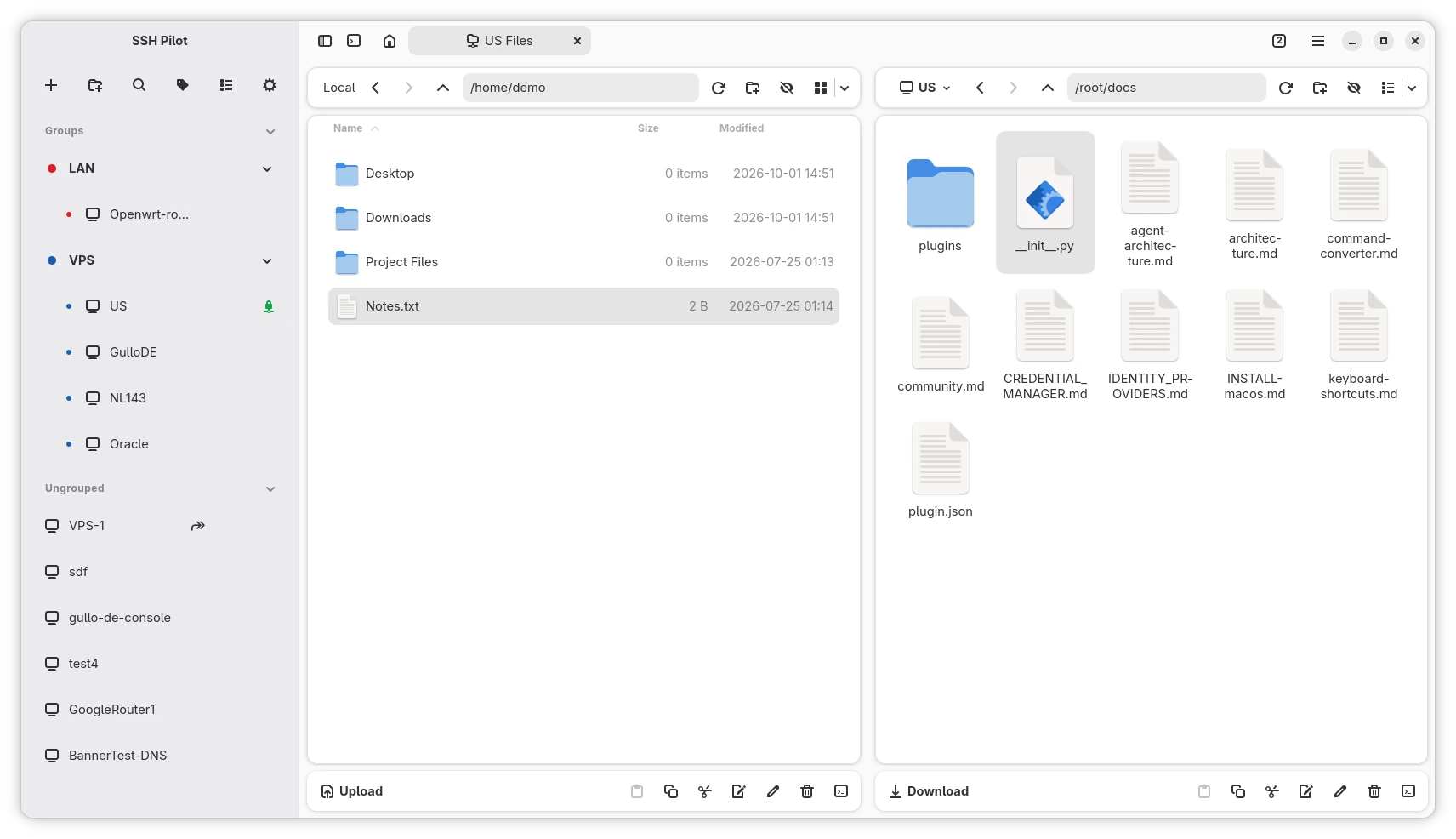
Dual-pane SFTP file manager
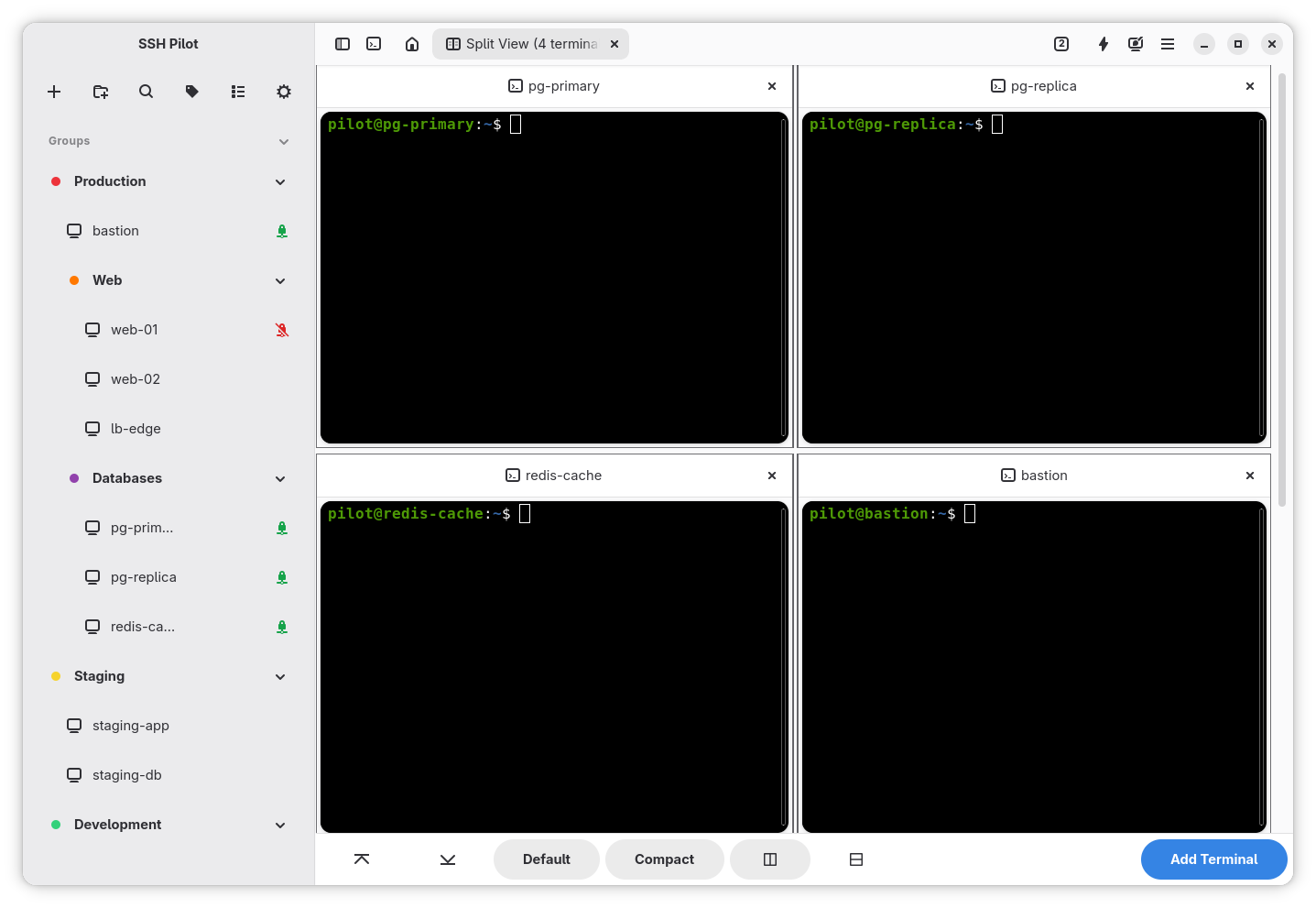
Split view with multiple terminals
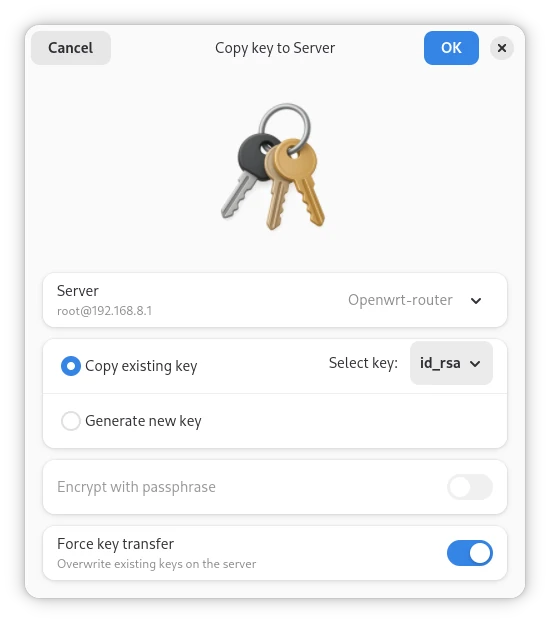
Key transfer to a server (ssh-copy-id)
You can download directly from the Releases section, but we recommend adding one of the repositories below for automatic updates:
 Ubuntu PPA
sudo add-apt-repository ppa:mfat/sshpilot
sudo apt update
sudo apt install sshpilot
 Debian APT Repository
curl -fsSL https://mfat.github.io/sshpilot-ppa/pubkey.gpg | sudo gpg --dearmor -o /usr/share/keyrings/sshpilot-ppa.gpg
echo "deb [signed-by=/usr/share/keyrings/sshpilot-ppa.gpg] https://mfat.github.io/sshpilot-ppa any main" | sudo tee /etc/apt/sources.list.d/sshpilot-ppa.list
sudo apt update
sudo apt install sshpilot
For more information, visit: https://mfat.github.io/sshpilot-ppa/
 Fedora/RHEL COPR Repository
This repository provides automatic updates for SSH Pilot on RPM-based distributions.
dnf copr enable mahdif62/sshpilot
dnf install sshpilot

 Flatpak
Available on Flathub
OR in a terminal type:
flatpak install flathub io.github.mfat.sshpilot
 Arch Linux
Arch Linux package via AUR: https://aur.archlinux.org/packages/sshpilot
# replace yay with your AUR helper of choice, e.g. paru
yay -S sshpilot
OR
Nightly Arch Linux package via AUR (community maintained): https://aur.archlinux.org/packages/sshpilot-git
# replace yay with your AUR helper of choice, e.g. paru
yay -S sshpilot-git
A single self-contained file for any distribution that meets the
minimum requirements. It bundles GTK 4, libadwaita, VTE,
GtkSourceView, WebKitGTK and Python — so the xterm.js terminal backend and
the Host Info tab work the same as in the other packages — and uses the host's
ssh. Download
sshpilot-<version>-linux-x86_64.AppImage from the
Releases page — there are no
automatic updates, so grab a new one when a release lands.
chmod +x sshpilot-*-linux-x86_64.AppImage
./sshpilot-*-linux-x86_64.AppImage
The AppImage mounts itself with FUSE 3, which every supported distribution
ships; on a system without it, run the file with --appimage-extract-and-run.
 Homebrew (macOS + Linux)
brew tap mfat/sshpilot
brew install sshpilot
More info here: https://github.com/mfat/homebrew-sshpilot
Works on macOS Homebrew and Linuxbrew. The formula is build-from-source; first install pulls the GTK4 stack and compiles a Python virtualenv with the runtime deps. After install, launch sshPilot from a terminal inside an active desktop session (Wayland/X11 + dbus on Linux; native on macOS).
 macOS (aarch64 and x86-64)
Download the dmg file from the releases section https://github.com/mfat/sshpilot/releases/
brew install gtk4 libadwaita pygobject3 py3cairo vte3 gobject-introspection adwaita-icon-theme pkg-config glib graphene icu4c sshpass gtksourceview5
Note: webkitgtk is Linux-only and not available on macOS via Homebrew. The xterm.js backend is not available on macOS; the application will use the VTE backend instead.
| Platform | Minimum version |
|---|---|
| Debian | 13 (trixie) |
| Ubuntu | 24.04 (noble) |
| Linux Mint | 22 |
| Fedora | 43 |
| RHEL / CentOS Stream | 10 |
| Arch Linux | rolling |
| macOS | 14 (Sonoma) |
On any other Linux distribution, install the Flatpak — it runs everywhere Flatpak does.
| Component | Minimum Version |
|---|---|
| Python | 3.12 |
| GTK 4 | 4.6 |
| libadwaita | 1.5 |
| VTE (GTK4) | 0.70 |
| PyGObject | 3.42 |
| pycairo | 1.20.0 |
| cryptography | 42.0 |
| keyring | 24.3 |
| psutil | 5.9.0 |
| pykeepass | 4.0 |
| certifi | 2023.7.22 |
| GtkSourceView | 5.0 |
SSH Pilot uses the following third-party libraries:
SSH Pilot is licensed under the GNU General Public License v3.0.
Ko-fi: https://ko-fi.com/newmfat
Bitcoin:
bc1qqtsyf0ft85zshsnw25jgsxnqy45rfa867zqk4t
Doge:
DRzNb8DycFD65H6oHNLuzyTzY1S5avPHHx
USDT (TRC20)
TAvQWVD83DB3QuDspnMh4uiJ7hi4Jzcr6X
579 followers · starred Nov 2025
253 followers · starred Aug 2025
12 followers · starred Sep 2025
183 followers · starred Aug 2025
User-friendly, cross-platform SSH connection manager
See the codeSSH Pilot is a user-friendly SSH and SFTP client for Linux and macOS
Connections sidebar with a terminal session
Server dashboard with live resource usage and system details
Dual-pane SFTP file manager
Split view with multiple terminals
Key transfer to a server (ssh-copy-id)
You can download directly from the Releases section, but we recommend adding one of the repositories below for automatic updates:
Ubuntu PPAsudo add-apt-repository ppa:mfat/sshpilot
sudo apt update
sudo apt install sshpilot
curl -fsSL https://mfat.github.io/sshpilot-ppa/pubkey.gpg | sudo gpg --dearmor -o /usr/share/keyrings/sshpilot-ppa.gpg
echo "deb [signed-by=/usr/share/keyrings/sshpilot-ppa.gpg] https://mfat.github.io/sshpilot-ppa any main" | sudo tee /etc/apt/sources.list.d/sshpilot-ppa.list
sudo apt update
sudo apt install sshpilot
For more information, visit: https://mfat.github.io/sshpilot-ppa/
Fedora/RHEL COPR RepositoryThis repository provides automatic updates for SSH Pilot on RPM-based distributions.
dnf copr enable mahdif62/sshpilot
dnf install sshpilot
FlatpakAvailable on Flathub
OR in a terminal type:
flatpak install flathub io.github.mfat.sshpilot
Arch Linux package via AUR: https://aur.archlinux.org/packages/sshpilot
# replace yay with your AUR helper of choice, e.g. paru
yay -S sshpilot
OR
Nightly Arch Linux package via AUR (community maintained): https://aur.archlinux.org/packages/sshpilot-git
# replace yay with your AUR helper of choice, e.g. paru
yay -S sshpilot-git
A single self-contained file for any distribution that meets the
minimum requirements. It bundles GTK 4, libadwaita, VTE,
GtkSourceView, WebKitGTK and Python — so the xterm.js terminal backend and
the Host Info tab work the same as in the other packages — and uses the host's
ssh. Download
sshpilot-<version>-linux-x86_64.AppImage from the
Releases page — there are no
automatic updates, so grab a new one when a release lands.
chmod +x sshpilot-*-linux-x86_64.AppImage
./sshpilot-*-linux-x86_64.AppImage
The AppImage mounts itself with FUSE 3, which every supported distribution
ships; on a system without it, run the file with --appimage-extract-and-run.
Homebrew (macOS + Linux)brew tap mfat/sshpilot
brew install sshpilot
More info here: https://github.com/mfat/homebrew-sshpilot
Works on macOS Homebrew and Linuxbrew. The formula is build-from-source; first install pulls the GTK4 stack and compiles a Python virtualenv with the runtime deps. After install, launch sshPilot from a terminal inside an active desktop session (Wayland/X11 + dbus on Linux; native on macOS).
macOS (aarch64 and x86-64)Download the dmg file from the releases section https://github.com/mfat/sshpilot/releases/
brew install gtk4 libadwaita pygobject3 py3cairo vte3 gobject-introspection adwaita-icon-theme pkg-config glib graphene icu4c sshpass gtksourceview5
Note: webkitgtk is Linux-only and not available on macOS via Homebrew. The xterm.js backend is not available on macOS; the application will use the VTE backend instead.
| Platform | Minimum version |
|---|---|
| Debian | 13 (trixie) |
| Ubuntu | 24.04 (noble) |
| Linux Mint | 22 |
| Fedora | 43 |
| RHEL / CentOS Stream | 10 |
| Arch Linux | rolling |
| macOS | 14 (Sonoma) |
On any other Linux distribution, install the Flatpak — it runs everywhere Flatpak does.
| Component | Minimum Version |
|---|---|
| Python | 3.12 |
| GTK 4 | 4.6 |
| libadwaita | 1.5 |
| VTE (GTK4) | 0.70 |
| PyGObject | 3.42 |
| pycairo | 1.20.0 |
| cryptography | 42.0 |
| keyring | 24.3 |
| psutil | 5.9.0 |
| pykeepass | 4.0 |
| certifi | 2023.7.22 |
| GtkSourceView | 5.0 |
SSH Pilot uses the following third-party libraries:
SSH Pilot is licensed under the GNU General Public License v3.0.
Ko-fi: https://ko-fi.com/newmfat
Bitcoin:
bc1qqtsyf0ft85zshsnw25jgsxnqy45rfa867zqk4t
Doge:
DRzNb8DycFD65H6oHNLuzyTzY1S5avPHHx
USDT (TRC20)
TAvQWVD83DB3QuDspnMh4uiJ7hi4Jzcr6X
579 followers · starred Nov 2025
253 followers · starred Aug 2025
12 followers · starred Sep 2025
183 followers · starred Aug 2025