A unikernel designed specifically for running Wasm applications and compatible with WASI
Zig
690
137 commits
updated Oct 18, 2026


Mewz is a unikernel designed specifically for running Wasm applications and compatible with WASI.
There are now various Wasm runtimes, but they operate on general-purpose operating systems such as Linux or Windows.
Mewz is a specialized kernel designed for running Wasm. Mewz runs a single Wasm application within the kernel by linking it together during the build process with the Wasm application. (A kernel composed in this manner is commonly referred to as a unikernel.) In this way, Mewz provides the minimal required features and environment for executing Wasm.
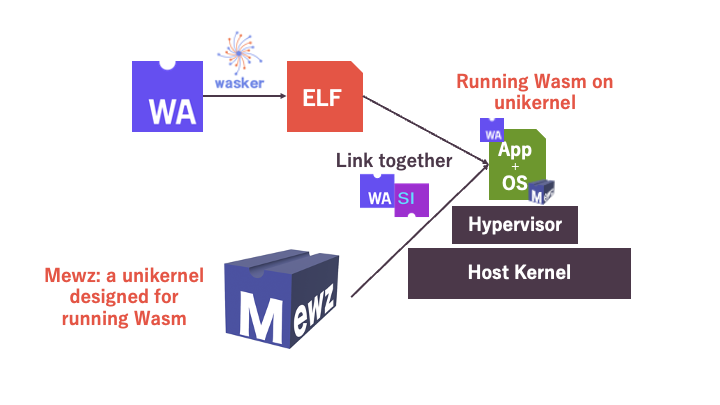
There are some example programs. Please check out examples.
We prepare for a Docker image that has a environment for running Mewz.
curl -o helloworld.wat https://raw.githubusercontent.com/Mewz-project/Wasker/main/helloworld.wat
docker run -v .:/volume ghcr.io/mewz-project/mewz helloworld.wat
This image internally run Wasker, build Mewz, and run it on QEMU.
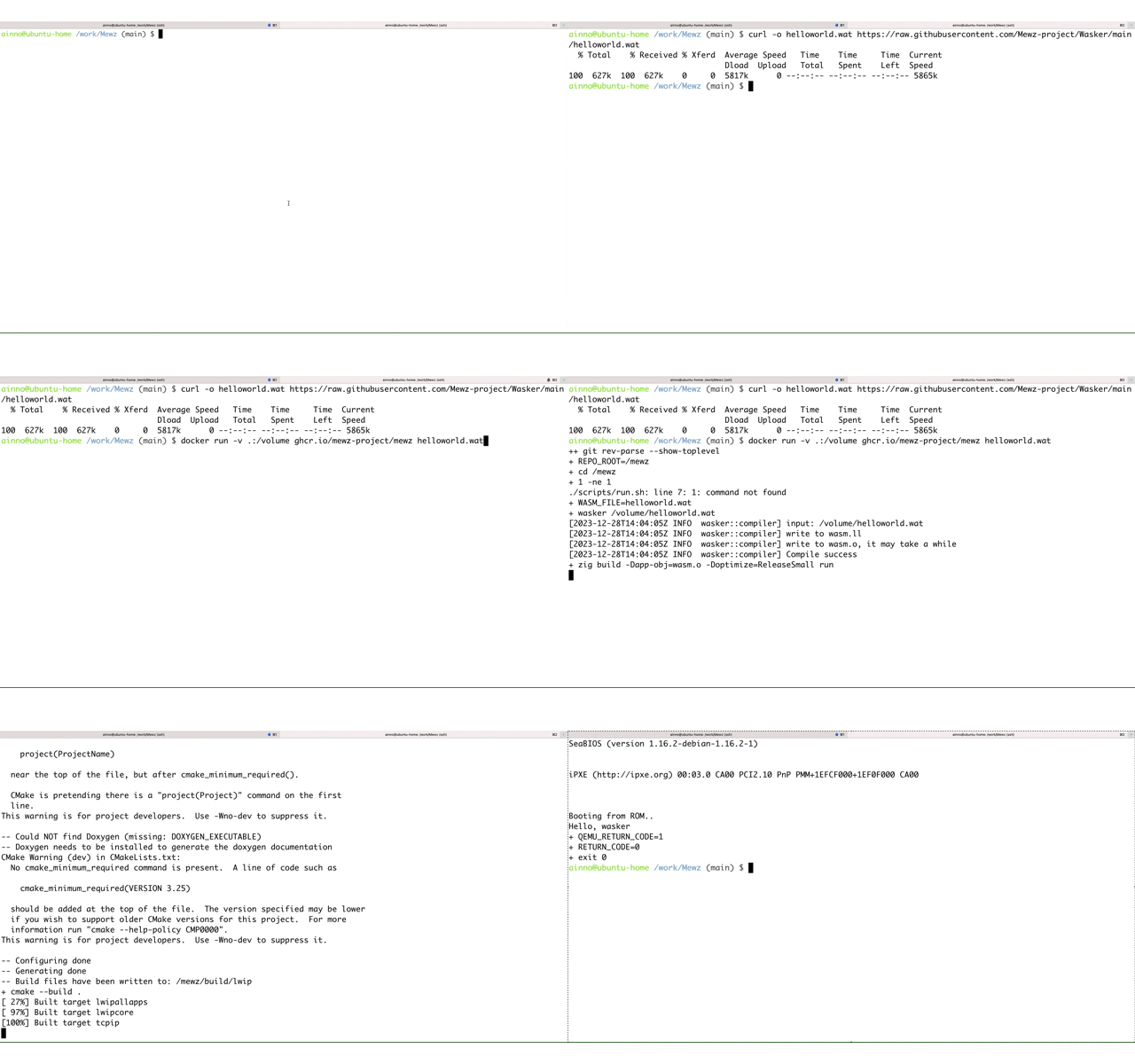
You can use Dev Container on GitHub Codespaces or your local VSCode.
To start Codespaces,
# On the Dev Container
git submodule update --init
curl -o helloworld.wat https://raw.githubusercontent.com/Mewz-project/Wasker/main/helloworld.wat
wasker helloworld.wat
zig build -Dapp-obj=wasm.o run
Compile a Wasm file into a native object file, using Wasker. Follow the instruction here.
Then, build Mewz and run it on QEMU with the following commands.
zig build -Dapp-obj=<path to the object file generated by Wasker> run
To use file systems, specify the directory by -Ddir=<path to dir>. See examples/static_file_server.
[!WARNING] This option makes an archive of the directory by
tarand attach it to QEMU.
[!NOTE] QEMU's port 1234 is mapped to localhost:1234.
You can debug Mewz with GDB. When you run Mewz with QEMU, it listens on port 12345 for GDB. You can connect to it by just running GDB at the root of the repository as .gdbinit is already configured.
zig build -Dapp-obj=<path to the object file generated by Wasker> run
# In another terminal
gdb
zig build debug command prevent Mewz from booting up until GDB connects to it. This is useful when you want to debug the boot process.
zig build -Dapp-obj=<path to the object file generated by Wasker> debug
# In another terminal
gdb
zig bulid -Dtest=true run
| Feature | Status |
|---|---|
| WASI Preview 1 | In Progress: Partial Implementation (Please refer to https://github.com/Mewz-project/Mewz/issues/1) |
| Socket | ✅ (WasmEdge Compatible) |
| Component Model | Not yet |
| File System | In-memory FS: read-only, Virtio-FS: read/write (partial) |
| Network | ✅ |
(top 24 of 31)
1,943 followers · starred Dec 2023
646 followers · starred Feb 2024
728 followers · starred Feb 2024
404 followers · starred Jun 2024
A unikernel designed specifically for running Wasm applications and compatible with WASI
Zig
690
137 commits
updated Oct 18, 2026
Mewz is a unikernel designed specifically for running Wasm applications and compatible with WASI.
There are now various Wasm runtimes, but they operate on general-purpose operating systems such as Linux or Windows.
Mewz is a specialized kernel designed for running Wasm. Mewz runs a single Wasm application within the kernel by linking it together during the build process with the Wasm application. (A kernel composed in this manner is commonly referred to as a unikernel.) In this way, Mewz provides the minimal required features and environment for executing Wasm.
There are some example programs. Please check out examples.
We prepare for a Docker image that has a environment for running Mewz.
curl -o helloworld.wat https://raw.githubusercontent.com/Mewz-project/Wasker/main/helloworld.wat
docker run -v .:/volume ghcr.io/mewz-project/mewz helloworld.wat
This image internally run Wasker, build Mewz, and run it on QEMU.
You can use Dev Container on GitHub Codespaces or your local VSCode.
To start Codespaces,
# On the Dev Container
git submodule update --init
curl -o helloworld.wat https://raw.githubusercontent.com/Mewz-project/Wasker/main/helloworld.wat
wasker helloworld.wat
zig build -Dapp-obj=wasm.o run
Compile a Wasm file into a native object file, using Wasker. Follow the instruction here.
Then, build Mewz and run it on QEMU with the following commands.
zig build -Dapp-obj=<path to the object file generated by Wasker> run
To use file systems, specify the directory by -Ddir=<path to dir>. See examples/static_file_server.
[!WARNING] This option makes an archive of the directory by
tarand attach it to QEMU.
[!NOTE] QEMU's port 1234 is mapped to localhost:1234.
You can debug Mewz with GDB. When you run Mewz with QEMU, it listens on port 12345 for GDB. You can connect to it by just running GDB at the root of the repository as .gdbinit is already configured.
zig build -Dapp-obj=<path to the object file generated by Wasker> run
# In another terminal
gdb
zig build debug command prevent Mewz from booting up until GDB connects to it. This is useful when you want to debug the boot process.
zig build -Dapp-obj=<path to the object file generated by Wasker> debug
# In another terminal
gdb
zig bulid -Dtest=true run
| Feature | Status |
|---|---|
| WASI Preview 1 | In Progress: Partial Implementation (Please refer to https://github.com/Mewz-project/Mewz/issues/1) |
| Socket | ✅ (WasmEdge Compatible) |
| Component Model | Not yet |
| File System | In-memory FS: read-only, Virtio-FS: read/write (partial) |
| Network | ✅ |
(top 24 of 31)
1,943 followers · starred Dec 2023
646 followers · starred Feb 2024
728 followers · starred Feb 2024
404 followers · starred Jun 2024