Turn the USB-C EarPods remote into macOS Dictation, Backspace and Enter keys. Native menu-bar app with configurable buttons, reconnect and optional login startup.
Swift
0
2 commits
updated Oct 16, 2026
Your EarPods music remote, repurposed for dictation and everyday input on a Mac.
Русский · Download for Apple silicon · MIT
| Button | Default action |
|---|---|
| Center | Start macOS Dictation; press again to stop in the tested setup |
| − | Backspace — delete a character or selected text |
| + | Enter — the focused app's usual action |
Dictate a prompt, fix a word and press Enter without reaching for the keyboard. It works through system input, so no ChatGPT account, API key or AI service integration is needed. Enter may insert a newline, send a message or execute a terminal command, depending on the focused app.
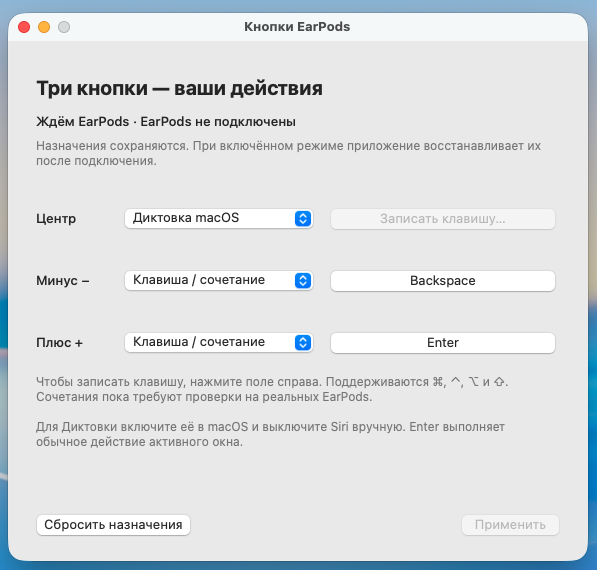
The app's real settings window, waiting for EarPods to connect.
First launch: this preview is ad-hoc signed and not notarized by Apple. If macOS blocks an unverified-developer build you trust, try opening it once, then go to System Settings → Privacy & Security → Open Anyway → Open. macOS normally remembers this exception for that copy on that Mac. A detected-malware or damaged-app alert is a different issue. Apple's instructions.
Custom combinations need macOS Input Monitoring and control permissions. The app preserves foreign mappings and refuses conflicting earlier installations. See the app guide for permissions and migration.
The downloadable preview is for Apple silicon and Apple USB-C EarPods. Standard input and reconnection were physically tested on two Macs running macOS 27.0.1; the second Mac also passed reboot with EarPods connected and reboot without them followed by connection. ⌘Z and full uninstall/reinstall were tested on the first Mac. Other headsets, Intel binaries and other macOS versions are unverified; the source deployment target is macOS 13+.
The app handles buttons; macOS handles speech recognition. It does not guarantee offline Dictation. Normal volume/playback buttons are replaced while remote mode is enabled. See verification details.
Use a Mac with Swift 6 / Command Line Tools. There are no third-party runtime or Swift package dependencies.
/bin/sh app/build-app.sh release
/bin/sh app/test.sh
python3 -m unittest discover -s tests -v
python3 -m unittest discover -s app/Tests -p 'test_package_dmg.py' -v
The build script prints the .app path. Packaging uses Python 3's standard library and native macOS tools at build time; the installed app needs no Python.
Created by Sergo Lebedovich. MIT © 2026. Apple, EarPods and macOS are trademarks of Apple Inc.; this is an independent project.
Turn the USB-C EarPods remote into macOS Dictation, Backspace and Enter keys. Native menu-bar app with configurable buttons, reconnect and optional login startup.
Swift
0
2 commits
updated Oct 16, 2026
Your EarPods music remote, repurposed for dictation and everyday input on a Mac.
Русский · Download for Apple silicon · MIT
| Button | Default action |
|---|---|
| Center | Start macOS Dictation; press again to stop in the tested setup |
| − | Backspace — delete a character or selected text |
| + | Enter — the focused app's usual action |
Dictate a prompt, fix a word and press Enter without reaching for the keyboard. It works through system input, so no ChatGPT account, API key or AI service integration is needed. Enter may insert a newline, send a message or execute a terminal command, depending on the focused app.
The app's real settings window, waiting for EarPods to connect.
First launch: this preview is ad-hoc signed and not notarized by Apple. If macOS blocks an unverified-developer build you trust, try opening it once, then go to System Settings → Privacy & Security → Open Anyway → Open. macOS normally remembers this exception for that copy on that Mac. A detected-malware or damaged-app alert is a different issue. Apple's instructions.
Custom combinations need macOS Input Monitoring and control permissions. The app preserves foreign mappings and refuses conflicting earlier installations. See the app guide for permissions and migration.
The downloadable preview is for Apple silicon and Apple USB-C EarPods. Standard input and reconnection were physically tested on two Macs running macOS 27.0.1; the second Mac also passed reboot with EarPods connected and reboot without them followed by connection. ⌘Z and full uninstall/reinstall were tested on the first Mac. Other headsets, Intel binaries and other macOS versions are unverified; the source deployment target is macOS 13+.
The app handles buttons; macOS handles speech recognition. It does not guarantee offline Dictation. Normal volume/playback buttons are replaced while remote mode is enabled. See verification details.
Use a Mac with Swift 6 / Command Line Tools. There are no third-party runtime or Swift package dependencies.
/bin/sh app/build-app.sh release
/bin/sh app/test.sh
python3 -m unittest discover -s tests -v
python3 -m unittest discover -s app/Tests -p 'test_package_dmg.py' -v
The build script prints the .app path. Packaging uses Python 3's standard library and native macOS tools at build time; the installed app needs no Python.
Created by Sergo Lebedovich. MIT © 2026. Apple, EarPods and macOS are trademarks of Apple Inc.; this is an independent project.



