a modern & lightweight HTML5 game engine
See the code







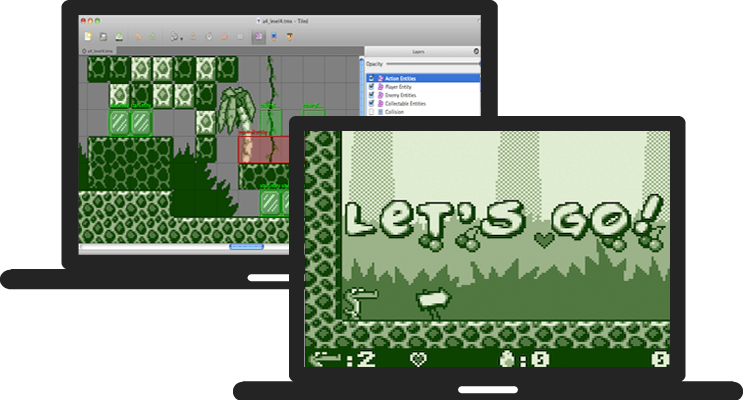
melonJS is an open-source 2.5D game engine designed for indie developers — perspective and orthogonal cameras, GPU-accelerated tilemap rendering, post-processing effects, custom shaders, 3D mesh support, polygon-accurate physics, modern Tiled workflows, and high performance. Runs on WebGPU, WebGL 2 or Canvas2D with automatic fallback. The whole engine is ~250 KB minzipped of vanilla JS/TS, with no dependencies and no toolchain lock-in. Built with modern class syntax and bundled with esbuild.
melonJS is licensed under the MIT License and actively maintained by the team at AltByte in Singapore.
melonJS is designed so you can focus on making games, not on graphics plumbing.
Canvas2D-inspired rendering API — If you've used the HTML5 Canvas, you already know melonJS. The rendering API (save, restore, translate, rotate, setColor, fillRect, ...) follows the same familiar patterns — no render graphs, no shader pipelines, no instruction sets to learn.
True renderer abstraction — Write your game once, run it on WebGPU, WebGL 2 or Canvas2D with zero code changes. The engine handles all GPU complexity behind a unified API: the default AUTO mode tries WebGPU first at startup, falls back to WebGL 2 if that is unavailable, and ultimately to Canvas, and the entire feature set renders identically on both GPU backends.
Complete engine, minimal footprint — Physics, tilemaps, audio, input, cameras, tweens, particles, UI — a full game stack in a single tree-shakeable ES module. No dependency sprawl, no library stitching.
Scenes, loaded in one call — level.load(name) brings an authored scene straight into your world. Tiled is a first-class citizen for 2D — orthogonal, isometric, hexagonal & staggered maps, animated tilesets, collision shapes, object properties, compressed formats, with GPU-accelerated tile rendering on the GPU backends — and glTF / GLB is the equivalent for 3D scenes: author in Blender (or any DCC tool), export a .glb, and the whole scene — meshes, materials, cameras, lights, and node animation — loads under a Camera3d, no per-mesh wiring. Animated models play back through the same animation API as a 2D Sprite.
Batteries included, hackable by design — Get started in minutes with minimal setup. When you need to go deeper: modern class-based architecture, a plugin system for engine extensions, and a clean architecture that's easy to extend without fighting the framework.
melonJS is a fully featured game engine :
Compatibility
Graphics
AUTOantiAlias: true) on both GPU backends — and it survives post-processing, since the offscreen targets a post-effect chain renders into are multisampled to matchNoise (simplex/perlin/value/cellular, fBm / ridged / ping-pong fractal, domain warp; renderer-free and CPU-samplable for heightmaps, terrain, and spawn jitter) and NoiseTexture2d — bake a noise field into a sprite image, a Gradient color ramp, or a live-animated tangent-space normal map for lit water and surfaces; unified under a new Texture2d base alongside TextureAtlasCamera3d — retained-mode geometry, uploaded to the GPU once and re-drawn from there, so moving, rotating, scaling or re-tinting a mesh costs no vertex upload and no per-vertex CPU work at alltextureFilter: "nearest" for crisp pixel-art models)Light2d as a first-class Renderable (multiple dynamic lights, radial-gradient falloff, illumination-only mode, procedural rendering via drawLight), plus optional per-pixel normal-map shading on sprites for 3D-looking dynamic lightsLight3d directional, point, spot and ambient lights, added to the world like Light2d (half-Lambert diffuse + ambient fill, quadratic falloff and cone angles on the punctual types, runtime-manipulable for day/night), auto-loaded from a glTF scene's authored suns and lampsInstancedMesh scatter regardless of instance count. Shaped by the light rather than always straight down: shadowLight points a blob at a Light3d and is re-read every draw, so a day/night cycle carries every shadow with it, while shadowOffset slides it out from the caster's feet, shadowStretch lengthens it for a low sun, shadowScale sizes it independently of the object, and shadowGroundNormal lays it on a floor that is not level. All of them work on an InstancedMesh too, as one value for the whole set. Controllable per object, per glTF scene (level.load(name, { castGroundShadow, shadowLight, … })) or application-wide. Deliberately not shadow mapping: it answers "where is this standing", which is what a 2.5D scene needsaddPostEffect(), plus custom shader support on both GPU backends: ShaderEffect for per-sprite fragment effects (GLSL and/or WGSL bodies) and complete custom mesh shader programs via mesh.shader (a dual-language GLShader: GLSL pair and/or WGSL module)hdr: true) — the camera's render targets become half-float, so additive light stops saturating on every write and BloomEffect thresholds on genuinely over-bright pixels instead of merely bright ones, with ToneMappingEffect and a toneMapping setting to compress the result back into display range when your art calls for it. Off by default and additive: nothing is inserted into your effect chain, so turning it on does not restyle a game whose look is built on clipped whites. On WebGPU it goes one step further — hdrOutput: true presents the frame in the display's own dynamic range rather than clamping it to SDR at the last stepSound
src/audio/backend/LICENSE)AudioContext / master-gain accessors for custom WebAudio graphs that mix with the engine's master volume / mutePhysics
raycast3d)RenderablePhysicsAdapter interface for custom physics via official adaptersInput
Camera
Camera3d) with frustum culling for 2.5D / 3D-projected scenes — drop-in subclass of the default 2D cameraUI
UIBaseElement / UISpriteElement containers for clickable, hoverable and holdable elements with full pointer-event wiringDraggable / DropTarget for drag-and-drop with configurable overlap or contains-checkUITextButton text button with hover, press, and key-bind support — built on BitmapTextScenes
level.load(name) — 2D Tiled maps and 3D glTF scenes alike, auto-registered on preload.aseprite / .ase tileset images (Tiled 1.11+ qaseprite plugin workflow), with frame tags auto-mapped to per-tile animations — no PNG export step requiredlevel.load(...), the same one call as a Tiled map
Camera3dgetChildByName("Sun") finds it for runtime tuningsetCurrentAnimation / play / pause / stop API as a 2D Sprite.glb and .gltf files, with embedded or external buffers & texturesAssets
.aseprite / .ase binary, audio, video, binary and fontsCore
Application class as the modern entry point — construct it, then await app.init() (asynchronous since 20.0, so the WebGPU device can be acquired) — with built-in pause, resume, and freeze() (hit-stop) primitivesParticleEmitter (emission rate, lifetime, velocity, gravity, blend modes), and a reference space so particles can be measured from the emitter, from the world, or from any container — a moving emitter leaves a trail instead of dragging its cloud alongmelonJS is supporting the below tools and frameworks natively or through our official plugin(s) :


Tools integration and usage with melonJS is documented in our Wiki.
The fastest way to create a new game:
npm create melonjs my-game
cd my-game
npm install
npm run dev
This scaffolds a ready-to-run project with TypeScript, Vite, and the debug plugin. It also works with plain JavaScript — just rename .ts files to .js.
You can also start from the boilerplate directly, or follow the step-by-step Platformer Tutorial.
For more details, check the wiki Details & Usage guide.
renderer.toFrameTexture(): fish swim across a seabed, then a water surface captures the live frame on the GPU and re-samples it through a scrolling NoiseTexture2d flow map (the standard screen-texture / opaque-frame-copy pattern)renderer.toFrameTexture() over a lit scene: normal-mapped tiles under a moving Light2d, distorted by a rising heat-haze that captures and ripples the lit frameCamera3d + 3D Mesh arcade shooterInstancedMesh, a rigged paddling boat, a procedural valley and shadows laid on its bankslevel.loadsetCurrentAnimation / play / pause / stop APIBrowse all examples here
import { Application, Text } from "https://cdn.jsdelivr.net/npm/melonjs/+esm";

// create a new melonJS application
const app = new Application(1218, 562, {
    parent: "screen",
    scale: "auto",
    backgroundColor: "#202020",
});

// initialize it (builds the renderer and appends the canvas)
await app.init();

// set a gray background color
app.world.backgroundColor.parseCSS("#202020");

// add a font text display object
app.world.addChild(new Text(609, 281, {
    font: "Arial",
    size: 160,
    fillStyle: "#FFFFFF",
    textBaseline: "middle",
    textAlign: "center",
    text: "Hello World !",
}));
Simple hello world using melonJS
Note: since version 20.0,
await app.init()is required after constructing theApplication. The WebGPU backend, whichAUTOtries first on browsers that support it, acquires its GPU device asynchronously, so initialization had to become an async step; it resolves without suspending on the WebGL and Canvas backends. On 19.x the call is optional and this example works without it.
melonJS provides a plugin system allowing to extend the engine capabilities.
Here is the list of official plugins maintained by the melonJS team:
If you wish to develop your own plugin, we also provide a plugin template to help you get started.
Since 19.5, melonJS exposes a PhysicsAdapter interface so the same game code can run on either the built-in SAT physics (default) or a third-party rigid-body engine, selected via the physic option on Application. Two official adapter packages, maintained by the melonJS team:
See the Migrating to the Physics Adapter API, Switching Physics Adapters, and BuiltinAdapter Quirks wiki pages for migration guides and the per-adapter behaviour table.
melonJS is distributed as a tree-shakeable ES module with TypeScript declarations included. The published bundle targets ES2022 — transpile it if you need to support older browsers.
Install via npm :
npm install melonjs
Then import what you need in your project :
import { Application, Sprite, loader } from 'melonjs';
Or use it directly via jsDelivr CDN :
<!-- load the ES module bundle of melonJS v20.x -->
<script type="module" src="https://cdn.jsdelivr.net/npm/melonjs@20/+esm"></script>
<!-- omit the version completely to get the latest one -->
<!-- you should NOT use this in production -->
<script type="module" src="https://cdn.jsdelivr.net/npm/melonjs/+esm"></script>
Note: the debug plugin is available separately as
@melonjs/debug-plugin
The published bundle targets ES2022, so it uses private class members and other modern syntax. A browser that predates those cannot parse the file at all — this fails at load, not at the point a feature is used.
To support older browsers, transpile melonJS together with your own code.
The usual trap is that build setups skip node_modules by default, which leaves
melonJS untouched no matter how low you set your target.
With Vite :
// vite.config.js
export default {
    build: {
        // esbuild downlevels dependencies too, melonjs included
        target: "es2020",
    },
};
With Babel, make sure melonJS is not excluded :
// webpack.config.js
{
    test: /\.js$/,
    // the default `exclude: /node_modules/` would skip melonjs
    exclude: /node_modules\/(?!melonjs)/,
    use: "babel-loader",
}
Transpiling costs some size and speed: private class members become WeakMap
lookups, which are on hot paths in the renderer. Only reach for it if you have
users on browsers that need it.
melonJS ships skills — guidance files that teach AI coding assistants the engine's conventions and, more usefully, the mistakes that fail silently rather than raising an error.
They are versioned with the engine and ship inside the package, at
node_modules/melonjs/skills/ — so a copy matching the exact release you are
running is always on disk.
Install them into whatever assistant you use, with one command :
npx skills add https://github.com/melonjs/melonJS/tree/master/packages/melonjs/skills
It detects the assistants in your project and installs one copy of each skill
under .agents/skills/<skill-name>, then symlinks that copy into every
assistant's own directory, so .claude/skills/melonjs points back at
.agents/skills/melonjs and there is nothing to place by hand. It reports the
assistants it covers as it runs (77 of them at the time of writing). Add
-a claude-code -a cursor to target specific ones.
The set includes an AGENTS.md for anything following that convention (Codex,
Cursor, Gemini CLI); GitHub Copilot reads the same content from
.github/copilot-instructions.md. It names the three rules that produce code
which runs and is wrong, and links the API index below — if you already keep an
AGENTS.md, paste its sections into yours.
The command installs from master. To pin to the release you are running,
point it at that tag instead of master in the URL above.
The skills are plain markdown and can be read by any agent, or by a human.
For anything the skills do not cover, the complete API is indexed for agents at llms.txt — every exported class, function and type with a one-line summary and a link to its reference page, regenerated on every docs build.
Join us and get help or share your projects :
We welcome contributions! Please read our Contributing Guide before submitting changes or new features.
Support the development of melonJS by becoming a sponsor. Get your logo in our README with a link to your site or become a backer and get your name in the BACKERS list. Any level of support is really appreciated and goes a long way !


Overall
Maintained
Code review
npm
Latest release
Releases this year
1,724 followers · starred Apr 2022
140 followers · starred Nov 2015
634 followers · starred Jul 2017
62 followers · starred Apr 2011
a modern & lightweight HTML5 game engine
See the code
melonJS is an open-source 2.5D game engine designed for indie developers — perspective and orthogonal cameras, GPU-accelerated tilemap rendering, post-processing effects, custom shaders, 3D mesh support, polygon-accurate physics, modern Tiled workflows, and high performance. Runs on WebGPU, WebGL 2 or Canvas2D with automatic fallback. The whole engine is ~250 KB minzipped of vanilla JS/TS, with no dependencies and no toolchain lock-in. Built with modern class syntax and bundled with esbuild.
melonJS is licensed under the MIT License and actively maintained by the team at AltByte in Singapore.
melonJS is designed so you can focus on making games, not on graphics plumbing.
Canvas2D-inspired rendering API — If you've used the HTML5 Canvas, you already know melonJS. The rendering API (save, restore, translate, rotate, setColor, fillRect, ...) follows the same familiar patterns — no render graphs, no shader pipelines, no instruction sets to learn.
True renderer abstraction — Write your game once, run it on WebGPU, WebGL 2 or Canvas2D with zero code changes. The engine handles all GPU complexity behind a unified API: the default AUTO mode tries WebGPU first at startup, falls back to WebGL 2 if that is unavailable, and ultimately to Canvas, and the entire feature set renders identically on both GPU backends.
Complete engine, minimal footprint — Physics, tilemaps, audio, input, cameras, tweens, particles, UI — a full game stack in a single tree-shakeable ES module. No dependency sprawl, no library stitching.
Scenes, loaded in one call — level.load(name) brings an authored scene straight into your world. Tiled is a first-class citizen for 2D — orthogonal, isometric, hexagonal & staggered maps, animated tilesets, collision shapes, object properties, compressed formats, with GPU-accelerated tile rendering on the GPU backends — and glTF / GLB is the equivalent for 3D scenes: author in Blender (or any DCC tool), export a .glb, and the whole scene — meshes, materials, cameras, lights, and node animation — loads under a Camera3d, no per-mesh wiring. Animated models play back through the same animation API as a 2D Sprite.
Batteries included, hackable by design — Get started in minutes with minimal setup. When you need to go deeper: modern class-based architecture, a plugin system for engine extensions, and a clean architecture that's easy to extend without fighting the framework.
melonJS is a fully featured game engine :
Compatibility
Graphics
AUTOantiAlias: true) on both GPU backends — and it survives post-processing, since the offscreen targets a post-effect chain renders into are multisampled to matchNoise (simplex/perlin/value/cellular, fBm / ridged / ping-pong fractal, domain warp; renderer-free and CPU-samplable for heightmaps, terrain, and spawn jitter) and NoiseTexture2d — bake a noise field into a sprite image, a Gradient color ramp, or a live-animated tangent-space normal map for lit water and surfaces; unified under a new Texture2d base alongside TextureAtlasCamera3d — retained-mode geometry, uploaded to the GPU once and re-drawn from there, so moving, rotating, scaling or re-tinting a mesh costs no vertex upload and no per-vertex CPU work at alltextureFilter: "nearest" for crisp pixel-art models)Light2d as a first-class Renderable (multiple dynamic lights, radial-gradient falloff, illumination-only mode, procedural rendering via drawLight), plus optional per-pixel normal-map shading on sprites for 3D-looking dynamic lightsLight3d directional, point, spot and ambient lights, added to the world like Light2d (half-Lambert diffuse + ambient fill, quadratic falloff and cone angles on the punctual types, runtime-manipulable for day/night), auto-loaded from a glTF scene's authored suns and lampsInstancedMesh scatter regardless of instance count. Shaped by the light rather than always straight down: shadowLight points a blob at a Light3d and is re-read every draw, so a day/night cycle carries every shadow with it, while shadowOffset slides it out from the caster's feet, shadowStretch lengthens it for a low sun, shadowScale sizes it independently of the object, and shadowGroundNormal lays it on a floor that is not level. All of them work on an InstancedMesh too, as one value for the whole set. Controllable per object, per glTF scene (level.load(name, { castGroundShadow, shadowLight, … })) or application-wide. Deliberately not shadow mapping: it answers "where is this standing", which is what a 2.5D scene needsaddPostEffect(), plus custom shader support on both GPU backends: ShaderEffect for per-sprite fragment effects (GLSL and/or WGSL bodies) and complete custom mesh shader programs via mesh.shader (a dual-language GLShader: GLSL pair and/or WGSL module)hdr: true) — the camera's render targets become half-float, so additive light stops saturating on every write and BloomEffect thresholds on genuinely over-bright pixels instead of merely bright ones, with ToneMappingEffect and a toneMapping setting to compress the result back into display range when your art calls for it. Off by default and additive: nothing is inserted into your effect chain, so turning it on does not restyle a game whose look is built on clipped whites. On WebGPU it goes one step further — hdrOutput: true presents the frame in the display's own dynamic range rather than clamping it to SDR at the last stepSound
src/audio/backend/LICENSE)AudioContext / master-gain accessors for custom WebAudio graphs that mix with the engine's master volume / mutePhysics
raycast3d)RenderablePhysicsAdapter interface for custom physics via official adaptersInput
Camera
Camera3d) with frustum culling for 2.5D / 3D-projected scenes — drop-in subclass of the default 2D cameraUI
UIBaseElement / UISpriteElement containers for clickable, hoverable and holdable elements with full pointer-event wiringDraggable / DropTarget for drag-and-drop with configurable overlap or contains-checkUITextButton text button with hover, press, and key-bind support — built on BitmapTextScenes
level.load(name) — 2D Tiled maps and 3D glTF scenes alike, auto-registered on preload.aseprite / .ase tileset images (Tiled 1.11+ qaseprite plugin workflow), with frame tags auto-mapped to per-tile animations — no PNG export step requiredlevel.load(...), the same one call as a Tiled map
Camera3dgetChildByName("Sun") finds it for runtime tuningsetCurrentAnimation / play / pause / stop API as a 2D Sprite.glb and .gltf files, with embedded or external buffers & texturesAssets
.aseprite / .ase binary, audio, video, binary and fontsCore
Application class as the modern entry point — construct it, then await app.init() (asynchronous since 20.0, so the WebGPU device can be acquired) — with built-in pause, resume, and freeze() (hit-stop) primitivesParticleEmitter (emission rate, lifetime, velocity, gravity, blend modes), and a reference space so particles can be measured from the emitter, from the world, or from any container — a moving emitter leaves a trail instead of dragging its cloud alongmelonJS is supporting the below tools and frameworks natively or through our official plugin(s) :
Tools integration and usage with melonJS is documented in our Wiki.
The fastest way to create a new game:
npm create melonjs my-game
cd my-game
npm install
npm run dev
This scaffolds a ready-to-run project with TypeScript, Vite, and the debug plugin. It also works with plain JavaScript — just rename .ts files to .js.
You can also start from the boilerplate directly, or follow the step-by-step Platformer Tutorial.
For more details, check the wiki Details & Usage guide.
renderer.toFrameTexture(): fish swim across a seabed, then a water surface captures the live frame on the GPU and re-samples it through a scrolling NoiseTexture2d flow map (the standard screen-texture / opaque-frame-copy pattern)renderer.toFrameTexture() over a lit scene: normal-mapped tiles under a moving Light2d, distorted by a rising heat-haze that captures and ripples the lit frameCamera3d + 3D Mesh arcade shooterInstancedMesh, a rigged paddling boat, a procedural valley and shadows laid on its bankslevel.loadsetCurrentAnimation / play / pause / stop APIBrowse all examples here
import { Application, Text } from "https://cdn.jsdelivr.net/npm/melonjs/+esm";

// create a new melonJS application
const app = new Application(1218, 562, {
    parent: "screen",
    scale: "auto",
    backgroundColor: "#202020",
});

// initialize it (builds the renderer and appends the canvas)
await app.init();

// set a gray background color
app.world.backgroundColor.parseCSS("#202020");

// add a font text display object
app.world.addChild(new Text(609, 281, {
    font: "Arial",
    size: 160,
    fillStyle: "#FFFFFF",
    textBaseline: "middle",
    textAlign: "center",
    text: "Hello World !",
}));
Simple hello world using melonJS
Note: since version 20.0,
await app.init()is required after constructing theApplication. The WebGPU backend, whichAUTOtries first on browsers that support it, acquires its GPU device asynchronously, so initialization had to become an async step; it resolves without suspending on the WebGL and Canvas backends. On 19.x the call is optional and this example works without it.
melonJS provides a plugin system allowing to extend the engine capabilities.
Here is the list of official plugins maintained by the melonJS team:
If you wish to develop your own plugin, we also provide a plugin template to help you get started.
Since 19.5, melonJS exposes a PhysicsAdapter interface so the same game code can run on either the built-in SAT physics (default) or a third-party rigid-body engine, selected via the physic option on Application. Two official adapter packages, maintained by the melonJS team:
See the Migrating to the Physics Adapter API, Switching Physics Adapters, and BuiltinAdapter Quirks wiki pages for migration guides and the per-adapter behaviour table.
melonJS is distributed as a tree-shakeable ES module with TypeScript declarations included. The published bundle targets ES2022 — transpile it if you need to support older browsers.
Install via npm :
npm install melonjs
Then import what you need in your project :
import { Application, Sprite, loader } from 'melonjs';
Or use it directly via jsDelivr CDN :
<!-- load the ES module bundle of melonJS v20.x -->
<script type="module" src="https://cdn.jsdelivr.net/npm/melonjs@20/+esm"></script>
<!-- omit the version completely to get the latest one -->
<!-- you should NOT use this in production -->
<script type="module" src="https://cdn.jsdelivr.net/npm/melonjs/+esm"></script>
Note: the debug plugin is available separately as
@melonjs/debug-plugin
The published bundle targets ES2022, so it uses private class members and other modern syntax. A browser that predates those cannot parse the file at all — this fails at load, not at the point a feature is used.
To support older browsers, transpile melonJS together with your own code.
The usual trap is that build setups skip node_modules by default, which leaves
melonJS untouched no matter how low you set your target.
With Vite :
// vite.config.js
export default {
    build: {
        // esbuild downlevels dependencies too, melonjs included
        target: "es2020",
    },
};
With Babel, make sure melonJS is not excluded :
// webpack.config.js
{
    test: /\.js$/,
    // the default `exclude: /node_modules/` would skip melonjs
    exclude: /node_modules\/(?!melonjs)/,
    use: "babel-loader",
}
Transpiling costs some size and speed: private class members become WeakMap
lookups, which are on hot paths in the renderer. Only reach for it if you have
users on browsers that need it.
melonJS ships skills — guidance files that teach AI coding assistants the engine's conventions and, more usefully, the mistakes that fail silently rather than raising an error.
They are versioned with the engine and ship inside the package, at
node_modules/melonjs/skills/ — so a copy matching the exact release you are
running is always on disk.
Install them into whatever assistant you use, with one command :
npx skills add https://github.com/melonjs/melonJS/tree/master/packages/melonjs/skills
It detects the assistants in your project and installs one copy of each skill
under .agents/skills/<skill-name>, then symlinks that copy into every
assistant's own directory, so .claude/skills/melonjs points back at
.agents/skills/melonjs and there is nothing to place by hand. It reports the
assistants it covers as it runs (77 of them at the time of writing). Add
-a claude-code -a cursor to target specific ones.
The set includes an AGENTS.md for anything following that convention (Codex,
Cursor, Gemini CLI); GitHub Copilot reads the same content from
.github/copilot-instructions.md. It names the three rules that produce code
which runs and is wrong, and links the API index below — if you already keep an
AGENTS.md, paste its sections into yours.
The command installs from master. To pin to the release you are running,
point it at that tag instead of master in the URL above.
The skills are plain markdown and can be read by any agent, or by a human.
For anything the skills do not cover, the complete API is indexed for agents at llms.txt — every exported class, function and type with a one-line summary and a link to its reference page, regenerated on every docs build.
Join us and get help or share your projects :
We welcome contributions! Please read our Contributing Guide before submitting changes or new features.
Support the development of melonJS by becoming a sponsor. Get your logo in our README with a link to your site or become a backer and get your name in the BACKERS list. Any level of support is really appreciated and goes a long way !
Overall
Maintained
Code review
npm
Latest release
Releases this year
1,724 followers · starred Apr 2022
140 followers · starred Nov 2015
634 followers · starred Jul 2017
62 followers · starred Apr 2011