AI Video dubbing / dubber / Video dubbing / AI dubbing AI 視訊配音
See the code
| Kaggle | Gradio | Youtube |
|---|---|---|
 |  |  |
| Free memory and GPU time! | Gradio Web App | Subscribe! |
ViDubb is an advanced AI-powered video dubbing solution focused on delivering high-quality, efficient dubbing for multilingual content. By utilizing cutting-edge voice cloning technology, ViDubb generates realistic voiceovers in multiple languages with exceptional accuracy. The system ensures perfect lip-sync synchronization, matching the voiceovers to the actors' movements, providing a seamless viewing experience. This approach not only enhances the natural flow of dialogue but also preserves the authenticity of the original video. ViDubb streamlines the dubbing process, enabling faster turnaround times while maintaining top-tier audio and visual quality for global audiences ( AI video dubbing / dubber).
| Original Video in French | ViDubb With Background in English | ViDubb Without Background in English |
|---|---|---|
| Original Video in English | ViDubb with LipSync in French |
|---|---|
[!NOTE]
Due to GitHub restrictions, we had to clip and downgrade the linked examples.
To view the original videos, please visit our YouTube channel. Don't forget to subscribe!
ViDubb (Video dubber) is an advanced AI-powered video dubbing solution designed to deliver high-quality, efficient dubbing for multilingual content. By integrating cutting-edge voice cloning technology and dynamic lip-sync synchronization, ViDubb ensures that voiceovers are perfectly aligned with the original video’s dialogue and actor movements, even when multiple speakers are involved, providing a seamless viewing experience across languages.
Leveraging state-of-the-art AI, ViDubb sets new standards in dubbing accuracy and naturalness, making it ideal for global content localization, film, media, and educational purposes. The tool enables content creators and businesses to quickly adapt their videos for international audiences while maintaining top-tier audio and visual quality.
Our mission is to provide an efficient and high-quality AI-driven dubbing solution that empowers content creators to expand their global reach, bringing videos to audiences in multiple languages with perfect synchronization and immersive quality.
ViDubb is an AI-powered video dubbing project that involves voice cloning, multilingual capabilities, lip-syncing, and background sound preservation. Follow the steps below to set up and run ViDubb.
Before starting, ensure you have Anaconda installed on your system. Anaconda is used to manage Python environments and dependencies.
Remove any existing environment (if necessary):
conda remove -n vidubbtest --all
Create a new conda environment with Python 3.10.14 and IPython:
conda create -n "vidubbtest" python=3.10.14 ipython
Activate the environment:
conda activate vidubbtest
Clone the ViDubb repository from GitHub:
git clone https://github.com/medahmedkrichen/ViDubb.git
Navigate to the ViDubb directory:
cd ViDubb
.env File.env file with your Hugging Face API and Groq API tokens:
.env file in the ViDubb directory.HF_TOKEN="your_huggingface_token"
Groq_TOKEN="your_groq_token"
[!NOTE]
You can obtain your
HF_TOKENfrom Hugging Face to use the speaker separation, make sure to request access to pyannote/speaker-diarization-3.1.You can obtain your
Groq_TOKENfrom GroqCloud to use the free API model 'llama3-70b' for translation instead of the standard model (optional).
[!TIP]
"llama3-70b" is effective for translating languages in the Latin language family, but it is not as effective for languages like Arabic or Mandarin. If you choose not to use it, leave the groq field empty.
Install FFmpeg (for audio/video processing):
sudo apt-get install ffmpeg
Install Python dependencies from the requirements.txt file:
pip install -r requirements.txt
Install PyTorch with CUDA support for GPU acceleration:
pip3 install torch torchvision torchaudio --index-url https://download.pytorch.org/whl/cu121
Check if CUDA is available: Open a Python shell and run the following:
import torch
print(torch.cuda.is_available())
Download the Wav2Lip model:
wget 'https://github.com/medahmedkrichen/ViDubb/releases/download/weights2/wav2lip_gan.1.1.pth' -O 'Wav2Lip/wav2lip_gan.pth'
Download the face detection model:
wget "https://github.com/medahmedkrichen/ViDubb/releases/download/weights1/s3fd-619a316812.1.1.pth" -O "Wav2Lip/face_detection/detection/sfd/s3fd.pth"
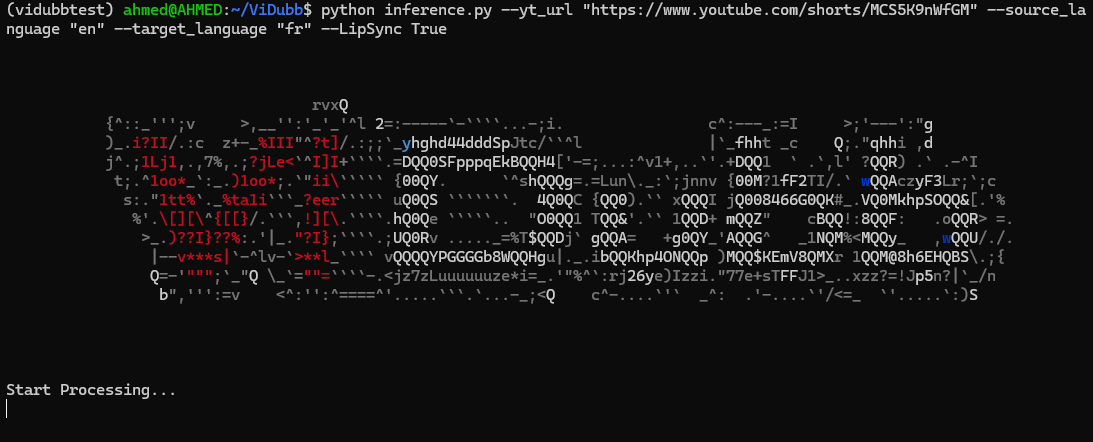
Run the inference script to process a video:
python inference.py --yt_url "https://www.youtube.com/shorts/ULptP9egQ6Q" --source_language "en" --target_language "fr" --LipSync True --Bg_sound True
This command will:
More options:
usage: inference.py [-h] (--yt_url YT_URL | --video_url VIDEO_URL)
                    --source_language SOURCE_LANGUAGE --target_language
                    TARGET_LANGUAGE [--whisper_model WHISPER_MODEL]
                    [--LipSync LIPSYNC] [--Bg_sound BG_SOUND]
Choose between YouTube or video URL

options:
  -h, --help            show this help message and exit
  --yt_url YT_URL       YouTube single video URL
  --video_url VIDEO_URL
                        Single video URL
  --source_language SOURCE_LANGUAGE
                        Video source language
  --target_language TARGET_LANGUAGE
                        Video target language
  --whisper_model WHISPER_MODEL
                        Chose the whisper model based on your device
                        requirements
  --LipSync LIPSYNC     Lip synchronization of the resut audio to the
                        synthesized video
  --Bg_sound BG_SOUND   Keep the background sound of the original video,
                        though it might be slightly noisy
[!TIP] --Bg_sound True: can lead to more noise in some videos with less background sound in origin video
--LipSync True: will take more time and more memory
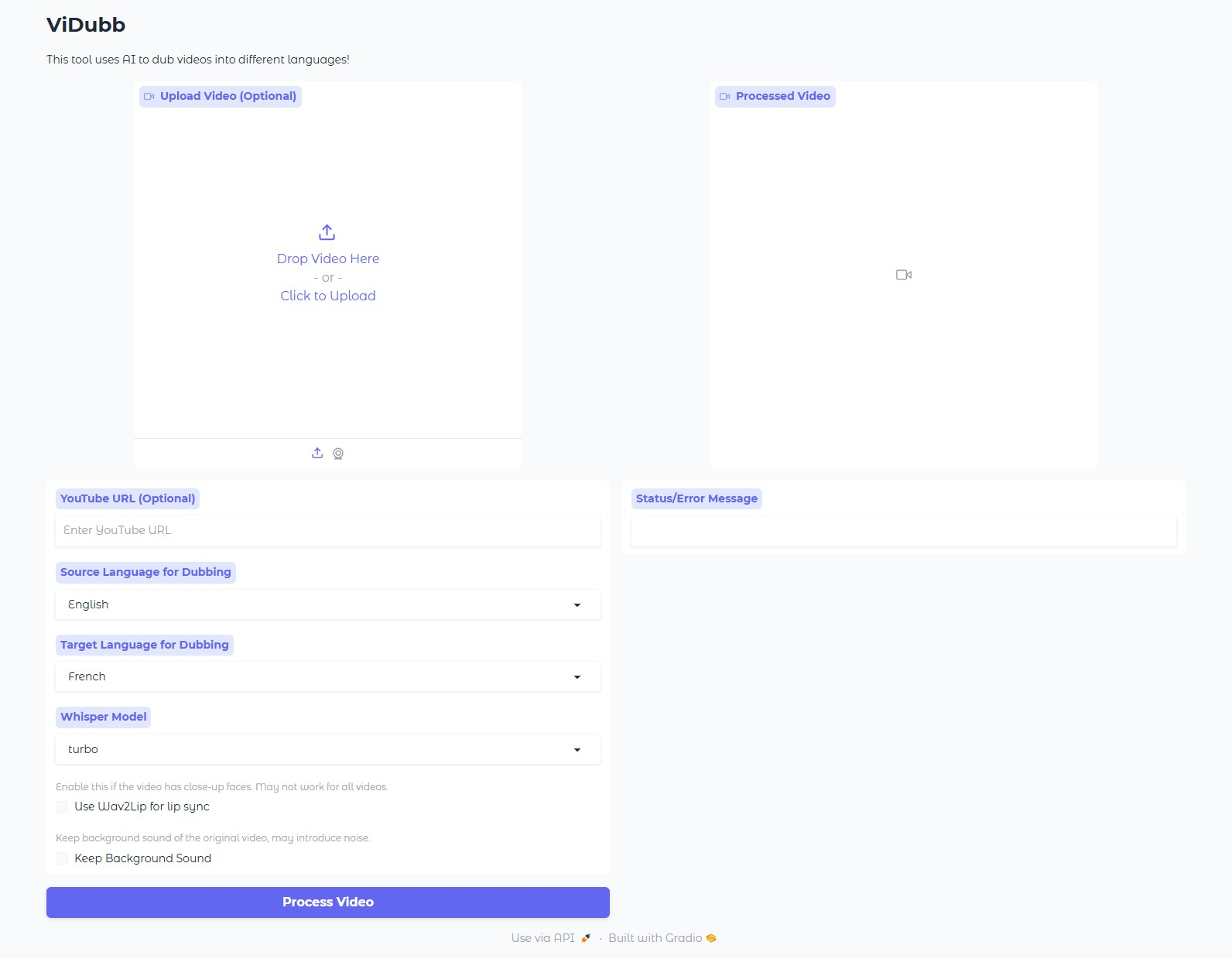
Start the web application:
python app.py
Access the app by opening a browser and going to:
http://localhost:7860/
By following these steps, you should be able to set up and run ViDubb for video dubbing with AI-powered voice and lip synchronization.
The provided code implements a robust video dubbing pipeline, leveraging various machine learning and audio/video processing techniques. Here's a detailed breakdown of the key features and their underlying technical implementations:
- Speaker Diarization
pyannote.audio library, a state-of-the-art speaker diarization toolkit. It segments the audio into speaker turns, allowing for accurate identification of who is speaking at any given time.- Lip-Sync (Optional)
- Text Transcription
- Sentence Segmentation
- Text Translation
- Emotion Analysis (Optional)
- Audio Synthesis
- Audio and Video Synchronization
- Audio and Video Mixing
By combining these techniques and leveraging the power of machine learning, the code effectively addresses the challenges of video dubbing, delivering high-quality results.
[!Caution]
When using this tool, please comply with relevant laws, including copyright, data protection, and privacy laws. Do not use this tool without permission from the original author and/or rights holder.
ViDubb follows the Apache License 2.0. When using this tool, please comply with relevant laws, including copyright, data protection, and privacy laws. Do not use this tool without permission from the original author and/or rights holder.
AI Video dubbing / dubber / Video dubbing / AI dubbing AI 視訊配音
See the code
| Kaggle | Gradio | Youtube |
|---|---|---|
| | |
| Free memory and GPU time! | Gradio Web App | Subscribe! |
ViDubb is an advanced AI-powered video dubbing solution focused on delivering high-quality, efficient dubbing for multilingual content. By utilizing cutting-edge voice cloning technology, ViDubb generates realistic voiceovers in multiple languages with exceptional accuracy. The system ensures perfect lip-sync synchronization, matching the voiceovers to the actors' movements, providing a seamless viewing experience. This approach not only enhances the natural flow of dialogue but also preserves the authenticity of the original video. ViDubb streamlines the dubbing process, enabling faster turnaround times while maintaining top-tier audio and visual quality for global audiences ( AI video dubbing / dubber).
| Original Video in French | ViDubb With Background in English | ViDubb Without Background in English |
|---|---|---|
| Original Video in English | ViDubb with LipSync in French |
|---|---|
[!NOTE]
Due to GitHub restrictions, we had to clip and downgrade the linked examples.
To view the original videos, please visit our YouTube channel. Don't forget to subscribe!
ViDubb (Video dubber) is an advanced AI-powered video dubbing solution designed to deliver high-quality, efficient dubbing for multilingual content. By integrating cutting-edge voice cloning technology and dynamic lip-sync synchronization, ViDubb ensures that voiceovers are perfectly aligned with the original video’s dialogue and actor movements, even when multiple speakers are involved, providing a seamless viewing experience across languages.
Leveraging state-of-the-art AI, ViDubb sets new standards in dubbing accuracy and naturalness, making it ideal for global content localization, film, media, and educational purposes. The tool enables content creators and businesses to quickly adapt their videos for international audiences while maintaining top-tier audio and visual quality.
Our mission is to provide an efficient and high-quality AI-driven dubbing solution that empowers content creators to expand their global reach, bringing videos to audiences in multiple languages with perfect synchronization and immersive quality.
ViDubb is an AI-powered video dubbing project that involves voice cloning, multilingual capabilities, lip-syncing, and background sound preservation. Follow the steps below to set up and run ViDubb.
Before starting, ensure you have Anaconda installed on your system. Anaconda is used to manage Python environments and dependencies.
Remove any existing environment (if necessary):
conda remove -n vidubbtest --all
Create a new conda environment with Python 3.10.14 and IPython:
conda create -n "vidubbtest" python=3.10.14 ipython
Activate the environment:
conda activate vidubbtest
Clone the ViDubb repository from GitHub:
git clone https://github.com/medahmedkrichen/ViDubb.git
Navigate to the ViDubb directory:
cd ViDubb
.env File.env file with your Hugging Face API and Groq API tokens:
.env file in the ViDubb directory.HF_TOKEN="your_huggingface_token"
Groq_TOKEN="your_groq_token"
[!NOTE]
You can obtain your
HF_TOKENfrom Hugging Face to use the speaker separation, make sure to request access to pyannote/speaker-diarization-3.1.You can obtain your
Groq_TOKENfrom GroqCloud to use the free API model 'llama3-70b' for translation instead of the standard model (optional).
[!TIP]
"llama3-70b" is effective for translating languages in the Latin language family, but it is not as effective for languages like Arabic or Mandarin. If you choose not to use it, leave the groq field empty.
Install FFmpeg (for audio/video processing):
sudo apt-get install ffmpeg
Install Python dependencies from the requirements.txt file:
pip install -r requirements.txt
Install PyTorch with CUDA support for GPU acceleration:
pip3 install torch torchvision torchaudio --index-url https://download.pytorch.org/whl/cu121
Check if CUDA is available: Open a Python shell and run the following:
import torch
print(torch.cuda.is_available())
Download the Wav2Lip model:
wget 'https://github.com/medahmedkrichen/ViDubb/releases/download/weights2/wav2lip_gan.1.1.pth' -O 'Wav2Lip/wav2lip_gan.pth'
Download the face detection model:
wget "https://github.com/medahmedkrichen/ViDubb/releases/download/weights1/s3fd-619a316812.1.1.pth" -O "Wav2Lip/face_detection/detection/sfd/s3fd.pth"
Run the inference script to process a video:
python inference.py --yt_url "https://www.youtube.com/shorts/ULptP9egQ6Q" --source_language "en" --target_language "fr" --LipSync True --Bg_sound True
This command will:
More options:
usage: inference.py [-h] (--yt_url YT_URL | --video_url VIDEO_URL)
                    --source_language SOURCE_LANGUAGE --target_language
                    TARGET_LANGUAGE [--whisper_model WHISPER_MODEL]
                    [--LipSync LIPSYNC] [--Bg_sound BG_SOUND]
Choose between YouTube or video URL

options:
  -h, --help            show this help message and exit
  --yt_url YT_URL       YouTube single video URL
  --video_url VIDEO_URL
                        Single video URL
  --source_language SOURCE_LANGUAGE
                        Video source language
  --target_language TARGET_LANGUAGE
                        Video target language
  --whisper_model WHISPER_MODEL
                        Chose the whisper model based on your device
                        requirements
  --LipSync LIPSYNC     Lip synchronization of the resut audio to the
                        synthesized video
  --Bg_sound BG_SOUND   Keep the background sound of the original video,
                        though it might be slightly noisy
[!TIP] --Bg_sound True: can lead to more noise in some videos with less background sound in origin video
--LipSync True: will take more time and more memory
Start the web application:
python app.py
Access the app by opening a browser and going to:
http://localhost:7860/
By following these steps, you should be able to set up and run ViDubb for video dubbing with AI-powered voice and lip synchronization.
The provided code implements a robust video dubbing pipeline, leveraging various machine learning and audio/video processing techniques. Here's a detailed breakdown of the key features and their underlying technical implementations:
- Speaker Diarization
pyannote.audio library, a state-of-the-art speaker diarization toolkit. It segments the audio into speaker turns, allowing for accurate identification of who is speaking at any given time.- Lip-Sync (Optional)
- Text Transcription
- Sentence Segmentation
- Text Translation
- Emotion Analysis (Optional)
- Audio Synthesis
- Audio and Video Synchronization
- Audio and Video Mixing
By combining these techniques and leveraging the power of machine learning, the code effectively addresses the challenges of video dubbing, delivering high-quality results.
[!Caution]
When using this tool, please comply with relevant laws, including copyright, data protection, and privacy laws. Do not use this tool without permission from the original author and/or rights holder.
ViDubb follows the Apache License 2.0. When using this tool, please comply with relevant laws, including copyright, data protection, and privacy laws. Do not use this tool without permission from the original author and/or rights holder.



