ezBookkeeping is an open source, powerful, self-hosted personal finance app that is easy to use.
See the code






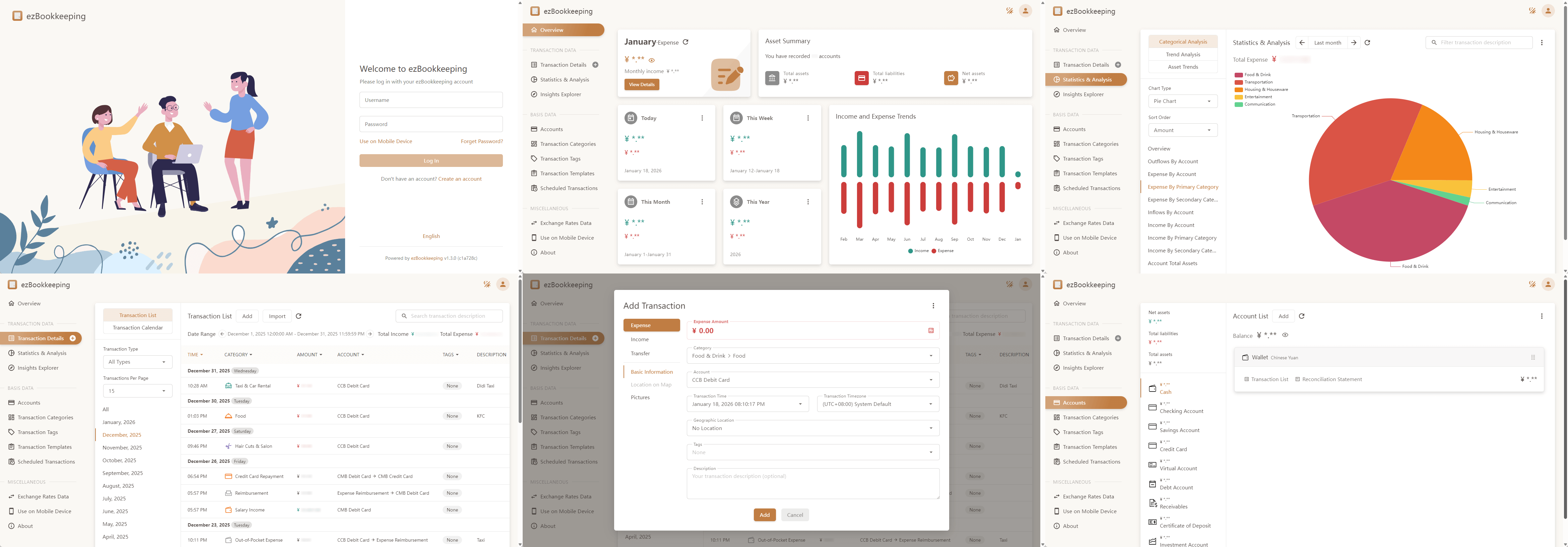
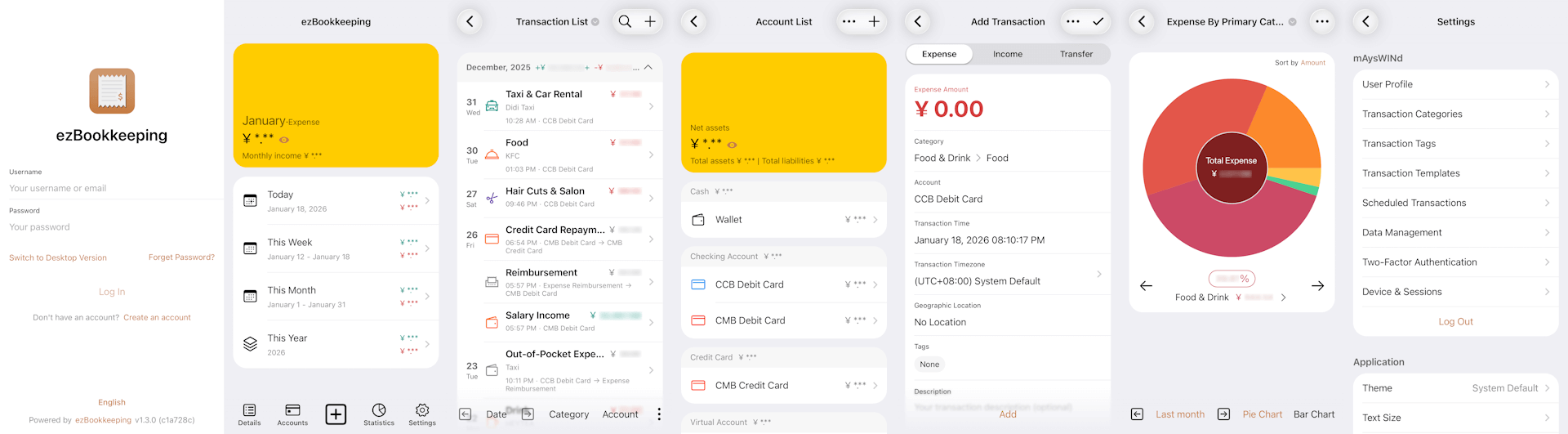
ezBookkeeping is an open source, powerful, self-hosted personal finance app that is easy to use. It helps you record daily transactions, import data from various sources, and quickly search and filter your bills. You can analyze historical data using built-in charts or perform custom queries with your own chart dimensions to better understand spending patterns and financial trends. ezBookkeeping is easy to deploy, and you can start it with just one single Docker command. Designed to be resource-efficient, it runs smoothly on devices such as home servers, NAS and Raspberry Pi.
ezBookkeeping offers tailored interfaces for mobile and desktop devices. With PWA (Progressive Web Apps) support, you can add it to your mobile home screen and use it like a native app.
Live Demo: https://ezbookkeeping-demo.mayswind.net
For a full list of features, visit the Full Feature List.
Visit Docker Hub to see all images and tags.
Latest Release:
$ docker run -p8080:8080 mayswind/ezbookkeeping
Latest Daily Build:
$ docker run -p8080:8080 mayswind/ezbookkeeping:latest-snapshot
For production use of ezBookkeeping, you need to mount a persistent volume when starting the container to prevent data loss. For more information, see documentation.
Download the latest release: https://github.com/mayswind/ezbookkeeping/releases
Linux / macOS
$ ./ezbookkeeping server run
Windows
> .\ezbookkeeping.exe server run
By default, ezBookkeeping listens on port 8080. You can then visit http://{YOUR_HOST_ADDRESS}:8080/ .
Make sure you have Golang, GCC, Node.js and NPM installed. Then download the source code, and follow these steps:
Linux / macOS
$ ./build.sh package -o ezbookkeeping.tar.gz
All the files will be packaged in ezbookkeeping.tar.gz.
Windows
> .\build.bat package -o ezbookkeeping.zip
or
PS > .\build.ps1 package -Output ezbookkeeping.zip
All the files will be packaged in ezbookkeeping.zip.
You can also build a Docker image. Make sure you have Docker installed, then follow these steps:
Linux
$ ./build.sh docker
We welcome contributions of all kinds.
If you find a bug, please submit an issue on GitHub.
If you would like to contribute code, you can fork the repository and open a pull request.
Improvements to documentation, feature suggestions, and other forms of feedback are also appreciated.
You can view existing contributors on the Contributor Graph.
Help make ezBookkeeping accessible to users around the world. We welcome help to improve existing translations or add new ones. If you would like to contribute a translation, please refer to the translation guide.
Currently available translations:
| Tag | Language | Progress | Contributors |
|---|---|---|---|
| de | Deutsch |  | @chrgm, @1270o1, @martinschilliger, @marcelweikum |
| el | Ελληνικά |  | @konet-gr |
| en | English |  | / |
| es | Español |  | @Miguelonlonlon, @abrugues, @AndresTeller, @diegofercri |
| fr | Français |  | @brieucdlf |
| it | Italiano |  | @waron97, @albanobattistella |
| ja | 日本語 |  | @tkymmm, @Mink16, @x0x0b |
| kn | ಕನ್ನಡ |  | @Darshanbm05 |
| ko | 한국어 |  | @overworks |
| nl | Nederlands |  | @automagics |
| pl | Polski |  | @mnowok |
| pt-BR | Português (Brasil) |  | @thecodergus, @balaios |
| ro | Română |  | @gg64nou |
| ru | Русский |  | @artegoser, @dshemin, @zhugaru |
| sl | Slovenščina |  | @thehijacker |
| ta | தமிழ் |  | @hhharsha36 |
| th | ไทย |  | @natthavat28 |
| tr | Türkçe |  | @aydnykn, @snizamaddinov |
| uk | Українська |  | @nktlitvinenko, @grid-pilot, @infinit1ve |
| vi | Tiếng Việt |  | @f97 |
| zh-Hans | 中文 (简体) |  | / |
| zh-Hant | 中文 (繁體) |  | / |
Overall
Maintained
Code review
Go module
Latest release
Releases this year
(top 24 of 32)
282 followers · starred Feb 2025
1,088 followers · starred Feb 2025
138 followers · starred Nov 2025
139 followers · starred Mar 2025
ezBookkeeping is an open source, powerful, self-hosted personal finance app that is easy to use.
See the code
ezBookkeeping is an open source, powerful, self-hosted personal finance app that is easy to use. It helps you record daily transactions, import data from various sources, and quickly search and filter your bills. You can analyze historical data using built-in charts or perform custom queries with your own chart dimensions to better understand spending patterns and financial trends. ezBookkeeping is easy to deploy, and you can start it with just one single Docker command. Designed to be resource-efficient, it runs smoothly on devices such as home servers, NAS and Raspberry Pi.
ezBookkeeping offers tailored interfaces for mobile and desktop devices. With PWA (Progressive Web Apps) support, you can add it to your mobile home screen and use it like a native app.
Live Demo: https://ezbookkeeping-demo.mayswind.net
For a full list of features, visit the Full Feature List.
Visit Docker Hub to see all images and tags.
Latest Release:
$ docker run -p8080:8080 mayswind/ezbookkeeping
Latest Daily Build:
$ docker run -p8080:8080 mayswind/ezbookkeeping:latest-snapshot
For production use of ezBookkeeping, you need to mount a persistent volume when starting the container to prevent data loss. For more information, see documentation.
Download the latest release: https://github.com/mayswind/ezbookkeeping/releases
Linux / macOS
$ ./ezbookkeeping server run
Windows
> .\ezbookkeeping.exe server run
By default, ezBookkeeping listens on port 8080. You can then visit http://{YOUR_HOST_ADDRESS}:8080/ .
Make sure you have Golang, GCC, Node.js and NPM installed. Then download the source code, and follow these steps:
Linux / macOS
$ ./build.sh package -o ezbookkeeping.tar.gz
All the files will be packaged in ezbookkeeping.tar.gz.
Windows
> .\build.bat package -o ezbookkeeping.zip
or
PS > .\build.ps1 package -Output ezbookkeeping.zip
All the files will be packaged in ezbookkeeping.zip.
You can also build a Docker image. Make sure you have Docker installed, then follow these steps:
Linux
$ ./build.sh docker
We welcome contributions of all kinds.
If you find a bug, please submit an issue on GitHub.
If you would like to contribute code, you can fork the repository and open a pull request.
Improvements to documentation, feature suggestions, and other forms of feedback are also appreciated.
You can view existing contributors on the Contributor Graph.
Help make ezBookkeeping accessible to users around the world. We welcome help to improve existing translations or add new ones. If you would like to contribute a translation, please refer to the translation guide.
Currently available translations:
| Tag | Language | Progress | Contributors |
|---|---|---|---|
| de | Deutsch | | @chrgm, @1270o1, @martinschilliger, @marcelweikum |
| el | Ελληνικά | | @konet-gr |
| en | English | | / |
| es | Español | | @Miguelonlonlon, @abrugues, @AndresTeller, @diegofercri |
| fr | Français | | @brieucdlf |
| it | Italiano | | @waron97, @albanobattistella |
| ja | 日本語 | | @tkymmm, @Mink16, @x0x0b |
| kn | ಕನ್ನಡ | | @Darshanbm05 |
| ko | 한국어 | | @overworks |
| nl | Nederlands | | @automagics |
| pl | Polski | | @mnowok |
| pt-BR | Português (Brasil) | | @thecodergus, @balaios |
| ro | Română | | @gg64nou |
| ru | Русский | | @artegoser, @dshemin, @zhugaru |
| sl | Slovenščina | | @thehijacker |
| ta | தமிழ் | | @hhharsha36 |
| th | ไทย | | @natthavat28 |
| tr | Türkçe | | @aydnykn, @snizamaddinov |
| uk | Українська | | @nktlitvinenko, @grid-pilot, @infinit1ve |
| vi | Tiếng Việt | | @f97 |
| zh-Hans | 中文 (简体) | | / |
| zh-Hant | 中文 (繁體) | | / |
Overall
Maintained
Code review
Go module
Latest release
Releases this year
(top 24 of 32)
282 followers · starred Feb 2025
1,088 followers · starred Feb 2025
138 followers · starred Nov 2025
139 followers · starred Mar 2025