A distributed SQLite server with MySQL wire compatible interface
See the code
Marmot v2 is a leaderless, distributed SQLite replication system built on a gossip-based protocol with distributed transactions and eventual consistency.
Key Features:
LOAD DATA LOCAL INFILE with distributed commit semanticsMySQL active-active requires careful setup of replication, conflict avoidance, and monitoring. Failover needs manual intervention. Split-brain scenarios demand operational expertise. This complexity doesn't scale to edge deployments.
Marmot excels at read-heavy edge scenarios:
| Use Case | How Marmot Helps |
|---|---|
| Distributed WordPress | Multi-region WordPress with replicated database |
| Lambda/Edge sidecars | Lightweight regional SQLite replicas, local reads |
| Edge vector databases | Built-in ANN search + distributed embeddings with local query |
| Regional config servers | Fast local config reads, replicated writes |
| Product catalogs | Geo-distributed catalog data, eventual sync |
# Start a single-node cluster
./marmot-v2

# Or run as daemon (background)
./marmot-v2 -daemon -pid-file=/tmp/marmot/marmot.pid

# Connect with MySQL client
mysql -h localhost -P 3306 -u root

# Or use DBeaver, MySQL Workbench, etc.
# Test DDL and DML replication across a 2-node cluster
./scripts/test-ddl-replication.sh

# This script will:
# 1. Start a 2-node cluster
# 2. Create a table on node 1 and verify it replicates to node 2
# 3. Insert data on node 1 and verify it replicates to node 2
# 4. Update data on node 2 and verify it replicates to node 1
# 5. Delete data on node 1 and verify it replicates to node 2

# Manual cluster testing
./examples/start-seed.sh              # Start seed node (port 8081, mysql 3307)
./examples/join-cluster.sh 2 localhost:8081  # Join node 2 (port 8082, mysql 3308)
./examples/join-cluster.sh 3 localhost:8081  # Join node 3 (port 8083, mysql 3309)

# Connect to any node and run queries
mysql --protocol=TCP -h localhost -P 3307 -u root
mysql --protocol=TCP -h localhost -P 3308 -u root

# Cleanup
pkill -f marmot-v2
Marmot can run distributed WordPress with full database replication across nodes. Each WordPress instance connects to its local Marmot node, and all database changes replicate automatically.
Marmot implements MySQL functions required by WordPress:
| Category | Functions |
|---|---|
| Date/Time | NOW, CURDATE, DATE_FORMAT, UNIX_TIMESTAMP, DATEDIFF, YEAR, MONTH, DAY, etc. |
| String | CONCAT_WS, SUBSTRING_INDEX, FIND_IN_SET, LPAD, RPAD, etc. |
| Math/Hash | RAND, MD5, SHA1, SHA2, POW, etc. |
| DML | ON DUPLICATE KEY UPDATE (transformed to SQLite ON CONFLICT) |
cd examples/wordpress-cluster
./run.sh up
This starts:
┌─────────────┐  ┌─────────────┐  ┌─────────────┐
│ WordPress-1 │  │ WordPress-2 │  │ WordPress-3 │
│ :9101       │  │ :9102       │  │ :9103       │
└──────┬──────┘  └──────┬──────┘  └──────┬──────┘
       ▼                ▼                ▼
┌─────────────┐  ┌─────────────┐  ┌─────────────┐
│  Marmot-1   │◄─┤  Marmot-2   │◄─┤  Marmot-3   │
│ MySQL: 9191 │  │ MySQL: 9192 │  │ MySQL: 9193 │
└─────────────┘  └─────────────┘  └─────────────┘
       └──────────────┴──────────────┘
              QUORUM Replication
Test it:
Commands:
./run.sh status   # Check cluster health
./run.sh logs-m   # Marmot logs only
./run.sh logs-wp  # WordPress logs only
./run.sh down     # Stop cluster
Marmot v2 uses a fundamentally different architecture from other SQLite replication solutions:
vs. rqlite/dqlite/LiteFS:
How It Works:
| Aspect | Marmot | MySQL Active-Active | rqlite | dqlite | TiDB |
|---|---|---|---|---|---|
| Leader | None | None (but complex) | Yes (Raft) | Yes (Raft) | Yes (Raft) |
| Failover | Automatic | Manual intervention | Automatic | Automatic | Automatic |
| Split-brain recovery | Automatic (anti-entropy) | Manual | N/A (leader-based) | N/A (leader-based) | N/A |
| Consistency | Tunable (ONE/QUORUM/ALL) | Serializable | Tunabale (ONE/QUORUM/Linearizable) | Strong | Strong |
| Direct file read | ✅ SQLite file | ❌ | ✅ SQLite file | ❌ | ❌ |
| JS-safe AUTO_INCREMENT | ✅ Compact mode (53-bit) | N/A | N/A | ❌ 64-bit breaks JS | |
| Edge-friendly | ✅ Lightweight | ❌ Heavy | ✅ Lightweight | ⚠️ Moderate | ❌ Heavy |
| Operational complexity | Low | High | Low | Low | High |
Marmot v2 supports distributed DDL (Data Definition Language) replication without requiring master election:
Cluster-Wide Locking: Each DDL operation acquires a distributed lock per database (default: 30-second lease)
Automatic Idempotency: DDL statements are automatically rewritten for safe replay
CREATE TABLE users (id INT)
→ CREATE TABLE IF NOT EXISTS users (id INT)

DROP TABLE users
→ DROP TABLE IF EXISTS users
Schema Version Tracking: Each database maintains a schema version counter (__marmot_schema_version)
Rolling Upgrades: DDL and CREATE/DROP DATABASE return the retryable error 1213 while any cluster member does
not serve the commit-log pull protocol (an older release). Upgrade every node, then retry.
Quorum-Based Replication: DDL replicates like DML through the same 2PC mechanism
[ddl]
# DDL lock lease duration (seconds)
lock_lease_seconds = 30

# Automatically rewrite DDL for idempotency
enable_idempotent = true
mydb.users instead of users)Marmot v2 uses Change Data Capture (CDC) for replication instead of SQL statement replay:
EncodedCapturedRow records and stored in Marmot's CDC segment log/cdc/manifest/{txnID} only after their segment ranges are known; recovery validates and truncates segment tails at record boundariesFor UPDATE and DELETE operations, Marmot automatically extracts row keys:
Marmot can publish CDC events to external messaging systems, enabling real-time data pipelines, analytics, and event-driven architectures. Events follow the Debezium specification for maximum compatibility with existing CDC tooling.
[publisher]
enabled = true

[[publisher.sinks]]
name = "kafka-main"
type = "kafka"                    # "kafka" or "nats"
format = "debezium"               # Debezium-compatible JSON format
brokers = ["localhost:9092"]      # Kafka broker addresses
topic_prefix = "marmot.cdc"       # Topics: {prefix}.{database}.{table}
filter_tables = ["*"]             # Glob patterns (e.g., "users", "order_*")
filter_databases = ["*"]          # Glob patterns (e.g., "prod_*")
batch_size = 100                  # Events per poll cycle
poll_interval_ms = 10             # Polling interval

# NATS sink example
[[publisher.sinks]]
name = "nats-events"
type = "nats"
format = "debezium"
nats_url = "nats://localhost:4222"
topic_prefix = "marmot.cdc"
filter_tables = ["*"]
filter_databases = ["*"]
Events follow the Debezium envelope structure:
{
  "schema": { ... },
  "payload": {
    "before": null,
    "after": {"id": 1, "name": "alice", "email": "alice@example.com"},
    "source": {
      "version": "2.9.0-beta",
      "connector": "marmot",
      "name": "marmot",
      "ts_ms": 1702500000000,
      "db": "myapp",
      "table": "users"
    },
    "op": "c",
    "ts_ms": 1702500000000
  }
}
Operation Types (per Debezium spec):
| Operation | op | before | after |
|---|---|---|---|
| INSERT | c (create) | null | row data |
| UPDATE | u (update) | old row | new row |
| DELETE | d (delete) | old row | null |
Topics follow the pattern: {topic_prefix}.{database}.{table}
Examples:
marmot.cdc.myapp.usersmarmot.cdc.myapp.ordersmarmot.cdc.analytics.eventsFor more details, see the Integrations documentation.
Deploy Marmot as a lightweight regional replica alongside Lambda functions:
Scale reads globally with replica mode and transparent failover:
[replica]
enabled = true
follow_addresses = ["central-cluster-1:8080", "central-cluster-2:8080", "central-cluster-3:8080"]
replicate_databases = []                    # Filter databases (empty = all, supports glob patterns)
database_discovery_interval_seconds = 10    # Poll for new databases (default: 10)
discovery_interval_seconds = 30             # Poll for cluster membership (default: 30)
failover_timeout_seconds = 60               # Failover timeout (default: 60)
snapshot_concurrency = 3                    # Parallel snapshot downloads (default: 3)
snapshot_cache_ttl_seconds = 30             # Snapshot cache TTL (default: 30)
GetClusterNodes RPCMarmot supports a wide range of MySQL/SQLite statements through its MySQL protocol server. The following table shows compatibility for different statement types:
| Statement Type | Support | Replication | Notes |
|---|---|---|---|
| DML - Data Manipulation | |||
INSERT / REPLACE | ✅ Full | ✅ Yes | Includes qualified table names (db.table) |
UPDATE | ✅ Full | ✅ Yes | Includes qualified table names |
DELETE | ✅ Full | ✅ Yes | Includes qualified table names |
SELECT | ✅ Full | N/A | Read operations |
LOAD DATA LOCAL INFILE | ✅ Full | ✅ Yes | Replicated bulk loading (cluster + forwarded replica writes) |
| DDL - Data Definition | |||
CREATE TABLE | ✅ Full | ✅ Yes | Replicated with cluster-wide locking |
ALTER TABLE | ✅ Full | ✅ Yes | Replicated with cluster-wide locking |
DROP TABLE | ✅ Full | ✅ Yes | Replicated with cluster-wide locking |
TRUNCATE TABLE | ✅ Full | ✅ Yes | |
RENAME TABLE | ✅ Full | ✅ Yes | Replicated with cluster-wide locking |
CREATE/DROP INDEX | ✅ Full | ✅ Yes | Replicated with cluster-wide locking |
CREATE/DROP VIEW | ✅ Full | ✅ Yes | Replicated with cluster-wide locking |
CREATE/DROP TRIGGER | ✅ Full | ✅ Yes | Replicated with cluster-wide locking |
| Database Management | |||
CREATE DATABASE | ✅ Full | ✅ Yes | Replicated with cluster-wide locking |
DROP DATABASE | ✅ Full | ✅ Yes | Replicated with cluster-wide locking |
ALTER DATABASE | ✅ Full | ✅ Yes | Replicated with cluster-wide locking |
SHOW DATABASES | ✅ Full | N/A | Metadata query |
SHOW TABLES | ✅ Full | N/A | Metadata query |
USE database | ✅ Full | N/A | Session state |
| Transaction Control | |||
BEGIN / START TRANSACTION | ✅ Full | N/A | Transaction boundary |
COMMIT | ✅ Full | ✅ Yes | Commits distributed transaction |
ROLLBACK | ✅ Full | ✅ Yes | Aborts distributed transaction |
SAVEPOINT | ✅ Full | ✅ Yes | Nested transaction support |
| Locking | |||
LOCK TABLES | ✅ Parsed | ❌ No | Requires distributed locking coordination |
UNLOCK TABLES | ✅ Parsed | ❌ No | Requires distributed locking coordination |
| Session Configuration | |||
SET statements | ✅ Parsed | ❌ No | Session-local, not replicated |
SET marmot_transpilation | ✅ Full | ❌ No | Toggle MySQL→SQLite transpilation |
LOAD EXTENSION | ✅ Full | ❌ No | Load SQLite extension (requires config) |
| XA Transactions | |||
XA START/END/PREPARE | ✅ Parsed | ❌ No | Marmot uses its own 2PC protocol |
XA COMMIT/ROLLBACK | ✅ Parsed | ❌ No | Not compatible with Marmot's model |
| DCL - Data Control | |||
GRANT / REVOKE | ✅ Parsed | ❌ No | User management not replicated |
CREATE/DROP USER | ✅ Parsed | ❌ No | User management not replicated |
ALTER USER | ✅ Parsed | ❌ No | User management not replicated |
| Administrative | |||
OPTIMIZE TABLE | ✅ Parsed | ❌ No | Node-local administrative command |
REPAIR TABLE | ✅ Parsed | ❌ No | Node-local administrative command |
Schema Changes (DDL): DDL statements are fully replicated with cluster-wide locking and automatic idempotency. See the DDL Replication section for details.
XA Transactions: Marmot has its own distributed transaction protocol based on 2PC. MySQL XA transactions are not compatible with Marmot's replication model.
User Management (DCL): User and privilege management statements are local to each node. For production deployments, consider handling authentication at the application or proxy level.
Table Locking: LOCK TABLES statements are recognized but not enforced across the cluster. Use application-level coordination for distributed locking needs.
Qualified Names: Marmot fully supports qualified table names (e.g., db.table) in DML and DDL operations.
LOAD DATA Scope: Marmot supports LOAD DATA LOCAL INFILE (client-uploaded file bytes). LOAD DATA INFILE (server-side file access) is not supported.
Marmot has built-in vector similarity search for RAG-style workloads. No external vector service is required: embeddings stay in your table, DML replicates through Marmot CDC, and each node builds its own local ANN files for reads.
The SQL surface is intentionally small:
CREATE VECTOR INDEX ... ON table(column) DIM n METRIC ...vec_match(column, query_vector, k) in WHEREvec_distance(column, query_vector) in ORDER BYREINDEX VECTOR index_nameDROP VECTOR INDEX index_nameCREATE DATABASE rag;
USE rag;
CREATE TABLE chunks (
id INTEGER PRIMARY KEY,
tenant_id INTEGER NOT NULL,
source_uri TEXT NOT NULL,
chunk_no INTEGER NOT NULL,
title TEXT NOT NULL,
body TEXT NOT NULL,
status TEXT NOT NULL,
created_at INTEGER NOT NULL,
embedding BLOB NOT NULL
);
CREATE INDEX chunks_tenant_status_idx
ON chunks(tenant_id, status);
CREATE VECTOR INDEX chunks_embedding_idx
ON chunks(embedding)
DIM 1536
METRIC cosine;
The embedding column is a packed little-endian float32 blob. Use driver parameters rather than hand-writing blobs in SQL.
import struct

def vec_blob(values: list[float]) -> bytes:
    return struct.pack("<" + "f" * len(values), *values)

# Use your driver's placeholder convention; the important part is binding
# vec_blob(embedding) as bytes for the BLOB column.
cursor.execute(
    """
    INSERT INTO chunks
        (id, tenant_id, source_uri, chunk_no, title, body, status, created_at, embedding)
    VALUES (?, ?, ?, ?, ?, ?, ?, ?, ?)
    """,
    (1, 42, "s3://kb/intro.md", 0, "Intro", "Marmot stores vectors in SQLite.", "published", 1730000000, vec_blob(embedding)),
)
Search composes with normal SQL filters:
SELECT id, source_uri, chunk_no, title, body
  FROM chunks
 WHERE vec_match(embedding, ?, 10)
   AND tenant_id = 42
   AND status = 'published'
 ORDER BY vec_distance(embedding, ?)
 LIMIT 10;
Pass the same query-vector blob to both placeholders.
LIMIT is the final row count. The third argument to vec_match is the ANN candidate and exact-rerank budget, so it may be larger than LIMIT when you want more recall headroom or selective post-filters:
SELECT id, title
  FROM chunks
 WHERE vec_match(embedding, ?, 100)
   AND tenant_id = 42
 ORDER BY vec_distance(embedding, ?)
 LIMIT 10;
Marmot rejects vec_match(..., k) when k < LIMIT.
For most RAG stores, start with auto tuning:
CREATE VECTOR INDEX chunks_embedding_idx
    ON chunks(embedding)
    DIM 1536
    METRIC cosine;
Override only when you have measured a reason:
CREATE VECTOR INDEX chunks_embedding_idx
    ON chunks(embedding)
    DIM 1536
    METRIC cosine
    WITH (nlist = 512, nprobe = 32);

SET @@marmot_vec_nprobe = 64;          -- per-connection recall/latency test
SET @@marmot_vec_force_plan = 'post';  -- force IVF path for debugging
SET @@marmot_vec_force_plan = 'auto';
nlist controls the number of IVF clusters. More clusters usually reduce bytes scanned per query but make build and maintenance work heavier. nprobe controls how many clusters a query scans. Higher nprobe usually improves recall and lowers false negatives, but increases disk reads and CPU per query. The default auto policy targets compact clusters and derives a probe budget from expected scanned rows.
Vector indexes are live:
.vecseg generation from a bounded overlay snapshot once enough rows exist.REINDEX VECTOR chunks_embedding_idx forces a full local retrain/rewrite.Settling improves read latency and QPS; it is not required for correctness. Raw insert QPS and final query-ready QPS are different measurements.
Latest local 100K vector validation:
| Metric | Value |
|---|---|
| Dataset | Random 100K DBpedia OpenAI 1536d subset from 990K rows, seed 42 |
| Query set | 10,000 queries, cosine, K=10, Go-rank, id projection |
| Index shape | nlist=196, explicit read test nprobe=24 |
| Stable encoding | Residual PQ8, 132 payload bytes/vector, 140 entry bytes/vector |
| Stable data file | 14,003,208 bytes for 100,000 rows |
| Block metadata | 877 blocks, 3,651,568 bytes |
| Segment read/query | 1,739,024 bytes, 1.00x overread |
| Recall | recall@10 = 0.9628, recall@10-in-100 = 1.0000 |
| Read throughput | 1,752 QPS aggregate at concurrency 8 |
| Read latency | p50 4.31ms, p95 5.82ms, p99 6.48ms |
| RSS after measurement | 340 MB |
The same 100K force-build validation measured DDL create at 203ms, insert at 100,000 rows in 3.00s, first clustered publish at 15.886s, and final settled state at 1m08.286s.
Latest local 500K read validation:
| Metric | Value |
|---|---|
| Dataset | Random 500K DBpedia OpenAI 1536d subset from 990K rows, seed 42 |
| Query set | 10,000 queries, cosine, K=10, Go-rank, id projection |
| Index shape | nlist=977, explicit read test nprobe=48 |
| Stable encoding | Residual PQ8, 132 payload bytes/vector, 140 entry bytes/vector |
| Stable data file | 70,015,704 bytes for 500,000 rows |
| Block metadata | 4,401 blocks |
| Segment read/query | 3,456,555 bytes, 1.00x overread |
| Recall | recall@10 = 0.9575, recall@10-in-100 = 1.0000 |
| Read throughput | 1,053 QPS aggregate at concurrency 8 |
| Read latency | p50 7.04ms, p95 12.13ms, p99 15.28ms |
| RSS after reopen | 185 MB |
| RSS after measurement | 459 MB |
The matching 500K force-build lifecycle run measured 500,000 inserts in 36.118s, first clustered publish at 1m21.011s, final settled state at 5m31.928s, and RSS after settled cleanup at 917 MB in the same process. Reopened steady read memory is lower because the transient build buffers are gone.
.vecseg generations, rowmaps, block metadata sidecars, manifests, and an overlay journal next to the SQLite database.LIMIT.Metrics: l2, cosine, and dot. For dot, set WITH (max_norm = ...) to a fixed upper bound for vector norms.
Full startup guide, tuning guidance, lifecycle details, benchmarking flags, crash semantics, and limitations are in the Vector Search docs.
Marmot also supports loading arbitrary SQLite extensions for anything that isn't vector search — full-text search tokenizers, JSON extensions, custom aggregates, domain-specific functions.
[extensions]
# Directory containing extension libraries (.so, .dylib, .dll)
directory = "/opt/sqlite/extensions"

# Extensions loaded automatically into every connection
always_loaded = ["my-custom-ext"]
Extensions can be loaded at runtime via SQL:
-- Load an extension by name (resolved from extensions.directory)
LOAD EXTENSION my-custom-ext;
Extension Resolution:
directory for the extensionname, name.so, name.dylib, libname.so, libname.dylibSecurity:
| Extension | Purpose |
|---|---|
| fts5 | Full-text search (usually built-in) |
| json1 | JSON functions (usually built-in) |
| Custom .so | Domain-specific aggregates or functions |
For vector search, use the native functions described above — no extension required.
Marmot normally transpiles MySQL syntax to SQLite. You can disable this per-session to send raw SQLite SQL directly.
-- Disable MySQL→SQLite transpilation (raw SQLite mode)
SET marmot_transpilation = OFF;

-- Now you can use SQLite-specific syntax
SELECT sqlite_version();
PRAGMA table_info(users);

-- Re-enable transpilation
SET marmot_transpilation = ON;

-- Back to MySQL mode
SELECT NOW();  -- Transpiled to SQLite's datetime functions
Note: Transpilation is enabled by default. The setting is per-session and not persisted.
Marmot includes a MySQL-compatible protocol server, allowing you to connect using any MySQL client (DBeaver, MySQL Workbench, mysql CLI, etc.). The server supports:
Marmot provides full support for MySQL metadata queries, enabling GUI tools like DBeaver to browse databases, tables, and columns:
SHOW DATABASES, SHOW TABLES, SHOW COLUMNS FROM table, SHOW CREATE TABLE, SHOW INDEXESINFORMATION_SCHEMA.TABLES, INFORMATION_SCHEMA.COLUMNS, INFORMATION_SCHEMA.SCHEMATA, and INFORMATION_SCHEMA.STATISTICSThese metadata queries are powered by the rqlite/sql AST parser, providing production-grade MySQL query compatibility.
# Using mysql CLI
mysql -h localhost -P 3306 -u root

# Connection string for applications
mysql://root@localhost:3306/marmot
Marmot handles various failure and recovery scenarios automatically:
| Scenario | Behavior |
|---|---|
| Minority partition | Writes fail - cannot achieve quorum |
| Majority partition | Writes succeed - quorum achieved |
| Partition heals | Anti-entropy log pull + per-row LWW merges divergent data |
How it works:
| Scenario | Recovery Method |
|---|---|
| Brief outage | Log pull - fetch the transactions it missed from every alive peer |
| Outage longer than log retention | Snapshot transfer, then log pull from the snapshot onward |
| New node joining | Full snapshot from existing node |
A node's membership is persisted. A restarted node is not a quorum by itself, and a gracefully stopped node rejoins on restart. A node marked REMOVED stays out until an operator allows it back (see Cluster Membership Management).
Anti-Entropy Background Process:
Every anti_entropy_interval_seconds (default 30), each node pulls every alive peer's local commit log, for every
database:
ListCommittedLog RPC) and
fetches the transactions it lacks (FetchTransactions RPC).__marmot_applied_txn) in the same SQLite
transaction, so a transaction received from several peers applies once.Log Garbage Collection:
gc_min_retention_hoursgc_max_retention_hours is deleted regardless; a member that was down longer restores by snapshotgc_max_retention_hours, and never when gc_max_retention_hours is 0Commit Timestamps and Per-Row Versions:
__marmot_row_version (table, key, timestamp, node, tombstone flag) in the same
SQLite transaction. An incoming change applies only if its version is at least the stored one.LOAD DATA stamps every row.| Write Consistency | Behavior |
|---|---|
ONE | Returns after 1 node ACK (fast, less durable) |
QUORUM | Returns after majority ACK (default, balanced) |
ALL | Returns after all nodes ACK (slow, most durable) |
Conflict Resolution:
SERIALIZABLE transaction assumptions may not hold across nodes.Distributed databases need globally unique IDs, but traditional solutions cause problems:
| Solution | Issue |
|---|---|
| UUID | 128-bit, poor index performance, not sortable |
| Snowflake/HLC 64-bit | Exceeds JavaScript's Number.MAX_SAFE_INTEGER (2^53-1) |
| TiDB AUTO_INCREMENT | Returns 64-bit IDs that break JavaScript clients silently |
The JavaScript Problem:
// 64-bit ID from TiDB or other distributed DBs
const id = 7318624812345678901;
console.log(id);  // 7318624812345679000 - WRONG! Precision lost!

// JSON parsing also breaks
JSON.parse('{"id": 7318624812345678901}');  // {id: 7318624812345679000}
TiDB's answer? "Use strings." But that breaks ORMs, existing application code, and type safety.
For BIGINT AUTO_INCREMENT columns, Marmot offers two ID generation modes to solve this (narrower columns are
covered in Narrow AUTO_INCREMENT Columns):
| Mode | Bits | Range | Use Case |
|---|---|---|---|
extended | 64-bit | Full HLC timestamp | New systems, non-JS clients |
compact | 53-bit | JS-safe integers | Legacy systems, JavaScript, REST APIs |
[mysql]
auto_id_mode = "compact"  # Safe for JavaScript (default)
# auto_id_mode = "extended"  # Full 64-bit for new systems
Compact Mode Guarantees:
Number.MAX_SAFE_INTEGER (9,007,199,254,740,991)With Marmot compact mode:
const id = 4503599627370496;
console.log(id);  // 4503599627370496 - Correct!
JSON.parse('{"id": 4503599627370496}');  // {id: 4503599627370496} - Correct!
DDL Transformation: An integer AUTO_INCREMENT column is stored as SQLite INTEGER. A column declared narrower
than BIGINT keeps its declared width (and UNSIGNED) in a comment marker in the stored schema.
CREATE TABLE users (id BIGINT AUTO_INCREMENT PRIMARY KEY, name VARCHAR(100))
-- Becomes internally:
CREATE TABLE users (id INTEGER PRIMARY KEY, name TEXT)
DML ID Injection: When inserting with 0 or NULL for a BIGINT auto-increment column:
INSERT INTO users (id, name) VALUES (0, 'alice')
-- Becomes internally (compact mode):
INSERT INTO users (id, name) VALUES (4503599627370496, 'alice')
Explicit IDs Preserved: If you provide an explicit non-zero ID in a BIGINT column, it is used as-is.
Schema-Based Detection:
Marmot automatically detects auto-increment columns by querying SQLite schema directly:
INTEGER PRIMARY KEY (SQLite rowid alias), with the declared width read from its markerBIGINT PRIMARY KEY (Marmot's transformed columns)No registration required - columns are detected from schema at runtime, works across restarts, and works with existing databases.
TINYINT, SMALLINT, MEDIUMINT and INT AUTO_INCREMENT columns get ids that fit their declared width. Each node
takes ids from ranges of the column it claims through a quorum two-phase commit, so no two nodes issue the same id
while cluster membership is stable.
transaction.lock_wait_timeout_seconds and then returns the retryable 1205; inside a transaction that has already
written a row, it returns 1205 at once.DROP TABLE/CREATE TABLE or DROP DATABASE/CREATE DATABASE.The full rules are in Compatibility; adding or removing nodes follows the procedure in Operations.
Marmot v2 uses a TOML configuration file (default: config.toml). All settings have sensible defaults.
node_id = 0  # 0 = auto-generate
data_dir = "./marmot-data"
[transaction]
heartbeat_timeout_seconds = 10  # Transaction timeout without heartbeat
conflict_window_seconds = 10    # Conflict resolution window
lock_wait_timeout_seconds = 50  # Lock wait timeout (MySQL: innodb_lock_wait_timeout)
An insert into a narrow AUTO_INCREMENT column also waits up to lock_wait_timeout_seconds while its node is still
merging claim bases after startup (see Narrow AUTO_INCREMENT Columns).
Note: Transaction log garbage collection is managed by the replication configuration to coordinate with anti-entropy. See replication.gc_min_retention_hours and replication.gc_max_retention_hours.
[connection_pool]
pool_size = 4              # Number of SQLite connections
max_idle_time_seconds = 10 # Max idle time before closing
max_lifetime_seconds = 300 # Max connection lifetime (0 = unlimited)
[grpc_client]
keepalive_time_seconds = 10    # Keepalive ping interval
keepalive_timeout_seconds = 3  # Keepalive ping timeout
max_retries = 3                # Max retry attempts
retry_backoff_ms = 100         # Retry backoff duration
[coordinator]
prepare_timeout_ms = 2000 # Prepare phase timeout
commit_timeout_ms = 2000  # Commit phase timeout
abort_timeout_ms = 2000   # Abort phase timeout
[cluster]
grpc_bind_address = "0.0.0.0"
grpc_port = 8080
seed_nodes = []                # List of seed node addresses
cluster_secret = ""            # PSK for cluster authentication (see Security section)
gossip_interval_ms = 1000      # Gossip interval
gossip_fanout = 3              # Number of peers to gossip to
suspect_timeout_ms = 5000      # Suspect timeout
dead_timeout_ms = 10000        # Dead timeout
autoinc_merge_interval_ms = 2000       # Narrow AUTO_INCREMENT: retry merging claim bases while votes are held
autoinc_base_sync_interval_ms = 10000  # Narrow AUTO_INCREMENT: raise claim bases to every alive peer's
Marmot supports Pre-Shared Key (PSK) authentication for cluster communication. This is strongly recommended for production deployments.
[cluster]
# All nodes in the cluster must use the same secret
cluster_secret = "your-secret-key-here"
Environment Variable (Recommended):
For production, use the environment variable to avoid storing secrets in config files:
export MARMOT_CLUSTER_SECRET="your-secret-key-here"
./marmot
The environment variable takes precedence over the config file.
Generating a Secret:
# Generate a secure random secret
openssl rand -base64 32
Behavior:
cluster_secret is empty and MARMOT_CLUSTER_SECRET is not set, authentication is disabledMarmot provides admin HTTP endpoints for managing cluster membership (requires cluster_secret to be configured):
Node Lifecycle:
# View cluster members and quorum info
curl -H "X-Marmot-Secret: your-secret" http://localhost:8080/admin/cluster/members

# Remove a node from the cluster (excludes from quorum, blocks auto-rejoin)
curl -X POST -H "X-Marmot-Secret: your-secret" http://localhost:8080/admin/cluster/remove/2

# Allow a removed node to rejoin (node must then restart to join)
curl -X POST -H "X-Marmot-Secret: your-secret" http://localhost:8080/admin/cluster/allow/2
See the Operations documentation for detailed usage and examples.
For read-only replicas that follow cluster nodes with transparent failover:
[replica]
enabled = true                                   # Enable read-only replica mode
follow_addresses = ["node1:8080", "node2:8080", "node3:8080"]  # Seed nodes for discovery
secret = "replica-secret"                        # PSK for authentication (required)
replicate_databases = []                         # Filter databases (empty = all, supports glob patterns like "prod_*")
database_discovery_interval_seconds = 10         # Poll for new databases (default: 10)
discovery_interval_seconds = 30                  # Poll for cluster membership (default: 30)
failover_timeout_seconds = 60                    # Max time to find alive node during failover (default: 60)
reconnect_interval_seconds = 5                   # Reconnect delay on disconnect (default: 5)
reconnect_max_backoff_seconds = 30               # Max reconnect backoff (default: 30)
initial_sync_timeout_minutes = 30                # Timeout for initial snapshot (default: 30)
snapshot_concurrency = 3                         # Parallel snapshot downloads (default: 3)
snapshot_cache_ttl_seconds = 30                  # Snapshot cache TTL in seconds (default: 30)
forward_writes = false                           # Forward writes to cluster nodes (default: false)
forward_write_timeout_sec = 30                   # Timeout for forwarded writes (default: 30s)
You can also specify follow addresses via CLI:
./marmot --config=replica.toml --follow-addresses=node1:8080,node2:8080,node3:8080
Per-Database Selective Replication:
Control which databases are replicated using the replicate_databases filter:
[replica]
# Replicate only specific databases
replicate_databases = ["myapp", "analytics"]

# Replicate databases matching glob patterns
replicate_databases = ["prod_*", "staging_*"]

# Replicate all databases (default)
replicate_databases = []
The system database (__marmot_system) is never replicated - each replica maintains its own independent system database.
Snapshot Caching:
Replicas use an LRU cache to avoid redundant snapshot creation:
snapshot_cache_ttl_seconds (default: 30 seconds)Parallel Snapshot Downloads:
Control download concurrency with snapshot_concurrency:
Write forwarding in replica mode: Reads stay local. If forward_writes = true, writes (including LOAD DATA LOCAL INFILE) are transparently proxied to a writable cluster node.
Note: Replica mode is mutually exclusive with cluster mode. A replica receives all data via streaming replication and automatically discovers cluster nodes and fails over to another node if the current source becomes unavailable.
[replication]
default_write_consistency = "QUORUM"      # Write consistency level: ONE, QUORUM, ALL
default_read_consistency = "LOCAL_ONE"    # Read consistency level
write_timeout_ms = 5000                   # Write operation timeout
read_timeout_ms = 2000                    # Read operation timeout

# Anti-Entropy: each node pulls every alive peer's commit log (snapshot when a peer's log no longer covers it)
enable_anti_entropy = true                 # Enable the background log pull
anti_entropy_interval_seconds = 30         # How often each node pulls its peers' logs (default: 30s)
gc_interval_seconds = 60                   # GC interval (MUST be >= anti_entropy_interval)
delta_sync_threshold_transactions = 10000  # Read replicas only: snapshot instead of catch-up above this txn gap
delta_sync_threshold_seconds = 3600        # Only used by the GC retention checks below

# Garbage Collection: Reclaim disk space by deleting old transaction records
# - A log entry is deleted once every member consumed it and it is older than gc_min,
#   or once it is older than gc_max regardless
# - Set gc_max = 0 for unlimited retention
gc_min_retention_hours = 2
gc_max_retention_hours = 24
Anti-Entropy Tuning:
gc_max_retention_hours at 24+ so a node down for a while catches up from the log
instead of a snapshotGC Configuration Rules (validated at startup when enable_anti_entropy is true):
gc_interval_seconds must be >= anti_entropy_interval_secondsgc_min_retention_hours must be >= delta_sync_threshold_seconds (in hours)gc_max_retention_hours must be >= 2x delta_sync_threshold_seconds (in hours) and > gc_min_retention_hours,
unless it is 0 (unlimited)[query_pipeline]
transpiler_cache_size = 10000 # LRU cache for MySQL→SQLite transpilation
validator_pool_size = 8 # SQLite connection pool for validation
[mysql]
enabled = true
bind_address = "0.0.0.0"
port = 3306
max_connections = 1000
unix_socket = ""              # Unix socket path (empty = disabled)
unix_socket_perm = 0660       # Socket file permissions
local_infile_enabled = true   # Enable LOAD DATA LOCAL INFILE
auto_id_mode = "compact"      # "compact" (53-bit, JS-safe) or "extended" (64-bit)
Unix Socket Connection (lower latency than TCP):
mysql --socket=/tmp/marmot/mysql.sock -u root
LOAD DATA LOCAL INFILE requirements:
mysql.local_infile_enabled = truemysql --local-infile=1, or driver-specific local infile flag)[publisher]
enabled = false # Enable CDC publishing to external systems
[[publisher.sinks]]
name = "kafka-main" # Unique sink name
type = "kafka" # "kafka" or "nats"
format = "debezium" # Debezium-compatible JSON (only option)
brokers = ["localhost:9092"] # Kafka broker addresses
topic_prefix = "marmot.cdc" # Topic pattern: {prefix}.{db}.{table}
filter_tables = ["*"] # Glob patterns for table filtering
filter_databases = ["*"] # Glob patterns for database filtering
batch_size = 100 # Events to read per poll cycle
poll_interval_ms = 10 # Polling interval (default: 10ms)
retry_initial_ms = 100 # Initial retry delay on failure
retry_max_ms = 30000 # Max retry delay (30 seconds)
retry_multiplier = 2.0 # Exponential backoff multiplier
See the Integrations documentation for details on event format, Kafka/NATS configuration, and use cases.
[extensions]
directory = "/opt/sqlite/extensions"  # Search path for extensions
always_loaded = ["my-custom-ext"]     # Auto-load into every connection
Loading Extensions at Runtime:
LOAD EXTENSION my-custom-ext;
Vector search is built-in and does not require an extension. See the Vector Search section above.
[logging]
verbose = false          # Enable verbose logging
format = "json"          # Log format: "console" or "json" (json is faster)
file = ""                # Log file path (empty = stdout only)
max_size_mb = 100        # Max size in MB before rotation
max_backups = 5          # Number of old log files to keep
compress = true          # Compress rotated files with gzip
File Logging with Rotation:
When file is set, logs are written to both stdout and the specified file. The file is automatically rotated when it reaches max_size_mb, keeping the last max_backups files. Rotated files are optionally compressed with gzip.
[logging]
file = "/var/log/marmot/marmot.log"
max_size_mb = 100
max_backups = 5
compress = true
[prometheus]
enabled = true  # Metrics served on gRPC port at /metrics endpoint
Accessing Metrics:
# Metrics are multiplexed with gRPC on the same port
curl http://localhost:8080/metrics

# Prometheus scrape config
scrape_configs:
  - job_name: 'marmot'
    static_configs:
      - targets: ['node1:8080', 'node2:8080', 'node3:8080']
See config.toml for complete configuration reference with detailed comments.
Latest measured Pika write benchmark on a local development machine (Apple M-series, 3-node cluster, single machine):
| Parameter | Value |
|---|---|
| Nodes | 3 (ports 3307, 3308, 3309) |
| Workers | 64 |
| Batch Size | 1 op/transaction |
| Consistency | QUORUM |
| Workload | INSERT-only load |
| Metric | Value |
|---|---|
| Throughput | 2,652.87 ops/sec |
| Records Loaded | 500,000 |
| Total Time | 188.48s |
| Errors | 0 |
| Retries | 0 |
| Node RSS After Load | 554-561 MB |
| Disk Per Node | 1.5 GB |
| Percentile | Latency |
|---|---|
| Min | 5.008ms |
| Average | 24.018ms |
| P50 | 22.662ms |
| P90 | 34.694ms |
| P95 | 40.351ms |
| P99 | 52.787ms |
| Max | 115.407ms |
All 3 nodes ended with identical row counts: 500,000 rows per node. Sample verification checked 100 rows and all 100 matched.
Note: These benchmarks are from a local development machine with all nodes on the same host. Production deployments across multiple machines will have different characteristics based on network latency. Expect P99 latencies of 50-200ms for cross-region QUORUM writes.
Marmot's SQLite files are standard WAL-mode databases, compatible with Litestream:
litestream replicate /path/to/marmot-data/*.db s3://bucket/backup
Enable CDC publisher to stream changes to Kafka/NATS, then archive to your preferred storage.
Since Marmot uses SQLite with WAL mode, you can safely snapshot the data directory during operation.
(top 24 of 63)
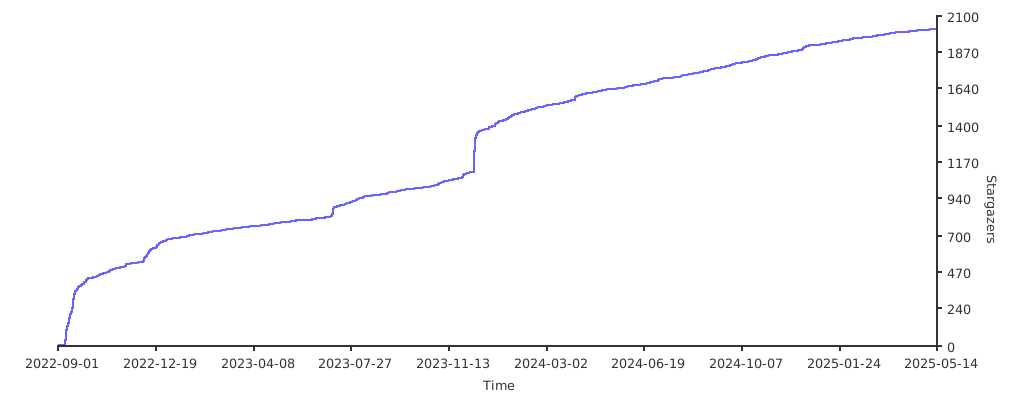
11,397 followers · starred Sep 2022
2,241 followers · starred Jan 2026
2,592 followers · starred Jan 2026
8,913 followers · starred Jan 2026
A distributed SQLite server with MySQL wire compatible interface
See the code
Marmot v2 is a leaderless, distributed SQLite replication system built on a gossip-based protocol with distributed transactions and eventual consistency.
Key Features:
LOAD DATA LOCAL INFILE with distributed commit semanticsMySQL active-active requires careful setup of replication, conflict avoidance, and monitoring. Failover needs manual intervention. Split-brain scenarios demand operational expertise. This complexity doesn't scale to edge deployments.
Marmot excels at read-heavy edge scenarios:
| Use Case | How Marmot Helps |
|---|---|
| Distributed WordPress | Multi-region WordPress with replicated database |
| Lambda/Edge sidecars | Lightweight regional SQLite replicas, local reads |
| Edge vector databases | Built-in ANN search + distributed embeddings with local query |
| Regional config servers | Fast local config reads, replicated writes |
| Product catalogs | Geo-distributed catalog data, eventual sync |
# Start a single-node cluster
./marmot-v2

# Or run as daemon (background)
./marmot-v2 -daemon -pid-file=/tmp/marmot/marmot.pid

# Connect with MySQL client
mysql -h localhost -P 3306 -u root

# Or use DBeaver, MySQL Workbench, etc.
# Test DDL and DML replication across a 2-node cluster
./scripts/test-ddl-replication.sh

# This script will:
# 1. Start a 2-node cluster
# 2. Create a table on node 1 and verify it replicates to node 2
# 3. Insert data on node 1 and verify it replicates to node 2
# 4. Update data on node 2 and verify it replicates to node 1
# 5. Delete data on node 1 and verify it replicates to node 2

# Manual cluster testing
./examples/start-seed.sh              # Start seed node (port 8081, mysql 3307)
./examples/join-cluster.sh 2 localhost:8081  # Join node 2 (port 8082, mysql 3308)
./examples/join-cluster.sh 3 localhost:8081  # Join node 3 (port 8083, mysql 3309)

# Connect to any node and run queries
mysql --protocol=TCP -h localhost -P 3307 -u root
mysql --protocol=TCP -h localhost -P 3308 -u root

# Cleanup
pkill -f marmot-v2
Marmot can run distributed WordPress with full database replication across nodes. Each WordPress instance connects to its local Marmot node, and all database changes replicate automatically.
Marmot implements MySQL functions required by WordPress:
| Category | Functions |
|---|---|
| Date/Time | NOW, CURDATE, DATE_FORMAT, UNIX_TIMESTAMP, DATEDIFF, YEAR, MONTH, DAY, etc. |
| String | CONCAT_WS, SUBSTRING_INDEX, FIND_IN_SET, LPAD, RPAD, etc. |
| Math/Hash | RAND, MD5, SHA1, SHA2, POW, etc. |
| DML | ON DUPLICATE KEY UPDATE (transformed to SQLite ON CONFLICT) |
cd examples/wordpress-cluster
./run.sh up
This starts:
┌─────────────┐  ┌─────────────┐  ┌─────────────┐
│ WordPress-1 │  │ WordPress-2 │  │ WordPress-3 │
│ :9101       │  │ :9102       │  │ :9103       │
└──────┬──────┘  └──────┬──────┘  └──────┬──────┘
       ▼                ▼                ▼
┌─────────────┐  ┌─────────────┐  ┌─────────────┐
│  Marmot-1   │◄─┤  Marmot-2   │◄─┤  Marmot-3   │
│ MySQL: 9191 │  │ MySQL: 9192 │  │ MySQL: 9193 │
└─────────────┘  └─────────────┘  └─────────────┘
       └──────────────┴──────────────┘
              QUORUM Replication
Test it:
Commands:
./run.sh status   # Check cluster health
./run.sh logs-m   # Marmot logs only
./run.sh logs-wp  # WordPress logs only
./run.sh down     # Stop cluster
Marmot v2 uses a fundamentally different architecture from other SQLite replication solutions:
vs. rqlite/dqlite/LiteFS:
How It Works:
| Aspect | Marmot | MySQL Active-Active | rqlite | dqlite | TiDB |
|---|---|---|---|---|---|
| Leader | None | None (but complex) | Yes (Raft) | Yes (Raft) | Yes (Raft) |
| Failover | Automatic | Manual intervention | Automatic | Automatic | Automatic |
| Split-brain recovery | Automatic (anti-entropy) | Manual | N/A (leader-based) | N/A (leader-based) | N/A |
| Consistency | Tunable (ONE/QUORUM/ALL) | Serializable | Tunabale (ONE/QUORUM/Linearizable) | Strong | Strong |
| Direct file read | ✅ SQLite file | ❌ | ✅ SQLite file | ❌ | ❌ |
| JS-safe AUTO_INCREMENT | ✅ Compact mode (53-bit) | N/A | N/A | ❌ 64-bit breaks JS | |
| Edge-friendly | ✅ Lightweight | ❌ Heavy | ✅ Lightweight | ⚠️ Moderate | ❌ Heavy |
| Operational complexity | Low | High | Low | Low | High |
Marmot v2 supports distributed DDL (Data Definition Language) replication without requiring master election:
Cluster-Wide Locking: Each DDL operation acquires a distributed lock per database (default: 30-second lease)
Automatic Idempotency: DDL statements are automatically rewritten for safe replay
CREATE TABLE users (id INT)
→ CREATE TABLE IF NOT EXISTS users (id INT)

DROP TABLE users
→ DROP TABLE IF EXISTS users
Schema Version Tracking: Each database maintains a schema version counter (__marmot_schema_version)
Rolling Upgrades: DDL and CREATE/DROP DATABASE return the retryable error 1213 while any cluster member does
not serve the commit-log pull protocol (an older release). Upgrade every node, then retry.
Quorum-Based Replication: DDL replicates like DML through the same 2PC mechanism
[ddl]
# DDL lock lease duration (seconds)
lock_lease_seconds = 30

# Automatically rewrite DDL for idempotency
enable_idempotent = true
mydb.users instead of users)Marmot v2 uses Change Data Capture (CDC) for replication instead of SQL statement replay:
EncodedCapturedRow records and stored in Marmot's CDC segment log/cdc/manifest/{txnID} only after their segment ranges are known; recovery validates and truncates segment tails at record boundariesFor UPDATE and DELETE operations, Marmot automatically extracts row keys:
Marmot can publish CDC events to external messaging systems, enabling real-time data pipelines, analytics, and event-driven architectures. Events follow the Debezium specification for maximum compatibility with existing CDC tooling.
[publisher]
enabled = true

[[publisher.sinks]]
name = "kafka-main"
type = "kafka"                    # "kafka" or "nats"
format = "debezium"               # Debezium-compatible JSON format
brokers = ["localhost:9092"]      # Kafka broker addresses
topic_prefix = "marmot.cdc"       # Topics: {prefix}.{database}.{table}
filter_tables = ["*"]             # Glob patterns (e.g., "users", "order_*")
filter_databases = ["*"]          # Glob patterns (e.g., "prod_*")
batch_size = 100                  # Events per poll cycle
poll_interval_ms = 10             # Polling interval

# NATS sink example
[[publisher.sinks]]
name = "nats-events"
type = "nats"
format = "debezium"
nats_url = "nats://localhost:4222"
topic_prefix = "marmot.cdc"
filter_tables = ["*"]
filter_databases = ["*"]
Events follow the Debezium envelope structure:
{
  "schema": { ... },
  "payload": {
    "before": null,
    "after": {"id": 1, "name": "alice", "email": "alice@example.com"},
    "source": {
      "version": "2.9.0-beta",
      "connector": "marmot",
      "name": "marmot",
      "ts_ms": 1702500000000,
      "db": "myapp",
      "table": "users"
    },
    "op": "c",
    "ts_ms": 1702500000000
  }
}
Operation Types (per Debezium spec):
| Operation | op | before | after |
|---|---|---|---|
| INSERT | c (create) | null | row data |
| UPDATE | u (update) | old row | new row |
| DELETE | d (delete) | old row | null |
Topics follow the pattern: {topic_prefix}.{database}.{table}
Examples:
marmot.cdc.myapp.usersmarmot.cdc.myapp.ordersmarmot.cdc.analytics.eventsFor more details, see the Integrations documentation.
Deploy Marmot as a lightweight regional replica alongside Lambda functions:
Scale reads globally with replica mode and transparent failover:
[replica]
enabled = true
follow_addresses = ["central-cluster-1:8080", "central-cluster-2:8080", "central-cluster-3:8080"]
replicate_databases = []                    # Filter databases (empty = all, supports glob patterns)
database_discovery_interval_seconds = 10    # Poll for new databases (default: 10)
discovery_interval_seconds = 30             # Poll for cluster membership (default: 30)
failover_timeout_seconds = 60               # Failover timeout (default: 60)
snapshot_concurrency = 3                    # Parallel snapshot downloads (default: 3)
snapshot_cache_ttl_seconds = 30             # Snapshot cache TTL (default: 30)
GetClusterNodes RPCMarmot supports a wide range of MySQL/SQLite statements through its MySQL protocol server. The following table shows compatibility for different statement types:
| Statement Type | Support | Replication | Notes |
|---|---|---|---|
| DML - Data Manipulation | |||
INSERT / REPLACE | ✅ Full | ✅ Yes | Includes qualified table names (db.table) |
UPDATE | ✅ Full | ✅ Yes | Includes qualified table names |
DELETE | ✅ Full | ✅ Yes | Includes qualified table names |
SELECT | ✅ Full | N/A | Read operations |
LOAD DATA LOCAL INFILE | ✅ Full | ✅ Yes | Replicated bulk loading (cluster + forwarded replica writes) |
| DDL - Data Definition | |||
CREATE TABLE | ✅ Full | ✅ Yes | Replicated with cluster-wide locking |
ALTER TABLE | ✅ Full | ✅ Yes | Replicated with cluster-wide locking |
DROP TABLE | ✅ Full | ✅ Yes | Replicated with cluster-wide locking |
TRUNCATE TABLE | ✅ Full | ✅ Yes | |
RENAME TABLE | ✅ Full | ✅ Yes | Replicated with cluster-wide locking |
CREATE/DROP INDEX | ✅ Full | ✅ Yes | Replicated with cluster-wide locking |
CREATE/DROP VIEW | ✅ Full | ✅ Yes | Replicated with cluster-wide locking |
CREATE/DROP TRIGGER | ✅ Full | ✅ Yes | Replicated with cluster-wide locking |
| Database Management | |||
CREATE DATABASE | ✅ Full | ✅ Yes | Replicated with cluster-wide locking |
DROP DATABASE | ✅ Full | ✅ Yes | Replicated with cluster-wide locking |
ALTER DATABASE | ✅ Full | ✅ Yes | Replicated with cluster-wide locking |
SHOW DATABASES | ✅ Full | N/A | Metadata query |
SHOW TABLES | ✅ Full | N/A | Metadata query |
USE database | ✅ Full | N/A | Session state |
| Transaction Control | |||
BEGIN / START TRANSACTION | ✅ Full | N/A | Transaction boundary |
COMMIT | ✅ Full | ✅ Yes | Commits distributed transaction |
ROLLBACK | ✅ Full | ✅ Yes | Aborts distributed transaction |
SAVEPOINT | ✅ Full | ✅ Yes | Nested transaction support |
| Locking | |||
LOCK TABLES | ✅ Parsed | ❌ No | Requires distributed locking coordination |
UNLOCK TABLES | ✅ Parsed | ❌ No | Requires distributed locking coordination |
| Session Configuration | |||
SET statements | ✅ Parsed | ❌ No | Session-local, not replicated |
SET marmot_transpilation | ✅ Full | ❌ No | Toggle MySQL→SQLite transpilation |
LOAD EXTENSION | ✅ Full | ❌ No | Load SQLite extension (requires config) |
| XA Transactions | |||
XA START/END/PREPARE | ✅ Parsed | ❌ No | Marmot uses its own 2PC protocol |
XA COMMIT/ROLLBACK | ✅ Parsed | ❌ No | Not compatible with Marmot's model |
| DCL - Data Control | |||
GRANT / REVOKE | ✅ Parsed | ❌ No | User management not replicated |
CREATE/DROP USER | ✅ Parsed | ❌ No | User management not replicated |
ALTER USER | ✅ Parsed | ❌ No | User management not replicated |
| Administrative | |||
OPTIMIZE TABLE | ✅ Parsed | ❌ No | Node-local administrative command |
REPAIR TABLE | ✅ Parsed | ❌ No | Node-local administrative command |
Schema Changes (DDL): DDL statements are fully replicated with cluster-wide locking and automatic idempotency. See the DDL Replication section for details.
XA Transactions: Marmot has its own distributed transaction protocol based on 2PC. MySQL XA transactions are not compatible with Marmot's replication model.
User Management (DCL): User and privilege management statements are local to each node. For production deployments, consider handling authentication at the application or proxy level.
Table Locking: LOCK TABLES statements are recognized but not enforced across the cluster. Use application-level coordination for distributed locking needs.
Qualified Names: Marmot fully supports qualified table names (e.g., db.table) in DML and DDL operations.
LOAD DATA Scope: Marmot supports LOAD DATA LOCAL INFILE (client-uploaded file bytes). LOAD DATA INFILE (server-side file access) is not supported.
Marmot has built-in vector similarity search for RAG-style workloads. No external vector service is required: embeddings stay in your table, DML replicates through Marmot CDC, and each node builds its own local ANN files for reads.
The SQL surface is intentionally small:
CREATE VECTOR INDEX ... ON table(column) DIM n METRIC ...vec_match(column, query_vector, k) in WHEREvec_distance(column, query_vector) in ORDER BYREINDEX VECTOR index_nameDROP VECTOR INDEX index_nameCREATE DATABASE rag;
USE rag;
CREATE TABLE chunks (
id INTEGER PRIMARY KEY,
tenant_id INTEGER NOT NULL,
source_uri TEXT NOT NULL,
chunk_no INTEGER NOT NULL,
title TEXT NOT NULL,
body TEXT NOT NULL,
status TEXT NOT NULL,
created_at INTEGER NOT NULL,
embedding BLOB NOT NULL
);
CREATE INDEX chunks_tenant_status_idx
ON chunks(tenant_id, status);
CREATE VECTOR INDEX chunks_embedding_idx
ON chunks(embedding)
DIM 1536
METRIC cosine;
The embedding column is a packed little-endian float32 blob. Use driver parameters rather than hand-writing blobs in SQL.
import struct

def vec_blob(values: list[float]) -> bytes:
    return struct.pack("<" + "f" * len(values), *values)

# Use your driver's placeholder convention; the important part is binding
# vec_blob(embedding) as bytes for the BLOB column.
cursor.execute(
    """
    INSERT INTO chunks
        (id, tenant_id, source_uri, chunk_no, title, body, status, created_at, embedding)
    VALUES (?, ?, ?, ?, ?, ?, ?, ?, ?)
    """,
    (1, 42, "s3://kb/intro.md", 0, "Intro", "Marmot stores vectors in SQLite.", "published", 1730000000, vec_blob(embedding)),
)
Search composes with normal SQL filters:
SELECT id, source_uri, chunk_no, title, body
  FROM chunks
 WHERE vec_match(embedding, ?, 10)
   AND tenant_id = 42
   AND status = 'published'
 ORDER BY vec_distance(embedding, ?)
 LIMIT 10;
Pass the same query-vector blob to both placeholders.
LIMIT is the final row count. The third argument to vec_match is the ANN candidate and exact-rerank budget, so it may be larger than LIMIT when you want more recall headroom or selective post-filters:
SELECT id, title
  FROM chunks
 WHERE vec_match(embedding, ?, 100)
   AND tenant_id = 42
 ORDER BY vec_distance(embedding, ?)
 LIMIT 10;
Marmot rejects vec_match(..., k) when k < LIMIT.
For most RAG stores, start with auto tuning:
CREATE VECTOR INDEX chunks_embedding_idx
    ON chunks(embedding)
    DIM 1536
    METRIC cosine;
Override only when you have measured a reason:
CREATE VECTOR INDEX chunks_embedding_idx
    ON chunks(embedding)
    DIM 1536
    METRIC cosine
    WITH (nlist = 512, nprobe = 32);

SET @@marmot_vec_nprobe = 64;          -- per-connection recall/latency test
SET @@marmot_vec_force_plan = 'post';  -- force IVF path for debugging
SET @@marmot_vec_force_plan = 'auto';
nlist controls the number of IVF clusters. More clusters usually reduce bytes scanned per query but make build and maintenance work heavier. nprobe controls how many clusters a query scans. Higher nprobe usually improves recall and lowers false negatives, but increases disk reads and CPU per query. The default auto policy targets compact clusters and derives a probe budget from expected scanned rows.
Vector indexes are live:
.vecseg generation from a bounded overlay snapshot once enough rows exist.REINDEX VECTOR chunks_embedding_idx forces a full local retrain/rewrite.Settling improves read latency and QPS; it is not required for correctness. Raw insert QPS and final query-ready QPS are different measurements.
Latest local 100K vector validation:
| Metric | Value |
|---|---|
| Dataset | Random 100K DBpedia OpenAI 1536d subset from 990K rows, seed 42 |
| Query set | 10,000 queries, cosine, K=10, Go-rank, id projection |
| Index shape | nlist=196, explicit read test nprobe=24 |
| Stable encoding | Residual PQ8, 132 payload bytes/vector, 140 entry bytes/vector |
| Stable data file | 14,003,208 bytes for 100,000 rows |
| Block metadata | 877 blocks, 3,651,568 bytes |
| Segment read/query | 1,739,024 bytes, 1.00x overread |
| Recall | recall@10 = 0.9628, recall@10-in-100 = 1.0000 |
| Read throughput | 1,752 QPS aggregate at concurrency 8 |
| Read latency | p50 4.31ms, p95 5.82ms, p99 6.48ms |
| RSS after measurement | 340 MB |
The same 100K force-build validation measured DDL create at 203ms, insert at 100,000 rows in 3.00s, first clustered publish at 15.886s, and final settled state at 1m08.286s.
Latest local 500K read validation:
| Metric | Value |
|---|---|
| Dataset | Random 500K DBpedia OpenAI 1536d subset from 990K rows, seed 42 |
| Query set | 10,000 queries, cosine, K=10, Go-rank, id projection |
| Index shape | nlist=977, explicit read test nprobe=48 |
| Stable encoding | Residual PQ8, 132 payload bytes/vector, 140 entry bytes/vector |
| Stable data file | 70,015,704 bytes for 500,000 rows |
| Block metadata | 4,401 blocks |
| Segment read/query | 3,456,555 bytes, 1.00x overread |
| Recall | recall@10 = 0.9575, recall@10-in-100 = 1.0000 |
| Read throughput | 1,053 QPS aggregate at concurrency 8 |
| Read latency | p50 7.04ms, p95 12.13ms, p99 15.28ms |
| RSS after reopen | 185 MB |
| RSS after measurement | 459 MB |
The matching 500K force-build lifecycle run measured 500,000 inserts in 36.118s, first clustered publish at 1m21.011s, final settled state at 5m31.928s, and RSS after settled cleanup at 917 MB in the same process. Reopened steady read memory is lower because the transient build buffers are gone.
.vecseg generations, rowmaps, block metadata sidecars, manifests, and an overlay journal next to the SQLite database.LIMIT.Metrics: l2, cosine, and dot. For dot, set WITH (max_norm = ...) to a fixed upper bound for vector norms.
Full startup guide, tuning guidance, lifecycle details, benchmarking flags, crash semantics, and limitations are in the Vector Search docs.
Marmot also supports loading arbitrary SQLite extensions for anything that isn't vector search — full-text search tokenizers, JSON extensions, custom aggregates, domain-specific functions.
[extensions]
# Directory containing extension libraries (.so, .dylib, .dll)
directory = "/opt/sqlite/extensions"

# Extensions loaded automatically into every connection
always_loaded = ["my-custom-ext"]
Extensions can be loaded at runtime via SQL:
-- Load an extension by name (resolved from extensions.directory)
LOAD EXTENSION my-custom-ext;
Extension Resolution:
directory for the extensionname, name.so, name.dylib, libname.so, libname.dylibSecurity:
| Extension | Purpose |
|---|---|
| fts5 | Full-text search (usually built-in) |
| json1 | JSON functions (usually built-in) |
| Custom .so | Domain-specific aggregates or functions |
For vector search, use the native functions described above — no extension required.
Marmot normally transpiles MySQL syntax to SQLite. You can disable this per-session to send raw SQLite SQL directly.
-- Disable MySQL→SQLite transpilation (raw SQLite mode)
SET marmot_transpilation = OFF;

-- Now you can use SQLite-specific syntax
SELECT sqlite_version();
PRAGMA table_info(users);

-- Re-enable transpilation
SET marmot_transpilation = ON;

-- Back to MySQL mode
SELECT NOW();  -- Transpiled to SQLite's datetime functions
Note: Transpilation is enabled by default. The setting is per-session and not persisted.
Marmot includes a MySQL-compatible protocol server, allowing you to connect using any MySQL client (DBeaver, MySQL Workbench, mysql CLI, etc.). The server supports:
Marmot provides full support for MySQL metadata queries, enabling GUI tools like DBeaver to browse databases, tables, and columns:
SHOW DATABASES, SHOW TABLES, SHOW COLUMNS FROM table, SHOW CREATE TABLE, SHOW INDEXESINFORMATION_SCHEMA.TABLES, INFORMATION_SCHEMA.COLUMNS, INFORMATION_SCHEMA.SCHEMATA, and INFORMATION_SCHEMA.STATISTICSThese metadata queries are powered by the rqlite/sql AST parser, providing production-grade MySQL query compatibility.
# Using mysql CLI
mysql -h localhost -P 3306 -u root

# Connection string for applications
mysql://root@localhost:3306/marmot
Marmot handles various failure and recovery scenarios automatically:
| Scenario | Behavior |
|---|---|
| Minority partition | Writes fail - cannot achieve quorum |
| Majority partition | Writes succeed - quorum achieved |
| Partition heals | Anti-entropy log pull + per-row LWW merges divergent data |
How it works:
| Scenario | Recovery Method |
|---|---|
| Brief outage | Log pull - fetch the transactions it missed from every alive peer |
| Outage longer than log retention | Snapshot transfer, then log pull from the snapshot onward |
| New node joining | Full snapshot from existing node |
A node's membership is persisted. A restarted node is not a quorum by itself, and a gracefully stopped node rejoins on restart. A node marked REMOVED stays out until an operator allows it back (see Cluster Membership Management).
Anti-Entropy Background Process:
Every anti_entropy_interval_seconds (default 30), each node pulls every alive peer's local commit log, for every
database:
ListCommittedLog RPC) and
fetches the transactions it lacks (FetchTransactions RPC).__marmot_applied_txn) in the same SQLite
transaction, so a transaction received from several peers applies once.Log Garbage Collection:
gc_min_retention_hoursgc_max_retention_hours is deleted regardless; a member that was down longer restores by snapshotgc_max_retention_hours, and never when gc_max_retention_hours is 0Commit Timestamps and Per-Row Versions:
__marmot_row_version (table, key, timestamp, node, tombstone flag) in the same
SQLite transaction. An incoming change applies only if its version is at least the stored one.LOAD DATA stamps every row.| Write Consistency | Behavior |
|---|---|
ONE | Returns after 1 node ACK (fast, less durable) |
QUORUM | Returns after majority ACK (default, balanced) |
ALL | Returns after all nodes ACK (slow, most durable) |
Conflict Resolution:
SERIALIZABLE transaction assumptions may not hold across nodes.Distributed databases need globally unique IDs, but traditional solutions cause problems:
| Solution | Issue |
|---|---|
| UUID | 128-bit, poor index performance, not sortable |
| Snowflake/HLC 64-bit | Exceeds JavaScript's Number.MAX_SAFE_INTEGER (2^53-1) |
| TiDB AUTO_INCREMENT | Returns 64-bit IDs that break JavaScript clients silently |
The JavaScript Problem:
// 64-bit ID from TiDB or other distributed DBs
const id = 7318624812345678901;
console.log(id);  // 7318624812345679000 - WRONG! Precision lost!

// JSON parsing also breaks
JSON.parse('{"id": 7318624812345678901}');  // {id: 7318624812345679000}
TiDB's answer? "Use strings." But that breaks ORMs, existing application code, and type safety.
For BIGINT AUTO_INCREMENT columns, Marmot offers two ID generation modes to solve this (narrower columns are
covered in Narrow AUTO_INCREMENT Columns):
| Mode | Bits | Range | Use Case |
|---|---|---|---|
extended | 64-bit | Full HLC timestamp | New systems, non-JS clients |
compact | 53-bit | JS-safe integers | Legacy systems, JavaScript, REST APIs |
[mysql]
auto_id_mode = "compact"  # Safe for JavaScript (default)
# auto_id_mode = "extended"  # Full 64-bit for new systems
Compact Mode Guarantees:
Number.MAX_SAFE_INTEGER (9,007,199,254,740,991)With Marmot compact mode:
const id = 4503599627370496;
console.log(id);  // 4503599627370496 - Correct!
JSON.parse('{"id": 4503599627370496}');  // {id: 4503599627370496} - Correct!
DDL Transformation: An integer AUTO_INCREMENT column is stored as SQLite INTEGER. A column declared narrower
than BIGINT keeps its declared width (and UNSIGNED) in a comment marker in the stored schema.
CREATE TABLE users (id BIGINT AUTO_INCREMENT PRIMARY KEY, name VARCHAR(100))
-- Becomes internally:
CREATE TABLE users (id INTEGER PRIMARY KEY, name TEXT)
DML ID Injection: When inserting with 0 or NULL for a BIGINT auto-increment column:
INSERT INTO users (id, name) VALUES (0, 'alice')
-- Becomes internally (compact mode):
INSERT INTO users (id, name) VALUES (4503599627370496, 'alice')
Explicit IDs Preserved: If you provide an explicit non-zero ID in a BIGINT column, it is used as-is.
Schema-Based Detection:
Marmot automatically detects auto-increment columns by querying SQLite schema directly:
INTEGER PRIMARY KEY (SQLite rowid alias), with the declared width read from its markerBIGINT PRIMARY KEY (Marmot's transformed columns)No registration required - columns are detected from schema at runtime, works across restarts, and works with existing databases.
TINYINT, SMALLINT, MEDIUMINT and INT AUTO_INCREMENT columns get ids that fit their declared width. Each node
takes ids from ranges of the column it claims through a quorum two-phase commit, so no two nodes issue the same id
while cluster membership is stable.
transaction.lock_wait_timeout_seconds and then returns the retryable 1205; inside a transaction that has already
written a row, it returns 1205 at once.DROP TABLE/CREATE TABLE or DROP DATABASE/CREATE DATABASE.The full rules are in Compatibility; adding or removing nodes follows the procedure in Operations.
Marmot v2 uses a TOML configuration file (default: config.toml). All settings have sensible defaults.
node_id = 0  # 0 = auto-generate
data_dir = "./marmot-data"
[transaction]
heartbeat_timeout_seconds = 10  # Transaction timeout without heartbeat
conflict_window_seconds = 10    # Conflict resolution window
lock_wait_timeout_seconds = 50  # Lock wait timeout (MySQL: innodb_lock_wait_timeout)
An insert into a narrow AUTO_INCREMENT column also waits up to lock_wait_timeout_seconds while its node is still
merging claim bases after startup (see Narrow AUTO_INCREMENT Columns).
Note: Transaction log garbage collection is managed by the replication configuration to coordinate with anti-entropy. See replication.gc_min_retention_hours and replication.gc_max_retention_hours.
[connection_pool]
pool_size = 4              # Number of SQLite connections
max_idle_time_seconds = 10 # Max idle time before closing
max_lifetime_seconds = 300 # Max connection lifetime (0 = unlimited)
[grpc_client]
keepalive_time_seconds = 10    # Keepalive ping interval
keepalive_timeout_seconds = 3  # Keepalive ping timeout
max_retries = 3                # Max retry attempts
retry_backoff_ms = 100         # Retry backoff duration
[coordinator]
prepare_timeout_ms = 2000 # Prepare phase timeout
commit_timeout_ms = 2000  # Commit phase timeout
abort_timeout_ms = 2000   # Abort phase timeout
[cluster]
grpc_bind_address = "0.0.0.0"
grpc_port = 8080
seed_nodes = []                # List of seed node addresses
cluster_secret = ""            # PSK for cluster authentication (see Security section)
gossip_interval_ms = 1000      # Gossip interval
gossip_fanout = 3              # Number of peers to gossip to
suspect_timeout_ms = 5000      # Suspect timeout
dead_timeout_ms = 10000        # Dead timeout
autoinc_merge_interval_ms = 2000       # Narrow AUTO_INCREMENT: retry merging claim bases while votes are held
autoinc_base_sync_interval_ms = 10000  # Narrow AUTO_INCREMENT: raise claim bases to every alive peer's
Marmot supports Pre-Shared Key (PSK) authentication for cluster communication. This is strongly recommended for production deployments.
[cluster]
# All nodes in the cluster must use the same secret
cluster_secret = "your-secret-key-here"
Environment Variable (Recommended):
For production, use the environment variable to avoid storing secrets in config files:
export MARMOT_CLUSTER_SECRET="your-secret-key-here"
./marmot
The environment variable takes precedence over the config file.
Generating a Secret:
# Generate a secure random secret
openssl rand -base64 32
Behavior:
cluster_secret is empty and MARMOT_CLUSTER_SECRET is not set, authentication is disabledMarmot provides admin HTTP endpoints for managing cluster membership (requires cluster_secret to be configured):
Node Lifecycle:
# View cluster members and quorum info
curl -H "X-Marmot-Secret: your-secret" http://localhost:8080/admin/cluster/members

# Remove a node from the cluster (excludes from quorum, blocks auto-rejoin)
curl -X POST -H "X-Marmot-Secret: your-secret" http://localhost:8080/admin/cluster/remove/2

# Allow a removed node to rejoin (node must then restart to join)
curl -X POST -H "X-Marmot-Secret: your-secret" http://localhost:8080/admin/cluster/allow/2
See the Operations documentation for detailed usage and examples.
For read-only replicas that follow cluster nodes with transparent failover:
[replica]
enabled = true                                   # Enable read-only replica mode
follow_addresses = ["node1:8080", "node2:8080", "node3:8080"]  # Seed nodes for discovery
secret = "replica-secret"                        # PSK for authentication (required)
replicate_databases = []                         # Filter databases (empty = all, supports glob patterns like "prod_*")
database_discovery_interval_seconds = 10         # Poll for new databases (default: 10)
discovery_interval_seconds = 30                  # Poll for cluster membership (default: 30)
failover_timeout_seconds = 60                    # Max time to find alive node during failover (default: 60)
reconnect_interval_seconds = 5                   # Reconnect delay on disconnect (default: 5)
reconnect_max_backoff_seconds = 30               # Max reconnect backoff (default: 30)
initial_sync_timeout_minutes = 30                # Timeout for initial snapshot (default: 30)
snapshot_concurrency = 3                         # Parallel snapshot downloads (default: 3)
snapshot_cache_ttl_seconds = 30                  # Snapshot cache TTL in seconds (default: 30)
forward_writes = false                           # Forward writes to cluster nodes (default: false)
forward_write_timeout_sec = 30                   # Timeout for forwarded writes (default: 30s)
You can also specify follow addresses via CLI:
./marmot --config=replica.toml --follow-addresses=node1:8080,node2:8080,node3:8080
Per-Database Selective Replication:
Control which databases are replicated using the replicate_databases filter:
[replica]
# Replicate only specific databases
replicate_databases = ["myapp", "analytics"]

# Replicate databases matching glob patterns
replicate_databases = ["prod_*", "staging_*"]

# Replicate all databases (default)
replicate_databases = []
The system database (__marmot_system) is never replicated - each replica maintains its own independent system database.
Snapshot Caching:
Replicas use an LRU cache to avoid redundant snapshot creation:
snapshot_cache_ttl_seconds (default: 30 seconds)Parallel Snapshot Downloads:
Control download concurrency with snapshot_concurrency:
Write forwarding in replica mode: Reads stay local. If forward_writes = true, writes (including LOAD DATA LOCAL INFILE) are transparently proxied to a writable cluster node.
Note: Replica mode is mutually exclusive with cluster mode. A replica receives all data via streaming replication and automatically discovers cluster nodes and fails over to another node if the current source becomes unavailable.
[replication]
default_write_consistency = "QUORUM"      # Write consistency level: ONE, QUORUM, ALL
default_read_consistency = "LOCAL_ONE"    # Read consistency level
write_timeout_ms = 5000                   # Write operation timeout
read_timeout_ms = 2000                    # Read operation timeout

# Anti-Entropy: each node pulls every alive peer's commit log (snapshot when a peer's log no longer covers it)
enable_anti_entropy = true                 # Enable the background log pull
anti_entropy_interval_seconds = 30         # How often each node pulls its peers' logs (default: 30s)
gc_interval_seconds = 60                   # GC interval (MUST be >= anti_entropy_interval)
delta_sync_threshold_transactions = 10000  # Read replicas only: snapshot instead of catch-up above this txn gap
delta_sync_threshold_seconds = 3600        # Only used by the GC retention checks below

# Garbage Collection: Reclaim disk space by deleting old transaction records
# - A log entry is deleted once every member consumed it and it is older than gc_min,
#   or once it is older than gc_max regardless
# - Set gc_max = 0 for unlimited retention
gc_min_retention_hours = 2
gc_max_retention_hours = 24
Anti-Entropy Tuning:
gc_max_retention_hours at 24+ so a node down for a while catches up from the log
instead of a snapshotGC Configuration Rules (validated at startup when enable_anti_entropy is true):
gc_interval_seconds must be >= anti_entropy_interval_secondsgc_min_retention_hours must be >= delta_sync_threshold_seconds (in hours)gc_max_retention_hours must be >= 2x delta_sync_threshold_seconds (in hours) and > gc_min_retention_hours,
unless it is 0 (unlimited)[query_pipeline]
transpiler_cache_size = 10000 # LRU cache for MySQL→SQLite transpilation
validator_pool_size = 8 # SQLite connection pool for validation
[mysql]
enabled = true
bind_address = "0.0.0.0"
port = 3306
max_connections = 1000
unix_socket = ""              # Unix socket path (empty = disabled)
unix_socket_perm = 0660       # Socket file permissions
local_infile_enabled = true   # Enable LOAD DATA LOCAL INFILE
auto_id_mode = "compact"      # "compact" (53-bit, JS-safe) or "extended" (64-bit)
Unix Socket Connection (lower latency than TCP):
mysql --socket=/tmp/marmot/mysql.sock -u root
LOAD DATA LOCAL INFILE requirements:
mysql.local_infile_enabled = truemysql --local-infile=1, or driver-specific local infile flag)[publisher]
enabled = false # Enable CDC publishing to external systems
[[publisher.sinks]]
name = "kafka-main" # Unique sink name
type = "kafka" # "kafka" or "nats"
format = "debezium" # Debezium-compatible JSON (only option)
brokers = ["localhost:9092"] # Kafka broker addresses
topic_prefix = "marmot.cdc" # Topic pattern: {prefix}.{db}.{table}
filter_tables = ["*"] # Glob patterns for table filtering
filter_databases = ["*"] # Glob patterns for database filtering
batch_size = 100 # Events to read per poll cycle
poll_interval_ms = 10 # Polling interval (default: 10ms)
retry_initial_ms = 100 # Initial retry delay on failure
retry_max_ms = 30000 # Max retry delay (30 seconds)
retry_multiplier = 2.0 # Exponential backoff multiplier
See the Integrations documentation for details on event format, Kafka/NATS configuration, and use cases.
[extensions]
directory = "/opt/sqlite/extensions"  # Search path for extensions
always_loaded = ["my-custom-ext"]     # Auto-load into every connection
Loading Extensions at Runtime:
LOAD EXTENSION my-custom-ext;
Vector search is built-in and does not require an extension. See the Vector Search section above.
[logging]
verbose = false          # Enable verbose logging
format = "json"          # Log format: "console" or "json" (json is faster)
file = ""                # Log file path (empty = stdout only)
max_size_mb = 100        # Max size in MB before rotation
max_backups = 5          # Number of old log files to keep
compress = true          # Compress rotated files with gzip
File Logging with Rotation:
When file is set, logs are written to both stdout and the specified file. The file is automatically rotated when it reaches max_size_mb, keeping the last max_backups files. Rotated files are optionally compressed with gzip.
[logging]
file = "/var/log/marmot/marmot.log"
max_size_mb = 100
max_backups = 5
compress = true
[prometheus]
enabled = true  # Metrics served on gRPC port at /metrics endpoint
Accessing Metrics:
# Metrics are multiplexed with gRPC on the same port
curl http://localhost:8080/metrics

# Prometheus scrape config
scrape_configs:
  - job_name: 'marmot'
    static_configs:
      - targets: ['node1:8080', 'node2:8080', 'node3:8080']
See config.toml for complete configuration reference with detailed comments.
Latest measured Pika write benchmark on a local development machine (Apple M-series, 3-node cluster, single machine):
| Parameter | Value |
|---|---|
| Nodes | 3 (ports 3307, 3308, 3309) |
| Workers | 64 |
| Batch Size | 1 op/transaction |
| Consistency | QUORUM |
| Workload | INSERT-only load |
| Metric | Value |
|---|---|
| Throughput | 2,652.87 ops/sec |
| Records Loaded | 500,000 |
| Total Time | 188.48s |
| Errors | 0 |
| Retries | 0 |
| Node RSS After Load | 554-561 MB |
| Disk Per Node | 1.5 GB |
| Percentile | Latency |
|---|---|
| Min | 5.008ms |
| Average | 24.018ms |
| P50 | 22.662ms |
| P90 | 34.694ms |
| P95 | 40.351ms |
| P99 | 52.787ms |
| Max | 115.407ms |
All 3 nodes ended with identical row counts: 500,000 rows per node. Sample verification checked 100 rows and all 100 matched.
Note: These benchmarks are from a local development machine with all nodes on the same host. Production deployments across multiple machines will have different characteristics based on network latency. Expect P99 latencies of 50-200ms for cross-region QUORUM writes.
Marmot's SQLite files are standard WAL-mode databases, compatible with Litestream:
litestream replicate /path/to/marmot-data/*.db s3://bucket/backup
Enable CDC publisher to stream changes to Kafka/NATS, then archive to your preferred storage.
Since Marmot uses SQLite with WAL mode, you can safely snapshot the data directory during operation.
(top 24 of 63)
11,397 followers · starred Sep 2022
2,241 followers · starred Jan 2026
2,592 followers · starred Jan 2026
8,913 followers · starred Jan 2026