A tiny (~1kB minzipped) and extremely fast library for creating reactive observables via functions.
TypeScript
889
303 commits
updated Sep 9, 2026

🏆 The goal of this library is to provide a lightweight reactivity API for other UI libraries to be built on top of. It follows the "lazy principle" that Svelte adheres to - don't do any unnecessary work and don't place the burden of figuring it out on the developer.
This is a tiny (~1kB minzipped) library for creating reactive observables via functions called
signals. You can use signals to store state, create computed properties (y = mx + b), and subscribe
to updates as its value changes.
computedeffect⏭️ Skip to API
Here's a simple demo to see how it works:

import { root, signal, computed, effect, tick } from '@maverick-js/signals';

root((dispose) => {
  // Create - all types supported (string, array, object, etc.)
  const $m = signal(1);
  const $x = signal(1);
  const $b = signal(0);

  // Compute - only re-computed when `$m`, `$x`, or `$b` changes.
  const $y = computed(() => $m() * $x() + $b());

  // Effect - this will run whenever `$y` is updated.
  const stop = effect(() => {
    console.log($y());

    // Called each time `effect` ends and when finally disposed.
    return () => {};
  });

  $m.set(10); // logs `10` inside effect

  // Flush queue synchronously so effect is run.
  // Otherwise, effects will be batched and run on the microtask queue.
  tick();

  $b.set((prev) => prev + 5); // logs `15` inside effect

  tick();

  // Nothing has changed - no re-compute.
  $y();

  // Stop running effect.
  stop();

  // ...

  // Dispose of all signals inside `root`.
  dispose();
});
$: npm i @maverick-js/signals

$: pnpm i @maverick-js/signals

$: yarn add @maverick-js/signals
rootsignalcomputedeffectpeekuntrackreadonlytickcomputedMapcomputedKeyedMaponErroronDisposeisReadSignalisWriteSignalgetScopescopedgetContextsetContextrootComputations are generally child computations. When their respective parent scope is destroyed so are they. You can create orphan computations (i.e., no parent). Orphans will live in memory until their internal object references are garbage collected (GC) (i.e., dropped from memory):
import { computed } from '@maverick-js/signals';

const obj = {};

// This is an orphan - GC'd when `obj` is.
const $b = computed(() => obj);
Orphans can make it hard to determine when a computation is disposed so you'll generally want to
ensure you only create child computations. The root function stores all inner computations as
a child and provides a function to easily dispose of them all:
import { root, signal, computed, effect } from '@maverick-js/signals';

root((dispose) => {
  const $a = signal(10);
  const $b = computed(() => $a());

  effect(() => console.log($b()));

  // Disposes of `$a`, $b`, and `effect`.
  dispose();
});
// `root` returns the result of the given function.
const result = root(() => 10);

console.log(result); // logs `10`
signalWraps the given value into a signal. The signal will return the current value when invoked fn(),
and provide a simple write API via set(). The value can now be observed when used
inside other computations created with computed and effect.
import { signal } from '@maverick-js/signals';

const $a = signal(10);

$a(); // read
$a.set(20); // write (1)
$a.set((prev) => prev + 10); // write (2)
Warning Read the
ticksection below to understand batched updates.
computedCreates a new signal whose value is computed and returned by the given function. The given compute function is only re-run when one of its dependencies are updated. Dependencies are are all signals that are read during execution.
import { signal, computed, tick } from '@maverick-js/signals';

const $a = signal(10);
const $b = signal(10);
const $c = computed(() => $a() + $b());

console.log($c()); // logs 20

$a.set(20);
tick();
console.log($c()); // logs 30

$b.set(20);
tick();
console.log($c()); // logs 40

// Nothing changed - no re-compute.
console.log($c()); // logs 40
import { signal, computed } from '@maverick-js/signals';

const $a = signal(10);
const $b = signal(10);
const $c = computed(() => $a() + $b());

// Computed signals can be deeply nested.
const $d = computed(() => $a() + $b() + $c());
const $e = computed(() => $d());
effectInvokes the given function each time any of the signals that are read inside are updated (i.e., their value changes). The effect is immediately invoked on initialization.
import { signal, computed, effect } from '@maverick-js/signals';

const $a = signal(10);
const $b = signal(20);
const $c = computed(() => $a() + $b());

// This effect will run each time `$a` or `$b` is updated.
const stop = effect(() => console.log($c()));

// Stop observing.
stop();
You can optionally return a function from inside the effect that will be run each time the
effect re-runs and when it's finally stopped/disposed of:
effect(() => {
  return () => {
    // Called each time effect re-runs and when disposed of.
  };
});
peekReturns the current value stored inside the given compute function whilst disabling observer tracking, i.e.
without triggering any dependencies. Use untrack if you want to also disable scope tracking.
import { signal, computed, peek } from '@maverick-js/signals';

const $a = signal(10);

const $b = computed(() => {
  // `$a` will not trigger updates on `$b`.
  const value = peek($a);
});
untrackReturns the current value inside a signal whilst disabling both scope and observer
tracking. Use peek if only observer tracking should be disabled.
import { signal, effect, untrack } from '@maverick-js/signals';

effect(() => {
  untrack(() => {
    // `$a` is now an orphan and also not tracked by the outer effect.
    const $a = signal(10);
  });
});
readonlyTakes in the given signal and makes it read only by removing access to write operations (i.e.,
set()).
import { signal, readonly } from '@maverick-js/signals';

const $a = signal(10);
const $b = readonly($a);

console.log($b()); // logs 10

// We can still update value through `$a`.
$a.set(20);

console.log($b()); // logs 20
tickBy default, signal updates are batched on the microtask queue which is an async process. You can
flush the queue synchronously to get the latest updates by calling tick().
Note You can read more about microtasks on MDN.
import { signal } from '@maverick-js/signals';

const $a = signal(10);

$a.set(10);
$a.set(20);
$a.set(30); // only this write is applied
import { signal, tick } from '@maverick-js/signals';

const $a = signal(10);

// All writes are applied.
$a.set(10);
tick();
$a.set(20);
tick();
$a.set(30);
computedMapNote Same implementation as
indexArrayin Solid JS. PrefercomputedKeyedMapwhen referential checks are required.
Reactive map helper that caches each item by index to reduce unnecessary mapping on updates. It only runs the mapping function once per item and adds/removes as needed. In a non-keyed map like this the index is fixed but value can change (opposite of a keyed map).
import { signal, tick } from '@maverick-js/signals';
import { computedMap } from '@maverick-js/signals/map';

const source = signal([1, 2, 3]);

const map = computedMap(source, (value, index) => {
  return {
    i: index,
    get id() {
      return value() * 2;
    },
  };
});

console.log(map()); // logs `[{ i: 0, id: $2 }, { i: 1, id: $4 }, { i: 2, id: $6 }]`

source.set([3, 2, 1]);
tick();

// Notice the index `i` remains fixed but `id` has updated.
console.log(map()); // logs `[{ i: 0, id: $6 }, { i: 1, id: $4 }, { i: 2, id: $2 }]`
computedKeyedMapNote Same implementation as
mapArrayin Solid JS. PrefercomputedMapwhen working with primitives to avoid unnecessary re-renders.
Reactive map helper that caches each list item by reference to reduce unnecessary mapping on updates. It only runs the mapping function once per item and then moves or removes it as needed. In a keyed map like this the value is fixed but the index changes (opposite of non-keyed map).
import { signal, tick } from '@maverick-js/signals';
import { computedKeyedMap } from '@maverick-js/signals/map';

const source = signal([{ id: 0 }, { id: 1 }, { id: 2 }]);

const nodes = computedKeyedMap(source, (value, index) => {
  const div = document.createElement('div');

  div.setAttribute('id', String(value.id));
  Object.defineProperty(div, 'i', {
    get() {
      return index();
    },
  });

  return div;
});

console.log(nodes()); // [{ id: 0, i: $0 }, { id: 1, i: $1 }, { id: 2, i: $2 }];

source.set((prev) => {
  // Swap index 0 and 1
  const tmp = prev[1];
  prev[1] = prev[0];
  prev[0] = tmp;
  return [...prev]; // new array
});

tick();

// No nodes were created/destroyed, simply nodes at index 0 and 1 switched.
console.log(nodes()); // [{ id: 1, i: $0 }, { id: 0, i: $1 }, { id: 2, i: $2 }];
onErrorRuns the given function when an error is thrown in a child scope. If the error is thrown again inside the error handler, it will trigger the next available parent scope handler.
import { effect, onError } from '@maverick-js/signals';

effect(() => {
  onError((error) => {
    // ...
  });
});
onDisposeRuns the given function when the parent scope computation is being disposed of.
import { effect, onDispose } from '@maverick-js/signals';

const listen = (type, callback) => {
  window.addEventListener(type, callback);
  // Called when the effect is re-run or finally disposed.
  onDispose(() => window.removeEventListener(type, callback));
};

const stop = effect(
  listen('click', () => {
    // ...
  }),
);

stop(); // `onDispose` is called
The onDispose callback will return a function to clear the disposal early if it's no longer
required:
effect(() => {
  const dispose = onDispose(() => {});
  // ...
  // Call early if it's no longer required.
  dispose();
});
isReadSignalWhether the given value is a readonly signal.
// True
isReadSignal(10);
isReadSignal(() => {});
isReadSignal(signal(10));
isReadSignal(computed(() => 10));
isReadSignal(readonly(signal(10)));

// False
isReadSignal(false);
isReadSignal(null);
isReadSignal(undefined);
isWriteSignalWhether the given value is a write signal (i.e., can produce new values via write API).
// True
isWriteSignal(signal(10));

// False
isWriteSignal(false);
isWriteSignal(null);
isWriteSignal(undefined);
isWriteSignal(() => {});
isWriteSignal(computed(() => 10));
isWriteSignal(readonly(signal(10)));
getScopeReturns the currently executing parent scope.
root(() => {
  const scope = getScope(); // returns `root` scope.

  effect(() => {
    const $a = signal(0);
    getScope(); // returns `effect` scope.
  });
});
scopedRuns the given function in the given scope so context and error handling continue to work.
import { root, getScope, scoped } from '@maverick-js/signals';

root(() => {
  const scope = getScope();

  // Timeout will lose tracking of the current scope.
  setTimeout(() => {
    scoped(() => {
      // Code here will run with root scope.
    }, scope);
  }, 0);
});
getContextAttempts to get a context value for the given key. It will start from the parent scope and
walk up the computation tree trying to find a context record and matching key. If no value can be
found undefined will be returned. This is intentionally low-level so you can design a context API
in your library as desired.
In your implementation make sure to check if a parent scope exists via getScope(). If one does
not exist log a warning that this function should not be called outside a computation or render
function.
Note See the
setContextcode example below for a demo of this function.
setContextAttempts to set a context value on the parent scope with the given key. This will be a no-op if no parent scope is defined. This is intentionally low-level so you can design a context API in your library as desired.
In your implementation make sure to check if a parent scope exists via getScope(). If one does
not exist log a warning that this function should not be called outside a computation or render
function.
import { root, getContext, setContext } from '@maverick-js/signals';

const key = Symbol();

root(() => {
  setContext(key, 100);
  // ...
  root(() => {
    const value = getContext(key); // 100
  });
});
The signal, computed, and effect functions accept a debugging ID (string) as part
of their options.
import { signal, computed } from '@maverick-js/signals';

const $foo = signal(10, { id: 'foo' });
Note This feature is only available in a development or testing Node environment (i.e.,
NODE_ENV).
import {
  isReadSignal,
  isWriteSignal,
  type Effect,
  type ReadSignal,
  type WriteSignal,
  type MaybeSignal,
} from '@maverick-js/signals';

// Types
const signal: ReadSignal<number>;
const computed: ReadSignal<string>;
const effect: Effect;

// Provide generic if TS fails to infer correct type.
const $a = computed<string>(() => /* ... */);

const $b: MaybeSignal<number>;

if (isReadSignal($b)) {
  $b(); // ReadSignal<number>
}

if (isWriteSignal($b)) {
  $b.set(10); // WriteSignal<number>
}
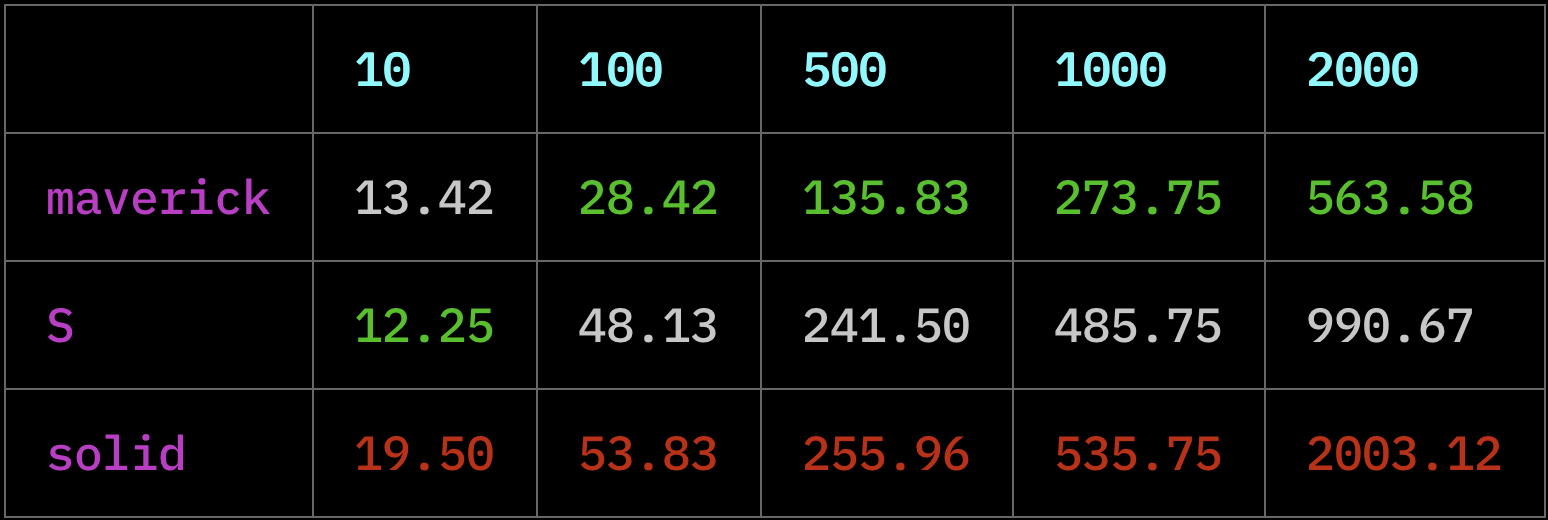
This benchmark was taken from cellx. It
tests how long it takes for an n deeply layered computation to update. The benchmark can be
found here.
Each column represents how deep computations were layered. The average time taken to update the computation out of a 100 runs is used for each library.
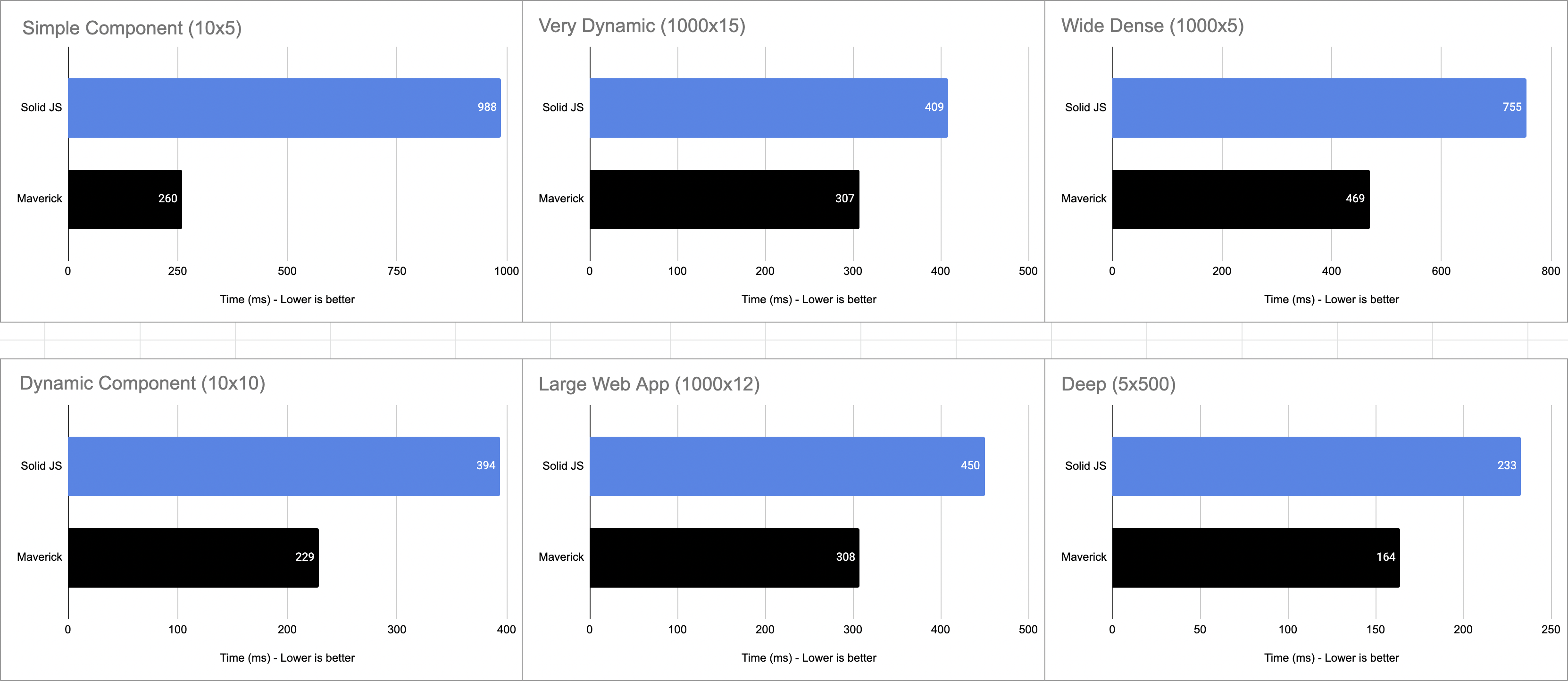
This benchmark was taken from reactively. It sets
up various computation graphs with a set number of sources (e.g., 1000x5 is 1000 computations with
a tree depth of 5). The benchmark measures how long it takes for changes to be applied after static
or dynamic updates are made to the graph (i.e., pick a node and update its value).
@maverick-js/signals was made possible based on code and learnings from:
Special thanks to Modderme, Wesley, Julien, and Solid/Svelte contributors for all their work 🎉
1,728 followers · starred Jun 2022
3,862 followers · starred Jul 2022
248 followers · starred Mar 2025
611 followers · starred Aug 2022
A tiny (~1kB minzipped) and extremely fast library for creating reactive observables via functions.
TypeScript
889
303 commits
updated Sep 9, 2026
🏆 The goal of this library is to provide a lightweight reactivity API for other UI libraries to be built on top of. It follows the "lazy principle" that Svelte adheres to - don't do any unnecessary work and don't place the burden of figuring it out on the developer.
This is a tiny (~1kB minzipped) library for creating reactive observables via functions called
signals. You can use signals to store state, create computed properties (y = mx + b), and subscribe
to updates as its value changes.
computedeffect⏭️ Skip to API
Here's a simple demo to see how it works:
import { root, signal, computed, effect, tick } from '@maverick-js/signals';

root((dispose) => {
  // Create - all types supported (string, array, object, etc.)
  const $m = signal(1);
  const $x = signal(1);
  const $b = signal(0);

  // Compute - only re-computed when `$m`, `$x`, or `$b` changes.
  const $y = computed(() => $m() * $x() + $b());

  // Effect - this will run whenever `$y` is updated.
  const stop = effect(() => {
    console.log($y());

    // Called each time `effect` ends and when finally disposed.
    return () => {};
  });

  $m.set(10); // logs `10` inside effect

  // Flush queue synchronously so effect is run.
  // Otherwise, effects will be batched and run on the microtask queue.
  tick();

  $b.set((prev) => prev + 5); // logs `15` inside effect

  tick();

  // Nothing has changed - no re-compute.
  $y();

  // Stop running effect.
  stop();

  // ...

  // Dispose of all signals inside `root`.
  dispose();
});
$: npm i @maverick-js/signals

$: pnpm i @maverick-js/signals

$: yarn add @maverick-js/signals
rootsignalcomputedeffectpeekuntrackreadonlytickcomputedMapcomputedKeyedMaponErroronDisposeisReadSignalisWriteSignalgetScopescopedgetContextsetContextrootComputations are generally child computations. When their respective parent scope is destroyed so are they. You can create orphan computations (i.e., no parent). Orphans will live in memory until their internal object references are garbage collected (GC) (i.e., dropped from memory):
import { computed } from '@maverick-js/signals';

const obj = {};

// This is an orphan - GC'd when `obj` is.
const $b = computed(() => obj);
Orphans can make it hard to determine when a computation is disposed so you'll generally want to
ensure you only create child computations. The root function stores all inner computations as
a child and provides a function to easily dispose of them all:
import { root, signal, computed, effect } from '@maverick-js/signals';

root((dispose) => {
  const $a = signal(10);
  const $b = computed(() => $a());

  effect(() => console.log($b()));

  // Disposes of `$a`, $b`, and `effect`.
  dispose();
});
// `root` returns the result of the given function.
const result = root(() => 10);

console.log(result); // logs `10`
signalWraps the given value into a signal. The signal will return the current value when invoked fn(),
and provide a simple write API via set(). The value can now be observed when used
inside other computations created with computed and effect.
import { signal } from '@maverick-js/signals';

const $a = signal(10);

$a(); // read
$a.set(20); // write (1)
$a.set((prev) => prev + 10); // write (2)
Warning Read the
ticksection below to understand batched updates.
computedCreates a new signal whose value is computed and returned by the given function. The given compute function is only re-run when one of its dependencies are updated. Dependencies are are all signals that are read during execution.
import { signal, computed, tick } from '@maverick-js/signals';

const $a = signal(10);
const $b = signal(10);
const $c = computed(() => $a() + $b());

console.log($c()); // logs 20

$a.set(20);
tick();
console.log($c()); // logs 30

$b.set(20);
tick();
console.log($c()); // logs 40

// Nothing changed - no re-compute.
console.log($c()); // logs 40
import { signal, computed } from '@maverick-js/signals';

const $a = signal(10);
const $b = signal(10);
const $c = computed(() => $a() + $b());

// Computed signals can be deeply nested.
const $d = computed(() => $a() + $b() + $c());
const $e = computed(() => $d());
effectInvokes the given function each time any of the signals that are read inside are updated (i.e., their value changes). The effect is immediately invoked on initialization.
import { signal, computed, effect } from '@maverick-js/signals';

const $a = signal(10);
const $b = signal(20);
const $c = computed(() => $a() + $b());

// This effect will run each time `$a` or `$b` is updated.
const stop = effect(() => console.log($c()));

// Stop observing.
stop();
You can optionally return a function from inside the effect that will be run each time the
effect re-runs and when it's finally stopped/disposed of:
effect(() => {
  return () => {
    // Called each time effect re-runs and when disposed of.
  };
});
peekReturns the current value stored inside the given compute function whilst disabling observer tracking, i.e.
without triggering any dependencies. Use untrack if you want to also disable scope tracking.
import { signal, computed, peek } from '@maverick-js/signals';

const $a = signal(10);

const $b = computed(() => {
  // `$a` will not trigger updates on `$b`.
  const value = peek($a);
});
untrackReturns the current value inside a signal whilst disabling both scope and observer
tracking. Use peek if only observer tracking should be disabled.
import { signal, effect, untrack } from '@maverick-js/signals';

effect(() => {
  untrack(() => {
    // `$a` is now an orphan and also not tracked by the outer effect.
    const $a = signal(10);
  });
});
readonlyTakes in the given signal and makes it read only by removing access to write operations (i.e.,
set()).
import { signal, readonly } from '@maverick-js/signals';

const $a = signal(10);
const $b = readonly($a);

console.log($b()); // logs 10

// We can still update value through `$a`.
$a.set(20);

console.log($b()); // logs 20
tickBy default, signal updates are batched on the microtask queue which is an async process. You can
flush the queue synchronously to get the latest updates by calling tick().
Note You can read more about microtasks on MDN.
import { signal } from '@maverick-js/signals';

const $a = signal(10);

$a.set(10);
$a.set(20);
$a.set(30); // only this write is applied
import { signal, tick } from '@maverick-js/signals';

const $a = signal(10);

// All writes are applied.
$a.set(10);
tick();
$a.set(20);
tick();
$a.set(30);
computedMapNote Same implementation as
indexArrayin Solid JS. PrefercomputedKeyedMapwhen referential checks are required.
Reactive map helper that caches each item by index to reduce unnecessary mapping on updates. It only runs the mapping function once per item and adds/removes as needed. In a non-keyed map like this the index is fixed but value can change (opposite of a keyed map).
import { signal, tick } from '@maverick-js/signals';
import { computedMap } from '@maverick-js/signals/map';

const source = signal([1, 2, 3]);

const map = computedMap(source, (value, index) => {
  return {
    i: index,
    get id() {
      return value() * 2;
    },
  };
});

console.log(map()); // logs `[{ i: 0, id: $2 }, { i: 1, id: $4 }, { i: 2, id: $6 }]`

source.set([3, 2, 1]);
tick();

// Notice the index `i` remains fixed but `id` has updated.
console.log(map()); // logs `[{ i: 0, id: $6 }, { i: 1, id: $4 }, { i: 2, id: $2 }]`
computedKeyedMapNote Same implementation as
mapArrayin Solid JS. PrefercomputedMapwhen working with primitives to avoid unnecessary re-renders.
Reactive map helper that caches each list item by reference to reduce unnecessary mapping on updates. It only runs the mapping function once per item and then moves or removes it as needed. In a keyed map like this the value is fixed but the index changes (opposite of non-keyed map).
import { signal, tick } from '@maverick-js/signals';
import { computedKeyedMap } from '@maverick-js/signals/map';

const source = signal([{ id: 0 }, { id: 1 }, { id: 2 }]);

const nodes = computedKeyedMap(source, (value, index) => {
  const div = document.createElement('div');

  div.setAttribute('id', String(value.id));
  Object.defineProperty(div, 'i', {
    get() {
      return index();
    },
  });

  return div;
});

console.log(nodes()); // [{ id: 0, i: $0 }, { id: 1, i: $1 }, { id: 2, i: $2 }];

source.set((prev) => {
  // Swap index 0 and 1
  const tmp = prev[1];
  prev[1] = prev[0];
  prev[0] = tmp;
  return [...prev]; // new array
});

tick();

// No nodes were created/destroyed, simply nodes at index 0 and 1 switched.
console.log(nodes()); // [{ id: 1, i: $0 }, { id: 0, i: $1 }, { id: 2, i: $2 }];
onErrorRuns the given function when an error is thrown in a child scope. If the error is thrown again inside the error handler, it will trigger the next available parent scope handler.
import { effect, onError } from '@maverick-js/signals';

effect(() => {
  onError((error) => {
    // ...
  });
});
onDisposeRuns the given function when the parent scope computation is being disposed of.
import { effect, onDispose } from '@maverick-js/signals';

const listen = (type, callback) => {
  window.addEventListener(type, callback);
  // Called when the effect is re-run or finally disposed.
  onDispose(() => window.removeEventListener(type, callback));
};

const stop = effect(
  listen('click', () => {
    // ...
  }),
);

stop(); // `onDispose` is called
The onDispose callback will return a function to clear the disposal early if it's no longer
required:
effect(() => {
  const dispose = onDispose(() => {});
  // ...
  // Call early if it's no longer required.
  dispose();
});
isReadSignalWhether the given value is a readonly signal.
// True
isReadSignal(10);
isReadSignal(() => {});
isReadSignal(signal(10));
isReadSignal(computed(() => 10));
isReadSignal(readonly(signal(10)));

// False
isReadSignal(false);
isReadSignal(null);
isReadSignal(undefined);
isWriteSignalWhether the given value is a write signal (i.e., can produce new values via write API).
// True
isWriteSignal(signal(10));

// False
isWriteSignal(false);
isWriteSignal(null);
isWriteSignal(undefined);
isWriteSignal(() => {});
isWriteSignal(computed(() => 10));
isWriteSignal(readonly(signal(10)));
getScopeReturns the currently executing parent scope.
root(() => {
  const scope = getScope(); // returns `root` scope.

  effect(() => {
    const $a = signal(0);
    getScope(); // returns `effect` scope.
  });
});
scopedRuns the given function in the given scope so context and error handling continue to work.
import { root, getScope, scoped } from '@maverick-js/signals';

root(() => {
  const scope = getScope();

  // Timeout will lose tracking of the current scope.
  setTimeout(() => {
    scoped(() => {
      // Code here will run with root scope.
    }, scope);
  }, 0);
});
getContextAttempts to get a context value for the given key. It will start from the parent scope and
walk up the computation tree trying to find a context record and matching key. If no value can be
found undefined will be returned. This is intentionally low-level so you can design a context API
in your library as desired.
In your implementation make sure to check if a parent scope exists via getScope(). If one does
not exist log a warning that this function should not be called outside a computation or render
function.
Note See the
setContextcode example below for a demo of this function.
setContextAttempts to set a context value on the parent scope with the given key. This will be a no-op if no parent scope is defined. This is intentionally low-level so you can design a context API in your library as desired.
In your implementation make sure to check if a parent scope exists via getScope(). If one does
not exist log a warning that this function should not be called outside a computation or render
function.
import { root, getContext, setContext } from '@maverick-js/signals';

const key = Symbol();

root(() => {
  setContext(key, 100);
  // ...
  root(() => {
    const value = getContext(key); // 100
  });
});
The signal, computed, and effect functions accept a debugging ID (string) as part
of their options.
import { signal, computed } from '@maverick-js/signals';

const $foo = signal(10, { id: 'foo' });
Note This feature is only available in a development or testing Node environment (i.e.,
NODE_ENV).
import {
  isReadSignal,
  isWriteSignal,
  type Effect,
  type ReadSignal,
  type WriteSignal,
  type MaybeSignal,
} from '@maverick-js/signals';

// Types
const signal: ReadSignal<number>;
const computed: ReadSignal<string>;
const effect: Effect;

// Provide generic if TS fails to infer correct type.
const $a = computed<string>(() => /* ... */);

const $b: MaybeSignal<number>;

if (isReadSignal($b)) {
  $b(); // ReadSignal<number>
}

if (isWriteSignal($b)) {
  $b.set(10); // WriteSignal<number>
}
This benchmark was taken from cellx. It
tests how long it takes for an n deeply layered computation to update. The benchmark can be
found here.
Each column represents how deep computations were layered. The average time taken to update the computation out of a 100 runs is used for each library.
This benchmark was taken from reactively. It sets
up various computation graphs with a set number of sources (e.g., 1000x5 is 1000 computations with
a tree depth of 5). The benchmark measures how long it takes for changes to be applied after static
or dynamic updates are made to the graph (i.e., pick a node and update its value).
@maverick-js/signals was made possible based on code and learnings from:
Special thanks to Modderme, Wesley, Julien, and Solid/Svelte contributors for all their work 🎉
1,728 followers · starred Jun 2022
3,862 followers · starred Jul 2022
248 followers · starred Mar 2025
611 followers · starred Aug 2022



