
README
Cache for clang-tidy static analysis results
Introduction
clang-tidy-cache is a command-line application which "wraps" invocations
of the clang-tidy static analysis tool and caches the results of successful
runs of clang-tidy. On subsequent invocations of clang-tidy on an unchanged
translation unit, the result is retrieved from the cache and clang-tidy
is not executed. For most C/C++ projects this allows to have static analysis
checks enabled without paying the cost of excessive build times when re-checking
the same unchanged source code.
How it works
When the CTCACHE_SAVE_OUTPUT environment variable is set, clang-tidy-cache scans the command-line arguments passed to clang-tidy,
relevant clang-tidy configuration files, all source files being analyzed
and makes a hash uniquely identifying the invocation of clang-tidy.
Then it searches if its database contains that hash. If it does, clang-tidy-cache
returns immediately without invoking clang-tidy, otherwise clang-tidy
is executed and if it finishes without error, the hash is stored in the database.
Local mode
clang-tidy-cache by default works as a standalone application and it stores
its hash database in a directory on the local file system. The location
is determined by the CTCACHE_DIR environment variable, by default it
is a sub-tree in the temporary directory. This means that the cache may
be cleared on reboot. If you want the cache to be persistent you need
to specify a path to a disk-backed file system directory.
Client/server mode
clang-tidy-cache can also work in client/server mode where a dedicated
HTTP server (the clang-tidy-cache-server executable) can be used to store
and retrieve the cached hashes.
This mode is enabled by setting the CTCACHE_HOST (localhost by default)
and optionally CTCACHE_PORT (5000 by default) environment variables.
Usage
The client
The most convenient way how to use clang-tidy-cache is to create a wrapper
shell script called clang-tidy in a directory which is listed
in the executable search path list, before the directory where the real
clang-tidy executable is located (on POSIX systems for example in /opt/bin),
The wrapper script typically contains something along these lines:
#!/bin/bash
REAL_CT=/full/path/to/clang-tidy
/path/to/clang-tidy-cache "${REAL_CT}" "${@}"
You can also use the prepared wrapper script from the repository and adapt it to your needs.
Make sure to set write permissions properly to prevent tampering by unauthorized users!
Running the server
The cache HTTP server can simply be run by executing clang-tidy-cache-server.
The server stores the hash database by default in the .cache/ subdirectory
of the home directory of the user under whose account it is executed.
This can be changed by a command-line option.
Invoke clang-tidy-cache-server with the --help argument to see all available
command-line options.
[!NOTE] To effectively share cache between clients you will likely need to use the
CTCACHE_STRIPoption. More information in the overview presentation (Extras section) (See Also section).
As systemd service
The systemd/ sub-directory also contains service file(s) that can be used
to run the server as a systemd service (for example on a RPi on the local
network).
In a docker container
The server can also be run in a Docker container.
The provided Dockerfile can be used to build the docker image.
docker build -t ctcache .
The CTCACHE_PORT docker environment variable can be used to set the server
port number.
docker run -e CTCACHE_PORT=5000 -p "80:5000" -it --rm --name ctcache ctcache
In order to make the saved cache data persistent in Docker, you can create
a volume and map it
to the /var/lib/ctcache directory:
docker volume create ctcache
docker run -p "80:5000" -v "ctcache:/var/lib/ctcache" -it --rm --name ctcache ctcache
Environment variables
The client and server can be configured by setting the following environment variables:
| variable | client | server | description |
|---|---|---|---|
CTCACHE_AUTH_KEY | ✓ | this key is passed to ctcache server when modifying cache | |
CTCACHE_CLANG_TIDY | ✓ | path to the clang-tidy executable | |
CTCACHE_DISABLE | ✓ | disables cache, always runs clang-tidy | |
CTCACHE_SKIP | ✓ | disables analysis altogether, returns OK | |
CTCACHE_STRIP | ✓ | list of strings stripped from inputs | |
CTCACHE_STRIP_SRC | ✓ | If set to true, apply strip paths to source code as well | |
CTCACHE_DUMP | ✓ | dumps all hash inputs into a file | |
CTCACHE_DUMP_DIR | ✓ | the directory to dump diagnostic info | |
CTCACHE_DEBUG | ✓ | enables debugging output | |
CTCACHE_DIR | ✓ | the cache storage directory in local mode | |
CTCACHE_EXCLUDE_HASH_REGEX | ✓ | regular expression of hashes that should not be cached | |
CTCACHE_BYPASS_FLAGS_REGEX | ✓ | regex of flags that cause bypassing ctcache | |
CTCACHE_SAVE_OUTPUT | ✓ | saves the stdout output of clang-tidy in the cache | |
CTCACHE_SAVE_ALL | ✓ | save the output even when clang-tidy exited with error | |
CTCACHE_KEEP_COMMENTS | ✓ | include source comments (e.g. NOLINT) in the hash | |
CTCACHE_LOCAL | ✓ | enables the local cache | |
CTCACHE_LOG_LEVEL | ✓ | set the log level: (critical, error, warning, info, debug) | |
CTCACHE_NO_LOCAL_STATS | ✓ | disables keeping local cache statistics | |
CTCACHE_NO_LOCAL_WRITEBACK | ✓ | disables storage of remote cache hits to the local cache | |
CTCACHE_S3_BUCKET | ✓ | the S3 bucket to store cache remotely | |
CTCACHE_S3_FOLDER | ✓ | the prefix directory in S3, w/o leading and trailing / | |
CTCACHE_S3_NO_CREDENTIALS | ✓ | if set, script won't try to put objects to S3 | |
CTCACHE_S3_READ_ONLY | ✓ | if set, script won't try to put objects to S3 | |
CTCACHE_PROTO | ✓ | protocol for connecting to the server | |
CTCACHE_HOST | ✓ | ✓ | hostname or IP address of the server |
CTCACHE_HOST_READ_ONLY | ✓ | if set, script won't try to push objects to server | |
CTCACHE_PORT | ✓ | listening port of the server (use --port for server) | |
CTCACHE_WEBROOT | ✓ | directory containing static server files | |
CTCACHE_GCS_BUCKET | ✓ | the Google Cloud Storage bucket to store cache remotely | |
CTCACHE_GCS_FOLDER | ✓ | the prefix in GCS, w/o leading and trailing / | |
CTCACHE_GCS_NO_CREDENTIALS | ✓ | if set, script won't try to put objects to GCS | |
CTCACHE_GCS_READ_ONLY | ✓ | if set, script won't try to put objects to GCS | |
CTCACHE_REDIS_HOST | ✓ | hostname or IP address of Redis server | |
CTCACHE_REDIS_PORT | ✓ | port of the Redis server (default 6379) | |
CTCACHE_REDIS_DB | ✓ | database id in Redis server (default 0) | |
CTCACHE_REDIS_USERNAME | ✓ | user name to connect to the Redis server | |
CTCACHE_REDIS_PASSWORD | ✓ | password to connect to the Redis server | |
CTCACHE_REDIS_NAMESPACE | ✓ | namespace to store objects in Redis (default /ctcache) | |
CTCACHE_REDIS_READ_ONLY | ✓ | if set, script won't try to put objects to Redis | |
CTCACHE_REDIS_CONNECT_TIMEOUT | ✓ | Socket connect timeout, seconds, parsed as float (default 0.1) | |
CTCACHE_REDIS_OPERATION_TIMEOUT | ✓ | Socket timeout, seconds, parsed as float (default 10.0) | |
CTCACHE_REDIS_CACHE_TTL | ✓ | cache TTL in seconds, parsed as int (default -1) |
The dashboard
The clang tidy cache's HTTP server also serves a couple of web pages
that are designed to be viewed in a browser.
The main one is the dashboard that can be accessed by visiting / or
/static/index.html at the server's site. For example if the server host name
is localhost and port is 5000 then the dashboard can be visited by
typing http://localhost:5000/ into the browser's address bar.
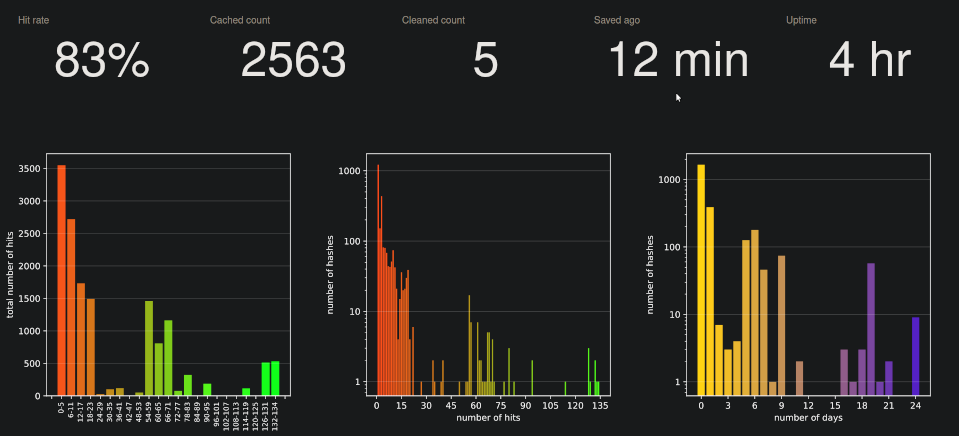
It displays basic information about the cache, like cache hit rate, number of cached hashes, uptime, etc. and some charts providing information about the current state of the server.
See also
There is a presentation describing the motivation, implementation, deployment and configuration options, and some performance measurements in the doc subdirectory.
Contributors
(top 30 of 31)


Similar repos


Languages
Python
92.0%
CMake
2.3%
JavaScript
1.6%
Shell
1.4%
HTML
1.4%
README
Cache for clang-tidy static analysis results
Introduction
clang-tidy-cache is a command-line application which "wraps" invocations
of the clang-tidy static analysis tool and caches the results of successful
runs of clang-tidy. On subsequent invocations of clang-tidy on an unchanged
translation unit, the result is retrieved from the cache and clang-tidy
is not executed. For most C/C++ projects this allows to have static analysis
checks enabled without paying the cost of excessive build times when re-checking
the same unchanged source code.
How it works
When the CTCACHE_SAVE_OUTPUT environment variable is set, clang-tidy-cache scans the command-line arguments passed to clang-tidy,
relevant clang-tidy configuration files, all source files being analyzed
and makes a hash uniquely identifying the invocation of clang-tidy.
Then it searches if its database contains that hash. If it does, clang-tidy-cache
returns immediately without invoking clang-tidy, otherwise clang-tidy
is executed and if it finishes without error, the hash is stored in the database.
Local mode
clang-tidy-cache by default works as a standalone application and it stores
its hash database in a directory on the local file system. The location
is determined by the CTCACHE_DIR environment variable, by default it
is a sub-tree in the temporary directory. This means that the cache may
be cleared on reboot. If you want the cache to be persistent you need
to specify a path to a disk-backed file system directory.
Client/server mode
clang-tidy-cache can also work in client/server mode where a dedicated
HTTP server (the clang-tidy-cache-server executable) can be used to store
and retrieve the cached hashes.
This mode is enabled by setting the CTCACHE_HOST (localhost by default)
and optionally CTCACHE_PORT (5000 by default) environment variables.
Usage
The client
The most convenient way how to use clang-tidy-cache is to create a wrapper
shell script called clang-tidy in a directory which is listed
in the executable search path list, before the directory where the real
clang-tidy executable is located (on POSIX systems for example in /opt/bin),
The wrapper script typically contains something along these lines:
#!/bin/bash
REAL_CT=/full/path/to/clang-tidy
/path/to/clang-tidy-cache "${REAL_CT}" "${@}"
You can also use the prepared wrapper script from the repository and adapt it to your needs.
Make sure to set write permissions properly to prevent tampering by unauthorized users!
Running the server
The cache HTTP server can simply be run by executing clang-tidy-cache-server.
The server stores the hash database by default in the .cache/ subdirectory
of the home directory of the user under whose account it is executed.
This can be changed by a command-line option.
Invoke clang-tidy-cache-server with the --help argument to see all available
command-line options.
[!NOTE] To effectively share cache between clients you will likely need to use the
CTCACHE_STRIPoption. More information in the overview presentation (Extras section) (See Also section).
As systemd service
The systemd/ sub-directory also contains service file(s) that can be used
to run the server as a systemd service (for example on a RPi on the local
network).
In a docker container
The server can also be run in a Docker container.
The provided Dockerfile can be used to build the docker image.
docker build -t ctcache .
The CTCACHE_PORT docker environment variable can be used to set the server
port number.
docker run -e CTCACHE_PORT=5000 -p "80:5000" -it --rm --name ctcache ctcache
In order to make the saved cache data persistent in Docker, you can create
a volume and map it
to the /var/lib/ctcache directory:
docker volume create ctcache
docker run -p "80:5000" -v "ctcache:/var/lib/ctcache" -it --rm --name ctcache ctcache
Environment variables
The client and server can be configured by setting the following environment variables:
| variable | client | server | description |
|---|---|---|---|
CTCACHE_AUTH_KEY | ✓ | this key is passed to ctcache server when modifying cache | |
CTCACHE_CLANG_TIDY | ✓ | path to the clang-tidy executable | |
CTCACHE_DISABLE | ✓ | disables cache, always runs clang-tidy | |
CTCACHE_SKIP | ✓ | disables analysis altogether, returns OK | |
CTCACHE_STRIP | ✓ | list of strings stripped from inputs | |
CTCACHE_STRIP_SRC | ✓ | If set to true, apply strip paths to source code as well | |
CTCACHE_DUMP | ✓ | dumps all hash inputs into a file | |
CTCACHE_DUMP_DIR | ✓ | the directory to dump diagnostic info | |
CTCACHE_DEBUG | ✓ | enables debugging output | |
CTCACHE_DIR | ✓ | the cache storage directory in local mode | |
CTCACHE_EXCLUDE_HASH_REGEX | ✓ | regular expression of hashes that should not be cached | |
CTCACHE_BYPASS_FLAGS_REGEX | ✓ | regex of flags that cause bypassing ctcache | |
CTCACHE_SAVE_OUTPUT | ✓ | saves the stdout output of clang-tidy in the cache | |
CTCACHE_SAVE_ALL | ✓ | save the output even when clang-tidy exited with error | |
CTCACHE_KEEP_COMMENTS | ✓ | include source comments (e.g. NOLINT) in the hash | |
CTCACHE_LOCAL | ✓ | enables the local cache | |
CTCACHE_LOG_LEVEL | ✓ | set the log level: (critical, error, warning, info, debug) | |
CTCACHE_NO_LOCAL_STATS | ✓ | disables keeping local cache statistics | |
CTCACHE_NO_LOCAL_WRITEBACK | ✓ | disables storage of remote cache hits to the local cache | |
CTCACHE_S3_BUCKET | ✓ | the S3 bucket to store cache remotely | |
CTCACHE_S3_FOLDER | ✓ | the prefix directory in S3, w/o leading and trailing / | |
CTCACHE_S3_NO_CREDENTIALS | ✓ | if set, script won't try to put objects to S3 | |
CTCACHE_S3_READ_ONLY | ✓ | if set, script won't try to put objects to S3 | |
CTCACHE_PROTO | ✓ | protocol for connecting to the server | |
CTCACHE_HOST | ✓ | ✓ | hostname or IP address of the server |
CTCACHE_HOST_READ_ONLY | ✓ | if set, script won't try to push objects to server | |
CTCACHE_PORT | ✓ | listening port of the server (use --port for server) | |
CTCACHE_WEBROOT | ✓ | directory containing static server files | |
CTCACHE_GCS_BUCKET | ✓ | the Google Cloud Storage bucket to store cache remotely | |
CTCACHE_GCS_FOLDER | ✓ | the prefix in GCS, w/o leading and trailing / | |
CTCACHE_GCS_NO_CREDENTIALS | ✓ | if set, script won't try to put objects to GCS | |
CTCACHE_GCS_READ_ONLY | ✓ | if set, script won't try to put objects to GCS | |
CTCACHE_REDIS_HOST | ✓ | hostname or IP address of Redis server | |
CTCACHE_REDIS_PORT | ✓ | port of the Redis server (default 6379) | |
CTCACHE_REDIS_DB | ✓ | database id in Redis server (default 0) | |
CTCACHE_REDIS_USERNAME | ✓ | user name to connect to the Redis server | |
CTCACHE_REDIS_PASSWORD | ✓ | password to connect to the Redis server | |
CTCACHE_REDIS_NAMESPACE | ✓ | namespace to store objects in Redis (default /ctcache) | |
CTCACHE_REDIS_READ_ONLY | ✓ | if set, script won't try to put objects to Redis | |
CTCACHE_REDIS_CONNECT_TIMEOUT | ✓ | Socket connect timeout, seconds, parsed as float (default 0.1) | |
CTCACHE_REDIS_OPERATION_TIMEOUT | ✓ | Socket timeout, seconds, parsed as float (default 10.0) | |
CTCACHE_REDIS_CACHE_TTL | ✓ | cache TTL in seconds, parsed as int (default -1) |
The dashboard
The clang tidy cache's HTTP server also serves a couple of web pages
that are designed to be viewed in a browser.
The main one is the dashboard that can be accessed by visiting / or
/static/index.html at the server's site. For example if the server host name
is localhost and port is 5000 then the dashboard can be visited by
typing http://localhost:5000/ into the browser's address bar.
It displays basic information about the cache, like cache hit rate, number of cached hashes, uptime, etc. and some charts providing information about the current state of the server.
See also
There is a presentation describing the motivation, implementation, deployment and configuration options, and some performance measurements in the doc subdirectory.
Similar repos
Contributors
(top 30 of 31)
Languages
Python
92.0%
CMake
2.3%
JavaScript
1.6%
Shell
1.4%
HTML
1.4%