A tiling window manager for the terminal: i3's tree, Hyprland's dwindle, configured in Lua
Rust
29
201 commits
updated Oct 14, 2026
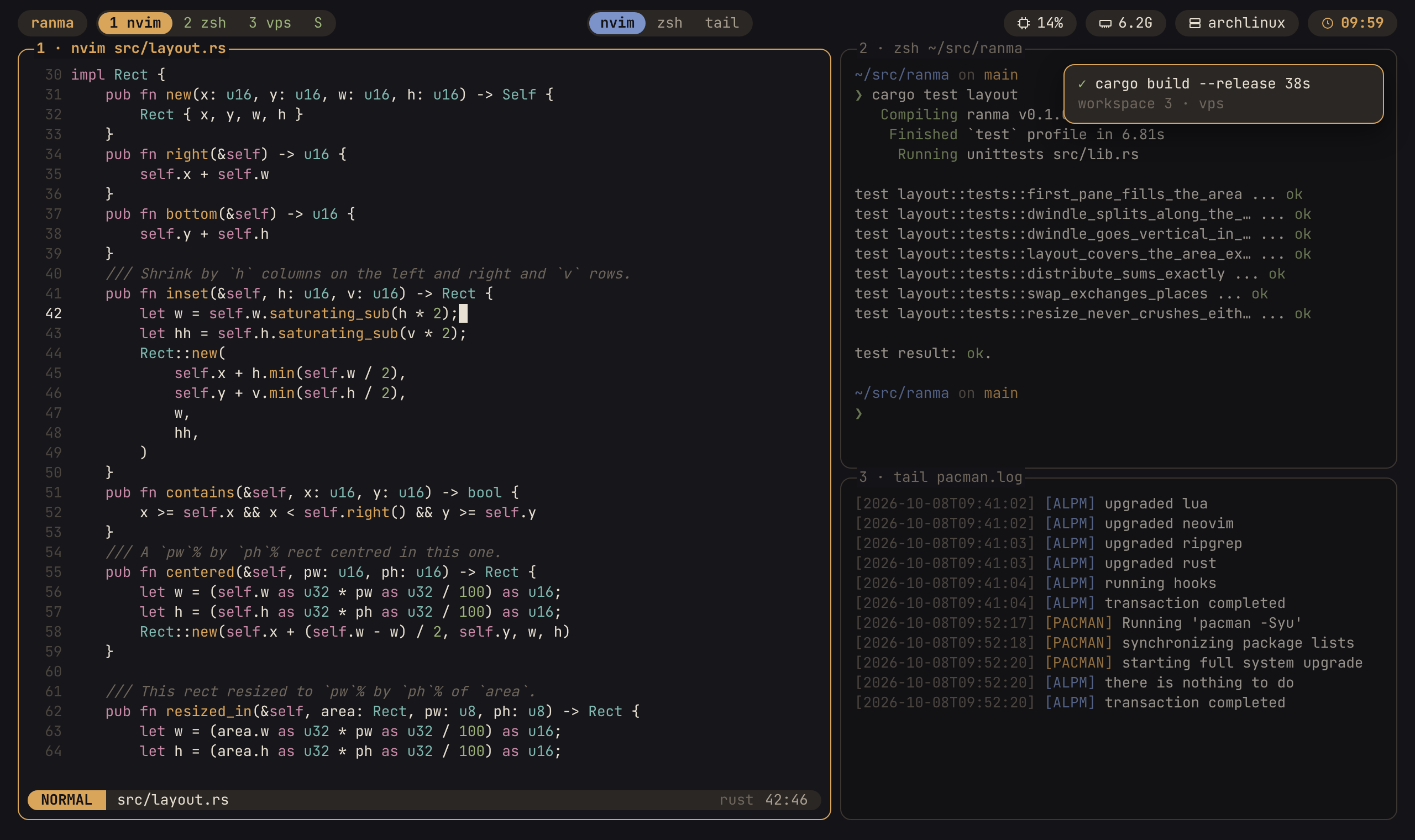
A tiling window manager for the terminal: i3's container tree and Hyprland's dwindle placement, where every window is a PTY. Sessions, workspaces, a floating layer and a scratchpad, driven by a leader key and a modal WM mode, configured in Lua and themed in TOML.
Named for the 欄間, the carved transom panel above sliding doors.

Status: a daily driver. Every milestone of
doc/ROADMAP.md, 0-13, is done (one plugin primitive aside):
ranma again picks up where you were; an upgrade moves running servers to
the new build without closing anythingleader ? lists every key, and leader : runs any action by name.
Plugins are plain Lua using the same API as init.lua
(doc/CONFIG.md, "Plugins"; ranma --dump-types prints it
for your editor). hako installs
and keeps them, shaped like lazy.nvim (without the lazy-loading): specs in
Lua, a lockfile, and a screen to update, install and clean. It comes with
ranma: the first start clones it, and a spec file in
~/.config/ranma/lua/plugins/ is all a plugin takes (plugin_manager = "none" opts out). Browse (leader L, then B) shows every plugin of the
official list, and of any list
you add, installed with one key. A few to start from:
$EDITOR and have it pasted where you were (an AI CLI's prompt box, say)On Arch, from the AUR: ranma-bin (the release binary) or ranma-git (built
from main). Elsewhere, each release
has a tarball for x86_64 Linux with glibc 2.34 or newer: put ranma on your
PATH and the man/ pages under a share/man beside it.
pacman and a copied binary skip what install.sh does after an upgrade. Run
it yourself:
ranma --check-config && ranma upgrade --all # check the new build, then move running servers onto it
From source:
./install.sh            # build, install to ~/.cargo/bin, check it against your config
./install.sh --check    # run the full pre-commit gate first
./install.sh --uninstall
Linux only. ranma reads /proc to know what runs in each pane, so it does
not work on macOS or the BSDs. WSL2 works.
Needs Rust 1.88 or newer (cargo) and a C compiler (ranma builds its Lua from
source). Optional, at run time:
wl-paste (wl-clipboard) or xclip for paste_image on Wayland or X11;
under WSL it uses powershell.exe. Any other command can be set with
paste.image_command.ssh) on both ends for pasting files into a pane that runs ssh.xdg-open for opening links from hint mode.tmux, only for the smoke test (scripts/smoke.sh).After installing, the new binary is run against your config; if it rejects it, the previous binary is put back, so a terminal that starts ranma never falls back to a plain shell because of an upgrade. Running instances keep the old binary until they exit.
Then start it with ranma (or from your shell startup: see
doc/CONFIG.md). Ctrl+b ? lists every key.
ranma --dump-config    # the default init.lua, which documents every option
ranma --check-config   # validate ~/.config/ranma/init.lua and its theme
The install also puts man pages beside the binary, in ~/.cargo/share/man
(man-db finds them there by itself; with mandoc, the install says what to
add to MANPATH):
man ranma (the commands), man 5 ranma (the configuration, which is
doc/CONFIG.md) and man ranma-keys (the default keys). They are generated
and committed in doc/man/.
doc/DESIGN.md: what ranma is, what it refuses to be, and whydoc/CONFIG.md: the configuration and theme referencedoc/ROADMAP.md: milestonesdoc/TESTING.md: what to run, and what each check provesdoc/RELEASING.md: cutting a release, and the AUR packagesscripts/demo/README.md: re-recording the gif aboveranma is written with AI coding agents, directed and reviewed by its author.
The direction is in the documents, not the prompts: doc/DESIGN.md
records every decision and what it rules out, doc/ROADMAP.md
the milestones, and nothing reaches main without passing fmt, clippy, the tests
and a smoke test that drives the release build in a headless tmux.
Commits carry no AI trailers. That's a choice about authorship, not concealment: whoever commits a change answers for it.
CONTRIBUTING.md says what belongs in the core and what
belongs in a plugin, and how to send a change. Read
doc/DESIGN.md first: it records the decisions and the
non-goals, and a feature on the non-goals list needs the design changed before
it needs a pull request. AGENTS.md has the conventions.
Arm the git hooks once per clone:
scripts/hooks.sh
They run cargo fmt --check and cargo clippy --all-targets -- -D warnings on
commit, and cargo test plus the smoke test on push. doc/TESTING.md says what
each check covers.
Licensed under either of Apache License, Version 2.0 or MIT license, at your option.
Unless you explicitly state otherwise, any contribution intentionally submitted for inclusion in ranma by you, as defined in the Apache-2.0 license, shall be dual licensed as above, without any additional terms or conditions.
A tiling window manager for the terminal: i3's tree, Hyprland's dwindle, configured in Lua
Rust
29
201 commits
updated Oct 14, 2026
A tiling window manager for the terminal: i3's container tree and Hyprland's dwindle placement, where every window is a PTY. Sessions, workspaces, a floating layer and a scratchpad, driven by a leader key and a modal WM mode, configured in Lua and themed in TOML.
Named for the 欄間, the carved transom panel above sliding doors.
Status: a daily driver. Every milestone of
doc/ROADMAP.md, 0-13, is done (one plugin primitive aside):
ranma again picks up where you were; an upgrade moves running servers to
the new build without closing anythingleader ? lists every key, and leader : runs any action by name.
Plugins are plain Lua using the same API as init.lua
(doc/CONFIG.md, "Plugins"; ranma --dump-types prints it
for your editor). hako installs
and keeps them, shaped like lazy.nvim (without the lazy-loading): specs in
Lua, a lockfile, and a screen to update, install and clean. It comes with
ranma: the first start clones it, and a spec file in
~/.config/ranma/lua/plugins/ is all a plugin takes (plugin_manager = "none" opts out). Browse (leader L, then B) shows every plugin of the
official list, and of any list
you add, installed with one key. A few to start from:
$EDITOR and have it pasted where you were (an AI CLI's prompt box, say)On Arch, from the AUR: ranma-bin (the release binary) or ranma-git (built
from main). Elsewhere, each release
has a tarball for x86_64 Linux with glibc 2.34 or newer: put ranma on your
PATH and the man/ pages under a share/man beside it.
pacman and a copied binary skip what install.sh does after an upgrade. Run
it yourself:
ranma --check-config && ranma upgrade --all # check the new build, then move running servers onto it
From source:
./install.sh            # build, install to ~/.cargo/bin, check it against your config
./install.sh --check    # run the full pre-commit gate first
./install.sh --uninstall
Linux only. ranma reads /proc to know what runs in each pane, so it does
not work on macOS or the BSDs. WSL2 works.
Needs Rust 1.88 or newer (cargo) and a C compiler (ranma builds its Lua from
source). Optional, at run time:
wl-paste (wl-clipboard) or xclip for paste_image on Wayland or X11;
under WSL it uses powershell.exe. Any other command can be set with
paste.image_command.ssh) on both ends for pasting files into a pane that runs ssh.xdg-open for opening links from hint mode.tmux, only for the smoke test (scripts/smoke.sh).After installing, the new binary is run against your config; if it rejects it, the previous binary is put back, so a terminal that starts ranma never falls back to a plain shell because of an upgrade. Running instances keep the old binary until they exit.
Then start it with ranma (or from your shell startup: see
doc/CONFIG.md). Ctrl+b ? lists every key.
ranma --dump-config    # the default init.lua, which documents every option
ranma --check-config   # validate ~/.config/ranma/init.lua and its theme
The install also puts man pages beside the binary, in ~/.cargo/share/man
(man-db finds them there by itself; with mandoc, the install says what to
add to MANPATH):
man ranma (the commands), man 5 ranma (the configuration, which is
doc/CONFIG.md) and man ranma-keys (the default keys). They are generated
and committed in doc/man/.
doc/DESIGN.md: what ranma is, what it refuses to be, and whydoc/CONFIG.md: the configuration and theme referencedoc/ROADMAP.md: milestonesdoc/TESTING.md: what to run, and what each check provesdoc/RELEASING.md: cutting a release, and the AUR packagesscripts/demo/README.md: re-recording the gif aboveranma is written with AI coding agents, directed and reviewed by its author.
The direction is in the documents, not the prompts: doc/DESIGN.md
records every decision and what it rules out, doc/ROADMAP.md
the milestones, and nothing reaches main without passing fmt, clippy, the tests
and a smoke test that drives the release build in a headless tmux.
Commits carry no AI trailers. That's a choice about authorship, not concealment: whoever commits a change answers for it.
CONTRIBUTING.md says what belongs in the core and what
belongs in a plugin, and how to send a change. Read
doc/DESIGN.md first: it records the decisions and the
non-goals, and a feature on the non-goals list needs the design changed before
it needs a pull request. AGENTS.md has the conventions.
Arm the git hooks once per clone:
scripts/hooks.sh
They run cargo fmt --check and cargo clippy --all-targets -- -D warnings on
commit, and cargo test plus the smoke test on push. doc/TESTING.md says what
each check covers.
Licensed under either of Apache License, Version 2.0 or MIT license, at your option.
Unless you explicitly state otherwise, any contribution intentionally submitted for inclusion in ranma by you, as defined in the Apache-2.0 license, shall be dual licensed as above, without any additional terms or conditions.



